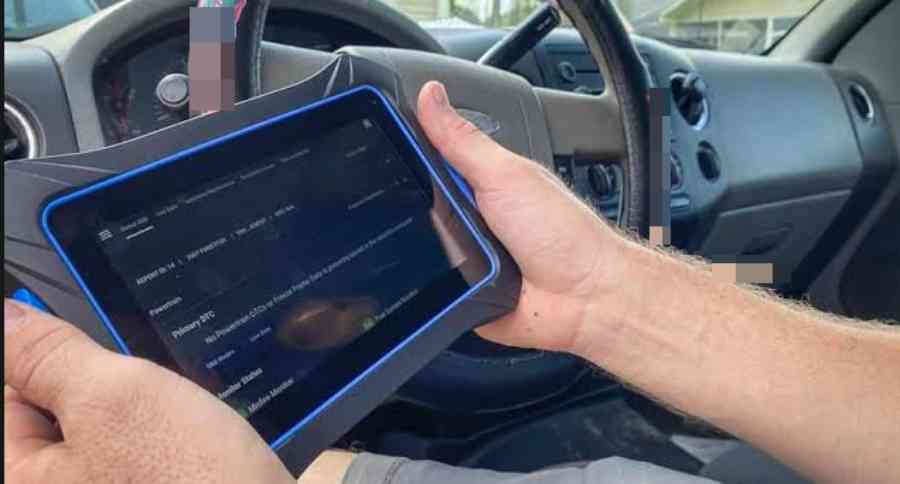
The Innova 7111 is a good diagnostic scanner for DIY mechanics and automotive technicians who need advanced vehicle diagnostics beyond basic OBD2 code reading. It combines all-system scanning, bidirectional controls, live data monitoring, and maintenance service functions in one diagnostic tool. These capabilities make it useful for identifying vehicle faults, testing supported components, and troubleshooting problems that basic code readers cannot fully diagnose.
One of the Innova 7111’s main advantages is its ability to communicate with multiple vehicle systems, including the engine, transmission, ABS, and airbag modules on compatible vehicles. Its bidirectional testing functions also allow users to activate supported components and observe their responses, helping narrow down the causes of mechanical and electrical problems. However, advanced feature availability varies by vehicle, and the scanner does not support ECU reprogramming.
The Innova 7111 is best suited for car owners who perform their own repairs and technicians who need broader diagnostic coverage. For drivers who only want to read and clear check engine codes, a less expensive OBD2 scanner may provide better value. This review examines the Innova 7111’s features, advantages, limitations, vehicle compatibility, ease of use, and overall value to determine whether it is worth buying.
Is the Innova 7111 a Good Diagnostic Scanner?
The Innova 7111 is a good diagnostic scanner for DIY mechanics and automotive technicians who need all-system diagnostics, bidirectional testing, and advanced troubleshooting functions. Unlike basic OBD2 scanners that primarily read and clear engine trouble codes, the Innova 7111 provides access to multiple electronic control modules on compatible vehicles. This broader diagnostic coverage helps users investigate problems involving the engine, transmission, anti-lock braking system (ABS), and supplemental restraint system (SRS) without relying solely on a check engine light.
The Innova 7111’s bidirectional control capability is one of its most valuable features. Bidirectional diagnostics allow the scanner to send commands to supported vehicle components rather than simply retrieve fault codes and sensor readings. For example, a technician can use an available active test to command a cooling fan and check whether it responds correctly. This process helps distinguish a faulty component from problems involving wiring, control circuits, or related systems. However, the available active tests depend on the vehicle’s make, model, year, and electronic control modules.
The scanner also supports live data monitoring and maintenance-related diagnostic functions, making it useful for investigating intermittent faults and performing supported service procedures. Its main limitations are vehicle-dependent feature coverage and the lack of ECU reprogramming capabilities. These restrictions matter most to technicians who require manufacturer-specific programming or advanced functions that the scanner does not support.
Overall, the Innova 7111 is a worthwhile choice for users who regularly diagnose multiple vehicle systems and need more than basic fault-code reading. Its value depends on whether its advanced functions support the vehicles being serviced and whether the buyer will use those capabilities frequently enough to justify the investment.
What Are the Main Features of the Innova 7111?
The Innova 7111 offers four major diagnostic capabilities: all-system scanning, bidirectional controls, live data monitoring, and maintenance service functions. These features allow users to retrieve diagnostic trouble codes, examine vehicle operating conditions, test supported electronic components, and perform selected maintenance procedures. The availability of advanced functions depends on the vehicle’s make, model, year, and electronic control modules.
Does the Innova 7111 Support All-System Diagnostics?
Yes, the Innova 7111 supports all-system diagnostics on compatible vehicles, providing access to electronic control modules beyond the engine control unit (ECU). Depending on vehicle coverage, users can retrieve diagnostic trouble codes from systems such as the transmission, anti-lock braking system (ABS), supplemental restraint system (SRS), and other electronically controlled components.
All-system scanning is particularly useful when a vehicle develops problems that do not trigger the check engine light. For example, an illuminated ABS warning light may indicate a wheel-speed sensor fault or an electrical problem within the braking system. Accessing ABS-specific trouble codes helps identify the affected circuit and determine which components require further testing. However, all-system support does not guarantee access to every module on every vehicle.
Does the Innova 7111 Have Bidirectional Controls?
Yes, the Innova 7111 supports bidirectional controls that allow users to command compatible vehicle components and observe their responses. Unlike conventional code readers, which primarily retrieve information from the vehicle, bidirectional scanners communicate with supported control modules to initiate active diagnostic tests.
For example, a technician investigating an engine cooling problem may use a supported bidirectional test to activate the radiator cooling fan. If the fan fails to operate, the technician can investigate the motor, relay, wiring, or control circuit. This testing process helps isolate faults without waiting for the vehicle to activate the component automatically. Available commands vary by vehicle, and bidirectional testing does not include ECU reprogramming.
Can the Innova 7111 Display Live Vehicle Data?
Yes, the Innova 7111 can display live vehicle data, allowing users to monitor supported sensor readings while the engine operates. Live data provides information about current operating conditions, helping technicians identify abnormal readings and investigate faults that may not be explained by stored diagnostic trouble codes alone.
Depending on vehicle support, available parameters may include engine speed (RPM), coolant temperature, oxygen sensor readings, throttle position, and fuel-system information. For example, an unusually low coolant temperature reading after the engine has reached normal operating temperature may indicate a thermostat or temperature-sensor problem. Comparing live readings with expected operating values helps narrow down possible causes, although additional testing is necessary to confirm a defective component.
What Service Reset Functions Does the Innova 7111 Support?
The Innova 7111 supports selected maintenance service functions that help users complete vehicle-specific procedures after repairs or scheduled maintenance. These functions extend the scanner’s usefulness beyond fault-code retrieval by providing access to supported electronic maintenance operations.
Service functions may include oil maintenance resets, electronic parking brake procedures, battery-related resets, and other vehicle-specific operations where supported. For example, an electronic parking brake service function can place a compatible braking system into the required service mode before rear brake maintenance. However, the presence of a service-function category does not mean every procedure is available for every vehicle. Users should verify the exact supported functions through Innova’s vehicle coverage information before purchasing the scanner.
What Are the Pros and Cons of the Innova 7111?
The Innova 7111 has four main advantages: all-system diagnostic coverage, bidirectional testing, live data monitoring, and maintenance service functions. Its primary disadvantages are vehicle-dependent feature availability, lack of ECU reprogramming, a learning curve for beginners, and a higher investment than basic OBD2 code readers. These strengths and limitations determine whether the scanner is suitable for a particular user’s diagnostic needs.
The Innova 7111’s biggest advantage is its ability to diagnose problems across multiple vehicle systems rather than focusing exclusively on engine-related faults. Access to supported ABS, SRS, transmission, and engine modules helps users investigate warning lights and retrieve system-specific trouble codes. Its bidirectional controls provide another practical benefit by allowing technicians to command supported components during troubleshooting. For example, activating a cooling fan through an active test can help determine whether the component responds to commands from its control module.
Live data monitoring adds diagnostic value by displaying sensor information while the vehicle operates. Users can examine parameters such as engine RPM, coolant temperature, and fuel-system readings to identify abnormal operating conditions. Combined with supported maintenance service functions, these capabilities make the Innova 7111 useful for routine repairs and more advanced troubleshooting tasks.
However, the Innova 7111’s most important limitation is that advanced diagnostic coverage varies between vehicles. A function available on one make or model may not be supported on another, even when both vehicles are OBD2-compliant. The scanner also cannot perform ECU reprogramming, limiting its usefulness for repairs that require software flashing or control module programming. Beginners may also need time to learn how to interpret diagnostic information and perform active tests correctly.
Overall, the Innova 7111 offers a strong combination of diagnostic functions for users who regularly troubleshoot vehicle problems. However, buyers who only need to read and clear check engine codes may find its advanced capabilities unnecessary compared with a less expensive scanner.
What Vehicles Are Compatible With the Innova 7111?
The Innova 7111 is designed to work with compatible OBD2-equipped vehicles, but its advanced diagnostic functions vary by vehicle manufacturer, model, year, and electronic control system. Standard OBD2 compatibility provides access to supported emissions-related engine diagnostics, while all-system scanning, bidirectional controls, and maintenance functions require additional vehicle-specific support.
In the United States, OBD2 became mandatory for most passenger cars and light-duty trucks beginning with the 1996 model year. However, this requirement does not guarantee that the Innova 7111 can access every electronic module or perform every advanced diagnostic function on those vehicles. For example, two OBD2-compliant vehicles may both support engine trouble-code reading, but only one may allow the scanner to activate a cooling fan or access electronic parking brake service functions.
Vehicle compatibility also depends on the communication protocols and diagnostic software supported by the scanner. Manufacturers use different electronic control architectures, meaning access to ABS, SRS, transmission, and body control modules can differ significantly between vehicles. Even vehicles from the same manufacturer may offer different diagnostic functions depending on their model year and installed equipment.
The most reliable way to check Innova 7111 compatibility is to use Innova’s official vehicle coverage checker before purchasing. Buyers should enter their vehicle’s year, make, and model, then verify the specific diagnostic systems and service functions they intend to use. This is particularly important for users purchasing the scanner for bidirectional testing, advanced module diagnostics, or maintenance procedures rather than basic engine-code reading.
How Easy Is the Innova 7111 to Use?
The Innova 7111 is relatively straightforward to use for basic vehicle diagnostics, but its advanced functions require an understanding of automotive systems and troubleshooting procedures. Reading diagnostic trouble codes is simpler than performing bidirectional tests or interpreting live sensor data. This makes the scanner accessible to experienced DIY mechanics while presenting a learning curve for first-time diagnostic tool users.
The diagnostic process begins by connecting the Innova 7111 to the vehicle’s OBD2 port, typically located beneath the dashboard on compatible vehicles. After establishing communication, users can select available diagnostic functions to retrieve trouble codes, examine vehicle system information, or monitor live operating data. For example, a driver investigating an illuminated check engine light can retrieve a stored P0301 code, which indicates a cylinder 1 misfire. However, identifying the underlying cause requires additional checks because the fault may involve an ignition coil, spark plug, fuel injector, or mechanical problem.
Advanced functions require greater technical knowledge because they involve interpreting sensor values and commanding electronic components. Bidirectional testing, for instance, allows users to activate supported actuators, but selecting the correct test and evaluating the results requires an understanding of the component’s normal operation. Performing an inappropriate active test can also create safety risks when moving mechanical or electrical components are involved.
Overall, the Innova 7111 is most practical for users who understand basic automotive diagnostics and want to expand their troubleshooting capabilities. Beginners can start with code reading and live data monitoring before progressing to advanced tests. However, the scanner provides diagnostic information rather than automatically identifying every faulty component, so accurate repairs still depend on proper testing and interpretation.
Is the Innova 7111 Worth the Money?
The Innova 7111 is worth the money for DIY mechanics and automotive technicians who regularly need all-system diagnostics, bidirectional testing, and advanced troubleshooting functions. Its value comes from combining several diagnostic capabilities in one tool, reducing the need to purchase separate devices for basic code reading, supported component testing, and maintenance procedures. However, buyers who only need to diagnose occasional check engine lights may find a basic OBD2 scanner more cost-effective.
The scanner’s bidirectional controls are particularly valuable for users who perform their own vehicle repairs. For example, diagnosing a malfunctioning radiator cooling fan with a basic code reader may require additional testing equipment to determine whether the fan responds to control commands. The Innova 7111 can perform supported active tests directly through the vehicle’s electronic control modules, helping technicians narrow down possible faults. This capability can reduce diagnostic guesswork and unnecessary component replacement, although it does not eliminate the need for electrical testing or mechanical inspection.
Long-term value also depends on vehicle compatibility, software support, and ownership costs. Buyers should confirm that the scanner supports their vehicle’s required diagnostic functions and review Innova’s current software update policies, warranty terms, and any applicable service fees. A scanner with advanced capabilities provides limited value when the specific functions needed for a vehicle are unavailable. Similarly, users who frequently work on different makes and models should evaluate coverage across their entire vehicle range rather than checking only one car.
For experienced DIY mechanics and technicians who regularly diagnose electronic vehicle systems, the Innova 7111 can justify its cost through broader diagnostic access and supported active testing. For occasional users who primarily read and clear engine trouble codes, a less expensive OBD2 scanner is generally the more economical choice. The final purchasing decision should depend on verified vehicle coverage, actual diagnostic requirements, and the scanner’s current selling price.
Read more: Subaru Head Gasket Replacement: Cost & Repair Guide
How Does the Innova 7111 Compare With Other OBD2 Scanners?
The Innova 7111 offers more advanced diagnostic capabilities than basic OBD2 scanners, making it better suited for users who need all-system scanning, bidirectional testing, and vehicle maintenance functions. Entry-level OBD2 readers primarily retrieve and clear emissions-related engine trouble codes, while the Innova 7111 provides access to additional electronic control modules and supported active tests. These capabilities make it more useful for diagnosing complex vehicle problems involving multiple systems.
Compared with a basic OBD2 scanner, the Innova 7111 provides greater diagnostic flexibility. For example, a conventional code reader can retrieve a P0420 trouble code indicating catalyst system efficiency below threshold, but it generally cannot access manufacturer-specific modules or command electronic components for testing. The Innova 7111 combines live data monitoring with supported bidirectional controls, allowing technicians to investigate sensor readings and test certain actuators. However, advanced functionality depends on vehicle compatibility, and neither scanner can determine every fault’s root cause without additional testing.
The Innova 7111 and Innova 5610 both target users who need more than basic engine-code diagnostics, but their designs and available functions should be compared according to specific vehicle requirements. The Innova 5610 is a handheld diagnostic scanner with advanced features, including supported bidirectional controls and service functions. The Innova 7111 provides a different diagnostic interface and feature package. Buyers should compare each model’s supported systems, active tests, software policies, and current pricing rather than assuming one scanner offers better coverage for every vehicle.
Overall, the Innova 7111 is a stronger option than a basic code reader for users who regularly troubleshoot multiple vehicle systems. However, its advantage over other advanced scanners, including the Innova 5610, depends on the exact diagnostic functions required and their availability for the vehicles being serviced.
Who Should Buy the Innova 7111?
The Innova 7111 is best suited for experienced DIY mechanics, automotive enthusiasts, and technicians who regularly diagnose electronic vehicle systems. Its combination of all-system scanning, bidirectional controls, live data monitoring, and supported maintenance functions makes it a practical choice for users who need more diagnostic information than a basic OBD2 scanner provides. However, its suitability depends on the vehicles being serviced and the complexity of the repairs performed.
DIY mechanics who maintain and repair their own vehicles are among the primary users who can benefit from the Innova 7111. The scanner allows them to investigate engine, transmission, ABS, and SRS faults on compatible vehicles without relying exclusively on basic engine trouble codes. For example, a DIY mechanic diagnosing an ABS warning light can retrieve supported ABS fault codes and examine relevant diagnostic information before inspecting a wheel-speed sensor or its wiring. Users who regularly perform these repairs are more likely to benefit from the scanner’s advanced capabilities.
Professional mechanics may also find the Innova 7111 useful for routine diagnostics, preliminary troubleshooting, and supported component testing. Its bidirectional functions can assist with identifying electrical and mechanical faults, while live data monitoring provides information about vehicle operating conditions. However, the Innova 7111 is not a complete replacement for manufacturer-specific diagnostic equipment, particularly when repairs require ECU programming, specialized calibration procedures, or unsupported vehicle functions.
Drivers who only need to read and clear occasional check engine codes should consider a less expensive OBD2 scanner. Similarly, buyers who require ECU reprogramming or advanced functions unavailable for their vehicles should choose equipment that explicitly supports those procedures.
The Innova 7111 is a worthwhile purchase when its supported diagnostic capabilities match the user’s vehicles and repair requirements. For experienced DIY mechanics and technicians who regularly troubleshoot multiple electronic systems, it offers greater practical value than a basic code reader. Buyers should verify vehicle-specific coverage and current ownership costs before making a final decision.