The Hyundai Palisade Key Not Detected warning means the vehicle cannot communicate with the smart key fob. The car cannot verify the key, so the push button start system may not allow the engine to start.
The Hyundai Palisade uses a smart key system to recognize the correct key. This system connects the key fob, immobilizer, and ignition system. The vehicle checks the key signal before it allows engine operation.
Five main issues usually cause a Hyundai Palisade Key Not Detected warning. These issues include a weak key fob battery, a low vehicle battery, signal interference, a damaged key fob, and smart key system faults.
Some problems require only a simple fix. Replacing the CR2032 key fob battery can restore normal operation in many cases. Other problems need further diagnosis, especially when the vehicle cannot detect any programmed key.
This guide explains the causes of Hyundai Palisade Key Not Detected problems. It also covers diagnostic steps, practical fixes, emergency starting methods, and situations that require professional repair.
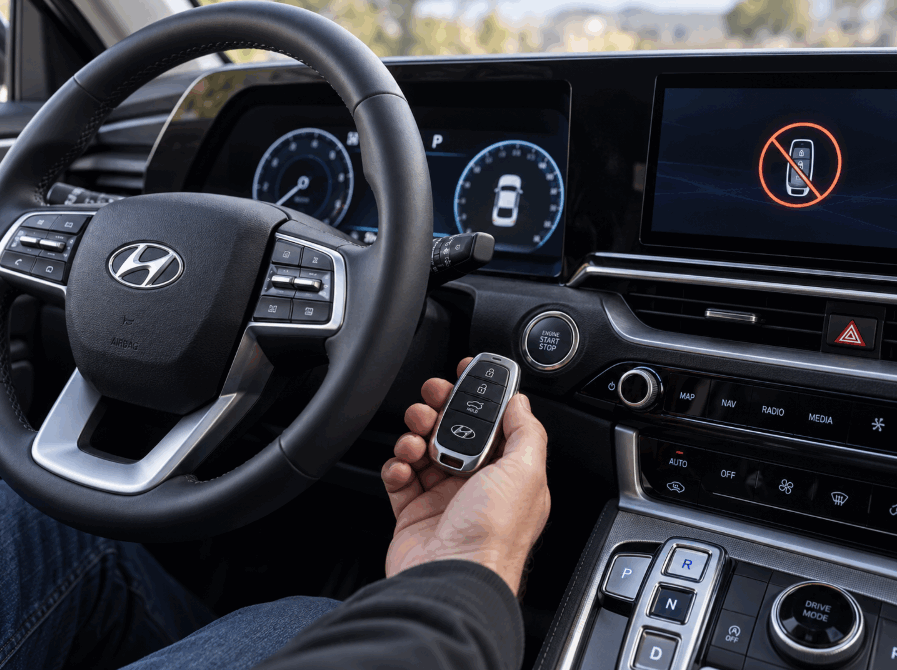
What Does Hyundai Palisade Key Not Detected Mean?
The Hyundai Palisade Key Not Detected warning means the vehicle cannot recognize the smart key fob signal. The system cannot confirm that the correct key is inside the vehicle or near the vehicle, so the push button start system may prevent engine operation.
The Hyundai Palisade uses a smart key system that exchanges signals between the key fob and the vehicle control modules. The key fob sends an identification signal through radio frequency communication. The vehicle receives this signal through smart key antennas and checks the key information through the immobilizer system before allowing the engine to start.
The smart key system has three main functions. It unlocks the doors, confirms key ownership, and allows the engine start button to activate the ignition system. When one part of this communication process fails, the dashboard displays the Key Not Detected message.
A Key Not Detected warning does not always mean the key itself has failed. The problem can come from several areas, including the key fob battery, vehicle battery, signal environment, or smart key components. For example, a weak CR2032 battery inside the key fob can reduce signal strength and prevent reliable communication with the vehicle.
The Hyundai Palisade also uses an immobilizer system as a security feature. The immobilizer checks whether the detected key matches the vehicle’s programmed key information. If the system cannot verify the key, it blocks engine starting to prevent unauthorized use.
Understanding how the Hyundai Palisade smart key system works helps owners identify the problem faster. A simple battery replacement may solve the issue, but repeated Key Not Detected warnings may indicate a deeper electrical or programming problem.
What Causes Hyundai Palisade Key Not Detected Warning?
The Hyundai Palisade Key Not Detected warning usually happens because the smart key system cannot complete communication between the key fob and the vehicle. Five main causes explain most cases: a weak key fob battery, a weak vehicle battery, signal interference, a damaged key fob, or a smart key programming problem.
Weak Key Fob Battery
A weak key fob battery is the most common reason for a Hyundai Palisade Key Not Detected warning. The key fob needs enough power to send a strong signal to the vehicle. When the battery loses power, the signal becomes weaker and the vehicle may not recognize the key.
The Hyundai Palisade key fob usually uses a CR2032 coin battery. This battery powers the remote functions and supports communication with the smart key system. A weak battery often creates early warning signs, such as reduced remote range, delayed door unlocking, or intermittent key detection.
Replacing the key fob battery can solve the problem when the vehicle still detects the key occasionally. If the warning continues after a battery replacement, the issue may involve another part of the smart key system.
Weak Vehicle Battery
A weak vehicle battery can also cause Hyundai Palisade Key Not Detected problems. The smart key system depends on stable electrical power from the vehicle battery to operate antennas, control modules, and the push button start system.
A low voltage condition can affect communication between electronic components. Drivers may notice other symptoms, such as slow engine cranking, dim interior lights, or multiple dashboard warnings.
For example, a Hyundai Palisade with an aging 12 volt battery may still unlock the doors but fail to recognize the key when the driver presses the start button. Testing the vehicle battery voltage helps identify whether the electrical system causes the detection failure.
Signal Interference
Signal interference can prevent the Hyundai Palisade from receiving the key fob signal correctly. The smart key system uses radio frequency communication, so nearby electronic devices or strong wireless signals can interrupt communication.
Common sources of interference include other key fobs, wireless chargers, electronic accessories, and devices that produce strong electromagnetic signals. Moving these items away from the key fob can restore normal communication.
A simple test involves placing the key fob alone near the vehicle and trying the start function again. If the vehicle recognizes the key, external interference may have caused the problem.
Damaged Key Fob
A damaged key fob can stop the Hyundai Palisade from detecting the correct key. Internal circuits, buttons, or the transponder chip can fail after physical damage, water exposure, or long term use.
A damaged key may show inconsistent behavior. The remote buttons may stop working, the vehicle may detect the key only sometimes, or the spare key may work normally while the main key fails.
Testing a second programmed key can help confirm whether the key fob itself causes the problem. If the spare key works correctly, the original key likely needs repair or replacement.
Smart Key Programming Problems
Smart key programming problems can cause a Hyundai Palisade to display the Key Not Detected warning. The vehicle must match the key fob identification data with the immobilizer system before it allows engine starting.
Programming issues can appear after replacing a key, losing synchronization, or experiencing problems with smart key control modules. These cases usually require diagnostic equipment because the system needs to verify communication between electronic components.
If the Hyundai Palisade cannot detect any programmed key, the problem may involve the smart key module, immobilizer system, or key registration process.
How Do You Fix Hyundai Palisade Key Not Detected Problem?
The best way to fix a Hyundai Palisade Key Not Detected problem depends on the cause of the communication failure. Start with simple solutions, such as checking the key fob battery and removing signal interference, before moving to advanced repairs involving the vehicle’s electrical system or smart key programming.
Replace the Hyundai Palisade Key Fob Battery
Replacing the key fob battery is the first solution to try because a weak battery causes many Key Not Detected warnings. The Hyundai Palisade smart key uses battery power to transmit the identification signal to the vehicle.
A low power CR2032 battery can reduce signal strength and create inconsistent key recognition. Installing a new battery restores the key fob’s ability to communicate with the smart key system in many cases.
To replace the battery, open the key fob case carefully, remove the old battery, and install a new CR2032 battery with the correct polarity. After replacement, test the lock, unlock, and engine start functions to confirm that the key works properly.
If the warning disappears after a battery replacement, the problem came from insufficient key fob power. If the warning remains, continue checking other possible causes.
Check the Hyundai Palisade Vehicle Battery
The vehicle battery can affect smart key operation because the system requires stable electrical power. A weak 12 volt battery may prevent the vehicle from communicating correctly with the key fob.
Check for signs of a weak vehicle battery, including slow engine starting, flickering dashboard lights, or unusual electrical behavior. A battery test can confirm whether the voltage level supports normal smart key operation.
Replacing or charging a weak vehicle battery may restore key detection if low voltage caused the communication problem. However, a healthy vehicle battery will not solve issues caused by a damaged key fob or faulty smart key module.
Remove Signal Interference Around the Key Fob
Removing nearby electronic devices can help when external signals interfere with the Hyundai Palisade smart key system. The key fob communicates with the vehicle through radio frequency signals, and some electronic devices can interrupt this connection.
Keep the key fob away from wireless chargers, other smart keys, electronic accessories, or devices that create strong signals. Then try starting the vehicle again.
This solution works best when the problem happens in specific locations or only occurs occasionally. If the vehicle consistently fails to detect the key in different environments, the issue likely comes from the key or vehicle system.
Use the Emergency Key Recognition Method
The Hyundai Palisade includes a backup recognition method for situations where the key fob battery becomes weak. The vehicle can often detect the key when the driver places the key fob close to the start button.
This method allows the vehicle to read the key signal at a shorter distance. It helps drivers start the vehicle temporarily before replacing the battery or repairing the key.
If the emergency recognition method does not work, the problem may involve a damaged key fob, vehicle battery issue, or smart key system failure.
Reprogram or Repair the Smart Key System
A Hyundai Palisade may need professional smart key repair when basic troubleshooting does not restore key detection. The vehicle uses programmed communication between the key fob, immobilizer system, and control modules.
A Hyundai dealer or automotive locksmith can use diagnostic equipment to check key registration, communication errors, and electronic module problems. Professional service becomes necessary when the vehicle cannot recognize any programmed key or when the smart key system has internal faults.
How Do You Start Hyundai Palisade When Key Is Not Detected?
The Hyundai Palisade can often start even when the Key Not Detected warning appears by using the emergency key recognition method. This method helps the vehicle read the key fob when the battery inside the remote has low power or when the signal range becomes too weak.
The Hyundai Palisade smart key system includes a backup detection process. When the key fob cannot send a strong signal from a normal distance, the vehicle can still identify the key when the driver places it close to the designated recognition area.
To start a Hyundai Palisade with a key that is not detected, place the key fob directly against or very close to the engine start button while pressing the brake pedal. Then press the start button normally. This allows the vehicle to read the key information through the backup communication system.
This method works mainly when the key fob battery has lost power but the internal transponder remains functional. The transponder chip stores the key identification information, and the vehicle can recognize it at a short distance without relying on the normal remote signal range.
If the vehicle starts using this method, replace the key fob battery as soon as possible. A weak battery can cause repeated detection problems and may eventually prevent normal key recognition.
The emergency starting method does not solve every Key Not Detected problem. The vehicle may still fail to start when the key fob has internal damage, the vehicle battery has low voltage, or the immobilizer system cannot verify the key information.
When the Hyundai Palisade does not recognize the key after trying the emergency method and replacing the key fob battery, the owner should check the spare key if available. A working spare key helps determine whether the problem comes from the original key fob or the vehicle’s smart key system.
How Do You Diagnose Hyundai Palisade Key Not Detected Before Repair?
The best way to diagnose a Hyundai Palisade Key Not Detected problem is to check the key fob, vehicle battery, signal environment, and smart key system in order. A step by step diagnosis helps identify simple causes before paying for advanced repairs.
Check the Key Fob Battery Condition
The first diagnostic step is checking the key fob battery. A weak battery reduces the signal strength between the key fob and the Hyundai Palisade smart key system.
Inspect the key fob for common symptoms of low battery power. These symptoms include shorter remote range, delayed response from lock and unlock buttons, and inconsistent key recognition.
Replace the CR2032 battery if the key fob shows signs of low power. After replacement, test whether the vehicle recognizes the key normally. If the warning disappears, the battery caused the communication problem.
Test With a Spare Hyundai Palisade Key
Testing a spare key helps separate a key fob problem from a vehicle system problem. If the spare key works correctly, the original key fob likely has a battery issue, internal damage, or programming problem.
If both keys show the same Key Not Detected warning, the problem may come from the vehicle side. Possible causes include a weak vehicle battery, smart key antenna failure, or a communication problem between electronic modules.
This test saves time because it shows whether the issue follows the key or stays with the vehicle.
Check the Vehicle Battery Voltage
The Hyundai Palisade smart key system needs stable electrical power to communicate with the key fob. A weak vehicle battery can affect electronic systems even when the vehicle still starts normally.
Check the battery voltage and inspect other electrical symptoms. Slow engine cranking, dim lights, or multiple warning messages often indicate a battery or charging system issue.
A battery test can confirm whether low voltage affects smart key operation. If the vehicle battery has poor performance, replacing it may restore normal communication.
Remove Possible Signal Interference
Signal interference can create temporary Key Not Detected warnings. The Hyundai Palisade key fob communicates through radio frequency signals, and nearby electronic devices can interrupt this communication.
Move the key fob away from other smart keys, wireless chargers, electronic accessories, and devices that produce electromagnetic signals. Then try starting the vehicle again.
If the problem disappears after removing nearby devices, external interference caused the detection failure.
Scan the Smart Key System for Fault Codes
Professional diagnosis may require a vehicle scanner that can communicate with the Hyundai Palisade electronic control modules. The scan tool can identify problems related to the smart key system, immobilizer, and communication circuits.
A diagnostic scan becomes important when simple fixes do not work. It helps technicians determine whether the issue involves key programming, control module failure, or damaged electrical components.
Accurate diagnosis prevents unnecessary parts replacement. Replacing a key fob or smart key module without confirming the cause can increase repair costs.
When Does Hyundai Palisade Need Smart Key Repair or Replacement?
The Hyundai Palisade needs smart key repair or replacement when basic troubleshooting cannot restore communication between the key fob and the vehicle. A battery replacement or signal check can solve simple problems, but persistent Key Not Detected warnings usually point to a damaged component or system issue.
A key fob replacement may become necessary when the remote has physical damage, water exposure, or internal circuit failure. The key fob contains electronic components that transmit identification signals to the vehicle. Damage to these components can prevent the Hyundai Palisade from recognizing the correct key.
Common signs of a damaged key fob include inconsistent detection, buttons that stop working, visible cracks, or failure after replacing the battery. For example, if a new CR2032 battery does not restore normal operation, the key fob may have an internal problem that requires repair or replacement.
The Hyundai Palisade may also need smart key programming when the vehicle loses synchronization with the key. The immobilizer system must match the key fob identification data before the vehicle allows engine starting. A replacement key or a key that loses programming may require registration with the vehicle system.
Professional diagnosis becomes necessary when the vehicle cannot detect any programmed key. This situation may indicate problems with the smart key module, antenna system, immobilizer communication, or electronic control components.
A Hyundai dealership or automotive locksmith can diagnose these issues with specialized equipment. They can test key communication, program replacement keys, and repair smart key system faults. Professional service helps avoid replacing expensive components without confirming the actual cause.
How Can You Prevent Hyundai Palisade Key Detection Problems?
The best way to prevent Hyundai Palisade Key Not Detected problems is to maintain the key fob, vehicle battery, and smart key system regularly. Preventive maintenance reduces communication failures and helps the vehicle recognize the key consistently.
Replace the Hyundai Palisade key fob battery before it loses power completely. A weak CR2032 battery reduces signal strength and creates inconsistent communication between the key fob and the vehicle. Replacing the battery when you notice reduced remote range or delayed response can prevent unexpected starting problems.
Keep the key fob away from water, extreme temperatures, and physical damage. The key fob contains sensitive electronic circuits that control communication with the vehicle. Water exposure, impact damage, or excessive heat can affect these components and cause key recognition failures.
Maintain the vehicle battery in good condition because the smart key system depends on stable electrical power. A weak 12 volt battery can create communication problems between the vehicle modules and the key fob. Regular battery testing helps identify electrical issues before they affect daily vehicle operation.
Avoid storing the key fob near devices that may create signal interference. Wireless chargers, electronic accessories, and other smart keys can sometimes interrupt radio frequency communication. Keeping the key fob separate from these devices helps maintain a reliable connection with the Hyundai Palisade.
Finally, keep a spare programmed key available and test it occasionally. A backup key helps drivers identify whether a problem comes from the original key fob or the vehicle system. It also provides a practical solution if the primary key suddenly stops working.
Regular smart key maintenance helps Hyundai Palisade owners avoid unexpected Key Not Detected warnings. Simple actions such as replacing batteries, protecting the key fob, and checking vehicle battery health can prevent many common recognition problems.