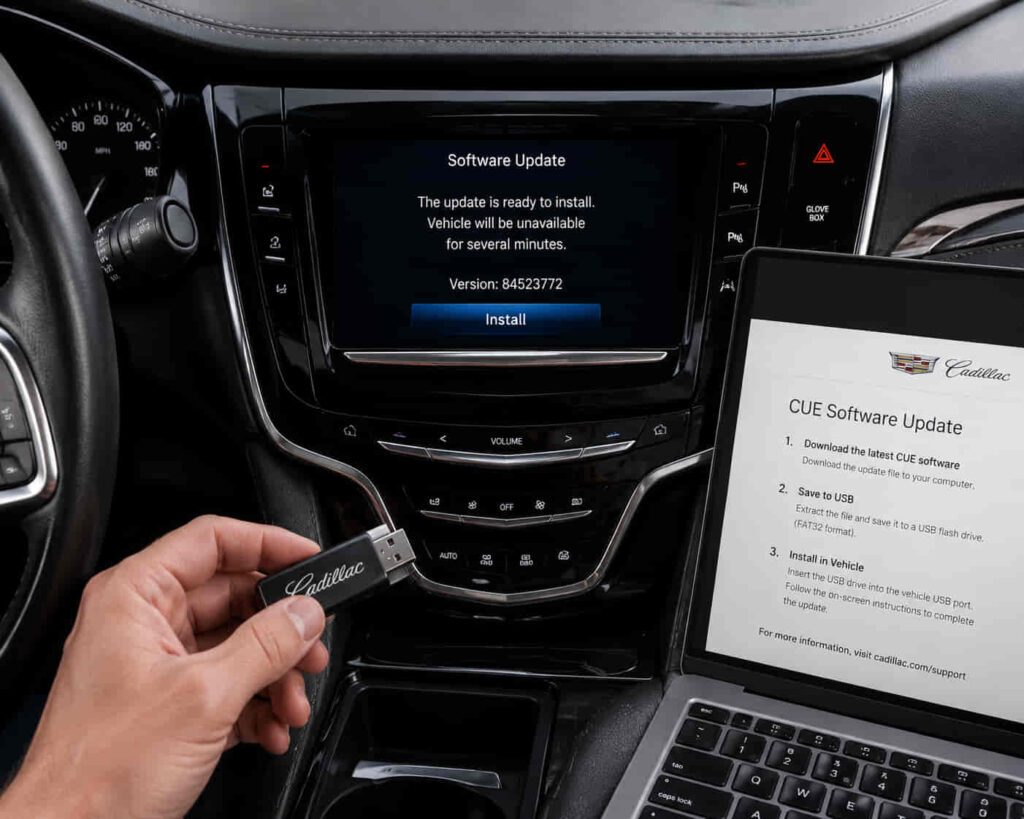
Updating Cadillac CUE software helps maintain infotainment system performance, improve device compatibility, and resolve software-related issues that affect connected features inside the vehicle. Cadillac CUE (Cadillac User Experience) is a software-based infotainment platform that controls important functions such as touchscreen operation, Bluetooth connectivity, smartphone integration, navigation features, and voice commands.
Over time, outdated software can create compatibility problems between the Cadillac CUE system and newer smartphones, applications, or connected services. Drivers may experience symptoms such as slow touchscreen response, Bluetooth connection failures, unstable Apple CarPlay or Android Auto performance, or unexpected system behavior.
The update process depends on the Cadillac model, current CUE software version, and the update method supported by the vehicle. Before installing new software, owners need to understand the current system status and prepare the vehicle correctly to avoid interruptions during the installation process.
Updating Cadillac CUE is not only about adding new features. Software updates can improve system stability, fix known bugs, and help different vehicle technologies communicate more reliably. This guide explains how to update Cadillac CUE software, from checking the current version to verifying the installation and troubleshooting common update problems.
How Do You Check Your Current Cadillac CUE Software Version?
Checking the current Cadillac CUE software version is the first step before updating because it determines the existing system status and helps identify whether a newer software version is required. Cadillac CUE updates are designed for specific vehicle systems, so knowing the current software environment helps avoid installing an incorrect update or repeating an unnecessary process.
The software version information is stored inside the Cadillac CUE infotainment system settings. By accessing the system information section, owners can identify details related to the installed software version and compare the current configuration with available update information from supported Cadillac sources.
Checking the version before updating also provides a reference point for troubleshooting. If a problem appears after installation, comparing the previous and updated software information helps determine whether the update process completed correctly or created a compatibility issue.
For example, a Cadillac owner experiencing Bluetooth instability may assume that the system requires an update, but the actual issue may come from a different configuration problem. Confirming the CUE software version first helps separate outdated software issues from other infotainment problems.
How Do You Prepare Your Cadillac Before a CUE Update?
Preparing your Cadillac before a CUE update is important because software installation requires a stable environment to prevent interruptions, incomplete installation, or system errors. The Cadillac CUE system performs a software replacement process, meaning unexpected interruptions during installation can affect system operation.
Vehicle power stability is one of the most important preparation factors. The vehicle should have sufficient battery power because infotainment updates can take time and require continuous operation of the system. Interrupting power during an update may prevent the software from installing correctly.
Owners should also confirm that the update method matches their Cadillac model and CUE system version. Some vehicles may support specific update methods, while others require different procedures depending on the available software package and vehicle configuration.
Proper preparation reduces update-related problems and creates a smoother installation process. For example, checking the correct software version, preparing the required update equipment, and ensuring stable vehicle conditions can prevent situations where Cadillac CUE becomes unresponsive or fails during the update.
Read more: Chevrolet Beat Not Starting
How Do You Update Cadillac CUE Software?
Updating Cadillac CUE software requires following the correct installation process because the infotainment system needs to replace existing software components with a newer version while maintaining communication with vehicle hardware and connected features. The update process depends on the Cadillac model, available software version, and the update method supported by the vehicle.
Before starting the installation, the vehicle system must recognize the correct update package and confirm that the software is compatible with the existing CUE configuration. Once the update begins, the system installs new software files and may restart during the process to apply changes.
During the update, the Cadillac CUE system may temporarily disable certain functions because the infotainment software is being modified. This behavior is normal because the system needs to complete the installation before returning to normal operation.
The update should not be interrupted because incomplete installation can cause software instability. For example, turning off the vehicle or disconnecting the update source during installation may prevent the CUE system from completing the update and may require additional troubleshooting.
Can You Update Cadillac CUE Using a USB Drive?
A USB drive can be used for certain Cadillac CUE software updates because external storage provides a way to transfer update files to the vehicle infotainment system. The USB update method depends on vehicle compatibility and the specific software package provided for that Cadillac system.
The USB device must contain the correct update files and meet the requirements of the Cadillac CUE system. Using an incorrect file, incompatible software package, or improperly prepared USB drive can prevent the system from recognizing the update.
The update process through USB involves transferring software data from the storage device to the vehicle infotainment system. Cadillac CUE reads the update files, verifies compatibility, and then begins the installation process when the required conditions are met.
USB updates are useful when a vehicle does not receive an available update automatically or when a specific software package requires manual installation. However, a failed USB update does not always indicate a hardware problem. Issues such as incompatible files, connection errors, or incorrect preparation can prevent successful installation.
How Do You Verify That Cadillac CUE Update Was Successful?
Verifying the Cadillac CUE update after installation is important because a completed update requires more than a system restart; the infotainment system must also operate correctly with its connected features. After the software installation finishes, checking system performance confirms whether the new software has been applied properly.
The first verification step is confirming that the Cadillac CUE software version has changed according to the update information. This confirms that the system has accepted and installed the new software package instead of only restarting without applying changes.
The next step is testing important infotainment functions that depend on CUE software. These include touchscreen response, Bluetooth connection, smartphone integration, navigation features, and voice command performance. A successful update should maintain or improve communication between the infotainment system and connected devices.
Software updates can sometimes change system behavior because settings, device connections, or stored configurations may be affected during installation. For example, a Cadillac owner may notice that a smartphone needs to be paired again after the update because the new software has refreshed connection settings.
A complete verification process helps identify problems early and ensures that the Cadillac CUE system provides stable performance after the update.
What Should You Do If Cadillac CUE Update Does Not Work?
When a Cadillac CUE update does not work, the problem is usually related to software compatibility, update files, installation conditions, or communication between the update source and infotainment system. A failed update does not automatically mean that the Cadillac CUE hardware has a problem.
The first step is checking whether the update package matches the specific Cadillac vehicle and CUE system version. Installing software intended for a different configuration can prevent the system from accepting the update or cause installation errors.
Restarting the infotainment system can also resolve temporary software conflicts. The CUE system may experience a temporary communication failure after an interrupted installation attempt, and a system restart can allow it to recognize the update process again.
If the problem continues, the update source and installation method should be reviewed. Issues such as incorrect USB preparation, damaged update files, or interrupted power supply can prevent successful installation.
For example, if Cadillac CUE does not recognize a USB update file, the problem may not come from the infotainment hardware but from an incompatible file format or incorrect update package. Identifying the actual failure point prevents unnecessary repairs and helps restore normal system operation.
When Should You Contact Cadillac Support for a CUE Update?
You should contact Cadillac support when a Cadillac CUE update cannot be completed, the system becomes unstable after installation, or standard troubleshooting steps cannot restore normal infotainment operation. Some update problems are caused by software compatibility or vehicle configuration issues that require access to manufacturer-specific diagnostic information.
Professional support becomes necessary when Cadillac CUE repeatedly fails to recognize an update, freezes during installation, restarts continuously, or loses important functions after the update process. These symptoms may indicate deeper software conflicts or system-level problems that cannot be resolved through basic user actions.
Providing accurate information helps Cadillac support identify the cause more efficiently. Important details include the Cadillac vehicle model and year, current CUE software version, update method used, error messages, and the specific functions affected after the update attempt.
For example, a touchscreen problem after a software update may have a different cause from a Bluetooth connection failure. Describing the exact behavior allows technicians to determine whether the issue relates to software installation, system configuration, or another infotainment component.
How Can You Maintain Cadillac CUE Performance After an Update?
Maintaining Cadillac CUE performance after an update requires keeping the infotainment system properly configured and monitoring connected features to ensure long-term stability. A software update improves the system environment, but ongoing maintenance helps prevent future compatibility and performance problems.
Keeping connected devices updated is an important part of maintaining Cadillac CUE reliability. Smartphones, Bluetooth settings, and applications such as Apple CarPlay or Android Auto continue to change over time, so compatibility depends on both vehicle software and external devices working together.
Regularly checking system behavior can also help detect problems before they become larger failures. Slow touchscreen response, repeated connection drops, navigation errors, or unexpected system restarts may indicate that the infotainment system requires further diagnosis.
A properly maintained Cadillac CUE system provides more consistent performance across vehicle technology features. By keeping software current, maintaining stable device connections, and addressing unusual behavior early, Cadillac owners can maximize the reliability of their infotainment experience.
How Can You Successfully Update Cadillac CUE Software?
You can successfully update Cadillac CUE software by following a structured process that includes checking the current software version, preparing the vehicle correctly, installing the update through the supported method, and verifying system performance afterward. Cadillac CUE is a connected infotainment platform that requires stable software communication between the vehicle hardware, touchscreen interface, smartphone integration, and connected features.
A successful update depends on more than installing new files. The vehicle configuration, software compatibility, installation environment, and update source all influence whether the process completes correctly. Checking these factors before updating reduces the risk of failed installation and prevents unnecessary troubleshooting.
After an update, verifying functions such as touchscreen response, Bluetooth connectivity, navigation, and smartphone integration helps confirm that the Cadillac CUE system is operating properly. If problems remain after installation, further diagnosis may be required to determine whether the cause comes from software compatibility, configuration issues, or another infotainment component.
Keeping Cadillac CUE software updated helps maintain system stability and improves compatibility with evolving automotive technology. Regular software maintenance allows Cadillac owners to continue using connected features with better reliability and a smoother driving experience.