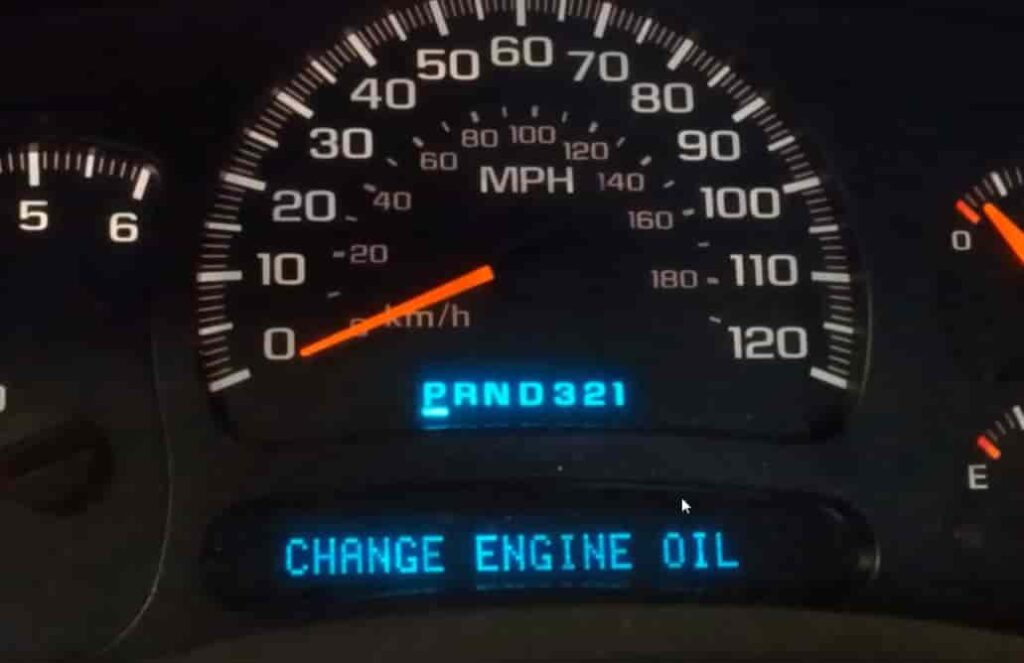
The Change Oil Soon light can confuse many Chevy Cobalt owners. You change the oil, but the reminder still stays on. This often makes drivers think something is wrong with the engine. In most cases, the oil life monitor simply needs a manual reset.
Knowing how to reset oil change indicator on your Chevy Cobalt is an important part of regular maintenance. The process only takes a minute. It helps your car track oil life correctly and keeps future service reminders accurate. If you skip this step, the system may give misleading alerts later.
Chevy designed the Cobalt with an oil life monitoring system that calculates service intervals based on mileage and driving conditions. After an oil change, you need to reset that system so it can start a new cycle. Most models use a simple accelerator pedal procedure, and you do not need special tools to do it.
This guide walks you through each step of the reset process. You will also learn why the oil light may stay on, how to avoid common mistakes, and what to do if the reset does not work the first time. If you want a quick solution, this guide will help you reset the oil change indicator on your Chevy Cobalt correctly.
How the Chevy Cobalt Oil Life Monitoring System Works
The Chevy Cobalt uses an oil life monitoring system instead of a fixed mileage reminder. This system tracks engine conditions and driving habits. It estimates when the oil loses its effectiveness.
The system does not measure oil quality directly. Instead, it calculates oil life based on factors like engine temperature, driving distance, idle time, and operating conditions. This helps provide a more accurate service schedule than traditional mileage-based reminders.
A Change Oil Soon message appears when the system detects that oil life has dropped to a low level. This does not always mean the oil is dirty or damaged. It simply means the system believes service is due based on its calculations.
The oil life indicator is separate from the check engine light. The check engine light signals engine or emission issues. The oil light only relates to maintenance tracking. Many drivers confuse the two, which leads to unnecessary concern.
After an oil change, the system does not reset automatically. It continues using the old data until you reset it manually. This is why the warning light may stay on even after fresh oil is added. Resetting the system allows it to start a new monitoring cycle.
How to Reset Oil Change Indicator on Your Chevy Cobalt Step by Step
This section shows the exact process to reset the oil change indicator. Follow each step in order. The procedure works on most Chevy Cobalt models.
Step 1 Turn the ignition to ON without starting the engine
Insert the key into the ignition. Turn it to the ON position. Do not start the engine. The dashboard lights should turn on. This activates the vehicle systems needed for the reset.
Step 2 Fully press the accelerator pedal three times
Press the accelerator pedal all the way down. Release it fully each time. Repeat this three times within five seconds. Keep the timing quick and steady. This step sends the reset command to the system.
Step 3 Turn the ignition off
Turn the key back to the OFF position. Wait a few seconds. This allows the system to save the reset information properly.
Step 4 Start the engine and verify the reset
Start the engine normally. Check the dashboard display. The Change Oil Soon message should disappear. The oil life indicator should now show a reset or 100 percent value.
If the message still appears, repeat the steps carefully. Most failures happen when the pedal timing is too slow or the ignition is in the wrong position.
Chevy Cobalt Oil Reset Procedure by Model Year
The reset steps for the Chevy Cobalt are mostly the same across model years. However, small differences in dashboard response or ignition behavior can appear depending on the year. This section helps you adjust the process if needed.
2005 Chevy Cobalt oil light reset
The 2005 model uses the same accelerator pedal method. Turn the ignition to ON, then press the gas pedal three times within five seconds. Some early models may respond slightly slower, so wait a few seconds before checking the dashboard.
2006 to 2008 reset instructions
Models from 2006 to 2008 follow the standard GM oil life system. The reset process works reliably if you press the pedal fully and quickly. Make sure the ignition stays in the ON position without starting the engine.
2009 to 2010 reset procedure differences
Later models like 2009 and 2010 may show a confirmation message after reset. In some cases, the oil life indicator updates only after restarting the vehicle. Always verify the reset by checking the display after engine start.
Across all model years, the key factor is correct timing. The system only registers the reset if the pedal sequence is fast and complete.
What to Do If the Oil Change Light Will Not Reset
In some cases, the oil change indicator on your Chevy Cobalt may not reset even after you follow the correct steps. This problem is common and usually does not indicate a serious mechanical issue. Most of the time, it comes from small errors during the reset process or incorrect ignition timing. You can usually fix it at home without any tools.
The first thing to do is repeat the accelerator pedal method carefully. Turn the ignition to the ON position without starting the engine. Then press the accelerator pedal fully three times within five seconds. Make sure each press is complete and reaches the floor. If the pedal is not fully pressed, the system may not recognize the reset command.
You should also double check the ignition position. The key must stay in the ON position, not ACC or START. If the engine starts, the reset mode will not activate and the process will fail. This is one of the most common mistakes drivers make.
Timing also plays an important role. The system requires quick and consistent input. If you press the pedal too slowly or pause between presses, the reset will not register. Try to keep a steady rhythm and complete the sequence without delay.
If the light still does not turn off after several attempts, the issue may come from the oil life monitoring system itself. In rare cases, a sensor or control module problem can prevent the reset from completing. At that point, using a diagnostic scan tool at a repair shop is the most reliable solution.
Common Mistakes When Resetting the Chevy Cobalt Oil Indicator
Many drivers struggle with resetting the oil change indicator on a Chevy Cobalt, not because the system is complex, but because small mistakes interrupt the process. Understanding these errors can help you complete the reset faster and avoid repeated attempts.
One of the most common mistakes is not pressing the accelerator pedal fully. The system only registers a full press, so partial presses will not trigger the reset command. Another frequent issue is incorrect timing. The three presses must be completed within five seconds, and any delay can cause the system to ignore the input.
Another mistake happens when the ignition is not set correctly. The key must be in the ON position without starting the engine. If the engine turns on or the key is in ACC mode, the reset will fail. Many users overlook this detail and repeat the process unnecessarily.
Some drivers also forget that the sequence must be smooth and continuous. Pausing between presses or pressing unevenly can interrupt the signal. The system is designed to detect a quick and consistent pattern.
Finally, a common misunderstanding is trying to reset the indicator without completing an oil change. The system is meant to track real maintenance cycles, so resetting without servicing the vehicle can lead to inaccurate oil life readings later.
By avoiding these mistakes, you can reset the oil change indicator on your Chevy Cobalt quickly and ensure the system works correctly for the next service cycle.
How Often Should You Change Oil in a Chevy Cobalt
Knowing the correct oil change interval helps you avoid engine wear and keeps the oil life monitoring system accurate. The Chevy Cobalt uses an adaptive system, so the interval is not fixed for every driver. It depends on driving style, road conditions, and engine load.
In normal driving conditions, most Chevy Cobalt models need an oil change roughly every 5,000 to 7,500 miles. This range works well for drivers who mostly travel on highways and maintain steady speeds. The oil life monitor will usually alert you when service is needed within this range.
If you drive in harsh conditions, you may need to change oil more often. Frequent short trips, heavy traffic, idling, or extreme temperatures can reduce oil life faster. In these cases, the interval may drop closer to 3,000 to 5,000 miles.
The type of oil also affects service frequency. Synthetic oil generally lasts longer and provides better engine protection compared to conventional oil. Using the correct oil type recommended for your Chevy Cobalt helps the engine run more efficiently and extends oil life.
It is important to understand that the oil life indicator is not just a mileage counter. It calculates real engine conditions. However, you should still follow regular maintenance habits and not rely only on the dashboard reminder.
After each oil change, always reset the indicator. This ensures the system starts a new cycle and gives accurate alerts for the next service. Keeping this routine helps maintain engine health and prevents unnecessary warning lights.
Signs Your Chevy Cobalt May Need More Than an Oil Reset
In most cases, the oil change indicator simply reminds you to reset the system after maintenance. However, there are situations where the warning light points to a deeper issue. Recognizing these signs helps you avoid ignoring a real problem.
If the oil light stays on even after multiple reset attempts, the issue may not be related to the reset procedure. It can indicate a fault in the oil life monitoring system or a sensor error. In this case, the system cannot correctly track oil condition.
You should also pay attention if the engine performance feels unusual. Rough idling, reduced acceleration, or strange engine noise may suggest low oil pressure or poor lubrication. These symptoms go beyond a simple maintenance reminder and require immediate inspection.
Another warning sign is frequent or unexpected dashboard alerts. If the oil change light appears too soon after a recent service, the system may not be calculating oil life correctly. This can happen due to electrical issues or incorrect reset history.
Low oil levels can also trigger warning behavior. Even though the indicator is based on a monitoring system, physical oil level still matters. Always check the dipstick if you suspect a problem.
If any of these signs appear, do not rely only on a reset. A full inspection at a repair shop is the safest option. This ensures the engine stays protected and prevents long-term damage.
Frequently Asked Questions
Can I drive with the Change Oil Soon light on
Yes, you can still drive for a short period, but you should not ignore it for too long. The light means the system believes the oil is near the end of its useful life. Driving for an extended time without an oil change can reduce engine protection and increase wear.
Why did my oil light stay on after resetting it
This usually happens when the reset process is not completed correctly. Common causes include not pressing the accelerator pedal fully, incorrect ignition position, or slow timing between presses. In some cases, the system may need another reset attempt.
Does disconnecting the battery reset the oil life monitor
No, disconnecting the battery does not reliably reset the oil life system on a Chevy Cobalt. The system stores maintenance data in memory, so manual reset using the pedal method is still required.
Can I reset the oil indicator without changing the oil
You can reset it, but you should not do it without an oil change. The system is designed to track real maintenance intervals. Resetting without servicing the oil can lead to incorrect tracking and potential engine damage over time.
Conclusion
Resetting the oil change indicator on your Chevy Cobalt is a simple but essential part of regular vehicle maintenance. Once you understand the correct steps, the process becomes quick and easy, and it helps keep your maintenance system accurate. The oil life monitor is designed to guide you, but it only works properly when it is reset after every oil change.
If the indicator is not reset, the dashboard may continue showing a warning even when fresh oil has already been added. This can lead to confusion and unnecessary concern. That is why following the correct reset procedure ensures the system starts a new monitoring cycle and reflects the real condition of your engine oil.
It is also important to pay attention to timing and technique during the reset process. Small mistakes like incomplete pedal presses or incorrect ignition position are the most common reasons the reset fails. When done correctly, the procedure takes less than a minute and does not require any tools.
By applying the steps in this guide, you can maintain better control over your Chevy Cobalt’s maintenance schedule. This helps improve engine performance, extend engine life, and reduce the risk of overlooking important service intervals.