Have you recently changed the oil in your Toyota Corolla only to discover that the maintenance light is still illuminated on the dashboard? If so, you are not alone. Many Corolla owners become concerned when the maintenance light remains on, assuming it signals a serious mechanical problem or an expensive repair. Fortunately, that is usually not the case.
The maintenance light on a Toyota Corolla is designed to serve as a reminder that routine service is due. In most cases, it appears after a specific mileage interval to help drivers stay on top of essential maintenance tasks such as oil changes, tire rotations, and vehicle inspections. Once the required service has been completed, the light must be manually reset.
Knowing how to reset the maintenance light on a Toyota Corolla can save you time, eliminate unnecessary trips to the dealership, and provide peace of mind every time you start your vehicle. However, the exact reset procedure can vary depending on the model year and dashboard configuration of your Corolla.
In this step-by-step guide, you will learn what the maintenance light means, how to reset it correctly, common mistakes to avoid, and what to do if the light returns after the reset process. By following these simple instructions, you can keep your Toyota Corolla running smoothly and your dashboard free from unnecessary warning indicators.
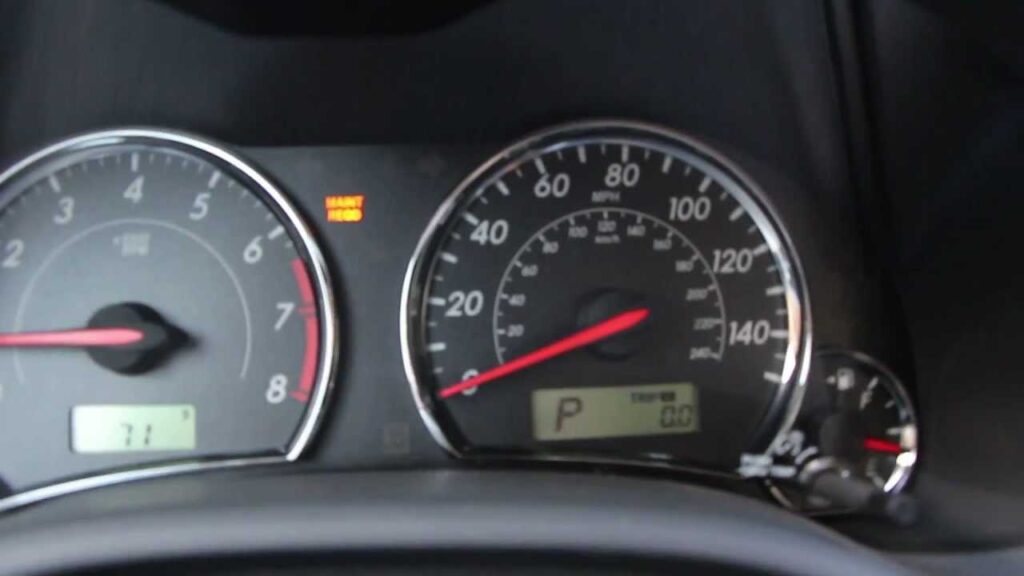
What Does the Maintenance Light Mean on a Toyota Corolla?
Many drivers become concerned when they see a warning light appear on the dashboard. However, the maintenance light on a Toyota Corolla is not the same as a fault warning or engine problem indicator. Its primary purpose is to remind vehicle owners that scheduled maintenance is due.
Toyota programs the maintenance reminder system to activate after a predetermined mileage interval, typically every 5,000 miles. This reminder helps ensure that important services such as oil changes, tire rotations, and general inspections are not overlooked. Regular maintenance plays a crucial role in preserving engine performance, fuel efficiency, and overall vehicle reliability.
One of the most common misconceptions among Corolla owners is confusing the maintenance light with the check engine light. The maintenance light serves only as a reminder for routine service, while the check engine light may indicate a mechanical, electrical, or emissions-related issue that requires diagnostic testing. If the maintenance light is illuminated by itself, there is usually no immediate cause for alarm.
Understanding the purpose of the maintenance reminder can help you avoid unnecessary stress and make informed decisions about your vehicle’s care. Once the required maintenance has been completed, resetting the light will allow the system to begin tracking the next service interval.
Before You Reset the Maintenance Light
Before performing a maintenance light reset, it is important to verify that all recommended maintenance has actually been completed. Resetting the reminder without servicing the vehicle may cause you to miss critical maintenance intervals in the future.
For most Toyota Corolla models, routine maintenance includes changing the engine oil, replacing the oil filter when necessary, rotating the tires, and inspecting essential vehicle systems. Completing these services before resetting the indicator ensures that your maintenance schedule remains accurate.
Another important step is identifying the model year of your Corolla. Toyota has introduced several dashboard designs and display systems over the years. Older models typically use a trip reset button located near the instrument cluster, while newer models may utilize a Multi Information Display controlled through steering wheel buttons.
You should also familiarize yourself with your vehicle’s dashboard controls before beginning the process. Taking a few moments to locate the trip button, ignition switch, or menu controls can make the reset procedure much easier and reduce the chance of mistakes.
Preparing properly before resetting the maintenance light helps ensure a successful reset and prevents unnecessary troubleshooting later.
How to Reset Maintenance Light on Toyota Corolla
The exact procedure may vary slightly depending on the model year, but the following method works for many Toyota Corolla vehicles equipped with a traditional trip meter reset button.
Step 1: Turn Off the Vehicle
Begin by ensuring that the vehicle is completely turned off. Remove the key from the ignition if applicable.
Step 2: Press and Hold the Trip Reset Button
Locate the trip reset button on the dashboard or instrument cluster. Press and hold the button firmly.
Step 3: Turn the Ignition to the On Position
While continuing to hold the trip reset button, turn the ignition key to the On position without starting the engine. For push button start models, press the start button twice without pressing the brake pedal.
Step 4: Continue Holding the Button
Keep holding the trip reset button for several seconds. You may notice a series of dashes, flashing lines, or a countdown display appearing on the odometer screen.
Step 5: Wait for the Reset to Complete
The display will eventually return to normal, indicating that the maintenance reminder has been successfully cleared.
Step 6: Start the Engine and Verify
Release the trip reset button and start the vehicle. Check the dashboard to confirm that the maintenance light is no longer illuminated.
If the light remains on, repeat the procedure carefully and ensure that each step is followed exactly. In many cases, the issue occurs because the button was released too early or the ignition was not placed in the correct position.
How to Reset Maintenance Light on Toyota Corolla With Multi Information Display
Many newer Toyota Corolla models feature a Multi Information Display that allows drivers to access vehicle settings directly from the steering wheel controls. If your Corolla is equipped with this system, resetting the maintenance reminder is usually faster and more convenient than using the traditional trip button method.
Start by turning the ignition on without starting the engine. Use the directional buttons on the steering wheel to navigate through the display menus. Locate the Settings menu and select it. Depending on the model year, you may need to scroll through several options before finding the Vehicle Settings section.
Once inside the settings menu, look for Scheduled Maintenance or Maintenance Reset. Select the option and choose Reset. The system will ask you to confirm your selection before clearing the maintenance reminder. Confirm the reset and wait for the display to indicate that the process has been completed successfully.
After the reset is finished, turn the ignition off and then restart the vehicle. Verify that the maintenance light no longer appears on the dashboard. If the reminder remains active, repeat the procedure and ensure that the correct menu option was selected.
Using the Multi Information Display allows Toyota owners to manage service reminders without special tools or dealership assistance, making routine maintenance tracking much more convenient.
Toyota Corolla Maintenance Light Reset by Model Year
Toyota has updated the Corolla’s dashboard and information systems several times over the years. As a result, the reset procedure can vary depending on the generation of the vehicle.
For Toyota Corolla models produced between 2005 and 2013, the maintenance light is typically reset using the trip meter button. Drivers must switch the display to Trip A, turn the ignition off, hold the reset button, and then turn the ignition back on until the maintenance reminder clears.
For Corolla models manufactured between 2014 and 2019, the process remains similar but may involve slight variations in display behavior. Some vehicles show a series of countdown bars while others display flashing zeros before the reset is completed. Following the owner’s manual instructions for the specific model year is recommended.
For 2020 through 2026 Toyota Corolla models, many vehicles use the Multi Information Display system. Drivers can navigate through dashboard settings and reset the maintenance reminder electronically. This modern approach eliminates the need for manually holding dashboard buttons during the reset process.
Knowing the correct procedure for your specific Corolla model year can save time and prevent unnecessary frustration when attempting to clear the maintenance light.
Common Problems When the Maintenance Light Won’t Reset
Occasionally, drivers follow the reset procedure but discover that the maintenance light remains illuminated. Several common issues can prevent the system from resetting properly.
One of the most frequent mistakes is selecting the wrong odometer mode. On many older Corolla models, the display must be set to Trip A before beginning the reset procedure. Attempting the reset from the total mileage screen often results in failure.
Another common problem occurs when the trip reset button is released too soon. The reset process may take several seconds to complete, and releasing the button prematurely can interrupt the sequence before the reminder is cleared.
Drivers may also accidentally place the ignition in the wrong position. The engine should not be started during most maintenance light reset procedures. Instead, the ignition should be switched to the On position while the engine remains off.
In some situations, the maintenance reminder returns shortly after being reset. This may happen if routine maintenance was not completed or if the reset process was not fully successful. Repeating the procedure carefully often resolves the issue.
Although rare, software glitches or instrument cluster problems can occasionally prevent the maintenance light from resetting. If multiple attempts fail, consulting a qualified technician may be necessary to diagnose the underlying issue.
What If the Maintenance Light Comes Back?
It can be frustrating to see the maintenance light return shortly after successfully resetting it. In many cases, the issue is not related to a serious mechanical problem but rather to the vehicle’s maintenance tracking system.
One possible reason is that the required maintenance was not actually completed before the reset. The maintenance reminder is designed to help drivers stay on schedule with routine service. If the oil change, tire rotation, or inspection was skipped, the reminder may continue to appear as the vehicle reaches its next service interval.
Another possibility is that the reset procedure was not completed correctly. Missing a step, releasing the reset button too early, or selecting the wrong menu option can prevent the system from fully clearing the maintenance reminder. Repeating the process carefully often solves the problem.
In some cases, the maintenance light may return because additional service items are due. While many drivers associate the reminder with oil changes, Toyota’s maintenance schedule includes other important inspections and replacements that should not be ignored.
If the maintenance light returns repeatedly despite following the correct reset procedure and completing all scheduled maintenance, it may be time to consult a professional technician. A qualified mechanic can verify that the vehicle’s maintenance tracking system is functioning correctly and identify any underlying issues.
Toyota Corolla Maintenance Schedule Overview
Following Toyota’s recommended maintenance schedule is one of the most effective ways to maximize the lifespan and reliability of your Corolla. Routine service helps prevent costly repairs, improves fuel efficiency, and ensures the vehicle continues to operate safely.
Every 5,000 miles, Toyota generally recommends a tire rotation and a comprehensive inspection of key vehicle components. During this service interval, technicians typically examine the brakes, steering system, suspension components, fluid levels, and tire condition.
Every 10,000 miles, most modern Toyota Corolla models require an engine oil and oil filter service when using synthetic oil. Maintaining proper oil quality is essential for reducing engine wear and preserving long term performance.
As mileage increases, additional maintenance items become important. Engine air filters, cabin air filters, brake components, coolant, transmission fluid, and spark plugs may require inspection or replacement according to Toyota’s service recommendations.
Keeping detailed records of maintenance visits can help ensure that your Corolla remains in excellent condition and can also improve resale value by demonstrating proper vehicle care.
Frequently Asked Questions
Can I reset the maintenance light without changing the oil?
Yes, it is technically possible to reset the maintenance light without performing an oil change. However, doing so is not recommended because the reminder is designed to help you keep up with routine maintenance. Ignoring scheduled service can lead to reduced performance and increased engine wear over time.
Will resetting the maintenance light fix mechanical problems?
No. Resetting the maintenance light only clears the service reminder. It does not repair mechanical issues, engine faults, or electrical problems. If another warning light remains on, additional diagnosis may be necessary.
Why is my maintenance light blinking?
A blinking maintenance light often indicates that scheduled maintenance is approaching. In many Toyota Corolla models, the light may flash briefly during startup before becoming solid as the service interval is reached.
Is it safe to drive with the maintenance light on?
In most cases, yes. The maintenance light is generally a reminder for routine service rather than an indication of an immediate safety concern. However, delaying maintenance for extended periods is not advisable because it can contribute to premature wear and higher repair costs.
How often should I reset the maintenance light?
The maintenance light should be reset only after completing the recommended service. Typically, this occurs after an oil change or other scheduled maintenance interval specified by Toyota.
Conclusion
Knowing how to reset the maintenance light on a Toyota Corolla is a simple but valuable skill that can save you time, reduce unnecessary dealership visits, and help you stay in control of your vehicle’s maintenance schedule. While the maintenance reminder may seem concerning at first, it is typically designed to notify drivers that routine service is due rather than indicate a serious mechanical problem.
Throughout this guide, you have learned what the maintenance light means, how to reset it on different Toyota Corolla models, common reasons why the reset may fail, and what steps to take if the light returns after being cleared. Whether your Corolla uses a traditional trip reset button or a modern Multi Information Display, the process can usually be completed in just a few minutes without specialized tools.
It is important to remember that resetting the maintenance light should always follow the completion of recommended service. Routine maintenance such as oil changes, tire rotations, and vehicle inspections plays a critical role in maintaining engine performance, fuel efficiency, safety, and long term reliability.
By following Toyota’s maintenance schedule and properly resetting the reminder after each service interval, you can keep your Corolla running smoothly for years to come. If this guide helped you reset the maintenance light on your Toyota Corolla, consider saving it for future reference and sharing it with other Toyota owners who may find it useful.