Have you ever pressed your Mercedes key fob multiple times only to find that your vehicle doesn’t respond? Whether the doors fail to unlock, the trunk won’t open, or the push-button start system becomes unreliable, a weak key fob battery is often the culprit.
Many Mercedes-Benz owners assume that a non-functioning key fob requires an expensive dealership visit or a complete key replacement. Fortunately, that is rarely the case. In most situations, replacing the battery is a simple do-it-yourself task that takes less than five minutes and costs only a few dollars.
Modern Mercedes key fobs are designed for convenience, but like all battery-powered devices, they eventually run out of power. Ignoring early warning signs such as reduced operating range, delayed responses, or dashboard battery alerts can lead to unnecessary frustration and even leave you struggling to access your vehicle when you need it most.
In this step-by-step guide, you will learn how to replace a Mercedes key fob battery safely and correctly. We will cover the battery types commonly used in Mercedes key fobs, the tools you need, detailed replacement instructions, and troubleshooting tips in case your key still does not work after the battery change. By the end of this guide, you will be able to restore your key fob’s performance quickly and confidently.
Why Your Mercedes Key Fob Battery Needs Replacement
A Mercedes key fob battery is designed to provide reliable performance for several years, but it will eventually lose its ability to hold a charge. Most Mercedes key fob batteries last between two and four years, depending on factors such as usage frequency, environmental conditions, and battery quality. Drivers who frequently use remote locking, trunk release, and remote start features may notice battery depletion sooner than those who use these functions less often.
There are several warning signs that indicate it may be time to replace your Mercedes key fob battery. One of the most common symptoms is a reduced operating range, requiring you to stand closer to the vehicle before the key fob responds. You may also experience delayed responses when locking or unlocking the doors. In some Mercedes models, a dashboard notification may appear, warning that the key battery is low. Other signs include intermittent detection of the key by the vehicle and inconsistent operation of the push-button start system.
Ignoring these symptoms can eventually result in a completely dead key fob battery. This can be particularly inconvenient if you are away from home or in an emergency situation. Replacing the battery at the first sign of trouble helps ensure uninterrupted access to your vehicle and prevents unnecessary stress.
Identify Your Mercedes Key Fob Type
Before replacing the battery, it is important to identify the type of Mercedes key fob you own. Different generations of Mercedes vehicles may use slightly different key designs and battery specifications. Determining the correct key type will help you purchase the right replacement battery and avoid installation issues.
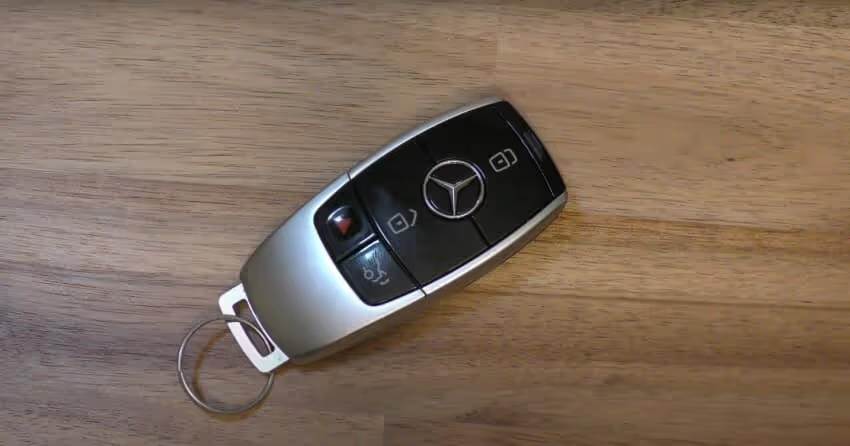
One of the most common designs is the Chrome SmartKey, found in many modern Mercedes-Benz models. This key typically features chrome accents around the edges and includes dedicated buttons for locking, unlocking, trunk release, and panic alarm functions. Most Chrome SmartKeys use either a CR2025 or CR2032 coin-cell battery.
Older Mercedes SmartKeys often have a larger plastic housing and are commonly found in earlier C-Class, E-Class, ML-Class, and CLK models. These keys generally use a CR2025 battery, although specifications may vary depending on the model year.
Newer Mercedes vehicles may feature a slimmer and more refined key design. While these keys often use the same battery types, it is always recommended to verify the battery model by checking the existing battery or consulting your owner’s manual. Taking a few moments to confirm compatibility can save time and prevent unnecessary purchases.
Tools and Materials Needed
One of the best things about replacing a Mercedes key fob battery is that the process requires very few tools. Most vehicle owners already have everything needed to complete the task at home.
The most important item is the correct replacement battery. Mercedes key fobs commonly use CR2025 or CR2032 lithium coin-cell batteries. Purchasing a high-quality battery from a reputable manufacturer can help ensure longer lifespan and more consistent performance.
You will also need a clean, flat workspace where small components cannot easily be lost. A soft cloth can be useful for protecting the key fob from scratches during the replacement process. In most cases, the emergency key stored inside the key fob can be used to access the battery compartment, eliminating the need for additional tools. However, a small plastic pry tool may be helpful if the battery cover is difficult to remove.
Compared to dealership service costs, replacing the battery yourself is extremely affordable. Most replacement batteries cost less than ten dollars, making this one of the simplest and most cost-effective maintenance tasks for Mercedes owners.
How to Replace Mercedes Key Fob Battery Step by Step
Replacing a Mercedes key fob battery is a straightforward process that can usually be completed in just a few minutes. Follow these steps carefully to avoid damaging the key fob and to ensure proper operation once the new battery is installed.
Step 1: Remove the Emergency Key
Start by locating the small release tab on the back of the Mercedes key fob. Press or slide this tab while gently pulling on the emergency mechanical key. The key should slide out smoothly from the housing. Set it aside in a safe location where it will not be misplaced during the battery replacement process.
Step 2: Open the Battery Compartment
Using the emergency key you just removed, insert it into the designated slot near the battery compartment. Gently twist or pry according to your key fob design until the battery cover releases. Take your time during this step, as excessive force can damage the plastic clips that secure the cover in place.
Step 3: Remove the Old Battery
Once the battery compartment is exposed, carefully remove the old battery. Before taking it out completely, pay close attention to its orientation. Noting the position of the positive and negative sides will make installing the new battery much easier. Dispose of the old battery according to local recycling guidelines.
Step 4: Install the New Battery
Insert the replacement battery into the compartment using the same orientation as the original battery. Ensure it sits securely and makes proper contact with the internal terminals. Avoid touching both battery surfaces excessively, as oils from your fingers can sometimes affect battery performance.
Step 5: Reassemble the Key Fob
Place the battery cover back onto the key fob and press it gently until it clicks into position. Next, slide the emergency key back into its slot until it locks securely. Check that all components fit properly and that there are no loose parts.
Step 6: Test the Key Fob
Stand near your vehicle and test all primary functions, including lock, unlock, trunk release, and panic alarm features. If your Mercedes uses push-button start, verify that the vehicle recognizes the key normally. In most cases, the key fob should begin working immediately after the battery replacement.
Common Mistakes to Avoid During Battery Replacement
Although replacing a Mercedes key fob battery is simple, several common mistakes can prevent the key from functioning correctly after installation.
One of the most frequent errors is installing the battery in the wrong orientation. Even a brand-new battery will not power the key fob if the positive and negative sides are reversed. Always compare the new battery’s position with the old one before closing the compartment.
Another common issue is using the wrong battery type. While many Mercedes key fobs use CR2025 or CR2032 batteries, not all models are identical. Installing an incorrect battery may lead to poor performance or complete failure.
Some owners accidentally damage internal components by using excessive force when opening the key fob. Plastic clips, battery contacts, and circuit board elements can be fragile, so gentle handling is essential throughout the process.
Low-quality batteries can also create problems. Cheap batteries often provide inconsistent voltage and may fail much sooner than expected. Choosing a reputable battery brand can improve reliability and extend service life.
Finally, many people forget to test the key fob before leaving the work area. Verifying functionality immediately allows you to correct any installation mistakes before they become frustrating issues later.
What to Do If the Mercedes Key Fob Still Doesn’t Work
If your Mercedes key fob remains unresponsive after replacing the battery, do not assume the key is permanently damaged. Several simple troubleshooting steps can often resolve the issue.
First, reopen the battery compartment and verify that the battery is installed correctly. A reversed battery remains one of the most common causes of post-replacement problems. Confirm that the battery is fully seated and making proper contact with the terminals.
Next, consider testing another new battery. While uncommon, replacement batteries can occasionally be defective or partially discharged when purchased. Trying a second battery is a quick and inexpensive way to eliminate this possibility.
Inspect the key fob for signs of physical damage. Water exposure, corrosion, cracked housings, or damaged battery contacts can interfere with normal operation. If you notice corrosion, cleaning the affected area carefully may help restore functionality.
Some Mercedes models may require a synchronization procedure after battery replacement. Consult your owner’s manual for model-specific instructions if the key fob appears functional but still fails to communicate properly with the vehicle.
If none of these solutions resolves the issue, professional diagnosis may be necessary. A qualified Mercedes technician can determine whether the problem involves the key fob’s internal electronics, the vehicle’s receiver system, or another component requiring repair.
Frequently Asked Questions
What battery does a Mercedes key fob use?
Most Mercedes key fobs use either a CR2025 or CR2032 lithium coin-cell battery. The exact battery type depends on your vehicle’s model and year. To ensure compatibility, check the battery currently installed in your key fob or refer to your owner’s manual before purchasing a replacement.
How often should I replace my Mercedes key fob battery?
In most cases, a Mercedes key fob battery lasts between two and four years. Factors such as frequency of use, climate conditions, and battery quality can affect lifespan. If you notice reduced range or delayed responses, it may be time to replace the battery even if it has not reached the typical replacement interval.
Do I need to reprogram my Mercedes key after changing the battery?
No. Most Mercedes key fobs do not require reprogramming after a battery replacement. Once the new battery is installed correctly, the key should function normally. However, some models may require a synchronization procedure if communication with the vehicle is temporarily interrupted.
How much does Mercedes key fob battery replacement cost?
Replacing the battery yourself is usually very inexpensive. A quality replacement battery often costs less than $10. In comparison, dealership service may include labor charges, making the overall cost significantly higher than a simple DIY replacement.
Can a low key fob battery prevent my Mercedes from starting?
Yes. In some situations, a weak battery can interfere with communication between the key and the vehicle, especially in models equipped with push-button start systems. Replacing the battery promptly can help avoid unexpected starting issues.
What should I do if my key fob still does not work after replacing the battery?
Start by confirming that the battery is installed correctly and that the correct battery type is being used. If the problem persists, inspect the key fob for physical damage, corrosion, or worn contacts. Professional diagnosis may be required if the internal electronics have failed.
Conclusion
Knowing how to replace a Mercedes key fob battery is a valuable skill that can save both time and money. Instead of scheduling a dealership appointment or worrying about expensive repairs, you can restore your key fob’s functionality in just a few minutes using a simple replacement battery.
By recognizing the early warning signs of a weak battery, such as reduced operating range, delayed responses, or dashboard alerts, you can prevent inconvenient situations before they occur. Regular maintenance of your key fob helps ensure reliable access to your vehicle and consistent performance of essential features such as remote locking, trunk release, and push-button start.
The replacement process is simple, requires minimal tools, and can be completed by most vehicle owners regardless of technical experience. Whether you drive a Mercedes C-Class, E-Class, GLC, GLE, S-Class, or another Mercedes-Benz model, following the steps outlined in this guide can help keep your key fob operating at peak performance.
If your key fob continues to experience issues after battery replacement, do not ignore the problem. Early troubleshooting and professional assistance when necessary can prevent more serious complications and ensure your Mercedes remains as convenient and reliable as it was designed to be.