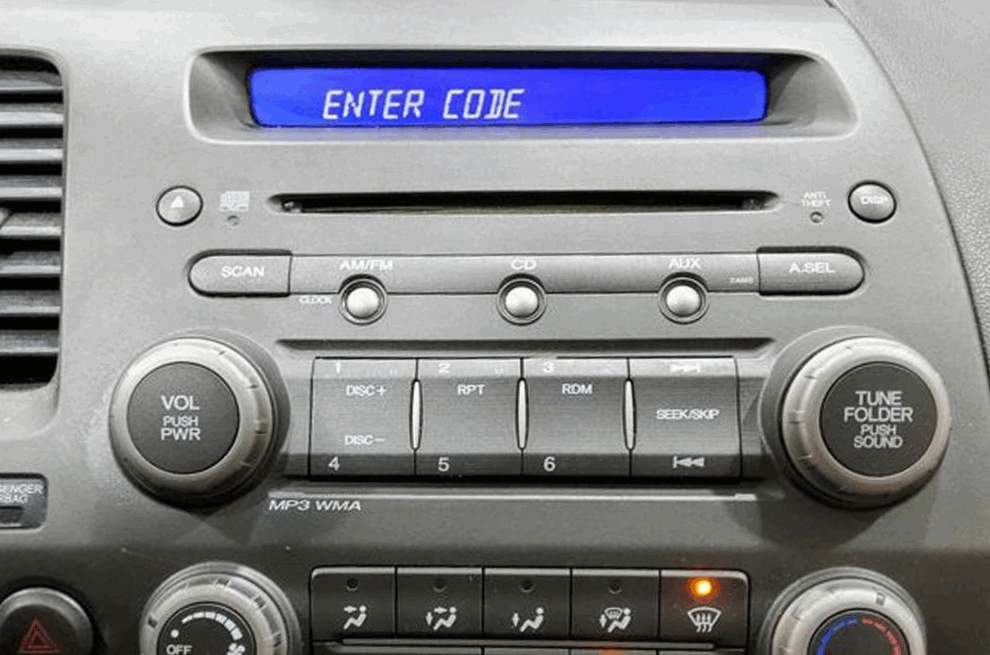
Your Honda Civic radio may display CODE, ENTER CODE, or ERR after you replace or disconnect the battery. Honda uses this anti-theft feature to protect the factory radio from unauthorized use. The system locks the radio until you enter the correct Honda Civic radio code. Without the code, you cannot use the radio or other audio functions.
Fortunately, you can recover the correct code in several ways. You can use your VIN, locate the radio serial number, check the original documentation, or access Honda’s official radio code lookup service. Each method works for specific Honda Civic model years, so choosing the right approach helps you restore the radio more quickly.
This guide explains the complete recovery process from start to finish. You will learn why the radio requests a code, when you need it, and how to retrieve it safely. You will also discover how to unlock the radio, fix common code errors, and avoid mistakes that can lock the system again. By the end of this article, you will know the fastest and most reliable way to restore your Honda Civic radio.
What Is a Honda Civic Radio Code and Why Does Your Radio Ask for It?
A Honda Civic radio code is a unique security code that unlocks the factory radio after it loses power. Honda assigns this code to each original radio before the vehicle leaves the factory. The code prevents thieves from using a stolen radio in another vehicle. Once the radio loses its power supply, it automatically requests the code before restoring normal operation.
Most Honda Civic owners see this security feature after replacing or disconnecting the battery. A dead battery can trigger the same result because the radio loses its stored memory. In some cases, electrical repairs or replacing the factory radio also activate the security system. When power returns, the display usually shows CODE, ENTER CODE, or a similar message. The radio remains locked until you enter the correct code.
Many drivers confuse the radio code with the vehicle identification number or VIN. However, these numbers serve different purposes. The VIN identifies the vehicle, while the radio code unlocks the factory audio system. Honda may use the VIN to verify ownership and retrieve the correct radio code, but the VIN itself does not unlock the radio.
Entering the correct code restores every factory audio function within seconds. Entering the wrong code several times can lock the system and display messages such as ERR or LOCK. If this happens, you may need to wait before trying again or retrieve the correct code from Honda. Understanding how the anti-theft system works helps you avoid unnecessary mistakes and makes the recovery process much easier.
When Do You Need a Honda Civic Radio Code?
You need a Honda Civic radio code whenever the factory radio loses its power supply and resets its security memory. The anti-theft system cannot verify that the radio still belongs to the original vehicle after a power interruption. As a result, it locks the audio system until you enter the correct unlock code.
The most common situation occurs after replacing the car battery. Even a routine battery change disconnects power from the radio for a short time. Once you reconnect the battery, the display may show CODE or ENTER CODE instead of the normal radio screen. This behavior is completely normal and does not indicate a fault with the radio itself.
A completely discharged battery can trigger the same problem. If the battery loses all of its charge, the radio also loses its stored memory. Likewise, disconnecting the battery for maintenance, repairing the electrical system, or replacing a blown fuse may activate the security feature. Any interruption that cuts power to the factory radio can require you to enter the code again.
You may also need the radio code after installing the original factory radio into another compatible Honda Civic. Because the anti-theft system links the radio to its original vehicle, it requests the unlock code before allowing normal use. However, many aftermarket radios do not use Honda’s factory security system, so they usually do not require this code after installation.
Knowing when the radio code becomes necessary helps you prepare before disconnecting the battery. If you store the code in a safe place or retrieve it in advance, you can restore your audio system within minutes. This simple step saves time and prevents unnecessary frustration after routine vehicle maintenance.
How to Find Your Honda Civic Radio Code
Finding your Honda Civic radio code is usually easier than many drivers expect. Honda provides several official ways to recover the code, and the best option depends on your vehicle’s model year and the information you have available. Before you begin, make sure you have access to your VIN and determine whether you also need the radio serial number.
Find the Radio Code Using Your VIN
The quickest method is to use your vehicle identification number. Honda can verify ownership through the VIN and provide the correct radio code for many Honda Civic models. You can start by checking the owner’s manual or the radio code card because some vehicles include the code at the time of purchase. If you cannot find the documentation, sign in to Honda’s official owner website or contact an authorized Honda dealership. In most cases, you will need the VIN, proof of ownership, and a valid photo ID before Honda releases the code.
Find the Radio Serial Number First
Some Honda Civic models require the radio serial number before Honda can retrieve the correct code. Many newer models display the serial number directly on the radio screen by pressing the appropriate button combination while the ignition is on. Older models may require you to remove the radio to read the serial number label attached to the unit. Once you have the serial number, you can submit it through Honda’s official lookup service or provide it to a dealership representative. After Honda verifies the information, you will receive the correct radio code and can unlock the factory radio within minutes.
How to Unlock Your Honda Civic Radio
Unlocking your Honda Civic radio takes only a few minutes when you have the correct code. Turn the ignition to the ON position without starting the engine. Wait until the radio displays CODE or ENTER CODE. Use the preset buttons on the radio to enter each digit of the security code in the correct order. Most factory radios unlock automatically after you enter the final digit. Some models may require you to press the power button or confirm the entry before the radio resumes normal operation.
Enter the code carefully because every incorrect attempt counts toward the security limit. Most Honda radios allow only a limited number of failed attempts before they display ERR or LOCK. Once the system reaches this limit, it temporarily disables further entries to prevent unauthorized access. Instead of guessing different combinations, verify the code before trying again. This approach protects the radio and saves time.
If the display shows ERR, the radio has detected one or more incorrect entries. In many cases, leaving the ignition in the ON position for a period allows the system to reset and accept another attempt. If the display changes to LOCK, you should stop entering random codes and retrieve the correct information from Honda. Continuing to guess rarely solves the problem and may extend the waiting period before the radio accepts another code.
After the radio unlocks successfully, test every audio function to confirm normal operation. Check the AM and FM stations, Bluetooth connection, and other available features if your model includes them. Finally, store the radio code in a secure location, such as your owner’s manual or a password manager. Keeping the code accessible makes future battery replacements much easier and prevents unnecessary delays.
Honda Civic Radio Code by Model Year
Honda has used radio security codes for decades, but the recovery process varies by model year. Newer Honda Civic models offer more convenient retrieval options, while older vehicles often require additional information before you can obtain the correct code. Knowing your vehicle’s production year helps you choose the fastest recovery method and reduces the chance of requesting the wrong code.
Older Honda Civic Models (2001–2015)
Most Honda Civic models built between 2001 and 2015 require both the vehicle identification number and the radio serial number. Many of these radios do not display the serial number on the screen, so you may need to remove the radio or use a specific button combination to access it. Once you have the required information, Honda can verify ownership and provide the correct radio code. If the original owner kept the radio code card or owner’s manual, you may also find the code printed inside those documents.
Newer Honda Civic Models (2016–Present)
Newer Honda Civic models make the recovery process much easier. Many vehicles allow you to display the radio serial number directly on the infotainment screen, while some systems simplify code retrieval through Honda’s official owner services. In many cases, you only need your VIN, proof of ownership, and the correct vehicle information to request the unlock code. Although the process has become more convenient, the anti-theft system still protects the factory radio after a battery replacement or power loss. For this reason, storing your radio code in a secure location remains the best way to avoid unnecessary delays during future maintenance.
Frequently Asked Questions About Honda Civic Radio Code
Can I get my Honda Civic radio code online?
Yes. Honda provides an official online service for many Honda Civic models. You typically need your vehicle identification number, the radio serial number, and proof of ownership before Honda releases the correct code. If your vehicle qualifies, this method is usually the fastest way to recover the factory radio code without visiting a dealership.
Is the radio code the same as the VIN?
No. The radio code and the VIN are completely different. The VIN identifies your vehicle, while the radio code unlocks the factory audio system. Honda uses the VIN to verify ownership and locate the correct radio code, but entering the VIN into the radio will not unlock it.
How many incorrect code attempts are allowed?
Most Honda factory radios allow only a limited number of incorrect attempts before activating additional security protection. After several failed entries, the display may show ERR, ERROR, or LOCK. When this happens, stop entering random codes and retrieve the correct information before trying again. Following the proper recovery process helps prevent longer lockout periods.
Can a Honda dealership retrieve my radio code?
Yes. An authorized Honda dealership can retrieve the correct radio code after verifying your ownership. In most cases, you need to provide the VIN, the radio serial number if required, and a valid photo ID. The dealership then checks Honda’s database and provides the correct unlock code for your factory radio.
Can I bypass the Honda Civic radio code?
No. The factory anti-theft system does not include a legitimate bypass option. Attempting to disable the security feature or using unofficial methods may damage the radio or create additional problems. The safest solution is to obtain the correct radio code through Honda’s official recovery process and unlock the radio as intended.
Conclusion
Recovering a Honda Civic radio code is a simple process when you understand how the factory anti-theft system works. Most drivers only need the code after replacing the battery, disconnecting the electrical system, or installing the original factory radio. By identifying the correct VIN and radio serial number, you can retrieve the proper unlock code quickly and restore your audio system without unnecessary delays.
If the code does not work, avoid repeated guesses because they can trigger additional security restrictions. Instead, verify your vehicle information and request the correct code through Honda’s official resources or an authorized dealership. Keeping a copy of the radio code in a secure place also makes future battery maintenance much easier.
With the right information and the correct recovery method, you can unlock your Honda Civic radio safely and restore every factory audio feature within minutes. Saving the code today helps you avoid the same problem the next time your vehicle loses power.