Seeing the “Service Tire Monitor System” message appear on your GMC’s dashboard can be frustrating, especially if your tires look perfectly fine. At first glance, many drivers assume they have a flat tire or dangerously low tire pressure. However, this warning often indicates a problem with the Tire Pressure Monitoring System (TPMS) itself rather than the air pressure inside your tires.
The TPMS is an important safety feature designed to monitor tire pressure in real time and alert you when one or more tires become underinflated. When the system displays a Service Tire Monitor System message, it usually means the vehicle is having trouble communicating with one or more tire pressure sensors or detecting a fault within the monitoring system. Ignoring the warning may not immediately affect your ability to drive, but it could prevent the TPMS from alerting you to future tire pressure issues, increasing the risk of poor handling, reduced fuel efficiency, uneven tire wear, or even a tire blowout.
In this comprehensive guide, you’ll learn exactly what the GMC Service Tire Monitor System Message means, the most common reasons it appears, and how to diagnose and fix the problem. We’ll also explain the difference between this warning and a standard low tire pressure alert, walk you through troubleshooting steps, discuss repair costs, and answer the most frequently asked questions. Whether you drive a GMC Sierra, Yukon, Terrain, Acadia, Canyon, or another GMC model, this guide will help you identify the issue and determine the best solution.
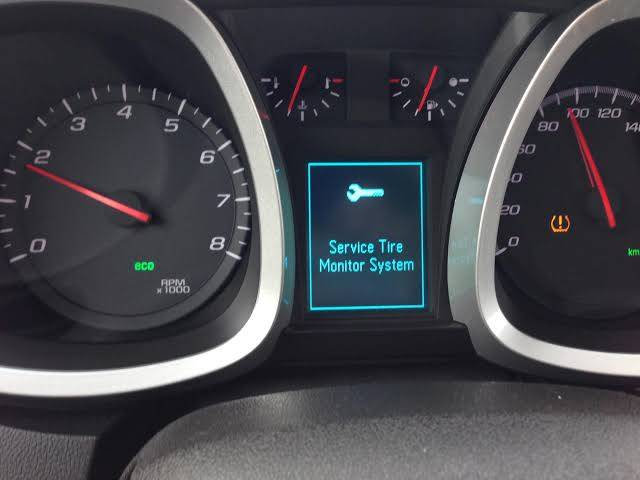
What Does the GMC Service Tire Monitor System Message Mean?
The GMC Service Tire Monitor System Message indicates that your vehicle has detected a malfunction within the Tire Pressure Monitoring System (TPMS). Unlike a standard low tire pressure warning, this message does not necessarily mean one or more of your tires are underinflated. Instead, it tells you that the system responsible for monitoring tire pressure is unable to operate correctly.
Modern GMC vehicles use a direct TPMS, which relies on battery-powered sensors installed inside each wheel. These sensors continuously measure tire pressure and transmit the information wirelessly to the vehicle’s TPMS control module. The module then sends the data to the Body Control Module (BCM), allowing the instrument cluster to display each tire’s pressure and alert the driver if a problem is detected.
When the Service Tire Monitor System message appears, one or more components in this communication chain may have failed. The issue could be as simple as a weak sensor battery or as complex as a malfunctioning receiver module or software error. As a result, the system can no longer accurately monitor tire pressure, reducing one of the vehicle’s most important safety features.
In many cases, the warning is accompanied by a flashing TPMS indicator that eventually remains illuminated. A flashing light generally indicates a system fault rather than low tire pressure. Since the TPMS cannot reliably report pressure readings during this time, drivers should manually check all four tires with a pressure gauge until the problem is resolved.
Although the warning usually does not affect the vehicle’s engine, braking, or steering systems, it should not be ignored. Without a functioning TPMS, you may not receive timely alerts about dangerously low tire pressure, which can lead to reduced fuel economy, uneven tire wear, poor vehicle handling, and an increased risk of tire failure.
Difference Between “Low Tire Pressure” and “Service Tire Monitor System”
Many GMC owners mistakenly believe that a Low Tire Pressure Warning and a Service Tire Monitor System Message indicate the same problem. While both are related to the Tire Pressure Monitoring System, they serve entirely different purposes and require different solutions.
A Low Tire Pressure Warning is triggered when one or more tires fall below the manufacturer’s recommended pressure. In this situation, the TPMS is functioning correctly and is simply notifying you that the tires need attention. Inflating the affected tire to the recommended pressure often clears the warning after driving for a short distance.
By contrast, a Service Tire Monitor System message indicates that the TPMS itself has developed a fault. The system may no longer receive information from one or more sensors, preventing it from accurately monitoring tire pressure. Even if every tire is inflated correctly, the warning will remain until the underlying issue is diagnosed and repaired.
Here is a comparison between the two warnings:
| Feature | Low Tire Pressure Warning | Service Tire Monitor System |
|---|---|---|
| Primary Cause | One or more tires have low air pressure | TPMS malfunction or communication failure |
| TPMS Status | Operating normally | System fault detected |
| Tire Pressure | Usually below specification | May be normal or abnormal |
| Dashboard Indicator | TPMS warning light | “Service Tire Monitor System” message, often with a flashing TPMS light |
| Immediate Action | Check and inflate the tires | Diagnose the TPMS components |
| Safety Impact | Higher risk if ignored | Reduced ability to detect future tire pressure problems |
If your dashboard displays the service message instead of a standard low-pressure warning, checking tire pressure should still be your first step. However, if all tires are properly inflated and the message remains, the problem likely lies within the TPMS hardware or software rather than the tires themselves.
8 Common Causes of the GMC Service Tire Monitor System Message
Several issues can trigger the GMC Service Tire Monitor System Message, ranging from a simple sensor battery failure to more complex electronic faults. Understanding the most common causes can help you narrow down the problem before visiting a repair shop.
1. Dead TPMS Sensor Battery
The most common reason for this warning is a depleted TPMS sensor battery. Since each sensor contains a sealed lithium battery, it cannot usually be replaced separately. Most batteries last between 7 and 10 years, depending on driving habits and environmental conditions. As the battery weakens, the sensor gradually loses its ability to transmit tire pressure data, causing intermittent warnings before eventually failing completely.
2. Faulty Tire Pressure Sensor
TPMS sensors can fail due to internal electronic damage, corrosion, physical impacts, or exposure to moisture. A damaged sensor may send inaccurate readings or stop communicating with the vehicle altogether. This problem often occurs after hitting potholes, curbs, or road debris, or following improper tire installation procedures.
3. Tire Rotation or Tire Replacement Without TPMS Relearn
Whenever tires are rotated or replaced, the vehicle may need to relearn the location of each TPMS sensor. If this relearn procedure is skipped, the control module may struggle to identify the correct sensor positions, resulting in warning messages or incorrect tire pressure readings. Fortunately, this issue can often be resolved using a TPMS relearn procedure or a compatible relearn tool.
4. Weak RF Signal Between the TPMS Sensors and the Vehicle
Each TPMS sensor communicates with your GMC using low-frequency and radio frequency (RF) signals. If these wireless signals are interrupted or weakened, the vehicle may lose communication with one or more sensors and trigger the Service Tire Monitor System message.
Signal interference can occur for several reasons. Parking near powerful radio transmitters, driving through areas with significant electromagnetic interference, or installing aftermarket electronic accessories may temporarily affect communication. Although these situations are relatively uncommon, they can occasionally cause intermittent TPMS warnings.
In some cases, the issue is related to the sensor itself rather than the surrounding environment. A weakened transmitter inside the sensor, damaged antenna components, or corrosion can reduce the signal strength until the vehicle can no longer receive accurate tire pressure data. If the warning appears only occasionally and then disappears, intermittent signal loss is often worth investigating.
5. Damaged TPMS Receiver Module
The TPMS receiver module collects signals from all four tire pressure sensors and forwards the information to the vehicle’s control system. If this module develops an electrical fault or fails completely, it may stop recognizing sensor signals even though the sensors themselves are functioning normally.
A faulty receiver module can produce several symptoms. The dashboard may display the Service Tire Monitor System message immediately after startup, tire pressure readings may disappear from the driver information center, or the TPMS warning light may continue flashing every time the vehicle is driven.
Diagnosing a receiver module usually requires professional diagnostic equipment capable of reading manufacturer-specific trouble codes. Since receiver module failures are less common than sensor failures, technicians typically rule out faulty sensors before replacing the module.
6. Low Vehicle Battery Voltage
Many drivers are surprised to learn that a weak vehicle battery can affect multiple electronic systems, including the TPMS. Modern GMC vehicles rely on stable electrical voltage for communication between modules. If the battery voltage drops below normal operating levels, electronic components may begin to behave unpredictably.
A weak battery can interrupt communication between the TPMS sensors, the receiver module, and the Body Control Module. This may cause temporary warning messages, especially during cold weather or immediately after starting the engine. Other symptoms, such as slow engine cranking, dim interior lights, or multiple dashboard warning lights appearing simultaneously, may also indicate that the battery is nearing the end of its service life.
Before replacing expensive TPMS components, it is always a good idea to have the vehicle’s battery and charging system tested. In some cases, restoring proper battery voltage eliminates the warning without requiring additional repairs.
7. Software or Body Control Module Issues
Not every TPMS warning is caused by a failed hardware component. Occasionally, outdated software or a malfunction within the Body Control Module (BCM) can prevent the TPMS from operating correctly.
The BCM manages communication between numerous electronic systems throughout the vehicle. If its software becomes corrupted or contains a programming error, it may misinterpret TPMS sensor data or lose communication with the sensors entirely. Manufacturers sometimes release software updates that resolve known issues affecting the TPMS on specific GMC models.
If diagnostic testing finds no problems with the sensors, receiver module, or wiring, your dealership or qualified repair shop may recommend updating the BCM software. Reprogramming the module can restore normal communication and prevent recurring warning messages without replacing any physical components.
8. Extreme Weather Conditions
Extreme temperatures can also contribute to TPMS-related warnings, although they are usually not the direct cause of permanent system failures. During very cold weather, tire pressure naturally decreases as the air inside the tires contracts. While this normally triggers a low tire pressure warning, freezing temperatures can also reduce sensor battery performance and weaken wireless communication.
Similarly, excessive heat can place additional stress on electronic components that have already begun to deteriorate. Older TPMS sensors with aging batteries are particularly susceptible to temperature-related communication failures.
If the warning appears only during unusually cold mornings and disappears after the vehicle has been driven for several miles, temperature may be influencing the system. However, repeated warnings during normal weather conditions generally indicate that a sensor or another TPMS component is approaching the end of its service life.
Is It Safe to Drive with the GMC Service Tire Monitor System Message?
In most situations, you can continue driving when the Service Tire Monitor System message appears, provided your tires are properly inflated and the vehicle is operating normally. The warning typically indicates that the TPMS is unable to monitor tire pressure rather than a problem with the tires themselves.
However, driving without a functioning TPMS means you will no longer receive automatic alerts if one of your tires develops a slow leak or suddenly loses pressure. This increases the likelihood of driving on an underinflated tire without realizing it, which can negatively affect braking performance, steering response, fuel economy, and tire lifespan.
Before continuing your trip, manually inspect all four tires for visible damage and use a reliable tire pressure gauge to confirm that each tire matches the pressure specified on the driver’s door jamb label. If all tire pressures are correct and no damage is visible, you can generally continue driving while scheduling a repair appointment at your earliest convenience.
You should stop driving immediately if the service message is accompanied by any of the following symptoms:
- A rapidly deflating tire
- A tire pressure warning that remains active after inflation
- Unusual steering behavior or vibration
- Loud noises coming from a wheel
- Visible tire damage or a suspected puncture
In these situations, the problem may involve the tire itself rather than just the monitoring system, making immediate inspection essential for your safety.
How to Diagnose the Problem
Proper diagnosis can save both time and money by identifying the actual source of the warning before unnecessary parts are replaced. Following a logical inspection process allows you to eliminate simple causes before moving on to more advanced troubleshooting.
Step 1: Check Tire Pressure
Begin by measuring the pressure in all four tires, including the spare tire if your GMC is equipped with a TPMS sensor in the spare. Inflate or deflate each tire to the manufacturer’s recommended specification.
Step 2: Inspect the Dashboard Warnings
Observe whether the TPMS warning light flashes before remaining illuminated or stays on continuously. A flashing light generally indicates a system malfunction, while a steady light often points to low tire pressure.
Step 3: Scan for TPMS Diagnostic Trouble Codes
Use a professional scan tool capable of reading manufacturer-specific TPMS codes. The stored fault codes can identify which sensor or component is causing the problem, significantly reducing diagnostic time.
Step 4: Test Each TPMS Sensor
A TPMS activation tool can verify whether each sensor is transmitting correctly. Sensors that fail to respond or report unrealistic pressure or temperature readings should be replaced.
Step 5: Check the Vehicle Battery and Charging System
Measure battery voltage and verify that the alternator is charging properly. Low system voltage can interfere with communication between electronic modules and trigger false TPMS warnings.
Step 6: Inspect for Software Updates
If all hardware components appear to function normally, check whether GMC has released updated software for the Body Control Module or TPMS system. Installing the latest calibration may resolve intermittent communication issues without replacing any components.
How to Fix the GMC Service Tire Monitor System Message
Once you have identified the cause of the warning, the next step is choosing the appropriate repair. Some problems can be resolved in just a few minutes, while others require replacing components or updating the vehicle’s software. Addressing the issue promptly ensures that your Tire Pressure Monitoring System continues to provide accurate pressure readings and important safety alerts.
Fix 1: Inflate the Tires to the Correct Pressure
Although the Service Tire Monitor System message usually points to a TPMS fault, checking tire pressure should always be your first step. Use a high-quality tire pressure gauge to measure the pressure in all four tires when they are cold. Compare the readings with the recommended pressure listed on the driver’s door jamb sticker rather than the maximum pressure printed on the tire sidewall.
If one or more tires are underinflated, inflate them to the correct specification and drive the vehicle for several minutes. In some cases, the TPMS may recalibrate automatically and clear the warning if low tire pressure was contributing to the issue.
Fix 2: Perform a TPMS Relearn Procedure
A TPMS relearn procedure is often required after rotating tires, replacing wheels, installing new TPMS sensors, or replacing certain suspension and steering components. During the relearn process, the vehicle records the location and identification number of each tire pressure sensor.
Many newer GMC models support a relearn procedure using the Driver Information Center along with a TPMS activation tool. Older models may require a scan tool or dealership equipment. Always follow the relearn procedure specified for your exact model year, as the process varies between vehicles.
Once the relearn is completed successfully, the system should correctly recognize all sensors and restore accurate tire pressure readings.
Fix 3: Replace a Faulty TPMS Sensor
If diagnostic testing identifies a defective sensor, replacing it is usually the most effective solution. TPMS sensors are sealed electronic units that measure tire pressure and temperature while transmitting the data wirelessly to the vehicle.
Sensor replacement requires removing the tire from the wheel, installing a compatible replacement sensor, and programming the new sensor if necessary. After installation, a TPMS relearn procedure must be completed so the vehicle can recognize the replacement sensor.
Whenever one sensor fails because of age, the remaining sensors may not be far behind. On older vehicles with original sensors, replacing all four sensors during the same service can reduce future labor costs and minimize unexpected failures.
Fix 4: Replace the TPMS Sensor Battery or Sensor Assembly
Most factory-installed GMC TPMS sensors contain a sealed lithium battery that is not designed to be replaced separately. Once the battery reaches the end of its service life, the entire sensor assembly typically needs to be replaced.
The average TPMS sensor battery lasts between seven and ten years, depending on driving conditions, mileage, and climate. If your vehicle is approaching this age and multiple sensor faults begin appearing, battery depletion is a likely cause.
Some aftermarket sensors feature replaceable batteries, but these designs are less common. For most GMC vehicles, replacing the complete sensor assembly is the recommended repair.
Fix 5: Repair or Replace the TPMS Receiver Module
If all sensors are functioning properly but the vehicle still cannot receive their signals, the TPMS receiver module should be inspected. Damaged wiring, loose electrical connectors, or internal module failure can interrupt communication between the sensors and the Body Control Module.
A qualified technician can perform circuit testing and module diagnostics to determine whether the receiver is defective. If replacement is required, the new module may need to be programmed to communicate with the vehicle’s electronic systems before normal operation is restored.
Fix 6: Update the Vehicle Software
Occasionally, TPMS issues are caused by software rather than hardware. GMC periodically releases software updates to improve communication between electronic control modules or resolve known issues affecting specific vehicle models.
If diagnostic testing reveals no mechanical faults, ask your dealership or repair facility to check for available software updates. Installing the latest calibration may eliminate intermittent warning messages and improve overall system reliability.
Fix 7: Clear Diagnostic Trouble Codes
After completing the necessary repairs, any stored TPMS diagnostic trouble codes should be cleared using an appropriate scan tool. Clearing the codes allows the system to perform a fresh self-test and confirm that the fault has been resolved.
If the warning message returns immediately after clearing the codes, additional diagnosis is required because the original problem still exists.
How to Reset the GMC TPMS
Resetting the TPMS is often the final step after repairing the underlying issue. It is important to understand that simply resetting the system without fixing the actual fault will not permanently remove the warning message.
Automatic Reset
Many GMC vehicles automatically update the TPMS after tire pressure has been corrected. Once all tires are inflated to the recommended pressure, drive the vehicle at moderate speeds for approximately 10 to 20 minutes. During this time, the sensors transmit updated pressure information, allowing the system to verify normal operation.
If the warning disappears after driving, no additional action may be necessary.
Manual TPMS Relearn
Certain GMC models require a manual relearn procedure whenever sensors are replaced or tire positions are changed. The relearn mode can usually be activated through the Driver Information Center, ignition sequence, or a combination of steering wheel controls.
During the relearn process, each TPMS sensor is activated individually in a specific order, allowing the control module to identify its location on the vehicle. Following the correct sequence is essential for accurate tire pressure monitoring.
Using a TPMS Relearn Tool
Many repair shops use a TPMS activation tool to speed up the relearn process. These handheld devices trigger each sensor wirelessly, allowing the vehicle to record sensor information quickly and accurately.
Investing in a TPMS relearn tool may be worthwhile for owners who regularly rotate their own tires or maintain multiple vehicles equipped with direct TPMS systems.
Model-Specific Reset Procedures
Reset procedures vary significantly between GMC models and production years. Vehicles such as the Sierra, Yukon, Terrain, Acadia, and Canyon may each use different menu options, ignition sequences, or relearn methods. Always consult the owner’s manual or factory service information for the correct procedure before attempting a reset.
How Much Does It Cost to Fix a GMC TPMS?
Repair costs depend on the exact cause of the warning, the model year of your GMC, labor rates in your area, and whether original equipment or aftermarket parts are used. The following estimates provide a general idea of what you can expect.
| Repair | Estimated Cost (USD) |
|---|---|
| TPMS diagnostic scan | $50 to $120 |
| TPMS sensor replacement (per sensor) | $60 to $150 |
| TPMS relearn procedure | $20 to $80 |
| TPMS programming | $30 to $100 |
| TPMS receiver module replacement | $200 to $600 |
| Body Control Module software update | $80 to $200 |
If more than one TPMS sensor has reached the end of its lifespan, replacing all four sensors during a single service appointment may reduce future labor costs and help prevent repeated warning messages.
Frequently Asked Questions
Can I ignore the GMC Service Tire Monitor System message?
While the vehicle can usually still be driven, ignoring the warning is not recommended. A malfunctioning TPMS cannot alert you to dangerous tire pressure changes, increasing the risk of driving with underinflated tires.
Will the warning disappear on its own?
The message may disappear temporarily if the fault is intermittent, but it will usually return until the underlying problem is repaired.
Can low tire pressure cause this message?
Low tire pressure normally triggers a standard TPMS warning rather than a service message. However, extremely low pressure combined with a sensor communication issue may result in both warnings appearing.
How long do TPMS sensors last?
Most original TPMS sensors last between seven and ten years before their internal batteries become depleted.
Do I need a TPMS relearn after replacing tires?
Not always. Tire replacement alone may not require a relearn if the original sensors remain in the same locations. However, tire rotation, wheel replacement, or sensor replacement often requires the system to relearn the sensor positions.
Can I replace just one TPMS sensor?
Yes. If only one sensor has failed, replacing that individual sensor is generally acceptable. However, if the remaining sensors are close to the end of their expected lifespan, replacing all four at once may be more cost-effective over the long term.
Conclusion
The GMC Service Tire Monitor System Message is an indication that your vehicle’s Tire Pressure Monitoring System has detected a fault rather than simply reporting low tire pressure. In many cases, the problem is caused by a worn TPMS sensor battery, a failed tire pressure sensor, or the need for a TPMS relearn after tire service. Less common causes include receiver module failures, low vehicle battery voltage, software issues, or communication problems within the system.
Fortunately, most TPMS problems can be diagnosed using a systematic approach. Begin by checking tire pressure, inspecting dashboard warnings, and scanning the vehicle for diagnostic trouble codes before replacing any components. Addressing the root cause not only restores the warning system but also ensures that your GMC continues to provide accurate tire pressure monitoring for improved safety, better fuel efficiency, and longer tire life.
If the warning persists after completing basic troubleshooting, consult a qualified technician with the proper diagnostic equipment. Restoring full TPMS functionality is a worthwhile investment that helps protect both your vehicle and everyone on board.