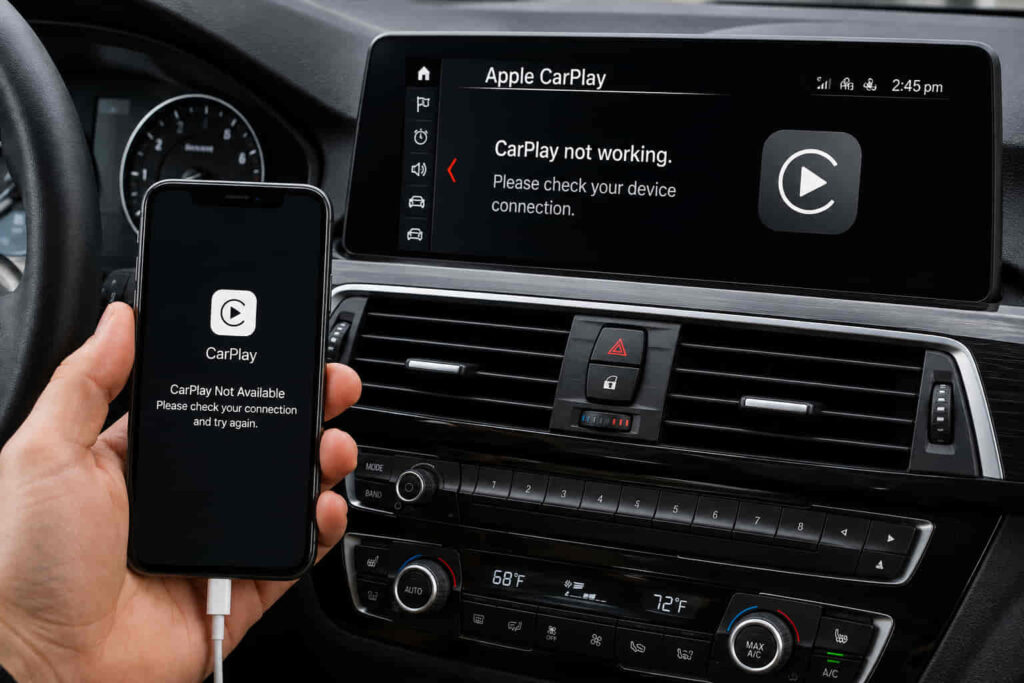
BMW CarPlay can stop working because of 10 main issues involving Apple CarPlay settings, Bluetooth, Wi-Fi, Siri, device pairing, BMW iDrive, network settings, software compatibility, device compatibility, or the vehicle’s infotainment hardware. Most connection problems originate from the iPhone or the wireless connection between the phone and BMW, so they can be diagnosed without immediately replacing hardware or taking the vehicle in for service.
The exact fix depends on how the problem appears. A BMW that cannot detect an iPhone has a different troubleshooting path from a vehicle that connects to CarPlay but repeatedly disconnects. Likewise, CarPlay disappearing after an iOS update points toward a different cause than CarPlay failing on multiple compatible iPhones. Identifying the symptom first prevents unnecessary resets and helps determine whether the fault is associated with the iPhone, the wireless connection, or BMW iDrive.
This guide covers the 10 main reasons BMW CarPlay is not working and explains how to fix each one. Start with CarPlay, Bluetooth, Wi-Fi, and Siri settings before progressing to re-pairing, iDrive restarts, network resets, software updates, compatibility checks, and infotainment diagnosis.
Why Is BMW CarPlay Not Working?
BMW CarPlay is not working because the connection between the iPhone and BMW iDrive is being interrupted by one of 10 main problems involving CarPlay settings, Bluetooth, Wi-Fi, Siri, pairing data, iDrive, network settings, software, compatibility, or infotainment hardware. The symptom that appears on the iDrive screen helps narrow down which component is responsible. For example, an iPhone that does not appear as an available device points toward a connectivity or pairing problem, while CarPlay disappearing after the phone has already connected can indicate a software or wireless communication issue.
Wireless Apple CarPlay depends on several systems working together rather than on a single Bluetooth connection. The iPhone and BMW must first recognize each other, establish the required wireless connection, and maintain communication while CarPlay is running. Apple CarPlay must also be permitted on the iPhone, while supporting services such as Bluetooth, Wi-Fi, and Siri need to be available. A failure at one stage can prevent CarPlay from launching even when another function, such as standard Bluetooth audio, continues to work.
The location of the fault can also be separated into the iPhone side and the BMW side. An iPhone-side problem includes disabled connectivity settings, incorrect CarPlay permissions, corrupted network configuration, or software-related errors. A BMW-side problem can involve stored pairing information, an unresponsive iDrive session, incompatible software, or an infotainment fault. Testing these areas in sequence is more efficient than immediately resetting the entire infotainment system because the earlier checks affect fewer settings and can isolate the failed connection stage.
What Are the 10 Most Common Reasons BMW CarPlay Is Not Working?
There are 10 common reasons BMW CarPlay does not work: disabled CarPlay, Bluetooth problems, Wi-Fi problems, disabled Siri, corrupted pairing data, an unresponsive iDrive system, incorrect iPhone network settings, software problems, compatibility limitations, and BMW infotainment faults. These causes cover the connection path from the iPhone settings through wireless communication to the BMW head unit, which makes them useful for diagnosing both a complete connection failure and CarPlay that previously worked but suddenly stopped.
Disabled Apple CarPlay is one of the first settings to check because the iPhone must permit the vehicle to use the feature before the CarPlay interface can operate normally. Bluetooth and Wi-Fi are the next two connection points. Bluetooth helps the iPhone and BMW discover and establish communication, while wireless CarPlay also relies on Wi-Fi for its connection. Siri configuration belongs to the same initial diagnostic group because Siri is integrated into the CarPlay environment. When one of these services is disabled or incorrectly configured, the vehicle may recognize the phone without successfully launching CarPlay.
Stored connection data creates another category of failure. An iPhone and BMW can remain listed as paired devices even when their saved connection information no longer produces a functioning CarPlay session. Removing the existing vehicle and phone records and creating a new pairing can resolve this type of problem. A temporary iDrive software state can produce similar symptoms, which is why restarting iDrive is a separate troubleshooting step from deleting and recreating the pairing.
Network and software problems become more relevant when the basic settings and pairing are correct. Incorrect or corrupted iPhone network configuration can interfere with the wireless connection, while an iOS or BMW software change can affect communication between the two systems. The timing of the failure provides useful diagnostic context: CarPlay that stops working immediately after an iPhone or vehicle software change should be investigated differently from a connection that has never worked.
Compatibility and infotainment faults complete the 10 causes. Apple CarPlay availability depends on the BMW model, production configuration, infotainment system, and compatible iPhone rather than on the BMW badge alone. If compatibility is confirmed and multiple compatible phones still fail after the connection and software checks have been completed, the diagnostic focus shifts toward BMW iDrive, the head unit, or related infotainment components. This sequence separates common configuration problems from faults that may require professional vehicle diagnosis.
Read more: Is BimmerCode Worth It
How Do You Fix BMW CarPlay When CarPlay Is Disabled on the iPhone?
Enable Apple CarPlay on the iPhone and confirm that the BMW is permitted to use CarPlay before changing Bluetooth, Wi-Fi, or iDrive settings. CarPlay cannot launch normally when the iPhone prevents the feature from operating, even if the phone can still establish a standard Bluetooth connection with the vehicle. This distinction is important because successful Bluetooth calling or audio playback does not confirm that Apple CarPlay itself is enabled.
Start by opening the CarPlay settings on the iPhone and checking whether the BMW appears as a recognized vehicle. If the vehicle is present, confirm that its CarPlay connection is still permitted. The exact location and wording of individual settings can vary with the iOS version, but the diagnostic objective remains the same: verify that the iPhone has not disabled or restricted CarPlay for the BMW. Restrictions configured through Screen Time should also be checked when CarPlay is unavailable despite the phone connecting normally to iDrive.
The way the failure started provides additional evidence. Check CarPlay permissions first if BMW CarPlay stopped working after an iPhone settings change, a restriction was enabled, or the device configuration was modified. Reinstalling software or resetting iDrive before checking these permissions adds unnecessary troubleshooting because neither action can correct a feature that remains restricted on the iPhone.
Reconnect the iPhone to the BMW after confirming that CarPlay is enabled. Remove the existing CarPlay association and create a new connection if the vehicle remains saved on the phone but CarPlay still does not launch. This refreshes the relationship between the iPhone and BMW without immediately resetting all network settings or changing the vehicle’s infotainment configuration. Continue to Bluetooth and Wi-Fi diagnosis if CarPlay is permitted but the BMW still cannot establish the required connection.
How Do You Fix BMW CarPlay When Bluetooth Is Not Working?
Restore the Bluetooth connection between the iPhone and BMW, then re-pair the two devices if BMW CarPlay still does not connect. Bluetooth is involved in device discovery and the initial wireless CarPlay connection process, so a Bluetooth failure can prevent the iPhone and BMW from recognizing each other correctly. This problem is more likely when the phone does not appear in iDrive, the BMW does not appear as an available connection on the iPhone, or pairing repeatedly fails before CarPlay starts.
Turn Bluetooth off on the iPhone, enable it again, and allow the phone to search for the BMW before performing a broader reset. The same principle applies on the vehicle side: iDrive must allow the phone to establish the required connection. A temporary Bluetooth session can fail while previously stored device information remains visible, which explains why seeing the BMW in the iPhone’s device history does not prove that the current connection is functioning.
A useful diagnostic distinction is whether ordinary Bluetooth functions work while CarPlay does not. If the BMW cannot establish any Bluetooth connection with the iPhone, troubleshoot Bluetooth discovery and pairing first. If Bluetooth calls or audio work but Apple CarPlay does not, Bluetooth alone is less likely to explain the entire failure. Wireless CarPlay uses additional connectivity and configuration components, so Wi-Fi, CarPlay permissions, pairing data, and software state must remain part of the diagnosis.
Delete the existing Bluetooth relationship from both the iPhone and BMW when simply disabling and re-enabling Bluetooth produces no change. Pair the devices again as a new connection rather than relying on the previous saved profile. Re-pairing is particularly relevant when BMW CarPlay previously worked with the same phone but stopped connecting without a hardware change. If the new Bluetooth pairing succeeds but CarPlay still fails to start, investigate the Wi-Fi connection next because a functioning Bluetooth link does not guarantee a functioning wireless CarPlay session.
How Do You Fix BMW CarPlay When Wi-Fi Is Not Working?
Enable Wi-Fi on the iPhone and restore the wireless connection with BMW if Bluetooth pairing works but Apple CarPlay does not start or repeatedly disconnects. Wireless BMW CarPlay does not operate through Bluetooth alone. Bluetooth helps establish communication between the iPhone and vehicle, while Wi-Fi provides the wireless connection required for CarPlay to exchange data with the infotainment system. This is why an iPhone can remain paired to BMW for calls or audio while wireless CarPlay itself fails.
Check whether Wi-Fi is enabled on the iPhone before deleting devices, resetting network settings, or restarting the entire infotainment system. Turning Wi-Fi off and back on can restore a temporary failed wireless session. After Wi-Fi is enabled, reconnect the iPhone through BMW iDrive and check whether CarPlay launches. This isolates a temporary connectivity problem without removing other saved network information from the phone.
The symptom helps distinguish a Wi-Fi problem from a Bluetooth problem. Focus on Bluetooth first when the BMW and iPhone cannot discover or pair with each other. Focus more closely on the wireless CarPlay connection when pairing succeeds but CarPlay does not open, drops shortly after connecting, or disconnects repeatedly during use. A working Bluetooth connection therefore narrows the diagnosis, but it does not prove that the complete wireless CarPlay connection is functioning.
Re-pair the iPhone and BMW if Wi-Fi is enabled and the connection still cannot be established reliably. Creating a new CarPlay connection removes the existing association and allows the two devices to negotiate a fresh wireless session. A broader iPhone network reset should remain a later step because it affects saved network configuration beyond the BMW connection. If a fresh pairing does not restore CarPlay, continue troubleshooting the settings and software components involved in the connection rather than repeatedly toggling Wi-Fi.
Can Disabled Siri Cause BMW CarPlay to Stop Working?
Yes, disabled or restricted Siri settings can interfere with BMW Apple CarPlay because Siri is integrated into the CarPlay system and its hands-free functions. Check Siri configuration on the iPhone when CarPlay is enabled and the basic wireless settings appear correct but the feature remains unavailable. This provides a more targeted diagnostic step before performing network resets or making changes to BMW iDrive.
Siri allows CarPlay to perform voice-controlled functions such as initiating calls, sending or reading messages, requesting directions, and controlling supported applications without requiring the driver to operate the iPhone directly. Because Siri forms part of the CarPlay environment, its configuration should be verified rather than treating CarPlay only as a Bluetooth or Wi-Fi connection problem. A phone can have both wireless services enabled while another required CarPlay setting remains unavailable.
Check that Siri is enabled and that the relevant Siri permissions have not been restricted on the iPhone. Restrictions are particularly relevant when CarPlay stopped working after changes to iPhone privacy, Screen Time, or voice-assistant settings. After correcting the Siri configuration, reconnect the iPhone to BMW and start CarPlay again. This test determines whether the problem was caused by configuration without changing unrelated network or vehicle settings.
Do not assume Siri is responsible when CarPlay cannot detect the BMW at all. Complete device-discovery failures point more strongly toward Bluetooth, Wi-Fi, or pairing problems, while an iPhone that works normally with other CarPlay vehicles can shift attention toward the BMW connection. If Siri is enabled and BMW CarPlay still does not work, the next diagnostic step is to remove the existing pairing data from both devices and establish the iPhone-to-BMW connection again.
How Do You Re-Pair an iPhone When BMW CarPlay Is Not Connecting?
Remove the existing CarPlay connection from both the iPhone and BMW, then pair the devices again to replace stored connection data that may be preventing CarPlay from working. Re-pairing is different from simply turning Bluetooth or Wi-Fi off and on. The process removes the existing relationship between the two devices and creates a new one, making it a logical troubleshooting step when the correct connectivity settings are enabled but BMW CarPlay still cannot establish a reliable connection.
Start on the iPhone by opening the CarPlay settings, selecting the associated BMW, and choosing the option to forget the vehicle. The existing Bluetooth relationship may also need to be removed if the BMW remains stored as a paired device. Next, use BMW iDrive to locate the connected or mobile-device settings and remove the iPhone from the vehicle. Menu names and locations differ between iDrive generations, so the objective is more important than a single menu path: neither device should continue relying on the previous saved connection when the new pairing begins.
After removing the old connection, make sure Bluetooth, Wi-Fi, CarPlay, and Siri are available on the iPhone before starting a new pairing through BMW iDrive. Select the iPhone when it appears as an available device, verify the pairing information shown by the phone and vehicle, and enable Apple CarPlay when the connection options appear. Allow the connection process to finish before testing CarPlay. Interrupting the setup or switching connection modes during pairing can leave the devices connected for basic phone functions without completing the CarPlay configuration.
Re-pairing is especially relevant when the same iPhone previously worked with the same BMW but CarPlay suddenly stopped connecting. In that situation, compatibility has already been demonstrated, making stored connection data or a temporary communication problem more plausible than a fundamental incompatibility between the devices. If a completely new pairing still produces the same failure, the diagnostic focus should move from the saved device relationship toward BMW iDrive, network configuration, and software state.
How Do You Restart BMW iDrive When CarPlay Is Not Working?
Restart BMW iDrive when CarPlay remains unresponsive after the iPhone settings, wireless connections, and device pairing have been checked. Restarting the infotainment system can clear a temporary software state that prevents iDrive from launching or maintaining Apple CarPlay even though the iPhone is configured correctly. This step targets the BMW side of the connection without immediately performing a factory reset or deleting the vehicle’s broader infotainment configuration.
On many BMW iDrive systems, a restart can be initiated by pressing and holding the audio power or volume button until the infotainment display switches off and the system reboots. The exact procedure can differ according to the BMW model, production year, and iDrive generation, so the vehicle’s documentation should be used when the standard restart method does not apply. The purpose is to reboot the active infotainment system rather than erase its stored settings.
An iDrive restart is most relevant when the infotainment interface freezes, CarPlay previously worked but no longer launches, the vehicle recognizes the iPhone without opening CarPlay, or other iDrive functions behave abnormally at the same time. These symptoms indicate that the failure may exist beyond the phone’s Bluetooth and Wi-Fi configuration. Restarting iDrive forces the system to initialize its active processes again and provides a clean environment for testing the CarPlay connection.
Restarting iDrive should not be confused with resetting BMW iDrive to factory settings. A restart is a lower-impact troubleshooting action intended to clear a temporary operating problem, whereas a factory reset can remove stored profiles, devices, preferences, and other configuration data. Test CarPlay after the normal restart before considering broader resets. If the iPhone still cannot connect after both a fresh pairing and an iDrive restart, investigate the iPhone’s network configuration and the software versions running on the phone and vehicle.
Should You Reset iPhone Network Settings When BMW CarPlay Is Not Working?
Reset iPhone network settings when BMW CarPlay still does not work after Bluetooth, Wi-Fi, CarPlay permissions, re-pairing, and an iDrive restart have been checked. A network reset can remove problematic wireless configuration stored on the iPhone and force the device to rebuild its network connections. It should remain a later troubleshooting step because it affects more than the connection between the iPhone and BMW.
This step becomes relevant when the BMW and iPhone should be compatible, both devices can detect each other, and repeated attempts to establish a fresh CarPlay connection produce the same result. It can also be considered when wireless connectivity behaves inconsistently across repeated pairing attempts. In this situation, the problem may no longer be limited to a single saved BMW profile. The iPhone’s broader network configuration can be part of the connection failure.
Resetting network settings is more disruptive than forgetting the BMW and pairing it again. The process removes saved network-related configuration from the iPhone, which means previously stored connections may need to be configured again afterward. For that reason, resetting the entire network configuration before testing Bluetooth, Wi-Fi, and a fresh BMW pairing reverses the logical troubleshooting order. The narrower fixes should be completed first because they isolate the CarPlay problem while changing fewer unrelated settings.
After the reset, enable the wireless services required for CarPlay and establish the BMW connection again as a new pairing. Test CarPlay before restoring or changing additional settings so the result can be attributed to the network reset. If BMW CarPlay continues to fail under a fresh network configuration, software compatibility becomes a stronger diagnostic candidate, particularly when the problem appeared after an iOS or BMW software change.
Can an iOS or BMW Software Update Fix CarPlay Problems?
Yes, updating iOS or compatible BMW software can fix CarPlay problems when the failure is caused by a software bug or communication issue between the iPhone and the vehicle’s infotainment system. Software should receive greater diagnostic attention when CarPlay worked normally before an update, stopped working immediately after a software change, or continues to fail despite correct connectivity settings and a fresh device pairing.
An iOS update can change how the iPhone interacts with wireless connections, permissions, applications, and CarPlay. A problem that begins immediately after installing a new iOS version therefore has a useful temporal signal: the software change occurred before the CarPlay failure. Restart the iPhone and establish a fresh connection before assuming the BMW has developed a hardware fault. If Apple subsequently provides a newer compatible iOS release containing relevant fixes, installing that update can resolve a problem originating on the phone side.
BMW software can also affect Apple CarPlay because iDrive manages the vehicle side of the connection and the CarPlay interface. An outdated or malfunctioning infotainment software version can create compatibility problems even when Bluetooth, Wi-Fi, Siri, and the iPhone itself are functioning correctly. The appropriate update method depends on the BMW model, production year, equipment, and iDrive generation, so software availability and installation procedures should be confirmed for the specific vehicle rather than assuming that every BMW uses the same update process.
Software diagnosis should follow evidence instead of treating every update as an automatic fix. If CarPlay fails only with one iPhone while other compatible iPhones work normally in the same BMW, the phone and its software become stronger suspects. If several compatible iPhones fail in the same vehicle after basic troubleshooting, the BMW side deserves greater attention. This comparison helps identify which system is associated with the failure before software is changed unnecessarily.
Test BMW CarPlay again after completing an applicable update and restarting the affected device or infotainment system. If current software, a fresh pairing, and correct network settings still do not restore the connection, confirm that the specific BMW configuration and iPhone support Apple CarPlay. Compatibility should be established before escalating the problem toward an iDrive or infotainment hardware diagnosis.
How Do You Know if Your BMW and iPhone Support Apple CarPlay?
Confirm that the specific BMW configuration and iPhone support Apple CarPlay before treating a persistent connection failure as an iDrive or hardware problem. Compatibility depends on more than the BMW model name because production year, infotainment equipment, iDrive configuration, market specification, and the phone itself can affect whether CarPlay is available. A vehicle that can connect to an iPhone through Bluetooth therefore does not automatically have an active Apple CarPlay function.
Start by determining whether Apple CarPlay is supported by the specific BMW rather than assuming that all vehicles within the same model series have identical infotainment capabilities. BMW has used different iDrive generations and equipment configurations across its vehicle range, and two cars carrying the same model designation can have different connectivity features depending on their production specifications. The presence of Bluetooth calling, music streaming, or a compatible-looking infotainment display is not sufficient evidence that CarPlay is available.
The iPhone must also be compatible with Apple CarPlay and configured to permit the feature. This distinction matters when diagnosing a BMW that has never successfully connected to CarPlay. If the feature has never worked with that particular vehicle and phone combination, compatibility and vehicle configuration deserve attention before repeated network resets or assumptions about defective hardware. If the same BMW and iPhone previously used CarPlay successfully, basic compatibility has already been demonstrated and a new connection, configuration, or software problem becomes more likely.
Testing another compatible iPhone can further isolate the source of the failure. If a second compatible iPhone connects to CarPlay normally in the same BMW, the original phone, its settings, or its software becomes the stronger diagnostic target. If multiple compatible iPhones fail under the same conditions after fresh pairing attempts, attention shifts toward the BMW side of the connection. This comparison does not identify a specific failed component by itself, but it reduces the number of plausible causes before professional diagnosis is considered.
Compatibility should therefore be treated as a diagnostic condition rather than a repair. Updating software, restarting iDrive, or resetting an iPhone cannot add unsupported hardware or an unavailable vehicle feature. Once support for Apple CarPlay has been confirmed and the previous troubleshooting steps have failed, the remaining diagnosis should focus more closely on BMW iDrive and the infotainment system.
When Does BMW CarPlay Not Working Indicate an iDrive or Hardware Problem?
BMW CarPlay may indicate an iDrive or infotainment problem when multiple compatible iPhones fail to connect after CarPlay settings, Bluetooth, Wi-Fi, pairing data, network configuration, software, and compatibility have already been checked. A hardware diagnosis belongs near the end of the troubleshooting process because common configuration and wireless connection failures can produce similar symptoms without any physical component being defective.
The strongest evidence comes from failures that extend beyond a single iPhone. If one phone cannot use CarPlay but another compatible iPhone connects normally, the BMW hardware is less likely to be the primary cause. If several compatible phones fail in the same vehicle after their old pairings have been removed and recreated, the common element is the BMW. This shifts diagnostic attention toward iDrive, the infotainment software environment, wireless communication components, or the head unit rather than repeatedly changing settings on individual phones.
Other infotainment symptoms strengthen that diagnosis. An iDrive system that freezes, unexpectedly restarts, fails to retain device connections, loses wireless functions, or shows problems unrelated to CarPlay suggests that the issue extends beyond Apple’s interface. CarPlay is one function operating through the wider infotainment environment, so simultaneous failures in several vehicle connectivity features provide more evidence of a BMW-side problem than CarPlay failing in isolation.
A persistent fault still does not prove that the head unit must be replaced. Software state, vehicle configuration, communication modules, and other infotainment components can produce overlapping symptoms, and identifying the failed component requires vehicle-specific diagnosis. Replacing hardware before completing connectivity and software checks can therefore add cost without addressing the actual cause.
Professional BMW diagnosis becomes appropriate when the vehicle is confirmed to support Apple CarPlay, multiple compatible iPhones reproduce the problem, a fresh pairing does not work, iDrive has been restarted, applicable software has been checked, and the connection remains unavailable. At that stage, diagnostic testing can determine whether the fault is associated with iDrive software, wireless communication, the head unit, or another component in the infotainment system. This escalation point separates problems that can reasonably be corrected through user settings from failures that require vehicle-level investigation.
Why Does BMW CarPlay Keep Disconnecting?
BMW CarPlay keeps disconnecting when the wireless connection between the iPhone and BMW becomes unstable, the saved pairing no longer functions correctly, or a software problem interrupts the active CarPlay session. This symptom differs from CarPlay not connecting at all because the iPhone and BMW have already completed at least part of the connection process. The diagnostic focus should therefore move from basic compatibility toward connection stability.
Bluetooth and Wi-Fi should be evaluated separately when CarPlay connects successfully and then drops. Wireless CarPlay uses Bluetooth during connection establishment and relies on Wi-Fi for the higher-bandwidth communication required while CarPlay is operating. A temporary interruption can therefore end the CarPlay session even when the iPhone remains visible as a known device in BMW iDrive. The continued presence of the phone in the vehicle’s device menu does not confirm that the active CarPlay connection is stable.
The timing and frequency of the disconnection help identify the likely source. CarPlay that disconnects once and reconnects normally can result from a temporary wireless or software interruption. Repeated disconnections during every drive indicate a persistent condition that deserves further diagnosis. If the problem began immediately after changing iPhone settings, installing software, or pairing the phone again, that change provides useful context for identifying the affected side of the connection.
Create a fresh pairing when repeated disconnections continue after confirming that Bluetooth and Wi-Fi remain enabled. Removing the BMW from the iPhone and the iPhone from iDrive replaces the existing device relationship instead of repeatedly attempting to reconnect through potentially problematic saved data. Restarting the iPhone and BMW iDrive can then clear temporary software states before the new connection is tested.
Compare the behavior with another compatible iPhone if BMW CarPlay continues to disconnect. Stable CarPlay operation with the second phone points toward the original iPhone, its network configuration, or its software. Repeated disconnections across multiple compatible iPhones shift attention toward BMW iDrive or the vehicle’s wireless communication system. This comparison is more diagnostically useful than repeatedly resetting the same phone because it changes one side of the connection while keeping the BMW constant.
Why Is BMW CarPlay Connected but Not Showing on the Screen?
BMW CarPlay can be connected but not appear on the screen when the iPhone is paired with the vehicle but CarPlay has not been selected, launched, or successfully established as the active infotainment connection. A connected iPhone and an active CarPlay interface are not the same state. BMW can recognize a phone for Bluetooth functions while the CarPlay interface remains unavailable on the central display.
First determine what “connected” means in the specific situation. If calls or Bluetooth audio work but the CarPlay interface does not appear, the phone has established a connection with BMW but not necessarily a complete CarPlay session. Check whether Apple CarPlay is enabled for the device in the relevant iDrive connection settings and whether the vehicle is still authorized under the iPhone’s CarPlay settings. This isolates a CarPlay configuration problem from a complete wireless connection failure.
The iDrive interface should also be checked when the phone appears correctly connected. CarPlay may be available as an infotainment option without automatically replacing the current BMW menu or media screen. Selecting the appropriate CarPlay function can determine whether the interface is simply inactive or whether the system fails when attempting to launch it. If selecting CarPlay produces no response, restarting iDrive becomes more relevant because the connection exists but the infotainment interface is not loading as expected.
Remove and re-pair the devices when BMW recognizes the iPhone but consistently fails to launch CarPlay. A saved device profile can support standard phone functions without establishing the expected CarPlay configuration. Creating the connection again allows the iPhone and BMW to negotiate CarPlay as part of a new pairing rather than relying on the existing relationship.
Test another compatible iPhone if the connection is recreated and CarPlay still does not appear. If the second iPhone displays CarPlay normally, investigate the original phone’s CarPlay permissions, network settings, and software. If neither compatible phone can display CarPlay despite the BMW recognizing both devices, the evidence shifts toward iDrive configuration, software, or the infotainment system. This distinction prevents a connected-but-not-showing problem from being incorrectly treated as a simple Bluetooth pairing failure.
Why Is BMW CarPlay Connected but There Is No Sound?
BMW CarPlay can connect without sound when the CarPlay session is active but the audio output, media source, volume state, or communication between the iPhone and BMW audio system is not functioning correctly. This is an audio-path problem rather than a complete CarPlay connection failure. If navigation, apps, or the CarPlay interface remain visible on the BMW display, troubleshooting should focus on audio before deleting the entire CarPlay connection.
Start by determining whether the loss of sound affects every CarPlay function or only one source. Audio that disappears from music but remains available for calls or navigation indicates a different failure from a CarPlay session with no audio output at all. Testing more than one CarPlay audio function helps determine whether the problem is associated with an individual app or the connection between CarPlay and the BMW audio system.
The active audio source and volume state should then be checked on the vehicle. A functioning CarPlay interface does not necessarily mean that the expected audio source is being reproduced through the speakers. Confirm that audio is not muted and test the volume while CarPlay is actively playing media or producing another sound. The iPhone should also be checked for an abnormal playback state before changing broader network or infotainment settings.
Restart the affected application when the problem occurs with only one CarPlay app. Restart the iPhone and BMW iDrive when sound is unavailable across several CarPlay functions. A temporary software or audio-routing state can remain active while the visual CarPlay interface continues operating, which explains why restarting the connection can restore sound without requiring a complete network reset.
Re-pair the iPhone and BMW if the no-sound condition returns after restarting both systems. Test another compatible iPhone when a new pairing produces the same result. Normal audio from the second phone shifts the diagnosis toward the original iPhone or its software, while the same audio failure across multiple compatible phones provides stronger evidence of a BMW-side infotainment or audio problem. This comparison keeps the diagnosis focused on the failed audio path instead of treating every no-sound condition as a general CarPlay connection failure.
What Should You Do if BMW CarPlay Still Does Not Work?
Use a progressive troubleshooting sequence and seek vehicle-level diagnosis if BMW CarPlay still does not work after the iPhone settings, wireless connection, pairing, network configuration, software, and compatibility have been verified. The objective is to isolate the failed part of the connection before performing disruptive resets or assuming that the BMW infotainment hardware is defective.
Begin with the settings that directly control CarPlay. Confirm that Apple CarPlay and Siri are available on the iPhone and that Bluetooth and Wi-Fi are enabled. These checks establish whether the phone can provide the services required for wireless CarPlay. If one of these settings is responsible, correcting it resolves the problem without changing stored vehicle or network configuration.
Recreate the connection when the basic settings are correct. Remove the existing BMW association from the iPhone, remove the iPhone from BMW iDrive, and pair the devices again. Restart the iPhone and iDrive if the fresh pairing does not restore CarPlay. This stage addresses stored connection data and temporary software states while avoiding a broader reset of the phone or vehicle.
Move to network and software diagnosis when CarPlay remains unavailable. Resetting iPhone network settings becomes reasonable after narrower connectivity fixes have failed because the procedure changes network configuration beyond the BMW connection. Applicable iOS and BMW software should also be checked, particularly when the failure began after a software change or when correct settings repeatedly produce the same connection problem.
Confirm compatibility before treating the problem as a vehicle fault. A BMW model name alone does not establish that every production year and infotainment configuration supports the same CarPlay functionality. The specific vehicle configuration and iPhone must support Apple CarPlay. If CarPlay has worked previously with the same BMW and iPhone, basic compatibility is already established and a later configuration, connection, or software change deserves greater attention.
Testing a second compatible iPhone provides one of the clearest final diagnostic comparisons. If another iPhone connects and runs CarPlay normally, focus further troubleshooting on the original phone. If multiple compatible iPhones fail after new pairings and the other troubleshooting steps have been completed, the common failure point is increasingly associated with the BMW.
Professional diagnosis is appropriate when the vehicle supports Apple CarPlay, multiple compatible iPhones reproduce the failure, correct wireless settings have been confirmed, fresh pairings do not work, iDrive has been restarted, and applicable software checks produce no improvement. At this point, further diagnosis can focus on BMW iDrive, wireless communication, the head unit, or other infotainment components. This escalation prevents unnecessary hardware assumptions while ensuring that a persistent BMW-side fault is not repeatedly treated as an iPhone settings problem.