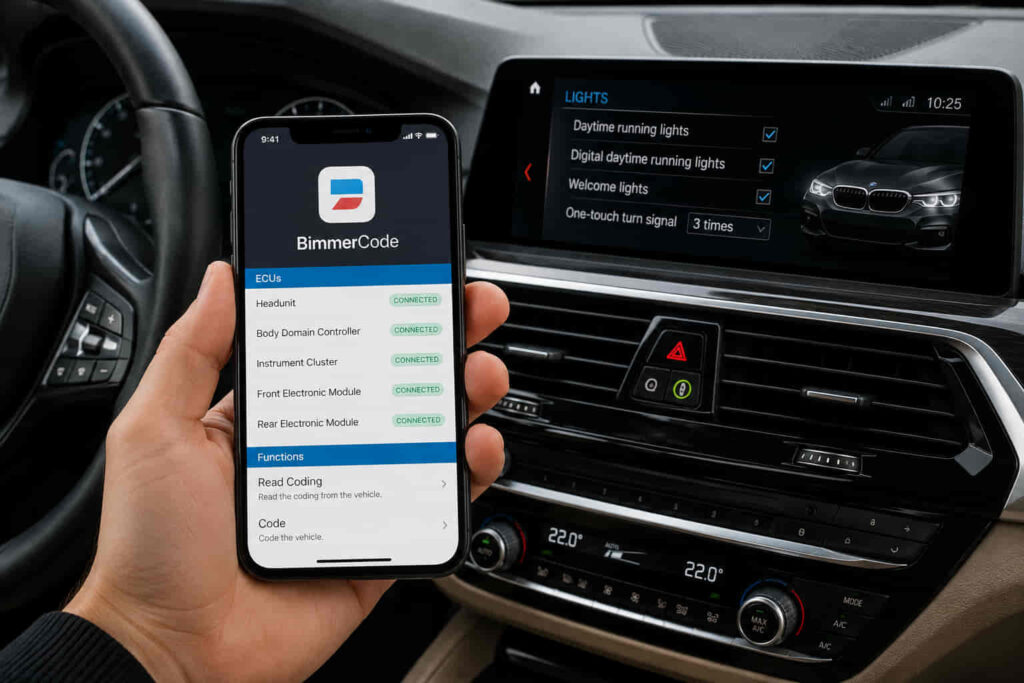
BimmerCode is worth it for BMW owners who want to customize multiple supported vehicle settings themselves without paying for individual coding services. The app gives users access to coding options for functions such as lighting, displays, mirrors, locking behavior, warning settings, and convenience features, although the exact options depend on the BMW model, generation, and installed control units. Its value increases when you plan to make several coding changes rather than buying the app and required OBD adapter for a single minor adjustment.
The real cost of using BimmerCode includes both the software and a compatible OBD adapter, so the app price alone does not determine whether it offers good value. Compatibility also matters because two BMW models can provide different coding options even when they both work with BimmerCode. Basic supported coding is designed to make vehicle customization accessible without traditional BMW coding software, while Expert Mode provides access to parameters that require substantially more knowledge and caution.
This guide evaluates whether BimmerCode is worth buying based on its cost, available coding features, advantages, limitations, safety, ease of use, and alternatives. It also explains which BMW owners gain the most value from BimmerCode and when another tool may be a better choice.
Is BimmerCode Worth It?
BimmerCode is worth it if your BMW supports several coding changes that you want to use, because one app and a compatible OBD adapter can provide access to multiple vehicle customization settings. Its main value comes from replacing separate coding jobs with a reusable DIY tool. Instead of paying someone each time you want to change a supported setting, you can connect BimmerCode to the vehicle, select an available control unit, change the relevant option, and code the new configuration yourself. The more supported changes you intend to make, the easier it becomes to justify the initial cost.
The value of BimmerCode depends heavily on vehicle compatibility because available coding options are determined by the model, generation, equipment, and installed control units. A coding feature shown for one BMW does not automatically exist on every other supported BMW. This means compatibility should be evaluated at the feature level rather than simply checking whether BimmerCode supports the vehicle. An owner who can access several useful comfort, lighting, display, locking, or convenience settings receives more practical value than an owner whose vehicle provides only a few relevant options.
BimmerCode also provides value through accessibility. Traditional BMW coding can involve specialized software, configuration files, and a steeper technical learning curve, while BimmerCode presents supported settings through a mobile interface. This reduces the technical barrier for owners who want to make standard coding changes themselves. The distinction becomes important with Expert Mode, where users can access more detailed coding parameters and therefore need to understand the function of a parameter before changing it.
BimmerCode is less compelling when the owner wants only one minor modification or primarily needs vehicle diagnostics rather than coding. Buying the software and an OBD adapter solely to change one setting can produce poor value compared with the same setup being reused for several modifications. Likewise, diagnostic tasks such as reading vehicle data or accessing service-related functions belong to a different use case from vehicle customization. BimmerCode therefore provides the strongest value to owners who have a compatible vehicle, want multiple supported coding changes, and prefer DIY customization over paying for individual coding services.
How Much Does BimmerCode Cost?
The actual cost of BimmerCode consists of the software license and the compatible OBD hardware required to communicate with the vehicle. Evaluating only the app price understates the startup cost because a phone cannot perform vehicle coding by itself. BimmerCode communicates with supported electronic control units through a compatible connection method, so a new user generally needs to account for both the software and appropriate connection hardware before deciding whether the setup is worth buying.
The cost should therefore be evaluated against the number of coding changes you expect to make rather than against the price of another mobile app. A BMW owner who uses the setup repeatedly to customize lighting, displays, mirrors, locking behavior, warning settings, and other supported functions distributes the initial expense across multiple changes. An owner who purchases the same setup for one small modification bears essentially the same startup cost while extracting considerably less value from it.
Adapter selection also affects the total investment because compatibility matters for both the vehicle and the connection method. An adapter should not be purchased simply because it has an OBD connector or supports generic vehicle diagnostics. BimmerCode maintains compatibility requirements for supported adapters and connection methods, and these requirements can differ according to vehicle generation and platform. Checking the specific vehicle against BimmerCode’s current compatibility information before purchasing hardware prevents an inexpensive but incompatible adapter from becoming an additional cost.
The software price, supported adapters, vehicle coverage, and purchase terms can change over time. For that reason, exact current pricing should be verified against BimmerCode’s official purchase information and the current price of the selected compatible adapter when calculating total cost. The relevant purchase question is not simply “How much does the BimmerCode app cost?” but whether the combined software and hardware cost is lower than the value you expect to receive from the supported coding changes you will actually use.
Read more: How to Change a BMW Key Fob Battery
What Can You Code With BimmerCode?
BimmerCode can code supported comfort, lighting, display, locking, warning, and vehicle behavior settings stored in compatible electronic control units. The exact options are determined by the vehicle rather than by the app alone. BMW models use different control units, software versions, equipment packages, and factory configurations, so a coding option available on one vehicle may be absent from another. This makes the number of useful changes available for your specific car one of the most important factors when deciding whether BimmerCode is worth buying.
Many of the most valuable BimmerCode changes involve functions that owners interact with regularly. Depending on the vehicle, coding can alter how mirrors behave when locking or reversing, how exterior and interior lights operate, what information appears on displays, how certain warnings behave, and how convenience functions respond to driver inputs. These changes do not necessarily add new physical equipment to the car. Coding primarily changes configurable parameters within supported control units, which means the vehicle must already contain the hardware and electronic capability required for a particular function.
The practical value of these changes depends on frequency of use. Changing a setting that affects every drive generally creates more long-term value than enabling a function that is rarely noticed. For example, an owner who changes several frequently used convenience, display, lighting, and locking behaviors can benefit from those modifications every time the vehicle is driven. This is why evaluating BimmerCode by the total number of available options can be misleading. The more useful measurement is how many supported options solve an actual inconvenience or create a customization that the owner wants.
Vehicle compatibility therefore needs to be checked before purchasing BimmerCode or an adapter. Support for a BMW model does not mean that every coding feature advertised or discussed by other owners will be available on that vehicle. The relevant control unit must exist, its software must support the parameter, and BimmerCode must provide access to the applicable coding function. Model year alone is not enough to predict identical capabilities because vehicles from the same model line can contain different equipment and electronic configurations.
BimmerCode also includes Expert Mode for compatible control units, but Expert Mode changes the risk-to-value calculation. Standard coding options present predefined functions in a more accessible format, while Expert Mode exposes lower-level parameters that require the user to understand what a setting controls. Expert Mode is therefore not automatically an additional benefit for every owner. It creates additional value for knowledgeable users who need a specific supported configuration, while beginners gain more reliable value from clearly defined standard coding options.
BimmerCode is most useful when a compatible vehicle offers several coding functions that improve settings the owner uses regularly. Before judging the app by screenshots, videos, or coding examples from another BMW, the owner should identify the functions supported by the exact vehicle and determine which of those changes have practical value. This vehicle-specific approach gives a much more accurate answer to whether BimmerCode is worth the combined cost of the software and required connection hardware.
What Are the Pros of Using BimmerCode?
The main advantages of BimmerCode are reusable DIY coding, access to multiple supported vehicle settings, a lower technical barrier for standard coding, vehicle-specific customization, and reduced dependence on third-party coding services. These advantages are interconnected because BimmerCode turns vehicle coding from a task that may require outside assistance into something a compatible BMW owner can perform through a supported mobile device and connection method.
Reusable DIY coding is one of the strongest reasons BimmerCode can justify its initial cost. The software is not limited to performing one predefined modification. Once the owner has the required setup, the same tool can be used to make multiple supported changes on the compatible vehicle. This creates an economic advantage when the owner wants several modifications because the software and adapter cost can be distributed across multiple coding tasks instead of being associated with one change.
Access to multiple settings also increases the utility of the tool beyond cost savings. BMW owners differ in how they want lighting, displays, mirrors, locking functions, warnings, and convenience settings to behave. Factory configurations are designed for broad markets and regulatory requirements rather than the preferences of every individual driver. BimmerCode provides access to supported configurable parameters so an owner can adjust available functions without physically replacing a control unit or installing hardware for settings that already exist within the vehicle’s electronic configuration.
A lower technical barrier is another significant advantage for standard coding. BMW coding has traditionally been associated with specialized software and terminology that can be difficult for an inexperienced owner to navigate. BimmerCode organizes supported standard functions through a mobile interface and translates many coding choices into recognizable vehicle settings. The user still needs to follow the correct connection and coding procedure, but the process requires less direct interaction with low-level parameters when standard mode supports the desired change.
Vehicle-specific customization creates a different type of value because the benefit continues after the coding session ends. A setting that changes a frequently used mirror, display, lighting, locking, or convenience behavior affects the ownership experience each time that function is used. The coding process itself may take only a short period, but a useful configuration can remain active afterward. This makes frequently used settings more valuable than novelty modifications that provide little benefit after the initial change.
BimmerCode can also reduce dependence on third-party coding services for supported changes. Professional coding remains useful when a modification requires expertise beyond the app’s capabilities, but owners do not necessarily need outside assistance for every standard option that BimmerCode explicitly supports. This distinction matters for users who expect to experiment with several configurations or change supported settings again later. Having direct access allows them to manage those options without arranging a separate coding session each time.
These advantages make BimmerCode particularly valuable as a reusable customization tool rather than as a one-time app purchase. Its strongest benefits appear when the owner has a compatible BMW, identifies several genuinely useful coding options, and intends to manage those settings independently. If those conditions are absent, the same advantages become less important and the limitations of BimmerCode have greater influence on whether the purchase is worthwhile.
What Are the Cons of Using BimmerCode?
The main disadvantages of BimmerCode are the additional hardware cost, vehicle-dependent coding options, limited value for one-time changes, restrictions on what coding can accomplish, and greater risk when using Expert Mode without sufficient knowledge. These limitations do not make BimmerCode a poor coding tool, but they determine whether the software provides enough practical value for a particular owner. A user who understands these constraints before purchasing is better positioned to judge BimmerCode based on the functions available for the actual vehicle rather than the capabilities demonstrated on other BMW models.
The first limitation is that BimmerCode requires more than the software itself. Vehicle communication requires a supported connection method, which adds hardware cost for users who do not already own a compatible adapter. This increases the effective entry price and makes BimmerCode less economical for someone who wants to perform only one minor coding change. The same expense becomes easier to justify when the software and adapter are used for several meaningful modifications because the initial cost is distributed across more coding tasks.
Vehicle-dependent functionality is a more important limitation than price for many owners. BimmerCode does not provide the same coding options across every supported BMW because coding capabilities depend on the electronic control units, equipment, software, and configuration installed in the vehicle. A function demonstrated on another BMW may therefore be unavailable even when both vehicles appear in BimmerCode’s supported model range. This creates a gap between general product capability and vehicle-specific capability, making compatibility research necessary before purchase.
BimmerCode is also limited by what vehicle coding itself can change. Coding modifies configurable software parameters; it does not automatically add physical equipment that the vehicle lacks. A feature that depends on missing sensors, lights, cameras, modules, or other hardware cannot necessarily be created by changing a software value. This distinction prevents unrealistic expectations about what the app can unlock and explains why a long list of coding examples does not guarantee equivalent functionality on every car.
Another limitation appears when users need functions outside BimmerCode’s primary coding purpose. Vehicle coding, diagnostics, live data, fault analysis, and service functions are related automotive tasks, but they are not interchangeable. An owner whose main objective is troubleshooting faults or monitoring vehicle data may receive less value from purchasing a coding-focused tool than an owner whose priority is customization. The intended task therefore matters as much as the number of functions offered by the software.
Expert Mode introduces the most significant knowledge requirement. Standard options are presented as recognizable coding functions, whereas Expert Mode exposes more detailed parameters within supported control units. A user who changes a parameter without understanding its purpose can create an unwanted configuration or unexpected vehicle behavior. Expert Mode should consequently be treated as an advanced capability rather than a reason for beginners to experiment with undocumented settings.
BimmerCode’s disadvantages matter most when the owner expects universal feature availability, needs only one small modification, or intends to use advanced parameters without understanding them. For a compatible vehicle with several useful standard coding options, these limitations may have relatively little effect on the overall value. For a vehicle with few desirable supported changes, the same limitations can make the software and adapter difficult to justify.
Is BimmerCode Safe to Use?
BimmerCode is designed to perform supported vehicle coding, but safe use depends on selecting compatible hardware, maintaining a stable coding environment, following the documented process, and avoiding unsupported Expert Mode changes. Coding changes software configuration inside electronic control units, so it should not be treated like changing an ordinary preference inside a smartphone app. The vehicle and relevant control units need to communicate reliably throughout the coding process.
Standard coding and Expert Mode should not be assigned the same level of complexity. Standard mode presents supported functions in a structured form, allowing users to select defined settings without manually interpreting every underlying parameter. Expert Mode provides access to more detailed coding values and consequently transfers more responsibility to the user. A predefined standard option and an unfamiliar Expert Mode parameter may ultimately interact with vehicle configuration, but the knowledge required to make those changes correctly is different.
Connection stability is important because the coding process involves writing configuration data to a control unit. The user should use a connection method supported for the relevant vehicle and avoid intentionally interrupting communication while coding is taking place. The vehicle’s electrical state also matters because unstable voltage during electronic programming or coding is undesirable. These requirements explain why adapter compatibility and preparation are safety considerations rather than merely setup details.
BimmerCode also provides mechanisms intended to help users restore coding configurations, but reversibility should not be interpreted as permission to change parameters indiscriminately. A backup is valuable when a user wants to return a supported control unit to an earlier coding state, yet restoration still depends on the relevant coding situation and available backup. The safer approach is to understand the intended result before making the change rather than relying on recovery after experimentation.
The possibility of physical vehicle damage should also be distinguished from an incorrect software configuration. Coding primarily changes configuration data, so an unwanted coding result is not automatically equivalent to mechanically damaging the vehicle. However, incorrect parameters can cause functions to behave differently from their intended configuration, and advanced changes can be more difficult to diagnose when the user does not know which values were modified. Recording changes and avoiding unknown Expert Mode parameters reduces this problem.
Warranty questions require similar precision. Coding a vehicle does not support a universal claim that the entire BMW warranty is automatically void, nor should owners assume that every coding-related issue must remain covered. Warranty treatment can depend on the market, applicable warranty terms, the modification performed, and whether that modification is relevant to the problem being claimed. Owners concerned about warranty coverage should review the terms applicable to their vehicle and market before making modifications that affect related systems.
BimmerCode is therefore safest when used as a controlled coding tool rather than an experimentation platform. Standard supported functions provide a clearer path for beginners, while Expert Mode is appropriate only when the user understands the parameter being changed and its effect on the corresponding control unit. For most prospective buyers, the relevant safety question is not simply whether BimmerCode is safe, but whether they will use the software within the limits of their vehicle, hardware, and coding knowledge.
Is BimmerCode Easy to Use for Beginners?
BimmerCode is relatively easy for beginners to use when they stay within supported standard coding options and understand the basic connection and coding process. The app reduces much of the complexity associated with traditional BMW coding by presenting available functions through a mobile interface instead of requiring users to manually work with more specialized coding software. This makes common customization tasks accessible to owners who have little previous coding experience, although it does not eliminate the need to understand what each selected option changes.
The basic workflow is straightforward. The user connects a compatible adapter or supported connection method to the vehicle, establishes communication through BimmerCode, selects an available control unit, chooses a supported coding option, and writes the new configuration to that unit. The app handles much of the technical interaction behind this process, allowing the user to focus on recognizable vehicle functions rather than the underlying coding structure. The difficulty therefore comes less from operating the interface and more from deciding which settings should be changed.
Vehicle-specific differences create part of the learning curve. Two BMW owners can open BimmerCode and see different control units or coding options because their vehicles contain different generations of electronics, equipment, and software configurations. Instructions created for another model should not be treated as confirmation that the same option exists or behaves identically on your vehicle. Beginners receive more predictable results when they work from the options BimmerCode identifies for their specific vehicle rather than attempting to reproduce every modification demonstrated in online examples.
Expert Mode changes the level of difficulty substantially. Standard coding translates supported functions into understandable selections, whereas Expert Mode exposes lower-level parameters that may not clearly describe their consequences to an inexperienced user. Access to those parameters increases flexibility but also removes part of the abstraction that makes BimmerCode beginner-friendly. A new user does not need Expert Mode simply because it is available, and avoiding unknown parameters is more useful than trying to maximize the number of settings changed during the first coding session.
Preparation also determines how easy the process feels. Using compatible connection hardware, ensuring the vehicle is in the appropriate state, keeping the mobile device available throughout the process, and avoiding interruptions during coding remove several preventable sources of difficulty. A failed connection caused by unsuitable hardware can make a simple coding task appear complicated even when the problem is unrelated to the actual coding option.
BimmerCode is therefore beginner-friendly for standard vehicle customization, but it should not be interpreted as a tool that makes every possible BMW coding change beginner-friendly. Owners who restrict their first changes to documented standard options can benefit from the simplified interface without needing to understand every underlying coding parameter. Advanced users can move beyond that level when a specific task requires it, but Expert Mode should follow knowledge rather than curiosity.
What Is the Difference Between BimmerCode and BimmerLink?
BimmerCode is primarily used to customize supported vehicle settings through coding, while BimmerLink is designed around diagnostics, vehicle data, and service-related functions. The two applications interact with BMW electronic systems but solve different owner problems. Choosing between them should therefore begin with the task you need to perform rather than treating BimmerCode and BimmerLink as two versions of the same product.
BimmerCode is the relevant tool when the objective is to change how a supported vehicle function is configured. An owner might want to alter an available lighting behavior, display setting, mirror function, locking preference, warning setting, or another configurable feature. These tasks involve coding parameters stored in compatible control units, which is why they belong to BimmerCode’s core use case.
BimmerLink serves a different purpose when the owner needs information about the vehicle or access to supported diagnostic and service functions. Diagnostic tasks focus on understanding vehicle status rather than changing convenience and customization parameters. This distinction is important because an owner searching for fault information, sensor values, or service-related functionality should not assume that purchasing a coding application will automatically satisfy those requirements.
The difference also affects whether BimmerCode is worth buying. An owner who wants several supported customization changes has a clear reason to purchase BimmerCode, while someone whose primary objective is diagnostics may receive limited value from it regardless of how many coding functions the application offers. Conversely, diagnostic capability does not replace BimmerCode when the actual objective is to customize supported vehicle behavior.
Some BMW owners can have legitimate uses for both applications because customization and diagnostics are separate requirements. Owning both does not make their functions identical; it reflects two different interactions with the vehicle’s electronic systems. BimmerCode answers the question of what supported configuration you want the vehicle to use, whereas BimmerLink addresses vehicle information, diagnostics, and supported service functions.
The practical choice is BimmerCode for coding and customization, BimmerLink for diagnostics and vehicle monitoring, or both when you genuinely need both sets of functions. This distinction prevents buyers from evaluating BimmerCode negatively for diagnostic functions it is not primarily intended to provide and keeps the purchase decision connected to the user’s actual goal.
Is BimmerCode Better Than Carly for BMW Coding?
BimmerCode is the more focused choice when the primary objective is coding supported BMW settings, while Carly is positioned around a broader set of vehicle-related functions in addition to coding. The better option therefore depends on what the owner intends to do rather than which application has the longer feature list. For a BMW owner evaluating BimmerCode specifically as a way to customize vehicle behavior, coding capability, vehicle compatibility, hardware requirements, pricing, and the number of useful supported changes are more relevant than unrelated features.
BimmerCode has a clear purpose within the BMW ownership workflow: it provides access to supported coding options in compatible control units. This focused approach benefits owners who already know that they want to change configurable vehicle settings. If the desired modifications involve supported lighting, display, mirror, locking, warning, or convenience functions, the value of BimmerCode can be evaluated directly against those changes. There is little reason to pay for a broader feature set when the additional functions do not solve a problem the owner actually has.
Carly can become more relevant when the purchase decision extends beyond coding. Its broader automotive-tool approach means the comparison changes when diagnostics and other supported vehicle functions are part of the owner’s requirements. However, having more categories of functionality does not automatically make a product better for BMW coding. A broader application provides additional value only when the user needs those additional capabilities.
Pricing also needs to be compared as a total ownership cost rather than as an isolated app price. Software payment models, compatible hardware, included functions, and subscription or licensing terms can change, so current terms should be verified before purchasing either product. The meaningful comparison is the amount an owner must spend to perform the functions they actually need over the expected period of use. This prevents a lower initial price or larger advertised feature set from being mistaken for better long-term value.
Vehicle compatibility remains equally important in this comparison. Neither a general feature description nor another owner’s experience proves that a specific coding option will work on your BMW. The relevant vehicle generation, equipment, electronic control units, and software configuration determine what can actually be changed. A coding tool that supports the exact functions you want has greater practical value than a broader tool whose additional capabilities remain unused.
BimmerCode is the stronger fit for BMW owners whose main priority is supported vehicle coding and customization, while Carly deserves consideration when the owner wants a broader combination of supported automotive functions. The comparison should ultimately be made against a defined set of tasks. If coding is the task that matters, evaluate each product on the coding changes available for your exact vehicle, the required hardware, and the total current cost rather than selecting a tool simply because it advertises more functions.
Who Should Buy BimmerCode?
BimmerCode is worth buying for BMW owners who have a compatible vehicle, want several supported coding changes, and prefer to manage those changes themselves. These conditions matter because the value of the software does not come from owning a coding app; it comes from repeatedly using supported coding functions that improve the vehicle’s configuration. An owner who meets all three conditions is positioned to receive substantially more value than someone purchasing BimmerCode for one experimental change.
The strongest use case is an owner who has already identified several settings they want to modify. Changes to frequently used lighting, display, mirror, locking, warning, and convenience functions can continue providing value after the coding session is complete. When several of these functions are supported on the vehicle, the combined software and adapter cost can be distributed across multiple useful modifications. This is fundamentally different from purchasing the same setup to enable one minor feature that may rarely be used.
BimmerCode also suits owners who value control over future configuration changes. A reusable DIY setup allows supported settings to be adjusted again without arranging a new coding service each time. This becomes useful when an owner wants to test different configurations, restore a preferred setting, or make additional supported changes later. The value therefore extends beyond the first coding session when the vehicle will be owned for long enough to make repeated use practical.
Beginners can also be suitable BimmerCode users when their objectives remain within documented standard coding options. Previous BMW coding experience is not a requirement for every basic change because the app presents supported functions through a more accessible interface. The important distinction is between being new to coding and making uninformed advanced changes. A beginner who follows the supported process and understands the setting being changed is different from a user entering Expert Mode and altering unfamiliar parameters.
BimmerCode provides less value when the desired outcome does not match its core purpose. An owner who mainly needs diagnostics, vehicle monitoring, or service functions should evaluate a tool designed around those tasks rather than judging BimmerCode by requirements outside its primary coding role. The same applies when the exact BMW provides few desirable coding options. Compatibility without useful functionality is not enough to make the purchase worthwhile.
The purchase is also harder to justify for a single low-value modification. The software and compatible connection hardware create an initial cost regardless of whether the owner performs one change or several. If one small setting is the only desired result, a professional coding service or another available method may be more economical depending on local pricing and the complexity of the task. As the number of useful supported changes increases, the reusable nature of BimmerCode becomes more valuable.
Owners who intend to use Expert Mode without understanding BMW coding parameters should not treat access to advanced settings as a reason to buy the application. Expert Mode expands control, but additional control creates value only when the user knows which parameter needs to change and what that change does. For most owners, the standard supported functions should determine the purchase decision first; Expert Mode should be considered an advanced capability rather than the core justification for buying BimmerCode.
BimmerCode is ultimately worth it when the value of the supported changes you will actually use exceeds the combined cost and effort required to make them. A compatible BMW with several desirable coding options, a reusable connection setup, and an owner comfortable performing DIY customization creates the strongest case for buying it. A vehicle with few useful options, a need for only one minor change, or a primarily diagnostic use case creates the opposite result. That user-specific distinction provides a more accurate answer than labeling BimmerCode universally worth it or not worth it.