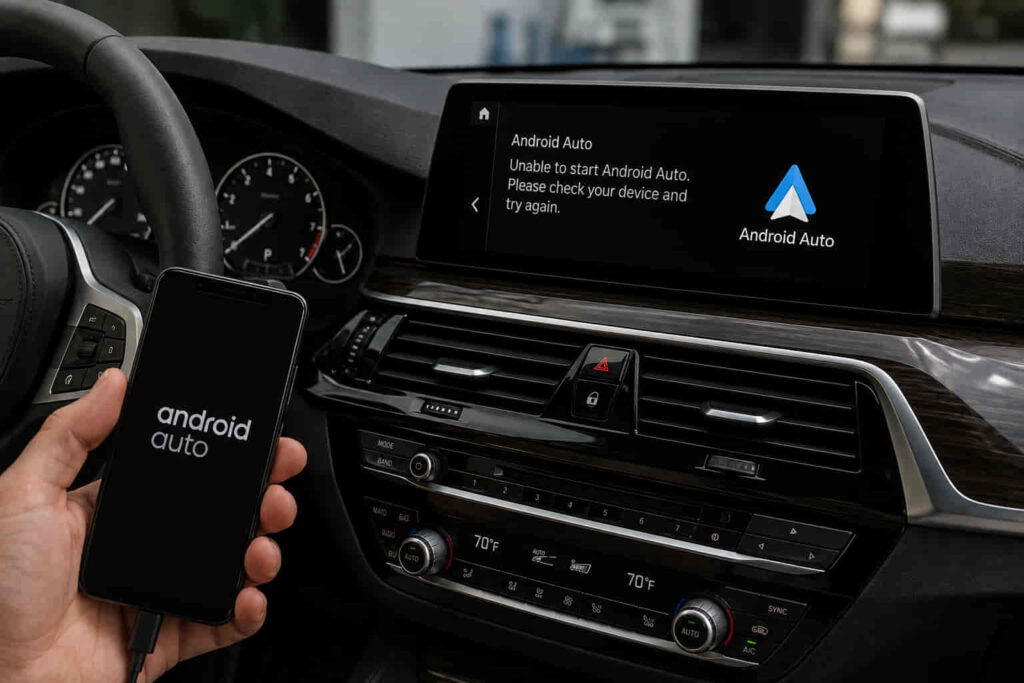
BMW Android Auto Not Working usually happens because of connection failures, software compatibility issues, incorrect smartphone settings, or problems with the BMW infotainment system. Android Auto allows BMW owners to connect an Android smartphone with the vehicle’s iDrive system to access navigation, music, calls, messages, and voice assistant features through the central display.
The Android Auto experience depends on multiple systems working together. The smartphone operating system, Bluetooth connection, Wi-Fi communication, USB connection, Android Auto application, and BMW iDrive software must all communicate correctly for the feature to function properly.
When Android Auto stops working, the problem is not always caused by the vehicle itself. A failed connection may result from outdated phone software, incorrect permissions, a damaged USB cable, previous pairing data, or temporary software glitches. However, BMW infotainment software issues, unsupported vehicle configurations, or head unit problems can also prevent Android Auto from launching.
Common symptoms include Android Auto not appearing on the BMW display, frequent disconnections, missing applications, audio problems, or a black screen after attempting to connect. Identifying whether the issue comes from the smartphone, connection method, or vehicle system is the key to finding the correct solution.
This guide explains how Android Auto works on BMW vehicles, why connection problems occur, how to diagnose the cause, and the most effective ways to restore reliable smartphone integration.
How Does Android Auto Work on BMW Vehicles?
Android Auto works on BMW vehicles by creating a connection between an Android smartphone and the BMW iDrive infotainment system, allowing phone applications and services to appear on the vehicle display. The system acts as a communication bridge between the smartphone and the vehicle’s head unit, combining smartphone software with BMW’s built-in controls.
When Android Auto is activated, the BMW infotainment system communicates with the Android phone through supported connection methods such as wireless Bluetooth and Wi-Fi communication or a USB connection on compatible vehicles. Bluetooth is commonly used for initial device pairing and communication features, while Wi-Fi provides the higher data transfer capability required for wireless Android Auto functions.
The BMW iDrive system manages how information from the smartphone appears on the vehicle screen. Applications such as Google Maps, Waze, Spotify, and Google Assistant can be controlled through the BMW display, iDrive controller, touchscreen, or voice commands depending on the vehicle configuration.
For Android Auto to function correctly, several conditions must work together. The BMW model must support Android Auto, the smartphone must meet software requirements, the Android Auto application must have proper permissions, and the vehicle’s infotainment software must be compatible with the connection.
A problem in any part of this communication chain can prevent Android Auto from starting. For example, the phone may successfully connect through Bluetooth for calls but fail to launch Android Auto because the Wi-Fi connection, software compatibility, or device authorization is incomplete.
Understanding how the system works helps separate simple connection problems from deeper BMW infotainment issues.
Why Is My BMW Android Auto Not Working?
BMW Android Auto may stop working because of incompatible software, incorrect device settings, connection errors, outdated infotainment software, or problems with the smartphone-to-vehicle communication process. Since Android Auto depends on multiple systems operating together, a failure in one area can interrupt the entire experience.
One common cause is an incomplete or corrupted phone pairing. When a BMW and Android device are connected repeatedly over time, stored Bluetooth, Wi-Fi, or Android Auto settings can become outdated. These saved connections may prevent the vehicle and smartphone from establishing a clean communication process.
Software compatibility is another major factor. Android Auto requires compatible versions of Android, the Android Auto application, and BMW iDrive software. If the phone or vehicle software is outdated, the system may fail to recognize the device or may experience unstable connections.
Incorrect smartphone permissions can also prevent Android Auto from launching. The application may require access to location services, notifications, contacts, Bluetooth communication, and background activity. If these permissions are restricted, some features may stop working or the connection may fail completely.
BMW infotainment software problems can also create Android Auto issues. The head unit controls communication between the vehicle and smartphone, so software glitches, outdated firmware, or system errors can affect how Android Auto operates.
For example, a BMW that previously connected normally but suddenly stops recognizing an Android phone may not have a hardware failure. The issue may simply require removing the old pairing, updating software, and creating a new connection.
Read more: BMW Air Conditioning Repair
What Causes BMW Android Auto Connection Problems?
BMW Android Auto connection problems are usually caused by compatibility issues, outdated software, incorrect pairing settings, unstable wireless connections, or problems with the smartphone and vehicle communication process. Because Android Auto relies on both the phone and BMW infotainment system, the failure can originate from either side of the connection.
One common cause is an unsupported BMW model or infotainment configuration. Not every BMW vehicle generation includes Android Auto capability, and compatibility depends on factors such as model year, iDrive version, and installed hardware. A smartphone may support Android Auto correctly but still fail to connect if the BMW system does not support the feature.
Outdated Android software or BMW iDrive software can also create connection problems. Android Auto receives regular updates, and BMW releases infotainment software improvements to fix compatibility issues and improve system stability. When one side of the connection uses older software, communication errors may occur.
Bluetooth and Wi-Fi pairing problems are another frequent cause, especially with wireless Android Auto. The system requires stable communication between the smartphone and vehicle. Previous pairing information, network conflicts, or incorrect connection permissions can prevent Android Auto from starting.
USB connection problems may affect BMW models that rely on wired Android Auto. A damaged cable, unsupported USB connection, or restricted phone settings can interrupt data transfer even when the phone appears to be charging.
Phone settings can also affect Android Auto performance. Battery optimization settings, restricted background activity, disabled permissions, or outdated Android Auto application data may prevent the application from communicating properly with the vehicle.
For example, if a BMW recognizes a smartphone through Bluetooth but Android Auto does not appear on the screen, the problem may involve Wi-Fi pairing, software permissions, or infotainment compatibility rather than a Bluetooth failure.
What Symptoms Indicate BMW Android Auto Failure?
BMW Android Auto failure usually appears through symptoms such as missing Android Auto display, repeated disconnections, application loading problems, audio issues, or an unstable smartphone connection. These symptoms help identify whether the problem is related to pairing, software, or the BMW infotainment system.
One common symptom is that Android Auto does not appear after connecting the phone. The smartphone may show that it is connected to the BMW, but the infotainment screen does not launch Android Auto. This often indicates a compatibility, permission, or connection authorization issue.
Frequent disconnections are another sign of a connection problem. Wireless Android Auto depends on continuous Bluetooth and Wi-Fi communication, so interference, outdated software, or unstable pairing data can cause the system to disconnect during use.
Some users experience situations where specific features do not work correctly. Navigation may fail to load, music applications may not display properly, or voice commands may not respond. These problems often indicate incomplete communication between the Android Auto software and BMW iDrive.
A black screen or frozen display can also occur when the infotainment system experiences a temporary software error. In these cases, the phone may still be connected, but the BMW display cannot properly process the Android Auto interface.
Audio problems may appear when calls work through Bluetooth but music or Android Auto applications fail. This happens because BMW uses different communication channels for different smartphone functions.
For example, a BMW that connects to a phone for calls but cannot display Google Maps likely has an Android Auto-specific connection or software issue rather than a general Bluetooth failure.
How Do You Diagnose BMW Android Auto Problems?
Diagnosing BMW Android Auto problems requires checking compatibility, smartphone settings, connection methods, and BMW infotainment software before replacing any hardware components. A structured diagnosis helps identify whether the failure comes from the phone, connection process, or vehicle system.
The first step is confirming compatibility between the BMW and Android device. The vehicle’s iDrive version, model year, and installed features determine whether Android Auto is supported. The smartphone should also meet Android Auto requirements and run a supported operating system version.
The next step is checking the connection setup. Removing the existing BMW pairing from both the phone and vehicle allows the systems to create a new connection without outdated pairing information. This process can resolve many temporary communication errors.
Smartphone settings should also be inspected. Android Auto permissions, Bluetooth access, Wi-Fi settings, and battery restrictions can prevent the application from running correctly. Ensuring that the application has necessary permissions allows proper communication with the BMW system.
BMW infotainment software should also be evaluated. If other smartphone features work but Android Auto continues failing, outdated iDrive software or infotainment glitches may be responsible.
A complete diagnosis separates software-related problems from hardware failures. Most Android Auto issues are caused by connection or software conditions, while true hardware failures involving the BMW head unit are less common.
For example, if multiple Android phones fail to connect to the same BMW, the vehicle infotainment system may require further inspection. If only one phone fails while others work normally, the issue is more likely related to that specific device.
How Do You Fix BMW Android Auto Not Working?
Fixing BMW Android Auto Not Working issues usually involves resetting connections, correcting smartphone settings, updating software, or addressing problems within the BMW infotainment system. The correct solution depends on whether the failure comes from the Android device, the connection process, or the vehicle software.
Restarting both the smartphone and BMW infotainment system is often the first step because temporary software glitches can interrupt communication. A simple restart clears temporary memory errors and allows both systems to establish a new connection.
Removing and reconnecting the smartphone is another effective solution. Old Bluetooth and Wi-Fi pairing information can become corrupted over time, preventing Android Auto from launching correctly. Deleting the BMW connection from the phone and removing the phone from the iDrive device list allows the systems to create a fresh pairing.
Checking Android Auto settings on the smartphone is also important. The application must have access to required permissions, including location, Bluetooth communication, notifications, and background activity. Battery-saving restrictions should also be reviewed because some Android devices limit background applications to reduce power consumption.
Updating smartphone software and Android Auto applications can resolve compatibility problems. Google regularly releases updates that improve stability and support newer Android versions, while outdated applications may create communication errors with BMW systems.
BMW iDrive software updates may also fix Android Auto problems. These updates can improve infotainment stability, repair connection bugs, and increase compatibility with newer smartphone software.
If basic troubleshooting does not solve the problem, the issue may involve the BMW head unit or infotainment control module. In these situations, professional diagnosis may be required to determine whether the vehicle software or hardware needs repair.
For example, a BMW that stops connecting after a phone update may only require resetting the pairing process, while a vehicle that fails with multiple smartphones may have an infotainment system issue.
When Does BMW Android Auto Need Software Update or Repair?
BMW Android Auto may require a software update or professional repair when repeated resets, pairing changes, and smartphone troubleshooting cannot restore normal operation. Most connection failures are software-related, but some cases involve deeper infotainment system problems.
A BMW software update may be necessary when the vehicle uses outdated iDrive firmware that cannot properly communicate with newer Android operating systems. Software updates improve system compatibility and may resolve problems related to wireless connectivity, application recognition, and system stability.
The infotainment head unit is responsible for managing smartphone integration, so failures within this component can affect Android Auto functionality. A malfunctioning head unit may cause symptoms such as repeated connection failures, frozen displays, missing smartphone integration features, or multiple device compatibility problems.
The climate of automotive software has changed because modern BMW vehicles depend heavily on electronic modules and digital communication. A problem that appears to be an Android Auto failure may actually involve the vehicle’s broader infotainment architecture.
Professional diagnosis becomes more important when multiple smartphones experience the same problem on one BMW. If different Android devices fail to connect while the same phones work correctly with other vehicles, the BMW system is more likely to be the source of the issue.
For example, a BMW with outdated iDrive software may regain Android Auto functionality after an update, while a vehicle with a failing head unit may require component-level repair.
How Can You Prevent BMW Android Auto Problems?
Preventing BMW Android Auto problems requires maintaining updated software, managing smartphone connections correctly, and keeping the BMW infotainment system in good operating condition. Regular digital maintenance helps reduce connection failures and improves long-term reliability.
Keeping both the Android smartphone and BMW software updated is one of the most effective prevention methods. Compatibility issues often develop when one system receives major updates while the other remains outdated.
Maintaining a clean connection history also improves reliability. Removing unused paired devices prevents the BMW iDrive system from managing unnecessary connection data that may interfere with active smartphone pairing.
Using high-quality USB cables is important for BMW models that support wired Android Auto. Low-quality or damaged cables may provide power but fail to transfer stable data between the phone and vehicle.
Smartphone settings should also be reviewed after major Android updates. System updates can change application permissions, battery management settings, or wireless communication behavior, which may affect Android Auto performance.
Avoiding unnecessary modifications to BMW infotainment software can also reduce compatibility problems. Unofficial software changes may create instability because BMW systems rely on carefully integrated communication between vehicle modules.
Regularly checking infotainment performance helps identify problems early. If Android Auto begins disconnecting, loading slowly, or showing inconsistent behavior, addressing the issue early can prevent more complicated troubleshooting later.
For example, a BMW owner who keeps iDrive software updated, maintains proper smartphone permissions, and periodically refreshes device connections can significantly reduce the chance of Android Auto failures.