Uconnect anti-theft codes are designed to protect your vehicle’s factory-installed infotainment system from unauthorized use. If your Uconnect radio suddenly displays a message requesting a security code after a battery replacement, battery disconnection, or radio installation, it does not necessarily indicate a system malfunction. In most cases, the anti-theft feature has activated as intended to verify that the radio remains in its original vehicle or is being accessed by its legitimate owner.
This guide explains everything you need to know about Uconnect anti-theft codes, including what they are, why the system requests them, how to retrieve the correct code, how to enter it safely, and what to do if you cannot locate it. You’ll also learn what happens after multiple incorrect attempts, whether a factory reset removes the security code, and why unofficial bypass methods can create additional problems.
Whether you own a Chrysler, Dodge, Jeep, or Ram equipped with a Uconnect infotainment system, understanding how the anti-theft feature works can help you restore access quickly while avoiding unnecessary lockouts or costly service visits. By the end of this guide, you’ll have a clear, step-by-step understanding of the official recovery process and the best practices for preventing future security-code requests.
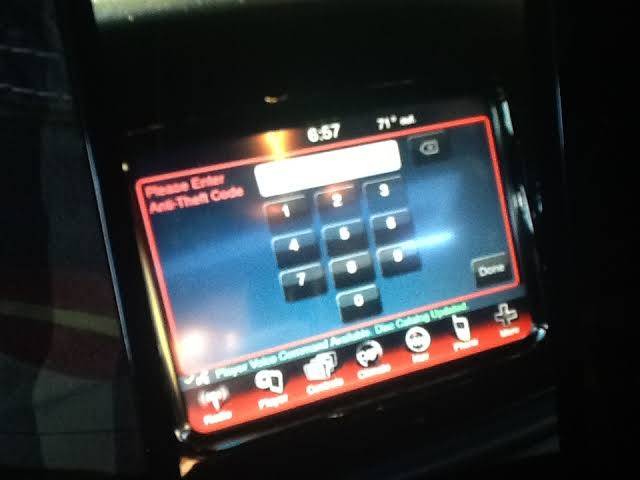
What Are Uconnect Anti-Theft Codes?
Uconnect anti-theft codes are security codes that prevent unauthorized use of a factory-installed Uconnect infotainment system after power loss or hardware replacement. The feature is integrated into many Chrysler, Dodge, Jeep, and Ram vehicles to discourage theft by locking the radio until ownership can be verified. Once activated, the system requires the correct code before restoring access to audio, navigation, and other infotainment functions.
Unlike a Bluetooth PIN or user-created password, an anti-theft code is linked to the vehicle or radio unit during manufacturing or dealership programming. Its primary purpose is to ensure that a stolen head unit cannot simply be installed in another vehicle and used immediately. This additional layer of protection reduces the resale value of stolen infotainment systems and helps protect vehicle owners against theft.
What is the purpose of a Uconnect anti-theft code?
The primary purpose of a Uconnect anti-theft code is to verify legitimate ownership before the infotainment system becomes operational. When the system detects a significant interruption to its power supply or identifies that the radio has been moved to another vehicle, it enters a protected state and requests authentication.
This security mechanism works alongside the vehicle’s electronic architecture rather than functioning as an isolated radio feature. Depending on the vehicle model and Uconnect generation, the radio may communicate with other control modules to determine whether it is still installed in its original vehicle. If the verification process cannot be completed automatically, the system requests the anti-theft code to restore access.
How does the anti-theft system protect your radio?
The anti-theft system protects the radio by preventing unauthorized activation after events that interrupt or alter the system’s normal operating environment. Common triggers include battery replacement, battery disconnection, radio replacement, or certain electrical repairs that temporarily remove power from the infotainment unit.
Once the security mode is activated, users must enter the correct code before the radio resumes normal operation. If incorrect codes are entered repeatedly, the system may temporarily disable additional attempts to reduce the risk of unauthorized guessing. This lockout mechanism makes brute-force attempts impractical while allowing legitimate owners to recover access through official verification methods.
Which Chrysler, Dodge, Jeep, and Ram vehicles use anti-theft codes?
Many factory-installed Uconnect infotainment systems found in Chrysler, Dodge, Jeep, and Ram vehicles include anti-theft protection, although implementation varies by model year and hardware generation. Earlier Uconnect radios are generally more likely to require manual security-code entry after a power interruption, while newer systems often perform automatic verification by communicating with other electronic modules in the vehicle.
The exact recovery procedure depends on several factors, including the vehicle model, production year, radio model, and software version. For this reason, owners should consult their owner’s manual or an authorized dealership when determining whether their specific vehicle requires a manual anti-theft code or supports automatic security verification.
Why Is Your Uconnect System Asking for an Anti-Theft Code?
A Uconnect system usually requests an anti-theft code after detecting an event that interrupts power or changes the radio’s installation status. The security feature is designed to distinguish routine ownership events from situations that could indicate unauthorized removal of the infotainment unit. While the prompt may seem unexpected, it is typically a normal response rather than evidence of a hardware failure.
Understanding what triggered the security request helps determine the fastest recovery method and whether additional information, such as the vehicle identification number (VIN) or radio serial number, will be needed.
Does a battery replacement trigger the anti-theft system?
Yes, replacing the vehicle’s battery is one of the most common reasons a Uconnect system requests an anti-theft code. Disconnecting the battery removes electrical power from the infotainment unit, causing some systems to initiate a security verification process when power is restored.
Whether the code is required depends on the specific Uconnect generation and vehicle configuration. Some newer systems automatically recognize the original vehicle after startup, while others require manual authentication before restoring full functionality.
Can disconnecting the battery activate the radio lock?
Yes, disconnecting the battery—even for routine maintenance—can activate the radio’s security mode on supported systems. This situation commonly occurs during battery testing, electrical repairs, alternator replacement, or extended vehicle storage when the battery has been removed.
The anti-theft feature cannot distinguish between planned maintenance and unauthorized removal based solely on power loss. As a result, it follows a predefined security procedure that protects the infotainment system until ownership can be confirmed.
Does replacing the radio require a new security code?
Yes, installing a replacement Uconnect radio often requires security verification before the unit can operate normally. If the replacement radio originates from another vehicle, the anti-theft system may recognize a mismatch between the radio and the vehicle’s electronic identity, prompting for authentication.
In many cases, an authorized Chrysler, Dodge, Jeep, or Ram dealership can verify ownership, retrieve the appropriate information, and program the replacement unit when necessary. The exact process varies depending on the radio model and the vehicle’s factory security configuration.
Can software updates or electrical faults cause the security prompt?
Although less common, certain software interruptions or electrical faults may also cause the anti-theft screen to appear. A failed software update, unstable battery voltage, damaged wiring, or intermittent communication between electronic control modules can occasionally prevent the infotainment system from completing its normal startup sequence.
If the anti-theft request appears repeatedly without any recent battery work or hardware replacement, the issue may indicate an underlying electrical or software problem rather than a missing security code. In these situations, diagnosing the vehicle’s electrical system is often more effective than repeatedly attempting to enter a code.
How Can You Find Your Uconnect Anti-Theft Code?
The safest way to find a Uconnect anti-theft code is through official sources that can verify ownership of the vehicle or the radio. Depending on the vehicle model and Uconnect generation, the code may already be documented in the owner’s records, or it may need to be retrieved by a dealership using the vehicle identification number (VIN) or the radio’s serial number. Attempting to guess the code is not recommended because repeated incorrect entries can temporarily lock the system.
Can you find the code in the owner’s manual?
Yes, some vehicle owners can find the anti-theft code in the original documentation provided with the vehicle. Depending on the dealership’s delivery process, the code may be written in the owner’s manual, included on a separate radio security card, or attached to the original vehicle paperwork. This information is typically stored with documents such as the warranty booklet, purchase agreement, or maintenance records rather than displayed directly within the Uconnect system.
If you purchased the vehicle new, checking these documents should be your first step before requesting assistance from a dealership. Owners who purchased a used vehicle may find that the previous owner removed the security information before selling the vehicle. In that situation, official code retrieval is usually required.
Can the dealership retrieve the code using the VIN?
Yes, an authorized Chrysler, Dodge, Jeep, or Ram dealership can often retrieve the anti-theft code by using the vehicle identification number and verifying ownership. The VIN allows dealership technicians to access factory records and determine whether the installed radio matches the vehicle’s original configuration. If the information is available, the dealership can provide the correct code or perform the necessary programming to restore the system.
Before visiting the dealership, prepare documents that confirm legal ownership of the vehicle. Having the vehicle registration, driver’s license, and proof of purchase available can significantly reduce processing time and help technicians complete the verification process without delays.
When is the radio serial number required?
The radio serial number becomes important when the dealership cannot retrieve the required information from the VIN alone or when the infotainment unit has previously been replaced. Because replacement radios may not match the factory-installed hardware, technicians sometimes need the serial number to identify the specific unit installed in the vehicle.
The serial number is generally located on a label attached to the radio itself. Accessing this label may require partial removal of the dashboard trim or the infotainment unit. Since improper removal can damage surrounding panels or electrical connectors, owners without experience should consider having the work performed by a qualified technician.
What documents prove vehicle ownership?
Most dealerships require proof of ownership before providing an anti-theft code because the security system is designed to prevent unauthorized access to stolen radios. Although documentation requirements vary by location, owners are commonly asked to present several forms of identification before assistance is provided.
Typical ownership documents include:
- Vehicle registration
- Government-issued photo identification
- Vehicle title, when applicable
- Purchase agreement or bill of sale
- Insurance documents that identify the registered owner
Providing complete documentation helps dealership staff verify ownership more efficiently and protects the integrity of the anti-theft system by ensuring that security information is released only to authorized vehicle owners.
How Do You Enter a Uconnect Anti-Theft Code Correctly?
Entering the correct anti-theft code exactly as provided is essential to restoring access without triggering additional security restrictions. Although the entry procedure differs slightly between Uconnect generations, every system follows the same principle: the displayed code must match the security information stored for that radio before normal operation resumes.
Before entering any numbers, verify that the code came from an official source and belongs to the specific radio installed in the vehicle. Using a code intended for another vehicle or another radio model will not unlock the system and may increase the risk of a temporary lockout.
How do different Uconnect models accept code entry?
Different Uconnect systems use different methods for entering the anti-theft code. Some models allow users to change each digit using physical preset buttons before confirming the entry, while others use touchscreen controls or rotary knobs depending on the infotainment hardware installed in the vehicle.
Because the interface varies by model year and radio generation, owners should follow the instructions provided for their specific Uconnect version rather than relying on procedures designed for another model. Using the incorrect sequence may prevent the system from accepting an otherwise valid code.
What should you check before entering the code?
Verify four items before entering the anti-theft code to reduce the risk of unnecessary lockouts.
First, confirm that the code matches the exact vehicle or radio installed in the car.
Second, ensure the vehicle battery maintains stable voltage throughout the unlocking process. Low battery voltage can interrupt communication between electronic modules and prevent successful verification.
Third, review every digit carefully before confirming the entry. A single incorrect number causes the authentication process to fail.
Finally, avoid repeated attempts if you are uncertain about the code. Verifying the information first is considerably safer than exhausting the available attempts.
How do you confirm a successful unlock?
A successful unlock restores normal access to the Uconnect infotainment system without displaying additional security prompts. Once the correct code is accepted, the radio should resume normal functions such as audio playback, navigation, Bluetooth connectivity, and system settings.
If the system continues requesting the anti-theft code after accepting the entry, the issue may involve an incorrect code, an improperly matched replacement radio, or an underlying communication problem between the infotainment unit and other vehicle control modules. In these cases, additional diagnosis by an authorized service center may be necessary before the system can be fully restored.
What Happens If You Enter the Wrong Code?
Entering an incorrect Uconnect anti-theft code prevents the infotainment system from unlocking and may activate additional security restrictions. The anti-theft feature is designed to discourage unauthorized access by limiting the number of consecutive attempts. Each failed entry is recorded by the system, and repeated mistakes can trigger a temporary lockout that prevents further code entry for a specific period.
For this reason, owners should never guess the code or rely on random code generators found online. Using the official code supplied by the dealership or verified vehicle documentation is the safest way to restore access while avoiding unnecessary delays.
How many incorrect attempts are allowed?
The number of permitted incorrect attempts depends on the Uconnect model and software version. Some factory-installed radios allow only a limited number of consecutive incorrect entries before temporarily disabling additional attempts, while others immediately activate a waiting period after several failed attempts.
Because Chrysler, Dodge, Jeep, and Ram vehicles use multiple generations of Uconnect hardware, there is no universal attempt limit that applies to every model. Owners should refer to their owner’s manual or dealership guidance instead of assuming that another vehicle follows the same security policy.
Does the system temporarily lock itself?
Yes, many Uconnect systems temporarily lock themselves after multiple incorrect code entries. During this lockout period, the radio may continue displaying messages such as “CODE,” “WAIT,” or similar security notifications while refusing to accept additional input.
The temporary lockout serves two purposes. First, it prevents automated guessing of thousands of possible code combinations. Second, it gives legitimate owners an opportunity to verify the correct code before making another attempt. Restarting the vehicle or disconnecting the battery usually does not bypass this security timer because the countdown is controlled by the radio’s security logic.
How long should you wait before trying again?
The required waiting time varies by Uconnect model and the number of previous incorrect attempts. Some systems require the ignition to remain switched on while the radio stays powered until the waiting period expires. Others automatically restore code entry after a predetermined amount of time.
Owners should avoid cycling the ignition repeatedly or disconnecting the battery in an attempt to shorten the waiting period. These actions generally do not reset the security timer and may prolong the recovery process. If the system remains locked after the expected waiting period, confirming the correct code with an authorized dealership is the most effective next step.
What Should You Do If You Cannot Find the Anti-Theft Code?
If you cannot locate your Uconnect anti-theft code, retrieve it through an official source instead of attempting unofficial recovery methods. The code is intended to verify ownership, so manufacturers and dealerships generally require proof that the vehicle belongs to you before releasing security information.
Using official recovery channels not only protects the security of the vehicle but also reduces the risk of receiving an incorrect code that could trigger additional lockouts.
Should you contact a Chrysler, Dodge, Jeep, or Ram dealership?
Yes, contacting an authorized dealership is the most reliable solution when the anti-theft code cannot be found in your vehicle records. Dealership technicians have access to manufacturer databases and service tools that allow them to verify ownership, identify compatible radio hardware, and retrieve or program the correct security information when available.
Before scheduling a visit, prepare the vehicle identification number (VIN), your driver’s license, vehicle registration, and any documents proving ownership. Providing complete information allows technicians to complete the verification process more efficiently and reduces unnecessary delays.
When should you contact Uconnect Customer Care?
Uconnect Customer Care can be helpful when dealership guidance is unavailable or when additional support is needed for infotainment-related issues. Customer support representatives may explain model-specific recovery procedures, confirm whether your radio requires a manual security code, or direct you to the appropriate service provider for your region.
However, customer support cannot always provide the security code directly. In many cases, ownership verification and code retrieval must still be completed through an authorized Chrysler, Dodge, Jeep, or Ram dealership because the anti-theft system is tied to manufacturer security policies.
Can independent repair shops retrieve the code?
Some independent repair shops may assist with radio diagnostics or infotainment repairs, but their ability to retrieve an official anti-theft code depends on their access to manufacturer-authorized tools and databases. Many aftermarket repair facilities can identify electrical faults, replace damaged hardware, or confirm that the radio is functioning correctly. However, they may not have permission to access factory security records needed to release an anti-theft code.
Before authorizing any repair, ask whether the shop has experience with Uconnect systems and whether it can perform manufacturer-approved security procedures. If the shop cannot verify ownership through official channels, you will likely need to complete the recovery process through an authorized dealership to ensure the radio is unlocked correctly and legally.
Can You Reset or Bypass a Uconnect Anti-Theft Code?
No, there is no official factory reset that permanently removes a Uconnect anti-theft code. The security feature is intentionally designed to remain active after power interruptions or hardware replacement to prevent unauthorized use of the infotainment system. While some troubleshooting procedures can reset user settings or restart the radio software, they do not disable the anti-theft protection or eliminate the need for the correct security code.
Owners should distinguish between a factory reset and an anti-theft unlock. A factory reset restores software settings such as paired Bluetooth devices, saved navigation destinations, or user preferences. It does not alter the security information stored for the radio or bypass ownership verification.
Is there a factory reset that removes the code?
No, resetting the Uconnect system does not remove the anti-theft code requirement. Even after restoring factory settings, the infotainment unit continues to use its built-in security mechanism to verify that it is installed in the correct vehicle. If the anti-theft feature has already been activated, the system will continue requesting the appropriate code until successful verification is completed.
Some owners mistakenly believe disconnecting the battery for an extended period or removing certain fuses will erase the security lock. In reality, modern Uconnect systems store security information in non-volatile memory, allowing the anti-theft protection to remain active even after power has been removed.
Why are unofficial bypass methods risky?
Unofficial bypass methods can damage the infotainment system, create software issues, or violate manufacturer security policies. Online videos and third-party websites often claim to provide universal unlock procedures, generic security codes, or programming devices that supposedly disable the anti-theft feature. These solutions rarely work across different Uconnect generations because each radio model uses different hardware, software, and security architecture.
Using unofficial diagnostic tools or modifying factory software can also introduce unexpected problems. Incorrect programming may disable radio functions, interrupt communication with other electronic control modules, or require expensive repairs that exceed the cost of official code retrieval. In addition, unauthorized modifications could affect warranty coverage or complicate future dealership servicing.
What is the safest way to restore access?
The safest way to restore access is to retrieve the correct anti-theft code through an authorized source and follow the official unlocking procedure. If the original documentation does not contain the required information, an authorized Chrysler, Dodge, Jeep, or Ram dealership can verify ownership using the vehicle identification number (VIN), inspect the installed radio if necessary, and provide the appropriate recovery process.
Following the official procedure minimizes the risk of permanent lockouts, software conflicts, or unnecessary component replacement. It also ensures that the infotainment system continues operating as designed without compromising the vehicle’s factory security features.
How Can You Prevent Future Uconnect Lockouts?
Preventing future Uconnect lockouts begins with keeping important security information accessible before maintenance or repairs are performed. Although many lockouts occur after routine battery service, most can be resolved quickly when owners have the correct documentation and understand how the anti-theft system operates.
Taking a few preventive steps reduces downtime, avoids repeated dealership visits, and helps ensure that the infotainment system can be restored immediately if power is interrupted.
Where should you store your security code?
Store the anti-theft code in a secure location that remains accessible whenever vehicle maintenance is performed. Suitable locations include the owner’s manual, a password manager, an encrypted digital note, or a secure home file containing important vehicle records. Avoid leaving the code on visible paper inside the vehicle because anyone with access to the cabin could use it if the radio were removed.
Keeping both physical and digital copies provides additional protection if one record is lost during ownership.
Should you record your radio serial number?
Yes, recording the radio serial number can simplify future recovery if the anti-theft code is ever required. Since some dealerships request the serial number when verifying replacement radios or investigating ownership records, having this information readily available can reduce diagnostic time.
If you remove the radio for repairs or upgrades, record the serial number before reinstalling the unit. Pairing this information with the VIN and purchase documentation creates a complete ownership record that may be useful during future service visits.
What should you do before disconnecting the battery?
Before disconnecting the battery, verify whether your vehicle requires a radio security code after power restoration. Reviewing the owner’s manual, confirming the recovery procedure, and locating your anti-theft documentation before beginning maintenance can prevent unnecessary interruptions later.
If battery replacement is being performed by a repair facility, ask whether they have experience with Uconnect-equipped vehicles and whether any security-related steps are recommended before disconnecting power. Spending a few minutes preparing beforehand can eliminate hours of troubleshooting after the battery has been reconnected.
Frequently Asked Questions About Uconnect Anti-Theft Codes
Can I get my anti-theft code online?
There is no official public database that allows every vehicle owner to retrieve a Uconnect anti-theft code online. Code availability depends on the vehicle model, radio generation, ownership verification requirements, and manufacturer policies. The most reliable source remains an authorized dealership.
Is the anti-theft code the same as the radio PIN?
In many situations, the terms “anti-theft code,” “radio code,” and “radio PIN” refer to the same security credential. However, manufacturers may use different terminology depending on the radio model and documentation. Owners should always follow the naming used in their vehicle’s official documentation.
Does every Uconnect radio have a security code?
No. Not every Uconnect radio requires manual anti-theft code entry. Many newer Uconnect systems automatically authenticate with other vehicle control modules after power is restored and therefore never display a manual code prompt during normal operation.
Will replacing the battery erase the code?
No. Replacing the battery does not erase the anti-theft code stored for the radio. Instead, a power interruption may trigger the security feature, causing the system to request the existing code before restoring normal operation.
Can I unlock the radio without proof of ownership?
Authorized dealerships generally require proof of ownership before providing security-related information. This policy protects legitimate vehicle owners by preventing unauthorized individuals from unlocking stolen infotainment systems.
Does every model use the same retrieval process?
No. The recovery procedure varies by vehicle model, model year, radio hardware, and Uconnect software generation. Some systems retrieve security information through VIN verification alone, while others require the radio serial number or additional programming during the recovery process.