A Tesla that won’t go into Drive or Reverse is usually caused by an electronic control or safety system rather than a transmission failure. Unlike conventional vehicles, Tesla models use an electronic gear selection system that relies on software, sensors, battery power, and multiple safety checks before allowing the vehicle to shift out of Park. If any of these conditions are not met, the car may remain in Park or display messages such as “Press Brake to Shift” or “Shift Into Drive Failed.”
In many cases, the problem can be resolved without replacing major components. A touchscreen glitch, a weak 12V battery, an incomplete software update, or a brake pedal sensor that fails to register input can all prevent the vehicle from entering Drive or Reverse. Some issues require only a simple reboot, while others indicate an electrical fault that should be inspected by Tesla Service.
This guide explains the most common reasons a Tesla is not going into gear, walks through safe troubleshooting steps you can perform yourself, and helps you recognize warning messages that signal a more serious problem. By understanding how Tesla’s electronic shifting system works, you can determine whether the issue is temporary or whether professional diagnosis is necessary before driving the vehicle again.
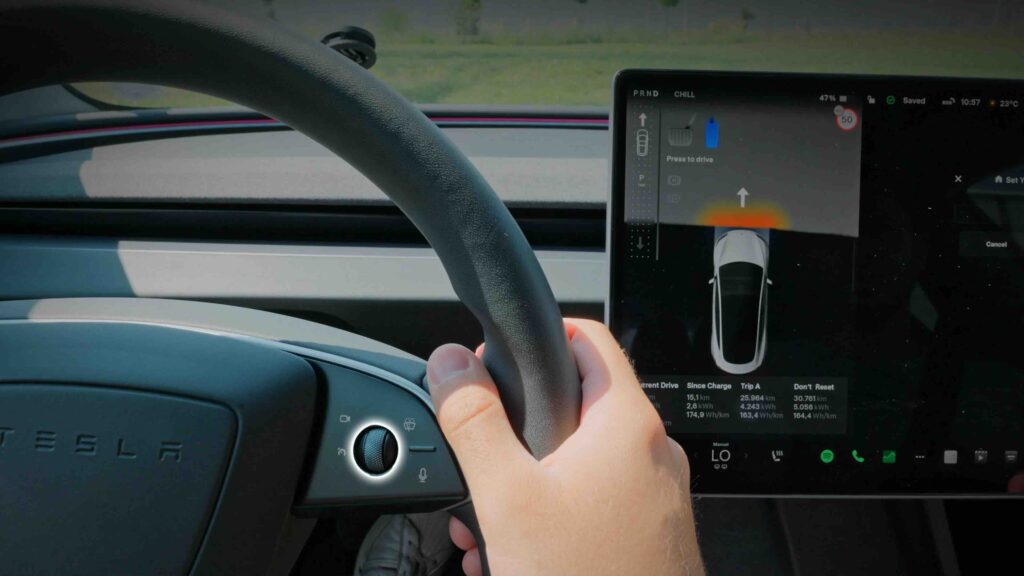
Why Is Your Tesla Not Going Into Gear?
A Tesla may not shift into Drive or Reverse because one or more safety conditions required by the vehicle’s electronic control system have not been satisfied. Unlike vehicles with a conventional automatic transmission, Tesla models rely on sensors, software, electrical systems, and battery power to authorize gear selection. If the system detects an abnormal condition, it keeps the vehicle in Park to prevent unintended movement.
One of the most common causes is that the brake pedal is not being recognized. Tesla requires the brake pedal to be firmly pressed before shifting into Drive or Reverse. If the brake pedal position sensor fails or the pedal is not fully depressed, the vehicle may display messages such as “Press Brake to Shift” and refuse to change gears. Even though the pedal feels normal, a faulty sensor or communication issue can prevent the system from confirming driver input.
A temporary software or touchscreen malfunction can also interrupt the shifting process. Since Tesla integrates vehicle controls with its operating system, an unresponsive touchscreen, incomplete software initialization, or firmware bug may prevent the gear selector from responding correctly. These issues are more likely to occur immediately after a software update or after the vehicle wakes from Sleep Mode. In many situations, restarting the touchscreen or rebooting the vehicle restores normal operation.
A weak or failing 12V battery is another frequent reason a Tesla remains stuck in Park. Although the high-voltage battery powers the vehicle during driving, the 12V battery supplies electricity to essential control modules, sensors, relays, and electronic systems required before shifting is permitted. When the low-voltage battery begins to fail, drivers may notice warning messages, an unresponsive display, or intermittent electrical problems before the vehicle eventually refuses to enter Drive or Reverse.
Safety systems can also prevent shifting if the vehicle detects that a door is open, the driver’s seat is unoccupied, or another required condition has not been met. Tesla continuously monitors these inputs to reduce the risk of unintended vehicle movement. For example, opening the driver’s door while attempting to shift or failing to fasten the seat belt on some models may activate a safety lockout until the condition is corrected.
In less common cases, the issue originates from the high-voltage electrical system or another critical vehicle component. If Tesla detects a fault involving the battery management system, drive unit, or electronic control modules, it may intentionally disable Drive and Reverse to protect the vehicle from further damage. These faults are typically accompanied by warning messages such as “Shift Into Drive Failed”, “Vehicle May Not Restart”, or “Electrical System Unable to Support All Features.” When these alerts appear together, the vehicle usually requires professional diagnosis rather than additional troubleshooting.
How Do You Fix a Tesla That Won’t Shift Into Drive or Reverse?
You should verify the vehicle’s safety conditions before attempting more advanced troubleshooting. Many shifting problems occur because Tesla cannot confirm one or more requirements needed to leave Park. Make sure the driver’s door is fully closed, the key card or phone key is detected, the brake pedal is pressed firmly, and no obvious warning messages appear on the touchscreen or instrument cluster. If any of these conditions are missing, correcting them may immediately restore normal gear selection.
Restart the touchscreen if the display is frozen or responding slowly. A temporary software glitch can interrupt communication between the touchscreen and the vehicle’s control systems. On most Tesla models, you can restart the display by pressing and holding both steering wheel scroll buttons until the Tesla logo appears. Wait for the system to reboot completely before attempting to shift into Drive or Reverse again. This procedure does not erase personal settings and often resolves minor software issues.
Perform a full vehicle reboot if restarting the touchscreen does not solve the problem. Some electronic faults affect multiple vehicle modules rather than only the display. Park the vehicle safely, exit the car, close all doors, and wait several minutes for the vehicle to enter Sleep Mode. After waking the vehicle again, test whether it can shift normally. If the issue was caused by a temporary communication error between control modules, a complete reboot may clear the fault.
Review every warning message before attempting additional troubleshooting. Tesla provides diagnostic alerts that help identify the source of the problem. Messages such as “Press Brake to Shift” usually indicate an input issue, while “Low Voltage Battery Requires Service” points to a failing 12V battery. Warnings such as “Vehicle May Not Restart” or “Electrical System Unable to Support All Features” often indicate a more serious electrical problem that requires professional diagnosis. Recording these messages or taking a photo can also help Tesla technicians identify the fault more quickly.
Check for signs of a weak 12V battery if electrical systems behave abnormally. A failing low-voltage battery may cause the touchscreen to reboot unexpectedly, windows to respond slowly, warning lights to appear intermittently, or the vehicle to refuse shifting entirely. Tesla vehicles depend on the 12V battery to power control modules before the high-voltage battery becomes fully active. Replacing a deteriorated 12V battery often resolves persistent electronic issues, especially on older vehicles.
Install any available software updates after the vehicle becomes operational. Tesla regularly releases firmware updates that improve system stability, correct software bugs, and address known operational issues. If the vehicle begins shifting normally after a reboot but continues to experience intermittent problems, checking for pending updates through the touchscreen or Tesla mobile app is a recommended preventive step.
Contact Tesla Service if the vehicle still cannot shift after completing these checks. Continuing to force troubleshooting when the vehicle displays critical electrical warnings or repeatedly refuses to enter Drive or Reverse may increase the risk of further damage. Tesla technicians can access diagnostic logs, perform hardware testing, and determine whether the problem involves the battery, drive unit, electronic control modules, or another component that cannot be diagnosed from the driver’s interface.
What Do Common Tesla Warning Messages Mean?
Tesla warning messages help identify why the vehicle cannot shift into Drive or Reverse and should always be checked before attempting additional troubleshooting. Each alert corresponds to a specific system or safety condition. Understanding these messages allows you to determine whether the issue is a simple operational error or a fault that requires professional service.
Press Brake to Shift
“Press Brake to Shift” means the vehicle cannot confirm that the brake pedal is being pressed. In most cases, the driver is either not applying enough pressure or the brake pedal position sensor is not sending the correct signal. The message may also appear if the brake switch, wiring, or related electronic control module is malfunctioning. Begin by pressing the brake pedal firmly with your foot while attempting to shift again. If the message remains after restarting the vehicle, the brake sensor or electrical system should be inspected.
Shift Into Drive Failed
“Shift Into Drive Failed” indicates that Tesla attempted to engage Drive but one or more safety or control systems prevented the operation. This warning commonly appears after a software malfunction, communication error between electronic control modules, or a fault involving the drive unit. If the message appears only once, restarting the vehicle may resolve the issue. However, if it returns repeatedly or is accompanied by additional warnings, the vehicle should not be driven until Tesla Service performs a diagnostic inspection.
Vehicle May Not Restart
“Vehicle May Not Restart” is one of the most important warnings because it often points to a deteriorating low-voltage battery or an electrical system fault. Although the vehicle may still be operational for a short period, restarting it after parking may become impossible. Drivers should avoid turning the vehicle off unnecessarily and schedule service as soon as possible. Continuing to operate the vehicle after this warning increases the risk of becoming stranded.
Low Voltage Battery Requires Service
“Low Voltage Battery Requires Service” means the 12V battery has reached the end of its service life or is no longer providing stable voltage to the vehicle’s electronic systems. Because Tesla relies on this battery to power computers, relays, safety systems, and gear selection controls, a failing 12V battery can cause the vehicle to remain stuck in Park. Replacing the battery promptly usually restores reliable operation and prevents additional electrical faults.
Electrical System Unable to Support All Features
“Electrical System Unable to Support All Features” indicates that the vehicle is limiting certain functions because electrical power is insufficient or an abnormal voltage condition has been detected. Drivers may notice that climate control, infotainment features, or charging functions become unavailable before shifting is also affected. This warning frequently appears alongside other electrical alerts and should be treated as a sign of a more serious problem involving the 12V battery, DC-DC converter, or another power management component. Professional diagnosis is recommended instead of continued troubleshooting.
When Should You Stop Troubleshooting and Call Tesla Service?
You should stop troubleshooting once the problem appears to involve the vehicle’s electrical or drive systems rather than a temporary software or operating issue. Restarting the touchscreen, rebooting the vehicle, and verifying the basic shifting requirements are reasonable first steps. If the Tesla still refuses to enter Drive or Reverse after these checks, further attempts are unlikely to resolve the underlying fault and may delay necessary repairs.
Contact Tesla Service immediately if the vehicle remains stuck in Park after multiple restart attempts. A persistent shifting failure usually indicates a problem that cannot be corrected through the driver interface. Potential causes include a defective brake pedal sensor, a failed electronic control module, a malfunctioning gear selection system, or an issue with the drive unit. These components require specialized diagnostic equipment that is only available through Tesla Service.
Multiple warning messages appearing simultaneously are another sign that professional diagnosis is required. Alerts such as “Shift Into Drive Failed,” “Vehicle May Not Restart,” and “Electrical System Unable to Support All Features” often indicate that more than one electronic system has been affected. Rather than representing separate problems, these warnings frequently stem from a single electrical fault that causes multiple vehicle modules to lose communication or operate outside their normal voltage range.
Do not continue driving if the vehicle reports a high-voltage or critical electrical system fault. Tesla continuously monitors the battery pack, drive unit, inverter, and battery management system. When one of these components experiences an abnormal condition, the vehicle may disable Drive or Reverse to protect both the occupants and the electrical system. Ignoring these warnings increases the risk of additional component damage or an unexpected vehicle shutdown.
A failing 12V battery should also be serviced as soon as warning messages appear. Although some drivers continue using the vehicle for several days after receiving a low-voltage battery alert, battery performance can deteriorate rapidly. Once the 12V battery can no longer supply stable power to the vehicle’s control modules, the Tesla may fail to unlock, start, charge, or shift into gear. Replacing the battery before complete failure is significantly more convenient than waiting until the vehicle becomes immobilized.
Use Tesla Roadside Assistance if the vehicle cannot be shifted safely or displays critical safety warnings. Attempting to tow or move a Tesla incorrectly can damage the electric drive unit because most models are not designed to roll freely without following Tesla’s transport procedures. If the vehicle cannot enter Transport Mode or remains completely unresponsive, requesting Tesla Roadside Assistance is the safest option to prevent additional mechanical or electrical damage.
Related Causes and Prevention
Can a Dead 12V Battery Stop a Tesla From Shifting?
Yes, a dead or failing 12V battery can prevent a Tesla from shifting into Drive or Reverse. Although Tesla vehicles are powered by a high-voltage battery pack, the 12V battery supplies electricity to essential systems during startup, including electronic control modules, relays, sensors, and the gear selection system. If the low-voltage battery cannot maintain stable voltage, the vehicle may remain locked in Park even when the high-voltage battery is fully charged.
A failing 12V battery rarely stops working without warning. Most drivers notice symptoms such as repeated touchscreen reboots, slow window operation, intermittent warning messages, key recognition issues, or alerts indicating that the low-voltage battery requires service. Addressing these symptoms early reduces the risk of becoming stranded and helps prevent unexpected shifting failures.
Can a Software Update Cause Tesla Shifting Problems?
A software update can temporarily affect Tesla’s shifting system, but permanent problems caused by firmware updates are uncommon. During or immediately after an update, vehicle modules must synchronize with the latest software version. If the update is interrupted or one control module fails to initialize correctly, the vehicle may temporarily refuse to shift into Drive or Reverse.
Most update-related issues disappear after restarting the touchscreen or allowing the vehicle to complete another sleep-and-wake cycle. If shifting problems begin immediately after installing new firmware and continue for more than one restart, check whether Tesla has released a follow-up software update or contact Tesla Service to determine whether the issue is related to the latest firmware version.
Does Cold Weather Affect Tesla Gear Selection?
Cold weather can indirectly affect gear selection by reducing battery performance and slowing electronic system initialization. Low temperatures decrease the efficiency of both the high-voltage battery and the 12V battery, which can delay system checks performed before the vehicle leaves Park. Drivers may also experience reduced regenerative braking, slower touchscreen responsiveness, and temporary system warnings while the battery warms to its normal operating temperature.
Tesla automatically conditions the battery pack in cold environments, but extremely low temperatures may require additional time before all vehicle systems function normally. If the vehicle shifts correctly after preconditioning or warming up, the issue is likely related to temperature rather than a hardware failure.
How Can You Prevent Tesla Shifting Problems?
Regular maintenance and early attention to warning messages are the most effective ways to prevent shifting issues. Although Tesla vehicles require less routine maintenance than conventional gasoline cars, their electronic systems still depend on healthy batteries, updated software, and properly functioning sensors.
Replace the 12V battery when Tesla recommends service or when warning messages appear instead of waiting for complete failure. Install firmware updates promptly because many releases include stability improvements and bug fixes for vehicle control systems. Keep the touchscreen responsive by allowing software updates to finish completely before driving, and avoid ignoring recurring electrical warnings even if the vehicle appears to operate normally.
If your Tesla begins displaying intermittent shifting problems, random electrical alerts, or repeated reboot cycles, schedule a service appointment before the condition worsens. Diagnosing a minor electrical issue early is usually faster and less expensive than repairing multiple components after a complete system failure.
Conclusion
A Tesla that won’t go into gear is usually the result of an electronic control issue rather than a mechanical transmission failure. In many cases, the problem can be traced to a weak 12V battery, a temporary software glitch, an undetected brake pedal input, or a safety lockout designed to protect the vehicle. Performing basic troubleshooting—such as verifying shifting requirements, restarting the touchscreen, checking warning messages, and inspecting the low-voltage battery—can often identify or even resolve the issue without major repairs.
If your Tesla continues to refuse shifting into Drive or Reverse after these steps, or if critical warnings such as “Shift Into Drive Failed” or “Vehicle May Not Restart” appear, professional diagnosis is the safest course of action. Addressing electrical or software-related faults early can help prevent unexpected breakdowns and reduce the risk of more expensive repairs.
For long-term reliability, keep your Tesla’s software up to date, replace the 12V battery when recommended, and never ignore recurring warning messages. Staying proactive with maintenance and responding quickly to early symptoms will help ensure your Tesla remains safe, dependable, and ready to drive whenever you need it.