Modern drivers expect seamless smartphone integration, real-time navigation, hands-free communication, and easy access to their favorite apps while on the road. If you own a Subaru and your infotainment system lacks Android Auto support, you may feel frustrated by outdated technology that limits convenience and connectivity. Whether you are driving an older Outback, Forester, Crosstrek, Legacy, or Impreza, upgrading to Android Auto can significantly improve your driving experience.
A Subaru Android Auto upgrade allows you to access Google Maps, Spotify, Google Assistant, messaging apps, and other essential smartphone features directly from your vehicle’s touchscreen. This not only makes daily commutes more enjoyable but also helps reduce distractions by enabling voice-controlled operation and simplified access to important functions.
However, many Subaru owners are unsure whether their vehicle is compatible with Android Auto, what upgrade options are available, or how much the process will cost. Some models can be upgraded through a simple software update, while others may require replacing the factory head unit with an OEM or aftermarket solution.
In this complete step-by-step guide, you’ll learn how to determine compatibility, choose the best upgrade method, install Android Auto successfully, estimate upgrade costs, and troubleshoot common issues. By the end, you’ll have everything you need to bring modern smartphone connectivity to your Subaru.
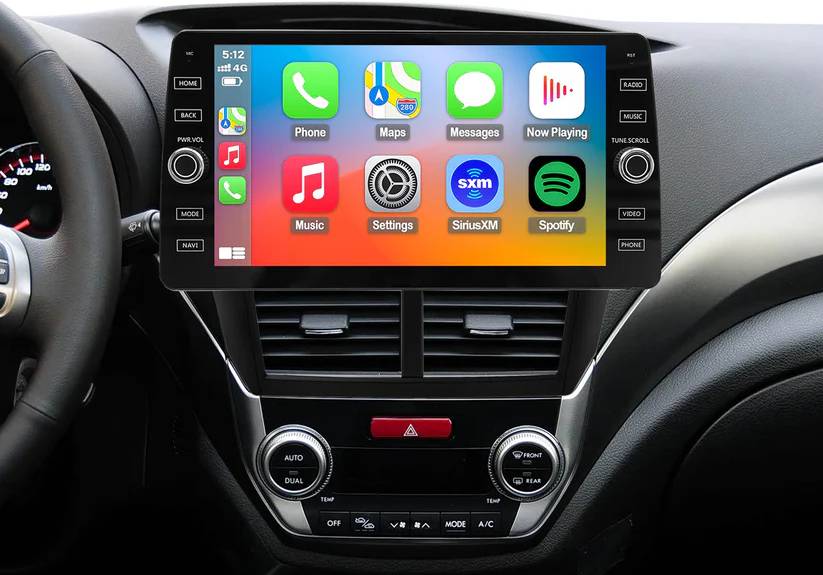
What Is Android Auto and Why Upgrade Your Subaru?
Android Auto is Google’s in car smartphone integration platform designed to bring essential mobile applications directly to your vehicle’s infotainment screen. Once connected, drivers can access navigation, music streaming, phone calls, messaging, and voice commands without constantly reaching for their phones.
One of the biggest advantages of Android Auto is its ability to provide real time navigation through Google Maps. Unlike traditional built in navigation systems, Google Maps continuously updates traffic conditions, road closures, and alternative routes, helping drivers reach their destinations more efficiently.
Voice control is another major benefit. Using Google Assistant, Subaru owners can send messages, make calls, play music, check weather conditions, or search for nearby locations while keeping their hands on the wheel and eyes on the road. This significantly improves safety and convenience during daily commutes and long road trips.
Many older Subaru models were released before Android Auto became a standard feature. As a result, owners often struggle with outdated infotainment systems that offer limited connectivity and fewer modern features. Upgrading to Android Auto can breathe new life into your vehicle without requiring the purchase of a newer car.
In addition to enhancing the driving experience, a Subaru Android Auto upgrade can improve the resale appeal of your vehicle. Buyers increasingly expect modern connectivity features, making Android Auto a valuable addition that can help your Subaru remain competitive in the used car market.
Which Subaru Models Support Android Auto Upgrades?
Before beginning any upgrade, it is important to determine whether your Subaru can support Android Auto through a software update or whether additional hardware will be required.
Many newer Subaru vehicles already include Android Auto support or can gain compatibility through official software updates. Models commonly associated with Android Auto compatibility include the Subaru Outback, Forester, Crosstrek, Legacy, Ascent, WRX, and Impreza. Compatibility may vary depending on trim level, infotainment system, and model year.
Owners of older Subaru vehicles may face additional challenges. Vehicles produced before widespread Android Auto adoption often rely on earlier STARLINK infotainment systems that lack the hardware necessary to run Android Auto. In these cases, replacing the factory head unit is typically the most effective solution.
To verify compatibility, start by accessing your infotainment system settings and locating the software version information. Record the head unit model number and current firmware version. You can then compare this information with Subaru documentation or consult a local Subaru dealership to determine whether an official update is available.
Another useful approach is checking the owner’s manual or visiting Subaru’s support resources. Understanding your vehicle’s current capabilities before purchasing equipment or scheduling installation can save both time and money.
Subaru Android Auto Upgrade Options
Once compatibility has been confirmed, Subaru owners generally have three upgrade paths available.
The first option is a software update. This is often the simplest and least expensive solution. If your existing infotainment hardware already supports Android Auto but requires updated firmware, a dealer installed or manufacturer supplied software update may unlock the feature. This approach preserves the factory appearance and functionality of the vehicle while minimizing installation complexity.
The second option involves replacing the original infotainment system with a newer OEM Subaru head unit. This method provides a factory integrated solution and often delivers excellent compatibility with vehicle controls, steering wheel buttons, backup cameras, and other built in systems. However, OEM upgrades can be relatively expensive and may require professional installation.
The third and often most popular option for older Subaru models is installing an aftermarket Android Auto head unit. Leading manufacturers such as Pioneer, Kenwood, Sony, and Alpine offer advanced multimedia receivers with wired and wireless Android Auto support. These systems frequently include larger touchscreens, improved audio quality, faster processing speeds, and additional features that exceed the capabilities of many factory systems.
When choosing between these options, consider your budget, vehicle age, desired features, and installation experience. For newer Subaru models, a software update may be all that is needed. For older vehicles, an aftermarket upgrade often delivers the best balance of performance, flexibility, and value.
Step by Step Subaru Android Auto Upgrade Process
Successfully upgrading your Subaru to Android Auto begins with proper preparation. Taking the time to verify compatibility and gather the necessary information can prevent costly mistakes and ensure a smooth installation process.
The first step is identifying your current infotainment system. Navigate to the settings menu on your Subaru’s display and locate the software or system information section. Record the software version, hardware model number, and any STARLINK details available. This information will help determine whether a software update can enable Android Auto or if a hardware replacement is required.
Next, verify Android Auto compatibility. Check Subaru documentation, dealership resources, or manufacturer support pages to confirm whether your specific model year and trim level support Android Auto upgrades. Compatibility varies significantly between vehicles, so this step should never be skipped.
Before making any changes, back up important settings. Save radio presets, paired Bluetooth devices, navigation preferences, and user profiles whenever possible. Some upgrades may reset the infotainment system and erase stored settings.
If your Subaru supports Android Auto through a firmware update, download the latest software according to Subaru’s instructions. In many cases, the update file can be transferred to a USB drive and installed through the vehicle’s infotainment system. During installation, keep the vehicle running or connected to a stable power source to avoid interruptions that could corrupt the software.
For vehicles requiring a head unit replacement, begin by disconnecting the battery to protect sensitive electronics. Carefully remove dashboard trim panels using non marring trim tools. Remove the factory radio and disconnect all wiring harnesses. Install the new Android Auto compatible head unit using the appropriate mounting kit and vehicle specific wiring adapters. Connect all cables securely before reassembling the dashboard.
Once installation is complete, reconnect the battery and power on the system. Connect your Android smartphone using a high quality USB cable or configure wireless Android Auto if supported. Follow the on screen prompts, grant necessary permissions, and complete the setup process. After installation, test navigation, voice commands, music playback, phone calls, and steering wheel controls to ensure everything functions correctly.
Subaru Android Auto Upgrade Costs
One of the most common questions Subaru owners ask is how much an Android Auto upgrade will cost. The answer depends on the upgrade method selected and the vehicle’s existing hardware.
If Android Auto can be enabled through a software update, costs are usually minimal. Some updates may be available at no charge during routine service visits, while others may involve diagnostic or installation fees. In most cases, software based upgrades represent the most affordable solution.
OEM head unit upgrades are generally more expensive. The cost includes the replacement infotainment system, programming, installation labor, and any necessary vehicle integration components. Depending on the model and dealership rates, expenses can increase significantly, making this option best suited for owners who prefer factory equipment and seamless integration.
Aftermarket upgrades offer a wide range of pricing options. Entry level Android Auto receivers are relatively affordable, while premium models with larger displays, wireless connectivity, advanced audio processing, and high resolution screens can command higher prices. Additional expenses may include installation kits, wiring harness adapters, backup camera integration modules, and professional installation services.
Vehicle owners who perform the installation themselves can save a substantial amount on labor costs. However, DIY installation requires confidence in working with automotive electronics and dashboard components. Improper installation can lead to connectivity issues, electrical problems, or damage to interior trim.
When evaluating upgrade costs, it is important to consider long term value rather than focusing solely on initial expenses. A properly installed Android Auto system can improve daily usability, enhance safety, increase driving enjoyment, and potentially boost resale appeal.
Common Subaru Android Auto Upgrade Problems and Solutions
Although Android Auto upgrades are generally reliable, some users encounter issues during installation or daily use. Understanding common problems and their solutions can help minimize frustration and keep the system operating smoothly.
One of the most frequent complaints involves Android Auto failing to connect. This issue is often caused by low quality USB cables, outdated smartphone software, damaged USB ports, or incorrect connection settings. Using a certified cable and ensuring both the phone and infotainment system are fully updated can resolve many connection problems.
Touchscreen responsiveness issues occasionally occur after software updates or hardware replacements. If the display becomes slow, freezes, or fails to register inputs accurately, restarting the infotainment system may help. In more persistent cases, installing updated firmware or performing a factory reset can restore normal operation.
Audio related problems are another common concern. Drivers may experience missing sound, poor audio quality, or interruptions during music playback. Checking volume settings, verifying audio source selection, and updating system software often correct these issues. If an aftermarket unit is installed, confirming proper amplifier and speaker connections is also essential.
Wireless Android Auto users sometimes report random disconnections while driving. Interference from other wireless devices, outdated firmware, weak Bluetooth connections, or smartphone power management settings can contribute to instability. Re pairing the device, updating firmware, and disabling aggressive battery optimization settings on the phone frequently improve performance.
In rare situations, steering wheel controls, backup cameras, or vehicle information displays may not function properly after a head unit replacement. These issues are usually related to installation errors or incompatible integration modules. Reviewing wiring connections and confirming compatibility between the vehicle and aftermarket components can often resolve these concerns.
Regular software updates, quality installation practices, and the use of reliable hardware remain the best strategies for preventing most Android Auto related problems and ensuring a smooth user experience for years to come.
OEM vs Aftermarket Subaru Android Auto Upgrade
Choosing between an OEM upgrade and an aftermarket Android Auto solution is one of the most important decisions Subaru owners face during the upgrade process. Each option offers distinct advantages and potential drawbacks, making it essential to evaluate your priorities before investing in new hardware.
An OEM upgrade refers to installing a genuine Subaru infotainment system designed specifically for your vehicle. This approach typically provides the most seamless integration with factory features, including steering wheel controls, vehicle settings, backup cameras, and dashboard displays. Because the system is engineered by Subaru, owners often enjoy a consistent user experience that matches the original design of the vehicle.
Another advantage of OEM solutions is long term reliability. Factory equipment is tested to meet manufacturer standards and is generally supported through dealership service networks. For drivers who value maintaining the original appearance and functionality of their Subaru, an OEM upgrade can be an attractive option.
However, OEM upgrades often come with higher costs. Parts can be expensive, availability may be limited for older vehicles, and professional installation is frequently required. In some cases, the performance and features of OEM systems may lag behind modern aftermarket alternatives.
Aftermarket Android Auto head units offer a different set of benefits. Brands such as Pioneer, Kenwood, Sony, and Alpine have developed advanced multimedia systems that often exceed factory specifications. Many aftermarket units feature larger touchscreens, faster processors, higher resolution displays, enhanced audio capabilities, wireless Android Auto support, and customizable interfaces.
For owners of older Subaru models, aftermarket solutions are often the most practical path to Android Auto compatibility. These systems can dramatically modernize the vehicle’s interior and provide access to the latest connectivity features without requiring a new car purchase.
The primary downside of aftermarket installations is complexity. Vehicle specific adapters, mounting kits, and integration modules may be necessary to retain factory functions. Installation quality also plays a significant role in system performance. Poor wiring or incompatible components can lead to connectivity issues or the loss of certain vehicle features.
Ultimately, the best choice depends on your goals. If maintaining factory appearance and integration is your top priority, an OEM upgrade may be worth the investment. If you want maximum functionality, modern features, and greater value for money, an aftermarket Android Auto system is often the better solution.
Conclusion
Upgrading your Subaru with Android Auto is one of the most effective ways to modernize your driving experience and improve daily convenience. Whether you rely on Google Maps for navigation, enjoy streaming music during long trips, or want hands free access to calls and messages, Android Auto brings powerful smartphone functionality directly to your vehicle’s dashboard.
The first step in any Subaru Android Auto upgrade is determining compatibility. Some newer Subaru models can gain Android Auto functionality through a simple software update, while older vehicles may require an OEM replacement unit or a complete aftermarket head unit installation. Understanding your vehicle’s capabilities before purchasing components can save both time and money.
For drivers seeking the most affordable solution, checking for available software updates should always be the starting point. Owners of older Subaru models will often achieve the best results through aftermarket upgrades, which provide advanced features such as wireless Android Auto, larger displays, and enhanced multimedia performance.
While installation costs and complexity can vary, the long term benefits are substantial. Improved navigation, safer communication, better entertainment options, and enhanced vehicle value make Android Auto one of the most worthwhile technology upgrades available for Subaru owners.
By following the steps outlined in this guide, you can confidently choose the right upgrade path and enjoy a more connected, convenient, and enjoyable driving experience. Whether you drive a Forester, Outback, Crosstrek, Legacy, WRX, Impreza, or Ascent, the right Subaru Android Auto upgrade can transform the way you interact with your vehicle every time you get behind the wheel.
Have you completed a Subaru Android Auto upgrade or are you planning one soon? Share your experience, vehicle model, and upgrade method to help other Subaru owners make the best decision for their needs.