A Mazda screen not working can quickly turn a normal drive into a frustrating experience. The center display controls navigation, entertainment, smartphone connectivity, vehicle settings, and even important driving features on many Mazda models. When the screen suddenly turns black, freezes on the startup logo, or stops responding to touch, many owners immediately assume the entire infotainment system has failed. Fortunately, that is not always the case.
In many situations, the problem is caused by something much simpler than a damaged display. A temporary software glitch, low battery voltage, an incorrect display setting, or a blown fuse can all prevent the screen from working properly. Even a recent battery replacement or an outdated version of Mazda Connect may trigger unexpected display issues. Understanding the root cause before replacing expensive components can save both time and money while preventing unnecessary repairs.
This guide explains the 10 most common reasons a Mazda screen is not working and provides practical solutions that you can try before scheduling a service appointment. You will also learn how to identify the difference between software related issues and hardware failures, when a simple restart may solve the problem, and when professional diagnosis becomes necessary. By following the troubleshooting steps in the correct order, you can narrow down the cause efficiently and make informed decisions about the next step for your vehicle.
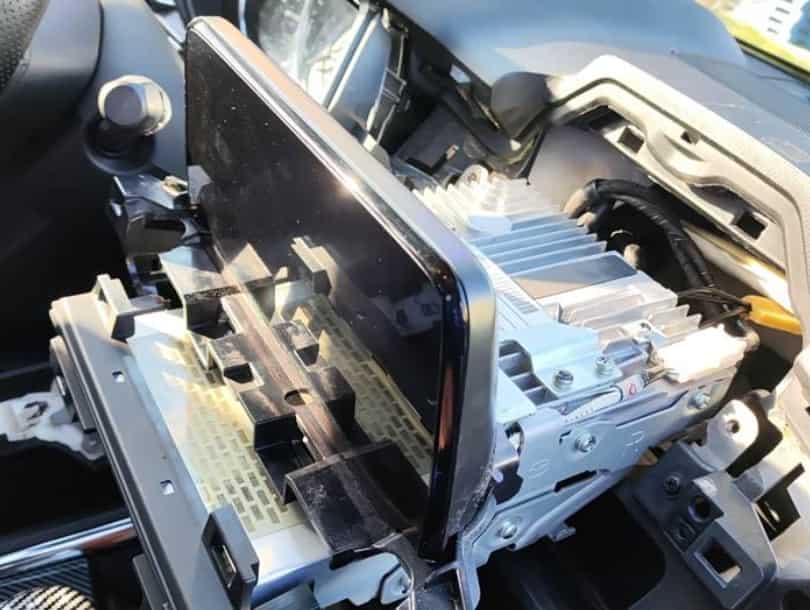
Mazda Screen Problems and Their Most Likely Causes
Before attempting any repair, it is important to identify the exact symptom your vehicle is showing. A black screen, a frozen display, or an unresponsive touchscreen may look similar at first, but each symptom often points to a different underlying problem. Starting with the correct diagnosis helps eliminate unnecessary repairs and allows you to focus on the most likely cause first. The table below provides a quick overview of common Mazda screen problems and the first action you should take before moving on to more advanced troubleshooting.
| Symptom | Most Likely Cause | First Action |
|---|---|---|
| Screen is completely black | Display setting, power interruption, or software crash | Restart the infotainment system and check display settings |
| Radio works but screen is black | Display disabled or screen hardware issue | Turn the display back on and restart the vehicle |
| Screen freezes on the Mazda logo | Mazda Connect software problem | Restart the system and check for software updates |
| Touchscreen does not respond | Software error or touchscreen malfunction | Clean the screen and restart Mazda Connect |
| Screen keeps restarting | Weak battery or firmware issue | Test the battery and inspect the charging system |
| Screen stopped working after battery replacement | Voltage interruption or initialization issue | Check battery connections and restart the system |
| Backup camera appears but menus do not | Mazda Connect software issue | Restart the infotainment system |
| Screen flickers while driving | Loose wiring or unstable power supply | Inspect the battery and electrical connections |
The Display Was Accidentally Turned Off
One of the most overlooked reasons a Mazda screen not working is that the display has simply been turned off. Many Mazda owners are unaware that Mazda Connect includes a feature that allows the center display to be disabled manually. As a result, the radio, Bluetooth connection, and other audio functions may continue working normally while the screen remains completely black. This often leads drivers to believe the display has failed when the system itself is still operating correctly.
Before assuming a major fault, begin with the simplest checks. Start the vehicle and press the volume or power control to see whether the display wakes up. Depending on your Mazda model and infotainment version, you may also be able to reactivate the display through the Commander Control or by accessing the display settings menu. If the screen immediately returns, there is no hardware failure and no repair is required.
It is also worth remembering that some display settings can be changed accidentally while adjusting other infotainment options. A family member, another driver, or even an unintended button press may disable the screen without anyone realizing it. Spending a few minutes reviewing the display settings can prevent an unnecessary visit to the repair shop and save the cost of diagnostics.
If the display remains black after confirming it has not been switched off, the issue is likely related to power delivery, software, or internal hardware. In that case, continue with the next troubleshooting step to narrow down the actual cause before considering expensive repairs.
Mazda Connect Has Frozen or Crashed
Like any modern computer, the Mazda Connect infotainment system can occasionally freeze or stop responding because of a temporary software error. When this happens, the display may remain stuck on the Mazda logo, turn completely black, respond very slowly, or ignore every touch and controller input. In some cases, the audio continues to play while the screen remains unusable. In other situations, every infotainment function becomes unavailable until the system recovers.
A software crash often occurs unexpectedly. It may happen immediately after starting the vehicle, while switching between navigation and media, or after connecting a smartphone through Apple CarPlay or Android Auto. Although these symptoms can appear serious, they do not automatically mean the display or the infotainment unit has failed. Many temporary software issues disappear after the system is restarted correctly.
Begin by parking the vehicle safely and turning the engine off completely. Wait for the infotainment system to shut down before restarting the vehicle. If the display loads normally, monitor its performance over the next few drives. Should the problem continue, check whether your Mazda Connect software is running the latest version recommended for your specific model. Updated software often resolves stability issues, improves system performance, and fixes known bugs that may cause freezing or repeated crashes.
If the screen continues to freeze after multiple restarts, the software may no longer be the only problem. Persistent freezing can also indicate unstable battery voltage, corrupted firmware, or an internal hardware fault. At this point, continue with the next diagnostic step instead of replacing expensive components based only on the symptoms.
The Battery Voltage Is Too Low
Many drivers do not realize that the infotainment system depends on a stable electrical supply to operate correctly. Even if the engine starts without difficulty, a weak or aging battery may not provide consistent voltage during startup. As a result, the display can remain black, restart repeatedly, freeze during boot, or behave unpredictably throughout the drive.
Battery related issues become more common during cold weather or after the vehicle has been parked for an extended period. A battery that is nearing the end of its service life may still have enough power to crank the engine while struggling to support sensitive electronic systems. Modern infotainment units require stable voltage during the startup process, and even a brief drop can interrupt normal operation.
Look for additional warning signs before assuming the screen itself has failed. Slow engine cranking, dim headlights, flickering interior lights, or repeated low battery warnings often point to an electrical issue rather than a defective display. If several electronic features begin acting strangely at the same time, the battery should become one of the first components to inspect.
Testing the battery is usually faster and less expensive than replacing infotainment hardware. Most automotive repair shops can measure battery health and charging performance within a few minutes. If the battery no longer meets the required specifications, replacing it may restore normal operation without any additional repairs. Confirming battery condition early in the diagnostic process can prevent unnecessary spending and eliminate one of the most common causes of a Mazda screen not working.
The Screen Stopped Working After Battery Replacement
Many Mazda owners are surprised when the infotainment display stops working immediately after installing a new battery. Although this situation can be alarming, the new battery is not always the source of the problem. During battery replacement, the vehicle loses electrical power for a short period. This interruption can temporarily affect the Mazda Connect system and cause unexpected behavior when power is restored.
In some cases, the system requires a normal startup cycle before every module communicates correctly again. A loose battery terminal or an unstable electrical connection can also prevent the infotainment system from receiving consistent power. Even a small amount of movement at the battery terminals may create intermittent electrical problems that affect sensitive electronic components long before the engine shows any obvious symptoms.
Start by inspecting both battery terminals to ensure they are clean, secure, and free from corrosion. Verify that the battery was installed correctly and that all electrical connections are fully tightened. After confirming the installation, turn the vehicle off completely, wait several minutes, and restart the engine. This simple procedure may allow the infotainment system to initialize normally.
If the display remains black after these checks, avoid disconnecting and reconnecting the battery repeatedly. Repeated power interruptions may create additional electronic issues and make diagnosis more difficult. Instead, continue checking other possible causes such as fuses, software, and power supply before assuming the display or infotainment module has failed.
A Blown Fuse Is Interrupting Power
A blown fuse is another common reason a Mazda screen stops working without warning. The infotainment system relies on dedicated electrical circuits that are protected by fuses. If one of these fuses fails, the display may lose power completely while other vehicle functions continue operating normally. Because different Mazda models use different fuse layouts, locating the correct fuse requires checking the owner’s manual or the fuse diagram for your specific vehicle.
Before inspecting any fuse, switch off the engine and remove the ignition key if applicable. Open the appropriate fuse box and locate the fuse connected to the infotainment or audio system. Carefully remove the fuse and examine the metal strip inside. If the strip is broken or shows signs of burning, the fuse has likely failed and should be replaced with another fuse of the exact same amperage rating.
Never install a fuse with a higher amperage in an attempt to solve the problem. Doing so may allow excessive electrical current to flow through the circuit, increasing the risk of serious damage to the wiring or electronic components. The fuse is designed to protect the system, and replacing it with the wrong type defeats that protection.
If the replacement fuse blows again shortly after installation, the fuse itself is not the underlying problem. A recurring failure usually indicates a deeper electrical fault such as damaged wiring, a short circuit, or a malfunctioning infotainment component. At this stage, professional diagnosis is the safest approach because continuing to replace fuses without identifying the root cause can lead to more expensive repairs.
Mazda Connect Software or Firmware Is Outdated
Outdated software can cause many infotainment problems. If your Mazda screen suddenly freezes, turns black, or keeps restarting, the software may be responsible. Many drivers think the display has failed. However, software bugs often create the same symptoms.
Mazda regularly releases software updates to improve system stability and fix known issues. These updates can also improve compatibility with newer smartphones and navigation features. If your vehicle still uses an older software version, the infotainment system may become slow or unstable during normal use.
Check whether your Mazda has the latest software version for its model and year. You can ask an authorized Mazda dealer to verify the installed version and recommend available updates. This step usually takes much less time than replacing expensive hardware.
Avoid installing firmware from unofficial websites. Many files shared online are designed for different regions or vehicle models. Installing the wrong version can disable important functions and create new problems. Always use official software that matches your vehicle specifications.
If updating the software does not solve the problem, continue checking the remaining possible causes. This approach helps you identify the real fault before replacing any expensive parts.
Apple CarPlay or Android Auto Is Causing the Display Issue
Sometimes the display works perfectly until you connect your smartphone. If that happens, Apple CarPlay or Android Auto may be causing the problem instead of the infotainment screen itself.
Start by disconnecting your phone and restarting the vehicle. If the screen works normally afterward, reconnect the phone with a certified USB cable. A damaged cable can interrupt data transmission even though it still charges the device. This simple issue often causes random black screens or frozen displays.
Next, restart your smartphone and install the latest operating system updates. Outdated software on the phone can create compatibility problems with Mazda Connect. If the issue continues, test another compatible phone. This comparison helps determine whether the problem comes from the vehicle or the mobile device.
If several phones produce the same symptoms, the infotainment system likely needs further diagnosis. Continue checking the battery, software, and electrical system before replacing the display. A careful inspection usually saves both time and repair costs.
The Touchscreen or Display Surface Is Damaged
Physical damage can prevent your Mazda screen from working as expected. In some cases, the display still shows images, but the touchscreen no longer responds. Other drivers notice cracked glass, dark spots, colored lines, or random touches across the screen. These symptoms usually point to a damaged display panel or touch digitizer.
Start with a careful inspection of the screen. Look for impact marks, moisture, or visible cracks. Dirt rarely causes a complete touchscreen failure, but a clean surface improves visibility and helps you rule out simple issues. Wipe the display with a dry microfiber cloth and avoid applying liquid directly to the screen.
Next, test the Commander Control if your vehicle includes one. A working controller with an unresponsive touchscreen often indicates a failed touch layer. On the other hand, if neither control method works, another component may have caused the problem.
Professional testing provides the most reliable answer when physical damage is visible. Many repair shops can replace only the damaged display assembly instead of the complete infotainment unit. Confirm the exact fault before approving an expensive repair because the display is not always the failed component.
Wiring or Electrical Connections Are Loose
Electrical connections can loosen over time because of vibration, previous repairs, or aftermarket accessories. Even a slightly loose connector may interrupt power and create random display problems. As a result, the screen may work normally one day and fail the next.
Watch for patterns while driving. A screen that flickers on rough roads often points to an unstable electrical connection. Random restarts or brief black screens can also indicate poor contact inside the dashboard. These symptoms usually appear before the connection fails completely.
Aftermarket equipment deserves careful attention. Dash cameras, audio systems, GPS trackers, and charging accessories sometimes share electrical circuits with the infotainment system. Incorrect installation can create voltage fluctuations that affect the display.
Leave dashboard disassembly to an experienced technician unless you have the proper tools and knowledge. A professional can inspect every connector, verify the power supply, and test each ground connection without damaging nearby components. Finding the loose connection early often prevents more expensive repairs later.
The CMU or Display Hardware Has Failed
After eliminating every other possibility, focus on the Connectivity Master Unit, also known as the CMU. This module manages most Mazda Connect functions. A failing CMU can leave the screen black, freeze the startup process, or restart the system repeatedly.
Hardware problems usually become worse over time. At first, the screen may freeze only once in a while. Eventually, the failures become more frequent until the infotainment system stops working altogether. Many owners also lose Bluetooth, navigation, voice commands, and media functions during this stage.
Request a complete diagnostic inspection before replacing any major component. A qualified technician should test the battery, fuses, wiring, software, and display first. This process helps identify the real source of the problem and prevents unnecessary replacement costs.
Once the diagnosis confirms a faulty CMU, discuss every available repair option. Some repair specialists can restore the original module, while others may recommend a replacement unit. Comparing both solutions helps you balance repair costs, reliability, and long term performance.
How to Fix a Mazda Screen That Is Not Working
Fixing a Mazda screen does not always require expensive repairs. In many cases, a simple check can restore the display within a few minutes. Start with the easiest solutions before moving on to more advanced diagnostics. This approach saves time, reduces repair costs, and helps you avoid replacing parts that still work properly.
Step 1. Check the Display Settings
Begin by confirming that the display is turned on. Some Mazda models allow drivers to disable the center screen through the infotainment settings. The audio system may continue working even when the display remains black. Press the power or volume control and check the display menu if you can still access it through the Commander Control. If the screen turns back on, no further repair is necessary.
Step 2. Restart the Infotainment System
Temporary software errors can stop the display from loading correctly. Turn the engine off and wait until every electronic system shuts down. After a few minutes, restart the vehicle and check the screen again. A complete restart often clears temporary software glitches and restores normal operation.
Step 3. Disconnect External Devices
Remove every USB cable and disconnect your smartphone from the infotainment system. Next, restart the vehicle without any external device connected. If the screen works normally, reconnect one device at a time. This method helps identify whether Apple CarPlay, Android Auto, or another accessory is causing the problem.
Step 4. Test the Battery
A weak battery can interrupt the startup process even when the engine still starts normally. Inspect the battery terminals for corrosion or loose connections. Then measure the battery voltage or ask a repair shop to perform a battery health test. Replacing a worn battery often solves random infotainment problems without additional repairs.
Step 5. Inspect the Fuse
Locate the correct infotainment fuse by using the owner’s manual or the fuse box diagram for your Mazda model. Remove the fuse carefully and inspect the metal strip inside. Replace a damaged fuse with another fuse that has the same amperage rating. Stop the inspection if the replacement fuse blows again because another electrical fault is likely causing the failure.
Step 6. Check for Software Updates
Outdated software can reduce system stability and create display problems. Contact an authorized Mazda dealer to verify the current software version for your vehicle. Install only official updates that match your model and production year. Official software improves reliability and reduces the risk of compatibility issues.
Step 7. Schedule a Professional Inspection
Seek professional help if the display remains black after completing every previous step. Ask the technician to inspect the battery, wiring, software, display, and Connectivity Master Unit before replacing any major component. A complete diagnosis identifies the real cause of the problem and prevents unnecessary repair costs.
How Much Does It Cost to Fix a Mazda Screen?
The cost of fixing a Mazda screen depends on the actual cause of the problem. Some issues take only a few minutes to resolve and require no replacement parts. Others involve advanced diagnostics or hardware repairs that increase the total cost. For this reason, identifying the source of the failure should always come before replacing any component.
Simple problems usually cost the least. A software restart, correcting the display settings, or reconnecting a loose battery terminal may restore normal operation without any additional expense. Replacing a blown fuse or a damaged USB cable also costs far less than installing a new infotainment unit.
Electrical problems often require professional testing. A technician may inspect the battery, charging system, wiring, and power supply before recommending further repairs. Although this inspection adds a diagnostic fee, it helps prevent unnecessary replacement of expensive parts that still work correctly.
Hardware repairs usually represent the highest expense. A damaged display, faulty touch panel, or failed Connectivity Master Unit may require repair or replacement. The final price varies according to the vehicle model, production year, replacement parts, and local labor rates. For that reason, request a written estimate before approving any repair. Comparing several repair options can also help you find the best balance between cost, reliability, and warranty coverage.
| Repair Type | Repair Complexity | Suitable for DIY |
|---|---|---|
| Display settings adjustment | Very Low | Yes |
| Infotainment restart | Very Low | Yes |
| USB cable replacement | Low | Yes |
| Battery inspection | Low | Yes |
| Fuse replacement | Low | Yes |
| Software diagnosis | Moderate | No |
| Wiring repair | High | No |
| Display replacement | High | No |
| CMU repair or replacement | Very High | No |
When Should You Visit a Mazda Dealer or Repair Shop?
Basic troubleshooting solves many display problems, but some situations require professional equipment and technical experience. Continuing to drive with an unresolved electrical fault may create additional problems and increase repair costs over time.
Visit a qualified repair shop if the screen remains black after completing every troubleshooting step. You should also seek professional help when the display restarts repeatedly, freezes every time you start the vehicle, or fails without warning during normal driving. These symptoms often indicate a deeper electrical or hardware problem.
Additional warning signs deserve immediate attention. A replacement fuse that blows again usually points to a short circuit. A burning smell near the dashboard may indicate overheating electrical components. Water damage, visible cracks, or distorted images also require a detailed inspection because physical damage can affect more than one part of the infotainment system.
Before approving any repair, ask the technician to inspect the battery, charging system, wiring, software, display, and Connectivity Master Unit. Request a written diagnosis that explains the failed component and the recommended repair. This simple step helps you understand the problem and reduces the risk of paying for unnecessary replacement parts.
Choosing an experienced repair facility can save both time and money. A complete diagnosis often reveals a simple electrical or software issue that costs far less than replacing the entire infotainment system.
Does This Problem Affect All Mazda Models?
A Mazda screen can stop working on almost any model that uses the Mazda Connect infotainment system. However, the symptoms and repair process may vary depending on the model year and the software generation. Some vehicles experience temporary software issues, while others develop hardware or electrical problems after years of regular use.
Owners of the Mazda3, Mazda6, CX3, CX30, CX5, CX50, CX9, CX70, CX90, and MX5 Miata have reported problems such as black screens, frozen displays, random restarts, and unresponsive touch controls. Although the symptoms often look similar, the root cause may differ from one vehicle to another. Battery condition, software version, electrical connections, and driving history can all influence system performance.
Older Mazda models are more likely to develop wear related electrical issues. Newer vehicles often experience software or smartphone compatibility problems instead. Because every model uses different hardware and software configurations, avoid assuming that a repair method for one vehicle will work on another.
The safest approach is to diagnose the problem according to the symptoms rather than the vehicle model. A systematic inspection helps identify the real cause and prevents unnecessary repairs.
Frequently Asked Questions
Why is my Mazda screen black but the radio still works?
This symptom usually indicates that the infotainment system still has power. The display may be turned off, the software may have frozen, or the screen itself may have developed a fault. Start by checking the display settings and restarting the infotainment system before inspecting the battery or electrical components.
Can a weak battery cause a Mazda screen to stop working?
Yes. Modern infotainment systems rely on stable battery voltage. A weak battery may allow the engine to start while causing the display to freeze, restart, or remain black during startup. Testing the battery is one of the first diagnostic steps you should complete.
Why did my Mazda screen stop working after replacing the battery?
A battery replacement interrupts power to every electronic module in the vehicle. The infotainment system may need time to complete a normal startup cycle after power returns. Loose battery terminals or unstable voltage can also create temporary display problems.
Why does my Mazda screen keep restarting?
Several issues can cause repeated restarts. Common causes include low battery voltage, outdated software, loose wiring, or a failing Connectivity Master Unit. A complete diagnosis helps identify the exact source of the problem.
Should I replace the screen immediately?
No. Many display problems result from software issues, electrical faults, or battery problems. Confirm the exact cause before replacing expensive components. A professional inspection often saves money by identifying a simpler solution.
Final Thoughts
A Mazda screen not working does not always mean the infotainment system has failed. Many problems begin with simple issues such as incorrect display settings, outdated software, a weak battery, or a blown fuse. Checking these items first can save both time and repair costs.
If the basic inspections do not solve the problem, continue with a structured diagnosis. Inspect the electrical system, verify the software version, and test the display before considering a replacement. This step by step approach reduces guesswork and helps you avoid replacing parts that still function correctly.
Professional assistance becomes important when the screen remains black, restarts repeatedly, or shows signs of hardware failure. An experienced technician can identify the exact cause and recommend the most effective repair for your Mazda.
Have you experienced a Mazda screen problem recently? Share your Mazda model, model year, and the symptoms you noticed in the comments. Your experience may help other owners identify the cause more quickly and choose the right solution.