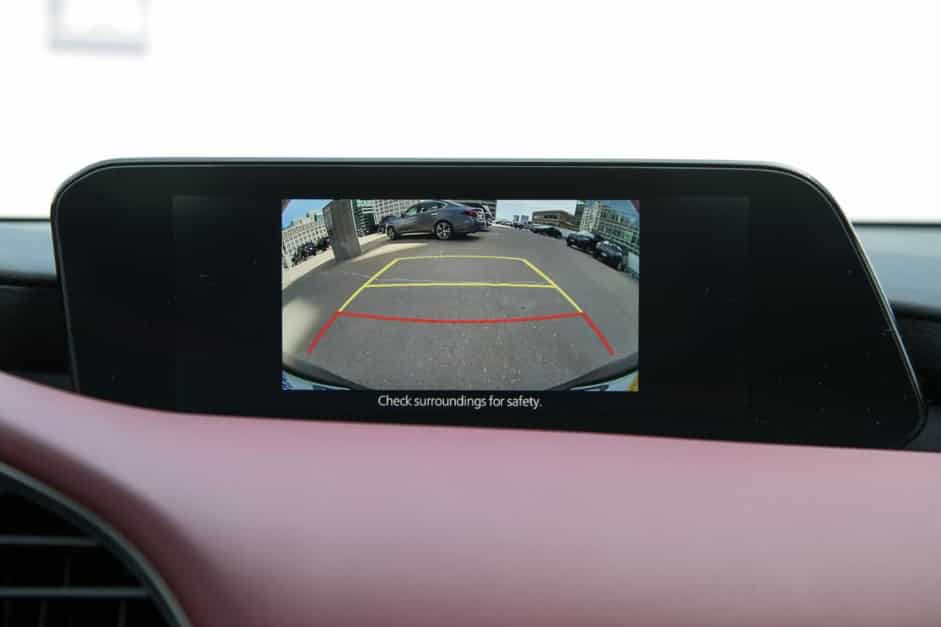
A backup camera has become one of the most valuable safety features in modern vehicles. It helps drivers reverse with greater confidence, avoid obstacles, and reduce the risk of accidents in crowded parking lots or narrow driveways. When the Mazda 3 backup camera not working issue suddenly appears, even a simple parking maneuver can become stressful. Instead of a clear rear view, you may see a black screen, a blurry image, an intermittent display, or no camera feed at all. These symptoms can make reversing more difficult and increase the chance of damaging your vehicle or missing objects that are difficult to see through mirrors alone.
The good news is that a backup camera failure does not always mean the camera itself has reached the end of its life. In many cases, the problem is caused by something much simpler, such as a dirty camera lens, a loose wiring connection, a blown fuse, low battery voltage, or a temporary software glitch within the infotainment system. Because several different components work together whenever you shift into reverse, identifying the true source of the problem is the first step toward an effective repair. Replacing parts without proper diagnosis often leads to unnecessary expenses and wasted time.
This guide explains the most common reasons why a Mazda 3 backup camera not working problem occurs across different model years. You will learn how to recognize specific symptoms, perform practical troubleshooting steps at home, determine when professional repairs are necessary, and understand the average repair or replacement costs. By following a logical diagnostic process, you can narrow down the cause of the malfunction and choose the most cost effective solution while restoring the reliability and safety of your Mazda 3.
Common Symptoms of a Mazda 3 Backup Camera Problem
Backup camera problems do not always look the same. Some drivers lose the camera image completely. Others experience problems only from time to time. The exact symptom often points to the real cause. For this reason, you should identify the symptom before replacing any parts. A careful inspection can save both time and repair costs. It also reduces the risk of replacing a component that still works properly.
The Infotainment Screen Stays Black in Reverse
A black screen is one of the most common backup camera problems. The infotainment display switches to the camera view, but no image appears. Sometimes the screen stays black for several seconds before returning to the previous display. This symptom often indicates a problem with the camera, its power supply, or the communication circuit. However, the infotainment unit can also cause the issue. If the screen freezes or restarts during normal driving, inspect the display system before replacing the camera.
The Camera Image Flickers or Appears Intermittently
A flickering image usually indicates an unstable electrical connection. The camera may work one moment and fail the next. Many owners notice the problem after opening or closing the trunk several times. The wiring harness bends whenever the trunk moves. Over time, repeated movement can damage the wires or loosen the connectors. Moisture inside the connector can create similar symptoms because corrosion interrupts the electrical signal. Early repairs often prevent more expensive electrical damage.
Why Is the Mazda 3 Backup Camera Not Working?
A backup camera depends on several electrical and electronic components. The camera, infotainment system, wiring, fuse, and reverse signal must all work together. If one part fails, the entire system may stop working. Some problems are easy to fix at home. Others require professional equipment and diagnosis. Understanding the possible causes helps you avoid unnecessary repairs and choose the right solution from the beginning.
Dirty or Blocked Camera Lens
A dirty camera lens is the simplest cause of poor image quality. Dust, mud, road salt, and water spots can cover the lens after daily driving. As a result, the image may look blurry or difficult to recognize. In some cases, the display may appear almost black at night because very little light reaches the camera sensor. Start by cleaning the lens with a soft microfiber cloth. Avoid using abrasive materials because they can scratch the protective surface and reduce image quality.
Loose or Damaged Wiring
The wiring harness is another common source of backup camera problems. Every time you open or close the trunk, the wires bend slightly. After years of repeated movement, the insulation may crack or the wires may break inside the protective sleeve. A loose connector can also interrupt the video signal. Drivers often notice that the camera works normally for a short time before the image suddenly disappears. If the display changes when the trunk moves, inspect the wiring before replacing the camera.
Blown Fuse
A blown fuse can stop the backup camera from receiving power. Although this problem is less common, it is easy to inspect. Locate the correct fuse by using the owner’s manual or the fuse diagram inside the vehicle. Remove the fuse and check whether the metal strip has broken. Replace it only with a fuse that has the same amperage rating. If the replacement fuse fails again, another electrical problem is likely causing the overload.
Faulty Backup Camera
The camera itself can fail after years of exposure to heat, vibration, moisture, and changing weather conditions. Water may enter the housing through a damaged seal and slowly damage the internal electronics. In many cases, the image becomes blurry before disappearing completely. Some cameras also produce random colors, distorted lines, or a frozen picture before they stop working. If power and wiring are in good condition, replacing the camera may become the most effective solution.
Infotainment System Software Problems
Software errors can also interrupt the camera display. The infotainment system may freeze, restart unexpectedly, or fail to switch to the rear camera view. This issue sometimes appears after a battery replacement or a temporary loss of power. Restarting the infotainment system may solve a minor software glitch. However, persistent problems may require a software update or professional diagnosis. Keeping the system software up to date also reduces the risk of future communication errors.
Low Battery Voltage
A weak battery can affect more than engine starting performance. Modern vehicles rely on stable voltage to operate electronic modules correctly. If the battery voltage drops too low, the backup camera may stop working or behave unpredictably. You may also notice slow engine cranking, warning lights, or infotainment problems. Testing the battery is a simple step that many owners overlook. Replacing an aging battery often restores normal operation to several electronic systems.
Moisture or Corroded Connectors
Water intrusion is another frequent cause of electrical failure. Rain, condensation, or improper washing can allow moisture to enter the camera connector. Corrosion then forms on the metal terminals and weakens the electrical connection. The camera may work on dry days but fail after heavy rain. Inspect every connector carefully for green or white corrosion. Cleaning or replacing a damaged connector often restores a stable signal.
Reverse Gear Signal Problems
The backup camera activates only after the vehicle detects reverse gear. If the reverse signal never reaches the infotainment system, the camera will not turn on. A faulty transmission range sensor or damaged wiring can interrupt this process. Check whether the reverse lights illuminate when the gear selector moves into reverse. If both the reverse lights and the camera fail at the same time, the reverse signal circuit deserves immediate attention.
Damaged Infotainment Display
Sometimes the camera works correctly, but the display cannot show the image. This problem usually affects more than one feature. You may notice that the touchscreen freezes, responds slowly, or restarts without warning. Audio controls or navigation functions may also stop working. These symptoms suggest that the infotainment unit needs further inspection. Replacing the camera alone will not solve the problem if the display hardware has already failed.
How to Fix a Mazda 3 Backup Camera Not Working
You can fix many backup camera problems without replacing expensive parts. Start with the simplest checks before moving to more advanced repairs. This approach saves time and reduces unnecessary costs. It also helps you identify the real cause of the problem instead of relying on guesswork.
First, inspect the camera lens. Dirt, road salt, water spots, and mud can block the lens and reduce image quality. Clean the surface with a soft microfiber cloth and test the camera again. If the display remains black, restart the infotainment system. A temporary software issue can sometimes prevent the camera from displaying the rear view.
Next, inspect the fuse that supplies power to the backup camera or infotainment system. Replace a blown fuse with one that has the correct amperage rating. If the new fuse fails immediately, stop using the system until you identify the electrical fault. After that, examine the wiring harness near the trunk. Repeated opening and closing can damage the wires over time. Look for loose connectors, cracked insulation, or signs of corrosion.
You should also check whether the reverse lights turn on when you shift into reverse. If they remain off, the vehicle may not detect the reverse gear correctly. This problem can prevent the backup camera from activating. Finally, test the battery because low voltage often affects electronic systems. If every component appears to work properly but the camera still fails, the camera module itself may have failed. At that point, replacing the camera or visiting a qualified technician is usually the most reliable solution.
How to Reset a Mazda 3 Backup Camera
Resetting the backup camera can solve minor software problems, but it will not repair damaged hardware. If the camera suddenly stops working after a battery replacement or a temporary power loss, a simple reset may restore normal operation. Before replacing any parts, try a few basic troubleshooting steps because they require very little time and cost nothing.
Start by turning off the engine and removing the key or key fob from the vehicle. Wait several minutes so the electronic control modules can shut down completely. Restart the vehicle and shift into reverse to check whether the camera image returns. This simple power cycle can clear temporary communication errors between the backup camera and the infotainment system.
If the problem continues, restart the infotainment system by following the procedure recommended for your Mazda 3 model year. Software updates and control systems may vary between different generations, so always follow the instructions in the owner’s manual. Using the correct reset method reduces the risk of changing other vehicle settings.
Some owners disconnect the battery for a short period to reset the electrical system. This method may clear temporary faults, but it can also erase saved settings or trigger warning lights. For that reason, it should only be used when you understand the possible effects.
If the backup camera still shows a black screen after completing these steps, the problem is probably not related to the software. Damaged wiring, a faulty camera module, corrosion, or an infotainment hardware failure are much more likely causes. In that situation, a detailed inspection or professional diagnosis will provide the most effective solution.
Mazda 3 Backup Camera Repair and Replacement Costs
The cost to repair a Mazda 3 backup camera depends on the source of the problem. A simple repair may cost very little, while a complete camera replacement or infotainment repair can be much more expensive. For this reason, you should identify the exact cause before buying new parts. An accurate diagnosis often saves money and prevents unnecessary repairs.
Cleaning the camera lens is usually the least expensive solution. Most owners can complete this task with basic cleaning supplies they already have at home. Replacing a blown fuse also costs very little and only takes a few minutes. If the problem involves damaged wiring or a corroded connector, repair costs usually increase because the technician must locate the fault before restoring the electrical connection.
A failed backup camera is more expensive to repair. The total price depends on your Mazda 3 model year, the type of replacement camera, and local labor rates. Original equipment cameras often cost more than aftermarket alternatives, but they usually provide better compatibility and image quality. Some replacement cameras also require programming or calibration after installation, which can increase the final repair bill.
Infotainment system repairs are normally the most expensive option. If the display or control module has failed, the repair may require specialized diagnostic equipment and additional labor. Although these repairs cost more, replacing the correct component is still less expensive than changing multiple parts without confirming the actual fault. A professional inspection helps you understand the condition of the entire system and choose the most cost effective repair for your Mazda 3.
Should You Repair or Replace the Backup Camera?
Choosing between repairing and replacing the backup camera depends on the actual cause of the problem. Many owners assume the camera has failed, but that is not always true. A damaged wire, loose connector, or blown fuse can produce the same symptoms as a faulty camera. Replacing the camera without checking these components may increase repair costs without solving the issue. A careful inspection helps you make the right decision and avoid unnecessary expenses.
Repairing the existing system is often the best option when the problem involves wiring, connectors, or minor electrical faults. For example, a loose connector can interrupt the video signal and create a black screen or a flickering image. Corrosion inside the connector can also reduce signal quality. In these situations, cleaning or repairing the electrical connection usually restores normal operation. This type of repair is often faster and less expensive than installing a new camera.
Replacing the backup camera becomes the better choice when the camera module has failed internally. Water intrusion, physical impact, and long term exposure to heat can permanently damage the internal sensor. Common signs include a completely black screen, distorted colors, frozen images, or poor picture quality that does not improve after cleaning or electrical repairs. Once the camera reaches this stage, replacement is usually the only reliable solution.
If you are unsure which component has failed, start with the simplest inspections before purchasing new parts. Check the lens, wiring, fuse, battery condition, and camera connector first. If every component appears to work correctly but the camera still does not display an image, replacing the backup camera is the most logical next step. A professional diagnosis can also confirm the fault and prevent unnecessary repairs.
Frequently Asked Questions
Why is my Mazda 3 backup camera not working?
Several issues can cause the backup camera to stop working. The most common causes include a dirty camera lens, damaged wiring, a blown fuse, low battery voltage, or a faulty camera module. Software problems within the infotainment system can also interrupt the camera display. A step by step inspection is the best way to identify the exact cause.
Why does my backup camera show a black screen?
A black screen usually means the infotainment system cannot receive a video signal from the camera. This problem may result from a loose connector, damaged wiring, a failed camera, or an infotainment system fault. Checking the electrical connections is a good place to start.
Can a blown fuse stop the backup camera from working?
Yes. A blown fuse can interrupt power to the backup camera or the infotainment system. Replace the fuse with one that has the correct amperage rating. If the new fuse blows again, another electrical problem is likely present.
Why did the backup camera stop working after replacing the battery?
A battery replacement can temporarily interrupt communication between electronic control modules. In many cases, restarting the infotainment system or completing a simple power cycle restores normal operation. If the problem continues, inspect the wiring and camera connections.
Can I replace the backup camera myself?
Many experienced vehicle owners can replace the camera with basic hand tools. However, some Mazda 3 models may require additional programming or calibration after installation. If you are unsure about the repair process, professional installation is the safer option.
How much does it cost to replace a Mazda 3 backup camera?
The total cost depends on the model year, the replacement camera, and local labor rates. A simple replacement may cost only a few hundred dollars, while repairs involving the infotainment system or wiring can increase the final price. A proper diagnosis helps you avoid paying for unnecessary parts.
Is it safe to drive with a backup camera that does not work?
You can still drive the vehicle, but reversing becomes less safe without a clear rear view. Always use your mirrors, check your surroundings carefully, and reverse slowly until the camera has been repaired.
How can I prevent future backup camera problems?
Keep the camera lens clean and inspect it regularly for damage. Avoid directing high pressure water at the camera housing when washing your vehicle. Check the wiring near the trunk if you notice intermittent problems, and repair any water leaks before they damage the electrical connectors.
Conclusion
Experiencing a Mazda 3 backup camera not working problem can be frustrating, but the solution is often simpler than many drivers expect. In many cases, the issue comes from a dirty camera lens, damaged wiring, a loose connector, a blown fuse, or a temporary software glitch. These problems are usually easier and less expensive to repair than replacing the entire camera system. Taking a few minutes to inspect the basic components can help you identify the real cause and avoid unnecessary repair costs.
If the camera still fails after checking the lens, wiring, fuse, battery, and infotainment system, the camera module or another electronic component may require professional attention. An accurate diagnosis is the best way to prevent replacing parts that still work properly. It also helps restore the safety features that make reversing easier in everyday driving.
Regular maintenance can reduce the risk of future camera problems. Keep the lens clean, inspect the wiring around the trunk, and address electrical issues as soon as they appear. Small problems often become more expensive if they are ignored for too long.
By following the troubleshooting steps in this guide, you can confidently diagnose the Mazda 3 backup camera not working issue and choose the most effective repair. Whether you decide to fix the problem yourself or visit a qualified technician, restoring a clear rear view will improve both convenience and safety every time you shift into reverse.