HondaLink has become one of the most talked-about connected car platforms among Honda owners. While the app promises remote vehicle controls, maintenance reminders, vehicle monitoring, and convenient connected services, many drivers still ask one important question: Is HondaLink worth it? The answer depends less on the number of available features and more on how often you will actually use them.
For many owners, HondaLink delivers genuine value by making everyday vehicle management easier. Being able to check whether the doors are locked, locate a parked vehicle, monitor charging progress, or start the cabin remotely can save time and add convenience to daily driving. However, those advantages are not available on every Honda model. Features vary by model year, trim level, hardware, and subscription package, which means two Honda owners may have very different experiences with the same app.
Cost is another important factor. Although downloading HondaLink is free, some connected services require an active subscription after an introductory trial. As a result, paying for HondaLink only makes sense when the premium features become part of your regular driving routine rather than occasional conveniences. Drivers who rarely use remote services may find that the free functions already satisfy their needs.
This guide provides a complete evaluation of HondaLink by examining its features, subscription costs, advantages, disadvantages, and real-world value. By the end of the article, you will know whether HondaLink is worth keeping, whether the paid subscription makes financial sense, and which types of Honda owners benefit from it the most.
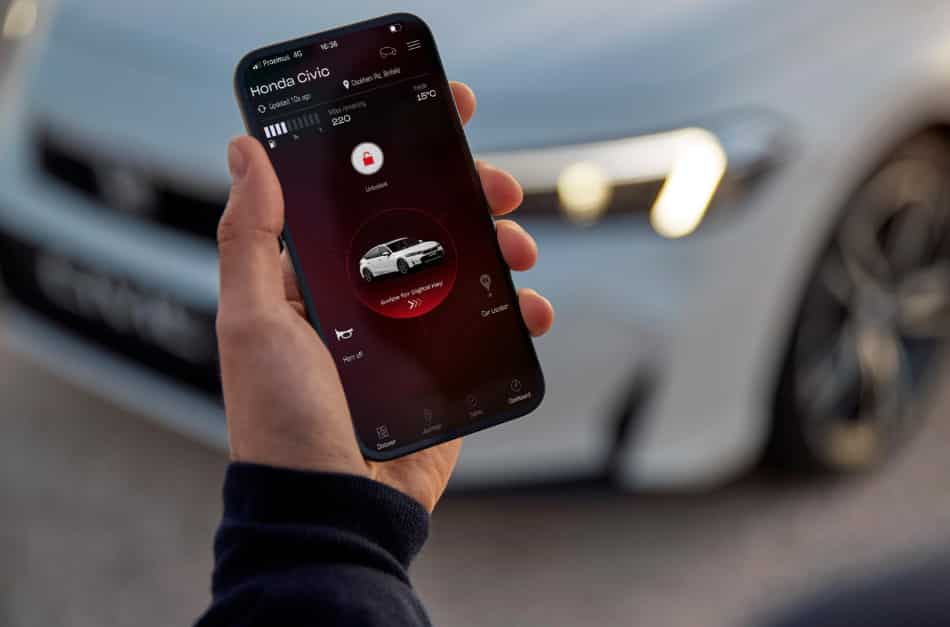
Is HondaLink Worth It for Most Honda Owners?
Yes, HondaLink is worth it for many Honda owners who use its connected services on a regular basis. It delivers the most value to drivers who rely on remote vehicle controls, monitor their vehicle from a distance, or own an electrified Honda with charging features. On the other hand, drivers who only need maintenance reminders or basic vehicle information may find that the free features are enough. The real question is not whether HondaLink is useful. The better question is whether its premium features fit your daily driving routine.
HondaLink stands out because it makes everyday ownership more convenient. You can check whether the doors are locked without returning to your vehicle. You can also view charging progress, locate your car, or prepare the cabin before leaving home. These actions take only a few seconds, but they can save time throughout the week. Drivers who commute every day often notice the biggest difference because they use these features more frequently.
The overall experience depends on the Honda you drive. Honda does not offer the same connected services on every model. Model year, trim level, factory hardware, and subscription eligibility all affect the available features. A newer vehicle may support remote commands and advanced vehicle monitoring. An older or lower trim model may only provide maintenance information and owner resources. This difference explains why some owners consider HondaLink essential while others rarely open the app.
For most people, the decision is simple. HondaLink is worth paying for when you use its remote features several times each week. Regular use increases the value of the subscription and makes daily driving easier. If you only open the app from time to time, the free version will probably meet your needs. Before you subscribe, confirm which features your Honda actually supports and decide whether you will use them often enough to justify the cost.
What Is HondaLink and How Does It Work?
HondaLink is Honda’s connected vehicle platform that links your smartphone with your vehicle through the official HondaLink app. Instead of acting as a traditional infotainment system, it allows you to monitor your vehicle, access important information, and perform selected remote commands from almost anywhere. The exact features depend on your Honda model, model year, trim level, and the connected services available for your vehicle.
Getting started with HondaLink is a straightforward process. After downloading the app, you create or sign in to your Honda account and add your vehicle using its Vehicle Identification Number (VIN). The app then verifies your ownership before activating the eligible connected services. Once the setup is complete, your smartphone communicates with Honda’s connected service platform, which securely sends commands to your vehicle whenever a supported feature is used.
HondaLink does not rely only on Bluetooth. Many remote functions use the vehicle’s built-in communication hardware and a cellular connection to exchange information with Honda’s servers. This system allows you to lock or unlock the doors, locate your vehicle, check its status, or monitor charging progress even when you are far away from the car. As a result, many features continue to work outside normal Bluetooth range.
It is also important to understand that HondaLink is different from Apple CarPlay and Android Auto. CarPlay and Android Auto bring smartphone apps to your vehicle’s infotainment screen while you are driving. HondaLink focuses on managing the vehicle itself. It gives you access to connected services before, during, and after your trip. Understanding this difference makes it much easier to decide whether HondaLink offers enough value for your driving habits.
What Features Does HondaLink Include?
HondaLink offers much more than simple remote vehicle access. It combines convenience, vehicle management, and connected services in one platform, allowing owners to stay informed about their vehicle whether they are nearby or miles away. While the available features vary by model and subscription package, the app focuses on helping drivers save time, monitor vehicle conditions, and simplify everyday ownership.
What Remote and Vehicle Control Features Does HondaLink Provide?
Remote vehicle control is one of HondaLink’s biggest advantages. On compatible vehicles, you can lock or unlock the doors, start the engine remotely, and precondition the cabin before entering the vehicle. The app also helps you locate your car in a crowded parking area and can activate the lights or horn to make the vehicle easier to find. Besides sending commands, HondaLink lets you check important vehicle information such as door status, fuel level, estimated driving range, and mileage without walking back to the car. These features improve convenience because they allow you to confirm your vehicle’s condition within seconds instead of making unnecessary trips.
What Maintenance and Charging Features Does HondaLink Provide?
HondaLink also helps owners keep their vehicles in good condition throughout the ownership experience. The app delivers maintenance reminders, recall notifications, and service information so you know when your Honda needs attention. Compatible vehicles can also display battery status, charging progress, and the remaining driving range. Owners of hybrid and electric Honda models may schedule charging sessions and monitor the vehicle remotely, making it easier to manage charging during off-peak hours. By combining maintenance information with connected vehicle data, HondaLink reduces uncertainty and helps owners stay informed without relying on manual inspections or paperwork.
How Much Does HondaLink Cost?
The HondaLink app is free to download. However, not every connected service is free to use. Honda includes several basic features on compatible vehicles. Advanced services, such as remote vehicle controls, may require a paid subscription after the trial period ends. The final cost depends on your model, model year, trim level, and market. Because of these differences, Honda does not offer one standard subscription for every vehicle.
It is important to separate the app from the services it provides. Anyone can download HondaLink and create an account. That does not mean every premium feature becomes available automatically. Your vehicle must support the connected service before you can use it. Some new Honda models include a complimentary trial. Others offer different subscription packages based on the vehicle configuration. Checking eligibility first helps you avoid paying for features you cannot access.
The easiest way to verify your subscription options is through the HondaLink app or your Honda account. Add your vehicle by entering the VIN. The system then displays the services available for your vehicle. You can also see whether a free trial is active and when it expires. This process gives you accurate information instead of estimates based on another Honda model.
Cost alone should not determine your decision. Think about how often you will use the premium features. Daily use makes the subscription easier to justify. Occasional use often reduces its value. Before paying for any plan, confirm that your Honda supports the features you need and that you expect to use them regularly.
What Are the Main Benefits of HondaLink?
HondaLink offers real value because it improves convenience, simplifies vehicle management, and helps owners stay connected to their vehicles. The biggest benefits come from features that drivers use repeatedly rather than occasionally. If you rely on remote access or want better visibility into your vehicle’s condition, HondaLink can make everyday ownership easier. Its value grows over time because it reduces small inconveniences that occur throughout the week.
One of the strongest advantages is remote vehicle control. Compatible Honda models allow you to lock or unlock the doors, start the engine, and prepare the cabin before you leave home. You can also locate your vehicle in a crowded parking lot without searching row by row. These features save time and reduce frustration, especially during busy mornings or poor weather. Drivers who commute every day often notice the greatest improvement because they use these functions regularly.
HondaLink also makes it easier to monitor your vehicle. You can check fuel level, estimated driving range, mileage, or battery status directly from your smartphone. This information helps you plan trips and avoid unexpected surprises. Instead of walking to the vehicle, you can confirm its status within seconds. That extra visibility gives many owners greater confidence throughout the day.
Another important benefit is maintenance management. HondaLink sends maintenance reminders and recall notifications when they become available. Some vehicles also allow owners to review service information and schedule maintenance through the app. Owners of hybrid and electric Honda models gain additional value because they can monitor charging progress and manage charging schedules remotely. These features help reduce manual checks and make vehicle ownership more efficient over the long term.
What Are the Main Drawbacks of HondaLink?
HondaLink offers many useful features, but it is not the right solution for every Honda owner. The biggest drawbacks include limited vehicle compatibility, subscription costs, and differences in available features. These factors can affect the overall value of the service. Understanding them before subscribing helps you make a better decision.
The first limitation is compatibility. HondaLink does not provide the same features on every Honda model. Your model year, trim level, and factory equipment determine which connected services you can access. A newer model may support remote start, vehicle location, and charging management. An older vehicle may only provide maintenance reminders and basic vehicle information. This difference explains why owner experiences vary so much.
Subscription costs are another important consideration. While the app is free to download, several premium services require an active subscription after the trial period ends. The cost may seem reasonable if you use the features every day. However, the value drops quickly when you only open the app a few times each month. Paying for services you rarely use creates an unnecessary recurring expense.
HondaLink also depends on a reliable connection. Many remote commands use the vehicle’s built in communication system instead of a direct Bluetooth connection. As a result, weak cellular coverage or temporary service interruptions may delay some commands. Although these situations are not common for every owner, they can affect the overall experience when you expect an immediate response.
Some drivers also expect HondaLink to replace Apple CarPlay, Android Auto, or a traditional key fob. In reality, each system serves a different purpose. HondaLink focuses on vehicle management and remote access, while CarPlay and Android Auto improve the in car experience. Understanding this difference helps set realistic expectations and prevents disappointment after subscribing.
Who Should Pay for a HondaLink Subscription?
A HondaLink subscription is worth paying for when its premium features become part of your daily routine. The service provides the greatest value to drivers who use remote vehicle controls, monitor their vehicle regularly, or depend on charging management. If you only open the app once in a while, paying for additional services may not be the best investment. The key is to compare your actual usage with the subscription cost instead of focusing on the number of available features.
Daily commuters often benefit the most from HondaLink. Remote start and cabin preconditioning make every trip more comfortable during hot summers and cold winters. Checking the vehicle’s status before leaving home also saves time and reduces unnecessary trips to the driveway. These small conveniences may seem minor at first, but they create noticeable value when repeated several times each week.
Owners of hybrid and electric Honda models can also gain significant benefits. HondaLink allows them to monitor battery status, check the remaining driving range, and manage charging sessions from their smartphones. Instead of walking to the vehicle, they can confirm charging progress with a quick glance at the app. This level of control makes daily charging easier and helps owners manage their schedules more efficiently.
Drivers who often park in large parking lots or unfamiliar locations may also find the subscription worthwhile. The ability to locate the vehicle remotely or confirm that the doors are locked adds convenience and peace of mind. These features reduce the chance of returning to the parking area simply to check the vehicle.
Before subscribing, think about how often you will use the premium features during a normal week. If you expect to rely on them several times each week, the subscription can provide good long term value. If your usage is only occasional, the free features will probably meet your needs without adding another recurring expense.
Who Does Not Need a Paid HondaLink Subscription?
A paid HondaLink subscription is not the best choice for every Honda owner. Many drivers use only a small number of connected features, while others own vehicles with limited compatibility. In these situations, the free version often provides enough functionality without adding another monthly or annual expense. Paying for premium services only makes sense when they solve a real problem or become part of your daily routine.
Owners who rarely use remote vehicle controls usually gain little value from a subscription. If you seldom need remote start, remote lock, or vehicle location, those features may not justify the extra cost. The same applies to drivers who park in a private garage every day. They can often access their vehicle quickly without using a smartphone.
Vehicle compatibility is another important factor. Some Honda models support only basic HondaLink functions because of their model year, trim level, or factory equipment. In these cases, purchasing a premium plan does not unlock every feature advertised for newer vehicles. Checking your vehicle’s supported services before subscribing helps you avoid unnecessary costs and prevents unrealistic expectations.
Many drivers also depend on Apple CarPlay or Android Auto for navigation, music, calls, and messaging. Those systems already cover most of their daily driving needs. If you mainly use your smartphone for entertainment and navigation, HondaLink may play only a small role in your ownership experience. The additional subscription may offer limited practical value.
The same advice applies to many used vehicle buyers. Some pre owned Honda models have fewer connected services than newer vehicles. Others may require additional account verification before certain features become available. Before purchasing a subscription, confirm which services your vehicle actually supports. If the premium features do not match your driving habits, the free version will usually be the better choice.
How Does HondaLink Compare With a Key Fob, Apple CarPlay, and Android Auto?
HondaLink, a traditional key fob, Apple CarPlay, and Android Auto all improve the driving experience, but they serve different purposes. Many drivers compare these technologies because they interact with the same vehicle. However, they are not direct replacements for one another. Understanding what each system does makes it easier to decide whether HondaLink adds enough value to your daily routine.
A key fob focuses on short range convenience. It allows you to lock or unlock the doors, activate the panic alarm, and start the engine on supported vehicles. It responds quickly because it communicates directly with the vehicle. However, its range is limited. Once you move too far away, the key fob can no longer send commands. HondaLink solves this limitation by allowing compatible vehicles to receive remote commands through the connected service platform. As long as the required services are active, you can check vehicle status or perform selected remote actions even when you are far from your car.
Apple CarPlay and Android Auto have a different purpose. They bring your smartphone experience to the infotainment display while you are driving. They make it easier to use navigation, stream music, answer calls, send messages, and access supported mobile apps with fewer distractions. HondaLink does not replace these functions because it focuses on the vehicle instead of the phone. Its primary role is to help you monitor, manage, and control your Honda before and after each trip.
For many Honda owners, the best solution is to use these technologies together. Apple CarPlay or Android Auto improves the driving experience inside the vehicle, while HondaLink extends vehicle management beyond the driver’s seat. The key fob remains the fastest option for nearby commands, but HondaLink offers greater flexibility when distance matters. Choosing between them is rarely necessary because each system solves a different problem and complements the others.
How Can You Decide Whether HondaLink Is Worth the Cost?
The best way to decide whether HondaLink is worth the cost is to evaluate how you actually use your vehicle. A long list of premium features may look impressive, but those features have little value if you rarely use them. Instead of focusing on marketing claims, think about your daily driving habits. The right decision depends on convenience, frequency of use, and your vehicle’s compatibility.
Start by identifying the features you expect to use every week. Many drivers subscribe because they want remote start, remote door controls, or vehicle location services. Others value charging management or vehicle status updates. If these features save you time several times each week, the subscription can deliver meaningful long term value. Regular use spreads the cost across many interactions and makes the service feel more worthwhile.
Next, compare the subscription cost with the benefits you receive. A small monthly fee may be reasonable if it improves your daily routine throughout the year. On the other hand, even a low price can feel expensive when the app remains unused for weeks at a time. Looking at the cost from a practical perspective helps you make a more objective decision.
You should also confirm that your Honda supports every feature you plan to use. Vehicle compatibility varies by model year, trim level, and factory equipment. A subscription cannot unlock functions that your vehicle does not support. Checking compatibility before paying helps you avoid disappointment and unnecessary expenses.
A free trial provides the best opportunity to evaluate HondaLink. Use the premium features as you normally would during that period. When the trial ends, review how often you opened the app and which functions became part of your routine. If you relied on those features regularly, renewing the subscription will probably make sense. If you barely used them, the free version will likely provide all the functionality you need.
How Do You Check Whether Your Vehicle Supports HondaLink?
Checking compatibility is an essential step before paying for a HondaLink subscription. Honda does not offer the same connected services on every vehicle. Available features depend on the model year, trim level, factory equipment, and your region. Verifying compatibility first helps you understand exactly which services your vehicle can access.
The easiest way to check is through the official HondaLink app or your Honda account. After creating an account, add your vehicle by entering its Vehicle Identification Number (VIN). The system identifies your vehicle and displays the connected services available for that specific model. It also shows whether your vehicle qualifies for a complimentary trial and which features require an active subscription.
If you are buying a used Honda, spend a few extra minutes verifying the connected services before making a decision. Some older models support fewer features than newer vehicles. In some cases, the previous owner’s account must also be removed before you can activate HondaLink. Completing this step early prevents activation issues and avoids unnecessary delays.
Compatibility should always come before pricing. A subscription only provides value when your vehicle supports the features you plan to use. Before you subscribe, confirm the available services, review the trial period, and make sure the premium features match your driving habits. Taking these simple steps helps you choose the right plan with confidence.
What Is the Final Verdict on HondaLink?
HondaLink is worth it for owners who use its connected features on a regular basis. Drivers who depend on remote start, vehicle monitoring, charging management, or remote vehicle controls can gain meaningful convenience every week. Over time, those small advantages save time and make daily ownership more enjoyable. For these users, the subscription often delivers good long term value.
The service becomes less attractive when premium features remain unused. Drivers who rarely open the app or own vehicles with limited compatibility may not receive enough benefits to justify an ongoing subscription. In many cases, the free features already provide maintenance reminders, recall information, and basic vehicle details without additional costs. Paying for services you rarely use adds another recurring expense without improving the ownership experience.
Before making your decision, confirm which HondaLink features your vehicle actually supports. Then think about how often you will use those features during a normal week. A subscription should solve everyday problems instead of offering features that look impressive but remain untouched. This practical approach gives you a much clearer picture of the service’s real value.
For most Honda owners, the answer is simple. HondaLink is a worthwhile investment when it supports features that become part of your routine. If those features save you time, improve convenience, or make vehicle management easier, the subscription can justify its cost. If not, the free version is usually enough to support your ownership experience without increasing your annual expenses.