You can disable Honda Remote Window Roll Down by turning off the Keyless Remote Power Window Control setting in your vehicle. Most newer Honda models include this option in the vehicle settings menu. Some older models require a Honda dealer to change the configuration. After you disable the feature, holding the unlock button will no longer lower the windows.
Honda designed this feature to improve cabin comfort during hot weather. It lets you open the windows before entering the vehicle and release trapped heat within a few seconds. While many drivers appreciate this convenience, others find it frustrating. The windows can open accidentally when the unlock button stays pressed inside a pocket, backpack, or handbag. A tight key fob cover or a worn unlock button can also trigger the function without your notice.
Honda does not use the same menu on every vehicle. The setting may appear on the infotainment screen, the Driver Information Interface, or another customization menu. Honda also uses different names for the same feature, including Keyless Remote Power Window Control, Remote Power Window Control, and Remote Window Control. The exact location depends on the model, model year, trim level, and software version.
This guide explains how to disable Honda Remote Window Roll Down safely. You will also learn how to confirm the setting, what to do if you cannot find it, and when dealer assistance becomes necessary. By the end of this guide, you can stop accidental window opening without affecting your normal key fob functions.
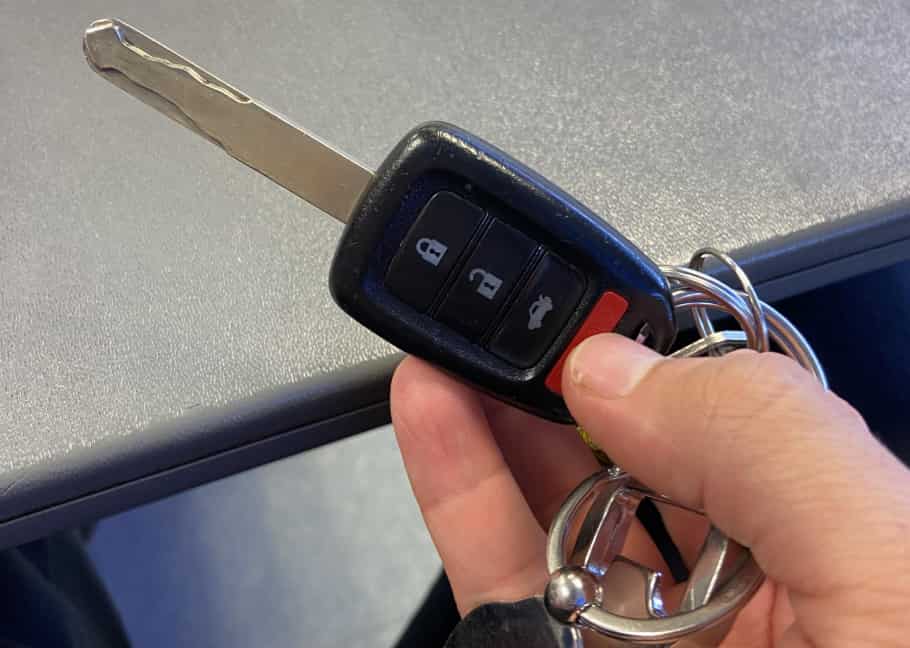
How Do You Disable Honda Remote Window Roll Down?
You can disable Honda Remote Window Roll Down by turning off the Keyless Remote Power Window Control setting in your vehicle’s customization menu. Most recent Honda models allow you to change this option without special tools or software. Once you save the new setting, holding the unlock button on the key fob will no longer open the windows. This method keeps your power windows and other key fob functions working as expected.
Start by parking your vehicle in a safe location and shifting the transmission into Park. Turn the ignition on or switch the vehicle to Accessory Mode, depending on your model. Next, open the Vehicle Settings menu through the infotainment display or the Driver Information Interface. Continue to Door Setup or Door/Window Setup and look for Keyless Remote Power Window Control. Some Honda models may display a different name, such as Remote Power Window Control or Remote Window Control. Although the wording changes, the function remains the same.
Select the setting and change it from On to Off. Confirm the new selection if the system asks for confirmation. Then exit the menu and switch the vehicle off. Lock the doors and test the key fob from outside the vehicle. Press the unlock button once, then press and hold it again for several seconds. If the windows stay closed, the feature has been disabled successfully.
The exact menu location depends on the Honda model, model year, trim level, and software version. For example, a newer CR-V may display the option in a different menu than an older Accord or Civic. If you cannot find the setting, check your owner’s manual before changing other vehicle options. Avoid removing fuses, disconnecting the battery, or modifying the wiring. Those methods can create unnecessary electrical problems and do not provide the correct solution for disabling Honda Remote Window Roll Down.
How Do You Turn Off Honda Remote Window Control From the Infotainment Screen?
You can turn off Honda Remote Window Control through the infotainment system if your vehicle includes a touchscreen with customizable vehicle settings. Honda places this option in the vehicle customization menu on many recent models. After you switch the setting to Off, the key fob will no longer lower the windows when you press and hold the unlock button.
Start by parking the vehicle and turning the ignition on. Keep the transmission in Park before opening the settings menu. Tap Settings, then open Vehicle Settings. Select Door Setup or Door/Window Setup, depending on your vehicle. Look for Keyless Remote Power Window Control, Remote Power Window Control, or a similar option. Honda uses different names across model years, but each setting controls the same remote window function.
Open the setting and select Off. Some infotainment systems display a confirmation message before saving the change. Accept the prompt if it appears, then return to the main screen. Turn the vehicle off and lock all doors. Step outside and test the key fob by pressing the unlock button once. Press and hold the unlock button again for several seconds. If the windows remain closed, the new setting works correctly.
Some Honda vehicles organize the menu differently, so you may need to explore more than one customization category. For example, one model may place the option under Vehicle Settings, while another stores it directly inside Door Setup. Always look for a setting that specifically mentions remote window control rather than general door lock preferences. Changing automatic locking, unlock behavior, or walk-away lock settings will not disable the remote window feature.
If you cannot find the option, confirm that your Honda supports owner-accessible customization. Some older models and lower trim levels do not include this setting in the infotainment system. In that case, check the owner’s manual for your exact model year before contacting a Honda dealer for additional assistance.
How Do You Disable Honda Remote Window Control From the Driver Information Interface?
You can disable Honda Remote Window Control through the Driver Information Interface if your vehicle stores customization settings in the instrument cluster. Many Honda models use this system instead of the infotainment screen. Once you turn the feature off, the key fob will stop sending the remote window opening command when you hold the unlock button.
Begin by parking the vehicle and switching the ignition to On. Keep the transmission in Park before changing any settings. Use the controls on the steering wheel to open the Settings menu in the instrument cluster. Scroll to Vehicle Settings, then open Door Setup or a similar customization category. Find Keyless Remote Power Window Control and change the setting from On to Off. Save the new setting before leaving the menu.
Honda uses different steering wheel controls across its model lineup. Some vehicles include directional buttons, while others use a selector wheel or a Home button. Although the controls look different, the process follows the same logic. You enter the settings menu, locate the door customization options, and disable the remote window feature. If you cannot find the option immediately, move through each vehicle customization category instead of changing unrelated settings.
After saving the new configuration, switch the vehicle off and step outside with the key fob. Lock the doors and test the feature. Press the unlock button once, then press and hold it for several seconds. The windows should remain closed if the setting has been saved correctly. If the windows still open, reopen the menu and confirm that the option remains set to Off.
Some Honda vehicles do not display this setting in the Driver Information Interface. Instead, Honda places it in the infotainment system or removes owner access completely. If your vehicle does not show the option in either location, check the owner’s manual for your exact model year and trim level. When the manual confirms that no customization is available, a Honda dealer can tell you whether the Body Control Module supports this feature.
How Can You Confirm That Honda Remote Window Roll Down Is Disabled?
You can confirm that Honda Remote Window Roll Down is disabled by testing the key fob after saving the new setting. A successful test takes only a few minutes and shows whether the vehicle accepted the change. If the windows remain closed during the test, the feature no longer responds to the unlock button.
Start by parking the vehicle in a safe and dry location. Close every window completely and make sure all doors are fully shut. Turn the vehicle off, exit the cabin, and lock the doors with the key fob. Wait a few seconds before beginning the test. Press the unlock button once to unlock the vehicle. Then press and hold the unlock button for several seconds. Watch the windows carefully during this step. If they stay closed, Honda has successfully disabled the remote window function.
If the windows still move, the setting may not have been saved correctly. Return to the customization menu and verify that Keyless Remote Power Window Control remains set to Off. Save the setting again if necessary and repeat the test. Some infotainment systems require confirmation before they apply a new preference. Leaving the menu too quickly may prevent the system from storing the change.
The test results can also help you identify other problems. If every window opens together, the remote command still works and the feature remains active. If only one window moves or stops halfway, the issue likely involves that window rather than the remote setting. A faulty window motor, regulator, or initialization procedure can cause this type of behavior. These problems require different troubleshooting steps because they do not affect the remote window function itself.
If the feature remains active after several tests, compare the menu path with your Honda owner’s manual. The option may appear under a different name or in another customization menu. Some Honda models also limit owner access to this setting. In that situation, a Honda dealer can verify whether your vehicle supports remote window customization through the Body Control Module.
Why Can’t You Find the Remote Window Control Setting in Your Honda?
You may not find the Remote Window Control setting because Honda does not offer the same customization options on every vehicle. The available settings depend on the model, model year, trim level, market, and infotainment system. Some vehicles allow owners to disable the feature in the settings menu, while others require dealer-level programming or do not support customization at all.
The first step is to confirm your vehicle information. Two Honda Civics from different model years may use completely different software. A higher trim level may also include features that are missing from the base model. For this reason, a menu shown in an online tutorial may not appear on your vehicle. Always compare the instructions with your exact model year before changing any settings.
Next, check every vehicle customization menu carefully. Many owners look only under the general settings page and miss the correct location. Honda often places the option inside Door Setup, Door/Window Setup, or another customization category. Some vehicles display the setting on the infotainment screen, while others move it to the Driver Information Interface in the instrument cluster. The feature may also appear under a different name, including Keyless Remote Power Window Control or Remote Power Window Control.
If you still cannot locate the setting, open your Honda owner’s manual and search for terms related to remote window, keyless remote, or power window control. The manual provides the correct menu path for your specific vehicle. This approach is much faster than searching through every available option on the screen.
Some Honda models simply do not provide an owner-accessible setting. In those cases, the Body Control Module controls the feature without offering a customization menu. A Honda dealer can inspect the vehicle and confirm whether the software supports this adjustment. If the system does not include an adjustable parameter, no menu change or standard key fob programming will disable the feature.
Which Honda Models May Support Remote Window Control Customization?
Several Honda models may support Remote Window Control customization, but the available options depend on the model year, trim level, and software version. Honda updates its vehicle interfaces regularly, so the same model can offer different customization menus across production years. Before following any instructions, confirm that the guide matches your exact vehicle instead of relying only on the model name.
Recent versions of the Honda Civic, Accord, CR-V, Pilot, Passport, and Odyssey often include a setting that controls Remote Window Roll Down. Many newer vehicles place this option inside the infotainment system, while others display it in the Driver Information Interface. Honda may also rename the feature between generations. For example, one vehicle may use Keyless Remote Power Window Control, while another shows Remote Power Window Control. Although the wording changes, both settings manage the same function.
| Honda Model | Typical Setting Location | What You Should Verify |
|---|---|---|
| Honda Civic | Infotainment or Driver Information Interface | Model year and trim level |
| Honda Accord | Vehicle Settings | Software version |
| Honda CR-V | Driver Information Interface or infotainment | Model year |
| Honda Pilot | Vehicle Settings | Trim level |
| Honda Passport | Vehicle Settings | Equipment package |
| Honda Odyssey | Vehicle Settings or dealer configuration | Model year and market |
The table provides a general reference rather than a complete compatibility list. Honda may add, remove, or relocate the setting when it introduces a new generation or updates the infotainment software. In addition, some regional markets receive different vehicle features even when the model name remains the same. Two vehicles with similar specifications may not share identical customization menus.
If you cannot find the setting on your vehicle, do not assume the feature is unavailable. First, check the owner’s manual for your exact model year and trim level. The manual identifies the correct menu path and explains whether the function supports owner customization. If the manual does not list the option, contact a Honda dealer and ask whether your vehicle allows Remote Window Control customization through the Body Control Module. This approach provides the most accurate answer and helps you avoid unnecessary troubleshooting.
Why Do Honda Windows Roll Down When You Hold the Unlock Button?
Honda windows roll down when you hold the unlock button because the key fob sends a dedicated remote command to the vehicle. Honda designed this feature to improve comfort before you enter the cabin. Instead of unlocking only the doors, the system also lowers the windows after it detects a specific button sequence. This function helps release hot air on warm days without requiring you to start the engine or open each window manually.
The process begins when you press the unlock button once to unlock the doors. If you press and hold the unlock button immediately afterward, the key fob sends a second signal to the Body Control Module. The module recognizes this signal as a remote window command instead of a standard unlock request. It then activates the power window system and lowers the supported windows. The windows continue moving until they reach the fully open position or until you release the button, depending on your Honda model.
Honda includes this feature to make everyday driving more convenient. During summer, the temperature inside a parked vehicle can rise quickly. Opening the windows before entering the cabin allows trapped heat to escape and improves airflow. As a result, the interior becomes more comfortable before you begin driving. Many owners use this function regularly because it works without opening the doors or starting the climate control system.
Although the feature offers clear benefits, it can also create unexpected problems. The unlock button may remain pressed inside a pocket, backpack, handbag, or tight key fob cover. A worn or damaged button can produce the same result. When this happens, the windows may open without the driver’s knowledge. Rain, dust, insects, or theft can then become a concern if the vehicle remains unattended. Disabling Honda Remote Window Roll Down removes this risk while preserving normal locking and unlocking functions on the key fob.
Does the Power Window Lock Button Disable Remote Window Roll Down?
No. The Power Window Lock button does not disable Honda Remote Window Roll Down. This button only prevents passengers from operating their window switches inside the vehicle. It does not control the remote commands sent by the key fob. As a result, holding the unlock button can still lower the windows even when the window lock button is active.
Many Honda owners confuse these two features because both involve the power window system. However, Honda designed them for different purposes. The Power Window Lock button works inside the cabin and limits access to the passenger window switches. Parents often use this function to prevent children from opening or closing the windows while the vehicle is moving. The driver can still operate every window through the master switch regardless of whether the window lock button is on or off.
Remote Window Roll Down uses a separate control system. When you press and hold the unlock button, the key fob sends a signal to the Body Control Module. The module recognizes the command and activates the remote window function if the feature remains enabled. Because the remote command bypasses the passenger window switches, the window lock button has no effect on this process. This design allows Honda to keep convenience features and safety controls independent from each other.
If your windows continue to open after you activate the window lock button, the vehicle is operating normally. To stop the remote window function, you must change the Keyless Remote Power Window Control setting in the vehicle customization menu. If your Honda does not provide this option, consult the owner’s manual or contact a Honda dealer to confirm whether your model supports remote window customization. Using the correct setting is the safest and most reliable way to prevent accidental window opening without affecting the normal operation of the power windows.
Will Reprogramming or Replacing the Honda Key Fob Disable the Feature?
No. Reprogramming or replacing the Honda key fob does not normally disable Remote Window Roll Down. The remote only sends commands to the vehicle, while the Body Control Module stores the customization settings. As a result, pairing a new key fob with the vehicle does not change how the Remote Window Roll Down feature operates. If the function is enabled before programming, it will usually remain enabled afterward.
Many owners replace or reprogram the key fob because they believe the remote causes the problem. In most cases, the key fob works exactly as Honda intended. The issue occurs because the vehicle still accepts the remote window command when you press and hold the unlock button. Installing a new battery or pairing another remote restores normal communication between the key fob and the vehicle, but these procedures do not modify the customization settings stored in the Body Control Module.
A damaged key fob can still contribute to accidental window opening. For example, a worn unlock button may stick after you press it. Dirt, moisture, or physical damage can also cause the button to remain partially engaged. When this happens, the remote may continue sending the unlock command longer than expected. Replacing the key fob solves this hardware problem, but it does not disable the Remote Window Roll Down feature itself.
If your key fob works normally, changing the vehicle setting remains the correct solution. Open the vehicle customization menu and turn Keyless Remote Power Window Control to Off if your Honda supports this option. If the setting is unavailable, check the owner’s manual for your model year before requesting dealer assistance. This approach addresses the actual cause of accidental window opening instead of replacing parts that still function correctly.
What Should You Do If the Windows Still Roll Down After Disabling the Setting?
If the windows still roll down after you disable the setting, verify that the vehicle saved the new configuration before looking for a mechanical or electrical problem. In most cases, the issue occurs because the setting did not save correctly or the vehicle uses a different menu than expected. A systematic inspection helps you identify the cause without replacing unnecessary parts.
Start by reopening the Vehicle Settings menu and checking the current value for Keyless Remote Power Window Control. Confirm that the setting still displays Off instead of On. If the system asks for confirmation after you make the change, accept the prompt before leaving the menu. Next, switch the vehicle off completely, lock the doors, and wait for a few seconds. Test the key fob again by pressing the unlock button once and then holding it. If the windows remain closed, the vehicle has saved the new configuration successfully.
If the windows continue to open, test every registered key fob. A damaged remote can send repeated unlock commands even when the vehicle setting is correct. Inspect the unlock button carefully for signs of wear, dirt, or physical damage. Remove any tight protective cover that may keep the button pressed. If only one key fob causes the problem, replacing that remote may solve the issue without changing any vehicle settings.
The way the windows behave can also reveal the source of the problem. If every window lowers at the same time, the Remote Window Roll Down feature probably remains active. If only one window moves slowly, stops halfway, or refuses to close, the problem likely involves the window motor, regulator, switch, or window initialization procedure. These faults require different repairs because they do not involve the remote control system.
If you complete every check and the feature still operates, consult your Honda owner’s manual to confirm that you changed the correct setting. Some models place the option in another customization menu, while others do not provide owner access at all. When no additional settings are available, contact a Honda dealer and request an inspection of the Body Control Module. The technician can verify whether your vehicle supports Remote Window Roll Down customization and confirm that the system operates as designed.
Does Disabling Remote Window Roll Down Affect Other Key Fob Functions?
No. Disabling Honda Remote Window Roll Down does not normally affect the other functions on your key fob. Honda treats Remote Window Roll Down as a separate customization feature, so changing this setting only prevents the windows from opening when you hold the unlock button. Your vehicle should continue to lock, unlock, and perform other supported remote functions as usual.
The Body Control Module manages several key fob features independently. When you change the Keyless Remote Power Window Control setting, the system updates only the remote window command. It does not modify the commands for door locks, the trunk or tailgate release, the panic alarm, or remote start on equipped models. This design allows you to disable one convenience feature without changing the rest of the keyless entry system.
After saving the new setting, test every important key fob function before using the vehicle normally. Lock the doors and unlock them again to confirm that both commands respond correctly. If your Honda includes a remote trunk release, verify that it still works as expected. Vehicles equipped with remote start should also start normally after the change. Finally, repeat the Remote Window Roll Down test by holding the unlock button for several seconds. The doors should unlock, but the windows should remain closed.
If another key fob function stops working after you disable Remote Window Roll Down, the problem usually has another cause. A weak key fob battery, a damaged remote, or an unrelated electrical fault can affect normal operation. The customization setting does not disable these features by itself. Check the battery first, then test a spare key fob if one is available. If the problem continues, consult your Honda owner’s manual or ask a Honda dealer to inspect the vehicle.
Keeping each function separate is one of the reasons Honda recommends using the factory customization menu instead of disconnecting the battery or modifying the electrical system. The official setting changes only the feature you want to disable while preserving the normal operation of the entire keyless entry system.
Conclusion: What Is the Safest Way to Disable Honda Remote Window Roll Down?
The safest way to disable Honda Remote Window Roll Down is to use the factory customization setting provided by Honda. This method changes only the remote window function and leaves every other key fob feature unchanged. It also protects the vehicle’s electrical system because it does not require hardware modifications, software hacks, or aftermarket tools.
Begin by locating the Keyless Remote Power Window Control setting in your vehicle’s customization menu. Depending on your Honda model, you can access this option through the infotainment system or the Driver Information Interface. Change the setting from On to Off, save the new preference, and switch the vehicle off. After that, lock the doors and test the key fob. Press the unlock button once, then press and hold it for several seconds. If the windows remain closed, the feature has been disabled successfully.
Avoid shortcuts that promise the same result. Removing a fuse may disable the entire power window system instead of the remote function. Disconnecting the battery can reset vehicle settings and create unnecessary calibration procedures. Likewise, modifying the wiring or installing unsupported software can affect multiple electronic systems. These methods introduce unnecessary risks and rarely solve the problem correctly.
If your Honda does not display the Remote Window Control setting, verify the instructions in the owner’s manual for your exact model year and trim level. Some vehicles do not provide owner access to this feature, even though they support Remote Window Roll Down. In those situations, a Honda dealer can determine whether the Body Control Module allows additional customization.
Using the factory setting remains the most reliable solution for preventing accidental window opening. It keeps the remote locking, unlocking, trunk release, panic alarm, and other supported key fob functions working normally while disabling only the feature you no longer want to use.