If your Honda navigation system has not been updated for a while, you may notice that it struggles to recognize new roads, recently opened businesses, or updated speed limits. An outdated navigation database can lead to incorrect directions, longer travel times, and unnecessary frustration, especially when driving in unfamiliar areas. Whether you rely on your vehicle for daily commuting or long road trips, keeping the navigation system current helps improve route accuracy and provides a smoother driving experience.
Many Honda owners believe they must visit a dealership and pay a significant fee whenever a new navigation update becomes available. However, that is not always the case. Depending on your Honda model, model year, navigation hardware, and map update eligibility, you may be able to update your Honda navigation system for free using official tools. Understanding which update method applies to your vehicle is the first step toward avoiding unnecessary costs while ensuring your navigation system performs as expected.
This guide explains how to update Honda navigation system for free using the official process recommended for supported Honda vehicles. You will learn how to determine whether your vehicle qualifies for a free update, prepare the correct USB drive, download the latest navigation data, and install the update safely. In addition, this article covers compatible Honda models, common update problems, practical troubleshooting tips, and the differences between built in navigation updates and smartphone navigation solutions. By the end of this guide, you will have everything you need to keep your Honda navigation system accurate, reliable, and ready for every journey.
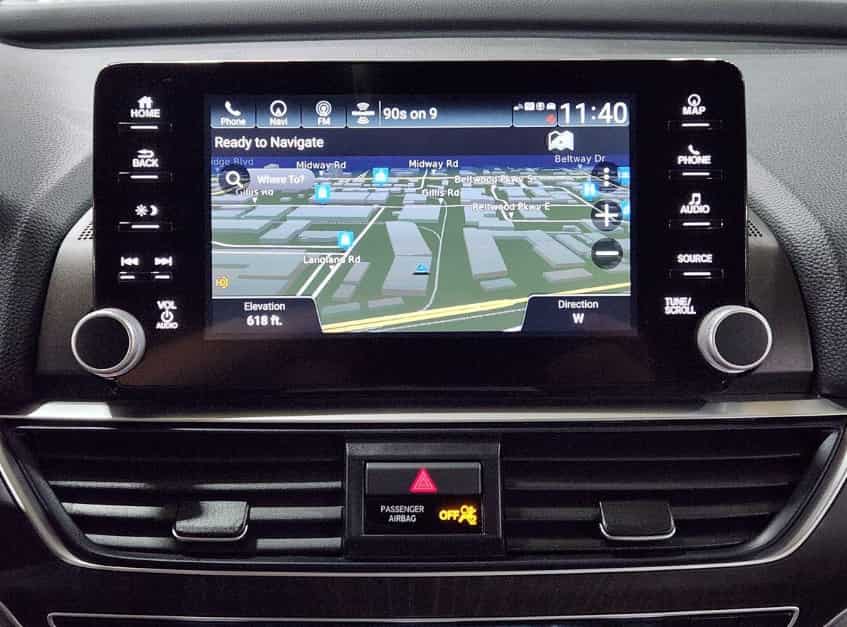
Yes, you can update some Honda navigation systems for free. However, free updates are not available for every vehicle. Your eligibility depends on the model, model year, navigation hardware, and the update policy for your factory installed system. Two Honda vehicles may look similar, but they can follow different update procedures.
Many newer Honda models include complimentary map updates for a limited time. If your vehicle qualifies, you can download the latest navigation data through the official update process without paying an additional fee. Older vehicles often require a paid map package after the free update period ends. For this reason, you should always check your eligibility before starting the update.
Many drivers also confuse a navigation map update with a software update. These updates serve different purposes. A map update refreshes roads, addresses, speed limits, and points of interest. A software update improves system performance, stability, and compatibility. It does not automatically install the latest navigation maps.
Most Honda vehicles with Garmin based navigation use Garmin Express as the official update tool. The software identifies your vehicle and checks for available map updates. It also tells you whether your Honda qualifies for a free update. If your vehicle is no longer eligible, Garmin Express will display the available purchase options. Understanding these differences helps you choose the correct update method and avoid unnecessary costs.
Preparing everything in advance makes the update process faster and helps you avoid common errors. Before you begin, confirm that your Honda has a factory installed navigation system. Some Honda models only support Apple CarPlay or Android Auto, so they do not require a built in map update. You should also check your current map version. This step helps you determine whether a newer update is available.
Next, prepare a compatible USB flash drive. A reliable USB drive with enough storage is essential because the navigation system will save vehicle information before you download the latest maps. Format the USB drive if necessary and remove any existing files. Using a clean drive reduces the risk of installation errors. You also need a Windows or Mac computer with a stable internet connection. A slow or interrupted connection can delay the download or cause the update to fail.
Another important step is identifying your Honda navigation platform. Many newer Honda vehicles use Garmin based navigation, while older models may rely on different update methods. Knowing which system your vehicle uses allows you to follow the correct instructions from the beginning. It also prevents compatibility issues during the installation process.
Finally, make sure your vehicle is ready for the update. Park it in a safe location and keep enough fuel in the tank if the engine must remain running during installation. Do not remove the USB drive while the system transfers data. Interrupting the process may corrupt the navigation files and force you to start over. A few minutes of preparation can save hours of troubleshooting later and ensure your Honda navigation system updates successfully.
Updating your Honda navigation system is a simple process when you follow the correct order. Before you download anything, confirm that your vehicle qualifies for an official map update. Open the navigation settings and check the current map version. Then visit the official update page or open Garmin Express to see whether a newer version is available for your Honda model. If the software confirms your eligibility, you can continue with the update process.
Next, insert a compatible USB flash drive into your vehicle. Allow the navigation system to save the required vehicle information to the drive. This file helps Garmin Express identify your navigation system and download the correct map data. Once the process finishes, remove the USB drive safely and connect it to your computer. Open Garmin Express and follow the on screen instructions. The software will verify your vehicle, download the latest navigation files, and copy them to the USB drive.
After the download is complete, return to your Honda and insert the updated USB drive into the correct USB port. Start the engine if the instructions require it, then begin the installation. Keep the USB drive connected until the process finishes. Turning off the vehicle or removing the drive too early may interrupt the installation and damage the navigation data. The update may take some time, so be patient and wait for the confirmation message.
Finally, restart the navigation system and check the installed map version. Compare it with the previous version to confirm that the update completed successfully. Test a nearby destination or search for a recently opened road to verify that the latest map data is active. Following these steps helps you update your Honda navigation system safely while improving route accuracy, navigation performance, and your overall driving experience.
Many Honda owners want to know whether their vehicle qualifies for free navigation updates. The answer depends on the model, model year, trim level, and navigation platform. Honda has used different navigation systems over the years, so two vehicles with the same name may not share the same update process. Before downloading any files, check your vehicle information to confirm compatibility.
Several popular Honda models include factory installed navigation on selected trims. These models often include the Honda Accord, Civic, CR V, Pilot, Passport, Odyssey, and HR V. Some versions of the Ridgeline and Insight also feature built in navigation. However, entry level trims usually rely on Apple CarPlay or Android Auto instead of an integrated navigation system. In those cases, you do not need to update factory maps because your smartphone provides the navigation service.
Even if your Honda includes factory navigation, free map updates are not guaranteed. Some vehicles receive complimentary updates for a limited period, while others require a paid map package after the initial coverage ends. Regional differences also matter. A Honda sold in North America may follow a different update policy than the same model sold in Europe or Asia. Always verify your vehicle before starting the installation.
The easiest way to confirm eligibility is by checking your navigation system through Garmin Express or the official Honda navigation update portal. The software identifies your vehicle and displays the latest map version that matches your system. It also tells you whether the update is free or requires a purchase. Taking a few minutes to verify compatibility helps you avoid downloading the wrong files and ensures a smooth update from start to finish.
Most Honda navigation updates finish without any issues. However, some drivers experience problems during the download or installation process. In many cases, the cause is simple and easy to fix. Identifying the problem early helps you complete the update without wasting time or downloading the files again.
One common issue is that Garmin Express cannot detect the USB drive or the vehicle information. This usually happens because the navigation system did not save the required identification files correctly. Insert the USB drive into your Honda again and repeat the export process. If the problem continues, try another USB drive with sufficient storage and format it before starting over.
Another frequent problem appears when the download stops or the installation freezes. A slow internet connection can interrupt the download, while removing the USB drive too early can stop the installation. Keep your computer connected to a stable network until the download finishes. During installation, leave the USB drive connected and avoid turning off the engine unless the official instructions say otherwise. Waiting a little longer is often the safest solution because large map updates may take more time than expected.
Some drivers also notice that the navigation system still shows the old map version after the update. Restart the infotainment system and check the map information again. If the version has not changed, repeat the installation to make sure every file transfers correctly. You should also confirm that you downloaded the correct map package for your Honda model. Following the official update steps carefully reduces the risk of errors and helps your navigation system perform as expected.
Choosing between the Honda navigation system and Google Maps depends on how and where you drive. Both options help you reach your destination, but they offer different advantages. Understanding these differences makes it easier to decide which solution fits your daily travel needs.
Honda navigation works without a mobile data connection because it stores map data inside the vehicle. This feature is useful when you drive through remote areas with limited network coverage. The system also integrates with the vehicle and displays directions directly on the factory screen. Many drivers appreciate this seamless experience because they do not need to connect a smartphone before every trip.
Google Maps offers a different set of benefits. It provides live traffic information, road closures, estimated travel times, and alternative routes based on current conditions. It also updates map data automatically, so you do not need to install new files manually. If your Honda supports Apple CarPlay or Android Auto, you can access Google Maps directly from the infotainment display while keeping the familiar interface on a larger screen.
For many Honda owners, the best solution is to use both systems together. The factory navigation system remains reliable when mobile service is unavailable or when you prefer an integrated driving experience. Google Maps becomes the better choice for daily commuting because it delivers real time traffic information and continuously updated routes. Keeping your Honda navigation system updated ensures that you always have a dependable backup, even when your smartphone is unavailable or loses its network connection.
Most drivers benefit from updating their navigation system at least once a year. If you travel frequently or drive in rapidly developing areas, check for new map releases more often. Regular updates improve route accuracy and help the system recognize new roads, businesses, and traffic changes.
Yes. Many Honda models support official navigation updates that you can complete at home. You only need a compatible USB flash drive, a computer with internet access, and the correct update software. Following the official instructions helps you complete the process safely.
A navigation update mainly refreshes map data. It adds new roads, updates points of interest, and improves routing information. It does not usually increase system speed or fix software issues. If your infotainment system has performance problems, you may need a separate software update.
What happens if I interrupt the installation?
Interrupting the installation can damage the navigation data or leave the update incomplete. Keep the USB drive connected until the process finishes. If the installation stops unexpectedly, restart the process by following the official instructions.
Yes. If your Honda supports Apple CarPlay or Android Auto, you can use Google Maps through the infotainment display. Many drivers prefer Google Maps for daily commuting because it provides live traffic information and automatic map updates. However, the factory navigation system remains useful when mobile data is unavailable.
The easiest method is to connect your USB drive to Garmin Express after exporting the vehicle information from your Honda. The software identifies your navigation system, checks for available map updates, and tells you whether your vehicle is eligible for a free update or requires a paid map package.
Conclusion
Keeping your navigation system up to date is one of the easiest ways to improve every drive. Accurate maps help you avoid outdated routes, discover new roads, and reach your destination with greater confidence. Whether you use your Honda for daily commuting, business travel, or family road trips, current navigation data makes every journey more reliable.
As you have learned in this guide, how to update Honda navigation system for free depends on your vehicle, navigation platform, and update eligibility. Many Honda owners can complete the entire process at home by using the official update tools and a compatible USB flash drive. Taking a few minutes to verify your vehicle and follow the correct steps can save both time and money. It also reduces the risk of installation errors and helps your navigation system perform as intended.
Although many drivers rely on Google Maps for real time traffic information, the factory navigation system remains a valuable backup. It continues to work even when mobile service is unavailable and provides seamless integration with your vehicle. Keeping both solutions available gives you greater flexibility in every driving situation.
If you are unsure whether your Honda qualifies for a free navigation update, check your current map version and verify your eligibility before downloading any files. Staying proactive ensures that your navigation system remains accurate, dependable, and ready for every trip. With the latest maps installed, you can spend less time worrying about directions and more time enjoying the road ahead.