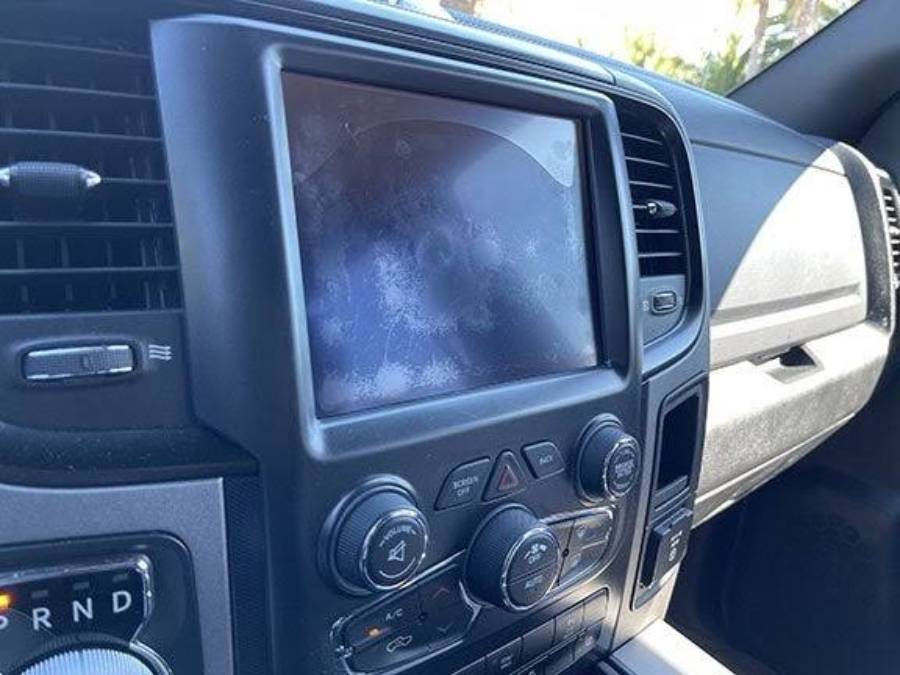
Uconnect screen delamination occurs when layers within the touchscreen assembly begin to separate, creating visible defects beneath or around the display. The problem can start as bubbling, discoloration, or separation near the screen edges and may progress to touchscreen issues such as inaccurate inputs, unresponsive areas, or ghost touches that activate controls without the driver intentionally touching the screen.
Delamination is primarily a physical screen problem rather than a software malfunction. The Uconnect display relies on multiple components, including the touchscreen or digitizer and display assembly, working together as a single unit. When separation develops within this assembly, restarting the infotainment system or updating its software will not repair the physical defect itself. However, touchscreen problems without visible separation may have other causes, so identifying the symptoms correctly is important before replacing parts.
Repair options depend on the Uconnect unit, the extent of the damage, and which screen components are affected. Some cases may be addressed by replacing the touchscreen or display components, while others may require a complete replacement unit. This guide explains the symptoms and causes of Uconnect screen delamination, how to diagnose the problem, available repair options, costs, warranty considerations, and when replacement makes more sense than repair.
What Is Uconnect Screen Delamination?
Uconnect screen delamination is the physical separation of layers within the touchscreen assembly. A touchscreen is not a single solid component; it combines multiple layers responsible for displaying information and detecting touch input. When these bonded layers begin separating, the defect becomes visible beneath or around the screen surface and may eventually interfere with touchscreen operation.
The separation distinguishes delamination from a software malfunction. A software problem can cause symptoms such as a frozen interface, delayed response, or temporary loss of functions without producing physical separation inside the screen. Delamination involves the screen assembly itself. Restarting Uconnect or updating its software may resolve a separate software issue, but these actions do not rebond physically separated screen layers.
Delamination is also different from a cracked screen. A crack involves physical breakage of the screen surface or another display component, typically following an impact or pressure. Delamination can develop without an obvious external crack because the problem occurs between bonded layers. This distinction matters when diagnosing the fault and determining whether the screen, digitizer, display assembly, or another component requires attention.
What Are the Symptoms of Uconnect Screen Delamination?
The main symptoms of Uconnect screen delamination are visible layer separation and abnormal touchscreen behavior. A driver may first notice bubbles, patches, discoloration, or separation developing beneath the screen surface, particularly around an edge. The appearance can change as the affected area expands, making a physical screen defect easier to distinguish from a temporary software problem.
Touchscreen problems can develop alongside the visible defect. One important symptom is ghost touch, also called phantom touch, in which the system registers touchscreen input that the user did not intentionally make. The display may select an item, change menus, or activate an on-screen control without a corresponding deliberate touch. When ghost touch occurs together with visible screen separation, the physical condition of the touchscreen assembly should be investigated rather than assuming the problem is exclusively software-related.
Delamination can also coincide with inaccurate or inconsistent touch response. A touch may register in the wrong location, an affected part of the screen may respond intermittently, or sections of the touchscreen may stop responding. The severity of these functional symptoms does not necessarily match the visible size of the affected area, so touchscreen behavior should be evaluated separately from the screen’s appearance.
Visible separation remains an important diagnostic clue because ghost touch and unresponsive controls are not exclusive to delamination. Software faults and other touchscreen or head-unit problems can produce overlapping symptoms. A combination of visible physical separation and abnormal touch input provides stronger evidence of delamination than touchscreen malfunction alone.
What Causes Uconnect Screen Delamination?
Uconnect screen delamination occurs when the bonded layers of the touchscreen assembly begin to separate. Heat exposure, aging of the bonding material, and repeated temperature changes are three factors that can contribute to deterioration of a laminated display assembly. The exact failure mechanism can differ between Uconnect units, so the presence of delamination should not automatically be attributed to a single cause without inspecting the affected screen.
Delamination is a hardware problem because the physical layers of the touchscreen have separated. Software faults can create similar functional symptoms, including frozen menus or incorrect touchscreen responses, but software cannot physically create or remove separation between bonded screen layers. Visible bubbling or separation therefore provides an important distinction between physical delamination and a software-only Uconnect problem.
Can Heat Cause a Uconnect Screen to Delaminate?
Heat can contribute to screen delamination by placing thermal stress on the materials that bond a touchscreen assembly together. Vehicle interiors are particularly relevant because a parked vehicle exposed to sunlight can develop substantially higher cabin and dashboard temperatures than the surrounding outdoor air. The infotainment display is positioned in the dashboard, where it can experience repeated heat exposure throughout the vehicle’s service life.
Heat affects different materials at different rates. The glass, touchscreen components, display layers, and bonding materials within an assembly do not necessarily expand and contract identically as their temperature changes. Repeated thermal stress can therefore place additional strain on bonded interfaces. If an adhesive or bonding layer deteriorates, separation can begin between components that were designed to remain laminated together.
Direct sunlight can add another source of thermal exposure. A vehicle parked outside for extended periods can expose the dashboard and Uconnect display to both elevated cabin temperatures and solar radiation. However, visible delamination alone does not prove that heat was the sole cause. The age of the unit, material condition, manufacturing characteristics, and its previous operating environment also need to be considered.
Can Age Cause a Uconnect Screen to Delaminate?
Age can contribute to Uconnect screen delamination because the materials used in a touchscreen assembly deteriorate over repeated years of use and environmental exposure. The screen experiences heating and cooling cycles whenever the vehicle is parked, driven, heated, or air-conditioned. These cycles accumulate throughout the service life of the infotainment system rather than occurring as a single event.
The bonding material is particularly important because it must maintain adhesion while the surrounding components experience changes in temperature. Degradation of this bond can allow a small area of separation to develop. Once separation becomes visible, the defect may appear as a bubble, patch, or irregular area beneath the screen rather than as external damage such as a crack.
Age alone does not confirm the cause of delamination. Two Uconnect screens of the same age can have different conditions because their operating environments, sun exposure, cabin temperatures, and usage histories differ. Vehicle age should therefore be treated as one diagnostic factor rather than proof that a touchscreen has reached a predetermined failure point.
Can Temperature Changes Make Uconnect Delamination Worse?
Repeated temperature changes can place additional stress on an already weakened touchscreen bond. A Uconnect display can move between high temperatures in a parked vehicle and substantially cooler conditions after the air conditioning begins operating. Seasonal changes can expose the same assembly to another range of heating and cooling conditions.
This process is known as thermal cycling. Materials expand when heated and contract when cooled, but different components can change dimensions at different rates. The resulting mechanical stress is concentrated at interfaces between bonded materials. If the bonding layer has already deteriorated, repeated cycles can further challenge the integrity of that interface.
Temperature changes should not be used as a universal explanation for every Uconnect touchscreen problem. A frozen display, black screen, delayed response, or intermittent infotainment fault can originate from components unrelated to screen delamination. Physical evidence of layer separation remains necessary when identifying the problem as delamination rather than another Uconnect fault.
Which Uconnect Screens Are Affected by Delamination?
Uconnect screen delamination should be identified by the condition of the touchscreen assembly rather than by assuming every Uconnect display has the same failure risk. Uconnect systems have been installed across Chrysler, Dodge, Jeep, and Ram vehicles in different screen sizes, hardware configurations, and model years. These differences matter because the display assembly and replacement procedure are not identical across every Uconnect-equipped vehicle.
The specific Uconnect unit should therefore be identified before diagnosing the problem or purchasing replacement parts. Vehicle owners can start with the vehicle model, model year, screen size, and infotainment configuration. Part numbers or other hardware identifiers become particularly important when selecting a replacement touchscreen, digitizer, display assembly, or complete head unit because components that appear visually similar are not necessarily interchangeable.
A list of affected models or model years should only be treated as definitive when supported by manufacturer documentation, service information, warranty material, or other reliable evidence. Reports from individual vehicle owners can indicate that a problem has occurred in a particular vehicle, but they do not establish that every vehicle using the same Uconnect system will experience delamination. The available reference materials for this article do not provide verified model-year prevalence data, so a universal affected-vehicle list cannot be established from those sources.
For diagnosis, the physical condition of the screen remains more useful than the vehicle badge alone. Visible bubbling, separation beneath the screen surface, and touchscreen abnormalities occurring alongside that separation provide stronger evidence of delamination. After identifying those symptoms, the exact Uconnect hardware can be determined to establish the appropriate repair or replacement path.
Does Uconnect Screen Delamination Get Worse Over Time?
Uconnect screen delamination can become a larger functional problem when physical separation progresses or begins interfering with touchscreen input. An early defect may initially appear to be cosmetic, especially when separation is limited to a small area and the touchscreen continues to respond correctly. The practical significance increases when the affected area expands or touchscreen behavior changes.
The progression matters because the touchscreen is an input interface as well as a display surface. Once the affected assembly begins producing inaccurate inputs, unresponsive areas, or ghost touches, the problem is no longer limited to appearance. For example, a screen that still displays menus clearly can nevertheless become difficult to operate if touches register at unintended locations.
There is no reliable universal timetable for how quickly a delaminated Uconnect screen will deteriorate. Progression depends on the condition of the screen assembly and the factors affecting it, and the supplied reference material does not establish a fixed number of days, months, or years between initial separation and touchscreen failure. Predicting an exact failure date would therefore create false certainty.
Owners should instead monitor two changes: the physical extent of the separation and the behavior of the touchscreen. Photographing the affected area can provide a simple visual record for comparison, while checking for new ghost touches, inaccurate inputs, or unresponsive areas helps determine whether functionality is changing. A screen that develops functional problems warrants greater attention than a stable cosmetic defect because the failure has begun affecting operation of the Uconnect interface.
Is It Safe to Drive With a Delaminated Uconnect Screen?
A delaminated Uconnect screen does not by itself indicate a mechanical failure that prevents the vehicle from being driven, but touchscreen malfunction can interfere with functions controlled through the infotainment system. The practical risk therefore depends less on the appearance of the delamination and more on whether the touchscreen still operates predictably.
A small area of visible separation can remain primarily a display problem when the screen continues to respond accurately. The situation becomes more significant when delamination occurs alongside ghost touch, inaccurate input, or unresponsive areas. These symptoms can make the Uconnect interface difficult to control because the system may register commands that the driver did not intentionally select.
Ghost touch deserves particular attention because unintended inputs can distract the driver. A malfunctioning touchscreen may change menus or activate an on-screen control while the vehicle is moving. Trying repeatedly to correct those inputs can require additional visual and manual attention that should remain focused on driving. Affected controls and their importance vary by vehicle and Uconnect configuration, so the consequences should be evaluated according to the functions available through the specific system.
Drivers should avoid repeatedly interacting with a malfunctioning screen while the vehicle is moving. If the Uconnect unit begins generating unintended commands or becomes difficult to control, diagnosis and repair become more important than when the defect remains purely cosmetic. The supplied materials do not establish a universal threshold at which a delaminated Uconnect screen makes a vehicle unsafe to drive, so the condition should be assessed according to touchscreen behavior and the functions affected.
How Can You Diagnose Uconnect Screen Delamination?
Diagnose Uconnect screen delamination by checking for physical layer separation first and then testing whether the touchscreen produces abnormal inputs. This approach helps distinguish a hardware defect in the screen assembly from software faults and other infotainment problems that can produce similar functional symptoms.
Start by visually inspecting the entire screen, including its edges. Look for bubbling, irregular patches, separation beneath the surface, or other areas that appear different from the surrounding display. A visible defect beneath an otherwise intact outer surface is more consistent with layer separation than a conventional surface crack. Photographing the affected area also provides a reference for determining whether the separation changes over time.
Next, test touchscreen response while the vehicle is safely stationary. Touch different areas of the display and verify that each input registers in the intended location. Check for three functional symptoms: unintended inputs, inaccurate inputs, and unresponsive areas. An unintended input occurs when the system registers a command without a deliberate touch, while an inaccurate input occurs when a touch activates a different location or control.
Then determine whether visible separation accompanies the touchscreen malfunction. This distinction is important because ghost touch, frozen menus, delayed responses, and unresponsive controls do not independently prove delamination. A Uconnect system can experience software or electronic faults without physical separation inside the screen. Conversely, restarting or updating the system cannot physically rebond a screen assembly that has already separated.
Finally, identify the exact Uconnect hardware before selecting a repair. Record the vehicle model, model year, screen size, infotainment configuration, and available part or hardware identifiers. These details help determine whether the affected component can be serviced at screen level or whether a larger display or head-unit assembly is involved. Professional or dealer diagnosis is appropriate when the physical defect cannot be clearly identified, multiple infotainment symptoms occur simultaneously, or the correct replacement component cannot be established.
How Do You Fix a Delaminated Uconnect Screen?
A delaminated Uconnect screen is fixed by repairing or replacing the affected touchscreen components rather than using a software reset to reverse the physical separation. The appropriate repair depends on which layers have failed, whether the display underneath still functions correctly, and whether compatible screen-level components are available for the specific Uconnect unit.
The first step is determining the extent of the failure. A screen can still display menus and graphics correctly while the touch-sensitive portion produces ghost touches or inaccurate inputs. In another case, the touchscreen and display may both have physical damage. These conditions do not necessarily require the same replacement parts, which is why identifying the affected component before ordering parts is important.
A software reset or update should not be treated as a physical delamination repair. Software troubleshooting can help determine whether an unrelated Uconnect malfunction is contributing to the symptoms, but it cannot restore adhesion between screen layers that have physically separated. Visible separation therefore shifts the repair process toward the touchscreen and display hardware.
Can You Replace Only the Uconnect Screen or Digitizer?
The touchscreen or digitizer may be replaceable without replacing the entire Uconnect head unit when the underlying electronics and other display components remain functional and the correct replacement component is available. This approach targets the screen assembly rather than replacing every component inside the infotainment system.
The distinction between the digitizer and display is important. The digitizer detects touch input, while the display produces the visual image. A Uconnect unit that displays information normally but registers incorrect or unintended touches may have a different repair requirement from a unit with both touch and image failure. However, the exact construction varies by Uconnect hardware, so owners should not assume that every screen can be separated and serviced in the same way.
Compatibility must be verified before a replacement screen or digitizer is purchased. Screen dimensions alone are not sufficient because two displays with similar external dimensions can use different connectors, electronics, mounting arrangements, or component revisions. The vehicle model, model year, Uconnect configuration, and hardware or part identifiers provide a more reliable basis for matching replacement components.
Screen-level replacement can preserve the existing head unit when the remaining hardware operates correctly. This matters because replacing a complete infotainment unit addresses more components than the delamination itself may require. The choice should therefore follow diagnosis: identify the failed component first, then replace the smallest serviceable assembly that reliably corrects the fault.
When Does the Entire Uconnect Unit Need to Be Replaced?
Complete Uconnect unit replacement becomes an option when screen-level repair is unsuitable, compatible components are unavailable, or faults extend beyond the replaceable touchscreen or display assembly. A complete unit contains more than the visible screen, so replacement should not automatically be the first response to delamination.
Additional electronic faults can change the repair decision. For example, a vehicle may have visible screen damage together with problems originating elsewhere in the infotainment hardware. Replacing only the touchscreen would address the physical screen defect but would not correct an independent internal fault. Proper diagnosis is therefore necessary when several unrelated symptoms occur at the same time.
Parts availability also affects the decision. A compatible screen-level component must match the specific Uconnect hardware, while replacement of the complete unit introduces its own compatibility requirements. A visually similar head unit should not be assumed to be a direct replacement based only on screen size or dashboard appearance.
The repair decision should ultimately compare the failed component, parts compatibility, repair complexity, and total cost. Screen-level repair is more targeted when the remaining Uconnect hardware works correctly and the required component can be serviced. Complete unit replacement becomes more reasonable when the failure extends beyond the screen assembly or a reliable screen-level repair is not available for that unit.
Can You Fix Uconnect Screen Delamination Yourself?
You can attempt a DIY Uconnect screen delamination repair when the affected screen component is replaceable, the correct replacement part is available, and you have the skills to remove and reassemble automotive electronics without damaging the unit. DIY repair is not equivalent to resetting the infotainment system because delamination involves physical separation within the touchscreen assembly.
A screen-level repair generally requires access to the Uconnect unit, removal of the affected screen components, verification of replacement-part compatibility, and careful reassembly. Depending on the hardware design, this process can involve trim removal, electrical connectors, mounting hardware, delicate display components, and bonded screen layers. Damage to a connector, display panel, circuit component, or replacement screen can turn a screen-level repair into a more expensive infotainment problem.
Part compatibility is one of the most important requirements for DIY repair. Matching a replacement solely by advertised screen size is insufficient because Uconnect systems can differ by vehicle, model year, hardware revision, connector configuration, and display assembly. Verify the identifying information on the existing unit and replacement component before disassembling the system.
DIY repair makes the most sense when the fault has been clearly diagnosed, the correct component can be obtained, and the person performing the work is comfortable handling display and automotive electronic components. Professional repair is the more appropriate route when the diagnosis is uncertain, the display has multiple faults, component-level disassembly is required, or replacement-part compatibility cannot be confirmed.
How Much Does Uconnect Screen Delamination Repair Cost?
Uconnect screen delamination repair cost depends primarily on the component being replaced, the source of the replacement part, labor requirements, and whether the repair involves the screen assembly or the complete head unit. There is no single repair price that accurately applies to every Uconnect system because different units can require different parts and levels of disassembly.
Screen or digitizer replacement is the most targeted repair route when the delamination is confined to a serviceable screen component and the rest of the Uconnect unit works correctly. The total cost can include the replacement component and labor for removing the unit, separating or replacing the affected assembly, and reinstalling and testing the system.
A complete head-unit replacement changes the cost structure because substantially more hardware is being replaced than with a screen-level repair. The final expense can also differ between OEM and aftermarket or remanufactured replacement options. Compatibility remains essential regardless of price because a cheaper component provides no practical saving if it does not match the existing Uconnect hardware.
Labor costs also vary according to the repair route. An independent automotive electronics specialist may offer component-level repair, while another service provider may replace a larger assembly rather than disassemble the screen. A dealership may follow a different service procedure again. Comparing quotes therefore requires checking what each quote actually includes rather than comparing the final price alone.
Before approving a repair, owners should compare at least 4 cost factors: the replacement part, labor, the extent of the assembly being replaced, and any applicable warranty or service coverage. A quote for replacing only a touchscreen cannot be directly compared with a quote for an entire Uconnect unit because the two repairs involve different components and scopes of work.
A reliable universal dollar range cannot be established from the source material available for this article. Specific prices would require current research for the exact Uconnect unit, vehicle, replacement component, and repair market. Providing an unsupported price range would create false precision rather than help the owner estimate the actual repair cost.
Is Uconnect Screen Delamination Covered Under Warranty?
Uconnect screen delamination may be covered when the affected infotainment component is still within an applicable vehicle or extended warranty, but coverage cannot be determined from the appearance of the screen alone. Eligibility depends on the specific vehicle, warranty terms, time and mileage limits, cause of the failure, and any additional coverage attached to the vehicle.
The first step is to identify the vehicle and its current warranty status. Record the VIN, model year, mileage, Uconnect configuration, and date the problem was first noticed. Photos showing visible separation can also document the condition before it progresses. These details allow a dealer or warranty administrator to determine which coverage applies to the vehicle rather than relying on general information about Uconnect screens.
A dealer inspection may be required before coverage is approved. The inspection can determine whether the problem is diagnosed as a defective screen or display component, external damage, or another infotainment fault. This distinction matters because warranty decisions are based on the applicable coverage terms and diagnosis, not simply on the owner’s description of the symptom as delamination.
An expired standard warranty does not automatically establish that the owner must pay the full repair cost. The vehicle may have extended coverage or another applicable service agreement. Owners should verify coverage using the VIN and current warranty documentation before paying for a screen or complete head-unit replacement.
There is no universal rule stating that every Uconnect screen affected by delamination is covered under warranty. Coverage must be confirmed for the individual vehicle. The source material available for this article does not establish a manufacturer-wide warranty policy specifically covering every case of Uconnect screen delamination, so a broader coverage claim would require additional manufacturer or vehicle-specific documentation.
How Can You Prevent Uconnect Screen Delamination?
Reducing prolonged heat exposure and avoiding unnecessary stress on the touchscreen are practical ways to protect a Uconnect screen, although no preventive measure can guarantee that delamination will never occur. Delamination involves the integrity of bonded screen layers, so preventive care should focus on limiting environmental and physical conditions that can stress the display assembly.
Heat management is particularly relevant because the infotainment screen remains inside the vehicle throughout repeated heating and cooling cycles. Parking in shade or a covered location when practical can reduce direct solar exposure to the dashboard. A windshield sunshade can also limit direct sunlight reaching interior surfaces when the vehicle is parked. These measures reduce exposure rather than eliminate the underlying possibility of material degradation.
Clean the screen without applying excessive pressure. A touchscreen should not require forceful scrubbing to remove fingerprints or dust, and unnecessary pressure places additional mechanical stress on the display surface. Use cleaning methods and products compatible with the specific screen rather than assuming that every household glass cleaner or solvent is suitable for an automotive touchscreen.
Monitor early physical changes instead of waiting for touchscreen failure. A small bubble, irregular patch, or separation near an edge can be photographed and checked periodically for changes. Monitoring provides evidence of whether the affected area is stable or expanding and can also help document the condition if professional diagnosis or warranty evaluation becomes necessary.
Prevention should not be presented as a guaranteed fix for a manufacturing or material-related failure. Proper screen care can reduce avoidable environmental and physical stress, but it cannot restore a bonding layer that has already separated. Once visible delamination develops, preventive measures shift from avoiding the initial problem to limiting additional stress while the owner evaluates repair or replacement.
How Can You Tell Uconnect Delamination From Other Screen Problems?
You can distinguish Uconnect screen delamination from other screen problems by checking for physical separation beneath the screen and comparing that evidence with the type of display or touchscreen malfunction. Delamination is a physical defect within the screen assembly, while a black screen, frozen interface, cracked screen, dead pixels, or software malfunction can originate from different components or failure mechanisms.
A cracked screen is generally distinguished by visible physical breakage rather than separation between bonded layers. Both conditions involve hardware, but they represent different types of damage. Identifying the difference matters because replacing a cracked outer or touchscreen component and repairing a delaminated assembly do not necessarily involve the same parts.
A black or blank Uconnect screen does not by itself indicate delamination. The absence of an image points toward a display, power, electronic, connection, or system-level problem that requires separate diagnosis. Visible layer separation can exist at the same time as another fault, but one symptom should not automatically be treated as the cause of the other.
Dead pixels and display defects are also different from touchscreen delamination. Dead or abnormal pixels affect how the display produces an image, whereas delamination involves separation within the bonded screen structure. A display can therefore show image defects while still responding correctly to touch, just as a delaminated touchscreen can display a clear image while producing inaccurate touch inputs.
Software problems create another important distinction. A frozen interface, delayed response, rebooting system, or temporary touchscreen malfunction can occur without visible physical separation. Software troubleshooting may be appropriate when the screen itself appears physically intact. When bubbling or separation is clearly visible beneath the surface, however, a software update cannot physically restore the separated screen layers.
Ghost touch requires more careful diagnosis because it describes a symptom rather than a single cause. A Uconnect system registering unintended inputs should be checked for visible screen defects and other possible touchscreen or system faults. Ghost touch combined with visible layer separation provides stronger evidence of a physical screen problem than ghost touch alone.
Should You Repair or Replace a Delaminated Uconnect Screen?
Repair the affected screen component when the rest of the Uconnect system functions correctly and a compatible screen-level repair is available; consider replacing the complete unit when damage extends beyond the serviceable screen assembly or screen-level repair is not practical. The decision should be based on diagnosis rather than the visible size of the screen or the assumption that delamination always requires a new head unit.
There are 5 primary factors to evaluate: the extent of delamination, touchscreen functionality, condition of the underlying display and electronics, availability of compatible replacement components, and total repair cost. These factors establish whether the failure is isolated enough for a targeted repair or extensive enough to justify replacement.
Screen-level repair is the more targeted option when the display and remaining infotainment hardware continue working normally. For example, a Uconnect unit that produces a normal image but has a confirmed fault within a replaceable touchscreen assembly may not require replacement of every component in the head unit. Replacing only the failed serviceable component avoids discarding functioning hardware.
Complete unit replacement becomes more relevant when additional hardware faults are present, the required screen component cannot be reliably sourced, or the construction of the specific unit makes component-level repair impractical. Compatibility must still be verified because another Uconnect unit with the same apparent screen size is not automatically interchangeable.
Cost should be compared by repair scope rather than headline price alone. A screen-level quote and a complete head-unit replacement quote represent different amounts of hardware and labor. Owners should determine exactly which component each quote replaces, whether the replacement is OEM, aftermarket, remanufactured, or used, what labor is included, and what warranty applies to the completed repair.
Warranty eligibility should be checked before purchasing replacement parts or authorizing paid work. If applicable coverage exists, the repair path may be determined by the warranty provider or service procedure. If coverage does not apply, owners can compare component-level repair with complete replacement based on the condition and value of the existing Uconnect system.
The most efficient repair strategy is therefore to identify the failed component before replacing the largest assembly. Visible delamination confirms a physical screen problem, but it does not automatically prove that the entire Uconnect head unit has failed. Accurate diagnosis prevents a screen-level defect from becoming an unnecessarily expensive complete-unit replacement.