Have you noticed your Subaru’s touchscreen becoming sluggish, Bluetooth connections dropping unexpectedly, or Apple CarPlay refusing to connect? These frustrating issues are more common than many drivers realize, and in many cases, an outdated infotainment system is the culprit. Fortunately, performing a Subaru Starlink update can often resolve these problems while improving your vehicle’s overall performance, security, and connectivity.
Subaru STARLINK serves as the central hub for entertainment, navigation, communication, and smartphone integration in many modern Subaru vehicles. Like any software-powered system, it requires regular updates to fix bugs, enhance functionality, and ensure compatibility with the latest mobile devices and applications. Ignoring available updates may lead to slower performance, connectivity issues, and missed feature improvements that can impact your driving experience.
Many Subaru owners hesitate to update their systems because they worry about installation errors, data loss, or the need for a dealership visit. The good news is that most Subaru Starlink software updates are straightforward and can often be completed from the comfort of your home using a stable WiFi connection.
In this complete guide, you will learn how to check your current software version, prepare your vehicle for an update, install the latest Subaru Starlink update, and troubleshoot common problems if something goes wrong.
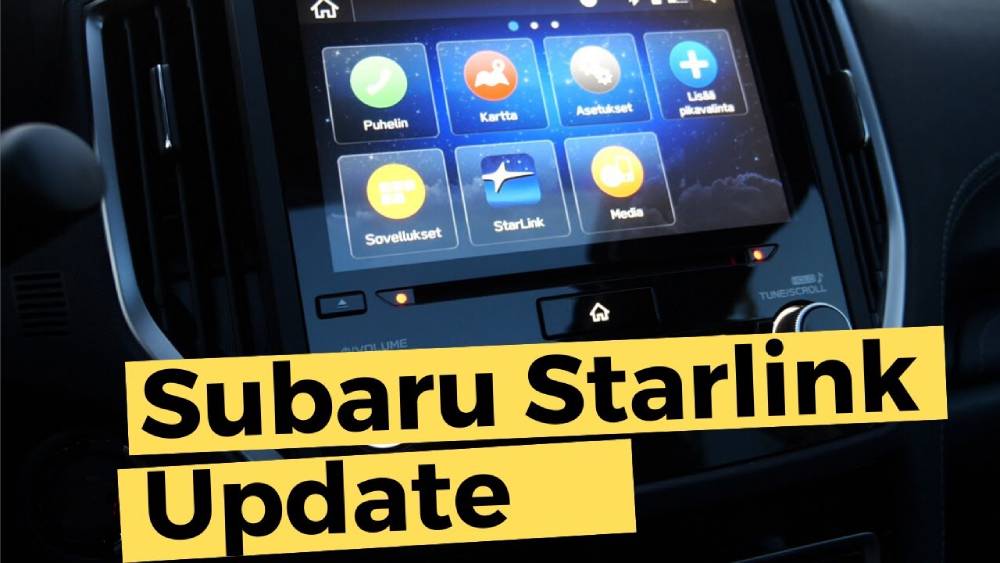
What Is a Subaru STARLINK Update?
Subaru STARLINK is the infotainment and connectivity platform integrated into many modern Subaru vehicles. It combines entertainment, navigation, communication, and vehicle information into a single user-friendly interface displayed on the vehicle’s touchscreen. Depending on the model and trim level, STARLINK may include navigation services, Bluetooth connectivity, smartphone integration, voice commands, media streaming, and access to various connected vehicle features.
Just like smartphones and computers, STARLINK relies on software to function properly. Over time, Subaru releases software updates designed to improve system stability, add new features, fix known bugs, and strengthen security protections. These updates help ensure the infotainment system remains compatible with the latest smartphones, applications, and connectivity standards.
Many drivers underestimate the importance of keeping their infotainment software current. An outdated STARLINK system may experience slow response times, frozen screens, failed Bluetooth pairings, navigation inaccuracies, or compatibility issues with Apple CarPlay and Android Auto. Regular updates can significantly reduce these problems while improving overall user experience.
Most Subaru models equipped with STARLINK can receive software updates, including popular vehicles such as the Outback, Forester, Crosstrek, Ascent, Legacy, and WRX. However, update availability may vary depending on model year, hardware configuration, and regional support. Checking for available updates periodically is one of the easiest ways to maintain optimal infotainment performance and ensure your vehicle benefits from Subaru’s latest improvements.
How to Check Your Current Subaru STARLINK Software Version
Before installing any Subaru STARLINK update, it is important to verify the software version currently installed on your vehicle. This simple step helps determine whether an update is available and provides a reference point for confirming a successful installation later.
Start by turning on your vehicle and allowing the infotainment system to fully load. Once the home screen appears, tap the Settings icon. Navigate to the General or System section, depending on your vehicle’s model and software version. Within this menu, look for an option labeled System Information, Software Information, or About Device.
After opening the information page, you should see details about the currently installed software version. Make a note of the version number or take a photo with your smartphone for future reference. If you plan to contact a Subaru dealership or technical support team, having this information readily available can speed up troubleshooting and support requests.
Checking your software version serves several purposes. First, it prevents unnecessary update attempts if your system is already running the latest release. Second, it allows you to verify that a newly installed update was completed successfully. Finally, it helps identify whether certain performance issues may be related to known software versions that Subaru has already addressed through subsequent updates.
Taking a few minutes to verify your software version before updating can save time, reduce confusion, and ensure a smoother update experience.
Preparing for a Subaru STARLINK Update
Proper preparation is one of the most important factors in ensuring a successful Subaru STARLINK update. While the process is generally straightforward, overlooking a few key requirements can lead to installation failures, incomplete downloads, or temporary system issues.
Begin by ensuring your vehicle has a stable power source. During the update process, the infotainment system must remain powered on continuously. Many Subaru owners choose to keep the engine running during the update to avoid battery drain. Interrupting power while software is being installed can potentially corrupt system files and create additional complications.
Next, verify that you have access to a reliable internet connection. If your vehicle supports WiFi connectivity, connect it to a strong home network whenever possible. Weak signals or unstable connections may interrupt downloads and cause update errors. Avoid performing updates in areas with poor network coverage.
It is also wise to back up any important settings before proceeding. Although software updates rarely erase personal data, recording Bluetooth pairings, audio preferences, navigation favorites, and other custom settings provides peace of mind in case a reset becomes necessary.
Finally, ensure the infotainment system has enough available storage space to download and install update files. Some updates require temporary storage during installation, and insufficient space can prevent the process from completing successfully.
Spending a few minutes on preparation can dramatically reduce the risk of update failures and help ensure your Subaru STARLINK system upgrades smoothly and efficiently.
How to Perform a Subaru STARLINK Update Over WiFi
Updating your Subaru STARLINK system through WiFi is the most convenient method for most vehicle owners. If your Subaru supports over the air software updates, you can often complete the entire process without visiting a dealership.
Start by parking your vehicle in an area with a strong and stable WiFi signal. Turn on the ignition and allow the infotainment system to fully boot. Open the Settings menu and select WiFi. Search for available networks and connect to your preferred wireless connection. Enter the password if required and verify that the system shows a successful connection.
Once connected, return to the Settings menu and navigate to the Software Update section. The exact menu names may vary depending on your Subaru model and software version. Select Check for Updates to allow the system to search for available software releases.
If an update is available, the infotainment system will display information about the new version. Review any update notes provided and select Download. The download process may take anywhere from a few minutes to over half an hour depending on the file size and internet speed. Avoid disconnecting from WiFi during this stage.
After the download is complete, choose Install Update. The system may restart automatically during installation. Keep the vehicle powered on throughout the process. Once installation finishes, return to the System Information screen and verify that the new software version is displayed. Test key functions such as Bluetooth, navigation, Apple CarPlay, and Android Auto to confirm everything is operating correctly.
How to Update Subaru STARLINK Through a Dealership
While many STARLINK updates can be installed through WiFi, some software upgrades require assistance from an authorized Subaru dealership. This is especially true for major firmware revisions, recall related updates, or situations where previous update attempts have failed.
Dealership technicians have access to specialized diagnostic equipment and manufacturer software tools that allow them to perform deeper system updates. These tools can address issues that are not accessible through consumer level update methods and can often restore functionality when an infotainment system becomes unstable or unresponsive.
The dealership update process usually begins with a diagnostic inspection. Technicians identify the current software version, check for active service bulletins, and verify whether any mandatory updates are available. They then connect the vehicle to Subaru’s service platform and install the appropriate software package.
The time required varies depending on the complexity of the update. Some installations may take less than an hour, while major software revisions could require additional time. In many cases, updates associated with recalls, warranty coverage, or service campaigns are provided at no cost. However, out of warranty software services may involve diagnostic or labor fees depending on dealership policies.
If your STARLINK system repeatedly fails to update, experiences frequent crashes, or displays persistent error messages, scheduling a dealership appointment may be the most effective solution.
Common Subaru STARLINK Update Problems and Solutions
Although most updates complete successfully, some Subaru owners encounter issues during or after installation. Understanding the most common problems can help you resolve them quickly and minimize downtime.
One of the most frequent complaints is that the update will not download. This issue is often caused by weak WiFi signals, temporary server outages, or network interruptions. Moving closer to the wireless router, reconnecting to the network, or attempting the download later can often resolve the problem.
Another common issue occurs when the installation process freezes or appears stuck. In many cases, the system simply requires additional time to complete background operations. Before attempting any reset, allow the installation process to continue for an extended period. If the screen remains frozen for a significant amount of time, consult your owner’s manual for approved restart procedures.
Some drivers notice touchscreen responsiveness problems after updating. A simple system reboot may restore normal operation. If performance issues persist, resetting the infotainment system to factory settings can sometimes eliminate software conflicts created by legacy settings carried over from previous versions.
Connectivity problems involving Apple CarPlay or Android Auto may also appear after a software update. Reconnecting the smartphone, deleting existing device pairings, updating mobile operating systems, and establishing a fresh connection often solve these issues.
If repeated troubleshooting attempts fail, contacting a Subaru dealership is recommended. Professional diagnostics can identify deeper software or hardware issues that may not be resolved through standard user level troubleshooting methods.
Subaru STARLINK Update Best Practices
Keeping your Subaru STARLINK system updated is only part of maintaining optimal performance. Following a few best practices can help ensure future updates install successfully and reduce the likelihood of software related issues.
One of the most important habits is checking for updates regularly. Subaru periodically releases software improvements that address newly discovered bugs, enhance system stability, and improve compatibility with evolving smartphone operating systems. Waiting too long between updates may result in multiple software versions being skipped, which can occasionally complicate the update process.
Always perform updates when you have sufficient time available. Rushing through the process increases the risk of accidental interruptions. Plan updates when the vehicle can remain powered on without interruption until installation is fully completed.
Maintaining a strong internet connection is equally important. A stable home WiFi network typically provides the most reliable environment for downloading large software files. Public networks may experience congestion, slower speeds, or unexpected disconnections that could interfere with the update process.
It is also wise to familiarize yourself with your vehicle’s owner’s manual and STARLINK documentation. Different model years may have slightly different update procedures, menu layouts, or feature availability. Understanding your specific system helps prevent confusion during future updates.
Finally, monitor your infotainment system after every update. Test Bluetooth pairing, navigation functionality, touchscreen responsiveness, voice commands, Apple CarPlay, and Android Auto. Identifying any issues immediately allows you to address them before they become more disruptive.
Frequently Asked Questions
How often should I perform a Subaru STARLINK update?
There is no fixed schedule for STARLINK updates. Subaru releases software updates as needed to improve performance, security, and functionality. Checking for updates every few months is generally a good practice.
Can I update Subaru STARLINK at home?
Yes. Many Subaru models support WiFi based software updates that can be completed from home without visiting a dealership. However, some major firmware updates may still require dealer assistance.
Are Subaru STARLINK updates free?
Many software updates are provided free of charge, particularly those related to system improvements, recalls, or warranty covered service campaigns. Certain dealership services outside warranty coverage may involve labor or diagnostic fees.
How long does a Subaru STARLINK update take?
The total update time varies depending on file size, internet speed, and vehicle model. Most updates are completed within 15 to 60 minutes.
What should I do if the update fails?
First, verify your internet connection and restart the infotainment system. Attempt the update again after reconnecting to WiFi. If repeated failures occur, contact your local Subaru dealership for further assistance.
Will a software update erase my settings?
Most STARLINK updates preserve personal settings and paired devices. However, creating a record of important settings before updating is always recommended as a precautionary measure.
Conclusion
Performing a Subaru STARLINK update is one of the simplest yet most effective ways to maintain your vehicle’s infotainment system. Regular updates help improve performance, fix software bugs, enhance security, and ensure compatibility with the latest smartphones and connected services.
Many of the issues Subaru owners encounter, including frozen touchscreens, Bluetooth connectivity problems, navigation glitches, and Apple CarPlay or Android Auto malfunctions, can often be resolved through a successful software update. By understanding how to check your current software version, prepare your vehicle properly, and complete the update process safely, you can avoid unnecessary frustration and keep your system running smoothly.
Whether you choose to install updates through WiFi at home or visit an authorized Subaru dealership for more advanced software upgrades, staying current with the latest STARLINK releases provides long term benefits for both convenience and reliability.
A well maintained infotainment system contributes to a more enjoyable driving experience every day. Taking a proactive approach to Subaru STARLINK updates ensures that your vehicle continues to deliver the technology, connectivity, and functionality that modern drivers expect.
Have you recently completed a Subaru STARLINK update? Share your experience, troubleshooting tips, or questions in the comments and help other Subaru owners get the most from their infotainment systems.