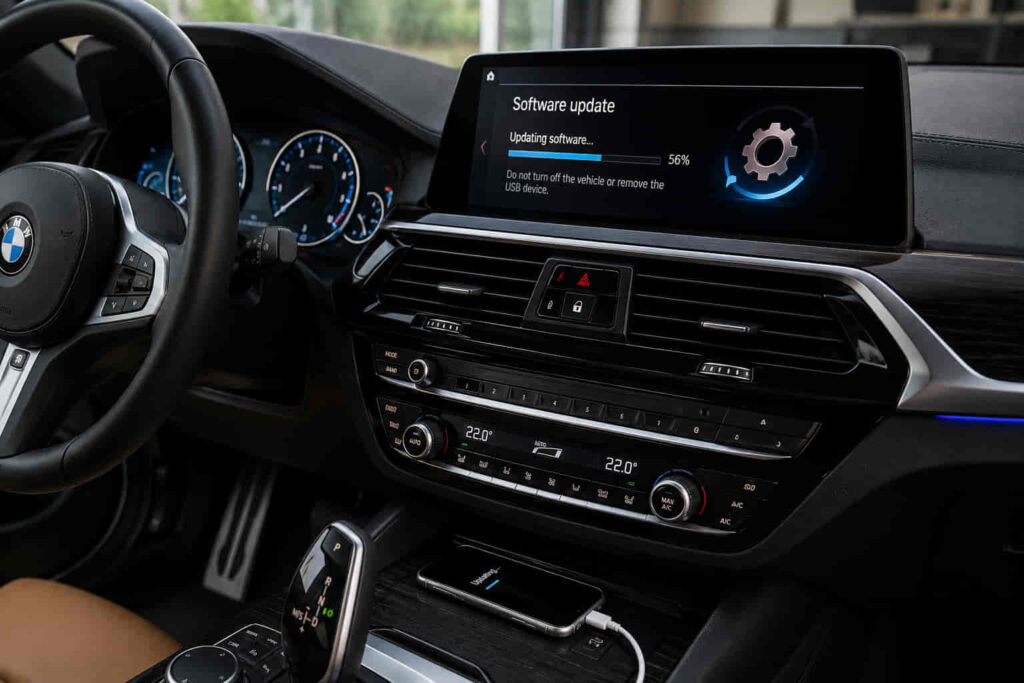
Updating BMW software allows the vehicle to receive system improvements, fix software-related problems, and maintain compatibility with modern digital features. Modern BMW vehicles rely on multiple software systems that control everything from the iDrive interface and navigation system to communication between electronic control modules.
BMW software is not limited to the infotainment screen. The vehicle contains multiple control units that operate different functions, including driver assistance systems, communication systems, and vehicle electronics. A software update can improve system stability, resolve known software issues, and introduce improvements designed by BMW.
The update process depends on the BMW model, production year, iDrive generation, and available software version. Some vehicles support BMW Remote Software Upgrade, which allows updates to be downloaded and installed through the vehicle’s built-in connectivity system. Other updates may require a USB installation method or professional programming using BMW diagnostic equipment.
Understanding how BMW software updates work helps owners choose the correct update method and avoid problems caused by incompatible software or interrupted installation. A successful update requires checking vehicle compatibility, maintaining sufficient battery power, and following the correct installation process.
This guide explains how to check BMW software versions, update BMW systems through available methods, troubleshoot common update problems, and understand when professional programming is required.
How Do You Check Your BMW Software Version?
Checking your BMW software version allows you to determine the current software status of the vehicle and identify whether a newer update is available. Before updating BMW software, owners need to confirm the existing software version because not every BMW supports the same update method or software package.
BMW software versions depend on the vehicle generation, iDrive system, and installed hardware. A BMW equipped with iDrive 7, iDrive 8, or newer systems may support different update features compared with older vehicles that use previous software platforms.
The software information is usually available through the vehicle’s iDrive system. By accessing the vehicle settings and software information section, owners can view details about the current system status and check whether the vehicle has access to available updates.
The BMW Remote Software Upgrade system uses this information to determine whether the vehicle qualifies for a compatible update. The availability of an update depends on factors such as the vehicle identification, installed software version, market region, and hardware configuration.
Checking the software version before updating prevents installation problems because BMW software updates are designed for specific vehicle systems. Installing an incorrect update or using incompatible files can create communication problems between vehicle modules.
For example, a BMW with iDrive 8 may receive a Remote Software Upgrade through the vehicle’s connected services, while an older BMW without supported OTA capability may require a different update method.
How Do You Update BMW Software Using Remote Software Upgrade?
BMW Remote Software Upgrade allows compatible vehicles to update software wirelessly through the vehicle’s built-in connectivity system without requiring a direct visit to a dealership. This method is designed to simplify software maintenance by allowing BMW owners to download and install approved updates directly through the vehicle.
The Remote Software Upgrade process begins when BMW checks whether a compatible software package is available for the specific vehicle. If an update is available, the vehicle can download the required software through its connected communication system.
Before installation begins, the vehicle must meet certain conditions. The battery needs sufficient charge, the vehicle should have stable connectivity, and the installation process requires the vehicle to remain stationary while the update is applied.
During the installation phase, some vehicle functions may be temporarily unavailable because the software update modifies important electronic systems. BMW performs these updates when the vehicle is parked to prevent interruptions during the programming process.
Remote Software Upgrade can update several vehicle systems depending on the BMW model and available software package. These updates may include improvements to iDrive performance, connectivity features, system stability, and compatibility with digital services.
However, not every BMW software update is available through OTA technology. Some updates involve deeper programming of vehicle control modules and require professional equipment because they affect systems beyond the infotainment platform.
For example, a newer BMW equipped with BMW Operating System and compatible ConnectedDrive services may receive an OTA update, while a vehicle requiring control module programming may need a workshop-based software update.
Read more: BMW Adaptive Headlight Repair
How Do You Update BMW Software With a USB Drive?
Updating BMW software with a USB drive is an alternative method used for specific software packages, especially when the vehicle does not support certain Remote Software Upgrade features or when BMW provides a compatible update file for a specific system. This method allows owners to manually install selected software improvements while following BMW’s compatibility requirements.
USB updates are commonly associated with systems such as multimedia compatibility, Bluetooth functionality, and certain infotainment-related features. Unlike a complete vehicle software programming session, many USB-based updates focus on specific user-facing systems rather than rewriting all vehicle control modules.
The update process requires using the correct software file for the specific BMW model and system version. The USB device must be prepared correctly, and the update file must match the vehicle’s requirements. Using an incorrect file can prevent installation or create compatibility problems.
Before starting the update, the vehicle should have stable electrical power because interruptions during software installation can affect system operation. BMW owners should avoid removing the USB device or turning off required systems while the update is running.
After the update is completed, the vehicle may need to restart the affected system to apply the changes. The new software version can then be checked through the vehicle’s settings to confirm successful installation.
However, USB updates have limitations. They cannot replace professional programming when deeper vehicle systems require updates. Control modules related to engine management, transmission, safety systems, or other integrated vehicle functions may require BMW diagnostic equipment.
For example, updating Bluetooth compatibility through USB may be possible on certain BMW systems, while updating a control module responsible for vehicle operation requires professional programming.
When Do You Need BMW Dealer Software Programming?
BMW dealer software programming is required when an update involves vehicle control modules, complex system integration, or software changes that cannot be completed through normal owner-based update methods. Unlike simple infotainment updates, programming modifies deeper vehicle systems and requires specialized diagnostic equipment.
BMW vehicles contain multiple electronic control modules that communicate with each other. These modules manage functions such as engine operation, transmission behavior, safety systems, driver assistance features, and body electronics.
When BMW releases software improvements for these systems, technicians may use BMW diagnostic platforms such as ISTA to perform programming procedures. The process ensures that the updated module communicates correctly with the rest of the vehicle.
Dealer programming may also be necessary after replacing certain components. For example, installing a new control module, replacing electronic components, or repairing communication issues may require coding and programming to integrate the component with the vehicle.
Software programming is more complex than a standard update because it involves vehicle-specific data. The technician must ensure that the correct software version is installed and that all affected systems remain synchronized.
Attempting improper programming procedures can create additional problems, including communication errors between modules or incomplete software installation. This is why advanced BMW software updates are normally performed with professional equipment.
For example, replacing a BMW lighting control module or engine-related electronic component may require programming, while updating a compatible iDrive feature may only require a standard software update.
Why Is My BMW Software Update Not Working?
A BMW software update may fail because of compatibility issues, insufficient battery power, connectivity problems, interrupted installation, or unsupported vehicle configurations. Understanding these causes helps owners identify whether the problem is related to the update process or the vehicle system itself.
One common reason for update failure is that the vehicle does not support the available software package. BMW software updates are designed for specific vehicle hardware and software configurations, meaning an update intended for one model may not work on another.
Battery condition is another important factor. Software installation requires stable electrical power because the vehicle must maintain communication between electronic modules during the update process. A weak battery can interrupt installation or prevent the update from starting.
Connectivity problems can also affect Remote Software Upgrade. The vehicle needs a reliable connection to download required files, and interruptions during the download stage may delay or prevent the update.
Software conflicts may occur when previous updates were incomplete or when certain vehicle systems have communication problems. In these cases, the update process may require professional diagnosis rather than repeated installation attempts.
Owners should also avoid interrupting an update once installation has started. Turning off the vehicle incorrectly, disconnecting power, or removing update media can create software errors.
For example, if a BMW Remote Software Upgrade repeatedly fails despite correct conditions, the issue may involve vehicle compatibility, battery voltage, or a deeper module communication problem requiring professional inspection.
What Should You Do Before Updating BMW Software?
Preparing your BMW before a software update helps prevent installation failures, communication errors, and interruptions during the update process. Because BMW software updates affect electronic systems that depend on stable communication and power supply, proper preparation is an important part of ensuring a successful installation.
The first consideration is the vehicle’s battery condition. BMW software updates require consistent electrical power because the vehicle may communicate with multiple control modules during installation. A weak battery can interrupt the process and potentially create software-related issues.
Vehicle compatibility should also be confirmed before starting an update. BMW software versions are designed for specific models, hardware configurations, and iDrive generations. Checking update availability through the vehicle system ensures that the installed software matches the vehicle requirements.
Owners should also maintain a stable connection when using Remote Software Upgrade. The vehicle needs sufficient connectivity to download update files, and interruptions during the download stage may delay the process.
Before installing an update, important vehicle settings and personal preferences should be reviewed. While software updates are designed to preserve user data, checking system settings helps owners identify any changes after installation.
The vehicle should remain stationary during installation because some functions may be temporarily unavailable while the software is being applied. Interrupting the process by moving the vehicle or disconnecting power can prevent successful completion.
Professional programming situations require additional preparation. When BMW control modules are updated at a workshop, technicians verify vehicle communication, diagnostic information, and software compatibility before performing programming procedures.
For example, a BMW with a healthy battery, compatible software version, and stable connection has a much higher chance of completing a Remote Software Upgrade successfully compared with a vehicle experiencing electrical problems.
Does Updating BMW Software Improve Vehicle Performance?
Updating BMW software can improve system stability, compatibility, and functionality, but it does not physically change the mechanical performance of the vehicle. Software updates primarily improve how existing hardware systems communicate and operate rather than adding completely new mechanical capabilities.
One major benefit of BMW software updates is improved system reliability. Software revisions can address known bugs, reduce unexpected system behavior, and improve communication between electronic modules.
Updates can also improve compatibility with modern digital services and devices. Changes to iDrive software may improve smartphone integration, Bluetooth connections, navigation functions, and connected vehicle features.
Driver assistance systems may also benefit from software improvements. BMW vehicles use complex electronic systems that depend on accurate communication between sensors, cameras, and control modules. Software updates can improve system operation when BMW identifies areas for refinement.
However, software updates do not replace mechanical maintenance. An update cannot repair worn engine components, damaged sensors, failing batteries, or physical hardware problems. If a vehicle has a mechanical issue, diagnosis and repair are still required.
The value of an update depends on the specific software version and vehicle configuration. Some updates focus mainly on fixing technical issues, while others introduce improvements to user experience and system functionality.
For example, a BMW software update may improve iDrive responsiveness or resolve a connectivity issue, but it will not increase engine power unless BMW specifically modifies engine control software through an approved performance-related update.