Have you recently changed the oil in your Toyota Camry only to find that the maintenance light is still illuminated on the dashboard? If so, you’re not alone. Many Camry owners assume that the maintenance light indicates a serious mechanical issue, leading to unnecessary stress and costly trips to the dealership. Fortunately, in most cases, the maintenance light is simply a reminder that scheduled service is due and can be reset in just a few minutes.
Toyota’s maintenance reminder system is designed to help drivers stay on top of routine vehicle care, such as oil changes and periodic inspections. However, after maintenance has been completed, the reminder must be manually reset. The exact procedure can vary depending on the model year, dashboard design, and whether your Camry uses a traditional key ignition or a push-button start system.
In this comprehensive guide, you’ll learn how to reset the maintenance light on Toyota Camry models from older generations to the latest releases. We’ll walk you through step-by-step instructions for each model range, explain the difference between the maintenance light and the check engine light, and provide troubleshooting tips if the reset process doesn’t work the first time.
By the end of this guide, you’ll be able to clear the maintenance reminder confidently and keep your Toyota Camry’s service tracking system functioning properly.
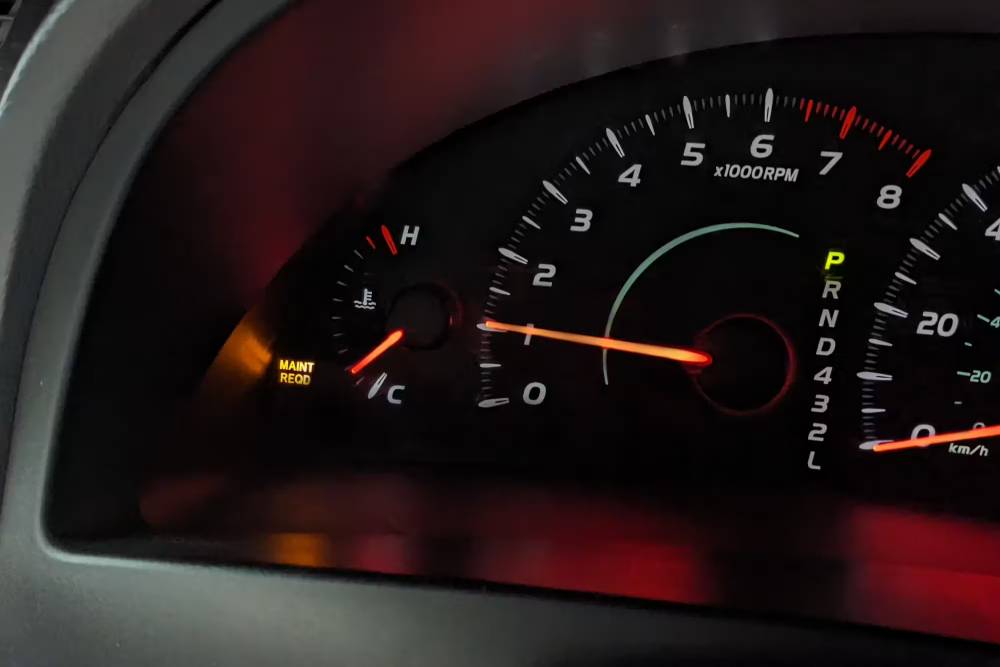
What Does the Maintenance Light Mean on a Toyota Camry?
One of the most common misconceptions among Toyota Camry owners is that the maintenance light signals a serious mechanical problem. In reality, the maintenance required light is primarily a service reminder designed to help drivers keep up with routine maintenance.
Toyota programs the maintenance reminder system to activate after a specific mileage interval, typically every 5,000 miles. The system tracks mileage and alerts the driver when it is time for regular maintenance, such as an oil change, tire rotation, or general vehicle inspection. The light itself does not monitor engine health or detect mechanical failures.
It is important to understand the difference between the maintenance light and the check engine light. The maintenance light is a scheduled service reminder, while the check engine light is triggered when the vehicle’s onboard diagnostic system detects a problem that may affect emissions, engine performance, or overall vehicle operation.
If your maintenance light comes on shortly after reaching a mileage milestone, there is usually no immediate cause for concern. However, ignoring routine maintenance can eventually lead to reduced fuel efficiency, increased wear on engine components, and more expensive repairs in the future.
For Toyota Camry owners, understanding the purpose of this warning indicator is the first step toward maintaining the vehicle properly and avoiding unnecessary worry when the light appears on the dashboard.
Before Resetting the Maintenance Light
Before attempting to reset the maintenance light on your Toyota Camry, it is important to verify that the required maintenance has actually been completed. Resetting the reminder without performing the recommended service defeats the purpose of the system and may cause you to miss critical maintenance intervals in the future.
Start by confirming that routine services such as an oil change, tire rotation, fluid inspection, or scheduled maintenance have been performed according to Toyota’s recommended service schedule. If the maintenance reminder appeared because the vehicle reached a mileage milestone, make sure the corresponding service has been completed before clearing the light.
Next, familiarize yourself with the controls that will be used during the reset procedure. Depending on the model year, you may need the ODO/TRIP button, steering wheel controls, the ignition switch, or the vehicle settings menu. Knowing where these controls are located will make the reset process much easier.
It is also helpful to identify your Camry’s model year before proceeding. Toyota has introduced several dashboard and infotainment system updates over the years, resulting in different reset procedures across generations. A method that works for a 2008 Camry may not work for a 2024 model.
Taking a few moments to prepare before resetting the maintenance light can save time, prevent errors, and ensure that the service reminder system continues to function accurately after the reset is completed.
How to Reset Maintenance Light on Toyota Camry 2002–2006
If you own a Toyota Camry manufactured between 2002 and 2006, the maintenance light can typically be reset using the odometer button and ignition switch. The process takes only a few minutes and requires no special tools.
First, insert the key into the ignition and turn it to the OFF position if the vehicle is currently running. Locate the ODO/TRIP button on the instrument panel. Press and hold this button firmly.
While continuing to hold the ODO/TRIP button, turn the ignition key to the ON position. Do not start the engine. Keep holding the button as the odometer display begins to change.
After a few seconds, the display may show a series of dashes or countdown indicators. Continue holding the button until the display returns to normal and the maintenance light turns off. Once the light disappears, release the button.
To verify that the procedure was successful, turn the ignition off and then start the vehicle normally. The maintenance light should no longer be illuminated on the dashboard.
If the light remains on, repeat the process carefully and ensure that the ODO/TRIP button is held continuously throughout the reset sequence. Releasing the button too early is one of the most common reasons the procedure fails.
This straightforward reset method has helped thousands of Camry owners clear the maintenance reminder after completing routine service, allowing the system to begin tracking the next maintenance interval accurately.
How to Reset Maintenance Light on Toyota Camry 2007–2011
Toyota made slight changes to the dashboard layout during this generation, but resetting the maintenance light remains a simple process that most owners can perform without professional assistance.
Begin by inserting the key into the ignition and turning it to the ON position without starting the engine. Press the ODO/TRIP button until the display shows Trip A. This step is important because the reset procedure will not work if another trip meter or the odometer display is selected.
Once Trip A is displayed, turn the ignition completely OFF. Press and hold the ODO/TRIP button. While continuing to hold the button, turn the ignition back to the ON position. Do not start the engine.
Keep holding the button as the odometer display shows a series of zeros or a countdown sequence. After several seconds, the display will return to normal, indicating that the maintenance reminder has been reset successfully.
Release the button and start the vehicle. The maintenance required light should no longer appear on the dashboard. If the light remains illuminated, repeat the process carefully and verify that Trip A was selected before beginning the reset sequence.
Many owners mistakenly use Trip B or the standard odometer display, which prevents the system from completing the reset. Following the steps exactly as outlined above will usually resolve the issue and restore the maintenance tracking system for the next service interval.
How to Reset Maintenance Light on Toyota Camry 2012–2017
The Toyota Camry models produced between 2012 and 2017 introduced more advanced instrument clusters and, in some trims, a Multi Information Display. As a result, the reset procedure may vary slightly depending on the vehicle’s equipment level.
For models equipped with a standard display, begin by turning the ignition to the ON position without starting the engine. Use the ODO/TRIP button to select Trip A. Turn the ignition OFF and then press and hold the ODO/TRIP button. While holding the button, turn the ignition back to the ON position. Continue holding until the maintenance reminder disappears.
For vehicles equipped with a Multi Information Display, use the steering wheel controls to navigate through the menu options. Access the settings menu and locate the maintenance section. Depending on the trim level, you may see options such as Scheduled Maintenance or Maintenance Reset.
Select the reset option and confirm your choice when prompted. The system will clear the maintenance reminder and begin tracking mileage toward the next service interval.
If the maintenance light does not reset successfully, verify that the vehicle is in the correct ignition mode and that all menu selections have been confirmed. Some owners exit the menu before the reset process is completed, causing the reminder to remain active.
This generation of Camry provides a more user-friendly reset experience, especially for drivers who prefer using the vehicle’s digital menu system rather than the traditional odometer button method.
How to Reset Maintenance Light on Toyota Camry 2018–2024
Toyota significantly modernized the Camry beginning with the 2018 model year. Most vehicles in this generation feature a larger Multi Information Display and steering wheel controls that allow drivers to manage maintenance settings directly from the instrument cluster.
Start by turning the vehicle on without starting the engine, or place the ignition in accessory mode if equipped with a push button start system. Using the directional controls on the steering wheel, navigate to the settings menu displayed within the instrument cluster.
Scroll through the available options until you locate Vehicle Settings or Maintenance Settings. The exact wording may vary depending on the model year and trim level. Once inside the maintenance menu, select Maintenance Reset.
A confirmation message will appear asking whether you want to reset the maintenance data. Choose Yes and wait for the system to complete the process. Within a few moments, the maintenance reminder should disappear from the display.
To confirm the reset, turn the vehicle off and restart it. Check the instrument cluster to ensure that no maintenance reminder messages remain active.
One of the most common mistakes during this procedure is selecting the wrong menu category. Drivers sometimes access general settings instead of vehicle maintenance settings, which prevents the reset option from appearing. Taking time to navigate carefully through the menus can help avoid frustration and ensure a successful reset.
Thanks to the enhanced digital interface introduced in this generation, resetting the maintenance light is more intuitive than ever and can usually be completed in less than a minute.
How to Reset Maintenance Light on Toyota Camry 2025–2026
The latest Toyota Camry models feature advanced digital displays and an updated user interface that makes resetting the maintenance reminder more convenient than ever. While the exact screen layout may vary slightly depending on trim level and software version, the overall process remains straightforward.
Begin by turning the vehicle on and allowing the digital instrument cluster to fully load. Using the steering wheel controls, navigate to the Settings menu within the driver’s display. Look for a section labeled Vehicle Settings, Maintenance, or Service Information.
Once inside the maintenance menu, locate the Maintenance Reset option. Select it and review any confirmation prompts displayed on the screen. The system may ask whether the scheduled maintenance has been completed. Confirm the reset if the required service has already been performed.
After confirmation, the system will clear the maintenance reminder and restart the mileage countdown for the next scheduled service interval. In most cases, the reset process takes only a few seconds.
To verify success, turn the vehicle off and restart it. Check the instrument cluster for any remaining maintenance notifications. If the reminder is no longer displayed, the reset has been completed correctly.
Modern Camry models are designed to make maintenance tracking easier for owners. By resetting the reminder after each scheduled service, drivers can ensure accurate maintenance records and avoid unnecessary dashboard alerts.
What If the Maintenance Light Won’t Turn Off?
Occasionally, Toyota Camry owners find that the maintenance light remains illuminated even after following the reset procedure. While this can be frustrating, the problem is usually caused by a simple error rather than a serious vehicle issue.
One common reason is that the reset sequence was not completed correctly. Missing a step, releasing the ODO/TRIP button too early, or selecting the wrong trip meter can prevent the system from resetting successfully. Carefully repeating the procedure often resolves the issue.
Another possibility is that the vehicle was not placed in the correct ignition mode. Some models require the ignition to be turned on without starting the engine, while others use accessory mode. Using the wrong mode may interrupt the reset process.
For newer Camry models equipped with digital displays, drivers sometimes exit the settings menu before confirming the reset. Without final confirmation, the maintenance reminder remains active even though the procedure appears complete.
If the maintenance light continues to stay on after multiple attempts, inspect the vehicle for pending maintenance items. In some situations, a maintenance reminder may be linked to service intervals that have not yet been acknowledged within the system.
Electrical issues are relatively uncommon but can also contribute to reset problems. A weak battery, instrument cluster malfunction, or software glitch may prevent the maintenance system from updating properly. If none of the standard reset procedures work, consulting a Toyota dealer or qualified technician may be necessary.
Most maintenance light reset issues can be resolved within minutes by carefully reviewing the procedure and ensuring each step is performed exactly as required for the specific model year.
Common Mistakes Drivers Make
Resetting the maintenance light on a Toyota Camry is generally a simple task, but several common mistakes can lead to confusion or unsuccessful results.
One of the most frequent errors is resetting the maintenance reminder before performing the recommended service. The maintenance light exists to help drivers stay on schedule with essential maintenance tasks. Clearing it without changing the oil or completing the required inspection can result in missed service intervals and increased vehicle wear over time.
Another common mistake is confusing the maintenance light with the check engine light. These two indicators serve completely different purposes. The maintenance light is a scheduled service reminder, while the check engine light signals a potential mechanical or emissions-related issue. Resetting the maintenance reminder will not fix engine problems or clear diagnostic trouble codes.
Many owners also release the ODO/TRIP button too early during the reset sequence. The button must remain pressed until the countdown or reset animation finishes completely. Letting go too soon interrupts the process and leaves the reminder active.
Selecting the wrong display mode is another frequent issue. Older Camry models typically require Trip A to be displayed before initiating the reset. Using Trip B or the standard odometer display often causes the procedure to fail.
Finally, some drivers rush through digital menu systems in newer Camry models and overlook confirmation prompts. Without confirming the reset, the vehicle will continue displaying maintenance reminders.
Avoiding these mistakes can save time, eliminate frustration, and ensure that the maintenance tracking system functions exactly as Toyota intended.
Toyota Camry Maintenance Schedule Overview
Understanding Toyota’s recommended maintenance schedule can help you keep your Camry running efficiently and reduce the likelihood of costly repairs. While specific intervals may vary slightly depending on model year, driving conditions, and engine type, the following schedule serves as a general guideline for most Toyota Camry models.
Every 5,000 Miles
At approximately every 5,000 miles, Toyota recommends performing basic maintenance tasks such as rotating the tires, inspecting fluid levels, checking the brakes, and conducting a general vehicle inspection. This is also the interval at which the maintenance reminder light typically appears on many Camry models.
Every 10,000 Miles
Most modern Toyota Camry models using synthetic motor oil require an oil and oil filter change every 10,000 miles under normal driving conditions. Additional inspections of belts, hoses, steering components, and suspension systems may also be recommended.
Every 30,000 Miles
At the 30,000-mile mark, maintenance becomes more comprehensive. Services often include replacing the engine air filter and cabin air filter, inspecting the battery, checking the cooling system, and examining various drivetrain components for wear.
Every 60,000 Miles and Beyond
As mileage increases, more extensive inspections and replacements may be required. Depending on the vehicle’s condition and service history, maintenance may include spark plug replacement, transmission service, coolant replacement, and detailed inspections of critical engine components.
Following Toyota’s recommended maintenance schedule not only helps maximize vehicle reliability but also supports fuel efficiency, performance, and long-term resale value. Most importantly, completing maintenance before resetting the maintenance reminder ensures that the system continues to provide accurate service notifications in the future.
Frequently Asked Questions
Can I Drive With the Maintenance Light On?
Yes. In most cases, the maintenance light is simply a reminder that routine service is due. The vehicle can usually be driven safely, but scheduled maintenance should be completed as soon as possible.
Will Resetting the Maintenance Light Fix Engine Problems?
No. Resetting the maintenance light only clears the service reminder. It does not repair mechanical issues, resolve warning codes, or turn off the check engine light.
How Long Does It Take to Reset the Maintenance Light?
Most Toyota Camry maintenance light reset procedures take less than five minutes. Once you are familiar with the steps for your specific model year, the process can often be completed in under a minute.
Why Is the Maintenance Light Flashing?
A flashing maintenance light often appears shortly before a scheduled maintenance interval is reached. It serves as an early reminder that service will soon be required.
Does Resetting the Maintenance Light Erase Service History?
No. Resetting the maintenance reminder does not erase maintenance records stored by dealerships, repair shops, or vehicle history reports. It simply restarts the maintenance tracking interval within the vehicle.
Why Does the Maintenance Light Come Back On?
The light is programmed to return after a predetermined mileage interval. If it comes back on immediately after a reset, the procedure may not have been completed correctly, or another maintenance interval may need attention.
What Is the Difference Between the Maintenance Light and the Check Engine Light?
The maintenance light is a scheduled service reminder based primarily on mileage. The check engine light indicates that the vehicle’s diagnostic system has detected a potential problem that may require inspection or repair.
Should I Reset the Light Before an Oil Change?
No. The maintenance reminder should only be reset after the recommended maintenance has been completed. Resetting it beforehand may cause you to lose track of important service intervals.
Conclusion
Knowing how to reset the maintenance light on a Toyota Camry is a valuable skill for any owner. Whether you drive an older Camry with a traditional ignition key or a newer model equipped with a fully digital instrument cluster, the reset process is generally quick and easy once you understand the correct procedure for your vehicle.
The maintenance light is not a warning that something is wrong with your engine. Instead, it serves as a helpful reminder that routine service is due. After completing scheduled maintenance such as an oil change, tire rotation, or vehicle inspection, resetting the reminder allows the system to begin tracking the next service interval accurately.
Throughout this guide, we covered reset procedures for Toyota Camry models from 2002 through 2026, explained the difference between the maintenance light and the check engine light, and explored common troubleshooting solutions when the reset does not work as expected.
Regular maintenance remains one of the most important factors in preserving vehicle reliability, fuel efficiency, and long-term value. By following Toyota’s recommended service schedule and properly resetting the maintenance reminder after each visit, you can help ensure that your Camry continues to perform at its best for years to come.
If you own a specific Toyota Camry model year and encounter issues during the reset process, consult your owner’s manual or seek assistance from a qualified Toyota technician for model-specific guidance.