Your Honda radio suddenly displays CODE after a battery replacement, and now you cannot listen to music or use the audio system. This situation surprises many Honda owners because the radio worked perfectly before the battery lost power. Fortunately, the problem is easy to solve once you know the correct security code and the proper steps to unlock the system.
If you are wondering how to enter code on Honda radio, you are in the right place. Honda installs an anti theft feature that automatically locks the radio whenever it loses electrical power. The feature helps protect the audio unit from theft, but it also requires the owner to verify the system before using it again. Many people become confused because they do not know where to find the code or how to enter it correctly.
This guide explains the entire process in simple language. You will learn how to enter the Honda radio code, where to find the correct security code, and how to locate the radio serial number if the code is missing. You will also discover what to do when the radio displays CODE, ERR, or other security messages. Whether you drive an older Honda with preset buttons or a newer model with a touchscreen display, this guide will help you unlock the radio quickly and avoid common mistakes that could delay the process.
How to Enter Code on Honda Radio
If you need to know how to enter code on Honda radio, the process is usually quick and straightforward. Most Honda vehicles ask for a security code after the battery loses power. This often happens after a battery replacement, a battery disconnect, or a complete battery failure. Once power returns, the radio remains locked until you enter the correct security code.
Start by turning the ignition to the ON or ACCESSORY position. Next, switch on the radio and wait for the display to show CODE or ENTER CODE. If the screen remains blank or shows another message, check your owner’s manual because some models follow a slightly different procedure.
Take the security code that belongs to your vehicle. Older Honda radios usually use the preset buttons to enter each number. For example, if your code is 43125, press button 4, then 3, then 1, followed by 2 and finally 5. After you enter the last digit, the radio normally unlocks automatically. Most models do not require you to press an additional confirmation button.
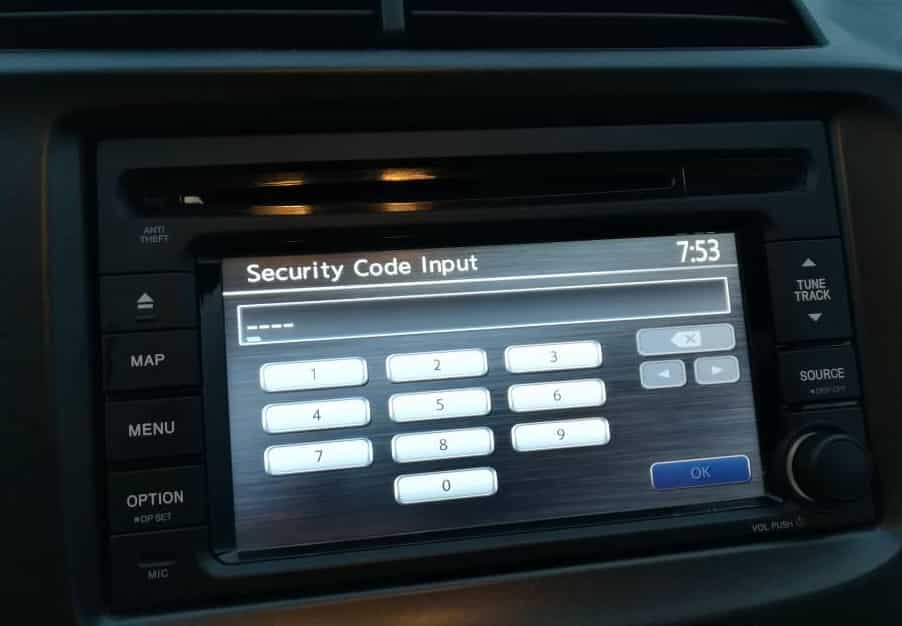
Newer Honda vehicles with touchscreen infotainment systems may display a digital keypad instead of physical preset buttons. In this case, simply tap each number on the screen and follow the prompt if the system asks you to confirm the code. Some recent Honda models even restore the radio automatically after the battery reconnects, so you may not need to enter a code at all.
Before entering the code, double check every digit. Avoid guessing because several incorrect attempts can lock the radio temporarily. Using the correct code the first time saves time and prevents unnecessary troubleshooting later.
Why Your Honda Radio Is Asking for a Code
Many Honda owners become concerned when the radio suddenly displays CODE instead of playing music. In most cases, this does not mean the radio is broken. The message simply tells you that the anti theft system has activated because the radio lost its power source. Once the system detects an interruption in electrical power, it requires the original security code before allowing normal operation.
The most common reason for this message is a battery replacement. However, the same issue can appear after disconnecting the battery for maintenance, replacing a blown fuse, performing electrical repairs, or allowing the battery to discharge completely. Even a short power interruption can trigger the security feature on many Honda models.
Honda introduced this system to discourage theft. If someone removes the radio from the vehicle, the unit becomes useless without the correct security code. This extra layer of protection helps reduce the value of stolen audio equipment and protects the owner’s investment. Although the feature improves security, it can surprise drivers who are not familiar with the system.
The exact behavior depends on your Honda model and model year. Many older vehicles require a five digit security code every time the radio loses power. Some newer models use a more advanced infotainment system that recognizes the vehicle after the battery reconnects. In these cases, the radio may unlock automatically without asking for a code.
Understanding why the message appears makes the next steps much easier. Instead of assuming the radio has failed, you can focus on locating the correct security code and restoring the system. Once you have the required information, the unlocking process usually takes only a few minutes.
Where to Find Your Honda Radio Code
Finding the correct security code is the most important step before you unlock your Honda radio. Every factory installed radio has its own unique code, so you must use the one assigned to your vehicle. If you enter the wrong numbers several times, the radio may refuse additional attempts for a short period. For this reason, it is always better to locate the correct code before touching any buttons.
The first place to check is the anti theft identification card that came with the vehicle. Honda often included this small card with the owner’s documents when the car was sold. Many owners also write the security code inside the owner’s manual or keep the card in a safe place with other important vehicle records.
If you cannot find the original documents, inspect the glove compartment carefully. Some Honda models have a sticker that lists the radio code or provides information that helps identify the audio unit. Although this label is not available on every vehicle, it is worth checking before trying other methods.
You can also retrieve the code through Honda’s official owner resources if you have the required vehicle information. In most cases, you will need the vehicle identification number, the radio serial number, and the model year. Some situations may also require proof that you own the vehicle before the code can be provided.
Avoid using security codes that belong to another Honda, even if the vehicles look identical. Each radio receives its own code during production. Using the correct code for your specific audio unit ensures a smooth unlocking process and reduces the risk of temporary lockouts caused by repeated incorrect entries.
How to Find the Honda Radio Serial Number
You may need the radio serial number before you can recover the correct security code. Honda uses this unique number to identify the audio unit installed in your vehicle. If you no longer have the original code card, the serial number becomes one of the most important pieces of information during the recovery process.
Many older Honda models allow you to display the serial number directly on the radio. Turn the ignition to the ON or ACCESSORY position and make sure the radio is turned off. Press and hold the preset buttons recommended for your model until the display shows a series of letters and numbers. Write down the entire sequence exactly as it appears because a single incorrect digit can prevent you from retrieving the correct security code.
Some newer Honda vehicles make the process even easier. The serial number may appear in the infotainment settings menu or the system information screen. The location varies by model year, so you should follow the instructions that match your specific vehicle if the number does not appear immediately.
If the radio cannot display the serial number, you may need to remove the audio unit and check the label attached to the side or back of the device. This method usually takes more time, so many owners try the built in options before removing any dashboard panels.
After you record the serial number, compare it carefully before requesting a security code. Double check every letter and number to avoid delays. Accurate information helps you receive the correct Honda radio code the first time and makes the unlocking process much faster.
What to Do If the Honda Radio Code Does Not Work
Entering the correct security code should unlock your Honda radio within seconds. If the radio remains locked, do not panic or start entering random numbers. Most problems have a simple explanation, and you can usually solve them by checking a few important details.
Start by confirming that you entered every digit correctly. Many Honda radio codes contain five digits, and pressing the wrong preset button even once will prevent the system from unlocking. Compare the code with your records and enter it again carefully. Taking a few extra seconds to verify each number is much better than making repeated mistakes.
Next, make sure you are using the correct code for the radio installed in your vehicle. Some owners accidentally enter the code from a previous Honda or from a replacement radio. Because every factory installed radio has a unique security code, a code from another unit will never work, even if the vehicles are the same model.
You should also verify the radio serial number if you recently requested the code. An incorrect serial number often results in the wrong security code. Checking both numbers again can save time and eliminate unnecessary troubleshooting.
Avoid entering different combinations in the hope that one of them will work. Honda radios usually limit the number of incorrect attempts. After several failed entries, the system may display an error message and temporarily block additional attempts. At that point, you may need to leave the ignition in the recommended position for a period before trying again.
If you have confirmed your vehicle information and the code still does not work, contact an authorized Honda dealer or use Honda’s official owner resources to verify the correct security code. This approach is faster, safer, and far more reliable than guessing.
How to Fix CODE, ERR, or Error Messages
Your Honda radio may display different messages during the unlocking process. The most common ones include CODE, ENTER CODE, and ERR. Each message has a different meaning, so understanding what the screen is telling you can help you solve the problem much faster.
When the display shows CODE or ENTER CODE, the radio is waiting for the correct security code. This message usually appears after the battery loses power. If you already have the correct code, enter each digit carefully and wait for the radio to unlock automatically. Most Honda radios begin working as soon as you enter the final digit.
An ERR message usually appears after one or more incorrect attempts. The radio recognizes that the wrong code has been entered and prevents normal operation until you follow the proper recovery procedure. Do not continue guessing because each failed attempt may increase the waiting time before the system accepts another code.
Some Honda models require you to leave the ignition in the ON or ACCESSORY position with the radio powered on for a period before the system resets. Once the waiting period ends, the display returns to the code entry screen and allows another attempt. During this time, avoid disconnecting the battery or turning the ignition off unless your owner’s manual instructs you to do so.
If the display shows an unusual message or the screen remains blank, inspect the vehicle battery and related fuses before assuming the radio has failed. A weak battery or electrical problem can interrupt normal operation and create symptoms that look similar to a locked radio.
The safest solution is always to identify the message first, confirm that you have the correct security code, and follow the recommended procedure for your Honda model. A careful approach reduces mistakes and helps restore the radio without unnecessary delays.
Honda Radio Instructions for Different Models
The basic steps for entering a Honda radio code remain similar across most vehicles, but the exact procedure depends on the model and model year. Honda has introduced several generations of audio systems, so the buttons, menus, and security features may not look the same in every vehicle. Knowing which type of system your vehicle uses can save time and prevent unnecessary confusion.
Older Honda models, including many versions of the Accord, Civic, CR V, Pilot, Odyssey, Fit, and Ridgeline, usually include physical preset buttons on the front of the radio. After the display shows CODE, press the matching preset button for each digit in the correct order. The radio normally unlocks immediately after you enter the final number.
Many newer Honda vehicles use touchscreen infotainment systems instead of traditional radio controls. These systems often display a numeric keypad on the screen and guide you through the code entry process. Simply tap each digit carefully and follow any instructions that appear on the display. Some models also verify the code automatically without requiring an additional confirmation step.
Recent Honda models may not request a security code after reconnecting the battery. The infotainment system can recognize the vehicle and restore normal operation automatically. Even so, this feature is not available on every trim level or model year, so you should not assume that every Honda behaves the same way.
If you are unsure which procedure applies to your vehicle, identify the model year before entering the code. Following the correct instructions reduces the risk of mistakes and helps you unlock the radio more quickly. Using the proper method for your specific Honda also prevents unnecessary troubleshooting and ensures the audio system returns to normal operation as expected.
Frequently Asked Questions
How many digits does a Honda radio code have?
Most factory installed Honda radios use a five digit security code. Some older models may use a different format, but five digits remain the most common. Always use the code assigned to your specific radio instead of trying codes from another vehicle.
Can I enter the Honda radio code more than once?
Yes, but you should be careful. Honda radios allow only a limited number of incorrect attempts before displaying an error message or temporarily locking the system. Double check every digit before entering the code to avoid unnecessary delays.
Can I get the radio code with only the VIN?
The vehicle identification number is important, but it is not always enough by itself. Depending on the model, you may also need the radio serial number and proof of ownership before Honda can provide the correct security code.
Why does my Honda radio ask for a code after replacing the battery?
The radio loses its stored security status when electrical power is interrupted. Once power returns, the anti theft feature activates and requests the original security code before restoring normal operation.
Can I bypass the Honda radio security code?
No legitimate method allows you to bypass the factory security feature. The safest solution is to recover the correct code through your vehicle documents or Honda’s official owner resources. Avoid unofficial methods because they may not work and could create additional problems.
What should I do if I lost my Honda radio code?
Start by checking the owner’s manual, the anti theft card, and the glove compartment for the original code. If you still cannot find it, record the vehicle identification number and the radio serial number, then request the correct code through an authorized Honda dealer or Honda’s official support services.
Does every Honda model require a radio code?
No. Many older Honda vehicles require a security code after losing battery power. Some newer models automatically recognize the vehicle after the battery reconnects and restore the infotainment system without asking for a code.
Conclusion
Knowing how to enter code on Honda radio can save you time, reduce frustration, and help you restore your audio system without unnecessary repairs. Although the security feature may seem inconvenient at first, it plays an important role in protecting your factory installed radio from unauthorized use. Once you understand how the system works, unlocking the radio becomes a simple task.
The key to a successful recovery is using the correct security code for your specific vehicle. Before entering any numbers, verify the code, confirm the radio serial number if necessary, and follow the procedure that matches your Honda model and model year. Taking a careful approach helps you avoid temporary lockouts and eliminates the need for repeated troubleshooting.
If the radio still does not unlock after following the recommended steps, do not continue guessing. Instead, use your vehicle documents or contact Honda through its official owner resources to confirm the correct information. This method is the safest and most reliable way to restore normal operation.
With the guidance in this article, you now have everything you need to unlock your Honda radio with confidence. Keep your security code in a safe place for future reference, and you will be prepared the next time your vehicle loses battery power.