Seeing the Honda Civic Water Temp Hot warning appear while driving can be alarming. Whether you are commuting to work, traveling on the highway, or sitting in traffic, this warning indicates that your engine is operating at an unsafe temperature. Ignoring it can quickly turn a minor cooling system issue into a costly repair that affects the engine, radiator, or even the head gasket.
The cooling system in a Honda Civic is designed to keep the engine within its ideal operating temperature. Coolant continuously absorbs heat from the engine before releasing it through the radiator. At the same time, the thermostat, water pump, cooling fan, and temperature sensor work together to maintain stable performance. If any of these components fail, the engine temperature can rise rapidly and trigger the Honda Civic Water Temp Hot warning.
Many drivers assume that adding more coolant will solve the problem. In reality, overheating can result from several different issues, including a leaking radiator, a stuck thermostat, a faulty cooling fan, a failing water pump, trapped air in the cooling system, or even a blown head gasket. Identifying the real cause is the only way to prevent repeated overheating and avoid severe engine damage.
This guide explains what the Honda Civic Water Temp Hot warning means, the most common causes behind it, and the steps you should take as soon as the warning appears. You will also learn how to diagnose cooling system problems, understand when professional repairs are necessary, and discover practical maintenance tips that help keep your Honda Civic running safely for years to come.
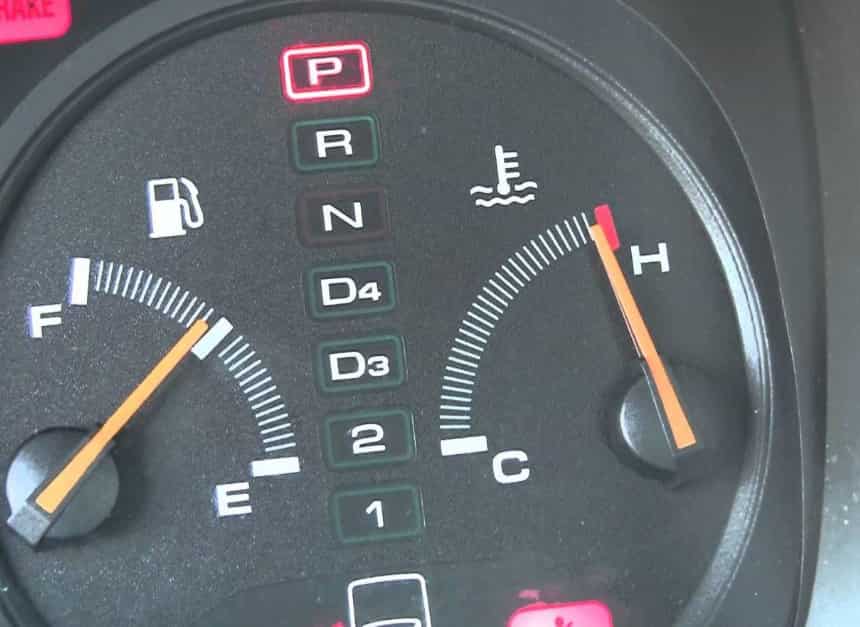
What Does Honda Civic Water Temp Hot Mean?
The Honda Civic Water Temp Hot warning means your engine is running hotter than its normal operating temperature. You should never ignore this warning. Excessive heat can damage important engine components in just a few minutes. Even if the vehicle still drives normally, the engine may already be overheating.
The cooling system keeps the engine at a safe temperature. Coolant absorbs heat as it flows through the engine block and cylinder head. The water pump keeps the coolant moving through the system. The thermostat controls when coolant enters the radiator. The radiator releases heat into the outside air. The cooling fan increases airflow whenever the vehicle is idling or moving at low speed. Every component has an important job. If one part fails, engine temperature can rise quickly.
Several problems can trigger the Honda Civic Water Temp Hot warning. Low coolant is one of the most common causes. Coolant leaks also reduce the system’s ability to remove heat. A stuck thermostat can block coolant flow, while a clogged radiator limits heat transfer. A failing water pump reduces coolant circulation. A faulty cooling fan may also cause overheating, especially in slow traffic. In some cases, a bad coolant temperature sensor sends incorrect readings to the dashboard.
Understanding this warning helps you respond before serious damage occurs. A quick inspection can identify the real cause. Early repairs protect the cooling system, reduce repair costs, and keep your Honda Civic running safely for years.
What Should You Do When the Water Temp Is Hot?
The Honda Civic Water Temp Hot warning requires immediate attention. Acting quickly can prevent severe engine damage and reduce repair costs. Never assume the warning will disappear on its own. Every extra minute of overheating increases the risk of expensive repairs.
Turn off the air conditioner as soon as the warning appears. This reduces the load on the engine and limits additional heat. Next, switch the cabin heater to the highest temperature. The heater removes some heat from the cooling system. Although this feels uncomfortable, it may help lower the engine temperature.
Find a safe place and pull over as soon as possible. Stop the vehicle and turn off the engine. Do not continue driving unless you have no other safe option. Driving with an overheating engine can damage the cylinder head, head gasket, and internal engine parts.
Allow the engine to cool completely before opening the hood. Never remove the radiator cap while the engine is hot. Hot coolant remains under high pressure and can cause serious burns. Wait until the cooling system has cooled before checking the coolant level.
After the engine cools, inspect the coolant reservoir. If the coolant level is low, refill it with the correct Honda approved coolant. Then look for visible leaks around the radiator, hoses, water pump, and coolant reservoir. Also check for steam, coolant stains, or unusual smells under the hood.
If the Honda Civic Water Temp Hot warning returns after adding coolant, the problem is likely more serious. The cooling fan, thermostat, radiator, water pump, or head gasket may have failed. At this point, avoid driving the vehicle. A complete cooling system inspection is the safest way to identify the root cause and prevent further engine damage.
10 Common Causes of Honda Civic Water Temp Hot
Low Coolant Level
A low coolant level is one of the most common reasons behind the Honda Civic Water Temp Hot warning. Coolant carries heat away from the engine and releases it through the radiator. When the coolant level drops, the system cannot remove enough heat. As a result, engine temperature rises much faster than normal.
Coolant does not disappear without a reason. In most cases, the system has developed a leak or has not been serviced correctly. Small leaks often go unnoticed because coolant can evaporate before it reaches the ground. However, the coolant level continues to fall over time. Eventually, the engine no longer receives enough cooling protection.
Several signs can help you identify this problem. The coolant reservoir may sit below the minimum mark. You may notice a sweet smell after driving. Some drivers also find dried coolant residue around the radiator or hoses. In more serious cases, steam may escape from the engine compartment after the vehicle stops.
Checking the coolant level is simple, but always wait until the engine is completely cool. Never remove the radiator cap while the engine is hot. High pressure inside the cooling system can force hot coolant out and cause serious burns. Instead, inspect the coolant reservoir first. If the level is low, refill it with coolant that meets Honda specifications.
Adding coolant may solve the immediate warning, but it does not fix the real problem. The cooling system should remain sealed during normal operation. If the coolant level drops again after a short time, inspect the radiator, hoses, water pump, and reservoir for leaks. Finding the source early helps prevent repeated overheating and protects the engine from expensive damage.
Coolant Leak
A coolant leak is another leading cause of the Honda Civic Water Temp Hot warning. Even a small leak can reduce cooling performance over time. As coolant escapes, the system loses its ability to control engine temperature. The problem often becomes worse during long drives or hot weather.
Leaks can develop in several locations. Radiator hoses may crack as they age. Hose clamps can become loose after years of vibration. The radiator itself may corrode or suffer impact damage from road debris. In some cases, the water pump seal wears out and allows coolant to escape. A damaged coolant reservoir or thermostat housing can also create slow leaks.
Many coolant leaks leave clear warning signs. You may notice green, blue, or pink fluid under the vehicle, depending on the coolant type. White stains around hose connections are another common indicator. Some leaks produce a sweet smell after the engine reaches operating temperature. Others create visible steam when coolant contacts hot engine parts.
Ignoring a coolant leak increases the risk of severe overheating. The engine may run normally for a while, but coolant continues to escape during every trip. Eventually, the coolant level becomes too low to absorb enough heat. This is when the Honda Civic Water Temp Hot warning often appears.
Repairing a coolant leak as soon as possible is the best way to protect the engine. A pressure test can help locate leaks that are difficult to see. Once the damaged component is replaced, refill the cooling system and remove any trapped air. This restores proper coolant circulation and reduces the chance of future overheating.
Faulty Radiator Cap
Many drivers overlook the radiator cap, yet it plays an important role in the cooling system. A faulty radiator cap can trigger the Honda Civic Water Temp Hot warning even when the radiator and coolant appear to be in good condition.
The radiator cap does more than seal the cooling system. It also maintains the correct pressure inside the system. Higher pressure raises the boiling point of the coolant. This allows the engine to operate safely at higher temperatures without forming steam. When the cap can no longer hold pressure, coolant may boil too early. Steam then replaces liquid coolant, reducing the system’s ability to remove heat.
A worn radiator cap often produces subtle symptoms. Coolant may overflow into the reservoir more often than usual. You may also notice coolant loss without any obvious leak. In some cases, the engine overheats only after long drives or while climbing hills. These symptoms can easily be mistaken for more serious cooling system failures.
Inspecting the radiator cap is quick and inexpensive. Look for cracked rubber seals, corrosion, or signs of physical damage. If the spring inside the cap feels weak, replace the cap with a new one that matches Honda specifications. Using the wrong pressure rating can also affect cooling performance.
Replacing a faulty radiator cap is one of the simplest cooling system repairs. Although the part is inexpensive, it helps maintain stable coolant pressure and supports efficient heat transfer. Replacing it early may prevent unnecessary overheating and reduce the risk of more expensive engine repairs.
Cooling Fan Not Working
The cooling fan helps remove heat from the radiator whenever airflow is limited. It becomes especially important when the vehicle is stopped, moving slowly, or sitting in heavy traffic. If the fan stops working, the Honda Civic Water Temp Hot warning may appear within minutes.
A failed cooling fan usually causes overheating at idle instead of highway speeds. While driving faster, natural airflow passes through the radiator and helps remove heat. However, this airflow almost disappears when the vehicle stops. Without the cooling fan, engine temperature rises quickly.
Several faults can prevent the fan from operating correctly. A blown fuse is one of the simplest causes. A failed relay can also interrupt power to the fan motor. In other cases, the fan motor itself wears out after years of use. Damaged wiring or a faulty coolant temperature sensor may also prevent the fan from turning on at the correct time.
You can perform a basic inspection without special tools. Start the engine and allow it to reach normal operating temperature. Watch the cooling fan as the temperature increases. If the engine becomes hot but the fan never starts, further diagnosis is necessary. Electrical testing can identify whether the problem lies in the fuse, relay, wiring, sensor, or fan motor.
Repairing the cooling fan restores proper airflow through the radiator. Once the fan operates normally, the cooling system can remove heat more efficiently during low speed driving. This reduces the risk of repeated overheating and helps prevent the Honda Civic Water Temp Hot warning from returning.
Stuck Thermostat
The thermostat controls coolant flow between the engine and the radiator. It stays closed while the engine warms up and opens once the coolant reaches its normal operating temperature. This process helps the engine reach peak efficiency without overheating. When the thermostat becomes stuck, the Honda Civic Water Temp Hot warning can appear within a short time.
A thermostat usually fails in either the open or closed position. A thermostat stuck open often causes slow engine warm up and poor heater performance. However, a thermostat stuck closed creates a much more serious problem. Coolant cannot reach the radiator, so heat remains trapped inside the engine. As the temperature continues to rise, the cooling system cannot remove enough heat to protect the engine.
Several symptoms can help identify a stuck thermostat. The temperature gauge may climb rapidly only a few minutes after starting the engine. The upper radiator hose may remain cool because hot coolant never reaches the radiator. The cabin heater may also produce inconsistent heat. In many cases, the engine overheats even though the coolant reservoir is full.
A technician can confirm the problem by checking coolant flow and monitoring engine temperature. Some owners also compare the temperature of the upper and lower radiator hoses after the engine warms up. A large temperature difference may indicate restricted coolant flow. However, a complete diagnosis is always recommended because similar symptoms can result from other cooling system problems.
Replacing a faulty thermostat is usually straightforward and costs much less than repairing an overheated engine. Installing a new thermostat restores proper coolant circulation and helps maintain a stable operating temperature. After the repair, the cooling system should be refilled and bled correctly to remove trapped air. This final step ensures reliable cooling performance and reduces the chance of future overheating.
Clogged or Damaged Radiator
The radiator removes heat from the coolant before it returns to the engine. It relies on clean internal passages and unrestricted airflow to perform efficiently. When the radiator becomes clogged or damaged, heat remains trapped inside the cooling system. As a result, the Honda Civic Water Temp Hot warning may appear during normal driving.
Internal blockages usually develop over time. Old coolant can leave deposits inside the radiator if it is not replaced at the recommended interval. Rust, corrosion, and contaminated coolant also reduce coolant flow. At the same time, dirt, leaves, and road debris can block airflow across the radiator fins. Even a partially blocked radiator can reduce cooling efficiency during hot weather.
A damaged radiator creates similar problems. Small cracks may allow coolant to leak slowly. Bent cooling fins reduce the radiator’s ability to release heat. Impact damage from road debris can also affect cooling performance. These issues often become more noticeable during long highway trips or while climbing steep hills.
Drivers may notice several warning signs before complete overheating occurs. Engine temperature may increase under heavy load but return to normal at lower speeds. Coolant loss may continue without an obvious source. Steam or a sweet smell around the front of the vehicle may also indicate radiator damage.
Regular radiator inspections help prevent unexpected overheating. Cleaning debris from the radiator fins improves airflow, while routine coolant replacement reduces internal corrosion. If the radiator is leaking or severely restricted, replacement is often the most effective solution. Restoring proper heat transfer helps the cooling system maintain a safe operating temperature and prevents repeated overheating.
Air Trapped in the Cooling System
Air trapped inside the cooling system can interfere with normal coolant circulation. Although this problem is often overlooked, it can trigger the Honda Civic Water Temp Hot warning even when the coolant reservoir is full. Air pockets prevent coolant from flowing smoothly through the engine and radiator, reducing the system’s ability to remove heat.
Air usually enters the cooling system after maintenance. Replacing the radiator, thermostat, water pump, or coolant often allows air to remain inside if the system is not bled correctly. In some cases, a coolant leak can also introduce air into the system. Once trapped, the air creates gaps that interrupt coolant flow and cause uneven engine temperatures.
Several symptoms point to trapped air. The temperature gauge may rise and fall without warning. The cabin heater may blow cold air even after the engine reaches operating temperature. Drivers may also hear gurgling sounds behind the dashboard or notice bubbles inside the coolant reservoir. These signs often appear together after recent cooling system repairs.
Removing trapped air requires the correct bleeding procedure. Honda recommends filling the system with the proper coolant, running the engine until it reaches operating temperature, and allowing trapped air to escape before sealing the system completely. Some models include a dedicated bleed valve, while others rely on careful filling and repeated heat cycles.
Ignoring trapped air can lead to repeated overheating and unnecessary parts replacement. Many drivers replace thermostats or radiators before discovering that air inside the cooling system caused the problem. Bleeding the system correctly restores steady coolant circulation, improves heater performance, and helps prevent the Honda Civic Water Temp Hot warning from returning.
Failing Water Pump
The water pump keeps coolant moving through the engine and radiator. It plays a critical role in maintaining a stable engine temperature. When the pump begins to fail, coolant circulation slows down or stops completely. As a result, the Honda Civic Water Temp Hot warning may appear within a short period.
Most water pumps wear out gradually. The internal bearing can become loose after years of use. The shaft seal may also fail and allow coolant to leak. In some cases, the impeller inside the pump becomes damaged or corroded. When this happens, the pump cannot move enough coolant through the cooling system.
Several warning signs often appear before complete pump failure. Coolant may drip from the front of the engine near the water pump. A whining or grinding noise can also develop as the bearing wears out. Some drivers notice engine temperature rising during long trips or while driving uphill. These symptoms usually become more severe as the pump continues to deteriorate.
A visual inspection can reveal coolant stains, damaged seals, or excessive pulley movement. However, internal impeller damage is more difficult to detect without removing the pump. A technician may also inspect coolant circulation or use diagnostic equipment to confirm the problem.
Replacing a failing water pump restores proper coolant flow and protects the engine from overheating. It is also a good time to inspect the drive belt and replace worn cooling system components if necessary. Regular maintenance helps extend the life of the new pump and reduces the risk of future cooling system failures.
Faulty Engine Coolant Temperature Sensor
The engine coolant temperature sensor measures coolant temperature and sends the information to the engine control module. The dashboard temperature gauge and cooling fan rely on this data to operate correctly. If the sensor fails, it may trigger the Honda Civic Water Temp Hot warning even when the engine temperature is normal.
A faulty sensor can create several confusing symptoms. The temperature gauge may suddenly move to the hot zone without warning. In other cases, the gauge may stay cold even after the engine reaches normal operating temperature. The cooling fan may also switch on too early, turn on too late, or fail to operate at all. These problems can make diagnosis more challenging.
Sensor failure does not always mean the engine is overheating. However, drivers should never assume the warning is false. The cooling system should always be inspected first to rule out genuine overheating. Once the system has been checked, diagnostic tools can compare the sensor reading with the actual coolant temperature.
Modern Honda Civic models often store diagnostic trouble codes when the coolant temperature sensor malfunctions. Reading these codes can help identify the fault quickly. A technician may also test the sensor with a multimeter or scan tool to confirm that it is sending accurate data.
Replacing a defective sensor is usually a simple repair. Once the new sensor is installed, the engine control module receives accurate temperature information again. This allows the cooling fan, dashboard gauge, and warning system to operate correctly while helping prevent unnecessary overheating alerts.
Blown Head Gasket
A blown head gasket is the most serious cause of the Honda Civic Water Temp Hot warning. The head gasket seals the engine block and cylinder head while keeping coolant, engine oil, and combustion gases separated. When the gasket fails, these systems can mix and create severe engine problems.
Overheating is both a cause and a result of head gasket failure. Excessive engine heat can damage the gasket over time. Once the gasket fails, combustion gases enter the cooling system and increase pressure inside the radiator. This reduces cooling efficiency and causes the engine to overheat even more. The cycle continues until major engine damage occurs.
Several symptoms strongly suggest a blown head gasket. White smoke may come from the exhaust after the engine warms up. Coolant may disappear without any visible leak. The engine oil can develop a milky appearance if coolant mixes with the lubricant. Drivers may also notice bubbles inside the coolant reservoir, rough engine operation, or repeated overheating after every drive.
A professional diagnosis is essential because head gasket failure can resemble other cooling system problems. Mechanics often perform a cooling system pressure test, a combustion gas test, or a cylinder leak down test to confirm the condition. These procedures help identify internal leaks that cannot be seen during a visual inspection.
Repairing a blown head gasket requires significant engine work. The cylinder head must be removed and carefully inspected for cracks or warping before a new gasket is installed. Although the repair can be expensive, delaying it usually leads to even greater engine damage. Addressing the problem early helps prevent complete engine failure and restores reliable cooling system performance.
How to Diagnose a Honda Civic Overheating Problem
Finding the exact cause of an overheating engine is more important than replacing parts at random. The Honda Civic Water Temp Hot warning can result from several different cooling system faults. A careful inspection helps identify the real problem and prevents unnecessary repair costs. Always begin with simple checks before moving to advanced diagnostics.
Step 1. Check the Coolant Level
Start with the coolant reservoir after the engine has cooled completely. The coolant should sit between the minimum and maximum marks. A low level often points to a leak or poor maintenance. If the reservoir is empty, inspect the entire cooling system before adding more coolant.
Step 2. Look for Coolant Leaks
Inspect the radiator, hoses, hose clamps, water pump, thermostat housing, and coolant reservoir. Look for wet areas, dried coolant residue, or stains around fittings. Also check the ground beneath the vehicle after it has been parked. Even a slow leak can eventually trigger the Honda Civic Water Temp Hot warning.
Step 3. Test the Cooling Fan
Start the engine and let it reach normal operating temperature. Watch the cooling fan closely as the temperature increases. The fan should switch on automatically when additional cooling is needed. If it never operates, inspect the fuse, relay, wiring, fan motor, and coolant temperature sensor.
Step 4. Inspect the Radiator
Examine the radiator for bent fins, corrosion, or external damage. Dirt, leaves, and insects can reduce airflow through the radiator core. Internal blockages can also limit coolant flow, especially if the coolant has not been replaced regularly. A restricted radiator often causes overheating during long drives or hot weather.
Step 5. Evaluate the Thermostat
Pay attention to how quickly the engine warms up. A rapid temperature increase may indicate that the thermostat is stuck closed. You can also compare the temperature of the upper and lower radiator hoses after the engine reaches operating temperature. A significant difference may suggest restricted coolant flow.
Step 6. Listen to the Water Pump
A failing water pump often produces unusual sounds before it stops working completely. Listen for grinding, whining, or rattling near the front of the engine. Also inspect the pump for coolant stains or leaks around the shaft seal. These signs usually indicate that the pump is approaching the end of its service life.
Step 7. Scan for Diagnostic Trouble Codes
Use an OBD II scanner to check for stored diagnostic trouble codes. Some codes relate directly to coolant temperature, cooling fan performance, or sensor failures. The scan results can narrow the list of possible causes and reduce diagnostic time.
Step 8. Perform Advanced Cooling System Tests
If the problem remains unresolved, perform a cooling system pressure test. This test helps locate hidden coolant leaks that may not appear during a visual inspection. A combustion gas test can also detect exhaust gases inside the cooling system. Positive results often indicate a damaged head gasket.
Following these diagnostic steps helps identify the actual cause of the Honda Civic Water Temp Hot warning. Accurate diagnosis saves time, reduces repair costs, and prevents unnecessary replacement of working components. If the engine continues to overheat after these inspections, professional diagnosis is the safest solution.
Honda Civic Water Temp Hot but Coolant Is Full
Many drivers assume the cooling system is working correctly when the coolant reservoir is full. However, the Honda Civic Water Temp Hot warning can still appear even with the correct coolant level. A full reservoir only confirms that coolant is present. It does not guarantee that the coolant is circulating or removing heat efficiently.
Several mechanical problems can cause overheating without reducing the coolant level. A thermostat stuck in the closed position prevents coolant from reaching the radiator. A failing water pump may not circulate coolant through the engine. Air trapped inside the cooling system can also block normal coolant flow. In addition, a clogged radiator may restrict heat transfer even when enough coolant is available.
Electrical faults can create similar symptoms. A cooling fan that does not operate at low speed reduces airflow through the radiator. A faulty engine coolant temperature sensor may also display an incorrect warning. Although sensor failure is possible, you should always confirm that the engine is not actually overheating before replacing electrical components.
Begin by checking whether the cooling fan turns on after the engine reaches operating temperature. Next, inspect the upper and lower radiator hoses for normal temperature changes. If the radiator remains cool while the engine becomes hot, the thermostat or water pump may not be working correctly. If every component appears normal, perform a cooling system pressure test and scan the vehicle for diagnostic trouble codes.
A full coolant reservoir should never rule out serious cooling system problems. A complete inspection identifies the real cause of the Honda Civic Water Temp Hot warning and helps prevent unnecessary engine damage.
Honda Civic Overheats at Idle but Not While Driving
If your Honda Civic overheats while idling but returns to a normal temperature at higher speeds, the problem usually involves airflow instead of coolant circulation. Natural airflow increases as the vehicle moves faster. When the vehicle stops, the cooling fan becomes the primary source of airflow through the radiator.
The cooling fan is the first component to inspect. A failed fan motor, blown fuse, faulty relay, damaged wiring, or defective coolant temperature sensor can prevent the fan from operating. Without enough airflow, the radiator cannot release heat efficiently. Engine temperature then rises quickly during traffic jams or extended idle periods.
The radiator should also be inspected carefully. Dirt, leaves, and road debris can block airflow across the cooling fins. Bent fins reduce cooling efficiency even further. Although these restrictions may not affect highway driving, they often cause overheating at low speeds.
Another possible cause is a weak water pump. At idle, the pump rotates more slowly than it does at highway speed. A worn impeller may circulate enough coolant while driving but fail to provide sufficient flow when the engine is idling.
Correcting the airflow problem usually eliminates overheating at low speeds. Once the cooling fan and radiator operate normally, engine temperature should remain stable in traffic as well as on the highway.
Honda Civic Overheats While Driving
An engine that overheats while driving often points to a coolant circulation problem rather than poor airflow. At highway speeds, large amounts of air pass through the radiator naturally. If the Honda Civic Water Temp Hot warning still appears, the cooling system may not be moving coolant effectively.
A thermostat stuck in the closed position is one of the most common causes. Because coolant cannot reach the radiator, heat remains trapped inside the engine. A failing water pump can produce the same result by reducing coolant circulation. Both problems often cause engine temperature to rise steadily during longer trips.
A partially clogged radiator is another possibility. Internal deposits restrict coolant flow, while external debris limits heat transfer. Under heavy engine loads, the radiator may no longer remove enough heat to maintain a safe operating temperature.
Low coolant should also remain on the list of possible causes. Even a small coolant loss reduces the system’s cooling capacity. During highway driving, the engine generates significant heat. A reduced coolant volume may no longer provide enough protection.
If your Honda Civic overheats while driving, stop the vehicle as soon as it is safe to do so. Allow the engine to cool completely before checking the cooling system. Continuing to drive with an overheating engine greatly increases the risk of head gasket failure, warped cylinder heads, and permanent engine damage.
How to Prevent Honda Civic Water Temp Hot
Preventive maintenance is the best way to avoid the Honda Civic Water Temp Hot warning. A well maintained cooling system keeps the engine at a safe operating temperature and reduces the risk of expensive repairs. Most overheating problems develop gradually, so regular inspections can identify small issues before they become major failures.
Check the coolant level at regular intervals. The coolant should remain between the minimum and maximum marks on the reservoir. If the level continues to drop, inspect the cooling system for leaks instead of adding coolant repeatedly.
Replace the coolant according to Honda’s recommended service schedule. Fresh coolant protects the engine from overheating, corrosion, and internal deposits. Using the correct Honda approved coolant also helps maintain proper cooling performance.
Inspect the radiator, hoses, and hose clamps during routine maintenance. Replace cracked hoses, loose clamps, or damaged components before they fail. Cleaning debris from the radiator fins also improves airflow and helps the radiator release heat more efficiently.
Pay attention to the temperature gauge whenever you drive. A sudden increase in engine temperature is often the first sign of a developing cooling system problem. Addressing the issue early can prevent severe engine damage.
Schedule periodic inspections of the water pump, thermostat, and cooling fan, especially on higher mileage vehicles. Replacing worn parts before they fail reduces the chance of unexpected overheating and extends the life of the engine.
Routine maintenance takes less time and costs far less than major engine repairs. Keeping the cooling system in good condition helps your Honda Civic deliver reliable performance for many years.
Frequently Asked Questions
Can I drive with the Honda Civic Water Temp Hot warning on?
No. You should stop driving as soon as it is safe to do so. Continuing to drive with an overheating engine can damage the head gasket, cylinder head, and other internal engine components.
How long should I wait before checking the coolant?
Allow the engine to cool completely before opening the hood. In most situations, waiting at least 30 to 60 minutes is recommended. Never remove the radiator cap while the engine is still hot.
Why is my Honda Civic overheating even though the coolant is full?
A full coolant reservoir does not guarantee that the cooling system is working correctly. A stuck thermostat, failing water pump, clogged radiator, trapped air, or faulty cooling fan can still cause the engine to overheat.
How much does it cost to fix a Honda Civic overheating problem?
Repair costs depend on the failed component. Replacing a radiator cap or thermostat is usually inexpensive. A new radiator or water pump costs more, while repairing a blown head gasket is often the most expensive solution because it requires extensive engine work.
Can low engine oil cause overheating?
Yes. Engine oil helps reduce friction and carries away some engine heat. Low oil levels can increase engine temperature. However, cooling system failures remain the most common cause of the Honda Civic Water Temp Hot warning.
Conclusion
The Honda Civic Water Temp Hot warning should always be treated as a serious issue. Although low coolant is a common cause, many other problems can produce the same warning. A failing water pump, stuck thermostat, clogged radiator, faulty cooling fan, trapped air, coolant leak, or blown head gasket can all lead to engine overheating.
Understanding how the cooling system works makes it easier to identify the real cause. Starting with simple inspections, such as checking the coolant level and looking for leaks, can save time and reduce repair costs. If basic checks do not reveal the problem, a complete diagnostic inspection is the safest approach.
Ignoring an overheating engine can result in severe mechanical damage and expensive repairs. Responding quickly protects critical engine components and helps prevent long term reliability issues. Routine maintenance also plays an important role by keeping the cooling system clean, properly sealed, and operating efficiently.
By recognizing the warning signs early and following the recommended diagnostic steps, you can reduce the risk of unexpected breakdowns and extend the life of your Honda Civic. Regular maintenance and prompt repairs will help ensure safe, reliable performance while preventing the Honda Civic Water Temp Hot warning from becoming a costly engine failure.