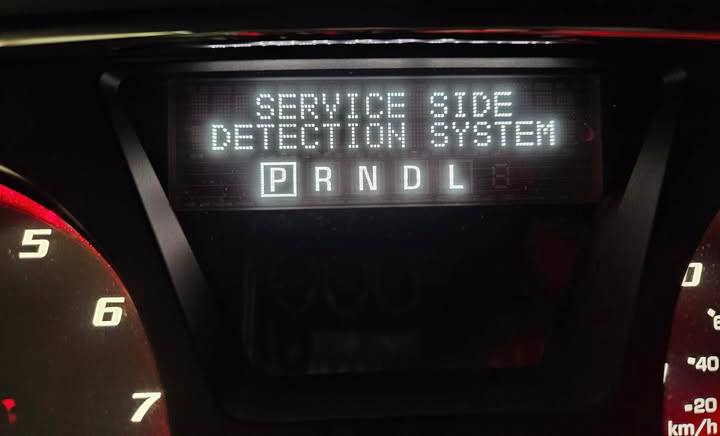
A “Service Side Detection System” warning on a GMC Acadia means the vehicle’s blind spot detection system has detected a fault and can no longer operate as intended. When this message appears, features such as Side Blind Zone Alert and, on some trims, related driver assistance functions may become unavailable until the underlying problem is diagnosed and repaired. While the warning does not necessarily indicate an engine or transmission issue, it reduces the vehicle’s ability to alert you to approaching vehicles in adjacent lanes.
Several faults can trigger this warning. The most common causes include blocked or contaminated rear radar sensors, damaged wiring, loose electrical connectors, rear bumper damage, a failed Side Detection Module, low battery voltage, or software and calibration issues. Because multiple components communicate through the vehicle’s electronic control network, the warning message alone cannot identify the exact source of the problem.
This guide explains what the GMC Acadia Service Side Detection System warning means, how the blind spot monitoring system works, the most common causes of the warning, and the diagnostic steps used to identify the fault. It also covers practical repair methods, reset procedures, typical repair costs, and preventive maintenance tips to help restore the system’s normal operation and reduce the likelihood of future failures.
What Does “Service Side Detection System” Mean on a GMC Acadia?
What does the warning message indicate?
The “Service Side Detection System” warning means the blind spot monitoring system has detected a malfunction and cannot operate normally. The warning appears when one or more components responsible for monitoring adjacent lanes fail self-diagnostic checks or stop communicating with the vehicle’s control modules. Instead of continuing to provide potentially inaccurate alerts, the system disables its blind spot detection function until the fault is repaired.
Unlike a temporary notification that disappears after driving for a short distance, this warning usually indicates an active fault stored in the vehicle’s electronic control system. In many cases, a Diagnostic Trouble Code (DTC) is recorded, allowing technicians to identify the affected component with a professional scan tool.
The warning itself does not identify the exact cause. A dirty radar sensor, damaged rear bumper, faulty Side Object Detection Module, loose wiring harness, software issue, or low system voltage can all trigger the same dashboard message. Because multiple faults produce identical warnings, proper diagnosis is necessary before replacing any parts.
Which safety features stop working after the warning appears?
Several Advanced Driver Assistance Systems (ADAS) may become unavailable after the warning appears. The exact features depend on the model year and trim level of the GMC Acadia, but the blind spot monitoring functions are typically disabled until the system detects that all components are operating correctly.
The most commonly affected feature is Side Blind Zone Alert, which normally monitors adjacent lanes using rear-mounted radar sensors. When another vehicle enters the blind spot, the system illuminates a warning icon in the corresponding outside mirror. If the driver activates the turn signal while another vehicle remains in the monitored area, the warning usually flashes to indicate a potential collision risk.
Many GMC Acadia models also integrate the same radar sensors with Lane Change Alert and Rear Cross Traffic Alert. When the side detection system fails, these related safety functions may also become unavailable because they depend on the same sensor network and control module.
Although these systems improve situational awareness, they are driver assistance technologies rather than autonomous safety systems. Drivers must continue checking mirrors and looking over their shoulders before changing lanes, even when the system is functioning normally.
Is this warning different from a Check Engine Light?
Yes. The Service Side Detection System warning is completely separate from the Check Engine Light. Each warning is generated by different vehicle systems and serves a different diagnostic purpose.
The Check Engine Light primarily reports faults related to the engine, emissions system, fuel delivery, ignition, or powertrain controls. These issues are managed by the Engine Control Module (ECM) or Powertrain Control Module (PCM).
By comparison, the Service Side Detection System warning is generated by the vehicle’s body electronics and driver assistance network. Components such as the Side Object Detection Module, rear radar sensors, Body Control Module (BCM), and CAN Bus communication network are responsible for monitoring and controlling blind spot detection functions.
In some situations, both warnings may appear simultaneously if a low battery voltage, charging system failure, or communication problem affects multiple electronic modules. However, the presence of one warning does not necessarily indicate that the other system has also failed.
How Does the GMC Acadia Side Detection System Work?
Which components make up the Side Detection System?
The GMC Acadia Side Detection System relies on multiple electronic components working together to detect vehicles approaching from adjacent lanes. Rather than depending on a single sensor, the system continuously exchanges information between radar units, control modules, and the instrument cluster to provide accurate blind spot warnings.
The primary components include:
- Rear corner radar sensors
- Side Object Detection Module
- Body Control Module (BCM)
- Instrument cluster
- Exterior mirror warning indicators
- CAN Bus communication network
- Wiring harnesses and electrical connectors
- Rear bumper mounting structure
The rear radar sensors continuously scan the areas beside and behind the vehicle. The Side Object Detection Module processes the radar signals, determines whether another vehicle occupies the blind zone, and sends the appropriate warning commands to the mirror indicators. The Body Control Module coordinates communication between these components and ensures the system performs regular self-diagnostic checks.
If any module stops communicating or detects abnormal sensor data, the system records a fault code and disables blind spot monitoring to prevent incorrect warnings.
How do rear radar sensors detect vehicles?
Rear radar sensors detect nearby vehicles by transmitting radio waves and analyzing the reflected signals. Each sensor continuously emits electromagnetic waves behind and alongside the vehicle. When another vehicle enters the monitored area, the reflected signal returns to the radar sensor, allowing the system to calculate the object’s distance, direction, and relative speed.
Unlike cameras, radar sensors remain effective in darkness because they do not depend on visible light. They also perform better than optical systems in many weather conditions, although heavy snow, thick mud, ice accumulation, or standing water on the rear bumper can reduce detection accuracy.
To ensure reliable operation, the sensors must remain securely mounted and precisely aligned. Even minor rear-end collisions or improper bumper repairs can alter sensor positioning enough to trigger calibration errors or false warning messages.
How does the system communicate with other ADAS features?
The Side Detection System shares information with other driver assistance systems through the vehicle’s Controller Area Network (CAN Bus). This communication network allows electronic control modules to exchange sensor data in real time without requiring separate wiring for every individual function.
For example, when the radar sensors identify a vehicle approaching from the rear, the Side Object Detection Module sends this information to the instrument cluster and mirror indicators. On vehicles equipped with Lane Change Alert, the same radar data is also used to determine whether changing lanes would create a collision risk. Similarly, Rear Cross Traffic Alert uses the rear radar sensors to monitor approaching vehicles when the Acadia is reversing out of a parking space.
Because several ADAS features depend on the same sensor network, a single failed radar sensor, damaged communication wire, or malfunctioning control module can disable multiple safety functions simultaneously. This is why drivers often notice that several driver assistance features become unavailable immediately after the Service Side Detection System warning appears.
What Causes the GMC Acadia Service Side Detection System Warning?
Can dirty or blocked radar sensors trigger the warning?
Yes. Dirty or obstructed rear radar sensors are one of the most common causes of the Service Side Detection System warning. The radar sensors are mounted behind the rear bumper and continuously scan adjacent lanes for nearby vehicles. To operate accurately, they require a clear path to transmit and receive radar signals.
Mud, road salt, snow, ice, heavy rain, or thick layers of dirt on the rear bumper can interfere with radar performance. When the sensor cannot accurately detect surrounding traffic, the Side Object Detection Module may interpret the abnormal readings as a system fault and temporarily disable blind spot monitoring.
This issue frequently occurs during winter driving, after driving on muddy roads, or following long trips in heavy rain. Cleaning the rear bumper around the radar sensor locations is often the first troubleshooting step because it is quick, inexpensive, and may restore normal operation if contamination is the only problem.
If the warning remains after the sensors are cleaned and the vehicle is restarted, the fault is likely caused by another electrical or mechanical issue that requires further diagnosis.
Can rear bumper damage affect the sensors?
Yes. Even minor rear bumper damage can prevent the Side Detection System from operating correctly. The radar sensors are mounted at precise angles behind the rear bumper. Their alignment determines the detection zone beside and behind the vehicle.
A low-speed parking collision, backing into a post, or being lightly struck from behind can shift the bumper enough to change the radar sensor’s orientation. Although the damage may appear cosmetic, a slight change in sensor position can cause inaccurate distance calculations or prevent the sensors from communicating correctly with the control module.
In some cases, aftermarket bumpers, improperly installed bumper covers, or excessive body filler applied during collision repairs may also interfere with radar signal transmission. Because radar waves must pass through specific bumper materials, incorrect replacement parts can reduce sensor performance.
Whenever the rear bumper is repaired or replaced, the radar sensors should be inspected for physical damage and recalibrated according to GM service procedures.
Can damaged wiring or loose connectors cause the fault?
Damaged wiring and poor electrical connections are among the most frequent electrical causes of Side Detection System failures. The rear radar sensors depend on stable power, reliable ground connections, and uninterrupted communication through the vehicle’s wiring harness.
Over time, connectors may become loose because of vibration, while moisture entering electrical terminals can lead to corrosion that increases electrical resistance. Wiring routed beneath the vehicle is also vulnerable to abrasion, rodent damage, and impact from road debris.
A damaged wire may interrupt communication between the radar sensor and the Side Object Detection Module, causing the module to detect a communication fault and disable the system. In many situations, the warning appears intermittently because the electrical connection changes as the vehicle moves or vibrates.
A visual inspection can identify obvious damage, but hidden wiring faults usually require a multimeter, wiring diagram, and manufacturer-specific diagnostic procedures to locate the exact failure point.
Can a failed Side Detection Module trigger the warning?
Yes. A malfunctioning Side Object Detection Module can disable the entire blind spot monitoring system. This electronic control module receives radar information, filters interference, determines whether another vehicle occupies the blind zone, and sends warning commands to the mirror indicators and instrument cluster.
Internal circuit failures, water intrusion, software corruption, or communication errors can prevent the module from processing sensor data correctly. When this occurs, the module typically stores one or more Diagnostic Trouble Codes and commands the vehicle to display the Service Side Detection System warning.
Module failures are considerably less common than dirty sensors or wiring problems. For that reason, technicians normally eliminate simpler causes before recommending module replacement. If replacement becomes necessary, many GM vehicles require programming and configuration using factory-level diagnostic equipment before the new module can communicate with the rest of the vehicle.
Can battery voltage or charging issues create false warnings?
Yes. Low battery voltage and charging system problems can trigger temporary Side Detection System warnings even when the radar sensors are functioning properly. Modern GMC vehicles rely on dozens of electronic control modules that require stable operating voltage. If battery voltage drops below the required threshold during engine start-up or while driving, communication between modules may become unstable.
Weak batteries, failing alternators, poor battery terminals, or loose ground connections can all produce voltage fluctuations. These fluctuations may interrupt communication across the CAN Bus network, causing the Side Object Detection Module to report a fault and disable driver assistance functions.
Drivers sometimes notice that the warning appears after replacing the battery, during extremely cold weather, or after the vehicle has remained parked for an extended period. Before replacing expensive ADAS components, technicians typically verify battery condition and charging system performance to eliminate power-related faults.
Can software updates or calibration problems cause the system to fail?
Yes. Software errors and incorrect sensor calibration can prevent the Side Detection System from operating normally. GMC periodically releases software updates that improve communication between electronic modules or correct known issues affecting driver assistance systems. Vehicles that have outdated software may experience intermittent warning messages that are resolved after module reprogramming.
Calibration is equally important whenever a radar sensor, Side Object Detection Module, or rear bumper assembly has been replaced. The system depends on precise sensor alignment to calculate vehicle position accurately. If calibration is skipped or performed incorrectly, the radar sensors may report inaccurate object locations, causing the control module to disable the system for safety reasons.
Professional calibration uses manufacturer-approved diagnostic equipment and alignment targets to verify that each radar sensor monitors the correct detection zone. This procedure ensures the blind spot monitoring system performs according to factory specifications after repairs.
Is It Safe to Drive with the Service Side Detection System Warning?
The primary feature affected is the Blind Spot Monitoring system, but additional driver assistance functions may also stop working depending on the vehicle configuration. Once the Service Side Detection System warning appears, the vehicle no longer provides reliable blind spot alerts because the control module has disabled the affected safety system.
Depending on the GMC Acadia model year and trim level, unavailable features may include Side Blind Zone Alert, Lane Change Alert, and Rear Cross Traffic Alert. Since these functions often share the same rear radar sensors, a single fault can disable multiple ADAS features simultaneously.
The warning does not affect steering, braking, acceleration, or engine performance. However, drivers lose an important layer of situational awareness that helps detect vehicles approaching from areas that are difficult to see using mirrors alone.
When is it still safe to drive?
The vehicle can usually be driven if the Service Side Detection System warning is the only active fault and no other safety-critical warnings are present. The blind spot monitoring system is designed as a driver assistance feature rather than a system required for basic vehicle operation.
Drivers should compensate for the unavailable technology by performing manual shoulder checks, using mirrors carefully, and increasing awareness when changing lanes or reversing from parking spaces. Defensive driving becomes especially important in heavy traffic, on multi-lane highways, and during poor weather conditions where blind spot detection normally provides additional protection.
Although the vehicle remains operational, scheduling a diagnostic inspection as soon as practical is recommended to restore the disabled safety features.
When should the vehicle be inspected immediately?
Immediate inspection is recommended if the Service Side Detection System warning appears together with multiple electronic warnings or follows a collision involving the rear of the vehicle. Simultaneous warnings affecting ABS, Stability Control, Forward Collision Alert, or other driver assistance systems may indicate a broader communication or electrical problem rather than an isolated blind spot monitoring fault.
Inspection should also be prioritized if the rear bumper has recently sustained impact damage, water has entered the cargo area after heavy rain, or the warning appears immediately after body repairs. These situations increase the likelihood of damaged radar sensors, wiring harnesses, or module connectors.
If the warning repeatedly returns after clearing fault codes or resetting the system, professional diagnosis using a GM-compatible scan tool is necessary to identify the underlying cause instead of repeatedly clearing the warning without repairing the fault.
How Can You Diagnose the Service Side Detection System Problem?
How do you inspect the radar sensor area?
Begin the diagnosis by inspecting the rear radar sensor area for visible obstructions or physical damage. Since the radar sensors are installed behind the rear bumper, external contamination is one of the easiest problems to identify and correct before performing electronic diagnostics.
Inspect the rear bumper for heavy dirt, mud, road salt, snow, ice, or aftermarket accessories that could interfere with radar signals. Also examine the bumper for dents, cracks, or deformation caused by parking impacts or minor collisions. Even if the bumper damage appears cosmetic, it may have shifted the radar sensor enough to trigger a calibration fault.
After cleaning the bumper, drive the vehicle under normal conditions to determine whether the warning disappears. If the message remains active, continue with electrical and electronic diagnosis.
How do you check for visible wiring damage?
Inspect the wiring harness and electrical connectors for signs of damage, corrosion, or loose connections. The rear radar sensors communicate with the Side Object Detection Module through dedicated wiring that is exposed to vibration, moisture, road debris, and temperature changes.
Check each connector for broken locking tabs, bent terminals, moisture intrusion, or green corrosion on the electrical contacts. Examine the wiring harness for cracked insulation, crushed sections, rodent damage, or areas where the wires may have rubbed against suspension or body components.
If recent body repairs have been performed, verify that every connector has been reinstalled correctly and that no wiring has been pinched behind the rear bumper. Wiring problems often create intermittent faults that appear only while the vehicle is moving.
Reading Diagnostic Trouble Codes (DTCs) is the fastest way to narrow down the source of the fault. The Side Detection System continuously monitors sensor operation, module communication, and electrical circuits. When an abnormal condition is detected, the control module stores one or more fault codes that guide the diagnostic process.
Common categories of DTCs include:
- Radar sensor communication faults
- Side Object Detection Module failures
- CAN Bus communication errors
- Sensor power supply faults
- Ground circuit faults
- Calibration-related faults
- Internal module performance faults
A fault code identifies the affected circuit or module but does not automatically confirm that the component has failed. For example, a communication code may be caused by a damaged wire instead of a defective radar sensor. Diagnostic codes should always be interpreted together with live sensor data and a physical inspection.
When should you use a professional scan tool?
A professional scan tool should be used whenever the warning remains after basic visual inspections or returns repeatedly after being cleared. Generic OBD-II scanners can read many engine-related fault codes, but they often cannot access manufacturer-specific modules responsible for Advanced Driver Assistance Systems.
GM-compatible diagnostic equipment such as GDS2 or advanced aftermarket scan tools can communicate directly with the Side Object Detection Module. These tools provide access to manufacturer-specific Diagnostic Trouble Codes, live radar sensor data, module communication status, calibration information, and service functions that are unavailable through basic code readers.
Professional diagnostic software also allows technicians to perform module programming, radar sensor calibration, and system verification after repairs. These procedures are essential whenever sensors or electronic modules are replaced.
How Do You Fix the GMC Acadia Service Side Detection System?
How do you clean the radar sensors?
Cleaning the radar sensor area is the simplest and least expensive repair for a Service Side Detection System warning. Because the sensors operate through the rear bumper, removing anything that blocks the radar signal may immediately restore normal operation if contamination is the only problem.
Wash the rear bumper using clean water and automotive shampoo to remove mud, salt, snow, or heavy dirt. Avoid using abrasive brushes or sharp tools that could damage the bumper surface. After cleaning, inspect the bumper for stickers, decorative accessories, or excessive paint buildup that could interfere with radar transmission.
If contamination caused the warning, the system may begin operating normally after the vehicle completes another self-diagnostic cycle. If the warning remains, additional diagnosis is required.
How do you repair damaged wiring?
Repair damaged wiring by restoring secure electrical connections and replacing compromised sections of the wiring harness. Wiring repairs should eliminate excessive resistance, intermittent communication failures, and voltage loss between the radar sensors and the control module.
Replace corroded connectors, repair broken wires using manufacturer-approved repair methods, and secure the harness away from moving suspension components or sharp metal edges. Electrical repairs should maintain the original wire gauge, insulation quality, and connector sealing to preserve long-term reliability.
After completing repairs, technicians normally erase stored Diagnostic Trouble Codes and verify that the radar sensors communicate correctly before returning the vehicle to service.
When should you replace the radar sensor?
Replace the radar sensor only after confirming that the sensor itself has failed. Radar sensors are precision electronic components, and replacing them without proper diagnosis may not resolve the warning if the actual problem lies elsewhere in the system.
Replacement is generally necessary when the sensor has suffered physical impact damage, water intrusion, internal electronic failure, or repeated communication faults that persist after wiring and connector inspections. Sensors may also require replacement if they fail manufacturer diagnostic tests or cannot complete calibration successfully.
Because radar sensors are mounted with strict alignment specifications, installation should follow GM service procedures to ensure the sensor is positioned correctly before calibration begins.
When does the Side Detection Module require replacement?
The Side Object Detection Module should be replaced only after all external causes have been eliminated. Module replacement is appropriate when internal electronic failure, memory corruption, or processor faults prevent the module from communicating with the radar sensors or other vehicle control modules.
Before replacing the module, technicians typically verify power supply voltage, ground integrity, CAN Bus communication, connector condition, and radar sensor operation. These preliminary checks reduce the risk of replacing an expensive electronic component unnecessarily.
A replacement module usually requires programming with GM-approved diagnostic software so that it can communicate correctly with the Body Control Module and other vehicle systems.
Why is calibration required after replacing components?
Calibration ensures the radar sensors accurately detect vehicles within the intended monitoring area after repairs. Even a small change in sensor angle can alter the detection zone and reduce the accuracy of blind spot monitoring.
Calibration is commonly required after replacing a radar sensor, installing a new Side Object Detection Module, repairing the rear bumper, or performing structural repairs near the sensor mounting locations. During calibration, manufacturer-approved equipment verifies that each sensor is correctly aligned and communicating with the vehicle’s electronic control network.
Skipping calibration may cause the Service Side Detection System warning to remain active, generate false blind spot alerts, or prevent the system from detecting nearby vehicles consistently. Completing the calibration procedure confirms that the repair has restored the system to factory operating specifications.
How Do You Reset the GMC Acadia Service Side Detection System?
Can disconnecting the battery reset the warning?
Disconnecting the battery may temporarily clear the warning, but it rarely fixes the underlying problem. Removing battery power resets several electronic modules and may erase temporary faults caused by voltage fluctuations or communication interruptions. However, if the radar sensor, Side Object Detection Module, wiring, or calibration remains defective, the warning will usually reappear after the system completes its next self-diagnostic cycle.
To perform a battery reset safely, turn off the ignition, disconnect the negative battery terminal for approximately 10 to 15 minutes, reconnect the battery, and start the vehicle. Afterward, drive the Acadia for several minutes under normal traffic conditions to allow the Side Detection System to complete its diagnostic checks.
If the warning returns immediately or after a short drive, further diagnosis is required. Repeatedly disconnecting the battery without repairing the fault only delays the correct repair and may erase valuable diagnostic information stored in the control modules.
Can an OBD scanner clear the fault?
Yes, a compatible diagnostic scanner can clear stored fault codes, but clearing the codes does not repair the system. Once Diagnostic Trouble Codes (DTCs) are erased, the Side Detection System immediately begins monitoring all sensors and communication circuits again. If the original fault still exists, the control module will detect it during the next self-test and store the fault code again.
Basic OBD-II scanners may only access generic powertrain codes and often cannot communicate with the Side Object Detection Module. A GM-compatible diagnostic scanner provides access to manufacturer-specific ADAS modules, allowing technicians to read fault codes, monitor live sensor data, perform system tests, and verify repairs before clearing the warning.
Clearing the codes should always be the final step after completing repairs rather than the first attempt at solving the problem.
Why does the warning return after resetting?
The warning returns because the Side Detection System continuously performs self-diagnostic checks whenever the vehicle is operating. If any sensor, module, wiring circuit, or communication network fails these tests, the control module immediately stores a new Diagnostic Trouble Code and disables the affected safety feature again.
Several unresolved conditions commonly cause the warning to reappear, including a damaged radar sensor, loose electrical connector, failed Side Object Detection Module, low battery voltage, incorrect radar calibration, or software communication errors.
A successful reset occurs only after the underlying fault has been repaired and every system component passes its diagnostic verification. If the warning repeatedly returns after multiple reset attempts, replacing parts without confirming the actual cause can increase repair costs without solving the problem.
How Much Does It Cost to Repair the GMC Acadia Side Detection System?
Sensor replacement cost
Replacing a rear radar sensor typically costs between $400 and $900, including parts and labor. The final price depends on the GMC Acadia model year, whether original GM parts are used, local labor rates, and whether radar calibration is included in the estimate.
Newer model years equipped with more advanced driver assistance systems generally have higher replacement costs because radar sensors require additional programming and calibration after installation.
Module replacement cost
Replacing the Side Object Detection Module generally costs between $500 and $1,200. This estimate includes the replacement module, diagnostic time, software programming, and labor. If additional wiring repairs or communication faults are discovered during diagnosis, the total repair cost may increase.
Because module replacement requires manufacturer-specific programming equipment, this repair is commonly performed at GM dealerships or independent repair shops specializing in electronic diagnostics.
Wiring repair cost
Electrical wiring repairs typically range from $100 to $500. Minor repairs involving a loose connector or damaged terminal are relatively inexpensive, while repairing or replacing sections of the wiring harness requires additional labor to access the affected components behind the rear bumper.
Vehicles that have experienced collision damage, water intrusion, or rodent damage often require more extensive wiring repairs.
Calibration and programming cost
Radar sensor calibration usually costs between $150 and $400. The exact amount depends on the repair facility, the equipment used, and whether calibration is performed together with sensor replacement or module programming.
Programming fees may be charged separately when a new electronic control module is installed. Since proper calibration directly affects blind spot detection accuracy, skipping this procedure can result in recurring warning messages or unreliable system performance.
Total repair cost by fault type
The total repair cost varies according to the failed component and the complexity of the repair.
| Fault Type | Typical Repair Cost |
|---|---|
| Dirty radar sensor | $0–$50 |
| Loose electrical connector | $50–$150 |
| Wiring repair | $100–$500 |
| Radar sensor replacement | $400–$900 |
| Side Detection Module replacement | $500–$1,200 |
| Calibration only | $150–$400 |
These estimates represent typical repair ranges. Actual costs vary by location, labor rates, OEM versus aftermarket parts, and the specific model year of the GMC Acadia.
How Can You Prevent Side Detection System Problems?
Preventive maintenance significantly reduces the likelihood of recurring Side Detection System warnings. Although electronic components eventually wear out, many common failures are caused by contamination, minor collision damage, or neglected electrical connections rather than defective hardware.
Maintain the system by following these best practices:
- Clean the rear bumper regularly to remove mud, snow, road salt, and heavy dirt.
- Inspect the rear bumper after every parking impact or minor collision.
- Repair bumper damage promptly to maintain correct radar sensor alignment.
- Keep the battery and charging system in good condition to ensure stable operating voltage.
- Avoid directing high-pressure water at electrical connectors during vehicle washing.
- Inspect wiring and connectors whenever the rear bumper is removed for repairs.
- Perform radar calibration after replacing sensors, repairing collision damage, or installing a new rear bumper.
- Scan the vehicle periodically with a compatible diagnostic tool to identify stored fault codes before they develop into larger electrical problems.
Routine inspection helps identify developing issues early and reduces the risk of losing important driver assistance features unexpectedly.
Frequently Asked Questions About GMC Acadia Service Side Detection System
Can rain trigger the Service Side Detection System warning?
Heavy rain by itself does not normally damage the system, but intense rainfall combined with road spray can temporarily reduce radar sensor performance. If water or debris blocks the radar signal, the warning may appear until driving conditions improve or the sensors are cleaned.
Can snow or ice disable the blind spot monitoring system?
Yes. Thick snow or ice covering the rear bumper can block radar transmission and prevent the sensors from detecting nearby vehicles accurately. Cleaning the bumper usually restores normal operation if no additional faults are present.
Will the warning clear itself?
The warning may disappear automatically if it was caused by a temporary condition such as sensor contamination or low battery voltage that has already been resolved. However, persistent electrical faults, damaged components, or calibration errors require repair before the warning will clear permanently.
Can you replace the radar sensor yourself?
Replacing the physical sensor is possible for experienced DIY mechanics with access to service information. However, most GMC Acadia models require electronic programming and radar calibration after installation. Without these procedures, the Side Detection System may continue displaying warning messages or fail to detect vehicles correctly.
Does insurance cover radar sensor replacement?
Insurance coverage depends on the cause of the damage and the terms of the policy. If the radar sensor was damaged during a covered collision, comprehensive or collision insurance may include the cost of replacement and calibration. Mechanical failure resulting from normal wear is generally not covered.
Is calibration always required after replacing the radar sensor?
Yes. Calibration is recommended whenever a radar sensor, Side Object Detection Module, or rear bumper component affecting sensor alignment has been replaced. Proper calibration ensures the blind spot monitoring system accurately detects vehicles and operates according to GM specifications.