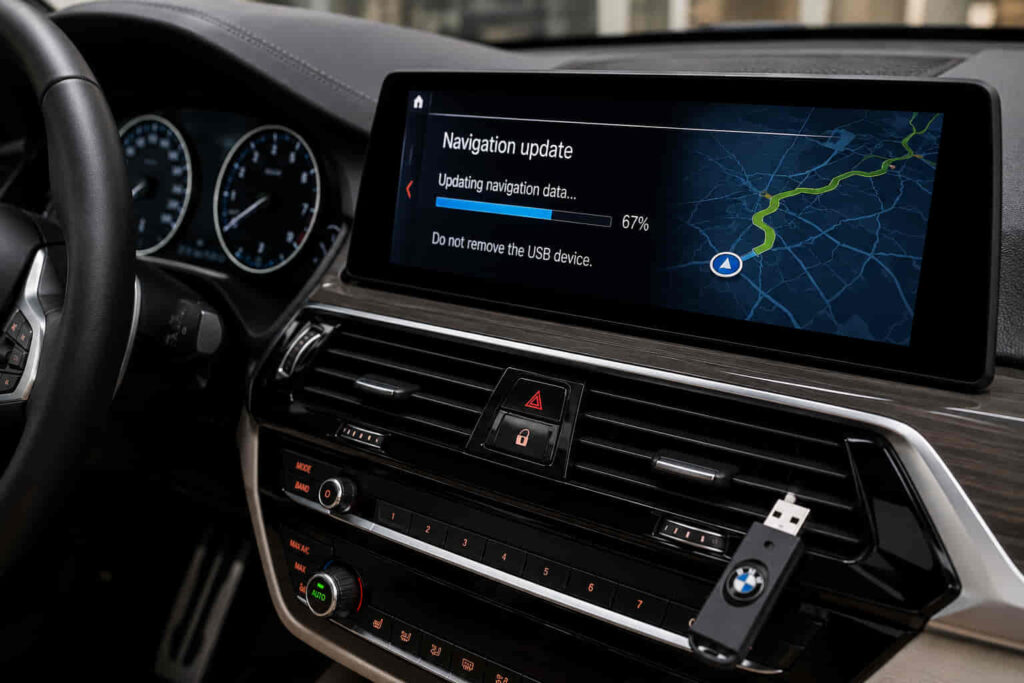
A BMW navigation update keeps the vehicle’s built-in navigation system current by installing newer map data and related navigation information. Updated maps help the system account for changes such as new roads, modified routes, updated points of interest, and other geographic data that may no longer match the version stored in the vehicle. However, BMW vehicles do not all use the same navigation system or update process, so the correct method depends on the vehicle, navigation generation, map version, region, and available BMW services.
There are 7 main ways to update a BMW navigation system, including automatic map updates, ConnectedDrive-supported updates, USB map updates, manual updates, BMW dealer updates, updates for older navigation systems, and professional navigation update services. Some methods require minimal driver involvement, while others require you to identify the current map version, obtain compatible map data, prepare an external storage device, or complete the installation manually.
Before starting a BMW navigation update, identify the navigation system and current map version installed in the vehicle. This prevents incompatible map data from being used and helps determine which update method is appropriate. The sections below explain how each BMW navigation update method works, when to use it, and what to check before installation.
There are 7 main ways to update a BMW navigation system: automatic map updates, ConnectedDrive-supported updates, USB map updates, manual updates, BMW dealer updates, updates designed for older navigation systems, and professional navigation update services. The correct method depends on the BMW navigation system installed in the vehicle, its current map version, the vehicle’s model and production period, the map region, and the update services available for that vehicle.
Automatic map updates require the least driver involvement because compatible vehicles can receive newer navigation data without completing the entire installation manually. This method is most suitable when the vehicle and its connected services support automatic map delivery. The system handles eligible map data in the background or through the vehicle’s connected functions, reducing the need to download a complete map package to an external storage device. Automatic availability should still be checked for the specific vehicle because support can differ between navigation generations, regions, and active services.
ConnectedDrive-supported navigation updates use BMW’s connected ecosystem to provide or manage map data for compatible vehicles. ConnectedDrive acts as the connection between the vehicle, supported digital services, and available navigation functions. The exact update process therefore depends on the services associated with the vehicle rather than on the BMW brand name alone. A driver should check the vehicle’s ConnectedDrive services and navigation information before assuming that a map update can be completed through this method.
USB map updates allow compatible BMW navigation systems to install map data from a prepared USB storage device. The process normally involves identifying the installed navigation system and map version, obtaining a compatible map package, preparing the USB drive, connecting it to the vehicle, and starting the installation through the navigation interface. Compatibility is the critical constraint: a map package intended for another navigation generation or region should not be treated as interchangeable simply because both packages are described as BMW navigation maps.
Manual BMW navigation updates give the driver greater control over obtaining, preparing, and installing the required navigation data. Unlike an automatic update, the process requires the user to verify the current system and select the appropriate update before installation. USB installation can form part of a manual update, but the two terms are not identical. “Manual update” describes how much of the process the user manages, while “USB update” describes a specific installation or data-transfer method.
A BMW dealer can update the navigation system when the vehicle requires direct technical support or when the owner does not want to perform the update independently. Dealer assistance is particularly relevant when the navigation generation is unclear, compatibility cannot be established confidently, or an attempted update does not install correctly. This approach transfers system identification and installation work to a BMW service environment, although availability, procedure, and cost can depend on the vehicle and market.
Older BMW navigation systems may require a different update process because they do not necessarily support the connected or automatic methods available on newer vehicles. The first step is therefore to identify the actual navigation generation rather than choosing an update based only on the vehicle model name. Two BMW vehicles from different production periods can have different infotainment hardware, map formats, and update requirements even when they belong to the same model family. Older systems may consequently require a more manual installation process or navigation data specifically prepared for that system generation.
Professional navigation update services provide another method for owners who want assistance identifying and installing a compatible BMW map update. A professional service should establish the vehicle’s navigation system, map region, current version, and update requirements before supplying or installing map data. This is especially useful when the owner cannot determine which package is compatible or when a manual installation involves requirements they do not want to manage independently. The service does not remove the need for compatibility; it shifts the identification and update process from the vehicle owner to the service provider.
These 7 methods are not universally interchangeable. The navigation system installed in the BMW determines which update options are actually available, so identifying the system and its current map version should come before downloading map data, preparing a USB drive, purchasing an update, or arranging an installation service.
Read more: BMW TPMS Sensor Replacement
Choose a BMW navigation update method by identifying the navigation system, checking the current map version, confirming the map region, and verifying which update options the vehicle supports. The BMW model alone is not sufficient to determine the correct method because vehicles within the same model family can use different navigation or infotainment systems depending on their production period and equipment. System identification should therefore come before downloading a map package or starting an installation.
Start by identifying the navigation system installed in the vehicle through its navigation or iDrive interface. The system generation determines which map data and update processes can be used, making it one of the primary compatibility attributes for a BMW navigation update. A newer system may support connected or automatic map functions, while an older system may depend more heavily on a manual installation process. This distinction explains why an update procedure that works on one BMW should not automatically be applied to another BMW with a different navigation generation.
Next, check the current BMW navigation map version. The current map version identifies the map family, geographic region, and release information needed to evaluate an update. This information is more useful than simply knowing that the existing maps are “old” because navigation updates must maintain compatibility with the system receiving the data. For example, a driver who identifies the existing map family and region can compare that information with the proposed update before beginning the installation instead of selecting a package solely because it contains newer map data.
The map region must also correspond with the region required by the vehicle and its navigation use. Navigation databases are organized around geographic coverage, so a newer release does not automatically make it the correct update when it belongs to a different map region or system family. Compatibility takes priority over release date: the correct BMW navigation update is the newer map data designed for the vehicle’s supported navigation environment, not simply the newest BMW map package available.
After identifying the system, version, and region, determine which update channel the vehicle supports. Vehicles with eligible connected functionality may use automatic or ConnectedDrive-supported map updates, while compatible systems that rely on external media may use a USB or other manual process. Dealer or professional assistance becomes relevant when the system cannot be identified confidently, the required update is unclear, or the owner does not want to manage the installation independently.
The final decision should therefore follow a fixed relationship: navigation system determines compatibility, current map data establishes the existing version, region determines geographic suitability, and supported update functionality determines the installation method. Checking these attributes first reduces the risk of selecting incompatible navigation data and establishes whether an automatic, connected, USB, manual, dealer-assisted, older-system, or professional update method is appropriate for the vehicle.
A BMW navigation update requires compatible map data and accurate information about the vehicle’s navigation system before installation begins. Additional requirements depend on the selected update method. A connected update and a manual USB update do not use exactly the same resources, so there is no single preparation process that applies to every BMW navigation system.
For a USB-based update, the storage device functions as the transfer medium between the downloaded navigation data and the vehicle. The USB device must be prepared for the update process and contain the map data intended for the identified navigation system. Using a USB drive does not make an incompatible package compatible; the storage device only transports the files. The navigation system, map family, version, and region must still correspond with the update being installed.
Vehicle identification information may also be relevant when determining which navigation update applies to a specific BMW. A VIN identifies the vehicle, but the exact update requirements still depend on the navigation system and services associated with that vehicle. This distinction matters because vehicle identification and navigation compatibility solve related but different problems: the first identifies the car, while the second determines whether particular navigation data can operate within its installed system.
Some BMW navigation generations or update processes may also involve an authorization or activation mechanism. This requirement should be verified for the specific navigation system rather than assumed for every BMW. An activation requirement that applies to one generation does not establish a universal rule for newer or older systems with different update architectures.
Preparation is complete when the owner can establish what navigation system is installed, what map version and region it currently uses, which newer data is compatible, and which installation method that system supports. These checks should be completed before downloading large map files, purchasing an update, or beginning installation because they determine whether the update can be used by the vehicle in the first place.
A BMW navigation update can take from several minutes to more than an hour, but there is no single installation time that applies to every BMW navigation system. The total duration depends on the update method, navigation generation, amount of map data, download speed, storage-device performance, and installation process. Automatic or connected updates require less direct involvement from the driver, while a manual update can include separate downloading, file preparation, transfer, and installation stages.
Download time and installation time should be treated as separate parts of the process. Download time is determined primarily by the size of the navigation data and the internet connection used to obtain it. Installation time begins when the compatible map data is transferred to or processed by the vehicle. A fast download therefore does not guarantee a fast installation because the navigation system still needs to recognize, validate, and install the supplied data.
USB navigation updates add a preparation stage between downloading and installation. The map data must first be obtained and placed on a compatible storage device before the USB drive is connected to the BMW. The vehicle then needs to detect the update and process the navigation files. The complete update duration consequently includes file acquisition, USB preparation, vehicle detection, and installation rather than only the time displayed by the navigation system after the update starts.
The size and scope of the map package can also affect the update duration. Navigation data may contain road networks, routing information, geographic coverage, and points of interest for a supported region. Processing a larger package requires more data to be transferred and installed. This is one reason two BMW navigation updates can require different amounts of time even when both are performed through a USB-based process.
Do not interrupt a BMW navigation update solely because the installation appears to be taking longer than expected. First check the instructions and status information associated with the specific navigation system and update method. Interrupting an active installation can create an incomplete update and introduce another troubleshooting step. The appropriate action depends on whether the system is still processing data, has displayed an error, or has stopped recognizing the update entirely.
The most accurate way to estimate update time is therefore to separate the process into download, preparation, and vehicle installation stages. Drivers using automatic or connected updates may encounter fewer manual stages, whereas drivers performing a USB or manual BMW navigation update need to account for the complete process from obtaining the correct map data to confirming the new version after installation.
The cost of a BMW navigation update depends on the vehicle, navigation system, update method, available BMW services, and whether professional installation is required. There is no universal price that applies to every BMW because an update included with an eligible service differs from purchasing navigation data or paying a dealer or professional service to complete the work.
An automatic or connected update may be available as part of the digital services supported by an eligible vehicle. In this situation, the driver is not necessarily purchasing an individual map package each time new navigation data becomes available. The relevant cost is connected to the services and eligibility associated with that BMW. Vehicle owners should therefore check what navigation services are active for their specific vehicle before assuming that every update is either free or separately chargeable.
A manual BMW navigation update can involve a different cost structure. The owner may need compatible navigation data and, depending on the system and update process, additional requirements associated with installation or authorization. Performing the physical installation independently can remove a separate labor charge, but it does not mean that every required component of the navigation update is automatically free.
Dealer-assisted updates can include service costs because the dealer handles some or all of the identification and installation process. This option provides value when the vehicle owner cannot determine the installed navigation system, is uncertain about map compatibility, or has encountered an update problem that requires direct support. The final cost can therefore reflect both the navigation update itself and the service involved in completing it.
Professional navigation update services operate on a similar principle but should be evaluated according to exactly what the service provides. A service may identify the navigation system, establish compatibility, supply the appropriate update, assist with installation, or complete multiple stages together. Compare BMW navigation update services by the work and compatible data included rather than by price alone, because two prices can represent different scopes of service.
The correct way to determine the cost is to identify the BMW and navigation system first, establish the compatible update method, and then check what that method requires. This sequence prevents a misleading comparison between an included connected update, a self-installed manual update, a dealer service, and a professional navigation update service. They all serve the same central purpose of updating BMW navigation data, but their delivery methods and associated costs are different.
Update your BMW navigation maps when a newer compatible map version provides road and location data that is more current than the version installed in the vehicle. There is no single update interval that applies to every BMW navigation system because update availability depends on the navigation generation, map region, supported services, and release schedule for compatible map data. The practical trigger for an update is therefore the difference between the information stored in the vehicle and the navigation data needed for current driving.
Road-network changes are one reason to update BMW navigation maps. New roads can open, existing roads can be rerouted, intersections can change, and access to particular areas can be modified after the vehicle’s map database was released. A navigation system using older data can continue to calculate routes, but those routes are based on the geographic information available in its installed map version. Updating the map gives the system access to newer supported road data.
Changes to points of interest can provide another reason to update. Built-in navigation systems can rely on stored geographic data for locations and destinations, and that information becomes less useful as businesses, facilities, and other mapped places change. Drivers who depend regularly on the vehicle’s built-in navigation have a stronger reason to maintain current map data than drivers who rarely use it.
The current map version should be checked before deciding whether an update is necessary. A BMW navigation update should be based on version and compatibility information rather than an arbitrary calendar interval. If the vehicle already has the latest compatible data available through its supported update channel, repeating the update provides no additional map version. If a newer compatible release is available and the installed data is outdated, updating becomes relevant.
Update frequency can also differ according to the method supported by the vehicle. A BMW with eligible automatic map functionality can receive navigation data differently from an older system that depends on a manual update. The owner of a manually updated system needs to check for compatible releases deliberately, whereas supported connected functionality can reduce the amount of manual monitoring and installation required.
For this reason, the most useful maintenance practice is to check the installed map version periodically and compare it with the latest compatible navigation data available for that specific system and region. This approach connects update frequency directly to the BMW navigation system instead of assuming that every vehicle needs an update on the same schedule.
A BMW navigation update can fail when the map data is incompatible, the update files or storage medium cannot be recognized, the required installation conditions are not met, or the process is interrupted before completion. The correct troubleshooting step depends on where the failure occurs. An update that is rejected before installation represents a different problem from a USB drive that is not detected or an installation that stops after the map data has already been recognized.
Compatibility should be checked first when the navigation system rejects an update. The map package needs to correspond with the navigation system and supported map environment of the vehicle. A newer release is not sufficient by itself. For example, navigation data belonging to an incompatible system family or geographic region should not be treated as the correct update simply because its release is newer than the map currently installed in the BMW.
When a USB-based BMW navigation update is not detected, check the storage device and update data before assuming that the navigation system itself has failed. The vehicle must be able to recognize the external medium and access the update files in the expected form. A problem with the USB device, file preparation, or data placement can therefore prevent the installation process from starting even when the vehicle otherwise supports USB navigation updates.
An update that begins and then stops requires a different diagnosis. Determine whether the BMW is still processing the navigation data, has displayed a specific error, or has terminated the installation. Installation time varies according to the navigation system and amount of data being processed, so a slow update is not automatically a failed update. A displayed error or terminated process provides a stronger indication that troubleshooting is required.
Authorization requirements should also be considered when they apply to the specific navigation generation or update process. Some systems can require an activation or authorization mechanism before compatible navigation data can be installed. This requirement should be verified for the actual BMW navigation system rather than applied as a universal explanation for every failed update.
Repeatedly downloading different map packages is not an effective first response to an update failure. Identify the navigation system, confirm the current map family and region, verify update compatibility, and then inspect the installation method at the stage where the failure occurs. This sequence narrows the problem from the central entity outward: first the BMW navigation system, then its compatible map data, and finally the transfer or installation process.
Dealer or professional support becomes appropriate when these checks do not establish the cause or when the owner cannot confidently identify the required update. This is especially relevant for older navigation generations, unclear system configurations, or repeated installation failures. Professional assistance should still begin with system identification and compatibility rather than treating every BMW navigation update error as the same technical problem.
A BMW navigation update is successful when the navigation system completes the installation, loads normally, and displays the newly installed map version instead of the previous version. Checking the map version provides a more reliable confirmation than assuming the update succeeded because the installation screen disappeared. The version shown after installation should correspond with the compatible navigation data that was installed.
Start by returning to the navigation information or map-version area available through the vehicle’s navigation interface. Compare the displayed information with the version that was recorded before the update. A change to the expected newer version confirms that the navigation system has processed the new map data. If the previous version remains displayed, the update should not be considered verified even when no obvious error appeared during installation.
The navigation system should also operate normally after the update. Successful installation requires both updated map data and a functioning navigation environment. Load the navigation interface, enter a destination, and confirm that route calculation works as expected. This functional check helps distinguish a completed update from an installation that changed version information but is followed by an operational problem requiring further investigation.
Map information relevant to the new version can provide an additional verification point when a known road, route, or mapped location has changed between releases. The purpose of this check is not to test every road in the database but to confirm that the navigation system is actually using the expected updated data. Version information remains the primary verification method because individual geographic changes can vary by map release and region.
If the expected map version does not appear, return to the same compatibility sequence used before installation. Confirm the installed navigation system, map family, geographic region, update package, and installation method before attempting another update. Repeating the same installation without identifying why the expected version was not installed can reproduce the same failure.
The complete BMW navigation update process therefore ends with verification rather than installation alone. Identify the navigation system, select compatible map data, use a supported update method, complete the installation, and verify the resulting map version. Following this sequence keeps every stage connected to the same central entity—the BMW Navigation System—and reduces the risk of treating a downloaded file or completed transfer as proof that the vehicle’s navigation maps were successfully updated.