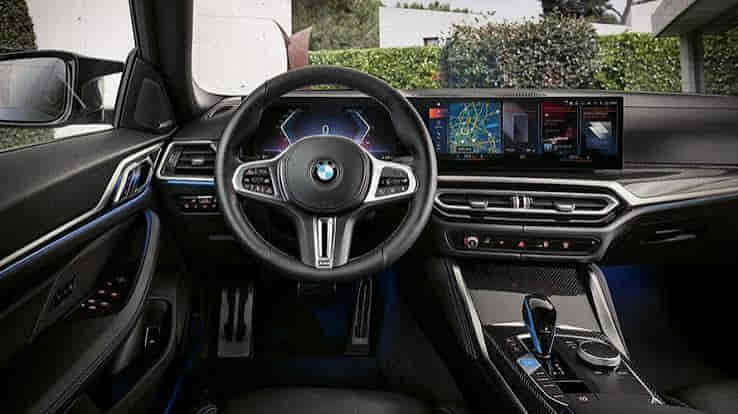
BMW Live Cockpit Pro, formally called BMW Live Cockpit Professional, combines digital driver information and central infotainment functions within an integrated cockpit environment. It is more than the digital instrument display behind the steering wheel. Depending on the BMW model and system generation, the configuration can bring together the driver display, central information display, navigation, iDrive functions, connectivity, and access to supported vehicle information and settings.
The exact BMW Live Cockpit Professional experience is not identical across every vehicle. Display layouts, control methods, software, connectivity functions, and available features can change with the model, production period, market, BMW Operating System generation, and installed equipment. For this reason, seeing “Live Cockpit Professional” on a vehicle specification does not automatically confirm one universal screen size or an identical set of functions across the BMW lineup.
Understanding BMW Live Cockpit Pro therefore requires looking at how its individual elements work together rather than treating it as a single screen or another name for iDrive. The digital instrument display focuses on information relevant to the driver, while the central interface supports broader interaction with navigation, media, communication, and vehicle functions. This article explains seven key features of BMW Live Cockpit Professional, how they contribute to the cockpit experience, and why the specific implementation matters when comparing BMW models.
What does the digital instrument display show in BMW Live Cockpit Pro?
The digital instrument display in BMW Live Cockpit Pro presents driving and vehicle information directly in front of the driver, allowing relevant data to remain visible without relying entirely on the central infotainment screen. Its role is driver-focused: it communicates information needed during vehicle operation while forming one part of the broader Live Cockpit Professional environment.
Core driving information such as vehicle speed is presented through the instrument display, while additional content can vary according to the BMW model, operating-system generation, equipment, and current driving context. Supported configurations can integrate information related to navigation, vehicle status, assistance functions, or other driving data into the display. This allows information generated by different vehicle systems to be presented within the driver’s primary viewing area rather than requiring every function to use the central display.
Navigation demonstrates why an integrated digital instrument cluster can be more useful than a conventional gauge display. When the specific BMW supports navigation information in the driver display, route guidance can be positioned closer to the driver’s normal line of sight. The instrument cluster is therefore not simply replacing analog gauges with digital graphics; it provides a display environment through which supported information can be organized according to the driving situation.
The digital format also allows the presentation of information to change according to the vehicle and software implementation. However, one BMW Live Cockpit Professional layout should not be treated as universal. BMW has used different cockpit designs and operating-system generations, so graphics, available views, information density, and supported functions can differ substantially between vehicles carrying the Live Cockpit Professional designation.
The primary role of the digital instrument display is therefore to provide driver-relevant information, not to replace every infotainment function in the vehicle. Broader interaction with navigation, media, communication, and configurable functions is handled through the central cockpit interface, which creates the second major element of BMW Live Cockpit Pro.
What does the central display add to BMW Live Cockpit Pro?
The central display adds the main infotainment and interaction area to BMW Live Cockpit Pro, complementing the driver-focused instrument display with access to broader navigation, media, communication, and supported vehicle functions. This division allows the cockpit to present essential driving information in front of the driver while using the central interface for functions that require more detailed viewing or interaction.
Navigation is one example of this relationship. The central display can provide the broader map and route interface, while supported driving guidance may also appear elsewhere in the cockpit. Media and communication functions follow a similar principle: the central interface provides access to available content and controls without requiring the instrument display to become the primary infotainment screen.
The central display also illustrates why BMW Live Cockpit Professional should not be defined as a pair of screens alone. The displays are presentation and interaction surfaces within a larger electronic environment. iDrive and the applicable BMW Operating System provide the software and control context through which many supported functions are accessed, while other vehicle systems generate or execute the information and commands presented through the cockpit.
Driver interaction with the central display depends on the specific BMW implementation. Different generations can support different combinations of touchscreen input, physical controls, voice interaction, and other control methods. A control method available on one Live Cockpit Professional configuration should therefore not automatically be attributed to every BMW carrying the same equipment name.
Screen dimensions and physical arrangements also vary across vehicles and generations. For a buyer comparing two BMWs, the presence of Live Cockpit Professional alone is not enough to establish that both cars have identical displays or infotainment capabilities. The actual model, production period, operating system, and installed equipment determine the implementation.
Navigation in BMW Live Cockpit Professional works as an integrated cockpit function, allowing route and guidance information to be presented through the vehicle’s supported displays and infotainment interface rather than functioning only as an isolated map screen. The exact presentation depends on the BMW model, equipment, and operating-system generation, but the central purpose is to connect navigation information with the broader digital cockpit experience.
The central display provides the primary environment for viewing maps, entering or selecting destinations, and interacting with supported route functions. This gives the driver a larger information area for understanding the route and surrounding map context. When the vehicle supports additional navigation presentation in the instrument display, relevant guidance can also be positioned directly in front of the driver, reducing the need to rely exclusively on the central screen for every navigation update.
This relationship demonstrates how the displays within Live Cockpit Professional can perform different roles without operating as completely separate systems. The central display can provide detailed navigation interaction, while the digital instrument area can emphasize information that is more immediately relevant during driving. The system therefore organizes navigation according to where and when particular information is useful rather than simply duplicating the same content across every display.
Some BMW configurations can extend navigation information to other supported display technologies, but those features should not be assumed to be included with every Live Cockpit Professional vehicle. Equipment availability changes across models, production periods, markets, and option packages. The presence of Live Cockpit Professional alone therefore does not prove that a particular BMW includes every available navigation-display feature.
Navigation also illustrates why software generation matters when comparing two BMWs with Live Cockpit Professional. Changes in BMW Operating System, display design, connected functionality, and vehicle equipment can affect how routes are entered, how information is presented, and which navigation functions are available. Buyers should therefore evaluate the actual system installed in the vehicle rather than assuming that the Live Cockpit Professional name guarantees one identical navigation experience.
The practical value of navigation integration is the connection between route information and the digital cockpit. The central interface supports detailed navigation interaction, while supported driver-facing displays can present relevant guidance in a location appropriate for driving. This integrated information flow is one of the features that separates Live Cockpit Professional as a cockpit environment from the idea of simply installing a larger infotainment screen.
How does iDrive work with BMW Live Cockpit Pro?
iDrive works with BMW Live Cockpit Pro as the interaction environment through which the driver accesses many of the infotainment and vehicle functions presented within the digital cockpit. The two terms are closely related, but they do not describe the same thing. Live Cockpit Professional refers to the broader cockpit and display configuration, while iDrive and the applicable BMW Operating System provide the interface and software environment for interacting with supported functions.
This distinction becomes clearer when the driver uses the central display. The display is the physical presentation surface, while the infotainment software organizes menus, navigation, media, communication, and available vehicle functions. The driver interacts with that environment through the control methods supported by the specific BMW. Live Cockpit Professional brings these elements into the cockpit configuration, but the display hardware alone does not define how the software operates.
Interaction methods can differ considerably between BMW generations. Depending on the vehicle, the driver may use a physical iDrive controller, touchscreen input, voice functions, steering-wheel controls, or a combination of supported methods. BMW has changed its interface strategy over time, which means a description of one generation should not be presented as the universal way every Live Cockpit Professional system operates.
The relationship also explains why BMW Live Cockpit Pro and iDrive should not be used as interchangeable names. A buyer asking which iDrive or BMW Operating System a vehicle has is asking about its software and interaction environment. A buyer asking whether the vehicle has Live Cockpit Professional is evaluating a broader cockpit equipment configuration. Those questions overlap, but they describe different attributes of the vehicle.
This distinction becomes especially important when comparing used BMWs from different model years. Two vehicles may both advertise Live Cockpit Professional while using different operating-system generations, interface designs, control methods, or available functions. The equipment name alone therefore provides less information than identifying the actual cockpit hardware and software configuration fitted to each vehicle.
The semantic relationship is Live Cockpit Professional → integrated cockpit configuration, while iDrive/BMW Operating System → interface and software environment used to access supported functions. Understanding that relationship makes it easier to evaluate navigation, media, connectivity, and vehicle controls without incorrectly treating Live Cockpit Pro as simply another name for iDrive.
Read more: BMW Emergency Call System Malfunction
What connectivity features can BMW Live Cockpit Pro provide?
BMW Live Cockpit Pro can provide access to supported smartphone, communication, media, and connected functions through the vehicle’s infotainment environment, but the exact connectivity features depend on the BMW model, production period, market, software generation, and installed equipment. Connectivity is therefore part of the broader cockpit experience rather than a single feature that remains identical across every Live Cockpit Professional configuration.
Smartphone integration is one of the most practical examples. When the specific vehicle supports compatible smartphone functions, the central infotainment environment can provide access to selected communication, media, navigation, or phone-related features. This allows information from a compatible mobile device to become part of the in-car interface rather than requiring the driver to interact directly with the phone for every supported task.
Bluetooth also forms part of the connectivity context on equipped BMWs. A compatible phone can use Bluetooth for supported communication or media functions, while other smartphone-integration technologies can provide a broader interface depending on the vehicle. These connection methods should not be treated as identical because Bluetooth pairing, smartphone integration, and connected BMW services perform different roles within the overall digital environment.
Connected services create another layer of functionality. Where supported by the vehicle, market, account, and service availability, Live Cockpit Professional can provide an interface through which connected information or services are accessed. However, a feature that appears on one BMW should not automatically be assumed to exist on another simply because both vehicles carry the Live Cockpit Professional designation. Hardware capability, software generation, service availability, and vehicle configuration can all affect the actual feature set.
This variation becomes especially important when evaluating a used BMW. The equipment name alone does not confirm that every smartphone or connected feature currently expected by the buyer is available. Checking the specific vehicle’s equipment and operating environment provides more reliable information than assuming that “Live Cockpit Pro” represents one fixed connectivity package.
The practical relationship is connectivity hardware and services → BMW operating environment → Live Cockpit interface → driver access to supported functions. Live Cockpit Professional provides the cockpit context in which these functions can be presented and controlled, but the exact connectivity capability is determined by the specific vehicle and system configuration.
What vehicle information and settings can Live Cockpit Pro display?
BMW Live Cockpit Pro can present supported vehicle information and provide access to configurable vehicle functions through its digital cockpit interface. This expands the system beyond navigation and entertainment because the displays can also serve as an information and control layer between the driver and other electronic systems in the vehicle.
Vehicle information can appear in different areas according to its purpose. Driving-related information is more naturally presented through the instrument display, while more detailed status information or configurable functions can be accessed through the central interface when supported. This division helps organize information according to relevance rather than placing every vehicle function on the same screen.
The important distinction is that Live Cockpit Professional generally presents information or provides an interface to supported functions; it is not the mechanical system carrying out those functions. For example, when the driver changes an available vehicle setting through the cockpit interface, the relevant control system executes the underlying function. The display and software provide the interaction layer between the driver and that system.
This relationship prevents a common misunderstanding about modern BMW interfaces. A function appearing inside iDrive or on a central display does not mean iDrive or Live Cockpit Professional is itself the component responsible for the physical operation. The cockpit provides information and control access, while the relevant vehicle system performs the requested action. This separation applies whether the setting relates to a comfort function, vehicle configuration, or another supported system.
Available information and settings also differ between BMW configurations. Model, equipment, software generation, and installed vehicle systems determine what the cockpit can display or control. A feature shown in one Live Cockpit Professional demonstration therefore should not be treated as standard equipment on every vehicle carrying the same cockpit designation.
For buyers, this makes the actual vehicle configuration more important than the equipment name alone. Live Cockpit Professional indicates an integrated digital cockpit concept, but the practical experience depends on which systems are connected to that interface and which functions the specific BMW supports. Its value comes from bringing driver information, infotainment, connectivity, and vehicle interaction into a coordinated environment rather than from one isolated display feature.
Is BMW Live Cockpit Pro the same on every BMW?
No, BMW Live Cockpit Pro is not identical on every BMW because its displays, software, control methods, connectivity functions, and available features can vary by model, production year, market, and equipment configuration. Live Cockpit Professional identifies a broader digital cockpit concept or equipment configuration, but the exact implementation must be determined from the specific vehicle.
Display design is one of the clearest examples of this variation. Different BMW generations can use different instrument-cluster layouts, central display arrangements, graphics, and physical screen configurations while still being associated with Live Cockpit Professional. A screen size or display layout listed for one model should therefore not be presented as a specification for every BMW equipped with the system.
The software environment can create an even larger difference in daily use. BMW has introduced different generations of its operating environment over time, and these changes can affect menu structure, graphics, navigation presentation, available functions, and methods of interaction. Two BMWs with Live Cockpit Professional can consequently provide noticeably different user experiences even though the equipment name appears similar in their specifications.
Control methods can vary for the same reason. Depending on the vehicle and generation, interaction may involve a physical controller, touchscreen functionality, steering-wheel controls, voice interaction, or a combination of supported methods. The presence of Live Cockpit Professional alone does not establish which of these controls the specific vehicle provides.
Connectivity and connected functions also depend on more than the cockpit name. Smartphone compatibility, communication features, connected services, software support, market availability, and vehicle equipment can determine what the owner can actually use. This is particularly relevant when comparing an older used BMW with a newer model because both may be described as having Live Cockpit Professional while supporting different digital functions.
Optional equipment creates another layer of variation. A feature shown alongside Live Cockpit Professional in one vehicle does not necessarily form part of the cockpit package on every BMW. Related display technologies, driver-assistance information, connected functions, or other equipment can depend on the vehicle specification. Buyers should therefore avoid assuming that every feature visible in a particular BMW demonstration is inherent to Live Cockpit Professional itself.
For a used-BMW buyer, the most reliable approach is to identify the specific model, production period, installed equipment, and operating-system generation. This establishes what the vehicle actually provides instead of using the Live Cockpit Professional name as a substitute for a complete equipment specification. It also makes comparisons between two vehicles more accurate because the buyer is comparing actual hardware and functionality rather than identical-looking equipment labels.
BMW Live Cockpit Pro should therefore be understood as an integrated digital cockpit configuration whose implementation evolves across the BMW lineup. Its core value comes from connecting driver information, the central infotainment environment, navigation, connectivity, and supported vehicle interaction. The exact displays and functions, however, belong to the specific vehicle configuration. This distinction is essential when deciding what BMW Live Cockpit Professional actually includes and whether its features meet a buyer’s requirements.