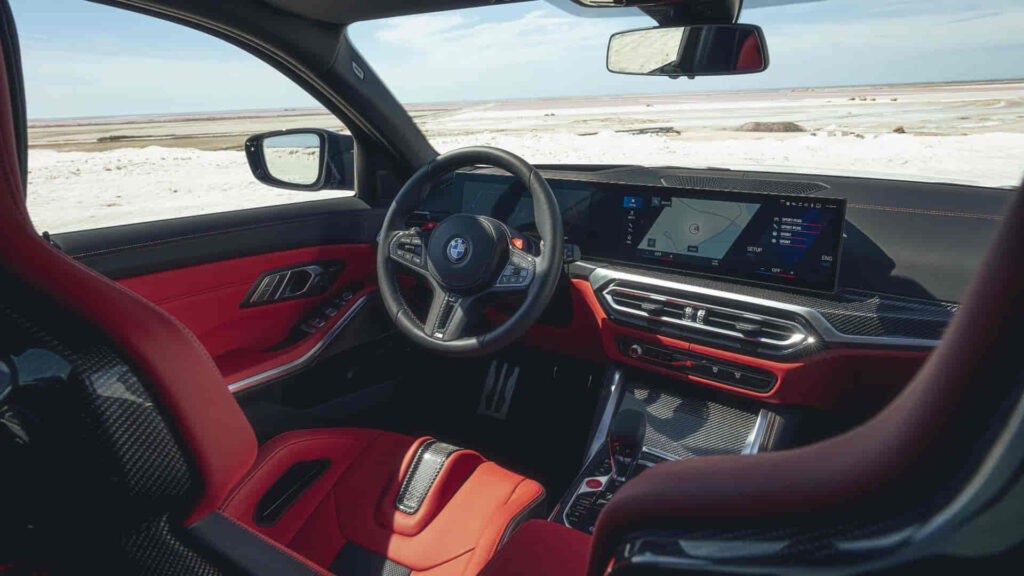
BMW iDrive 8 is a major change from iDrive 7 in interface design, screen architecture, interaction methods, and the organization of vehicle functions. The difference is not simply a newer software version with a different visual theme. BMW Operating System 8 places greater emphasis on touchscreen interaction, voice control, digital displays, and a redesigned user interface, while iDrive 7 uses a more established layout centered around the iDrive Controller and conventional menu structure.
The comparison also depends on the BMW model. iDrive is an infotainment and vehicle-control platform, but the hardware surrounding it varies between vehicles. The display, head unit, physical controls, and available functions can therefore differ even when two BMWs use the same operating-system generation.
This distinction becomes especially important when comparing iDrive 7 with iDrive 8 for a purchase or upgrade decision. A newer operating system does not automatically mean that every feature is available on every BMW, and an iDrive 7 vehicle cannot necessarily be converted to iDrive 8 through a normal software update. BMW states that compatibility with newer operating systems depends on the vehicle and its hardware or head-unit generation.
There are 7 major differences between BMW iDrive 7 and iDrive 8, covering the interface, controls, display, voice interaction, personalization, smartphone integration, and upgradeability. The comparison should therefore focus on how each difference changes the actual BMW driving experience rather than simply declaring one system newer or better.
How Is the BMW iDrive 8 Interface Different From iDrive 7?
BMW iDrive 8 introduces a substantially redesigned interface that relies more heavily on touch interaction and reorganizes vehicle functions compared with iDrive 7. BMW describes Operating System 8 as an iDrive experience with an intuitive touch display and fewer physical switches, with relevant controls grouped into different areas depending on the vehicle model.
The difference is most noticeable in how the driver navigates through functions. iDrive 7 uses a more established menu structure in which the physical Controller plays a central role. BMW’s documentation, for example, uses the Controller to navigate settings and menus in iDrive 7, while OS 8 moves many of those functions into touch-oriented menus.
This does not mean that iDrive 8 eliminates the BMW Controller. BMW’s documentation confirms that the Controller and its touchpad remain available on applicable vehicles running Operating System 8, although the menu locations and interaction paths differ from OS 7. The important change is therefore the balance between interaction methods, not the complete removal of physical controls.
The practical difference is that iDrive 7 feels more Controller-centric, while iDrive 8 gives touchscreen interaction a much larger role. A driver moving from OS 7 to OS 8 therefore needs to adapt not only to a new visual design but also to a different way of accessing vehicle functions.
How Do the Controls Differ Between BMW iDrive 7 and iDrive 8?
BMW iDrive 7 and iDrive 8 both combine physical and digital controls, but OS 8 shifts more functions toward touchscreen and grouped digital controls. BMW specifically describes OS 8 as using a touch display to reduce the number of switches in the vehicle, while the exact control arrangement depends on the BMW model.
In iDrive 7, the Controller provides a consistent physical method for navigating menus, selecting functions, entering information, and interacting with the infotainment system. BMW’s current documentation still identifies the Controller as an operating element on OS 7, while OS 8 retains it but changes the paths used to access many functions.
OS 8 also places greater emphasis on direct interaction with the control display. BMW describes relevant controls and systems as being clustered in areas such as the doors, steering wheel, roof lining, and center console depending on the model. This means the physical layout cannot be generalized across every BMW equipped with OS 8.
The difference is therefore best understood as an interaction-model change rather than a simple reduction in buttons. iDrive 7 gives the driver a familiar physical navigation method, while iDrive 8 combines the Controller with a more prominent touchscreen and model-specific digital control layout. For drivers who prefer tactile controls, this distinction can have a greater effect on daily usability than the software’s visual redesign alone.
Read more: BMW Chassis Stabilization
Is the BMW iDrive 8 Display Better Than iDrive 7?
BMW iDrive 8 introduces a newer display architecture on supported BMW models, with the BMW Curved Display becoming one of the most visible differences from many iDrive 7 vehicles. The change is not simply a larger screen. BMW combines the digital instrument display and central control display into a curved visual layout, creating a more integrated interface between driver information and infotainment. The exact display hardware still depends on the BMW model and equipment configuration.
This distinction matters because iDrive is software, while the display is hardware. Two BMWs can use related operating-system technology but have different screen sizes, dashboard layouts, or available functions. BMW’s documentation for Operating System 8 describes the touch display as a central part of the interaction model, while the vehicle-specific hardware determines how that system is presented to the driver.
The larger visual role of the display also changes how information is organized. iDrive 7 generally presents information through a more conventional central infotainment screen combined with a separate instrument display. iDrive 8 creates a more continuous digital environment, allowing information and controls to occupy different areas of the available display according to the vehicle’s configuration.
The practical difference is therefore display architecture + software interface + vehicle hardware, rather than simply “iDrive 8 has a bigger screen.” When comparing two BMWs, the model, equipment level, screen configuration, and operating-system version should all be considered before assuming that every iDrive 8 vehicle has the same display experience.
Is BMW Intelligent Personal Assistant Better on iDrive 8?
BMW iDrive 8 gives the BMW Intelligent Personal Assistant a more prominent role in the vehicle’s interaction model, allowing voice interaction to become a more important way of accessing functions without manually navigating through menus. This complements the increased touchscreen emphasis introduced with Operating System 8.
The mechanism is different from simply adding voice commands to an existing infotainment system. Voice interaction becomes another layer of the interface alongside the touchscreen and iDrive Controller. Instead of navigating through multiple menus for every function, the driver can use supported voice commands to interact with vehicle functions and information.
BMW’s operating-system documentation describes the Intelligent Personal Assistant as part of the broader iDrive experience, while the exact capabilities depend on the vehicle and software version. This is important because BMW Intelligent Personal Assistant features should not be assumed to be identical across every iDrive 8 vehicle.
The comparison with iDrive 7 is therefore about the role and integration of voice interaction, not simply whether both systems have voice control. iDrive 7 already provides voice-related functions on supported vehicles, but iDrive 8 places greater emphasis on conversational interaction as part of the overall interface.
For everyday use, this can reduce the need to navigate through touch menus for supported commands. However, touchscreen, Controller, and physical controls remain relevant because not every vehicle function is necessarily better or faster to operate through voice. The main advantage of iDrive 8 is the broader integration of voice interaction into the redesigned BMW interface, rather than the existence of voice control itself.
Does BMW iDrive 8 Have Better Personalization Than iDrive 7?
BMW iDrive 8 provides a more prominent personalization experience through BMW ID, widgets, recommendations, and user-specific settings, but the exact capabilities depend on the vehicle and software version. BMW describes BMW ID as a way to personalize supported BMW experiences, including settings, widget configurations, recommendations, and favorites.
The important difference is not that iDrive 7 has no personalization. BMW ID is also supported on relevant earlier systems, so it would be inaccurate to describe iDrive 8 as the first BMW system capable of remembering driver preferences. The stronger distinction is how personalization is integrated into the newer interface and how information is presented through widgets and the redesigned home-screen experience.
On iDrive 8, personalization becomes more visible because the interface is organized around configurable digital information rather than a primarily menu-based structure. The system can use BMW ID to associate supported settings and preferences with the driver, reducing the need to configure the same preferences every time the vehicle is used.
The actual experience still depends on the BMW model, operating-system version, equipment, and connected services. A BMW with iDrive 8 should therefore not be assumed to have every personalization feature available on every other iDrive 8 vehicle. The meaningful comparison is the depth and presentation of personalization, not simply whether personalization exists.
Is Smartphone Integration Different on BMW iDrive 7 and iDrive 8?
Apple CarPlay and Android Auto are available across relevant BMW iDrive generations, but the way drivers access and interact with these smartphone functions differs between iDrive 7 and iDrive 8. BMW’s documentation provides different Android Auto access procedures for iDrive 7 compared with Operating System 8 and 8.5, demonstrating that the underlying smartphone integration can remain available while the user interface changes.
On iDrive 7, smartphone integration is accessed through the established iDrive menu structure and Controller-based interaction. On iDrive 8, the redesigned interface changes how connected smartphone functions are presented and accessed. The larger role of the touchscreen also makes the interaction feel more integrated with the rest of the OS 8 environment.
This distinction is important because newer iDrive does not automatically mean completely different smartphone compatibility. A driver comparing the systems should separate three questions: whether CarPlay or Android Auto is supported, how the feature is accessed, and how naturally it integrates with the vehicle’s display and controls.
The difference becomes more noticeable when using navigation, media, messaging, or other smartphone functions during normal driving. iDrive 8’s redesigned interface can make these features feel more consistent with the rest of the operating system, while iDrive 7 provides a more established interaction model.
BMW’s documentation also shows that Android Auto instructions differ between iDrive 7 and OS 8/8.5, confirming that the interaction path is an actual operating-system difference rather than merely a visual redesign.
Can You Upgrade BMW iDrive 7 to iDrive 8?
You cannot assume that a BMW equipped with iDrive 7 can be upgraded to iDrive 8 through a normal software update. The ability to move from one operating-system generation to another depends on the BMW’s hardware architecture, head unit, vehicle generation, and the specific software supported by that vehicle. BMW explicitly distinguishes software updates from compatibility with newer operating systems.
This distinction is important because iDrive 7 and iDrive 8 are not simply two versions of the same software package that can always be exchanged through an over-the-air update. Operating System 8 is designed around a different interaction model and, on applicable vehicles, different display and electronic hardware. A vehicle that lacks the required hardware cannot automatically gain the complete OS 8 experience by installing newer software.
BMW’s Remote Software Upgrade system can deliver software updates to supported vehicles, but the available update depends on the vehicle’s existing hardware and software configuration. BMW therefore recommends checking the specific vehicle rather than assuming that every BMW with an earlier operating system is eligible for a newer one.
The practical distinction is software update → update supported software on existing hardware, while OS 7 to OS 8 compatibility → depends on the vehicle platform and hardware. For a specific BMW, the VIN, model year, head unit, and current operating system provide the relevant information for determining whether an upgrade is supported.
Is BMW iDrive 8 Better Than iDrive 7?
BMW iDrive 8 is better for drivers who value a newer digital interface, greater touchscreen interaction, newer display architecture, and more prominent voice and personalization features, while iDrive 7 can be preferable for drivers who favor a more established Controller-centered interface. The better system therefore depends on how the driver interacts with the vehicle rather than simply which operating system has the higher number.
iDrive 8 changes the balance between physical and digital interaction. BMW describes Operating System 8 as relying more heavily on the touch display while reducing the number of conventional switches, although the iDrive Controller remains available on applicable vehicles. For drivers who prefer direct touchscreen interaction, this can make the newer system feel more modern. Drivers who prefer tactile navigation may find the established iDrive 7 approach more familiar.
The display architecture also influences the comparison. Supported BMW models with OS 8 can use the BMW Curved Display, creating a more integrated digital environment for driver information and infotainment. However, display hardware varies by vehicle, so an iDrive 8 BMW should not automatically be assumed to have exactly the same screen experience as another OS 8 vehicle.
The best choice is therefore determined by interaction preference, vehicle hardware, available features, and upgradeability. iDrive 8 offers a newer overall experience, but iDrive 7 remains a strong choice for drivers who value its familiar controls and menu structure.
Is BMW iDrive 7 Easier to Use Than iDrive 8?
BMW iDrive 7 can feel easier to use for drivers who prefer physical controls and a more established menu structure, while iDrive 8 can feel more intuitive to drivers who are comfortable with touchscreen interfaces. The difference comes from the interaction model rather than from one system being objectively simpler in every situation.
iDrive 7 gives the iDrive Controller a prominent role in navigating menus and selecting functions. This allows many operations to be performed without reaching toward the center display. BMW’s documentation identifies the Controller as a central operating element in iDrive systems, while OS 8 combines the Controller with expanded touch-based interaction.
iDrive 8 shifts more interaction toward the display and reorganizes functions into a newer digital interface. This can reduce the number of physical controls but also requires drivers familiar with iDrive 7 to learn new menu locations and interaction patterns. The learning curve therefore depends heavily on what the driver already considers intuitive.
The comparison should not be reduced to “iDrive 7 is simple, iDrive 8 is complicated.” A better distinction is physical navigation versus touch-oriented navigation. Drivers who value tactile consistency may prefer iDrive 7, while drivers accustomed to smartphone-style interfaces may adapt more quickly to iDrive 8.
Does BMW iDrive 8.5 Differ From iDrive 8?
BMW Operating System 8.5 differs from the original iDrive 8 experience, particularly through its QuickSelect interface and redesigned organization of frequently used functions. This distinction matters because a BMW described informally as having “iDrive 8” may actually use OS 8.5, depending on its production date and configuration.
BMW specifically identifies QuickSelect as a change introduced with Operating System 8.5 compared with Operating System 8. The newer interface changes how drivers access applications and vehicle functions from the main display.
This creates an important semantic distinction for buyers. iDrive 8 and iDrive 8.5 belong to the same broader BMW operating-system generation, but their interfaces are not identical. A comparison that treats every OS 8 vehicle as having the same menu structure can therefore produce an inaccurate description of the actual user experience.
The distinction is especially relevant when comparing a BMW equipped with early OS 8 against a newer BMW using OS 8.5. The operating-system version, vehicle model, display hardware, and production period should all be considered before comparing the interface.
Which BMW Models Have iDrive 7 or iDrive 8?
The BMW model and production period are important when determining whether a vehicle uses iDrive 7 or iDrive 8 because operating-system availability is tied to vehicle generation and hardware. There is no reliable universal rule based only on a single model year because BMW introduced different operating systems across different models and production periods.
The correct relationship is model → production period → vehicle electronics/head unit → operating system. This is also why BMW’s documentation treats operating-system compatibility as vehicle-specific rather than assuming that every BMW can receive every newer software generation.
A buyer should therefore verify the exact vehicle rather than relying on a general statement such as “all BMWs after year X have iDrive 8.” Equipment configuration and production timing can change the operating system available on a particular vehicle.
For a purchase decision, the most reliable evidence is the vehicle’s VIN, factory equipment information, current software information, and the physical interface visible in the car. The model name alone is not sufficient to establish the exact iDrive version.
Can You Tell Which BMW iDrive Version You Have?
You can identify a BMW’s iDrive generation by checking the vehicle’s software information and comparing its interface and hardware with BMW’s documentation, but the exact identification method varies by model and software version. The interface can provide useful clues, but visual appearance alone should not be treated as definitive.
The most reliable approach is to combine the vehicle’s system information with its hardware configuration. The operating-system version, display arrangement, menu design, and available features can establish whether the vehicle uses iDrive 7, OS 8, or OS 8.5 more accurately than simply looking at the screen size.
This distinction matters because display hardware does not independently define the operating system. A large display does not automatically mean OS 8, just as the presence of an iDrive Controller does not automatically mean the vehicle uses OS 7.
For an exact identification, the BMW’s VIN and vehicle-specific documentation provide stronger evidence than comparing screenshots or relying on a seller’s description. BMW provides Digital Owner’s Manuals and vehicle-specific information through its owner resources, which can help verify the equipment and operating-system context of a particular vehicle.
Does iDrive 8 Require Different Hardware From iDrive 7?
The complete iDrive 8 experience depends on hardware as well as software, which is why an iDrive 7 vehicle cannot automatically be assumed to support OS 8 through a software download. BMW’s compatibility guidance makes the vehicle’s hardware and head-unit generation relevant when determining whether a newer operating system can be installed.
The hardware relationship includes the head unit, display architecture, vehicle electronics, and other components required by the operating system. OS 8’s redesigned interface and supported display configurations therefore represent more than a cosmetic software update to an existing iDrive 7 installation.
This explains why an unofficial retrofit can be substantially different from a factory-equipped OS 8 vehicle. Replacing or modifying hardware may create a different set of compatibility, programming, and feature limitations, while BMW’s official software-update path only applies to supported vehicle configurations.
The key relationship is operating system → hardware platform → display/control architecture → available features. Software alone does not guarantee that an iDrive 7 vehicle can become an iDrive 8 vehicle.
Should You Choose BMW iDrive 7 or iDrive 8?
Choose BMW iDrive 8 if you prioritize a newer interface, greater touchscreen interaction, newer display architecture, and a stronger emphasis on digital personalization and voice interaction. Choose iDrive 7 if you prefer its established Controller-centered experience and familiar menu structure.
The difference is most significant in daily interaction. iDrive 8 changes how drivers reach functions by giving the touchscreen a larger role, while retaining physical interaction methods such as the Controller on applicable vehicles. BMW ID and newer personalization features further integrate driver preferences into the newer digital environment.
For buyers comparing two used BMWs, however, the operating system should not be evaluated in isolation. Vehicle generation, display hardware, equipment, production date, software version, and upgradeability can have as much practical importance as the iDrive version itself.
The most accurate conclusion is therefore that iDrive 8 is the more modern platform, but iDrive 7 can be the better fit for a driver who prefers physical controls and its established interaction model. The decision should be based on the actual vehicle and the driver’s priorities rather than assuming that the newer operating-system number automatically makes the car better.