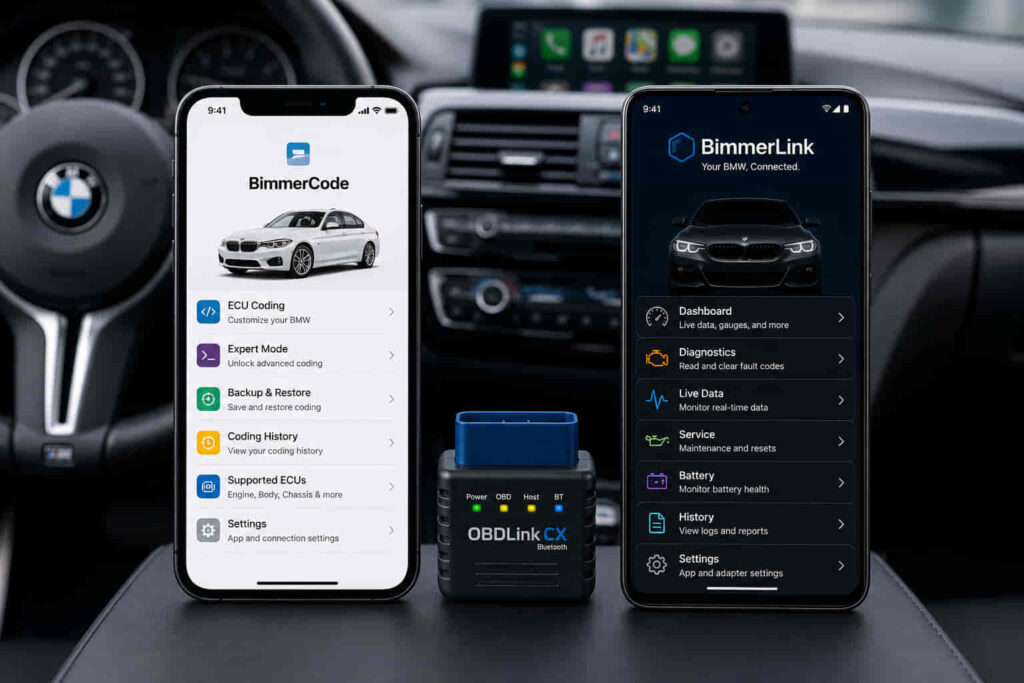
BimmerCode and BimmerLink serve different purposes for BMW and MINI owners. BimmerCode is primarily designed for coding and customizing supported vehicle settings, while BimmerLink focuses on diagnostics, live vehicle data, and maintenance-related functions. The two apps therefore complement each other rather than functioning as direct replacements.
The right choice depends on what you want to do with your vehicle. BimmerCode is the more relevant option when your goal is to change supported settings and personalize vehicle functions through coding. BimmerLink is designed for owners who need greater access to vehicle diagnostics, fault information, real-time data, and supported service functions. Drivers who want both customization and diagnostic capabilities may find a practical use for both applications.
There are 10 key differences between BimmerCode and BimmerLink, including their primary purpose, coding capabilities, diagnostic functions, fault-code management, live data, service functions, vehicle compatibility, OBD adapter support, cost, and ideal use cases. Comparing these differences provides a clearer way to determine which app matches your BMW or MINI and whether using both offers additional value.
1. How Do BimmerCode and BimmerLink Differ in Their Main Purpose?
The main difference between BimmerCode and BimmerLink is that BimmerCode is built primarily for vehicle coding and customization, while BimmerLink is designed primarily for diagnostics, monitoring, and supported vehicle management functions. This distinction determines which app is appropriate for a specific task. Although both applications communicate with supported BMW and MINI control units through a compatible adapter, they give the driver access to different types of vehicle functions.
BimmerCode focuses on changing configurable settings stored within supported control units. Coding allows a BMW or MINI owner to modify how certain factory-installed functions behave without physically replacing the corresponding components. Depending on the specific vehicle and control unit, these changes can involve convenience, lighting, displays, warnings, or other configurable vehicle functions. The exact coding options are vehicle-dependent, so the presence of a function in BimmerCode for one BMW does not establish that the same function is available for every BMW or MINI.
BimmerLink serves a different purpose because its primary context is vehicle status rather than vehicle customization. It is intended to provide access to diagnostic information, real-time vehicle values, fault-related functions, and supported maintenance or control functions. This makes BimmerLink more relevant when the objective is to investigate what is happening inside the vehicle instead of changing how a configurable feature behaves.
The practical distinction is therefore based on the user’s intended action. A BMW owner who wants to customize supported vehicle settings should start with BimmerCode. An owner who wants to inspect diagnostic information and monitor vehicle data should start with BimmerLink. Neither purpose makes one application universally better than the other because BimmerCode and BimmerLink solve two different groups of problems.
2. How Are BimmerCode and BimmerLink Different for BMW Coding?
BimmerCode is the app designed for BMW and MINI coding, whereas BimmerLink is not a substitute for BimmerCode when the goal is to customize supported vehicle settings through coding. Coding is therefore one of the clearest functional differences in a BimmerCode vs BimmerLink comparison.
BimmerCode communicates with supported control units and exposes coding options that can be changed by the user. A control unit manages a particular set of electronic vehicle functions, and changing a supported coding parameter changes the configuration associated with that function. The available options depend on the BMW or MINI model, equipment, software, and relevant control unit. For this reason, coding capability should be evaluated at the vehicle and feature level rather than described as a universal list of modifications available to every owner.
BimmerCode also separates ordinary customization from more advanced coding scenarios. This distinction matters because the technical risk increases when a user moves beyond straightforward supported options and changes individual parameters without understanding their function. A coding application changes vehicle configuration; it does not add hardware that the car does not possess or guarantee that every function found on another BMW can be activated on a different model.
BimmerLink has a different role. Its diagnostic and vehicle-management functions do not make it an alternative coding interface for owners whose primary objective is personalization. Reading vehicle information, accessing fault-related functions, or viewing operating values is conceptually different from changing the configuration stored in a control unit. Choose BimmerCode for supported coding and customization; choose BimmerLink when the task involves diagnostics, monitoring, or its supported vehicle functions.
This division also explains why some BMW owners use both apps. Coding and diagnostics are related to the same electronic vehicle systems, but they represent different actions. BimmerCode addresses the configuration side of those systems, while BimmerLink addresses diagnostic and operational information. Using both can therefore provide a broader toolset than treating either application as a complete replacement for the other.
Read more: Are Laufenn Tires Good
3. How Are BimmerCode and BimmerLink Different for BMW Diagnostics?
BimmerLink is the more appropriate app for BMW diagnostics because its functions focus on identifying, reading, and managing vehicle information, while BimmerCode primarily focuses on changing supported vehicle configurations. This difference separates diagnostic work from coding: diagnostics examines the condition and operating state of vehicle systems, whereas coding changes how supported electronic functions are configured.
BMW and MINI vehicles use multiple electronic control units to manage systems throughout the vehicle. When a monitored system detects an abnormal condition, diagnostic information can be stored in the corresponding control unit. Accessing this information gives the owner a more specific starting point for investigating a warning, malfunction, or unexpected vehicle behavior. BimmerLink is positioned around this diagnostic relationship between the vehicle, its control units, and the information those units provide.
BimmerCode should not be treated as the diagnostic equivalent of BimmerLink simply because both applications communicate with BMW control units. The purpose of that communication is different. BimmerCode accesses supported configuration parameters so that users can change vehicle settings, while BimmerLink focuses on information and functions associated with vehicle condition and operation. A driver trying to investigate a vehicle problem therefore has a different search intent from a driver trying to customize a supported setting.
This distinction becomes important when deciding which app to purchase first. Choose BimmerLink first when diagnosing and monitoring the vehicle is the primary objective. Choose BimmerCode first when changing supported vehicle settings is the primary objective. A BMW owner who regularly performs both types of tasks may benefit from having both because diagnostic access and coding access solve separate problems within the same electronic vehicle ecosystem.
4. Can BimmerCode and BimmerLink Read and Clear Fault Codes?
BimmerLink is designed to read and clear diagnostic fault codes from supported vehicle control units, while fault-code diagnosis is not the primary function for which BimmerCode is designed. This makes BimmerLink the relevant choice when a BMW or MINI owner needs to investigate stored diagnostic errors rather than modify vehicle coding.
A fault code is diagnostic information generated when a control unit detects a condition outside its expected operating parameters. Reading that information can help identify which system recorded the problem and provide a starting point for further diagnosis. Clearing a fault code performs a different action: it removes stored fault information where the vehicle and control unit permit it. Clearing the record does not itself repair the mechanical, electrical, or software condition that caused the fault.
For example, a driver investigating a warning should distinguish between identifying the stored fault and correcting its underlying cause. If the condition remains present after the fault memory is cleared, the control unit can detect the condition again and store corresponding diagnostic information. Fault-code clearing should therefore be treated as a diagnostic function, not as a repair method.
BimmerCode serves a different purpose in this workflow. Its core value comes from coding supported vehicle settings rather than functioning as the primary fault-code management tool. This is an important boundary because coding and clearing diagnostic faults both involve electronic control units but do not accomplish the same task. Changing a configuration parameter does not inherently diagnose a malfunction, just as clearing a fault does not customize a vehicle feature.
For BMW owners comparing BimmerCode vs BimmerLink specifically for fault codes, BimmerLink is the relevant application for fault-code diagnostics and management. BimmerCode remains the appropriate choice when the intended action is coding supported settings. This functional separation is one of the strongest reasons the two applications should be viewed as complementary tools rather than interchangeable alternatives.
5. How Do BimmerCode and BimmerLink Compare for Live Vehicle Data?
BimmerLink is designed for monitoring live vehicle data, while BimmerCode is primarily designed for changing supported coding parameters rather than continuously displaying operating values. Live data is therefore another major functional difference between BimmerCode and BimmerLink because it determines whether the user is configuring the vehicle or observing what the vehicle is doing.
Live vehicle data consists of operating values reported by supported electronic control units while the vehicle is running or being inspected. These values give the user more context than a static warning alone because they show how supported systems are behaving at that moment. Depending on the vehicle and available control units, BimmerLink can provide access to real-time values associated with different vehicle systems. The exact parameters available should be treated as vehicle-dependent rather than assumed to be identical across every BMW and MINI model.
The practical value of live data is its ability to add operating context to diagnostics. A fault code indicates that a control unit detected a particular condition, while a live value can help the user observe relevant vehicle behavior during diagnosis. These functions serve different diagnostic purposes: stored faults provide information about detected problems, whereas live data provides current measurements or operating information made available by the vehicle.
BimmerCode does not have the same primary role because its workflow centers on configuration. A BimmerCode user connects to supported control units to access coding options and change compatible settings. A BimmerLink user can connect for a different reason: to inspect vehicle information and monitor supported values. BimmerCode changes supported configurations; BimmerLink provides greater visibility into supported vehicle operating data.
This distinction makes BimmerLink more appropriate for BMW owners whose priority is vehicle monitoring. BimmerCode remains more appropriate when the objective is personalization through coding. Owners interested in both activities can use the applications for separate stages of vehicle management instead of expecting one app to perform the other’s primary function.
6. How Do BimmerCode and BimmerLink Compare for Service and Maintenance Functions?
BimmerLink provides supported service and maintenance-related functions that are outside BimmerCode’s primary coding purpose. This difference is important because maintenance functions interact with vehicle systems for operational or service-related tasks, whereas BimmerCode primarily changes configurable settings within supported control units.
Battery registration is one example of this distinction on supported vehicles. Registering a replacement battery tells the relevant vehicle system that a new battery has been installed so the vehicle can account for the replacement within its energy-management strategy. This is fundamentally different from coding a convenience or display setting. BimmerLink includes battery registration functionality for supported vehicles, making it the more relevant of the two applications when this specific maintenance task is required.
BimmerLink can also provide supported vehicle-control functions such as exhaust-flap control on compatible vehicles. The purpose is again different from permanent coding customization. A control function allows the user to interact with a supported system through the app, while coding changes a configurable parameter stored by a control unit. Treating these operations as separate categories prevents a common misconception that every electronically accessible BMW function is a form of coding.
Diesel-related functions provide another maintenance context for compatible BMW models. BimmerLink supports diesel particulate filter information and functions on supported vehicles, giving applicable diesel owners access to information relevant to the DPF system. Availability depends on the specific vehicle and its electronic systems, so a feature supported by the application should not be interpreted as universally available on every BMW or MINI.
The difference between the apps can therefore be expressed through the action each one performs. Use BimmerCode when the task is to code a supported configuration; use BimmerLink when the task involves its supported diagnostic, monitoring, service, or vehicle-control functions. Battery registration, vehicle diagnostics, live operating information, and other BimmerLink functions expand its role beyond simple fault-code reading, while BimmerCode remains centered on vehicle customization.
This difference also explains why choosing between BimmerCode and BimmerLink based only on the number of features produces a weak comparison. The relevant factor is not which application has more functions, but whether those functions correspond to the owner’s intended task. A driver who only wants to customize supported settings gains little from selecting an app primarily because it has diagnostic functions. A driver performing vehicle diagnostics or supported maintenance tasks has the opposite requirement.
7. Do BimmerCode and BimmerLink Support the Same BMW and MINI Models?
BimmerCode and BimmerLink support many BMW and MINI vehicles, but support for a vehicle does not mean that every coding, diagnostic, or service function is available on that vehicle. Compatibility depends on the model, generation, installed control units, vehicle equipment, and the specific function the owner wants to access. For this reason, app compatibility and feature compatibility should be evaluated separately.
BimmerCode requires a supported vehicle and compatible control unit before a coding option can be accessed. Two BMW models can therefore provide different coding possibilities even when both vehicles work with the application. Differences in electronic architecture, factory equipment, software, and control units determine which configurable parameters are exposed. A coding option available on one vehicle should not be assumed to exist on another model simply because both appear within the application’s supported vehicle range.
The same principle applies to BimmerLink. A vehicle may be compatible with the application while individual diagnostic, live-data, service, or control functions remain dependent on its electronic systems. Battery registration, diesel-related functions, exhaust-flap control, and specific live values are examples of capabilities whose practical relevance depends on what the vehicle contains and supports. Compatibility therefore needs to answer two questions: whether the app supports the vehicle and whether the required function is available for that particular vehicle.
This distinction matters when comparing BimmerCode vs BimmerLink because their vehicle lists alone cannot determine which app is more useful. The correct app is the one that supports both your BMW or MINI and the specific task you intend to perform. A driver interested in coding should verify BimmerCode support for the required coding function, while a driver interested in diagnostics or maintenance should verify the corresponding BimmerLink capability.
Vehicle compatibility should consequently be checked before purchasing either application or an adapter. This is especially important when a user has identified a specific feature as the reason for buying the app. Compatibility at the brand level, such as support for BMW or MINI, is less precise than compatibility at the model, control-unit, and function level.
8. Do BimmerCode and BimmerLink Use the Same OBD Adapters?
BimmerCode and BimmerLink can use compatible OBD adapters to communicate with supported BMW and MINI vehicles, but users should verify that the specific adapter, vehicle, app, and connection method are supported before purchasing hardware. An adapter that works in one configuration should not automatically be treated as universally compatible with every vehicle or device.
The OBD adapter creates the communication link between the application and the vehicle’s electronic systems. BimmerCode uses that connection to access supported control units for coding, while BimmerLink uses it to retrieve diagnostic information, monitor supported vehicle data, and perform available vehicle or service functions. The physical connection can therefore serve similar communication purposes even though the two apps process that access differently.
Adapter compatibility also depends on more than the presence of an OBD port. The vehicle generation, adapter model, mobile device, operating system, and connection technology can affect whether a particular setup is supported. This is why selecting an adapter based solely on a generic label such as “BMW OBD2 adapter” is less reliable than checking the adapter against the application’s current compatibility information.
Using both applications does not necessarily mean the owner needs two separate adapters. A single adapter can serve both BimmerCode and BimmerLink when that adapter is explicitly compatible with both applications and the relevant vehicle setup. This can reduce the hardware required for owners who want coding capabilities from BimmerCode together with diagnostic and monitoring capabilities from BimmerLink.
Adapter selection is particularly important for coding because communication reliability matters while vehicle configuration data is being accessed and written. Users should therefore prioritize explicitly supported hardware rather than choosing an adapter only because it is inexpensive or advertised as a generic OBD2 device. The same principle applies to diagnostic access: confirmed compatibility provides a clearer basis for selecting hardware than assumptions based on connector type alone.
The adapter itself does not determine whether the user receives BimmerCode or BimmerLink functionality. The adapter provides communication, BimmerCode provides supported coding functions, and BimmerLink provides its supported diagnostic, monitoring, and vehicle-management functions. Keeping these three roles separate makes it easier to choose the correct software and hardware combination for a BMW or MINI.
9. How Much Do BimmerCode and BimmerLink Cost?
BimmerCode and BimmerLink are separate applications, so access to one does not automatically provide access to the other. BMW owners who need both coding and diagnostic functionality should therefore evaluate the cost of the two apps separately and also account for any compatible OBD adapter required to connect the mobile device to the vehicle.
Price alone is not a useful way to determine whether BimmerCode or BimmerLink provides better value because the applications perform different primary tasks. The value of BimmerCode comes from access to supported coding and customization functions. The value of BimmerLink comes from its diagnostic, monitoring, and supported service or vehicle-management functions. Paying for functionality that does not correspond to the owner’s intended task provides less practical value even when that application has a lower purchase price.
The total cost can also extend beyond the application itself. A BMW owner starting without compatible hardware may need an OBD adapter in addition to the selected app. An owner who plans to use both applications may be able to use one compatible adapter for both when the adapter and vehicle configuration are supported. This makes the cost of the complete setup more relevant than comparing app prices in isolation.
Current pricing should be checked before purchase because application prices, purchase models, regional pricing, and platform-specific conditions can change. The better purchasing decision is therefore based on required functionality first and current price second. BimmerCode provides better value when coding is the intended task, while BimmerLink provides better value when diagnostics, monitoring, or its supported maintenance functions are the intended tasks.
10. Is BimmerCode or BimmerLink Better for Your BMW?
BimmerCode is better for BMW owners who primarily want to code and customize supported vehicle settings, while BimmerLink is better for owners who primarily need diagnostics, live data, fault-code functions, and supported maintenance or vehicle-management features. Neither application is universally better because each one addresses a different part of BMW electronic vehicle management.
BimmerCode is the more appropriate choice when customization is the central goal. Its value comes from accessing supported coding parameters within compatible control units and allowing the owner to change configurable vehicle behavior. A driver whose intended tasks involve supported convenience settings, displays, lighting behavior, warnings, or other available coding parameters has a use case aligned with BimmerCode rather than BimmerLink.
BimmerLink is the more appropriate choice when vehicle condition and diagnostic information are the central concerns. Its functions are aligned with reading and clearing supported fault information, observing available live vehicle data, and accessing compatible service or vehicle functions. A driver investigating faults, monitoring vehicle operating values, registering a replacement battery on a supported vehicle, or using another compatible BimmerLink function has a use case aligned with BimmerLink rather than BimmerCode.
The distinction becomes clearer when the decision is based on the action the owner wants to perform. Use BimmerCode to change supported vehicle configurations. Use BimmerLink to inspect, monitor, and manage supported vehicle systems. This action-based distinction is more precise than comparing the two applications according to the total number of features because a diagnostic function cannot replace a coding function, and a coding function cannot replace a diagnostic requirement.
BMW owners who perform both types of tasks do not necessarily need to choose one application permanently. BimmerCode and BimmerLink can occupy complementary positions in the same toolset because coding and diagnostics address different interactions with the vehicle’s electronic systems. BimmerCode can handle supported configuration changes, while BimmerLink can provide diagnostic and operational information before or after those changes when applicable.
The best choice ultimately follows the owner’s primary search intent. Choose BimmerCode when coding is the reason you are connecting to the BMW. Choose BimmerLink when diagnostics and vehicle monitoring are the reason. Consider both when you need the functions of both categories and your specific BMW or MINI, mobile device, and adapter are compatible. This distinction summarizes the most important difference in the BimmerCode vs BimmerLink comparison without treating either application as a universal replacement for the other.
Do You Need Both BimmerCode and BimmerLink?
You need both BimmerCode and BimmerLink only when you want access to both supported vehicle coding and diagnostic or monitoring functions. The two applications are complementary rather than duplicate tools: BimmerCode addresses vehicle configuration and customization, while BimmerLink addresses diagnostics, live data, fault information, and supported service or vehicle-management functions.
A BMW owner interested only in changing supported vehicle settings does not need BimmerLink solely to perform those coding tasks. BimmerCode is designed for that purpose and provides access to compatible coding parameters within supported control units. Adding BimmerLink becomes relevant when the same owner also wants to investigate faults, monitor operating data, or use one of its supported maintenance functions.
The opposite applies to an owner whose requirements are limited to diagnostics and monitoring. BimmerLink can address those tasks without requiring BimmerCode simply because both applications communicate with the same vehicle. Coding becomes relevant only when the owner also wants to change supported configurations. This distinction prevents unnecessary software purchases based on the assumption that the two applications must always be used together.
Using both becomes practical when an owner regularly interacts with the vehicle in both contexts. For example, the same BMW owner may want to customize supported vehicle behavior with BimmerCode and later use BimmerLink to inspect fault information or monitor available operating values. In this scenario, each application retains a separate role rather than duplicating the other’s main functionality.
The decision can therefore be reduced to the required actions: BimmerCode for supported coding, BimmerLink for supported diagnostics and monitoring, and both for owners who require both groups of functions. Vehicle, feature, device, and adapter compatibility should still be verified because owning both applications does not make every function available on every BMW or MINI.
Can You Use BimmerCode and BimmerLink With the Same OBD Adapter?
The same OBD adapter can be used with BimmerCode and BimmerLink when that specific adapter is supported by both applications and is compatible with the vehicle and connection setup. Owners planning to use both apps therefore do not automatically need to purchase two separate OBD adapters.
The adapter acts as the communication interface between the mobile application and the vehicle’s electronic systems. When BimmerCode is connected, that communication supports access to compatible coding functions. When BimmerLink is connected, the connection supports its diagnostic, monitoring, and vehicle-management functions. Changing applications changes what the software does with supported vehicle access; it does not necessarily require different hardware.
Compatibility should still be confirmed for the exact setup rather than inferred from the OBD connector alone. BMW generation, adapter model, mobile operating system, and connection method can affect support. An adapter advertised generically as an OBD2 device is therefore not automatically an appropriate choice for BMW coding or diagnostics.
Using one supported adapter for both applications provides the simplest setup for owners who need both function groups. It also keeps the distinction between hardware and software clear: the adapter establishes communication with the vehicle, while BimmerCode and BimmerLink determine which supported functions the user can access through that communication.
Is BimmerCode or BimmerLink Worth Buying First?
BimmerCode is worth buying first when your immediate goal is BMW coding and customization, while BimmerLink is worth buying first when your immediate goal is diagnostics, fault management, live vehicle data, or supported maintenance functions. Buying order should follow the first task you actually need to perform rather than which application appears to offer more features.
BimmerCode provides the more direct value for an owner who purchased an adapter specifically to change supported vehicle settings. Its purpose aligns with customization, so buying BimmerLink first would not satisfy the central requirement simply because BimmerLink provides other useful BMW functions. The value of the application comes from matching its function to the owner’s intended action.
BimmerLink should be prioritized when the owner needs information about vehicle condition. Reading supported faults, monitoring available vehicle values, or accessing compatible maintenance functions belongs to a diagnostic and vehicle-management context rather than a coding context. Buying BimmerCode first would therefore provide the wrong primary tool for that objective.
Owners who expect to perform both groups of tasks can add the second application when its functions become necessary. This approach avoids treating BimmerCode vs BimmerLink as a conventional winner-versus-loser comparison. BimmerCode is the better first purchase for coding; BimmerLink is the better first purchase for diagnostics and monitoring; both make sense when the owner genuinely needs both capabilities.
That decision also provides the clearest answer to the broader BimmerCode vs BimmerLink question. The applications overlap in the BMW and MINI ecosystem, compatible electronic systems, and connection hardware, but their central purposes remain distinct. Choosing according to the task, then confirming vehicle and adapter compatibility, produces a more reliable decision than selecting either app based on feature count alone.