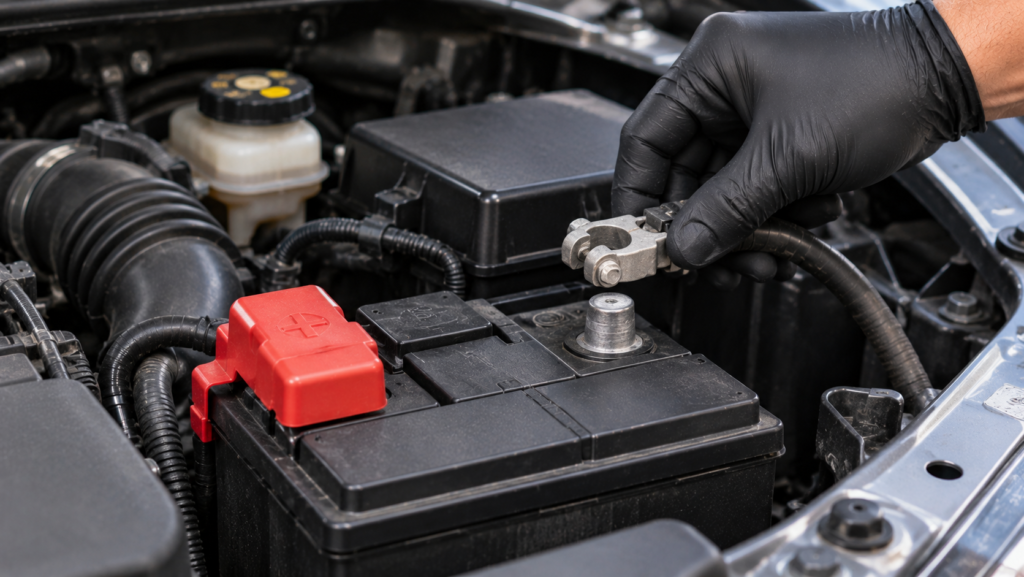
To reset a car computer, first identify which system needs resetting and follow the procedure recommended by your vehicle manufacturer. A compatible OBD-II scanner can clear diagnostic trouble codes after repairs, while certain vehicles support resetting learned settings through specific service procedures. Disconnecting the 12-volt battery may erase some temporary computer data, but it does not reset every control module or work the same way on all vehicles.
A car computer, commonly called the Engine Control Unit (ECU), Engine Control Module (ECM), or Powertrain Control Module (PCM), manages engine functions such as fuel delivery, ignition timing, and emissions control. Resetting this system can clear stored diagnostic information or initiate the relearning of certain operating parameters. However, a computer reset does not repair defective sensors, damaged wiring, or mechanical problems. Clearing fault codes may also reset emissions readiness monitors, requiring additional driving before the vehicle completes its diagnostic checks.
This guide explains how to reset a car computer using an OBD-II scanner, when battery disconnection is appropriate, and what information may be erased during the process. It also covers ECU relearning, reset verification, and the conditions that require professional automotive diagnostics.
When Should You Reset a Car Computer?
You should reset a car computer when the vehicle manufacturer requires the procedure, when diagnostic trouble codes need to be cleared after a confirmed repair, or when specific engine control settings must be relearned. Resetting the Engine Control Unit (ECU) or Powertrain Control Module (PCM) can remove certain stored diagnostic information or restore selected adaptive parameters, depending on the procedure used. However, a reset is not a routine maintenance requirement for every vehicle and should have a clearly identified purpose.
One common reason to reset a car computer is to clear diagnostic trouble codes after repairing an engine-related problem. For example, replacing a defective oxygen sensor may resolve the condition that triggered the Check Engine Light. A compatible OBD-II scanner can then clear supported fault codes, allowing the vehicle’s diagnostic system to monitor the repaired component during subsequent operation. Clearing the codes does not repair the sensor itself, and the warning light may return if the underlying problem remains unresolved.
A computer reset may also be necessary after certain component replacements or maintenance procedures that affect learned engine settings. Modern ECUs continuously adjust parameters such as idle speed and fuel delivery based on sensor readings and operating conditions. Some vehicles require a manufacturer-defined relearning procedure after throttle body service, battery replacement, or specific electronic repairs. Resetting these settings without a valid reason can temporarily affect engine operation and may require additional driving or calibration.
What Should You Check Before Resetting a Car Computer?
Before resetting a car computer, check the vehicle’s diagnostic trouble codes, battery condition, control module requirements, and manufacturer-recommended procedures. These checks help determine whether a reset is necessary and prevent the accidental loss of diagnostic information. The correct procedure depends on the vehicle’s make, model, production year, engine configuration, and electronic control system.
Start by connecting a compatible OBD-II scanner to retrieve stored and pending diagnostic trouble codes. Record the codes before clearing them because they identify systems where the computer has detected abnormal operating conditions. Some scanners also provide freeze-frame data, which records engine parameters such as vehicle speed, engine load, coolant temperature, and engine speed when a fault was detected. For example, freeze-frame information associated with a misfire code can help identify the conditions under which the malfunction occurred. Erasing this information before diagnosis can make intermittent problems more difficult to investigate.
Next, inspect the 12-volt battery and its electrical connections. Low battery voltage, loose terminals, and unstable electrical power can interfere with electronic control systems and diagnostic communication. Check the battery’s condition and address any electrical problems before attempting a reset. Battery disconnection should not be treated as a universal reset method because some vehicles require specific shutdown procedures, battery registration, or electronic system initialization after power is restored.
Finally, consult the vehicle owner’s manual or manufacturer service information to identify the supported reset procedure. Basic OBD-II scanners generally provide emissions-related fault code functions, while resetting adaptive settings or performing module calibrations may require manufacturer-compatible diagnostic equipment. Confirming these requirements before starting helps avoid unnecessary resets, lost settings, and additional diagnostic problems.
Read more: lojack alternatives
How Do You Reset a Car Computer With an OBD2 Scanner?
To reset a car computer with an OBD2 scanner, connect a compatible diagnostic tool to the vehicle’s OBD-II port, retrieve the stored trouble codes, complete any necessary repairs, and use the scanner’s code-clearing function. This process removes supported diagnostic trouble codes (DTCs) and associated information from the vehicle’s onboard diagnostic system. However, clearing fault codes is different from resetting ECU adaptive settings, which may require a manufacturer-specific diagnostic tool.
Begin by locating the OBD-II diagnostic connector, typically positioned beneath the dashboard near the driver’s seat. With the ignition switched off, connect the scanner securely to the port. Turn the ignition to the ON position without starting the engine, unless the scanner or vehicle manufacturer specifies a different operating condition. Once communication is established, select the diagnostic function to retrieve stored, pending, and available permanent trouble codes. Record the code numbers and any freeze-frame data before proceeding because this information helps identify the conditions responsible for the malfunction.
After diagnosing and repairing the underlying problem, access the scanner’s Erase Codes or Clear DTCs function. Follow the on-screen instructions and confirm the operation when prompted. Most basic OBD-II scanners use this function to clear emissions-related diagnostic information and switch off the Check Engine Light when the associated fault conditions no longer require the warning. For example, after repairing a faulty oxygen sensor circuit, clearing the stored code allows the ECU to evaluate the system again during subsequent driving. The warning may return if the original malfunction persists.
Some advanced diagnostic scanners provide additional functions, including throttle adaptation resets, idle relearning, and manufacturer-specific ECU procedures. These operations modify selected learned parameters rather than simply deleting fault codes. Their availability depends on the scanner’s capabilities, vehicle compatibility, and manufacturer requirements. A standard code reader should therefore not be assumed to perform a complete ECU reset.
Once the clearing procedure finishes, scan the vehicle again to check for remaining diagnostic codes. Clearing codes can also reset emissions readiness monitors to a Not Ready state, meaning the vehicle must complete the required diagnostic self-tests before those monitors return to Ready. Permanent DTCs may remain until the vehicle confirms that the corresponding fault has been corrected. A successful reset should therefore be verified through diagnostic results and normal vehicle operation rather than the disappearance of the Check Engine Light alone.
How Do You Reset a Car Computer by Disconnecting the Battery?
To reset a car computer by disconnecting the battery, switch off the vehicle, follow the manufacturer’s 12-volt battery disconnection procedure, and reconnect the battery as instructed. This method can clear certain temporary memory settings in some vehicles because removing the electrical power supply interrupts the control module’s ability to retain volatile data. However, battery disconnection does not guarantee a complete ECU reset, and some modern vehicles require additional electronic system initialization after power is restored.
Before disconnecting the battery, park the vehicle on a level surface, engage the parking brake, switch off the ignition, and remove the key or move the electronic key away from the vehicle as directed by the manufacturer. Locate the 12-volt battery and review the owner’s manual for specific disconnection requirements. On conventional negative-ground vehicles where battery disconnection is permitted, the negative terminal is generally disconnected first to reduce the risk of an electrical short. Carefully isolate the disconnected cable to prevent accidental contact with the battery terminal. Never bridge the battery terminals or connect a disconnected cable directly to the opposite terminal.
The time required for electrical power interruption depends on the vehicle’s electronic architecture. There is no universal waiting period that guarantees all ECU settings will be erased. Some control modules retain important information in nonvolatile memory even when battery power is removed. Once the manufacturer-specified procedure is complete, reconnect the battery using the correct terminal sequence and ensure the connections are secure. If both terminals were removed on a conventional negative-ground system, the positive terminal is normally reconnected before the negative terminal.
After reconnecting the battery, certain vehicles require idle relearning, power window initialization, or battery management system procedures. For example, Ford documents that battery disconnection can erase learned idle and fuel-trim settings on some models, requiring a prescribed relearning process to restore normal engine operation. Hybrid and electric vehicle owners must also follow model-specific low-voltage battery instructions and must not interfere with high-voltage components.
What Gets Erased When You Reset a Car Computer?
Resetting a car computer can erase diagnostic trouble codes, freeze-frame information, emissions readiness data, and selected adaptive settings, depending on the reset method and vehicle design. The Engine Control Unit stores different types of information in memory, and not all stored data is removed when electrical power is interrupted or a diagnostic reset command is performed.
Diagnostic trouble codes identify malfunctions detected by the vehicle’s onboard monitoring system. Clearing these codes with a compatible scanner can also remove associated freeze-frame data, which records operating conditions when a fault was detected. Emissions readiness monitors may return to a Not Ready state because the computer must repeat the required diagnostic tests. Permanent diagnostic trouble codes are handled differently and generally remain until the vehicle completes the required self-tests confirming that the original fault has been corrected.
Certain adaptive engine settings may also be erased during a supported reset. These settings allow the ECU to adjust engine behavior based on operating conditions, component wear, and sensor feedback. For example, losing learned idle or fuel-trim values can temporarily affect idle stability until the vehicle completes the manufacturer’s relearning procedure. Other settings may remain stored because they use nonvolatile memory that does not depend on continuous battery power.
Battery disconnection can additionally reset vehicle-specific convenience settings, including the clock, radio presets, and automatic window functions. However, it does not normally erase the ECU’s operating software or restore the module to its original factory programming. Resetting stored information also does not eliminate defective sensors, damaged wiring, or mechanical faults. The information affected must therefore be distinguished from the underlying condition that caused the vehicle problem.
How Do You Relearn Engine Idle After Resetting a Car Computer?
To relearn engine idle after resetting a car computer, follow the manufacturer’s idle relearn procedure, which may involve warming the engine to normal operating temperature, allowing it to idle under specified conditions, and completing a prescribed driving cycle. This process allows the Engine Control Unit (ECU) to rebuild adaptive settings used to maintain stable engine operation. The required procedure varies by vehicle, and some models require a compatible diagnostic scanner to initiate an electronic throttle or idle adaptation.
Modern engine control systems continuously adjust idle speed and fuel delivery according to sensor feedback, engine temperature, electrical demand, and accessory loads. When certain learned values are erased, the ECU must recalibrate its control strategy to accommodate the engine’s operating characteristics. For example, an engine may temporarily idle unevenly after battery replacement because its previously learned idle corrections are no longer available. These adjustments are restored as the computer receives new operating data under the conditions specified by the manufacturer.
Ford provides a specific idle and fuel-trim relearning procedure for certain vehicles after battery disconnection. The procedure includes bringing the engine to normal operating temperature, allowing it to idle for a prescribed period, and driving the vehicle to complete the learning process. Some Ford models also require operating the air conditioning during the procedure to help the computer adjust to additional engine load. These instructions illustrate how idle relearning works but should not be applied to other vehicles without checking their service documentation.
After completing the required procedure, monitor engine idle stability and acceleration response. Temporary changes may disappear as the ECU rebuilds its adaptive settings, but persistent stalling, severe vibration, or irregular engine speed requires further diagnosis. Relearning corrects lost adaptive information; it does not repair faulty sensors, vacuum leaks, contaminated throttle components, or other underlying engine problems.
How Do You Restore OBD2 Readiness Monitors After an ECU Reset?
To restore OBD2 readiness monitors after an ECU reset, drive the vehicle under the operating conditions required for its onboard diagnostic system to complete the applicable emissions self-tests. Clearing diagnostic trouble codes or disconnecting the battery can return readiness monitors to a Not Ready state because previously completed test results have been erased. The monitors change to Ready only after the ECU successfully performs the corresponding diagnostic checks.
OBD-II readiness monitors evaluate emissions-related systems, including catalytic converter efficiency, oxygen sensor performance, and evaporative emissions control. Each monitor requires specific conditions before testing can begin. For example, an evaporative emissions monitor may depend on fuel level, ambient temperature, and vehicle operating conditions, while catalyst monitoring may require particular engine temperatures and driving patterns. These requirements vary by manufacturer, model, and powertrain, so no single driving distance or universal drive cycle can guarantee that every monitor will become ready.
A compatible OBD-II scanner can display the readiness status of each supported monitor. Ready indicates that the required diagnostic evaluation has been completed, while Not Ready means the applicable test has not finished. Not Supported indicates that the vehicle does not use that particular monitor. For example, a vehicle may complete its oxygen sensor monitoring while its evaporative emissions monitor remains Not Ready because the necessary operating conditions have not occurred.
If a monitor remains incomplete after normal driving, consult the manufacturer’s specified drive cycle and check for unresolved diagnostic problems. Faulty components can prevent the ECU from completing the corresponding test, even after extended driving. Readiness status also affects emissions inspections because inspection programs may reject vehicles with too many incomplete monitors. Confirming the applicable monitor status with a scanner provides a more reliable result than estimating readiness from driving time alone.
Does Resetting a Car Computer Turn Off the Check Engine Light?
Resetting a car computer can turn off the Check Engine Light by clearing the diagnostic trouble codes responsible for activating the warning, but the light may return if the underlying problem remains unresolved. The Check Engine Light, also called the Malfunction Indicator Lamp (MIL), is controlled by the vehicle’s onboard diagnostic system. When the Engine Control Unit (ECU) detects an emissions-related malfunction that meets the conditions for illuminating the warning, it stores diagnostic information and activates the light to alert the driver.
A compatible OBD-II scanner can request the removal of supported diagnostic trouble codes, which may switch off the Check Engine Light. For example, after repairing a defective oxygen sensor circuit, clearing the associated code allows the ECU to monitor the repaired system during subsequent driving. However, clearing codes also removes certain diagnostic information and can reset emissions readiness monitors to a Not Ready state. Permanent diagnostic trouble codes cannot be erased with a standard scanner command and remain until the onboard diagnostic system verifies that the relevant fault has been corrected.
If the original malfunction persists, the ECU can detect it again and reactivate the Check Engine Light once the required diagnostic conditions are met. A flashing Check Engine Light may indicate a severe engine misfire capable of damaging the catalytic converter and requires immediate attention. Therefore, turning off the warning light should not be considered evidence of a successful repair. The underlying fault must be corrected, and the relevant diagnostic tests must confirm normal system operation.
Why Does a Car Computer Reset Not Fix the Problem?
A car computer reset does not fix a vehicle problem when the malfunction originates from a defective component, damaged wiring, mechanical failure, or another condition that requires physical repair. Resetting the ECU changes selected stored information or adaptive settings, but it does not restore damaged components to working condition. Once the vehicle resumes operation, its onboard diagnostic system continues monitoring engine performance and can detect the same malfunction again.
Engine problems that persist after a reset commonly involve fuel delivery, ignition performance, sensor signals, or unmetered air entering the engine. For example, a defective ignition coil can cause an engine misfire that triggers a diagnostic trouble code. Clearing the code does not restore the coil’s ability to generate the required ignition voltage, so the misfire continues and the ECU may record the fault again. Similarly, a vacuum leak can disrupt the air-fuel mixture even after adaptive fuel-trim values have been reset.
An unsuccessful reset can also indicate that the selected procedure did not address the intended control module or adaptive function. Basic OBD-II scanners primarily provide standardized diagnostic functions, while specialized calibration and relearning operations may require manufacturer-compatible equipment. If engine symptoms or diagnostic codes persist, the next step is to examine live sensor data, electrical connections, and relevant mechanical components rather than repeatedly clearing the computer’s memory. Correct diagnosis identifies the source of the malfunction and determines whether component repair, system calibration, or professional ECU service is necessary.
When Should You Have a Professional Reset or Reprogram the ECU?
You should have a professional reset or reprogram the ECU when the vehicle requires manufacturer-specific diagnostic equipment, persistent electronic faults remain unresolved, or a control module needs software updates, calibration, or replacement. Professional service is particularly important when a basic OBD-II scanner cannot perform the required procedure or when resetting stored information fails to restore normal vehicle operation.
An ECU reset, ECU reprogramming, and ECU replacement are three different operations. Resetting clears selected diagnostic information or adaptive settings, while reprogramming installs or updates the control module’s software using compatible diagnostic equipment. ECU replacement involves installing another control module and completing any required programming, configuration, and security procedures. For example, replacing the Powertrain Control Module (PCM) on certain Honda vehicles requires immobilizer registration using Honda diagnostic software before the engine can start normally.
Professional ECU reprogramming also requires a stable electrical power supply and an uninterrupted connection between the diagnostic equipment and the vehicle. Voltage fluctuations or communication interruptions during software installation can corrupt programming and leave the control module inoperative. Manufacturers such as Mazda specify battery voltage stabilization equipment during certain ECU reprogramming procedures to reduce this risk.
A qualified automotive technician should also inspect the vehicle when diagnostic communication fails, multiple control modules report related faults, or engine problems continue after the appropriate repairs and reset procedures. These symptoms do not automatically indicate a defective ECU because wiring faults, unstable voltage, and communication network problems can produce similar results. Hybrid and electric vehicles require additional precautions, particularly when servicing components associated with high-voltage systems. Accurate diagnosis helps determine whether the vehicle needs a simple reset, software reprogramming, or control module replacement.