The Hyundai Palisade Lane Assist system is an important part of the Hyundai SmartSense safety package. It helps drivers stay within their lane by monitoring road markings and providing steering support when the vehicle begins to move away from its lane. However, some owners may experience a situation where the Hyundai Palisade Lane Assist is not working properly.
In most cases, this issue does not mean the system has completely failed. Lane Assist may stop working because the front camera cannot detect lane markings, the system has been turned off, driving conditions are unsuitable, or the vehicle needs a software update. Understanding these causes can help drivers identify the problem before visiting a service center.
The Hyundai Palisade uses advanced driver assistance technology that depends on multiple components working together. The front view camera, electronic control modules, vehicle software, and driver assistance settings all affect Lane Assist performance.
This guide explains why Hyundai Palisade Lane Assist may stop working, what conditions can disable the system, how to troubleshoot common problems, and when professional service may be required.
Why Is My Hyundai Palisade Lane Assist Not Working?
When the Hyundai Palisade Lane Assist is not working, the cause is usually related to camera detection, system settings, or operating conditions. The Lane Assist system needs clear information from the front camera to identify lane boundaries and provide assistance. If the camera cannot recognize the road, the system may temporarily deactivate.
One of the most common causes is unclear lane markings. The front camera relies on visible lines painted on the road. Faded markings, missing lines, uneven pavement, or roads with complicated patterns can prevent the system from identifying the correct lane position.
Another common reason is a blocked or dirty front camera. The camera is usually located near the top center area of the windshield. Dust, mud, snow, ice, or stickers on the windshield can reduce camera visibility. When the camera cannot capture accurate road information, the Palisade may display a warning message or disable Lane Assist.
The system settings can also cause Lane Assist problems. Drivers may accidentally turn off Lane Keeping Assist or Lane Following Assist through the vehicle infotainment system or steering wheel controls. Checking the driver assistance menu is one of the easiest troubleshooting steps.
In addition, certain driving conditions can limit Lane Assist operation. Heavy rain, fog, strong sunlight, sharp curves, construction zones, and poor road surfaces may affect lane detection. The system is designed to assist the driver, but it depends on stable environmental conditions.
Software problems can also affect Hyundai Palisade Lane Assist performance. Modern ADAS systems rely on communication between different vehicle modules. A software error, outdated firmware, or incorrect system calibration may cause temporary failures or warning messages.
How Does Hyundai Palisade Lane Assist Work?
The Hyundai Palisade Lane Assist system works through a combination of cameras, sensors, and electronic control systems. It is part of Hyundai SmartSense, which includes various driver assistance technologies designed to improve safety and reduce driver workload.
The main component responsible for lane detection is the front view camera. This camera continuously monitors the road ahead and analyzes lane markings. When the system detects that the vehicle is moving away from its lane without an active turn signal, it can provide a warning or apply steering assistance depending on the selected feature.
Hyundai Palisade models may include different lane assistance functions, such as Lane Keeping Assist and Lane Following Assist. Although these systems work together, they have different purposes.
Lane Keeping Assist mainly focuses on preventing unintended lane departure. It can alert the driver and provide steering correction when the vehicle starts crossing detected lane lines.
Lane Following Assist provides more continuous steering support. It helps the vehicle maintain its position in the center of the lane during highway driving when road conditions allow the system to operate.
Because these systems depend heavily on camera data, any problem affecting camera visibility or calibration can reduce performance. This is why windshield condition, camera alignment, and software status are important factors in maintaining Hyundai Palisade Lane Assist functionality.
What Conditions Prevent Hyundai Palisade Lane Assist From Working?
The Hyundai Palisade Lane Assist system has specific operating conditions. It does not operate in every driving situation because the technology depends on clear lane information and stable road conditions.
Poor lane visibility is one of the biggest limitations. If road markings are faded, covered, or missing, the camera cannot accurately identify lane boundaries. As a result, the system may temporarily become unavailable.
Weather conditions can also affect performance. Heavy rain, fog, snow, or water spray from other vehicles can reduce camera visibility. Strong sunlight, especially when it shines directly into the camera, may also interfere with lane detection.
Road design can create additional limitations. Sharp curves, narrow roads, intersections, temporary construction markings, and roads with multiple lane lines may confuse the camera system. In these situations, the driver should maintain full control of the vehicle.
Vehicle speed can also influence Lane Assist operation. Depending on the model year and system settings, certain Lane Assist features only activate within specific speed ranges. If the vehicle is driving too slowly or conditions do not meet system requirements, assistance may not be available.
Finally, driver behavior affects system operation. Lane Assist is designed as a support feature, not an autonomous driving system. The driver must keep hands on the steering wheel and remain responsible for controlling the Hyundai Palisade at all times.
How Do You Fix Hyundai Palisade Lane Assist Not Working?
When the Hyundai Palisade Lane Assist is not working, drivers can perform several basic checks before seeking professional assistance. In many situations, the problem comes from simple issues such as incorrect settings, blocked camera visibility, or temporary system limitations.
The first step is to check the Lane Assist settings. The system can be disabled through the vehicle infotainment screen or steering wheel controls. Open the driver assistance menu and confirm that Lane Keeping Assist or Lane Following Assist is turned on. If the feature was accidentally switched off, enabling it again may restore normal operation.
Next, inspect and clean the front view camera area. The camera is usually mounted behind the windshield near the rearview mirror. Remove any dirt, dust, water marks, stickers, or objects that may block the camera view. A clean windshield allows the Hyundai SmartSense system to receive clearer information from the road.
Restarting the vehicle can also solve temporary electronic issues. Turn off the engine, wait for a short period, and restart the Hyundai Palisade. This process allows the vehicle control modules to refresh and may clear minor software communication errors.
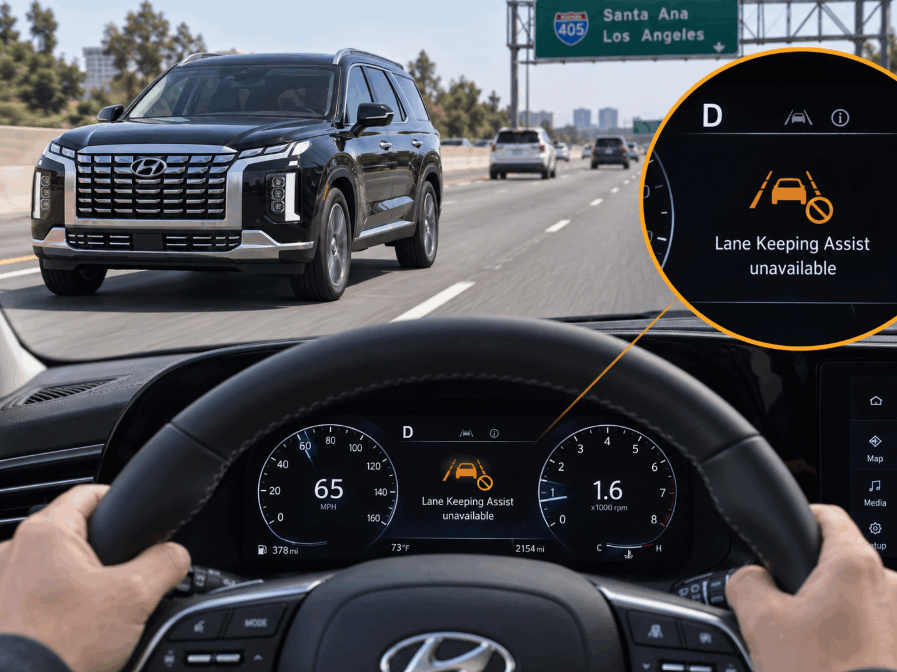
Drivers should also check for warning messages on the instrument cluster or infotainment display. Messages such as “Lane Keeping Assist unavailable” or “Check Lane Keeping Assist system” provide useful information about the cause of the problem. These warnings often indicate whether the issue relates to camera visibility, system limitations, or a technical fault.
If the problem continues, check whether the vehicle recently experienced windshield replacement, front-end repairs, or a collision. The Lane Assist camera requires accurate alignment to function correctly. Any change in camera position may require ADAS calibration to restore proper operation.
Finally, ensure that the vehicle software is up to date. Hyundai regularly releases software improvements that can improve system performance, fix communication issues, and enhance driver assistance features. A Hyundai dealer or qualified technician can check for available updates if necessary.
The Hyundai Palisade may display a Lane Assist unavailable warning when the system cannot receive reliable information from its sensors or camera. This warning does not always indicate a serious failure. In many cases, the system temporarily disables itself to prevent incorrect assistance.
One common reason is that the front camera cannot detect lane markings. If the road does not provide enough visual information, the system cannot determine the vehicle’s position. As a safety measure, Lane Assist becomes unavailable until normal detection conditions return.
A blocked camera is another frequent cause. The camera needs a clear view through the windshield. Dirt, fog, condensation, ice, or external objects can interfere with image processing. Cleaning the windshield area around the camera may remove the warning.
The warning can also appear because of extreme weather conditions. Heavy rain, fog, bright sunlight, or poor visibility can reduce camera accuracy. Once conditions improve, the system may automatically return to normal operation.
In some cases, the warning points to a technical issue. Problems with the camera module, electrical connections, vehicle software, or ADAS calibration can prevent Lane Assist from functioning correctly. These situations usually require diagnostic equipment to identify the exact cause.
If the warning appears repeatedly under normal driving conditions, the vehicle should be inspected. Continuous warnings may indicate that the camera system needs calibration, repair, or a software update.
Can Software Issues Cause Hyundai Palisade Lane Assist Problems?
Software plays an important role in modern vehicle safety systems, and Hyundai Palisade Lane Assist is no exception. The system depends on communication between the front camera, control modules, infotainment system, and vehicle software.
A software problem can cause incorrect system behavior. For example, the Lane Assist feature may stop working after a system update, battery replacement, electrical issue, or communication error between vehicle modules.
In some cases, a temporary software glitch prevents the system from activating even though all hardware components are working correctly. Restarting the vehicle may solve minor issues, but persistent problems may require a software diagnosis.
Software updates can improve ADAS performance by fixing known issues and improving communication between different vehicle systems. Hyundai dealerships can check whether the vehicle has available updates or technical service solutions related to Lane Assist operation.
However, software is not always the cause. If the camera is damaged, incorrectly positioned, or requires calibration, updating software alone will not solve the problem. Proper diagnosis is important because Lane Assist depends on both hardware condition and software performance.
Does Hyundai Palisade Lane Assist Failure Affect Driving Safety?
When the Hyundai Palisade Lane Assist system is not working, the vehicle can still be driven normally. However, drivers should understand that Lane Assist is a support technology, not a replacement for safe driving habits.
The purpose of Lane Assist is to provide additional assistance by monitoring lane position and helping reduce unintended lane departures. It does not control the vehicle completely, and it cannot prevent every type of accident. The driver must always remain focused, keep both hands available for steering control, and monitor surrounding traffic conditions.
If Lane Assist becomes unavailable, the main difference is that the vehicle loses this additional layer of driver assistance. The Palisade will continue to operate using its normal steering, braking, and driving systems. However, the driver needs to pay closer attention, especially during highway driving or long trips where lane assistance can reduce fatigue.
A temporary Lane Assist failure caused by poor weather, unclear lane markings, or a blocked camera is usually not a safety concern because the system is designed to deactivate when conditions are unreliable. In fact, disabling assistance during uncertain conditions helps prevent incorrect steering input.
However, repeated warnings or permanent system failures should not be ignored. If the camera, sensors, or ADAS calibration are not working correctly, other driver assistance features connected to Hyundai SmartSense may also be affected.
Regular inspection helps maintain the reliability of safety systems. Keeping the windshield clean, following software updates, and addressing warning messages early can help ensure that Hyundai Palisade Lane Assist continues to operate correctly.
When Should You Service Hyundai Palisade Lane Assist?
Professional service may be necessary when basic troubleshooting steps do not restore Hyundai Palisade Lane Assist operation. While many problems come from simple causes, some situations require specialized diagnostic tools and ADAS calibration equipment.
One important sign is when warning messages appear repeatedly. If the Lane Assist unavailable message continues even after cleaning the camera area and checking system settings, the vehicle may have a deeper electrical, software, or sensor-related issue.
Windshield replacement is another situation that may require inspection. The front camera is mounted behind the windshield, and replacing the glass can affect camera alignment. After windshield replacement, proper ADAS calibration ensures that the camera accurately detects lane markings and road conditions.
A front-end collision can also affect Lane Assist performance. Even minor impacts may change the position of the camera or damage related components. A professional inspection can verify whether the system still meets factory specifications.
Drivers should also schedule service if Lane Assist behaves unusually. Examples include unexpected steering corrections, frequent system deactivation, inaccurate lane detection, or warnings that appear during normal driving conditions.
A qualified Hyundai technician can use diagnostic equipment to check camera operation, communication between control modules, software status, and calibration requirements. This approach helps identify the actual cause instead of replacing parts unnecessarily.
Hyundai Palisade Lane Assist Not Working: Final Thoughts
The Hyundai Palisade Lane Assist system may stop working for many reasons, but most issues are related to camera visibility, system settings, driving conditions, software communication, or calibration requirements.
Before visiting a service center, drivers should check the Lane Assist settings, clean the front camera area, restart the vehicle, and review any warning messages. These simple steps can often solve temporary problems.
However, if the system continues showing warnings or fails during normal driving conditions, professional diagnosis is recommended. The Lane Assist system is an important part of Hyundai SmartSense, and maintaining it properly helps preserve the vehicle’s advanced safety features.
By understanding how Hyundai Palisade Lane Assist works and why it becomes unavailable, owners can quickly identify problems and take the right steps to restore reliable driver assistance performance.