Bluetooth has become an important feature in modern Mazda vehicles. Drivers use it every day to play music, answer calls, and access smartphone features safely. However, many owners face a frustrating problem when their Mazda Bluetooth stops working.
The issue can happen in several ways. Your phone may not connect with Mazda Connect. The pairing process may fail. Sometimes, the system connects successfully but does not play any audio.
These problems can affect your driving experience. They can also make simple tasks feel more complicated. Many drivers assume that their phone has a problem. In reality, the cause often comes from Bluetooth settings, outdated software, or connection errors inside the Mazda infotainment system.
Finding the right solution starts with understanding the cause. This guide explains why Mazda Bluetooth is not working and shows you how to fix common connection problems. You will learn how to troubleshoot pairing issues, audio problems, and smartphone compatibility errors.
Whether you use an iPhone, Android phone, or a Mazda Connect system, these solutions can help you restore a stable Bluetooth connection and enjoy a smoother driving experience.
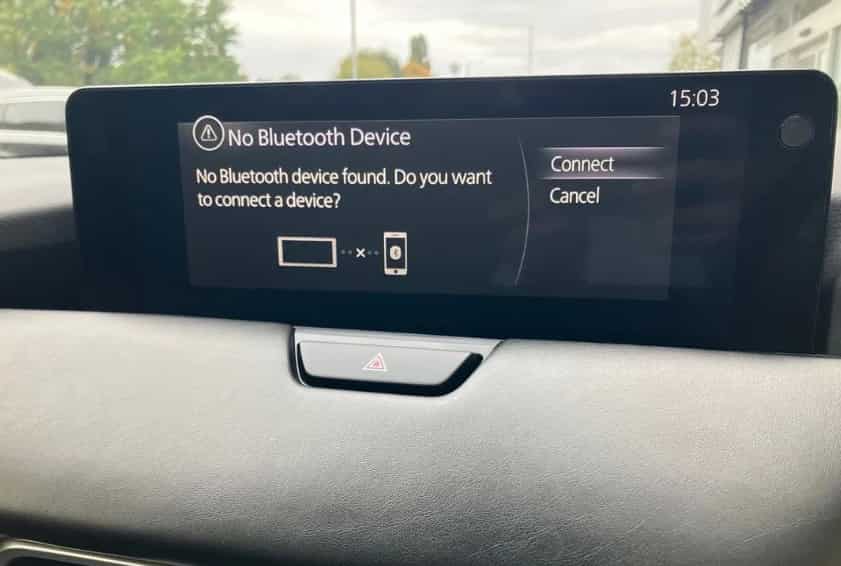
Why Is My Mazda Bluetooth Not Working?
When your Mazda Bluetooth stops working, the problem usually comes from a connection issue between your vehicle and your smartphone. Mazda Connect relies on Bluetooth communication to exchange data between the infotainment system and your device. A small setting mistake or software conflict can interrupt this connection.
One common cause involves an incorrect Bluetooth pairing process. Your phone and Mazda Connect may remember old connection data that creates conflicts. This situation often happens when you switch phones, update your device, or connect multiple smartphones to the same Mazda vehicle.
Another possible reason involves outdated software. Both smartphones and Mazda infotainment systems receive regular updates. Sometimes, a new phone update changes Bluetooth settings and creates compatibility problems with older Mazda software versions.
Your Mazda Bluetooth may also connect successfully but fail to play audio. This issue usually happens because of incorrect audio settings, low media volume, or a conflict between Bluetooth and other connection features such as Apple CarPlay or Android Auto.
Bluetooth permissions can create another problem. Modern smartphones require users to allow specific access for contacts, calls, and media sharing. If these permissions remain disabled, Mazda Bluetooth may not work as expected.
Signal interference can also affect connection stability. Other nearby Bluetooth devices, saved connections, or wireless accessories may compete with your phone connection.
Before trying advanced solutions, identify the symptoms first. Knowing whether your Mazda Bluetooth fails during pairing, disconnects randomly, or connects without sound will help you choose the right fix and save time during troubleshooting.
Check the Basics Before Fixing Mazda Bluetooth Problems
Before you try advanced solutions, check the basic settings on your Mazda and smartphone. Many Mazda Bluetooth problems come from simple connection errors that you can fix within a few minutes.
Start by checking Bluetooth on your phone. Make sure the feature is active and your device can connect with other Bluetooth accessories. If your phone cannot connect to any device, the issue may come from your smartphone settings instead of your Mazda system.
Next, check your Mazda Connect screen and confirm that your phone appears in the paired device list. If you cannot find your device, Mazda may not have saved the previous connection correctly. Remove old devices that you no longer use because too many saved connections can create conflicts.
You should also check your phone permissions. Open your Bluetooth settings and select your Mazda connection. Make sure your phone allows access to calls, contacts, and media audio. Without these permissions, your Mazda may connect but fail to provide full functionality.
Another simple step involves checking audio settings. Increase your phone media volume and your Mazda audio volume. Many users think their Mazda Bluetooth has failed when the system actually receives audio with the volume turned down.
Restarting both devices can also solve temporary connection problems. Turn off your Mazda completely, restart your smartphone, and try connecting again. This process clears minor software errors and creates a fresh Bluetooth connection.
These basic checks can solve many Mazda Bluetooth issues without requiring a reset or professional service. Always begin with simple solutions before moving to more complex troubleshooting steps.
How to Fix Mazda Bluetooth Not Working Issues
When basic checks do not solve the problem, you need to try deeper troubleshooting steps. Most Mazda Bluetooth issues come from outdated pairing information, software conflicts, or incorrect system settings. The following solutions can help restore a stable connection.
The first solution involves deleting and reconnecting your phone. Open the Bluetooth settings on your Mazda Connect system and remove your smartphone from the paired device list. Then, remove Mazda from your phone’s Bluetooth memory. After you delete both connections, pair your devices again from the beginning.
Restarting the Mazda Connect system can also fix temporary problems. Turn off your vehicle, wait for a few minutes, and restart the infotainment system. This action helps clear minor software glitches that may affect Bluetooth performance.
You should also check for software updates. Mazda regularly improves its infotainment systems to increase stability and compatibility. An outdated Mazda Connect version may struggle with newer smartphones and operating system updates.
If your Mazda Bluetooth still does not work, try resetting the Bluetooth settings. A reset removes old connection data and allows your vehicle to create a fresh connection with your phone. However, you may need to pair your devices again after completing this step.
Check your smartphone compatibility as well. Some older Mazda models may have limited support for newer phone features. Your phone may connect for calls but experience problems with music streaming or advanced functions.
Finally, test your Bluetooth connection with another smartphone. This step helps you identify whether the problem comes from your Mazda system or your original device. If another phone works correctly, your smartphone settings may need further adjustment.
Following these steps can resolve most Mazda Bluetooth connection problems without professional assistance.
Mazda Bluetooth Not Working With iPhone or Android
Many Mazda owners experience Bluetooth problems after connecting a new iPhone or Android device. Although Mazda Connect supports most modern smartphones, different operating systems can create different connection issues.
iPhone users often experience Bluetooth problems after installing a new iOS update. A software update can change Bluetooth settings, permissions, or device compatibility. If your Mazda Bluetooth stops working after an iPhone update, check your Bluetooth permissions and remove the old Mazda connection before pairing again.
Open your iPhone settings, select Bluetooth, and forget your Mazda device. Then restart your phone and reconnect it with Mazda Connect. This simple process can remove outdated connection information and create a cleaner connection.
Android users may face similar problems, especially when manufacturers apply custom software settings. Some Android devices limit background connections or restrict Bluetooth permissions to save battery. These restrictions can affect calls, music streaming, and automatic reconnection.
Check your Android Bluetooth settings and allow your Mazda system to access calls and media audio. You should also disable battery restrictions for Bluetooth-related services if your phone frequently disconnects.
Some drivers confuse Bluetooth problems with Apple CarPlay or Android Auto issues. These systems use different connection methods and settings. A phone may work correctly with Bluetooth calls but experience problems with wireless smartphone integration.
To improve compatibility, keep both your smartphone and Mazda Connect system updated. Avoid storing too many old devices in your Mazda Bluetooth memory because unused connections can create conflicts.
Whether you use an iPhone or Android phone, the troubleshooting process remains similar. Remove old connections, check permissions, restart your devices, and create a fresh pairing process. These steps solve many smartphone-related Mazda Bluetooth problems.
Advanced Solutions for Persistent Mazda Bluetooth Problems
Sometimes, basic troubleshooting steps cannot solve Mazda Bluetooth problems. If your connection keeps failing, disconnecting, or losing audio, you may need to try advanced solutions.
One effective method involves performing a Mazda Connect system reset. A reset removes stored connection data and restores the infotainment system to a cleaner state. Before resetting, save any important settings because the process may remove paired devices and personal preferences.
To reset Mazda Bluetooth settings, access the communication or Bluetooth menu on your Mazda Connect screen. Remove all saved devices and restart the system. Then, pair your smartphone again and test the connection.
Software updates can also improve Bluetooth performance. Mazda releases updates that fix compatibility problems, improve system stability, and support newer smartphone models. Check your Mazda software version and install available updates when needed.
If your Mazda Bluetooth continues to fail after a reset and update, test another smartphone. This step helps separate vehicle problems from phone-related issues. If multiple phones experience the same problem, your Mazda system may require further inspection.
Hardware problems can also affect Bluetooth performance, although they happen less often. Issues with the infotainment unit, internal connections, or system components may prevent Bluetooth from working correctly.
You should contact a Mazda service center when the system shows repeated failures, freezes frequently, or cannot detect any Bluetooth devices. A technician can check the infotainment system and identify problems that basic troubleshooting cannot fix.
Most Mazda Bluetooth issues come from software or connection errors rather than hardware failures. By following a structured troubleshooting process, you can often restore Bluetooth functionality without expensive repairs.
How to Prevent Future Mazda Bluetooth Connection Problems
After fixing Mazda Bluetooth issues, you should take simple steps to prevent the same problems from happening again. A stable Bluetooth connection depends on regular maintenance, proper settings, and good device management.
Keep your smartphone software updated because new updates often improve Bluetooth performance and security. However, check your Mazda compatibility after major phone updates. Some updates can change connection settings and affect how your phone communicates with Mazda Connect.
You should also update your Mazda infotainment software when new versions become available. Software updates help improve system performance and reduce compatibility problems with newer smartphones.
Managing your paired devices can also prevent connection errors. Remove old phones that you no longer use from your Mazda Bluetooth memory. Too many saved devices can create confusion and make automatic connections less reliable.
Avoid connecting your phone to multiple Bluetooth devices while driving. Other wireless accessories can compete for connection priority and cause unexpected disconnections. Keep your phone close to the vehicle when you need a stable connection.
Restart your smartphone occasionally to clear temporary software issues. A simple restart can refresh Bluetooth services and improve connection reliability.
You should also check your Bluetooth permissions after installing major software updates. Make sure Mazda Connect can access calls, contacts, and media features. Incorrect permissions can create problems even when your phone appears connected.
Following these habits can help your Mazda Bluetooth work more consistently. Regular updates, clean device management, and proper settings reduce connection failures and improve your overall driving experience.
Conclusion
When your Mazda Bluetooth is not working, the problem can come from several sources. Connection errors, outdated software, incorrect settings, and smartphone compatibility issues are some of the most common causes.
In many cases, you can fix Mazda Bluetooth problems by starting with simple solutions. Check your Bluetooth settings, remove old paired devices, restart your Mazda Connect system, and reconnect your smartphone. These steps solve many connection problems without requiring professional support.
For more persistent issues, advanced solutions such as resetting Bluetooth settings, updating Mazda software, or checking hardware components can help identify the root cause. Understanding the difference between phone-related problems and vehicle system problems can save time and avoid unnecessary repairs.
A reliable Bluetooth connection improves your driving experience by making calls, music, and smartphone features easier to use. Regular updates and proper device management can help prevent future connection failures.
If you follow this complete troubleshooting guide, you can handle most Mazda Bluetooth not working issues with confidence. Have you experienced Bluetooth problems with your Mazda? Share your situation and the solution that worked for you.