A Land Rover remote key makes everyday driving more convenient by allowing you to lock, unlock, and start your vehicle without inserting a traditional key. However, like every battery powered device, the key fob eventually runs out of power. When that happens, you may notice slower button responses, reduced operating range, or warning messages such as Key Battery Low on your dashboard. These signs often appear before the battery completely fails, giving you enough time to replace it.
Fortunately, a Land Rover remote key battery replacement is one of the easiest maintenance tasks you can perform at home. The process only takes a few minutes, requires minimal tools, and costs significantly less than visiting a dealership. More importantly, replacing the battery before it dies completely helps prevent unexpected inconvenience when you need to access or start your vehicle.
Different Land Rover models use slightly different key fob designs, which means the replacement procedure and battery type may vary. Whether you own a Range Rover, Defender, Discovery, Discovery Sport, Evoque, Velar, or another Land Rover model, understanding your specific remote key is essential for a safe and successful battery replacement. Using the correct battery and installing it properly also helps protect the electronic components inside the smart key.
This comprehensive guide explains everything you need to know about Land Rover remote key battery replacement. You will learn how to identify the correct battery, recognize the warning signs of a weak battery, replace it step by step, avoid common mistakes, and troubleshoot problems if the remote key does not work after installation. By the end of this guide, you will have the confidence to complete the replacement correctly while extending the lifespan of your Land Rover smart key.
What Is a Land Rover Remote Key Battery Replacement?
A Land Rover remote key battery replacement is the process of removing the old battery from your smart key and installing a new one. This simple maintenance task restores the remote’s normal performance. It also ensures reliable communication between the key fob and your vehicle.
Modern Land Rover vehicles use smart keys instead of traditional mechanical keys. These smart keys contain a small lithium coin battery that powers the electronic functions. The battery allows the remote to lock and unlock the doors, activate the panic alarm, open the tailgate on supported models, and support keyless entry.
As the battery loses power, the remote signal becomes weaker. You may notice a shorter operating range or slower button response. In some cases, the remote only works when you stand close to the vehicle. Many drivers also see a Key Battery Low warning on the instrument display before the battery fails completely.
Fortunately, replacing the battery does not erase the key’s programming. The security chip stores the vehicle information separately from the battery. Installing the correct replacement battery allows the smart key to continue working without additional programming in most situations.
Most Land Rover key fobs use a CR2032 or CR2025 lithium coin battery. However, the correct battery depends on the model and key design. Always verify the battery specification before opening the key fob. Using the recommended battery helps maintain stable performance and protects the internal electronics.
Understanding how the remote key works can save both time and money. Many owners believe the entire key fob is defective when the battery is simply depleted. A quick Land Rover remote key battery replacement often restores full functionality in just a few minutes.
Signs Your Land Rover Key Fob Battery Needs Replacing
A weak battery rarely stops working without warning. Instead, your Land Rover key fob usually shows several signs before it reaches the end of its service life. Recognizing these early symptoms allows you to replace the battery before it fails completely. This simple step helps you avoid unexpected problems when locking, unlocking, or starting your vehicle.
One of the most common symptoms is a shorter operating range. You may notice that the remote only works when you stand much closer to your Land Rover than before. At the same time, the buttons may respond more slowly or require multiple presses before the vehicle reacts. These changes occur because the battery can no longer provide enough power to transmit a strong and stable signal.
Many modern Land Rover models also display a Key Battery Low warning on the instrument cluster. This message should not be ignored because it indicates that the battery is approaching the end of its lifespan. If the battery continues to lose power, the passive entry system may become unreliable. The vehicle may take longer to recognize the smart key, or it may not unlock the doors immediately when you touch the handle.
As the battery becomes weaker, additional problems may appear. The tailgate release, panic alarm, or remote locking functions can become inconsistent. In some cases, the vehicle may even struggle to detect the smart key when you attempt to start the engine. Although the emergency key blade still allows manual access, replacing the battery before complete failure is the safest solution. A timely Land Rover remote key battery replacement restores reliable performance, protects the convenience features of your smart key, and helps prevent unnecessary frustration during everyday driving.
What Battery Does a Land Rover Remote Key Use?
Choosing the correct battery is one of the most important steps in a Land Rover remote key battery replacement. Although most Land Rover smart keys use lithium coin cell batteries, the exact battery type depends on the model, production year, and key fob design. Installing the wrong battery can reduce remote performance or prevent the key from working properly. For this reason, it is always recommended to check the existing battery or consult your owner’s manual before purchasing a replacement.
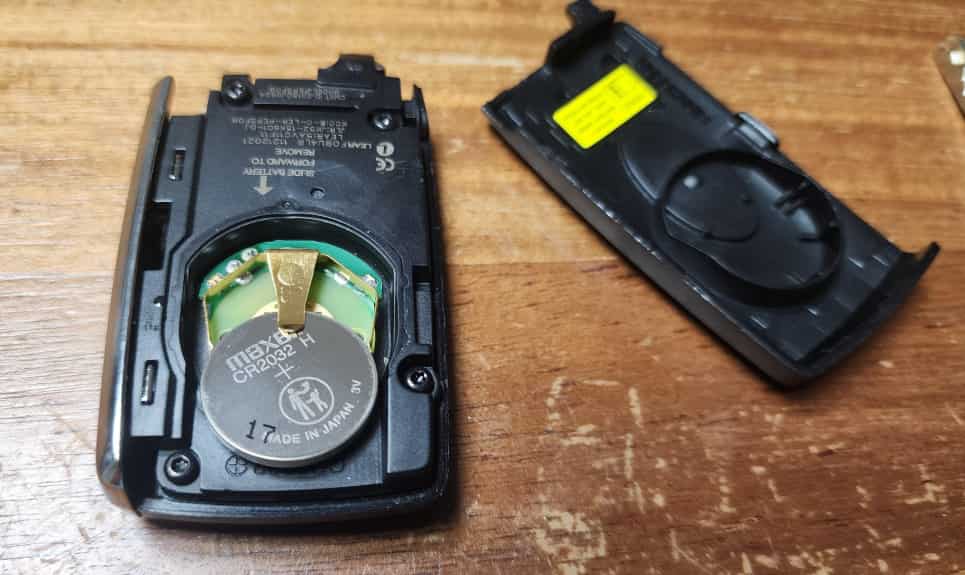
The two most common batteries found in Land Rover key fobs are the CR2032 and CR2025. Both are high quality 3 volt lithium batteries, but they differ in thickness. A CR2032 measures 3.2 millimeters thick, while a CR2025 measures 2.5 millimeters. Even though they share the same diameter and voltage, they should not be used interchangeably unless the key fob is specifically designed to support both sizes. Using the correct battery ensures a secure fit, stable electrical contact, and consistent remote performance.
Many newer Range Rover, Defender, Discovery, Evoque, and Velar models commonly use a CR2032 battery. However, some older Land Rover vehicles or different key fob versions may require a CR2025 instead. Because Land Rover has introduced several smart key designs over the years, battery compatibility can vary even within the same model lineup. Verifying the battery specification before opening the key fob helps prevent unnecessary damage and saves time during the replacement process.
When purchasing a replacement battery, choose a trusted brand such as Panasonic, Energizer, Duracell, or Maxell. High quality batteries provide longer service life, stable voltage output, and better resistance to temperature changes. Investing in a reliable battery helps your smart key maintain consistent performance while reducing the likelihood of early battery failure.
How to Replace a Land Rover Remote Key Battery Step by Step
Completing a Land Rover remote key battery replacement is a straightforward task that most owners can finish in just a few minutes. You do not need advanced tools or technical experience. The most important step is handling the key fob carefully to avoid damaging the internal components. Before you begin, prepare a new battery that matches your key fob specification and work on a clean, flat surface with good lighting.
Start by removing the emergency key blade from the remote. Most Land Rover smart keys have a small release button on the side or back of the key fob. Press the button while gently pulling the emergency key outward until it slides free. Once the key blade is removed, locate the opening point on the key housing. Carefully insert a plastic pry tool or a small flat tool into the gap and twist gently to separate the two halves of the casing. Avoid using excessive force because it can scratch the housing or damage the internal clips.
After opening the key fob, remove the old battery with care. Take a moment to note the battery orientation before lifting it out. The positive side should be installed in the same position as the original battery. Insert the new battery without touching both terminals more than necessary, then make sure it sits securely inside the battery compartment. A loose battery may interrupt the electrical connection and cause the remote to function inconsistently.
Once the new battery is installed, align both halves of the key fob and press them together until each retaining clip clicks into place. Reinsert the emergency key blade and check that it locks securely. Finally, test every remote function, including locking, unlocking, tailgate release, and keyless entry if your vehicle supports these features. In most cases, the smart key works immediately after the battery is replaced. If the remote does not respond, reopen the key fob and confirm that the battery type, polarity, and installation are correct before investigating other possible causes.
Land Rover Remote Key Battery Replacement by Model
Although the replacement process is similar across the Land Rover lineup, the smart key design can vary by model and production year. Some key fobs open with a simple release mechanism. Others require extra care to protect the internal clips. Understanding these differences makes a Land Rover remote key battery replacement safer and easier.
Most modern Range Rover and Range Rover Sport models use a premium smart key with a compact design. These models usually require a CR2032 lithium battery. Begin by removing the emergency key blade. Then separate the key housing with a plastic pry tool. Avoid using metal tools because they can scratch the housing or damage the retaining clips.
The Land Rover Defender and Discovery models also use durable smart keys. The replacement procedure is almost the same. However, the battery compartment may look different on older model years. Before removing the battery, take a quick photo of its position. This simple step makes reassembly much easier.
Owners of the Discovery Sport, Range Rover Evoque, and Range Rover Velar will notice a very similar key design. These vehicles commonly use the same battery type. Even so, Land Rover has updated several key fob versions over the years. Compare the new battery with the original one before installation. This quick check helps prevent compatibility problems.
Some older Land Rover vehicles, including early Freelander models, use a different remote key design. They may also require a different battery specification. Always inspect the existing battery before buying a replacement. Using the correct battery protects the internal electronics and restores reliable remote performance. Careful handling also extends the service life of your smart key.
What to Do If the Land Rover Key Fob Does Not Work After Battery Replacement
A successful Land Rover remote key battery replacement should restore normal operation immediately. If the key fob still does not work, there is usually a simple explanation. Before assuming the remote is defective, inspect the battery installation and check for common issues. Most problems can be resolved without replacing the entire key fob.
The first step is to confirm that the new battery is installed correctly. Check the battery polarity and make sure the positive side matches the original position. A battery installed upside down prevents the remote from receiving power. You should also verify that the battery is the correct type. Although CR2032 and CR2025 batteries look similar, they are not always interchangeable.
Next, inspect the battery contacts inside the key fob. Dust, moisture, or corrosion can interrupt the electrical connection. Clean the contacts gently with a soft, dry cloth if necessary. While the key fob is open, check that the battery sits firmly in the holder. A loose battery may cause the remote to work only occasionally.
If the battery and contacts are in good condition, examine the key housing for damage. Broken retaining clips or a poorly closed casing can prevent the battery from maintaining proper contact. Press the two halves of the key fob together until every clip locks securely. Then test each function, including locking, unlocking, and keyless entry.
If the remote still does not respond, the problem may not be related to the battery. Physical damage, water exposure, or an internal electronic fault can prevent the smart key from working correctly. In rare cases, the vehicle may also have a receiver issue. If none of the basic checks solve the problem, professional diagnosis is the safest option. Identifying the real cause early can save time, reduce repair costs, and restore the full functionality of your Land Rover smart key.
Common Mistakes to Avoid During a Land Rover Remote Key Battery Replacement
Replacing the battery in a Land Rover smart key is a simple task, but small mistakes can lead to unnecessary problems. Taking a few extra minutes to work carefully helps protect the key fob and ensures the new battery performs as expected. Most issues reported after a Land Rover remote key battery replacement are caused by incorrect handling rather than a defective battery.
One common mistake is using the wrong battery type. Many owners assume that all coin cell batteries are the same because they have a similar appearance. In reality, using the wrong size can create poor electrical contact and reduce the reliability of the remote. Always compare the replacement battery with the original one before installation.
Another mistake is forcing the key housing open with a metal screwdriver. Excessive force can crack the plastic shell or break the retaining clips. A plastic pry tool is a much safer option because it reduces the risk of cosmetic or structural damage. Opening the key fob slowly also helps protect the electronic components inside.
Some owners install the new battery without checking its orientation. Reversing the polarity prevents the remote from receiving power. It is also important to avoid touching the battery terminals more than necessary. Clean hands help reduce the transfer of dirt, oil, and moisture that may affect electrical contact over time.
After installing the battery, make sure the two halves of the key fob are fully aligned before pressing them together. Every retaining clip should lock into place without excessive pressure. Finally, test all remote functions before putting the key back into daily use. A careful inspection at the end of the process confirms that the Land Rover remote key battery replacement was completed successfully and helps prevent future problems.
How Long Does a Land Rover Key Fob Battery Last?
The battery inside a Land Rover smart key typically lasts between two and four years under normal driving conditions. However, the actual lifespan depends on several factors. Daily usage, driving habits, environmental conditions, and battery quality all affect how long the battery can provide reliable performance. Replacing the battery before it fails completely helps prevent unexpected access or starting issues.
Frequent use is one of the biggest factors that influences battery life. Drivers who lock and unlock their vehicles many times each day place a greater demand on the remote key. Smart keys with passive entry and push button start systems also consume more power because they communicate with the vehicle more often. As a result, these batteries may need replacement sooner than those in vehicles with less frequent use.
Temperature also plays an important role. Extremely hot or cold weather can reduce battery efficiency over time. Storing the key in direct sunlight or leaving it inside a hot vehicle for long periods may shorten its service life. Moisture and humidity can also affect the electronic components inside the key fob if the casing is damaged or not fully sealed.
Choosing a high quality replacement battery helps maximize performance and reliability. Trusted brands often deliver more stable voltage and a longer operating life than low cost alternatives. It is also a good idea to keep a spare battery at home, especially before long trips. This simple precaution can save time if the battery begins to fail unexpectedly.
The best approach is to replace the battery as soon as you notice slower button response, reduced operating range, or a Key Battery Low warning. Waiting until the battery is completely depleted increases the chance of inconvenience. A timely Land Rover remote key battery replacement keeps your smart key working reliably and helps maintain the convenience features you use every day.
Frequently Asked Questions About Land Rover Remote Key Battery Replacement
Do I need to reprogram my Land Rover key after replacing the battery?
In most cases, no. A Land Rover remote key battery replacement does not erase the programming stored inside the smart key. Once the new battery is installed correctly, the remote should work normally without additional setup.
What battery does a Land Rover key fob use?
Most Land Rover key fobs use either a CR2032 or CR2025 lithium coin battery. The correct battery depends on the vehicle model, production year, and key fob design. Always check the original battery or your owner’s manual before purchasing a replacement.
How can I tell if my Land Rover key battery is low?
Common signs include reduced operating range, slower button response, inconsistent keyless entry, and a Key Battery Low warning on the instrument cluster. Replacing the battery early helps prevent unexpected problems.
Can I replace the Land Rover key battery myself?
Yes. Most owners can complete the replacement at home with a new battery and a simple plastic pry tool. The process usually takes only a few minutes and does not require professional equipment.
Why does my key fob still not work after replacing the battery?
Start by checking that the battery is installed with the correct polarity and that the battery type matches the original specification. If the problem continues, inspect the battery contacts and key housing for damage. A faulty key fob or a vehicle receiver issue may also prevent normal operation.
How often should I replace my Land Rover key battery?
Most key fob batteries last between two and four years. However, heavy daily use, extreme temperatures, and lower quality batteries can shorten their lifespan. Replacing the battery when the first warning signs appear is the best way to maintain reliable performance.
Can a dead key fob battery stop my Land Rover from starting?
A completely depleted battery may prevent the vehicle from detecting the smart key. However, many Land Rover models include a backup starting procedure. Refer to your owner’s manual for the correct method if the key battery fails unexpectedly.
Conclusion
A Land Rover remote key battery replacement is a simple maintenance task that every owner can complete with the right battery and a few basic tools. The entire process takes only a few minutes, yet it helps restore reliable remote performance and prevents unexpected problems when accessing or starting your vehicle. Learning how your smart key works also makes it easier to recognize early warning signs before the battery fails completely.
Choosing the correct battery is just as important as following the proper replacement procedure. A high quality CR2032 or CR2025 battery, combined with careful installation, helps protect the electronic components inside the key fob and ensures stable communication with your Land Rover. Taking a few moments to verify the battery type and polarity can prevent many of the issues that owners experience after replacing the battery.
Routine maintenance is the best way to keep your smart key operating reliably throughout its service life. If you notice a shorter operating range, slower button response, or a Key Battery Low warning, replace the battery as soon as possible. Acting early reduces the risk of unexpected inconvenience and helps preserve the convenience features you use every day.
By following the guidance in this article, you can complete a Land Rover remote key battery replacement safely and confidently. Whether you drive a Range Rover, Defender, Discovery, Discovery Sport, Evoque, Velar, or another Land Rover model, proper battery maintenance will help keep your remote key dependable for years to come.