The Kia Service Required Message appears on many Kia vehicles as part of the built in maintenance reminder system. This alert reminds drivers when their vehicle needs scheduled service. It usually relates to routine maintenance such as oil changes, filter replacements, or general inspections.
Most drivers feel confused when this message first appears. Many think it signals a serious engine problem. In most cases, this assumption is incorrect. The message mainly supports regular maintenance and helps keep the vehicle in good condition.
Kia designs this system to improve vehicle performance and reliability. Kia Motors, a global automotive manufacturer, uses this reminder to ensure drivers follow proper service intervals. When drivers ignore the alert for a long time, the vehicle may suffer from reduced performance and higher fuel consumption.
Understanding this message helps drivers avoid unnecessary worry. It also helps them take the right action at the right time. In most cases, drivers only need to complete the required maintenance and reset the system afterward.
In this guide, you will learn what the Kia Service Required Message means, why it appears, and how to reset it correctly. The explanation will help you handle the alert with confidence and avoid common mistakes.
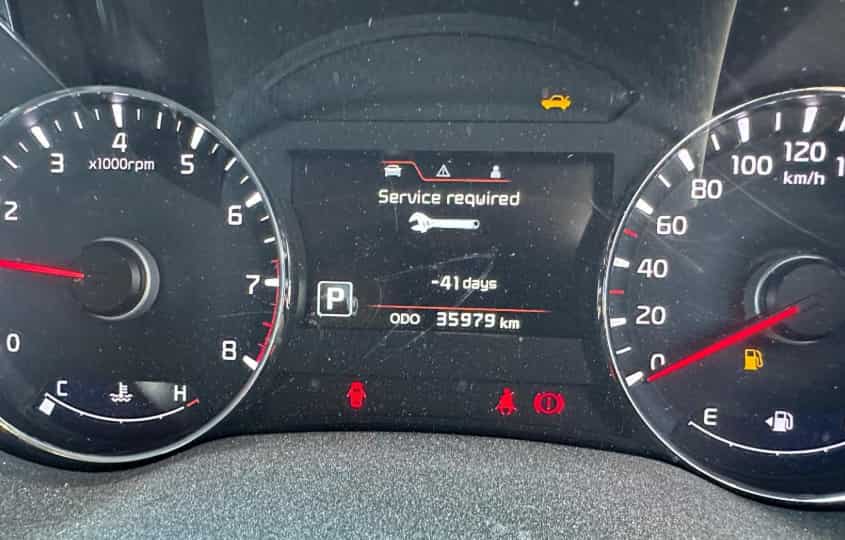
Kia Service Required Message Meaning
The Kia Service Required Message is a maintenance reminder that appears on the dashboard when your vehicle reaches a scheduled service interval. It does not indicate a critical engine failure in most situations. Instead, it signals that the car needs routine maintenance to stay in proper working condition.
This message is part of the vehicle information system built into many models from Kia Motors, a global automotive manufacturer. The system tracks mileage and time since the last service. When the preset threshold is reached, the alert activates automatically.
In most cases, the message is linked to basic maintenance tasks. These tasks include engine oil changes, oil filter replacements, air filter checks, and general vehicle inspections. The system uses these intervals to help maintain engine efficiency and reduce long term wear.
Many drivers confuse this message with a serious warning light such as the check engine light. However, the meaning is different. The Kia Service Required Message focuses on scheduled maintenance, while the check engine light usually signals a mechanical or electronic fault that needs diagnosis.
The timing of this message depends on driving habits and mileage. Drivers who travel long distances or drive in harsh conditions may see the message more frequently. This behavior is normal because the system adjusts based on expected service cycles.
Understanding this message helps drivers respond correctly. Instead of worrying about damage, drivers should view it as a reminder to complete maintenance and keep the vehicle in optimal condition.
Common Causes of Kia Service Required Message
The Kia Service Required Message appears for several predictable reasons related to maintenance tracking. In most cases, the system does not detect a fault. It simply reaches a preset service interval and triggers a reminder.
One of the most common causes is that the vehicle has reached the recommended mileage for an oil change. The system calculates distance traveled and activates the message when it reaches the scheduled limit. This helps protect the engine from running with old or degraded oil.
Another frequent cause is overdue scheduled maintenance. If the driver does not service the vehicle on time, the system continues to display the reminder until the maintenance is completed and the counter is reset.
The message can also appear when the system was not reset after the last service. In this case, the vehicle still tracks the previous maintenance cycle. This leads to an incorrect reminder even if the car has already been serviced.
Driving conditions also influence the appearance of this alert. Frequent short trips, heavy traffic, and harsh environments can shorten service intervals. The system responds to these conditions by triggering the message earlier than expected.
In some cases, simple system glitches or incorrect service data input can also activate the message. However, this situation is less common compared to normal maintenance triggers.
Understanding these causes helps drivers identify why the message appears and take the correct action. In most situations, completing the required maintenance and resetting the system will resolve the alert.
Is Kia Service Required Message Serious?
The Kia Service Required Message is not usually a serious warning. It does not indicate an immediate engine failure or a dangerous mechanical issue in most cases. Instead, it works as a scheduled maintenance reminder that helps the driver keep the vehicle in good condition.
In normal situations, the car can still be driven safely after the message appears. The system simply informs the driver that the vehicle has reached a service interval. This interval is based on mileage or time, depending on how the system is configured.
However, ignoring the message for a long period is not recommended. When maintenance is delayed too long, engine oil may degrade and lose its protective ability. This can lead to reduced engine performance, higher fuel consumption, and increased wear on internal components.
The seriousness of the message depends on how long it has been active. If the alert appears shortly before a scheduled service, it is not urgent. If the message remains for an extended period without maintenance, the risk of mechanical issues gradually increases.
It is also important to distinguish this message from other dashboard warnings. Unlike the check engine light, the Kia Service Required Message does not usually signal a fault in sensors or engine systems. It focuses only on maintenance timing.
Drivers should treat this message as a proactive maintenance signal rather than an emergency warning. Completing the service on time and resetting the system will ensure the vehicle continues to operate efficiently and safely.
How to Reset Kia Service Required Message Correctly
Resetting the Kia Service Required Message is an important step after completing scheduled maintenance. The reset process ensures that the system starts a new service interval and does not display outdated reminders.
Before resetting the message, the driver should make sure that all required maintenance tasks have been completed. These usually include engine oil change, oil filter replacement, and basic vehicle inspection. Resetting without completing maintenance can lead to incorrect service tracking.
In many Kia models, the reset process can be done directly from the dashboard. First, turn the ignition to the ON position without starting the engine. Next, use the steering wheel controls or instrument cluster buttons to access the settings menu. Look for the service interval or maintenance option.
Once inside the menu, select the service reset option. Confirm the reset when prompted. After confirmation, the system will clear the existing reminder and restart the service countdown based on mileage or time.
In some newer models, the reset can also be done through the infotainment system. The driver needs to navigate to vehicle settings, then maintenance settings, and finally select reset service interval.
If the message does not disappear after resetting, the system may require a second attempt or a brief restart of the vehicle. In rare cases, a diagnostic tool at a service center may be needed.
Proper reset ensures that the maintenance tracking system works accurately. It helps drivers avoid confusion and keeps the service schedule aligned with the actual condition of the vehicle.
Kia Service Required Message on Different Models
The Kia Service Required Message appears across many Kia models, but the reset process and menu navigation can vary slightly depending on the vehicle system. Although the core function remains the same, each model may use a different dashboard layout or infotainment interface.
In the Kia Sportage, the message is usually managed through the instrument cluster display. Drivers can access the settings using steering wheel controls and navigate to the service interval menu. The reset process is straightforward and follows a step by step confirmation.
In the Kia Seltos, the system is often integrated into a more modern digital display. Drivers may find the maintenance settings inside the vehicle settings menu on the infotainment screen. The interface is more visual, which makes it easier to locate the reset option.
In the Kia Sorento, the process is similar but may include additional sub menus depending on the model year. Some versions allow reset through the cluster display, while newer versions support infotainment based controls.
Although the interface differs, the logic behind the system is the same in all models. The Kia Service Required Message is always tied to maintenance intervals, not engine faults. This consistency helps drivers understand that the alert is part of a standard maintenance tracking system.
Understanding model differences helps avoid confusion when trying to reset the message. It also ensures that drivers use the correct menu path for their specific vehicle without unnecessary errors or failed resets.
How to Prevent Kia Service Required Message in the Future
The Kia Service Required Message will continue to appear as long as the vehicle follows a scheduled maintenance system. However, drivers can reduce confusion and avoid unexpected alerts by managing maintenance properly and consistently.
The most effective way to prevent repeated or unexpected messages is to follow the recommended service schedule provided by Kia Motors. Each vehicle has a specific maintenance interval based on mileage or time. Sticking to this schedule ensures the system remains accurate and predictable.
Regular oil changes also play an important role. Engine oil degrades over time, especially in vehicles that are driven in heavy traffic or harsh conditions. Keeping the oil fresh helps maintain engine performance and prevents early activation of service reminders.
Resetting the system correctly after every service is equally important. If the reset step is skipped or done incorrectly, the system may continue tracking an old service cycle. This often leads to unnecessary warning messages even after maintenance has been completed.
Drivers should also monitor driving conditions. Frequent short trips, stop and go traffic, and extreme temperatures can accelerate wear and shorten service intervals. Understanding these factors helps drivers anticipate when the message may appear.
By maintaining a consistent service routine and resetting the system properly, drivers can ensure that the Kia Service Required Message only appears when it is truly needed. This creates a smoother ownership experience and helps keep the vehicle in optimal condition over time.
Conclusion
The Kia Service Required Message is a standard maintenance reminder designed to help drivers keep their vehicle in good condition. It does not usually indicate a serious mechanical problem. Instead, it signals that the vehicle has reached a scheduled service interval based on mileage or time.
Understanding this message helps drivers avoid unnecessary concern. In most cases, the issue is solved by completing routine maintenance such as oil changes, filter replacements, and general inspections. After servicing the vehicle, resetting the system ensures that the reminder cycle restarts correctly.
Across different Kia models, the message functions in a similar way even though the interface may vary. Whether on a Kia Sportage, Seltos, or Sorento, the purpose remains the same. It supports preventive maintenance and helps extend engine life.
Drivers who follow the recommended service schedule and reset the system properly will experience fewer unexpected alerts. This also helps maintain fuel efficiency, performance, and long term reliability of the vehicle.
If you have ever seen the Kia Service Required Message on your dashboard, it is usually a sign that your car is simply asking for routine care. Have you experienced this message before, and how did you handle it?