Kia Display Screen Not Working is a common problem in modern vehicles. Drivers often face this issue when the infotainment system suddenly stops responding in Kia cars. The screen may go black, freeze, or fail to turn on after ignition. This issue affects navigation, media control, and reverse camera functions.
Many drivers feel confused when this problem appears. The display may work one moment and fail the next. Some systems freeze on the logo screen. Others show no power at all. In some cases, the touch function stops working even though the screen is still on.
This issue usually comes from three main sources. Electrical problems can interrupt power supply. Software errors can cause system crashes. Hardware failure can damage the display or head unit.
Most cases of Kia Display Screen Not Working do not require full replacement. Some problems come from temporary glitches. A simple reset can restore the system. Other cases need deeper inspection of the electrical system or software.
This guide helps you understand the real causes behind the issue. It also shows how technicians diagnose the problem step by step. You will learn how to separate minor glitches from serious failures. You will also learn when you can fix the issue yourself and when you should visit a service center.
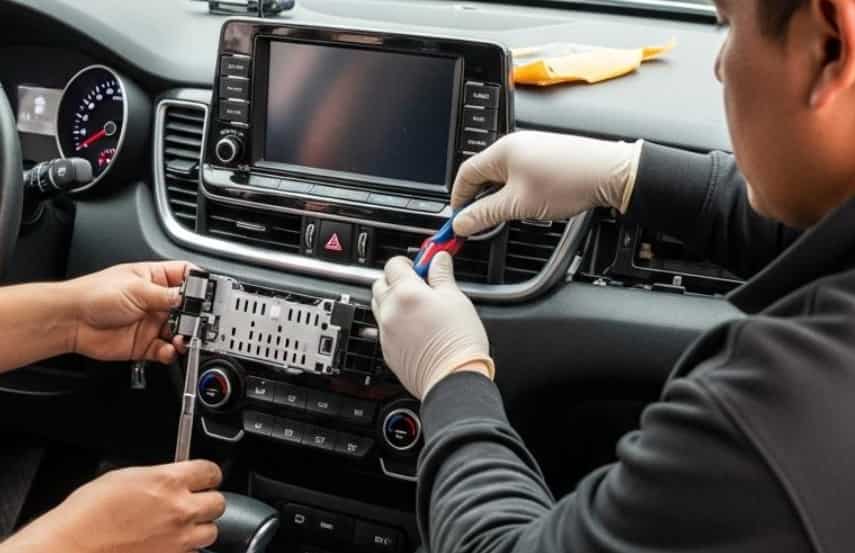
Symptoms of Kia Display Screen Not Working
Kia Display Screen Not Working often shows clear warning signs before it completely fails. Drivers can notice these symptoms early if they pay attention to how the system behaves in Kia vehicles.
The most common symptom is a black screen. The display does not turn on after starting the engine. In some cases, the screen powers on but stays blank. This usually indicates a failure in power delivery or system boot.
Another frequent issue is a frozen screen. The display may show the Kia logo and stop there. The system does not load the main interface. Drivers cannot access navigation or media functions during this state.
Touchscreen unresponsiveness is also common. The display remains visible, but it does not react to touch input. This often signals software lag or calibration issues inside the infotainment system.
Some drivers report random system restarts. The screen turns off and on without warning. This behavior usually points to unstable electrical supply or internal system errors.
Audio working without display is another sign. The sound system continues to function, but the screen stays black. This often indicates a display panel or head unit issue rather than a full system failure.
In some cases, the backup camera does not appear when reversing. This symptom shows that the infotainment system cannot properly switch display modes. It often connects to deeper software or hardware faults.
These symptoms help narrow down the cause of Kia Display Screen Not Working. Identifying the exact behavior of the system makes diagnosis faster and more accurate.
Main Causes of Kia Display Screen Not Working
Kia Display Screen Not Working usually comes from a combination of electrical, software, or hardware issues in Kia vehicles. Each cause affects the system in a different way, so proper identification is important before applying any fix.
Electrical problems are one of the most common causes. A weak car battery can reduce power supply to the infotainment system. A blown fuse can also stop the display from turning on. Loose wiring or poor grounding may interrupt signal flow and cause the screen to fail randomly.
Software issues also play a major role. The infotainment system may crash due to corrupted firmware. A failed software update can stop the system from booting correctly. Temporary system glitches may freeze the screen or make it unresponsive. These issues often appear suddenly after updates or system resets.
Hardware failure is another possible cause. The display panel itself can stop working due to internal damage. The head unit may fail and prevent the system from loading. In some cases, internal components overheat or degrade over time, which leads to permanent screen failure.
External factors can also contribute to the problem. Extreme temperature changes may affect electronic stability. Aftermarket accessories can overload the electrical system if installed incorrectly. Water damage or moisture inside the dashboard can also disrupt the display system.
Understanding these causes helps narrow down why Kia Display Screen Not Working happens. Each category requires a different diagnostic approach. Electrical issues often require voltage and fuse checks. Software problems need resets or updates. Hardware failures usually require repair or replacement.
Step-by-Step Diagnostic Guide for Kia Display Screen Not Working
When Kia Display Screen Not Working happens in Kia vehicles, a structured diagnostic process helps identify the root cause faster. This step-by-step guide follows the same logic that technicians use in real repair situations.
Start by checking the vehicle battery. A weak battery often fails to provide stable voltage to the infotainment system. Use a multimeter if possible and confirm that the voltage is within a normal range. If the battery is low, charge or replace it before continuing further diagnosis.
Next, inspect the fuse box. Locate the infotainment system fuse and check if it is blown. A damaged fuse will immediately stop power delivery to the display. Replace it only with the correct rating to avoid further electrical issues.
After that, perform a soft reset of the infotainment system. Hold the power button for several seconds until the system restarts. This step can fix temporary software glitches and restore normal operation in many cases.
If the screen still does not work, check whether the system responds to audio controls. If sound works but the display does not, the issue may be related to the screen panel or video output rather than the entire system.
Next, test the backup camera function. Put the vehicle in reverse and observe the display behavior. If the camera does not appear, the system may have a deeper software or communication error between modules.
Finally, use an OBD diagnostic scanner if available. Scan the vehicle for error codes related to the infotainment system. These codes help identify whether the issue comes from software, electrical signals, or hardware failure.
This structured process helps isolate the real reason behind Kia Display Screen Not Working. It reduces unnecessary repairs and helps decide whether a simple reset or professional service is required.
Electrical Issues Behind Kia Display Screen Not Working
Electrical problems are one of the most common reasons why Kia Display Screen Not Working occurs in Kia vehicles. These issues affect the power flow to the infotainment system and cause unstable or complete screen failure.
A weak battery is often the first cause. When the battery voltage drops, the infotainment system may not receive enough power to start properly. This leads to a black screen or repeated system restarts. Drivers often notice this problem after long parking periods or cold starts.
A blown fuse can also stop the display from working. The infotainment system depends on a dedicated fuse for stable operation. When this fuse fails, the screen loses power completely. Replacing the fuse can restore the system if no other damage exists.
Loose or damaged wiring can create intermittent display issues. A poor connection interrupts power delivery and causes the screen to turn on and off randomly. This problem may get worse over time if not fixed early.
Grounding issues also affect system stability. If the ground connection is weak, the infotainment system may behave unpredictably. This can include flickering screens, random shutdowns, or complete failure to boot.
Power surges can damage sensitive electronic components. Sudden voltage spikes may affect the head unit or display circuits. In some cases, this leads to permanent failure that requires part replacement.
Understanding electrical causes is important because many cases of Kia Display Screen Not Working do not require software repair or hardware replacement. Simple electrical checks often solve the problem faster and at lower cost.
Software and Infotainment Glitches Causing Kia Display Screen Not Working
Software issues are a major reason behind Kia Display Screen Not Working in Kia vehicles. These problems affect how the infotainment system boots, loads, and responds during operation.
A common issue is system freezing during startup. The screen may stop at the Kia logo and never reach the main menu. This usually happens when the software fails to load core modules correctly.
Failed or interrupted updates can also trigger screen failure. If the update process stops halfway, the system may become unstable. The display can go black or enter a boot loop where it restarts repeatedly without loading fully.
Temporary software bugs can cause touch unresponsiveness. The screen may appear normal but stop reacting to input. This often happens when system memory becomes overloaded or when background processes crash.
Some systems experience lag before full failure. The screen responds slowly, and apps take longer to open. This is an early warning sign of deeper software instability inside the infotainment system.
Corrupted firmware is another critical issue. When system files are damaged, the infotainment unit cannot initialize properly. This leads to a complete loss of display function in many cases.
Reset procedures often solve these problems. A soft reset can clear temporary errors. A factory reset can restore system settings to default and remove corrupted data. However, some cases require firmware reinstallation at a service center.
Software glitches are often mistaken for hardware failure. That is why proper diagnosis is important before replacing any components. Many Kia Display Screen Not Working cases are fully recoverable with correct software recovery steps.
How to Reset Kia Display System When Kia Display Screen Not Working
Resetting the system is one of the most effective solutions when Kia Display Screen Not Working occurs in Kia vehicles. Many display issues come from temporary software errors, and a reset can restore normal function without repair.
The first method is a soft reset. Drivers can press and hold the power button on the infotainment system for several seconds. The system will shut down and restart automatically. This method often fixes minor glitches, frozen screens, and temporary lag.
The second method is a system reset through the settings menu. If the screen still responds, users can access the settings and select the reset option. This process restores default system behavior and clears temporary data that may cause instability.
The third method involves a battery reset. Drivers disconnect the car battery for a short period and then reconnect it. This action forces the entire electrical system to reboot. It can resolve deeper software or communication issues between modules.
A factory reset is the most advanced option. It removes all user settings and restores the infotainment system to original factory conditions. This method is useful when corrupted software causes persistent display failure. However, it should be used carefully because it deletes saved data.
After any reset, the system may take a few minutes to reboot fully. Drivers should avoid interrupting the startup process. If the screen still does not work after all reset methods, the issue may be hardware related.
Resetting is often the fastest solution for Kia Display Screen Not Working. It helps separate software problems from electrical or hardware failures before moving to more complex repairs.
Model-Specific Kia Display Screen Not Working Issues
Kia Display Screen Not Working does not always happen in the same way across all vehicles in Kia. Different models use different infotainment systems, so the symptoms and causes can vary.
In Kia Seltos, drivers often report screen lag and delayed touch response. The system may freeze during startup or become slow after software updates. These issues usually relate to software performance or memory overload.
In Kia Sportage, the most common issue is a black screen after ignition. The display may fail to power on even when the vehicle starts normally. This often points to electrical supply issues or infotainment unit instability.
In Kia Sorento, users sometimes experience reboot loops. The screen turns on and off repeatedly without reaching the main interface. This usually indicates firmware corruption or communication failure between system modules.
Some newer Kia models show problems after over-the-air updates. The system may fail to complete reboot and stay stuck on the logo screen. This is often caused by incomplete software installation or compatibility issues.
Older models tend to experience hardware-related failures more frequently. The display panel may degrade over time, leading to permanent screen blackout or flickering issues.
Understanding model-specific behavior helps narrow down the cause of Kia Display Screen Not Working faster. Each model has its own weak points, so diagnosis becomes more accurate when the vehicle type is considered during troubleshooting.
Repair Cost and When to Visit a Dealer for Kia Display Screen Not Working
When Kia Display Screen Not Working happens in Kia vehicles, many drivers first try to understand whether the issue is simple or requires professional repair. Cost and repair decisions depend on the root cause of the problem.
If the issue comes from a fuse or minor electrical fault, repair costs are usually low. Replacing a fuse or fixing a loose connection is fast and inexpensive. These problems are often solved without specialized tools.
Software related issues may require diagnostic services. A technician may perform system updates, resets, or firmware reinstallation. These services cost more than basic fixes but are still affordable compared to hardware replacement.
If the display unit or head unit fails, the cost increases significantly. Replacing the infotainment system can be expensive because it includes both hardware and software integration. Prices vary depending on the model and region, but this is the most costly scenario.
Dealers should be visited when the screen remains completely unresponsive after resets. Professional diagnosis is also needed when multiple systems fail at the same time, such as audio, navigation, and backup camera. These signs often indicate deeper system or communication failure.
Drivers should also consider visiting a dealer if the vehicle is still under warranty. In many cases, infotainment issues may be covered, reducing or eliminating repair costs.
Knowing when to stop troubleshooting helps avoid unnecessary damage. Some cases of Kia Display Screen Not Working require professional tools and system-level diagnostics that cannot be done at home.
Prevention Tips for Kia Display Screen Not Working
Preventing Kia Display Screen Not Working is easier than fixing it after it happens in Kia vehicles. Most issues start from small habits or neglected maintenance.
Keep the car battery in good condition. A stable battery helps the infotainment system run without interruptions. Weak voltage is one of the main triggers of screen failure.
Avoid forcing the system to shut down repeatedly. Sudden power cuts can corrupt software files and lead to boot issues. Always allow the system to turn off properly before leaving the vehicle.
Update the infotainment software correctly. Use official updates only and avoid interrupting the update process. A failed update can cause serious system instability.
Limit the use of unsupported accessories. Poorly installed aftermarket devices can overload the electrical system. This increases the risk of display malfunction.
Keep the dashboard area dry and clean. Moisture can damage electronic components inside the infotainment system. Heat protection also helps extend system life.
Regular maintenance checks can help detect early warning signs. Slow response or small glitches often appear before full screen failure.
Conclusion
Kia Display Screen Not Working is a multi-cause issue that can come from electrical, software, or hardware problems in Kia vehicles. Most cases start with simple symptoms like black screens, freezing, or unresponsive touch input.
Many problems can be fixed with basic steps such as resets, fuse checks, or software recovery. These solutions solve a large number of cases without requiring expensive repairs. However, deeper hardware failures need professional diagnosis.
Understanding the root cause is the most important step. It helps avoid unnecessary replacement and reduces repair costs. A structured approach always works better than random fixes.
If the issue continues after all troubleshooting steps, professional inspection is the safest option. This ensures the system is properly diagnosed and repaired without further damage.