How to Use Apple CarPlay in Volvo Cars: Complete Setup Guide for Seamless iPhone Integration is a highly searched topic among modern drivers. Many users want to connect their iPhone to their car in a simple and reliable way. Volvo drivers are no exception. They expect a smooth digital experience inside the car, not just basic driving functions.
Today, cars are no longer only mechanical tools. They have become smart devices on wheels. Infotainment systems now play a key role in daily driving. They support navigation, communication, and entertainment. Apple CarPlay helps bring the iPhone experience directly into Volvo Cars. It makes driving safer and more convenient.
Many drivers still face problems when they try to set up CarPlay. Some do not know the correct steps. Others struggle with compatibility or connection errors. These issues can make the process feel more complex than it really is.
This guide will show you how to use Apple CarPlay in Volvo Cars in a clear and practical way. You will learn how to connect your iPhone, activate CarPlay features, and fix common issues. You will also learn how to improve performance for daily use. The goal is to help you enjoy a smooth, safe, and fully connected driving experience with your Volvo.
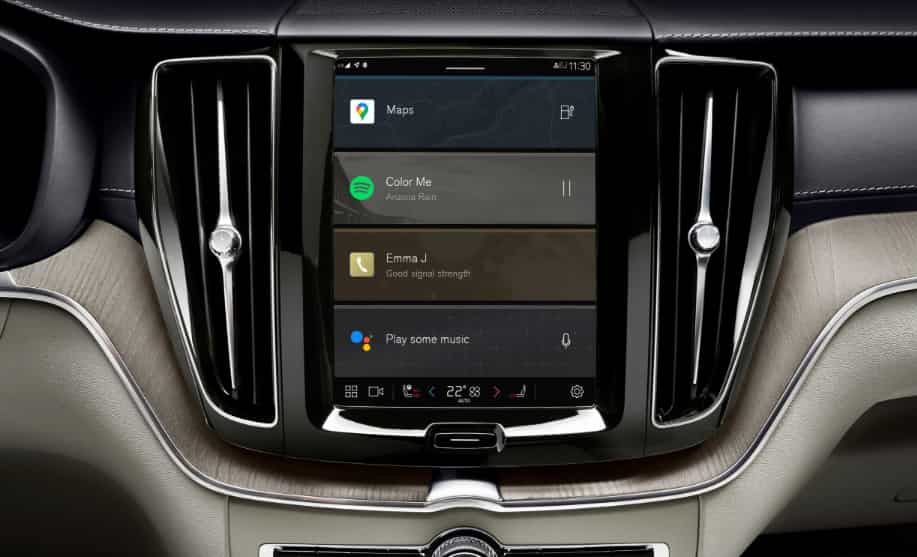
What is Apple CarPlay and How It Works in Volvo Cars
Apple CarPlay is a smart driving interface created by Apple. It allows you to connect your iPhone directly to your car’s infotainment system. Once connected, it brings key apps from your phone to the car screen in a simplified and safe layout. This helps drivers stay focused on the road while still using essential phone functions.
In Volvo Cars, Apple CarPlay works through the infotainment system and mirrors selected iPhone apps. You can access navigation, music, calls, and messages without touching your phone. The system prioritizes safety by reducing distractions and enabling voice control through Siri.
When you connect your iPhone, Volvo’s display becomes an extension of your phone. You can use Apple Maps or other supported navigation apps for real time directions. You can also listen to music through Apple Music or Spotify and control everything using the touchscreen or voice commands.
Volvo supports both wired and wireless CarPlay depending on the model and software version. Wired connection usually offers more stable performance. Wireless connection provides more convenience because it removes the need for a cable.
Overall, Apple CarPlay in Volvo Cars creates a seamless bridge between your iPhone and your driving environment. It improves comfort, safety, and usability while keeping your attention on the road.
Requirements Before Setting Up Apple CarPlay in Volvo Cars
Before you set up Apple CarPlay in Volvo Cars, you need to check a few basic requirements. These steps help ensure a smooth connection and prevent common errors during setup.
First, you need a compatible iPhone. Apple CarPlay works on most iPhone models starting from iPhone 5 and newer. Your device must run a supported iOS version. Keeping your iPhone updated helps improve stability and performance.
Second, your Volvo Cars model must support Apple CarPlay. Most newer Volvo models include this feature, but availability can vary depending on the year and infotainment system. Some vehicles use a built in Google based system, while older models may rely on Volvo’s Sensus system. Compatibility is important before you start.
Third, you need a proper connection method. If you use wired CarPlay, you should use an original or high quality USB cable. A low quality cable can cause connection failure or unstable performance. For wireless CarPlay, your vehicle must support Bluetooth and Wi Fi pairing.
Fourth, you should enable Siri on your iPhone. Siri is essential for hands free control inside Apple CarPlay. It allows you to send messages, make calls, and control apps while driving without touching the screen.
Finally, make sure your Volvo infotainment system software is updated. Updates improve compatibility and fix known bugs that may affect Apple CarPlay performance.
Step-by-Step Guide How to Set Up Apple CarPlay in Volvo Cars
Setting up Apple CarPlay in Volvo Cars is simple when you follow the correct steps. The process only takes a few minutes if your iPhone and vehicle are compatible.
First, start your Volvo and make sure the infotainment system is fully active. The system needs to load before you connect your phone.
Second, connect your iPhone to the car. If you use a wired connection, plug your iPhone into the USB port using a certified cable. If your Volvo supports wireless CarPlay, enable Bluetooth and Wi Fi on your iPhone and pair it with the car system.
Third, your iPhone will display a permission request. You need to allow Apple CarPlay access. This step is required for the system to work correctly.
Fourth, check the Volvo infotainment screen. The CarPlay interface should appear automatically. If it does not appear, select Apple CarPlay from the menu.
Fifth, customize your CarPlay display if needed. You can arrange apps, adjust settings, and choose which apps appear on the main screen.
Finally, test the system. Open navigation, play music, or make a call using Siri. This helps confirm that the connection works properly.
How to Use Apple CarPlay Features in Volvo Cars
Once you set up Apple CarPlay in Volvo Cars, you can start using its core features directly on the infotainment screen. The system is designed to make driving safer and more convenient by reducing the need to handle your phone.
Navigation is one of the most important features. You can use Apple Maps or other supported apps to get real time directions. The system shows clear routes, traffic updates, and estimated arrival times. This helps you drive more efficiently and avoid delays.
Communication also becomes easier. You can make phone calls or send messages using Siri. Just use your voice to control everything without touching the screen. This keeps your attention on the road and improves safety.
Entertainment is another key part of Apple CarPlay. You can listen to music, podcasts, or audiobooks through apps like Apple Music or Spotify. The sound system in Volvo Cars delivers high quality audio for a better listening experience.
Siri voice control plays a central role in the system. You can ask Siri to open apps, read messages, or set destinations. This hands free control makes the driving experience smoother and less distracting.
Overall, Apple CarPlay turns your Volvo into a smart connected environment. It combines navigation, communication, and entertainment in one simple interface that is easy to use while driving.
Wireless Apple CarPlay in Volvo Cars
Wireless Apple CarPlay gives you a more convenient way to connect your iPhone to Volvo Cars. You do not need to plug in a USB cable each time. The system connects automatically once it is properly paired.
To use wireless CarPlay, your Volvo must support Bluetooth and Wi Fi connection. Your iPhone also needs to have both features enabled. After the first setup, the car will recognize your device when you start the engine.
The main advantage of wireless Apple CarPlay is convenience. You can enter your car and start using navigation, music, or calls without any cables. This makes the driving experience cleaner and faster.
However, wireless connection can sometimes be less stable than wired setup. Signal interference or battery usage on your iPhone may affect performance. In some cases, you may notice a slight delay when switching apps or loading features.
Not all Volvo Cars support wireless Apple CarPlay. Some older models only support wired connection through USB. It is important to check your vehicle compatibility before relying on wireless mode.
Overall, wireless Apple CarPlay in Volvo Cars offers a modern and flexible experience. It works best for short daily trips and users who prefer a cable free setup.
Common Problems and Troubleshooting Apple CarPlay in Volvo Cars
Even when Apple CarPlay in Volvo Cars works well, you may still face some common issues. Most problems come from connection settings, cables, or software versions. The good news is that you can fix most of them quickly.
One common issue is that Apple CarPlay does not connect. This usually happens when the USB cable is damaged or not certified. You should replace the cable with an original or high quality one and try again. If you use wireless CarPlay, make sure Bluetooth and Wi Fi are both enabled on your iPhone.
Another problem is when the iPhone is not detected by the Volvo system. In this case, restart both your phone and the infotainment system. This simple step often solves temporary connection errors.
Software updates can also affect performance. If CarPlay stops working after an update, check if your iPhone iOS and Volvo infotainment system are both up to date. Outdated software can cause compatibility issues.
Sometimes Apple CarPlay may freeze or disconnect during use. This can happen due to signal interruption or background system errors. Reconnecting the device usually fixes the problem.
You may also face permission issues when connecting for the first time. Make sure you accept all prompts on your iPhone to allow CarPlay access.
Overall, most Apple CarPlay issues in Volvo Cars are easy to solve. A few quick checks on cable quality, settings, and software updates usually restore normal performance.
Tips to Optimize Apple CarPlay Experience in Volvo Cars
You can improve your Apple CarPlay experience in Volvo Cars with a few simple adjustments. These tips help the system run smoother and make daily driving more comfortable.
First, organize your CarPlay home screen. Keep only the apps you use most often, such as Maps, Music, and Messages. This reduces distractions and helps you access functions faster while driving.
Second, use Siri as much as possible. Voice control helps you keep your hands on the wheel and your eyes on the road. You can ask Siri to navigate, send messages, or play music without touching the screen.
Third, enable Do Not Disturb while driving. This feature blocks unnecessary notifications and reduces interruptions. It helps you stay focused and improves driving safety.
Fourth, keep your iPhone and Volvo software updated. Regular updates improve performance and fix bugs that may affect Apple CarPlay stability. This also ensures better compatibility between devices.
Fifth, use a high quality USB cable if you rely on wired CarPlay. A stable connection reduces lag and prevents random disconnections during use.
Finally, avoid running too many background apps on your iPhone. This helps improve speed and ensures Apple CarPlay works smoothly without delays.
Overall, these small optimizations help you get a more stable, faster, and safer Apple CarPlay experience inside Volvo Cars.
Conclusion
Apple CarPlay in Volvo Cars brings a more connected and safer driving experience. It allows you to combine your iPhone with your vehicle in a simple and practical way. You can access navigation, communication, and entertainment features without distraction while driving.
When you understand how to use Apple CarPlay in Volvo Cars correctly, the setup process becomes easy. You only need to meet basic requirements, follow the connection steps, and adjust a few settings. Once everything is configured, the system works smoothly in daily use.
This integration helps reduce manual phone usage and improves road safety. It also enhances comfort by giving you quick access to essential apps through a clean and intuitive interface. Whether you use wired or wireless connection, the system adapts to your driving needs.
If you face any issues, most of them can be solved quickly by checking cables, updating software, or restarting the system. Small adjustments often restore full functionality.
Overall, Apple CarPlay turns Volvo Cars into a smarter and more convenient driving environment. It supports a modern lifestyle where connectivity and safety work together on every journey.