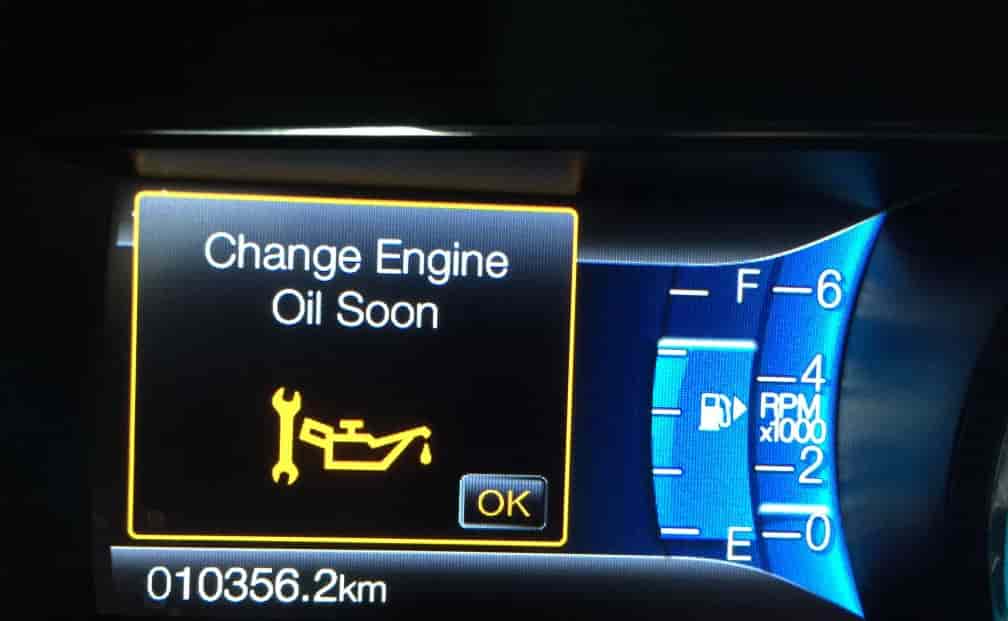
Seeing the oil change light on your Ford Escape can be stressful, especially if you are not sure what it means. This warning is an important reminder that your engine requires attention. Ignoring it may cause damage or lead to costly repairs. Knowing how to reset the oil change light on Ford Escape helps you maintain your vehicle properly and ensures that your dashboard reflects accurate information.
Many drivers are unsure how to perform this task safely. Some think they need special tools or a mechanic to reset the light. In reality, most Ford Escape models allow you to reset the oil change indicator yourself with a few simple steps. This guide explains the process clearly and provides tips to avoid mistakes.
Whether you have just changed your oil or want to make sure your maintenance schedule is correct, learning how to reset the oil change light on Ford Escape saves time and reduces unnecessary worry. Following these steps keeps your vehicle running smoothly, protects the engine, and restores confidence in your car’s monitoring system. By the end of this guide, you will know exactly how to reset the oil change light safely and efficiently.
Contents
Turn on the Ignition Without Starting the Engine
The first step to reset the oil change light on Ford Escape is to turn on the ignition without starting the engine. Insert your key into the ignition and rotate it to the “On” position. For models with a push-button start, press the start button once without pressing the brake pedal. This action powers the dashboard and vehicle electronics without activating the engine.
At this stage, your dashboard lights, including the oil change indicator, should illuminate. This is normal and allows you to access the vehicle’s settings for resetting. Avoid pressing the accelerator or attempting to start the engine while performing this step. Doing so can interfere with the reset process and may cause errors.
It is important to stay patient and make sure the ignition is fully on. If your Ford Escape has a digital display, look for the menu or settings icon. Some models may show “Settings,” “Vehicle Info,” or “Oil Life” directly on the screen. Taking your time ensures that you are ready to follow the next steps accurately.
Turning on the ignition without starting the engine prepares the system for the reset procedure. This step is simple, but it is crucial for a successful oil change light reset. Completing this correctly allows your vehicle to register the reset in the next steps and prevents any warning errors from appearing later.
Access the Vehicle Settings on the Dashboard
After turning on the ignition without starting the engine, the next step to reset the oil change light on Ford Escape is accessing the vehicle settings on the dashboard. Look at your instrument cluster or digital display for the menu navigation buttons. These buttons are usually located on the steering wheel or near the dashboard screen. They allow you to scroll through various options and access the vehicle’s system settings.
Press the menu button and navigate to the settings or vehicle information section. Depending on your Ford Escape model, you may see options labeled as “Vehicle Info,” “Settings,” or directly “Oil Life.” Take your time to scroll carefully and avoid pressing multiple buttons at once, as this can make the display jump past the correct option. Patience and precision are important for a successful reset.
Once you find the settings menu, familiarize yourself with the navigation. Some models require you to use an arrow button to highlight options, while others allow direct selection on a touchscreen display. Knowing the correct menu layout ensures that you can quickly move to the next step, where you will locate the oil life or maintenance option.
Accessing the vehicle settings is a simple but essential step. It allows your Ford Escape to recognize that you are preparing to reset the oil change light. Completing this step correctly ensures that the dashboard accurately registers the reset, keeping your maintenance reminders up to date.
Locate the Oil Life or Maintenance Menu
After accessing the vehicle settings on your dashboard, the next step to reset the oil change light on Ford Escape is locating the oil life or maintenance menu. This menu shows the current status of your engine oil and other maintenance reminders. On most Ford Escape models, the option is labeled as “Oil Life,” “Oil Life Reset,” or “Maintenance.” Scroll carefully through the vehicle settings to find it.
Some Ford Escape models may display the oil life as a percentage, indicating how much oil remains before the next service is needed. Others might show a maintenance reminder or countdown. Knowing the correct menu is essential because selecting the wrong option may not reset the oil change light. Take your time to confirm the label before proceeding.
If you are unsure which menu to select, refer to your owner’s manual for guidance. The manual will show the exact path for your specific model year, which can differ slightly from one version of Ford Escape to another. Paying attention to these details ensures a smooth and accurate reset process.
Locating the oil life or maintenance menu is a key step in resetting the oil change light. This step prepares your vehicle for the actual reset, making sure the system correctly registers the change. Once you have found the menu, you are ready to move on to the next step and complete the reset successfully.
Reset the Oil Change Light
Once you have located the oil life or maintenance menu, it is time to reset the oil change light on Ford Escape. In most models, you will see an option labeled “Reset Oil Life” or “Reset Maintenance.” Highlight this option using the navigation buttons on your steering wheel or dashboard. Press the select or OK button to begin the reset process.
Some Ford Escape models require you to hold the button for a few seconds to confirm the reset. Pay attention to the display as it may show a confirmation message or the oil life percentage returning to 100. This indicates that the reset was successful. Make sure you follow the instructions carefully to avoid any errors.
It is important to avoid turning off the ignition or starting the engine during this step. Doing so may interrupt the reset and cause the oil change light to remain on. If the reset fails, simply repeat the steps, ensuring that you follow each instruction carefully.
Resetting the oil change light ensures that your vehicle’s maintenance system is up to date. This step restores accuracy to the dashboard warnings and keeps your engine monitoring correct. Completing this process allows you to maintain your Ford Escape efficiently, giving you peace of mind that your maintenance reminders are reliable.
Confirm the Reset and Turn Off the Ignition
After resetting the oil change light, it is important to confirm that the process was successful. Check your dashboard display to ensure that the oil change indicator has turned off or shows 100 percent oil life. If the light is still on, repeat the reset steps carefully. Some Ford Escape models may require a brief wait or a quick restart of the ignition to register the change.
Once the reset is confirmed, turn off the ignition completely. Remove the key or press the engine stop button if your model uses a push-button start. Turning off the ignition finalizes the reset process and allows the vehicle’s system to save the updated maintenance status. Avoid starting the engine immediately if the reset has not fully registered, as this can cause the light to reactivate.
After turning off the ignition, wait a few seconds before starting your Ford Escape. When you turn the engine back on, check that the oil change light remains off. This step ensures that your maintenance system is functioning correctly and that the dashboard reflects accurate information.
Confirming the reset and turning off the ignition is the final step in maintaining an accurate oil change reminder. Following this procedure helps you manage your vehicle’s maintenance efficiently and gives you confidence that your Ford Escape’s dashboard warnings are reliable.
Conclusion
Resetting the oil change light on Ford Escape is a simple process when you follow the correct steps. By turning on the ignition without starting the engine, accessing the vehicle settings, locating the oil life menu, performing the reset, and confirming the change, you ensure that your dashboard reflects accurate maintenance information. These steps help you avoid confusion, prevent unnecessary service visits, and keep your engine running smoothly.
Maintaining an accurate oil change indicator is essential for the health of your vehicle. It allows you to monitor engine oil life, stay on top of scheduled maintenance, and reduce the risk of damage caused by overdue oil changes. Performing the reset correctly restores confidence in your Ford Escape’s monitoring system and ensures that all warnings are reliable.
If you recently changed your oil or need to keep your maintenance reminders up to date, following this guide will save time and provide peace of mind. Always double-check the display after completing the reset and consult your owner’s manual for model-specific instructions. Learning how to reset the oil change light on Ford Escape empowers you to manage your vehicle efficiently and keep it in optimal condition.