Getting locked out of your car because you forgot the door code can feel frustrating. Many drivers who use the keypad system from Ford Motor Company deal with this problem, especially after buying a used vehicle or losing the original code.
The situation gets worse when the keypad stops working. You may not know whether the issue comes from the code or the system itself. This confusion often leads to wasted time or unnecessary service costs.
Learning how to reset Ford door code helps you stay in control. The keyless entry system gives you quick access without a key, but you need to manage it properly. If you know how to find the factory code, change it, and fix common issues, you can avoid most lockout situations.
This guide shows you each step in a simple and practical way. You will learn how to find your factory code, reset it, create a new personal code, and fix keypad problems. By the end, you can access your vehicle with confidence and avoid common mistakes.
Contents
- What Is a Ford Door Code and How the Keyless Entry System Works
- How to Find Your Ford Factory Door Code
- How to Reset Ford Door Code
- How to Change or Program a New Ford Door Code
- Ford Door Code Not Working? Common Issues and Fixes
- How to Reset Ford Door Code Without Factory Code
- Model Specific Tips for Ford F 150, Escape, and Explorer
- Pro Tips to Avoid Getting Locked Out Again
- Conclusion
What Is a Ford Door Code and How the Keyless Entry System Works
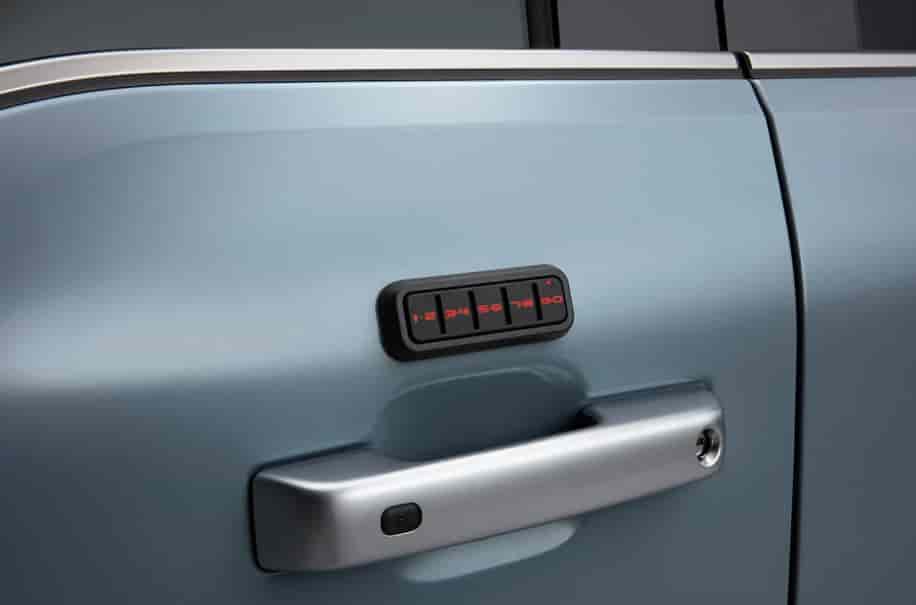
A Ford door code is a five digit number that unlocks your vehicle through the exterior keypad. This system lets you access your car without using a physical key. Many drivers use it for convenience, especially when carrying items or sharing access with family members.
The keyless entry system from Ford Motor Company works by matching the code you enter with a stored value inside the vehicle’s security module. When the system detects the correct code, it unlocks the doors instantly. If the code does not match, the system keeps the vehicle locked to protect against unauthorized access.
There are two main types of codes you need to understand. The first is the factory code. Ford assigns this code during production, and it stays permanently stored in the system. You cannot erase it, but you can always use it to regain access. The second is the personal code. You can create and change this code anytime after entering the factory code.
Many drivers choose to reset or change their code for better security. For example, you may want to update the code after buying a used vehicle or after sharing access with someone else. In some cases, the keypad may stop responding due to incorrect inputs or system errors, which also makes resetting necessary.
Understanding how this system works helps you avoid confusion later. Once you know the difference between factory and personal codes, you can reset and manage your access much more easily.
How to Find Your Ford Factory Door Code
Before you can reset anything, you need your factory door code. This code plays a key role because the system requires it to verify your access. Many drivers struggle at this step, especially if they bought a used vehicle or lost the original documents.
The easiest way to find the factory code is in the owner’s manual. Manufacturers often include a card or sticker with the code inside the manual package. If you still have it, check there first because it saves time.
If you cannot find the manual, you can look inside the vehicle. In many models from Ford Motor Company, the code appears on a label placed in specific areas. Common locations include the glove box, the trunk panel, or near the fuse box. Some vehicles also store it on the Body Control Module, which may require partial access to the interior panel.
Another reliable option is to visit a dealership. You will need to provide proof of ownership, but the dealer can retrieve the factory code using your vehicle identification number. This method works well if you cannot locate the code yourself.
If you recently purchased a used car, always check with the previous owner first. Many sellers forget to mention the code, but they may still have it recorded somewhere.
Finding the factory code may take a bit of effort, but it is the most important step. Once you have it, you can reset and manage your door access without any issues.
How to Reset Ford Door Code
Once you have your factory code, you can reset your door code in just a few minutes. The process is simple, but you need to follow each step carefully to avoid errors.
Start by locating the keypad on your vehicle door. Make sure the system is active and responsive before you begin.
First, enter your factory code using the keypad. Press each number clearly and at a steady pace. The system will unlock the doors after you enter the correct code, which confirms that the code works.
Next, press the 1 and 2 buttons at the same time within five seconds. This step tells the system that you want to program a new personal code. Timing matters here, so do not wait too long.
Now, enter your new five digit personal code. Choose a number that is easy for you to remember but hard for others to guess. Avoid simple patterns like 12345 or repeated digits.
After that, wait for the system to lock and unlock the doors again. This action confirms that the new code has been saved successfully.
To test it, lock your vehicle and enter the new code. If the doors unlock, the reset process worked correctly.
Many drivers make small mistakes during this process. Some press the buttons too slowly, while others enter the wrong factory code. If the system does not respond, wait a few seconds and try again from the beginning.
Resetting your code only takes a short time, but it gives you full control over your vehicle’s access. Once you complete this step, you can move on to managing or updating your code whenever needed.
How to Change or Program a New Ford Door Code
After you reset the system, you may want to change or add a new personal code. This step helps you improve security and manage access more easily, especially if multiple people use the vehicle.
To begin, enter your factory code on the keypad. The system will unlock the doors, which confirms that the code is correct and active.
Next, press the 1 and 2 buttons together within five seconds. This action opens the programming mode. You need to act quickly here because the system will exit this mode if you wait too long.
Now, enter your new five digit personal code. Choose a number that you can remember بسهولة, but avoid obvious patterns. A strong code reduces the risk of unauthorized access.
If you want to add more codes for other users, repeat the same process. Some vehicles from Ford Motor Company allow multiple personal codes, which makes it easier to share access without giving out your main code.
To delete old personal codes, you need to reset the system again using the factory code. This action clears all previously saved personal codes and lets you start fresh.
Always test your new code after programming it. Lock the vehicle and enter the code to confirm it works as expected. This simple step helps you avoid problems later.
Changing or programming a new code only takes a few minutes, but it gives you better control and peace of mind. It also helps you prevent issues that often happen when too many people know the same access code.
Ford Door Code Not Working? Common Issues and Fixes
Sometimes the keypad does not respond even when you enter the correct code. This issue can feel frustrating, especially when you need quick access to your vehicle. The good news is that most problems have simple causes and quick fixes.
One common issue is entering the code too slowly. The system from Ford Motor Company requires quick and consistent input. If you pause too long between numbers, the system may reject the code. Try entering the code again at a steady pace.
Another frequent problem is a worn or unresponsive keypad. Over time, dirt, moisture, or heavy use can affect the buttons. If some numbers do not respond, clean the keypad surface and try again. In more serious cases, the keypad may need replacement.
A weak vehicle battery can also cause the keypad to stop working. The keyless entry system depends on stable power. If the battery is low, the system may fail to respond or behave inconsistently. Check your battery and replace it if needed.
In some situations, the system may lock you out after multiple incorrect attempts. This feature protects your vehicle from unauthorized access. Wait a few minutes before trying again to allow the system to reset.
If none of these solutions work, try resetting your personal code using the factory code. This step often resolves hidden glitches in the system.
Fixing keypad issues does not require advanced skills in most cases. Once you identify the cause, you can restore access quickly and avoid unnecessary stress.
How to Reset Ford Door Code Without Factory Code
Many drivers want to reset their door code without the factory code, especially after buying a used vehicle. However, you need to understand one important fact. The system from Ford Motor Company does not allow a full reset without the original factory code.
This restriction exists for security reasons. It prevents unauthorized users from changing access to the vehicle. Even if you try different button combinations, the system will not accept a new code without verifying the factory code first.
If you do not have the factory code, you still have a few reliable options. The most common solution is to visit an authorized dealership. You will need to provide proof of ownership, such as your registration and identification. The dealer can then retrieve the factory code using your vehicle information.
Another option involves using a professional diagnostic tool. Some technicians can access the system through the onboard diagnostics port. This method requires proper equipment and experience, so it is not ideal for most drivers.
Avoid following unofficial tricks or online hacks that claim to bypass the factory code. These methods often do not work and may even damage your vehicle’s system or create security risks.
If you cannot find the factory code yourself, the safest approach is to contact a professional. Once you recover the code, you can reset and manage your keypad normally without any limitations.
Model Specific Tips for Ford F 150, Escape, and Explorer
Although the reset process stays similar across most vehicles, each model from Ford Motor Company may include small differences. Understanding these details helps you avoid confusion and complete the process faster.
For the Ford F 150, the keypad system is widely used and easy to access. You can usually find the factory code label behind the passenger side fuse panel or inside the cabin area. The reset steps work smoothly, but you need to press the keypad firmly because trucks often experience more wear over time.
For the Ford Escape, the system feels more compact and slightly more sensitive. The keypad responds quickly, so you should enter the code at a steady pace without rushing. In many cases, the factory code label appears inside the glove box or near the interior panel.
For the Ford Explorer, the system focuses more on security and user control. Some versions allow multiple personal codes, which makes it ideal for families. You may also notice faster lock and unlock feedback during programming, which helps confirm each step clearly.
Across all models, the core process remains the same. You always need the factory code first, then you enter programming mode, and finally set your personal code. The differences mainly come from keypad sensitivity and code label location.
If you understand these small variations, you can reset your door code more efficiently no matter which model you drive.
Pro Tips to Avoid Getting Locked Out Again
Resetting your code solves the problem, but preventing future issues is even more important. Many drivers repeat the same mistakes and end up locked out again after a short time.
Start by choosing a strong but memorable code. Avoid simple patterns like 11111 or 12345 because they are easy to guess. At the same time, do not create a code that is too complex to remember. A balanced combination works best.
Store your factory code in a safe place. Do not rely only on memory. You can keep it in your phone, a secure note app, or a document at home. This step saves you time if you ever need to reset the system again.
If you share your vehicle with family or friends, update the code regularly. This habit helps you maintain control over access. Many systems from Ford Motor Company allow multiple personal codes, so you can assign different codes when needed.
Check your keypad condition from time to time. Clean the surface and make sure all buttons respond properly. A small maintenance step can prevent bigger problems later.
Building these simple habits will help you avoid stress and keep your vehicle secure at all times.
Conclusion
Learning how to reset Ford door code gives you full control over your vehicle’s keyless entry system. Whether you forget your code, face keypad issues, or want to improve security, the process becomes simple once you understand the basics.
In this guide, you learned how to find your factory code, reset your door code step by step, program a new personal code, and fix common keypad problems. You also explored what to do when the code is not available and how different models may vary slightly.
The most important takeaway is this. Always keep your factory code safe and choose a personal code that balances security and convenience. These small actions can save you time, money, and frustration.
Now that you understand how to reset Ford door code, you can apply these steps with confidence. If you have experienced any issues or found a useful tip, feel free to share your experience. Your insight may help other drivers solve the same problem faster.