Many Hyundai owners experience a situation where their key fob suddenly stops working or shows weak signal performance. In most cases, this issue does not come from a faulty device but simply from a depleted battery inside the key fob. This is one of the most common maintenance needs for modern smart key systems used by Hyundai Motor Company.
As vehicles become more advanced, smart key technology has made driving more convenient by allowing remote locking, unlocking, and even engine start functions. However, this convenience depends heavily on a small coin cell battery that powers the entire system. Over time, this battery naturally loses its efficiency, which leads to delayed response or complete failure of the key fob.
This guide is designed to help you understand how to replace battery in Hyundai key fob in a simple and safe way that applies to most Hyundai models including Tucson, Elantra, Santa Fe, and others. You do not need advanced tools or technical knowledge to complete this process at home. The goal is to save time, avoid unnecessary dealership costs, and restore full functionality to your key fob within a few minutes.
By following this step by step guide, you will learn not only how to replace the battery correctly but also how to avoid common mistakes that could damage the device. This ensures your Hyundai smart key continues to perform reliably in daily use.
WHAT BATTERY DOES A HYUNDAI KEY FOB USE
Before learning how to replace battery in Hyundai key fob, you need to choose the correct battery type. This step matters because the wrong battery can reduce performance and cause connection issues with your vehicle.
Most Hyundai key fobs use a CR2032 lithium coin battery. Some older models use a CR2025 battery instead. These two batteries look similar, but the CR2032 is slightly thicker. That difference affects how well the battery fits inside the key fob.
The smart key system in vehicles from Hyundai Motor Company depends on stable power to send signals to the car. When the battery weakens, the system responds more slowly. You may notice the key fob works only at short distance or requires multiple presses.
A weak battery can also stop the key fob from working completely. Many users think the remote is damaged in this situation. In reality, the battery often causes the problem and a simple replacement restores normal function.
You should also choose a good quality battery from a reliable brand. A stable voltage helps the key fob work consistently. Low quality batteries often drain faster and reduce signal strength over time.
TOOLS YOU NEED BEFORE REPLACEMENT
Before you start the process of how to replace battery in Hyundai key fob, you should prepare a few simple tools. Proper preparation helps you avoid damage and makes the process faster and safer.
You need a new coin battery that matches your key fob model. Most Hyundai key fobs use a CR2032 battery. Some models may require a CR2025 battery, so always check your old battery before buying a replacement.
You also need a small flathead screwdriver or a plastic pry tool. A plastic tool works better because it reduces the risk of scratching or cracking the key fob casing. Many users damage the outer shell when they use metal tools with too much force.
A clean cloth or soft surface also helps during the process. You can place the key fob on it to avoid scratches when you open it or remove the battery.
The smart key system from Hyundai Motor Company uses sensitive electronic components inside a compact case. You should handle it carefully because excessive force can damage internal parts. A slow and controlled approach works best and helps you avoid unnecessary repairs.
Good preparation makes the replacement process smooth. When you have the right battery and tools ready, you can complete the task in just a few minutes without any technical difficulty.
STEP BY STEP GUIDE TO REPLACE BATTERY IN HYUNDAI KEY FOB
This is the main part of the process where you learn how to replace battery in Hyundai key fob safely and correctly. You do not need special skills, but you should follow each step carefully to avoid damaging the device.
Step 1: Identify your key fob type
Start by checking your Hyundai key fob design. Some models use a smart key system with a hidden emergency key inside. Others use a simple flip key design. Knowing the type helps you open it correctly without force.
The key fob system used in Hyundai Motor Company varies slightly across models, but the battery replacement process remains similar.
Step 2: Open the key fob
Find the small seam or slot on the side of the key fob. Insert a plastic pry tool or a small flat screwdriver gently into the gap. Twist slowly until the cover opens.
Do not use strong force. Most damage happens when users rush this step or try to pry the case too aggressively.
Step 3: Remove the old battery
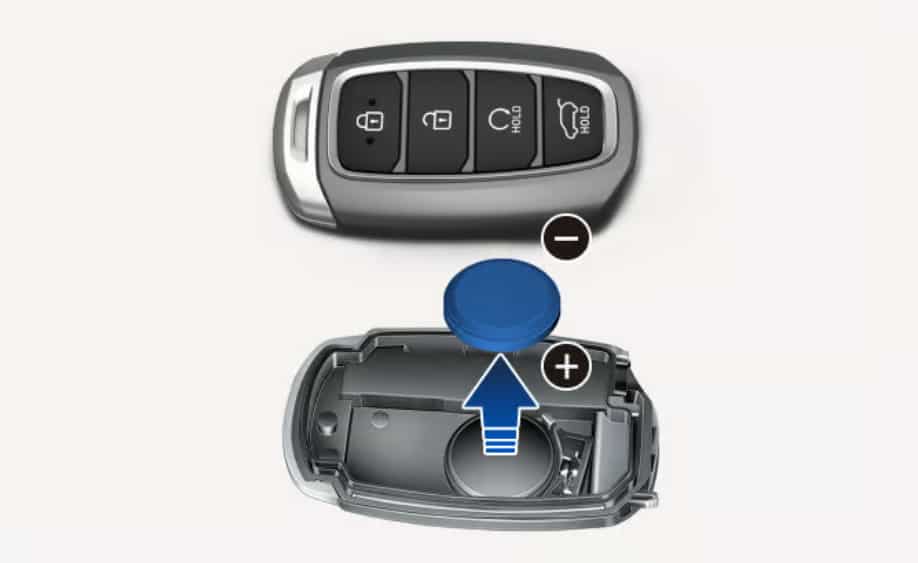
Take out the old battery carefully. Pay attention to the battery position before removal. The positive side usually faces up, but you should always confirm the correct orientation inside the case.
Step 4: Insert the new battery
Place the new CR2032 or CR2025 battery into the same position as the old one. Make sure it sits flat and stable inside the compartment. A loose battery can cause connection problems.
Step 5: Close the key fob
Press both halves of the key fob together until you hear a click. Check the edges to make sure the case closes evenly. A proper seal protects the internal electronics from dust and moisture.
TESTING THE KEY FOB AFTER BATTERY REPLACEMENT
After you finish installing the new battery, you should test the key fob immediately. This step confirms that the replacement worked correctly and the device sends signals to your vehicle without issues.
Stand close to your car and press the lock button once. Then press the unlock button. If your Hyundai responds instantly, the key fob works normally. If the response feels slow, press the buttons a few more times to stabilize the connection.
The smart key system in Hyundai Motor Company usually reconnects automatically after a battery change. In most cases, you do not need to reprogram the key fob. The system detects the new battery right away.
If the key fob does not work after replacement, check the battery orientation first. A reversed positive or negative side is the most common reason for failure. You should also confirm that the battery sits flat inside the slot.
If everything looks correct but the key fob still does not respond, try using a different new battery. Low quality or defective batteries can cause the same problem even if installation is correct.
COMMON MISTAKES TO AVOID
Many users make simple mistakes when they learn how to replace battery in Hyundai key fob. These mistakes often cause the key fob to stop working even after a new battery is installed. You can avoid most problems by paying attention to a few key details.
One common mistake is installing the battery in the wrong direction. The positive and negative sides must match the correct orientation inside the key fob. If you reverse the battery, the remote will not send any signal.
Another mistake is using the wrong battery type. Many Hyundai key fobs require a CR2032 battery. Some users accidentally use CR2025 or other similar sizes. This creates poor contact and unstable performance.
Some users also damage the key fob casing by using too much force when opening it. The smart key system used in Hyundai Motor Company is compact and sensitive. If you force the case open, you can crack the plastic or loosen internal components.
A loose battery is another issue. If the battery does not sit flat, the connection becomes unstable. The key fob may work sometimes but fail randomly, which creates confusion.
Finally, some users forget to test the key fob after closing it. A quick test helps you confirm everything works correctly before you leave the area or reassemble tools.
TROUBLESHOOTING IF YOUR HYUNDAI KEY FOB STILL DOES NOT WORK
Sometimes the key fob still does not work even after you replace the battery. This situation can feel confusing, but most problems come from a few simple causes. You can usually fix them without professional help.
First, check the battery orientation again. Many users install the battery correctly at first glance, but the positive and negative sides can still be reversed. Even a small mistake will stop the signal completely.
Next, check if the battery makes proper contact. The metal clips inside the key fob must press firmly against the battery. If the battery feels loose, remove it and adjust it again.
You should also test a second new battery. Some low quality batteries lose power quickly or come with factory defects. A fresh replacement often solves the problem immediately.
The key fob system in Hyundai Motor Company usually reconnects automatically after a battery change. However, in rare cases, the system may need a reset. You can try locking and unlocking the car manually with the physical key and then testing the remote again.
If the key fob still does not respond, the issue may come from internal damage or electronic failure. Water exposure, drops, or long term wear can affect the circuit board inside the device. In this case, you may need professional inspection or a full key fob replacement.
HOW LONG DOES A HYUNDAI KEY FOB BATTERY LAST
A Hyundai key fob battery usually lasts between one and two years under normal usage. The exact lifespan depends on how often you use the remote and the environment where you keep it.
Frequent use reduces battery life faster. If you lock and unlock your car many times a day, the battery drains sooner. Cold or hot weather can also affect performance and shorten lifespan.
The smart key system in Hyundai Motor Company continuously sends and receives signals when you use features like remote start or keyless entry. This constant communication slowly consumes battery power over time.
You may notice early signs of battery wear before it fully dies. The key fob may respond slower or only work when you stand closer to the car. These signs indicate you should replace the battery soon to avoid sudden failure.
Good quality batteries last longer and provide more stable performance. Cheap batteries often drain quickly and create inconsistent signal strength. Choosing a reliable brand helps maintain smooth operation of your key fob.
To avoid unexpected issues, it is a good idea to replace the battery every one to two years even if it still works. This simple habit helps you prevent sudden key fob failure in daily use.
TIPS TO EXTEND HYUNDAI KEY FOB BATTERY LIFE AND CONCLUSION
You can extend the life of your key fob battery with a few simple habits. These small actions help reduce unnecessary power consumption and keep your remote working longer between replacements.
First, avoid pressing buttons repeatedly when you do not need to. Each press sends a signal that uses battery power. Over time, frequent unnecessary use drains the battery faster.
Second, keep your key fob away from electronic devices that may cause signal interference. Strong interference can force the key fob to work harder when sending signals to your vehicle, which increases power usage.
Third, store your key fob in a dry and stable environment. Heat and humidity can reduce battery efficiency and damage internal components. A stable environment helps maintain long term performance.
The key fob system in Hyundai Motor Company performs best when the battery delivers stable voltage. High quality batteries combined with proper usage habits help maintain consistent signal strength and reduce sudden failures.
In conclusion, learning how to replace battery in Hyundai key fob is a simple but important skill for every Hyundai owner. The process does not require advanced tools or technical knowledge. You only need the correct battery, careful handling, and a few minutes of your time.
When you follow the correct steps, you can restore full functionality quickly and avoid unnecessary visits to service centers. Regular maintenance also helps you prevent unexpected key fob failures and ensures smooth daily vehicle use.
If your key fob still shows problems after replacement, the issue may involve internal damage or system errors that require professional support. However, in most cases, a fresh battery solves the problem completely.