Have you ever wondered why you have to press the ECO or Auto Start/Stop button every time you start your Mercedes-Benz? While the Auto Start/Stop system is designed to reduce fuel consumption and lower emissions, many drivers find it more frustrating than helpful. Frequent engine restarts in stop-and-go traffic, slight delays when accelerating, and the constant need to disable the feature after every ignition cycle are common complaints among Mercedes owners.
The reason this happens is simple: Mercedes-Benz programs the Auto Start/Stop system to reactivate automatically whenever the vehicle is restarted. This factory setting helps the vehicle comply with fuel economy and emissions regulations, but it leaves drivers with limited control over their preferred driving experience.
Fortunately, there are several ways to permanently or effectively disable the Mercedes Auto Start/Stop system. Depending on your vehicle model and budget, you can choose from simple aftermarket memory modules, Start/Stop eliminator devices, professional ECU coding, or specialized programming performed by a Mercedes technician. Each method has its own advantages, installation requirements, potential warranty implications, and long-term reliability.
In this comprehensive guide, you’ll learn how the Mercedes Auto Start/Stop system works, why it always turns itself back on, and the safest methods to disable it permanently. We’ll also compare the costs, difficulty level, and potential risks of each solution so you can choose the option that best fits your vehicle and driving needs.
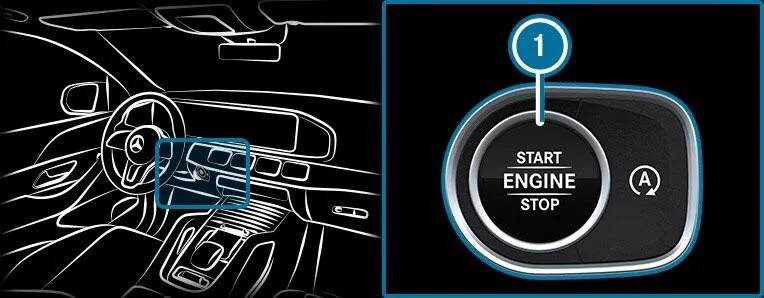
What Is Mercedes Auto Start/Stop?
Mercedes Auto Start/Stop is a fuel saving system that temporarily switches off the engine when the vehicle comes to a complete stop. It is commonly active at traffic lights, in traffic jams, or during short pauses in city driving. When the driver releases the brake pedal, presses the accelerator, or performs another action that signals the vehicle is ready to move, the engine restarts automatically.
On many Mercedes models, the system is connected to the ECO function and is controlled by the vehicle’s electronic management system. It continuously evaluates several conditions before deciding whether the engine should shut down. These conditions may include battery charge, engine temperature, cabin temperature, brake pressure, steering input, seat belt status, door position, and climate control demand.
This means the engine will not always stop every time the vehicle becomes stationary. For example, the system may remain inactive when the battery charge is low, the engine is still cold, the air conditioning system is working heavily, or the vehicle is parked on a steep slope. These operating conditions are designed to protect the vehicle and maintain driver comfort.
The system relies on several important components, including the starter motor, battery, alternator, sensors, and engine control unit. Mercedes vehicles equipped with Auto Start/Stop often use batteries and starting components designed to handle more frequent engine restarts than conventional systems.
The main purpose of the system is to reduce unnecessary idling. By switching off the engine during short stops, the vehicle may use less fuel and produce fewer emissions in urban driving. However, the actual benefit depends on traffic conditions, driving habits, engine type, and the amount of time the vehicle spends stationary.
Why Does Mercedes Auto Start/Stop Turn Back On?
Many Mercedes owners become frustrated when the Auto Start/Stop system turns back on every time they restart the vehicle. Even after pressing the ECO button to disable it, the system usually returns to its default active setting during the next ignition cycle.
This behavior is not normally a fault. It is part of the factory programming. Mercedes designs the system to activate by default so the vehicle can operate according to its approved fuel economy and emissions configuration. The ECO button usually provides only a temporary override for the current journey.
When the engine is switched off and restarted, the vehicle reloads its factory settings. As a result, the previous Auto Start/Stop preference is not always stored. Some newer vehicles may remember certain driver preferences, but permanent memory for the Start/Stop setting is not available on every Mercedes model or software version.
This is why repeatedly pressing the button becomes part of the daily routine for many drivers. For someone who makes several short trips each day, the process can quickly become irritating. It may also be easy to forget, especially when entering busy traffic immediately after starting the vehicle.
The system may also appear inconsistent because it does not shut down the engine under every condition. A driver may see the ECO indicator but notice that the engine remains running. This can happen when the battery needs charging, the climate control system requires engine power, the engine has not reached its operating temperature, or another safety condition prevents automatic shutdown.
Understanding this distinction is important. Turning off Auto Start/Stop manually is different from the system being temporarily unavailable. If the feature is disabled with the button, the vehicle follows the driver’s request for that trip. If the feature is unavailable because operating conditions are not met, it may become active again automatically once those conditions change.
Can You Permanently Turn Off Mercedes Auto Start/Stop?
In many Mercedes vehicles, there is no factory menu option that allows the driver to permanently disable Auto Start/Stop. Pressing the ECO button usually switches the system off only until the vehicle is turned off. Once the engine is restarted, the feature becomes active again.
However, there are several ways to make the system remain off or automatically restore the driver’s previous preference. The best solution depends on the Mercedes model, production year, electronic architecture, warranty status, and the owner’s tolerance for modifications.
One common option is a Start/Stop memory module. This device remembers whether the system was active or inactive when the vehicle was last switched off. When the vehicle starts again, the module automatically restores the previous setting. From the driver’s perspective, this functions almost like a permanent solution because the button does not need to be pressed during every trip.
Another option is a Start/Stop eliminator. Depending on the product and vehicle, the device may simulate a button press shortly after startup. This means the system is automatically disabled each time the engine starts. Installation can be simple on some models, but other vehicles may require access to dashboard panels, wiring connectors, or control modules.
ECU coding is another possible method. A qualified technician may be able to change the relevant software setting so the system remains off, remembers its last status, or starts in the disabled position. Coding availability varies significantly between Mercedes models. A procedure that works on one C Class may not work on a newer GLC, GLE, or E Class.
Professional coding can provide a clean solution, but it also carries more risk than pressing a button or installing a removable module. Incorrect coding may cause warning messages, communication errors, or problems after a software update. Factory updates may also restore the original configuration.
Before choosing any permanent method, owners should confirm compatibility with the exact model, chassis code, production year, and control unit version. They should also consider warranty implications and local emissions requirements. For many drivers, a reversible memory module offers the best balance between convenience and low risk, while professional coding may be more appropriate for owners who want a software based solution.
Method 1: Use the ECO Button
The simplest way to disable Mercedes Auto Start/Stop is by pressing the ECO or A OFF button located on the center console. Once the button is pressed, the indicator light changes, confirming that the Auto Start/Stop system has been deactivated for the current drive.
This method requires no tools, no technical knowledge, and does not modify any vehicle settings. It is also the safest option because it uses the feature exactly as Mercedes intended. If your vehicle is still under warranty, using the ECO button has no impact on warranty coverage or future software updates.
However, this solution comes with one significant drawback. The setting is only temporary. Every time you turn off the engine and restart the vehicle, the Auto Start/Stop system automatically returns to its default active state. Drivers who make multiple short trips throughout the day often find themselves pressing the button repeatedly, which quickly becomes an inconvenience.
The ECO button is best suited for drivers who only occasionally want to disable the feature or who are not ready to install aftermarket hardware or perform software modifications. While it is not a permanent solution, it remains the easiest and completely risk free way to turn off the system during a single trip.
Method 2: Install a Start/Stop Memory Module
A Start/Stop memory module is one of the most popular solutions for Mercedes owners who want the Auto Start/Stop system to remember their preferred setting. Instead of permanently removing the feature, the module stores the last button position before the vehicle is turned off. When the engine is started again, the module automatically restores that preference without requiring the driver to press the ECO button.
Most memory modules are designed specifically for Mercedes-Benz vehicles and connect directly to the switch panel behind the dashboard. Installation typically involves removing a trim panel, disconnecting the factory connector, plugging in the module, and reinstalling the trim. Depending on the model, the process usually takes between fifteen and thirty minutes and does not require cutting or splicing any factory wiring.
One of the biggest advantages of a memory module is that it is completely reversible. If you decide to sell the vehicle or return it to its original condition, the module can usually be removed without leaving permanent modifications. Because the original wiring remains intact, many owners consider this a lower risk option compared to ECU coding.
Memory modules are available for many Mercedes models, including the C Class, E Class, GLC, GLE, GLS, CLA, A Class, and several AMG variants. Before purchasing one, always verify compatibility with your vehicle’s model year, chassis code, and infotainment system, as Mercedes frequently updates its electronic architecture.
Although memory modules are generally reliable, quality varies between manufacturers. Choosing a reputable brand with positive customer reviews and clear installation instructions is essential for long term reliability. A poorly designed module may fail to restore the previous setting consistently or could trigger dashboard warning messages.
For most Mercedes owners, a Start/Stop memory module provides the ideal balance of convenience, affordability, and ease of installation. It offers an experience that feels almost identical to permanently disabling the system while allowing the vehicle to be restored to factory condition whenever necessary.
Method 3: Install a Start/Stop Eliminator
A Start/Stop eliminator offers another effective way to keep the Mercedes Auto Start/Stop system disabled without manually pressing the ECO button every time you drive. Although it serves a similar purpose as a memory module, the way it operates is slightly different.
Instead of remembering the previous button position, a Start/Stop eliminator automatically sends a signal that simulates pressing the ECO button shortly after the vehicle starts. As a result, the Auto Start/Stop feature is disabled automatically during every ignition cycle, giving the driver the same outcome without any manual interaction.
Most eliminators are designed as plug and play devices that connect behind the dashboard or directly to the factory switch assembly. Installation is generally straightforward for anyone familiar with removing interior trim panels. No permanent wiring changes are required on most models, making the device easy to remove if the vehicle needs to be returned to its original configuration.
The primary advantage of a Start/Stop eliminator is convenience. Once installed, the system works automatically in the background and requires no additional attention from the driver. High quality products are engineered specifically for Mercedes electronic systems and typically do not interfere with other vehicle functions, warning lights, or onboard diagnostics.
The cost of a Start/Stop eliminator usually ranges from approximately 80 to 200 US dollars, depending on the vehicle model and manufacturer. Premium products often include vehicle specific connectors, detailed installation guides, and firmware designed to maintain compatibility with the latest Mercedes control systems.
Before purchasing any eliminator, ensure it is compatible with your exact Mercedes model, production year, and trim level. Buying a vehicle specific device from a reputable manufacturer helps minimize installation issues and ensures reliable operation over the long term.
Method 4: Disable Auto Start/Stop Through ECU Coding
ECU coding is one of the most effective methods for changing how the Mercedes Auto Start/Stop system behaves. Instead of installing additional hardware, this approach modifies specific software parameters within the vehicle’s electronic control units. Depending on the model and software version, coding may allow the system to remember the previous Auto Start/Stop setting, start with the feature disabled by default, or completely deactivate the function.
Professional technicians typically perform coding using manufacturer level diagnostic software such as Xentry, Vediamo, DTS Monaco, or other advanced programming tools. These applications communicate directly with the vehicle’s control modules, allowing authorized parameters to be modified where supported.
The biggest advantage of ECU coding is that no aftermarket hardware needs to remain installed in the vehicle. Everything is handled through software, resulting in a clean and factory like appearance. Many Mercedes enthusiasts prefer this solution because there are no additional electronic devices hidden behind dashboard panels.
However, ECU coding is not universally available. Mercedes frequently changes the software architecture across different model years, and a coding option that works on an older C Class may not exist on a newer GLC or E Class. Some vehicles also receive software updates during dealer servicing that can overwrite previous coding changes, requiring the procedure to be repeated.
Incorrect coding can lead to communication faults, warning lights, or unexpected system behavior if performed by someone without sufficient experience. In rare cases, programming errors may require recovery using specialized diagnostic equipment. For this reason, ECU coding should only be performed by experienced professionals who understand Mercedes electronic systems.
Before choosing this method, verify that your specific vehicle supports the desired coding option. A qualified Mercedes specialist can usually confirm compatibility by checking the vehicle identification number and the software version installed in the relevant control modules.
Method 5: Visit a Professional Mercedes Coding Specialist
If you prefer not to install aftermarket hardware or perform ECU coding yourself, visiting a professional Mercedes coding specialist is often the safest solution. Independent workshops that specialize in Mercedes-Benz vehicles have the equipment and expertise needed to determine which options are available for your particular model.
Unlike general repair shops, Mercedes specialists work with factory diagnostic software and understand the differences between various chassis, production years, and control unit versions. Before making any changes, they can inspect the vehicle, identify compatible coding options, and explain the potential advantages and limitations of each solution.
In many cases, these specialists can also install Start/Stop memory modules or eliminator devices if software coding is not supported by the vehicle. This allows owners to receive a customized recommendation rather than relying on a single approach that may not work for every Mercedes model.
Dealer support, however, is usually more limited. Most authorized Mercedes dealerships are unlikely to permanently disable the Auto Start/Stop system because the feature is part of the vehicle’s certified emissions and fuel economy configuration. Dealers generally follow manufacturer policies and may only perform software updates or repairs approved by Mercedes-Benz.
The cost of professional coding varies depending on the vehicle and the complexity of the work. Basic coding services often range from 100 to 300 US dollars, while more advanced programming or multiple software modifications may cost more. Although this option is more expensive than installing a module yourself, many owners appreciate the confidence that comes from having the work completed by an experienced technician.
Choosing a reputable specialist with positive customer reviews and extensive Mercedes experience significantly reduces the risk of software issues and ensures that any modifications can be reversed if necessary.
Comparison of All Available Methods
Each method for disabling the Mercedes Auto Start/Stop system offers different advantages. The best choice depends on your budget, technical ability, warranty concerns, and whether you want a fully automatic or software based solution.
| Method | Permanent or Automatic | Estimated Cost | Installation Difficulty | Reversible | Warranty Risk |
|---|---|---|---|---|---|
| ECO Button | Temporary only | Free | Very Easy | Yes | None |
| Start/Stop Memory Module | Automatically remembers previous setting | $80 to $200 | Easy | Yes | Low |
| Start/Stop Eliminator | Automatically disables every startup | $80 to $200 | Easy | Yes | Low |
| ECU Coding | Permanent on supported vehicles | $100 to $400 | Difficult | Usually | Medium |
| Professional Coding Service | Depends on available coding options | $100 to $300 or more | None for the owner | Usually | Low to Medium |
For drivers looking for the simplest solution, using the ECO button remains the safest option, although it must be pressed every time the vehicle is started.
A Start/Stop memory module is an excellent choice for owners who want the vehicle to remember their preferred setting without changing factory software. Installation is relatively simple, and the modification can usually be removed within minutes.
A Start/Stop eliminator provides a similar level of convenience by automatically disabling the feature during each startup. It is particularly attractive for drivers who want a fully automatic experience without accessing the vehicle’s software.
ECU coding is ideal for enthusiasts seeking a software based solution with no additional hardware installed. However, compatibility varies significantly between models, and professional expertise is strongly recommended.
For owners who value peace of mind above all else, consulting a Mercedes coding specialist remains the most reliable approach. A qualified technician can recommend the safest solution based on the exact vehicle configuration while minimizing the risk of compatibility issues or future software conflicts.
Is It Safe to Disable Mercedes Auto Start/Stop?
For most drivers, disabling the Mercedes Auto Start/Stop system does not create immediate mechanical problems when it is done using a reputable memory module, Start/Stop eliminator, or professional ECU coding. However, understanding how the system was designed helps you make an informed decision.
Mercedes engineers developed the Auto Start/Stop system to reduce fuel consumption during idle periods and lower exhaust emissions in urban driving. Vehicles equipped with this technology are fitted with heavy duty starter motors, AGM or EFB batteries, intelligent battery management systems, and reinforced electrical components capable of handling frequent engine restarts.
One common concern is engine wear. Many owners worry that repeatedly shutting down and restarting the engine may increase wear on internal components. Modern Mercedes engines address this issue by maintaining oil pressure, using advanced lubrication systems, and employing components designed for repeated restart cycles. Under normal operating conditions, the manufacturer considers the system safe for long term use.
Battery life is another frequently discussed topic. While the Auto Start/Stop system does place additional demands on the battery, Mercedes vehicles are equipped with batteries specifically designed for this purpose. Disabling the system may reduce the number of restart cycles, but battery lifespan is still influenced by driving habits, climate, charging performance, and overall vehicle maintenance.
Fuel economy is one area where drivers may notice a difference. Auto Start/Stop can reduce fuel consumption during extended periods of idling, especially in heavy city traffic. If the feature is disabled permanently, fuel usage may increase slightly in stop and go conditions. However, the difference is often minimal for drivers who spend most of their time on highways or open roads.
Many owners choose to disable the system simply because they prefer a smoother and more predictable driving experience. Eliminating frequent engine restarts can make driving feel more responsive, particularly when pulling away quickly from intersections or navigating congested traffic.
Ultimately, whether disabling Auto Start/Stop is the right choice depends on your driving style, priorities, and personal preferences. Drivers who value convenience and immediate throttle response often appreciate the change, while those focused on maximizing fuel efficiency may prefer to leave the feature enabled.
Will Disabling Auto Start/Stop Affect Your Warranty?
Warranty concerns are one of the most important considerations before modifying any factory installed vehicle system.
Simply pressing the ECO button does not affect your warranty because it uses a feature already provided by Mercedes-Benz. Likewise, removing or reinstalling a plug and play memory module generally leaves the factory wiring unchanged, making it a reversible modification. Even so, warranty decisions ultimately depend on the policies of the manufacturer and the dealership performing the inspection.
Software coding introduces additional considerations. Although many coding changes are reversible, any modification to factory software may attract closer attention during warranty claims involving electrical or electronic systems. If a dealer determines that an aftermarket software modification directly contributed to a specific failure, they may decline coverage for that particular repair.
It is important to understand that warranty laws differ by country. In many regions, a manufacturer cannot automatically void an entire vehicle warranty simply because an aftermarket part has been installed. Instead, they typically must demonstrate that the modification caused the problem being claimed under warranty.
If your Mercedes is still covered by a factory warranty, consider discussing your options with a qualified Mercedes specialist before making permanent changes. A professional can recommend the least intrusive solution based on your vehicle’s model, software version, and warranty status.
Owners who are especially concerned about preserving warranty coverage often choose removable memory modules because they can be uninstalled before dealer servicing if necessary. Regardless of the method you select, always keep the original components and documentation so the vehicle can be returned to factory condition if required.
Frequently Asked Questions
Can I permanently disable Mercedes Auto Start/Stop?
Yes, but the available method depends on your vehicle model and software version. Most owners choose a Start/Stop memory module, a Start/Stop eliminator, or professional ECU coding to achieve a permanent or automatic solution.
Why does Auto Start/Stop turn back on every time I restart the car?
Mercedes programs the system to activate by default after every ignition cycle. This configuration helps the vehicle meet fuel economy and emissions standards established during certification.
Does disabling Auto Start/Stop damage the engine?
No evidence suggests that disabling the feature will damage a properly maintained Mercedes engine. Likewise, the Auto Start/Stop system itself is also designed to operate safely using reinforced starting components.
Will I save fuel if I leave Auto Start/Stop enabled?
Yes, particularly during frequent stops in urban traffic. The amount of fuel saved varies depending on driving conditions, idle time, weather, and engine type. Highway drivers usually notice very little difference because the engine spends less time idling.
Which method is best for most Mercedes owners?
A high quality Start/Stop memory module is often considered the best overall solution because it is easy to install, automatically remembers the previous setting, and can usually be removed without permanent modifications.
Can I restore the factory settings later?
Yes. Most plug and play devices can be removed, and professional ECU coding can often be reversed. Always keep the original parts and records of any modifications for future reference.
Conclusion
The Mercedes Auto Start/Stop system was created to improve fuel efficiency and reduce emissions, but it does not suit every driver’s preferences. For many owners, the repeated engine shutdowns and the need to press the ECO button after every startup become daily annoyances that reduce overall driving comfort.
Fortunately, several reliable solutions are available. The ECO button provides a quick temporary fix, while memory modules and Start/Stop eliminators offer automatic operation without requiring daily interaction. Professional ECU coding delivers a clean software based solution for compatible vehicles, although it should always be performed by an experienced technician.
Before making any modifications, consider your vehicle’s model year, warranty status, budget, and long term ownership plans. Choosing a high quality product or working with a qualified Mercedes specialist will help ensure compatibility and minimize potential risks.
If your goal is to enjoy a smoother and more consistent driving experience without repeatedly disabling the system every time you start your vehicle, a professionally installed memory module or compatible coding solution is often the most practical choice. By selecting the method that best fits your needs, you can permanently or automatically turn off Mercedes Auto Start/Stop while maintaining the reliability and performance expected from your Mercedes-Benz.