If you have ever driven a Ford vehicle in city traffic, you probably know how frustrating the Auto Start Stop system can be. Every time you come to a complete stop, the engine shuts off, then restarts a moment later when you release the brake. While this feature is designed to improve fuel efficiency and reduce emissions, many drivers find it disruptive rather than helpful.
The constant restarting can feel rough, especially in heavy traffic. It may create a slight delay when accelerating, which becomes annoying over time. Some drivers even worry about long term wear on the starter and battery, particularly in hot or congested driving conditions. The biggest frustration, however, is that Ford does not allow you to permanently turn it off using the default settings. You have to disable it manually every time you start the vehicle.
This is exactly why so many people search for how to permanently turn off Ford Auto Start Stop. They are not just looking for a temporary fix. They want a reliable and lasting solution that removes the hassle completely.
In this step by step guide, you will discover multiple methods to disable the system, from simple workarounds to more advanced solutions. Whether you want a quick fix or a permanent solution, this guide will help you choose the best approach for your needs.
Contents
What Is Ford Auto Start Stop System
The Ford Auto Start Stop system helps reduce fuel consumption during short stops. It automatically turns off the engine when the vehicle comes to a complete stop. The engine restarts as soon as you release the brake pedal.
This system works through the vehicle’s onboard computer. It monitors driving conditions in real time and decides when to activate. You will usually notice it at red lights, in traffic, or during brief stops.
When you press the brake and hold the vehicle still, the engine shuts down. Once you lift your foot, the engine starts again almost instantly. The process feels automatic and does not require any manual action.
Ford designed this feature to meet fuel economy and emission standards. By reducing idle time, the system lowers fuel usage and cuts emissions, especially in city driving.
However, the system does not always activate. It depends on factors like battery level, engine temperature, and climate control usage. For example, if the battery is weak or the air conditioning needs more power, the system may stay off to maintain performance.
Even though the system has clear benefits, many drivers find it annoying in daily use. The constant stopping and restarting can feel uncomfortable. This is why many people search for how to permanently turn off Ford Auto Start Stop.
Why You Can’t Permanently Turn It Off by Default
Many drivers feel confused when they turn off the Auto Start Stop system, only to see it activate again the next time they start the car. This behavior is not a glitch. Ford designed the system this way on purpose.
The main reason comes from global fuel economy and emissions regulations. Governments require car manufacturers to meet strict environmental standards. Auto Start Stop plays a key role in reducing idle emissions during official testing cycles. Because of this, Ford must keep the system active by default every time the engine starts.
Ford also builds this logic into the vehicle’s software. The system resets automatically after each ignition cycle. Even if you disable it using the dashboard button, the car will not remember your preference. This ensures the vehicle always operates in a fuel efficient mode according to regulatory requirements.
Another factor is manufacturer control. Ford wants to maintain consistency across all vehicles and avoid user settings that could affect compliance. Allowing a permanent shutdown from the factory could create legal and environmental complications in different markets.
From a user perspective, this creates frustration. You take the time to turn the system off, but it comes back every single time. This repeated action becomes annoying, especially in daily driving.
That is why many drivers look beyond the default controls. They search for real solutions that can override the system behavior and finally keep it off for good.
Using the Auto Start Stop Button
The simplest way to disable the system is by using the Auto Start Stop button on your dashboard. Most Ford vehicles include this button with an “A” symbol and a circular arrow around it.
To turn off the system, start your vehicle as usual. Locate the button on the center console or dashboard. Press it once, and you will see a notification on the instrument cluster. This confirms that Auto Start Stop is now disabled for that drive.
This method works instantly and does not require any tools or technical knowledge. It is the fastest way to stop the engine from shutting off during short stops. Many drivers use this option daily because it is convenient and safe.
However, the biggest drawback is that the setting does not stay saved. Each time you turn off the engine and restart the car, the system activates again. You need to press the button every time you drive.
Over time, this becomes frustrating. It adds an extra step to your routine and breaks the driving flow. In heavy traffic, forgetting to press the button can lead to repeated engine restarts, which many drivers find uncomfortable.
This method works best if you only want a quick and temporary solution. It does not solve the core problem. If your goal is to permanently turn off Ford Auto Start Stop, you will need a more advanced approach.
Disable via Battery Management
The Ford Auto Start Stop system depends heavily on battery performance. The system only activates when the battery has enough charge and remains in good condition. If the battery level drops or becomes unstable, the system will stop working automatically.
You can use this behavior as a workaround. By changing how the battery performs, you can reduce or completely prevent the system from activating.
One common approach involves using an older battery or a battery with lower charge capacity. When the system detects that the battery cannot support frequent restarts, it disables Auto Start Stop to protect the vehicle. Some drivers also increase electrical load by turning on air conditioning or other systems. This can stop the feature from activating during driving.
Another method includes disconnecting or modifying the battery monitoring system. This system tracks battery health and communicates with the vehicle computer. When it does not receive accurate data, the Auto Start Stop feature may remain inactive.
This approach can work for longer periods compared to using the dashboard button. However, it is not a true permanent solution. The system may reactivate if conditions return to normal or if the vehicle software recalibrates.
There are also risks to consider. Weak battery performance can affect other vehicle functions. It may reduce reliability, especially during long trips or in extreme weather. In some cases, it can trigger warning messages or affect electrical systems.
This method suits drivers who want a low cost workaround without installing additional devices. However, if you want a stable and permanent solution, you should consider a more reliable option in the next section.
Install Auto Start Stop Eliminator
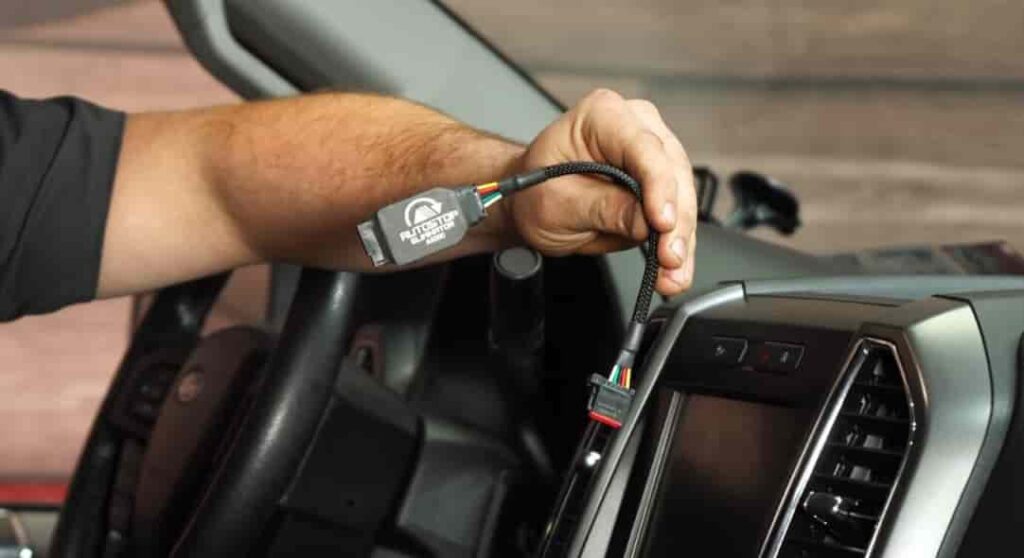
If you want a true long term solution, installing an Auto Start Stop eliminator is the most effective option. This device allows you to permanently turn off Ford Auto Start Stop without changing your driving habits every time you start the car.
The eliminator works by remembering your last setting. When you disable the system once, the device stores that preference. The next time you start the vehicle, it automatically keeps Auto Start Stop turned off. You no longer need to press the button again.
Installation is usually simple. Most devices connect directly to the vehicle’s wiring behind the dashboard or near the control module. Many products are plug and play, which means you do not need to cut wires or perform complex modifications. Basic tools and a few minutes are often enough.
One major advantage of this solution is stability. It does not rely on battery conditions or temporary tricks. It provides a consistent experience every time you drive. The engine will no longer shut off unexpectedly in traffic, which improves comfort and control.
Another benefit is safety for your vehicle systems. High quality eliminators are designed to work with Ford’s electronics without causing errors or warning lights. They simply automate the same action as pressing the disable button.
However, there are a few downsides. You need to spend a small amount of money to purchase the device. Installation, while simple, may feel intimidating if you are not familiar with basic car components.
Overall, this is the best option for most drivers. It solves the core problem and delivers a true permanent experience. If your goal is to completely eliminate the annoyance, this method stands out as the most reliable choice.
Using OBD2 or Coding
If you want deeper control over your vehicle, you can disable the system through OBD2 tools or software coding. This method targets the vehicle’s internal settings instead of using external workarounds.
OBD2 tools connect directly to your car’s onboard diagnostic port. With the right software, you can access hidden configurations and adjust how certain systems behave. Some tools allow you to change the default state of Auto Start Stop or disable related functions entirely.
To use this method, you need an OBD2 adapter and compatible software such as FORScan. After connecting the tool, you access the control modules and locate the Auto Start Stop settings. From there, you can modify parameters based on supported options.
This approach offers more flexibility than other methods. It allows you to customize how your vehicle operates and gives you access to additional features beyond Auto Start Stop. For experienced users, this can be a powerful solution.
However, this method comes with risks. Incorrect changes can affect other vehicle systems. You may trigger warning lights or unexpected behavior if you modify the wrong settings. In some cases, it can also impact your vehicle warranty.
This solution works best for users who understand vehicle electronics and feel comfortable working with diagnostic tools. If you prefer a safer and simpler option, installing an eliminator device remains the better choice.
Does Turning Off Auto Start Stop Affect Your Ford
Many drivers worry about potential damage when they look for how to permanently turn off Ford Auto Start Stop. This concern is understandable, especially when the system connects to core engine and battery functions.
In reality, turning off the system does not harm your engine. The Auto Start Stop feature mainly exists to improve fuel efficiency and reduce emissions. It does not protect the engine in a critical way. Your vehicle can operate normally without it.
In fact, some drivers believe that disabling the system can improve long term comfort. The engine no longer stops and restarts repeatedly in traffic. This can reduce the feeling of delay and create a smoother driving experience.
The battery and starter system are designed to handle frequent restarts. However, constant cycling may still contribute to wear over time. By turning off the system, you may reduce that repeated stress, especially in heavy city driving.
When it comes to warranty, the situation depends on the method you choose. Using the dashboard button has no impact at all. Installing a plug and play eliminator is generally safe, as it does not alter core systems. However, advanced coding or hardware modifications may raise concerns during inspections.
Overall, disabling Auto Start Stop is safe for most drivers when done correctly. The key is to choose a method that matches your comfort level and avoids unnecessary risks.
Best Method Comparison
If you want to choose the right solution, it helps to compare each method based on convenience, cost, and reliability.
The dashboard button is the easiest option. It requires no tools and works instantly. However, it is only temporary and must be used every time you drive.
Battery based workarounds can last longer, but they are inconsistent. They depend on conditions like battery health and electrical load. This makes them less reliable over time.
An Auto Start Stop eliminator offers the best balance. It provides a stable and automatic solution. Once installed, it keeps the system off without any extra effort.
OBD2 or coding methods offer advanced control. They allow deep customization but require technical knowledge. They also carry a higher risk if used incorrectly.
For most drivers, the eliminator stands out as the best choice. It delivers a permanent experience without affecting daily usability.
Conclusion
Finding how to permanently turn off Ford Auto Start Stop is a common goal for many drivers who want a smoother and more predictable driving experience. While Ford does not provide a built in option to disable the system permanently, several effective solutions exist.
Simple methods like using the dashboard button work well for short term needs. Battery based tricks can extend the effect but do not guarantee consistency. More advanced options like OBD2 coding offer flexibility but require technical skills and careful handling.
For most users, installing an Auto Start Stop eliminator remains the most practical and reliable solution. It removes the need for daily interaction and ensures the system stays off every time you start your vehicle.
In the end, the best method depends on your priorities. If you value convenience and long term stability, investing in a dedicated solution makes the most sense.
Have you tried any of these methods on your Ford? Share your experience and help other drivers find the best way to permanently turn off Ford Auto Start Stop.