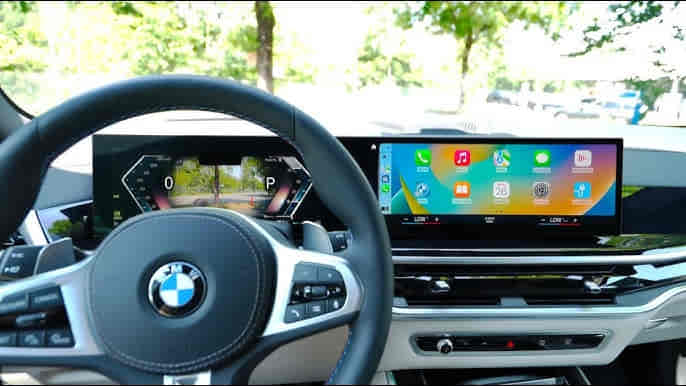
Connecting Apple CarPlay to a BMW allows drivers to access iPhone features such as navigation, music, calls, messages, and Siri through the BMW iDrive infotainment system. The connection process depends on the BMW model year, iDrive version, software configuration, and whether the vehicle supports wireless or wired Apple CarPlay.
BMW iDrive acts as the communication platform between the vehicle and the iPhone. Unlike a standard Bluetooth connection that mainly supports calls and audio streaming, Apple CarPlay integrates compatible iPhone applications directly into the vehicle display and allows drivers to control functions through the touchscreen, iDrive controller, or voice commands.
Modern BMW vehicles use wireless connectivity technology that combines Bluetooth pairing and Wi-Fi communication to provide a seamless CarPlay experience. Earlier BMW models may require a wired connection through the USB interface or may need additional software activation depending on the vehicle configuration.
A successful Apple CarPlay connection requires both the BMW infotainment system and the iPhone to meet compatibility requirements. Problems often occur when software versions are outdated, connection settings are incorrect, or the vehicle does not support the required CarPlay features.
Understanding how BMW iDrive communicates with Apple CarPlay helps owners complete the setup correctly and troubleshoot common connection issues. This guide explains BMW CarPlay compatibility, connection steps, wireless setup, common problems, and solutions to maintain a reliable smartphone integration experience.
Does My BMW Support Apple CarPlay?
A BMW supports Apple CarPlay only when the vehicle has compatible iDrive hardware, software capability, and the required smartphone integration features enabled. Not every BMW model automatically includes Apple CarPlay support because compatibility depends on the production year, infotainment generation, and market configuration.
BMW introduced Apple CarPlay support across different model ranges gradually as the iDrive platform evolved. Newer BMW vehicles equipped with modern iDrive systems generally provide better smartphone integration, including wireless Apple CarPlay, while older models may require software activation or additional hardware support.
The BMW iDrive generation is one of the most important factors that determines CarPlay compatibility. The infotainment system controls communication between the vehicle and the iPhone, meaning the hardware must be capable of handling Apple CarPlay data transmission and display functions.
BMW models equipped with newer infotainment platforms can typically support wireless Apple CarPlay, which allows the iPhone to connect automatically without using a USB cable after the initial setup. Older BMW systems may rely on wired connections or may not support CarPlay without an upgrade.
Software version also affects reliability. An outdated BMW iDrive system or an older iPhone operating system can create connection problems even when the vehicle technically supports Apple CarPlay.
Owners should verify their BMW configuration before attempting setup because compatibility issues can appear similar to connection failures. A vehicle without the required CarPlay capability will not connect successfully regardless of resetting Bluetooth settings or reinstalling the iPhone connection.
For example, a newer BMW X5 equipped with a recent iDrive system may support wireless Apple CarPlay immediately, while an older BMW 3 Series may require checking whether the infotainment system includes the necessary integration feature.
How Do You Connect Apple CarPlay to BMW?
Connecting Apple CarPlay to a BMW requires pairing the iPhone with the BMW iDrive system, enabling the necessary wireless settings, and allowing the vehicle to access compatible iPhone features. The setup process creates a connection between the smartphone and the infotainment system so that applications can appear on the BMW display.
The first step is preparing the iPhone by ensuring Bluetooth, Wi-Fi, and Siri are enabled. Apple CarPlay uses these communication systems to exchange information between the phone and BMW iDrive, especially in wireless configurations.
The BMW iDrive system must then search for available devices and recognize the iPhone as a compatible smartphone. During the pairing process, BMW displays a confirmation request on both the vehicle screen and iPhone, allowing the user to approve the connection and activate Apple CarPlay.
Once the connection is accepted, BMW iDrive loads the CarPlay interface instead of only using traditional Bluetooth audio. The driver can then access supported applications such as Apple Maps, Apple Music, phone calls, and messages directly through the vehicle display.
Permissions are an important part of the setup process. The iPhone must allow notifications, contacts, and Siri access if the user wants to use full CarPlay functionality. Restricting these permissions can make the system appear incomplete even though the connection itself is successful.
After the first successful pairing, compatible BMW vehicles can automatically reconnect when the iPhone enters the vehicle. The system stores the device information and creates a faster connection process during future drives.
For example, a BMW owner who pairs an iPhone correctly with iDrive can start the vehicle and have Apple CarPlay appear automatically, while incorrect Bluetooth-only pairing may result in phone audio working without access to the full CarPlay interface.
Read more: How Much for an Oil Change on a BMW
How Do You Set Up Wireless Apple CarPlay on BMW?
Wireless Apple CarPlay on BMW works by combining Bluetooth pairing with Wi-Fi communication between the iPhone and BMW iDrive system. Unlike traditional Bluetooth audio connections, wireless CarPlay transfers application data, navigation information, and interface controls through a dedicated wireless connection between the smartphone and vehicle.
The first wireless connection requires pairing the iPhone with BMW iDrive. During this process, the vehicle identifies the smartphone through Bluetooth and then establishes a Wi-Fi connection to provide the higher data transfer capacity required for Apple CarPlay functions.
After the initial setup is completed, compatible BMW vehicles can automatically reconnect to the previously paired iPhone when the vehicle starts. This automatic connection improves convenience because drivers do not need to manually select CarPlay every time they enter the vehicle.
Wireless CarPlay depends on several settings working correctly. The iPhone must have Bluetooth, Wi-Fi, and Siri enabled because Apple CarPlay uses these features to communicate with BMW iDrive. If one of these functions is disabled, the connection process may fail or operate incorrectly.
The number of connected devices can also affect wireless CarPlay performance. BMW iDrive stores multiple smartphone connections, but conflicts can occur when several phones attempt to connect at the same time. Selecting the correct primary device helps maintain a stable connection.
Software updates are another important factor. BMW periodically improves infotainment system performance through software updates, while Apple updates iOS to maintain compatibility with connected vehicle systems.
For example, an iPhone that previously connected successfully may stop connecting after a software update if the BMW iDrive system requires a corresponding update or if the stored connection profile becomes corrupted.
Why Is Apple CarPlay Not Working on My BMW?
Apple CarPlay may not work on a BMW because of compatibility limitations, incorrect connection settings, outdated software, Bluetooth conflicts, or problems within the BMW iDrive infotainment system. Since CarPlay depends on communication between multiple systems, a failure in any part of the connection process can prevent normal operation.
One common cause is an incorrect pairing configuration. Many BMW owners accidentally connect their iPhone through Bluetooth only, which enables phone calls and audio streaming but does not activate the full Apple CarPlay interface. The iPhone must be paired specifically as an Apple CarPlay device through BMW iDrive.
Software compatibility problems can also interrupt CarPlay functionality. The iPhone operating system and BMW infotainment software must communicate correctly, and outdated versions can create issues such as failed pairing, random disconnections, or missing CarPlay options.
Stored connection data can become another source of problems. When a BMW and iPhone exchange connection information, both systems save device profiles. If these profiles become outdated or corrupted, deleting the old connection and creating a new pairing may restore normal operation.
Wireless interference can affect wireless CarPlay connections because the system relies on wireless communication channels. Other connected devices, network settings, or communication conflicts may reduce connection stability.
BMW iDrive problems can also create symptoms that appear to be Apple CarPlay failures. A malfunctioning head unit, software error, or communication issue within the infotainment system can prevent the vehicle from recognizing the iPhone correctly.
For example, if Bluetooth audio works but Apple CarPlay does not appear on the BMW screen, the issue is more likely related to CarPlay activation, compatibility, or software configuration rather than a basic Bluetooth failure.
How Do You Fix BMW Apple CarPlay Connection Problems?
Fixing BMW Apple CarPlay connection problems requires checking the iPhone settings, BMW iDrive configuration, software versions, and stored connection data between the two systems. Because Apple CarPlay depends on both Apple and BMW technologies working together, troubleshooting should focus on identifying where the communication process fails.
The first step is usually restarting both the iPhone and BMW iDrive system. Temporary software errors can prevent devices from recognizing each other correctly, and a simple restart can refresh the communication process.
If restarting does not solve the issue, removing the existing connection and pairing the devices again is often effective. BMW iDrive stores smartphone profiles, and outdated connection information can prevent a new CarPlay session from starting correctly. Deleting the iPhone from BMW settings and removing the BMW connection from the iPhone allows both systems to create a new connection profile.
Checking iPhone permissions is also important. Apple CarPlay requires access to features such as Siri, notifications, contacts, and wireless communication. If these permissions are restricted, some CarPlay functions may not appear or may operate incorrectly.
Updating software can resolve compatibility problems. BMW iDrive updates can improve infotainment performance, while newer iOS versions often include improvements for vehicle connectivity. Keeping both systems updated reduces the possibility of connection failures.
If problems continue, resetting BMW iDrive network settings may help restore normal operation. However, persistent failures may indicate a deeper issue involving the infotainment hardware, communication module, or vehicle software.
For example, if an iPhone connects successfully in another BMW but fails consistently in one vehicle, the issue may be related to the BMW infotainment system rather than the smartphone itself.
What Can You Do With Apple CarPlay in a BMW?
Apple CarPlay in a BMW allows drivers to access essential iPhone functions through the BMW iDrive display while keeping smartphone interaction safer and more convenient during driving. The system transforms the vehicle screen into an interface for compatible applications and reduces the need to operate the phone directly.
Navigation is one of the most commonly used CarPlay features. Drivers can access Apple Maps and other supported navigation applications through the BMW display, allowing route guidance, traffic information, and voice instructions without manually handling the iPhone.
Music and audio streaming are another important function. Apple CarPlay allows access to compatible music applications, podcasts, and audio content through BMW speakers while maintaining control through the touchscreen, iDrive controller, or steering wheel controls.
Communication features are also integrated into the system. Drivers can make phone calls, view messages, and use Siri voice commands to interact with contacts without needing to operate the smartphone manually.
Siri provides voice-based control for many CarPlay functions. Drivers can request directions, send messages, make calls, or control music using voice commands, which supports safer interaction while driving.
The available experience depends on the BMW model and software version. Newer BMW vehicles with advanced iDrive systems typically provide a more integrated experience compared with older infotainment platforms.
For example, a BMW driver can use Apple CarPlay to receive navigation guidance from Apple Maps, play music from an iPhone, and respond to messages through Siri while keeping attention focused on the road.
How Can You Keep Apple CarPlay Working Properly on BMW?
Keeping Apple CarPlay working properly on a BMW requires maintaining updated software, managing connected devices, and ensuring both the iPhone and BMW iDrive system operate correctly. Stable connectivity depends on regular attention to the technology systems involved.
Keeping the iPhone updated helps maintain compatibility with Apple CarPlay features. New iOS versions often include improvements related to wireless communication, application performance, and vehicle integration.
BMW software updates also play an important role in infotainment reliability. Updates can improve iDrive performance, fix connection problems, and enhance compatibility with newer smartphone technology.
Managing connected devices helps prevent conflicts. BMW iDrive can store multiple smartphones, but having several devices attempting to connect simultaneously may cause unexpected behavior. Setting the preferred device as the primary connection can improve consistency.
Maintaining proper wireless settings is also important for wireless CarPlay. Bluetooth and Wi-Fi must remain enabled, and battery-saving features that restrict wireless communication may affect automatic connections.
Regularly checking connection behavior can help identify problems early. Frequent disconnections, delayed loading, or missing CarPlay functions may indicate software or configuration issues that should be addressed before they become persistent.
For example, a BMW owner who keeps both the iPhone and iDrive software updated, removes unused device profiles, and maintains correct wireless settings is more likely to experience reliable Apple CarPlay performance.