Seeing your Honda Civic mileage display not showing can be confusing, especially if the rest of the dashboard appears to work normally. Many drivers immediately assume the instrument cluster has failed. However, the actual cause is often much simpler. A hidden odometer screen, incorrect display settings, a weak battery, or a blown fuse can all prevent the mileage from appearing. Understanding the difference between a temporary display issue and a genuine hardware failure is the first step toward an accurate diagnosis.
The mileage display does much more than show the total distance your vehicle has traveled. It helps you monitor maintenance intervals, estimate resale value, track fuel efficiency, and document service history. When the display disappears, it becomes difficult to verify important vehicle information. In some cases, the problem develops gradually with flickering numbers or faded segments. In other situations, the screen suddenly goes blank after a battery replacement or electrical repair.
Fortunately, most mileage display problems follow recognizable patterns. By identifying the symptoms and checking each possible cause in the correct order, you can often avoid replacing expensive components unnecessarily. This guide explains the nine most common reasons why a Honda Civic mileage display not showing issue occurs. It also provides practical troubleshooting steps, repair recommendations, and advice on when professional diagnosis becomes the safest and most cost effective solution.
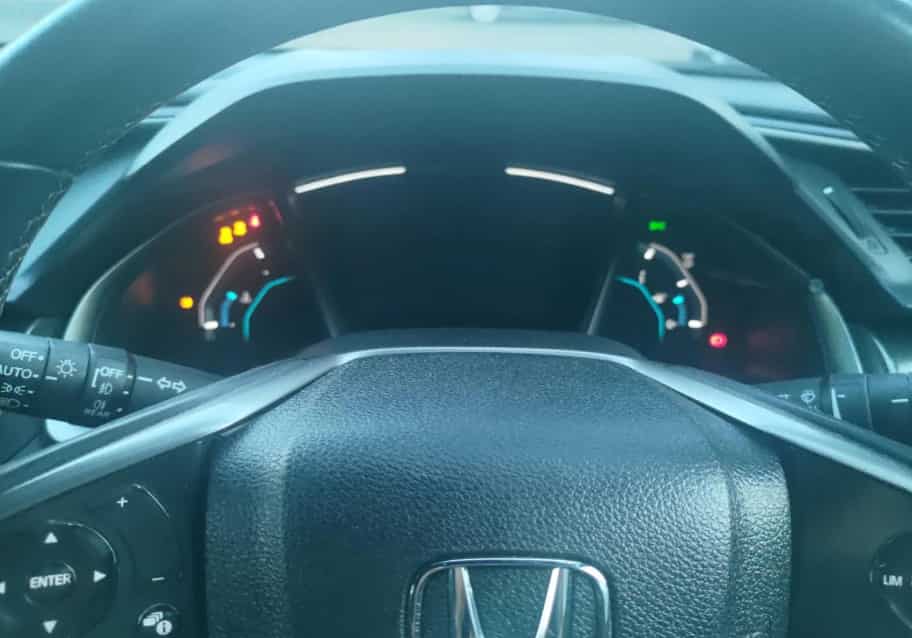
What Does “Mileage Display Not Showing” Mean?
A Honda Civic mileage display not showing issue does not always mean the instrument cluster has failed. In many cases, the problem is much less serious than it appears. The mileage information may be hidden behind another display screen, the trip meter may be frozen, or the dashboard may simply require a basic reset. Identifying exactly what is happening is the first step toward finding the correct solution. Without understanding the symptoms, it is easy to replace parts that are still working properly.
The mileage display is an important part of your Honda Civic because it provides access to the vehicle’s total odometer reading and trip information. Drivers rely on this data to schedule maintenance, monitor fuel consumption, calculate driving distances, and verify the vehicle’s service history. When the display suddenly disappears, many owners worry about expensive instrument cluster repairs. Fortunately, that is not always the case.
There are several ways this problem can appear. Some drivers notice that only the odometer is missing while the rest of the dashboard continues to function normally. Others find that the trip meter no longer updates, even though the total mileage remains accurate. In more serious situations, the entire instrument display becomes blank, making it impossible to view warning lights, fuel level, or vehicle information. Modern Honda Civic models can also display multiple information pages, which means the odometer may simply be hidden behind another menu instead of being damaged.
Understanding which of these situations matches your vehicle will make troubleshooting much easier. Once you identify whether the problem is related to display settings, electrical power, or instrument cluster hardware, you can follow the correct repair process and avoid unnecessary replacement costs.
Quick Checks Before You Start Troubleshooting
Before assuming your Honda Civic mileage display not showing problem requires an expensive repair, perform a few simple checks. Many display issues have straightforward causes. A hidden display screen, incorrect brightness setting, or temporary electrical interruption can all prevent the mileage from appearing. Checking these items first can save time and money.
Start by turning the ignition to the ON position. Wait a few seconds for the instrument panel to complete its startup sequence. Watch the display carefully. If the mileage appears briefly before disappearing, the problem may involve the display settings instead of the instrument cluster.
Next, cycle through every available information screen. Use the steering wheel controls or the Trip button, depending on your Honda Civic model. The dashboard can display fuel economy, remaining range, maintenance information, and other vehicle data. Sometimes the odometer is simply hidden behind another screen.
You should also increase the dashboard brightness to its highest level. A very dim display can look completely blank in bright daylight. If the numbers become visible after adjusting the brightness, the display itself is probably still working.
Think about when the problem first started. Did it appear after a battery replacement, jump start, or electrical repair? If so, inspect the battery terminals and confirm they are clean and secure. Loose or corroded connections can interrupt power to the instrument panel.
Finally, check the rest of the dashboard. Make sure the speedometer, fuel gauge, warning lights, and infotainment system operate normally. If several systems stop working together, the problem likely involves the vehicle’s electrical system rather than the mileage display alone.
These quick inspections help eliminate the simplest causes first. They also make the remaining diagnostic process faster and much more accurate.
The Display Is on the Wrong Information Screen
One of the most common reasons for a Honda Civic mileage display not showing issue is surprisingly simple. The mileage display may not be broken at all. Instead, the instrument panel could be showing a different information screen. Many Honda Civic models include a multifunction display that allows drivers to switch between several types of vehicle information. If another screen is selected, the odometer will disappear until you return to the correct menu.
The digital display can show fuel economy, remaining driving range, outside temperature, maintenance reminders, trip information, and other vehicle data. Because these screens share the same display area, changing the menu can make it appear as though the mileage has stopped working. This situation often happens after someone presses the Trip button or steering wheel controls by accident.
The first step is to cycle through every available display screen. Press the Trip button or use the steering wheel controls, depending on your Honda Civic model. Move through each menu until the odometer appears again. If the mileage returns, the problem is solved and no repair is necessary.
If the display does not respond, inspect the control button carefully. Dirt, wear, or internal damage can prevent the switch from working correctly. A button that sticks or fails to register input may leave the display locked on one screen. In this case, the instrument cluster is usually functioning, but the control mechanism requires attention.
You should also remember that display layouts vary between Honda Civic generations. Older models often use a simple Trip or Select button, while newer models rely on steering wheel controls and digital menus. Reading the owner’s manual can help you locate the correct control for your specific model year.
Always confirm that the mileage screen is not simply hidden before checking fuses, wiring, or replacing the instrument cluster. This quick inspection takes only a few seconds and can prevent unnecessary diagnostic work and repair expenses.
The Instrument Panel Brightness Is Set Too Low
A low brightness setting is another common reason for a Honda Civic mileage display not showing complaint. Many drivers assume the display has failed because they cannot see the mileage clearly. However, the screen may still work normally. It simply becomes too dim to read under certain lighting conditions.
This problem often appears during the daytime. Bright sunlight can make a dim display look completely blank. At night, the mileage may become visible again because the surrounding light is much lower. As a result, the issue can seem intermittent even though the display itself is functioning correctly.
Start by increasing the instrument panel brightness to its highest setting. Most Honda Civic models include a brightness control on the dashboard or within the vehicle settings menu. Adjust the brightness while the headlights are both off and on. Some models use different brightness levels for daytime and nighttime driving, so testing both conditions is important.
After increasing the brightness, look closely at the mileage display. If the numbers become clear, the problem was simply caused by the illumination setting. No additional repair is necessary. If the display remains difficult to read, inspect it from different viewing angles. Faded screens sometimes become visible when viewed from the side, which may indicate an aging LCD panel instead of an incorrect brightness setting.
You should also compare the mileage display with the rest of the instrument panel. If every gauge and indicator appears equally dim, the brightness setting is the most likely cause. On the other hand, if only the mileage display is difficult to read while the other indicators remain bright, the problem may involve the LCD screen or its backlight.
Do not confuse a dim display with a failed display. A brightness adjustment takes less than a minute and costs nothing. Performing this simple check before replacing parts can prevent unnecessary repairs and help you identify the real cause much faster.
The 12 Volt Battery Is Weak or Disconnected
A weak or recently disconnected battery can also cause a Honda Civic mileage display not showing problem. Modern Honda Civic models rely on a stable power supply to operate the instrument cluster and other electronic systems. When battery voltage drops too low, the display may behave unpredictably. The screen can flicker, freeze, reset itself, or remain completely blank.
Many drivers first notice the issue after replacing the battery or jump starting the vehicle. Although the engine starts normally, the instrument cluster may not initialize correctly during startup. Loose battery terminals can produce similar symptoms because they interrupt the electrical connection whenever the vehicle vibrates or hits a bump.
Begin by inspecting the battery terminals. Make sure both connections are clean, tight, and free from corrosion. Even a small amount of corrosion can increase electrical resistance and reduce the voltage reaching the dashboard. If you notice white or green deposits around the terminals, clean them before performing additional diagnostics.
Next, check the condition of the battery itself. An old battery may no longer provide consistent voltage, especially during cold weather or after the vehicle has been parked for several days. If the engine cranks slowly or the headlights appear dim, the battery may need testing. Most auto parts stores can perform a battery test within a few minutes.
Pay attention to other electrical symptoms as well. Slow power windows, intermittent warning lights, or an infotainment system that repeatedly restarts often indicate a power supply problem rather than a failed instrument cluster. When several electrical components behave abnormally at the same time, the battery should become one of your first inspection points.
If the battery and terminals are in good condition, restart the vehicle and monitor the dashboard during the next few drive cycles. Sometimes the electronic systems restore normal operation after receiving a stable power supply. However, if the mileage display remains blank while other electrical issues continue to appear, further diagnosis of the charging system or instrument cluster may be necessary.
A Dashboard or Instrument Cluster Fuse Has Blown
A blown fuse is another common reason for a Honda Civic mileage display not showing issue. Every electrical circuit in your vehicle relies on a fuse for protection. If excessive current flows through the circuit, the fuse breaks the connection to prevent damage to the wiring and electronic components. When this happens, the instrument cluster may lose power and stop displaying the mileage.
The symptoms often depend on which fuse has failed. In some cases, only the mileage display disappears while the rest of the dashboard continues to work. In more serious situations, the entire instrument cluster may become unresponsive. You may also notice that the warning lights, gauges, or other dashboard functions stop working at the same time.
Start by locating the correct fuse box for your Honda Civic. Most models have one fuse panel inside the cabin and another in the engine compartment. Use the owner’s manual or the fuse box cover to identify the fuse that protects the instrument cluster. Removing the wrong fuse can create additional problems, so always confirm the correct location before proceeding.
Once you find the correct fuse, inspect it carefully. A broken metal strip inside the fuse usually indicates that it has blown. If the damage is difficult to see, use a multimeter or fuse tester to confirm whether the fuse still carries electrical continuity. Replace the fuse only with another fuse that has the same amperage rating. Installing a higher rated fuse can damage the electrical system and increase the risk of component failure.
If the replacement fuse blows again shortly after installation, stop replacing fuses and investigate the underlying cause. A repeated fuse failure often points to a short circuit, damaged wiring, or a faulty electrical component. Continuing to install new fuses without diagnosing the problem can lead to more expensive repairs.
Checking the fuse is one of the quickest and least expensive diagnostic steps. Even if the fuse appears normal, completing this inspection helps eliminate a common cause before moving on to more advanced electrical testing.
The Trip or Select Reset Button Is Stuck
A faulty Trip or Select Reset button can also cause a Honda Civic mileage display not showing problem. This small control allows you to switch between the odometer, Trip A, Trip B, fuel economy, and other dashboard information. When the button stops working, you may lose access to the mileage screen even though the instrument cluster continues to function normally.
The problem often develops gradually. At first, the button may respond only after several presses. Over time, it can become completely unresponsive or remain stuck in one position. Dirt, moisture, normal wear, or an internal switch failure can all prevent the button from operating correctly. In some cases, the button feels loose or fails to produce the normal clicking sensation when pressed.
Start by testing the button several times while the ignition is on. Press it gently and observe whether the display changes to another information screen. Avoid pressing the button with excessive force because this can damage the switch or the surrounding trim. If the display never changes, inspect the button for visible signs of dirt or physical damage.
You should also compare the button’s operation with the other dashboard controls. If every other control works correctly but the Trip or Select Reset button does not respond, the switch itself is the most likely cause. On newer Honda Civic models that use steering wheel controls, perform the same test using the menu buttons to determine whether the issue affects only one control or the entire display system.
A stuck button does not always require a complete instrument cluster replacement. In many cases, a technician can repair or replace the faulty switch without installing a new cluster. However, if the switch failure results from internal circuit board damage, additional repairs may be necessary after the instrument cluster is removed and inspected.
Testing the control button is a simple step that many owners overlook. Completing this inspection before replacing expensive electronic components can save both time and repair costs.
A Wiring Connector or Ground Is Loose
A loose wiring connector or poor ground connection can prevent the instrument cluster from working correctly. As a result, you may experience a Honda Civic mileage display not showing problem even though the display itself is not damaged. Electrical connections inside the dashboard must remain stable to deliver power and communication signals. If one of these connections becomes loose, the mileage display may work intermittently or stop working altogether.
The symptoms often change while driving. The mileage may appear after starting the engine but disappear a few minutes later. In some cases, the display returns when the vehicle hits a bump or after the dashboard is lightly pressed. These signs usually indicate an unstable electrical connection rather than a failed LCD screen.
Begin by thinking about any recent repairs or modifications. If you recently installed an aftermarket radio, dash camera, remote starter, or security system, a connector may have been disturbed during the installation. Dashboard panels often need to be removed for these upgrades, increasing the chance of a loose electrical connection.
Moisture can also create electrical problems. Water entering the dashboard through a leaking windshield or damaged weather seal may corrode the wiring terminals over time. Corrosion increases electrical resistance and interrupts communication between the instrument cluster and other control modules. Look for signs of rust, water stains, or green corrosion around accessible connectors.
Ground connections deserve equal attention. Every electrical circuit requires a solid ground to operate correctly. A loose or corroded ground point can produce random display failures, flickering screens, or intermittent warning lights. Because these symptoms often come and go, they are easy to mistake for an instrument cluster failure.
Inspecting dashboard wiring requires patience and care. Pulling on the wiring harness or disconnecting connectors without proper procedures can create additional faults. If you cannot access the wiring safely or the problem continues after a visual inspection, professional electrical testing is the next logical step. A technician can use wiring diagrams and specialized equipment to locate voltage drops, damaged wires, or poor ground connections without replacing unnecessary parts.
The LCD Screen or Backlight Has Failed
If every basic inspection checks out, the Honda Civic mileage display not showing problem may result from a failed LCD screen or backlight. The instrument cluster can still receive power and process information, but the display may no longer show the mileage clearly. This issue becomes more common as the vehicle ages because electronic components gradually wear out after years of daily use.
The symptoms often differ from those caused by electrical problems. The display may appear very faint, show only part of the numbers, or develop dark patches across the screen. Some drivers notice that the mileage is visible only from certain viewing angles. Others find that the display works normally when the vehicle is cold but fades after the dashboard warms up. These signs usually point to a failing LCD panel or backlight rather than a blown fuse or weak battery.
Start by observing the rest of the instrument cluster. If the speedometer, fuel gauge, warning lights, and other indicators continue to operate normally, the problem may affect only the display section. Shine a flashlight across the screen from different angles. If you can barely see the mileage without normal illumination, the backlight may have failed while the LCD continues to function.
Unfortunately, a failed LCD screen rarely has a simple repair. Some instrument clusters allow the display or backlight components to be replaced individually, while others require repair at the circuit board level or complete cluster replacement. The correct solution depends on the model year and the design of the instrument panel.
Before replacing the instrument cluster, verify that power, ground, fuses, and wiring are all working correctly. Skipping these inspections can lead to unnecessary repair costs because a display failure and a power supply problem often produce similar symptoms.
When the LCD screen or backlight reaches the end of its service life, professional repair is usually the most reliable option. A qualified technician can confirm the failure, repair the cluster when possible, and ensure the odometer information remains accurate.
The Instrument Cluster Has an Internal Failure
An internal instrument cluster failure is one of the more serious causes of a Honda Civic mileage display not showing problem. Although it is less common than a blown fuse or weak battery, it can occur after years of normal use. Heat, vibration, aging electronic components, or manufacturing defects may eventually damage the circuit board inside the cluster.
The symptoms often extend beyond the missing mileage display. You may notice that the speedometer or tachometer stops working, warning lights behave unpredictably, or the fuel gauge provides incorrect readings. In some cases, the entire instrument cluster remains blank after starting the engine. These signs usually indicate an internal hardware problem rather than a simple display setting or wiring issue.
Pay attention to when the problem occurs. If the dashboard works normally during one drive but fails completely on the next, the circuit board may have developed an intermittent fault. Some clusters begin working again after the cabin warms up or after the dashboard is lightly tapped. While this may temporarily restore the display, it also suggests that an internal electrical connection has become unreliable.
Diagnosing an instrument cluster failure requires more than a visual inspection. A technician can test the power supply, communication signals, and internal electronics using specialized diagnostic equipment. These tests help confirm whether the cluster has failed or another component is preventing it from operating correctly.
If the instrument cluster requires replacement, keep in mind that the odometer information must remain accurate. In many regions, mileage records are regulated by law. Installing a replacement cluster without proper programming can create incorrect mileage readings and complicate future vehicle sales or registration. Depending on the model year, the replacement unit may need to be programmed so it communicates correctly with the vehicle’s electronic systems.
An internal cluster failure should be considered only after eliminating simpler causes such as incorrect display settings, low battery voltage, blown fuses, faulty switches, and loose wiring. Following this order reduces unnecessary repair costs and improves diagnostic accuracy.
A Software or Communication Error
A software or communication error can also cause a Honda Civic mileage display not showing problem, especially on newer models with advanced electronic systems. Modern Honda Civic vehicles rely on several control modules that constantly exchange information. If one of these modules fails to communicate correctly, the instrument cluster may lose access to the odometer data or stop displaying it altogether.
Unlike a hardware failure, a software issue often appears without any visible damage. The mileage display may disappear after the battery has been disconnected, following an electronic system update, or after an unexpected voltage drop. In some cases, the display returns after restarting the vehicle. In others, the problem continues until the fault is cleared or the affected module is reprogrammed.
Look for additional warning signs before assuming the instrument cluster has failed. You may notice multiple warning lights, error messages, or temporary malfunctions in other electronic features. The infotainment system, steering wheel controls, or driver assistance functions may also behave unexpectedly if the communication network is interrupted.
A professional diagnostic scan is the fastest way to identify this type of problem. Modern scan tools can detect communication faults between control modules and retrieve diagnostic trouble codes that are not visible during a basic inspection. These codes help determine whether the issue involves the instrument cluster, another control module, or the vehicle’s communication network.
If the scan identifies a software related fault, the solution may be as simple as clearing the error codes or updating the affected module. In other cases, a damaged control module or communication circuit may require additional testing and repair. Replacing the instrument cluster without confirming the root cause can waste both time and money.
Software and communication problems are less common than battery, fuse, or wiring issues, but they should not be overlooked. After ruling out the mechanical and electrical causes discussed earlier, electronic diagnostics provide the final step toward identifying the source of the missing mileage display.
How to Fix a Honda Civic Mileage Display That Is Not Showing
After identifying the cause of your Honda Civic mileage display not showing problem, the next step is choosing the correct repair. Some issues require only a few minutes to resolve, while others need professional diagnosis. Starting with the simplest solutions helps you avoid unnecessary expenses and reduces the risk of replacing parts that still work properly.
If the mileage is hidden behind another information screen, cycle through the available dashboard menus using the Trip button or steering wheel controls. Once the odometer appears, no further repair is necessary.
When the display is too dim to read, increase the instrument panel brightness and compare the screen under both daytime and nighttime conditions. A simple brightness adjustment often restores visibility without any additional work.
If the problem started after a battery replacement or jump start, inspect the battery terminals for loose connections or corrosion. A stable power supply is essential for the instrument cluster to operate correctly. Recharging or replacing a weak battery may restore normal dashboard operation.
Next, inspect the instrument cluster fuse. Replace a blown fuse only with one that has the correct amperage rating. If the replacement fuse fails again, stop replacing fuses and diagnose the electrical circuit before continuing.
A faulty Trip or Select Reset button may prevent you from accessing the odometer screen. Test the button carefully and repair or replace it if it no longer responds. This repair is often less expensive than replacing the entire instrument cluster.
If loose wiring or a poor ground connection is responsible, reconnect the affected connector and clean any corroded terminals. Secure electrical connections help prevent intermittent display failures and improve long term reliability.
When the LCD screen, backlight, or instrument cluster has failed internally, professional repair is usually the most practical solution. Depending on the model year, the display may be repairable, or the entire cluster may require replacement and programming.
Finally, if the problem results from a software or communication error, perform a diagnostic scan to retrieve any stored fault codes. Updating the affected control module or correcting the communication fault may restore the mileage display without replacing hardware.
The key to an accurate repair is following a logical diagnostic process. By checking the simplest causes first and progressing to more advanced testing only when necessary, you can save time, reduce repair costs, and restore your Honda Civic mileage display with confidence.
Conclusion
A Honda Civic mileage display not showing problem can be frustrating, but it does not always indicate an expensive repair. In many cases, the solution is much simpler than most drivers expect. The mileage may be hidden behind another information screen, the dashboard brightness may be set too low, or a weak battery may interrupt normal instrument cluster operation. Performing a few basic checks can often restore the display without replacing any parts.
If the simple inspections do not solve the problem, continue with a systematic diagnosis. Check the battery, inspect the fuse, test the Trip or Select Reset button, and examine the wiring connections before considering instrument cluster replacement. Taking these steps in the correct order reduces unnecessary repair costs and helps you identify the real cause more quickly.
For vehicles with LCD failures, internal instrument cluster damage, or software related communication errors, professional diagnosis is usually the safest and most reliable option. An experienced technician can confirm the fault, perform the necessary repairs, and ensure the odometer information remains accurate.
We hope this guide has helped you understand the most common causes of a Honda Civic mileage display not showing issue and the best ways to fix it. If you have experienced a similar problem, share your model year, symptoms, and repair results in the comments below. Your experience may help other Honda Civic owners diagnose the same issue faster. If you found this guide useful, explore our other Honda Civic maintenance and troubleshooting articles to keep your vehicle running safely and reliably.