Owning a Honda Civic means enjoying a vehicle equipped with advanced safety technologies that help make every journey safer and more comfortable. However, seeing the “Drive Carefully Systems Initializing” message on the dashboard can quickly raise concerns, especially if it appears unexpectedly or remains on the screen longer than usual. Many drivers immediately wonder whether the warning indicates a serious mechanical problem, a failure in the Honda Sensing system, or simply a temporary condition that will disappear after a few moments.
In most cases, this message appears because the vehicle’s driver assistance systems are performing a normal initialization process. The front camera, millimeter wave radar, and other electronic components need a short period to communicate with the vehicle’s control modules before features such as Adaptive Cruise Control, Lane Keeping Assist System, and Collision Mitigation Braking System become fully operational. Environmental conditions, battery voltage, software updates, or sensor obstructions can all influence how long this process takes.
Understanding the real meaning behind this warning is important because not every appearance requires immediate repairs. Some situations are completely normal, while others may indicate that one or more Honda Sensing components need inspection or recalibration. This guide explains what the Honda Civic Drive Carefully Systems Initializing message means, why it appears, how to fix it, whether it is safe to continue driving, and when professional diagnosis becomes necessary. By the end of this article, you will know how to identify the underlying cause and restore your Honda Civic’s safety systems with confidence.
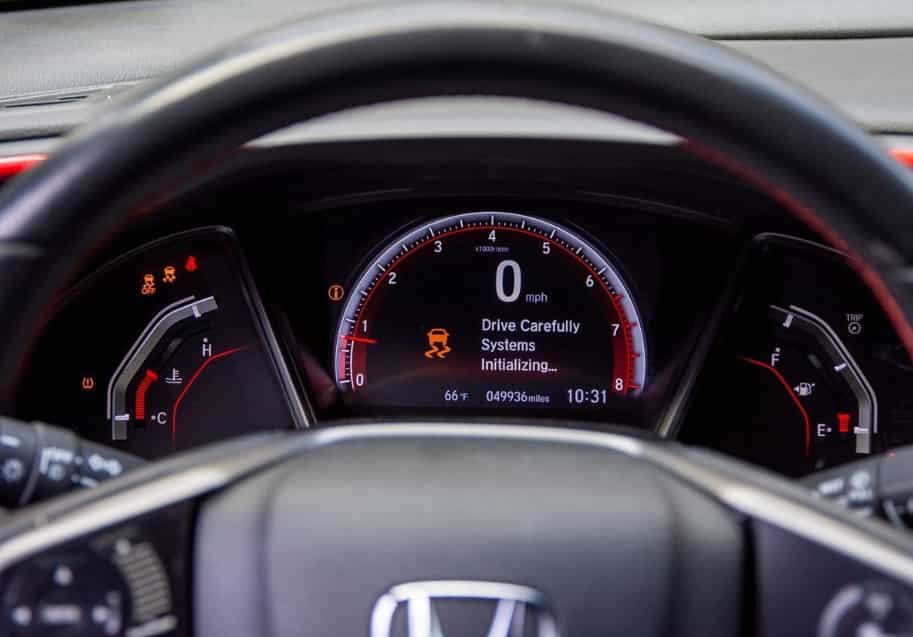
What Does “Drive Carefully Systems Initializing” Mean on a Honda Civic?
The “Drive Carefully Systems Initializing” message means your Honda Civic is preparing its advanced driver assistance systems. In most cases, it does not indicate a serious mechanical problem. Instead, the vehicle is checking whether all electronic components are communicating correctly before enabling important safety features.
Honda Sensing depends on several sensors and control modules. The front camera, millimeter wave radar, and onboard computer constantly exchange information. This data allows the vehicle to support features such as Adaptive Cruise Control, Lane Keeping Assist System, Collision Mitigation Braking System, and Road Departure Mitigation. If one component is not ready, the system temporarily limits these functions. This prevents inaccurate readings and improves overall driving safety.
The warning often appears for only a short time. It is common after starting the engine. It may also appear after replacing the battery or reconnecting the battery terminals. Cold temperatures, heavy rain, or excessive heat can also delay the initialization process. Once every sensor finishes its self check, the message usually disappears without any action from the driver.
However, the warning should not stay on for an extended period. If it remains visible while driving, the system may have detected an issue. A dirty windshield camera, a blocked radar sensor, low battery voltage, outdated software, or a sensor that needs calibration can all interrupt the initialization process. As a result, some Honda Sensing features may remain unavailable until the problem is resolved.
Understanding this message helps you respond correctly. A brief warning is usually normal. A persistent warning deserves further inspection. Knowing the difference can save time, reduce unnecessary repairs, and ensure your Honda Civic continues to deliver the safety performance it was designed to provide.
Common Causes of the “Drive Carefully Systems Initializing” Message
The Honda Civic Drive Carefully Systems Initializing message can appear for several reasons. In many cases, it is part of the normal startup process. However, it may also indicate that one or more Honda Sensing components need attention. Understanding the possible causes helps you decide whether the warning is temporary or requires further inspection.
A normal system initialization is the most common reason. After the engine starts, the vehicle checks the front camera, radar sensor, and electronic control units. During this process, Honda Sensing features remain unavailable until every component finishes communicating. The message usually disappears within a few seconds.
Battery condition is another important factor. A weak battery or a recently replaced battery can interrupt communication between control modules. This may delay system initialization and trigger the warning. Once the battery voltage becomes stable, the message often clears automatically.
Sensor visibility also affects system performance. Dirt, snow, ice, or heavy rain can block the front camera or millimeter wave radar. When either sensor cannot detect the road correctly, Honda Sensing limits its functions until visibility improves. Cleaning the windshield and front grille often resolves this issue.
Software problems or sensor calibration issues can also trigger the warning. A failed software update, a recent windshield replacement, or minor front end damage may prevent the system from completing its checks. In these situations, a diagnostic scan or professional calibration may be required.
Most causes are not serious and can be resolved without major repairs. However, if the message appears frequently or remains on while driving, the vehicle should be inspected. Early diagnosis helps restore Honda Sensing and ensures every safety feature operates as intended.
How to Fix the “Drive Carefully Systems Initializing” Message
If the Honda Civic Drive Carefully Systems Initializing message appears, there is no need to panic. In many situations, the warning clears on its own after the system completes its startup process. Waiting a few minutes or driving a short distance is often enough for Honda Sensing to become fully operational.
If the message does not disappear, inspect the front camera and radar sensor. Make sure the windshield is clean and free from dirt, ice, fog, or heavy condensation. Also, check the front grille for mud, leaves, or other debris that could block the radar. Even a small obstruction can prevent the sensors from collecting accurate data.
Next, check the condition of the battery. A weak battery or unstable voltage can interrupt communication between the vehicle’s electronic control modules. If the battery is old or has recently been replaced, test its voltage and ensure the terminals are clean and securely connected. Replacing a failing battery often resolves repeated initialization warnings.
Restarting the vehicle is another simple step. Turn off the engine, wait a few minutes, and start the car again. This allows the control modules to reset and repeat the initialization process. If the warning was caused by a temporary communication error, it may disappear after the restart.
If the message continues to appear, the vehicle may require a diagnostic scan. A professional scan tool can read stored fault codes and identify problems affecting Honda Sensing. In some cases, the front camera or radar sensor must be recalibrated after a windshield replacement, collision repair, or suspension work. Accurate calibration restores communication between the sensors and the control modules.
Persistent warnings should never be ignored. Although the vehicle may still be drivable, some driver assistance features may remain disabled. Fixing the problem early helps restore the full functionality of Honda Sensing and ensures your Honda Civic continues to provide the safety and convenience it was designed to deliver.
Can You Continue Driving Safely?
In most situations, you can continue driving when the Honda Civic Drive Carefully Systems Initializing message appears. The warning does not usually indicate a serious engine or transmission problem. Instead, it means the Honda Sensing system is not fully ready to provide driver assistance. Your vehicle will continue to operate normally, but some safety features may be temporarily unavailable.
If the message appears immediately after starting the engine and disappears within a few minutes, there is usually no cause for concern. The front camera, radar sensor, and control modules simply need more time to complete their system checks. Once initialization is complete, Honda Sensing returns to normal operation without any action from the driver.
However, you should pay closer attention if the warning remains on while driving. Features such as Adaptive Cruise Control, Lane Keeping Assist System, and Collision Mitigation Braking System may not function until the issue is resolved. This means you cannot rely on these technologies to assist with braking, steering, or maintaining a safe following distance.
Driving without Honda Sensing is still possible because the vehicle’s core systems remain fully functional. You should simply drive more carefully and rely on your own judgment. Maintain a safe distance from other vehicles, avoid distractions, and adjust your speed to match road and weather conditions. These habits become even more important when electronic safety features are temporarily unavailable.
If the warning continues to appear every time you drive or is accompanied by other warning lights, schedule a professional inspection as soon as possible. A technician can identify the underlying cause before it develops into a more expensive repair. Resolving the issue early also ensures that every Honda Sensing feature continues to protect you and your passengers as designed.
Repair Costs and How to Prevent the Warning
The cost of fixing the Honda Civic Drive Carefully Systems Initializing message depends on the underlying cause. Some problems require no repair at all. For example, the warning may disappear after the system finishes initializing or after the front camera and radar sensor are cleaned. In these situations, you do not need to replace any parts.
If the problem is caused by a weak battery, replacing the battery is often the only repair needed. A software update may also solve communication errors between the control modules. These repairs are usually less expensive than replacing sensors or electronic components.
More complex issues can increase repair costs. A damaged front camera or radar sensor may need recalibration or replacement. Calibration is commonly required after a windshield replacement, front end repair, or collision. Although the procedure may take only a short time, it requires specialized equipment to ensure the sensors operate accurately. Ignoring this step can reduce the performance of Honda Sensing and cause the warning to return.
Preventive maintenance is the best way to avoid future problems. Keep the windshield clean and remove dirt, snow, or ice that may block the front camera. Regularly inspect the front grille to ensure the radar sensor remains unobstructed. Maintaining a healthy battery also helps prevent communication errors between electronic systems. In addition, install recommended software updates whenever they become available and have the sensors inspected after any repair involving the windshield or front suspension.
Most importantly, never ignore a warning that appears repeatedly. Early diagnosis can prevent minor issues from becoming expensive repairs. By keeping the sensors clean, maintaining the electrical system, and following the recommended service schedule, you can reduce the risk of seeing the Honda Civic Drive Carefully Systems Initializing message and keep every Honda Sensing feature working as intended.
Frequently Asked Questions
Why does the “Drive Carefully Systems Initializing” message appear every time I start my Honda Civic?
The message may appear briefly each time you start the engine because the Honda Sensing system is performing a self check. This is a normal process that allows the front camera, radar sensor, and electronic control modules to communicate before driver assistance features become active. If the message disappears within a short time, there is usually nothing to worry about.
Can I drive with the “Drive Carefully Systems Initializing” warning on?
Yes, you can usually continue driving safely. The warning does not mean the engine or brakes have failed. However, some Honda Sensing features may be temporarily unavailable. You should drive carefully and avoid relying on systems such as Adaptive Cruise Control or Lane Keeping Assist until the warning disappears.
Will disconnecting the battery clear the warning?
Disconnecting the battery is not a recommended solution. In some cases, it may temporarily reset the system. However, it does not fix the underlying problem. If the warning is caused by a faulty sensor, low battery voltage, or a calibration issue, the message will likely return.
Does a windshield replacement affect Honda Sensing?
Yes. The front camera is mounted behind the windshield and must remain precisely aligned. After replacing the windshield, the camera often requires professional calibration. Without proper calibration, the Honda Civic Drive Carefully Systems Initializing message may continue to appear, and several safety features may not operate correctly.
When should I visit a Honda service center?
You should schedule an inspection if the warning remains on for an extended period, appears during every drive, or is accompanied by other warning lights. A certified technician can perform a diagnostic scan, identify stored fault codes, and determine whether the problem involves the battery, sensors, software, or another electronic component.
Conclusion
The Honda Civic Drive Carefully Systems Initializing message is usually a reminder that the vehicle’s advanced safety systems are completing their startup process. In many cases, the warning disappears within a few moments and does not indicate a serious problem. However, a message that remains on or appears repeatedly should never be ignored because it may point to sensor obstructions, battery issues, software errors, or calibration problems.
Understanding the most common causes helps you respond with confidence. Simple actions such as cleaning the windshield, checking the battery, or restarting the vehicle may resolve the issue. If the warning persists, a professional diagnosis can identify the exact cause and restore the full functionality of Honda Sensing.
Regular maintenance is the best way to prevent future warnings. Keeping the sensors clean, maintaining a healthy battery, and following Honda’s recommended service schedule will help ensure every driver assistance feature performs as expected. By addressing problems early, you can improve vehicle safety, avoid unnecessary repair costs, and enjoy a more reliable driving experience every time you get behind the wheel.