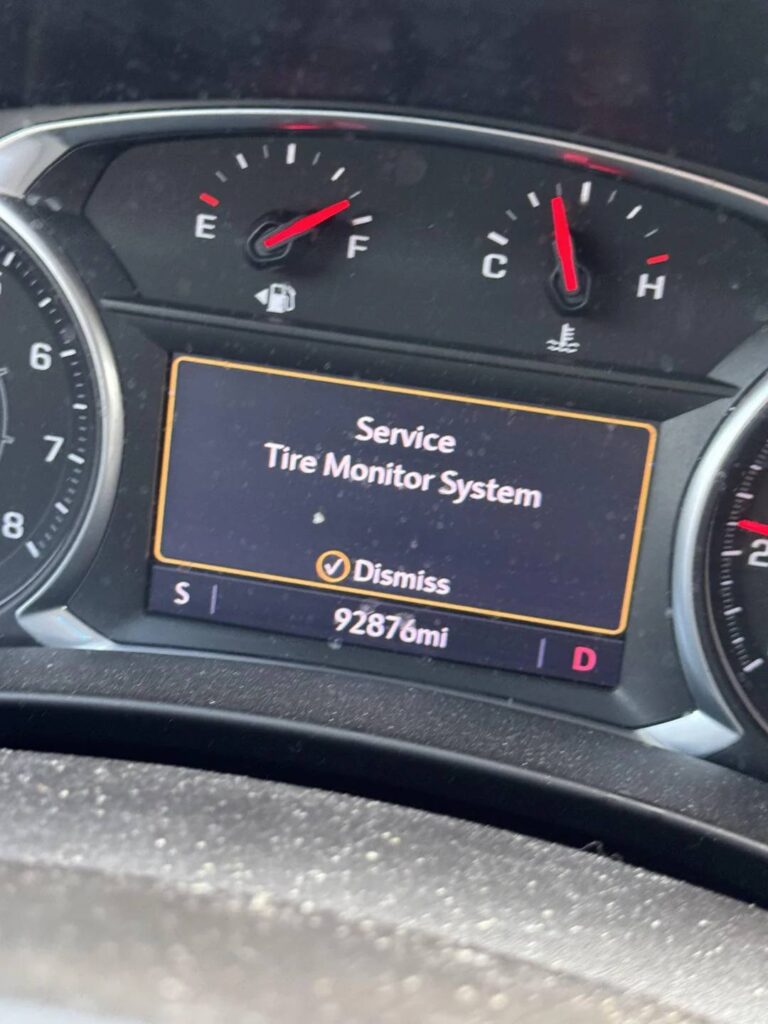
Have you started your GMC only to see the “Service Tire Monitor System” warning appear on the dashboard? If so, you’re not alone. This message is one of the most common tire-related alerts reported by GMC owners, often causing confusion about whether it’s safe to continue driving or if immediate repairs are necessary.
Unlike a standard low tire pressure warning, the GMC Service Tire Monitor System message usually indicates that there is a problem with the Tire Pressure Monitoring System (TPMS) itself rather than the air pressure in your tires. A failing TPMS sensor, a depleted sensor battery, communication issues, or a malfunctioning control module can all trigger this warning. Ignoring the problem may prevent your vehicle from accurately monitoring tire pressure, increasing the risk of driving with underinflated or overinflated tires.
The good news is that this warning is often straightforward to diagnose and repair. In many cases, the solution may be as simple as relearning the TPMS sensors after a tire rotation, while other situations may require replacing a faulty sensor or repairing the monitoring system.
In this comprehensive guide, you’ll learn exactly what the GMC Service Tire Monitor System warning means, the most common causes behind it, how to diagnose the issue step by step, available repair options, estimated repair costs, and practical tips to prevent the warning from returning. Whether you drive a GMC Sierra, Yukon, Terrain, Acadia, or Canyon, this guide will help you understand the issue and restore your TPMS to proper working condition.
What Does “Service Tire Monitor System” Mean on a GMC?
The GMC Service Tire Monitor System message means that your vehicle has detected a problem with the system responsible for monitoring tire pressure. This does not always mean that one of your tires is low on air. Instead, it often indicates that the vehicle cannot receive accurate information from one or more tire pressure sensors.
Each wheel typically contains a TPMS sensor that measures tire pressure and sends the information to the vehicle. The readings may appear on the Driver Information Center, depending on the GMC model and trim level. When a sensor stops transmitting, reports an incorrect value, or cannot communicate with the vehicle, the system may display the service warning.
This message should not be ignored. Even when the tires look properly inflated, a malfunctioning monitoring system may fail to warn you about a future pressure loss. That creates a serious inconvenience for drivers who depend on the dashboard display to identify tire problems early.
The warning is commonly seen in GMC Sierra, Yukon, Terrain, Acadia, and Canyon models. It may appear after a tire rotation, wheel replacement, sensor replacement, battery issue, or sudden temperature change. In some cases, the message disappears after the system completes a successful relearn. In others, a technician may need to scan the TPMS system and identify the failed sensor.
What Is TPMS?
TPMS stands for Tire Pressure Monitoring System. Its purpose is to alert the driver when tire pressure falls below a safe level or when the monitoring system itself develops a fault.
Most modern GMC vehicles use a direct TPMS system. This design relies on individual sensors installed inside the wheels. Each sensor monitors tire pressure and transmits data wirelessly to the vehicle.
Proper tire pressure is important because it affects:
- Vehicle stability
- Braking performance
- Tire wear
- Fuel efficiency
- Steering response
- Overall driving safety
A working TPMS helps drivers detect pressure loss before it becomes obvious. However, TPMS should not replace regular manual pressure checks. Sensors may fail, batteries may expire, and readings may not update immediately after inflation.
Low Tire Pressure Warning vs. Service Tire Monitor System
A low tire pressure warning and a Service Tire Monitor System message are related, but they do not mean the same thing.
A low tire pressure warning normally means that at least one tire does not have enough air. The system is still working, and it has detected a pressure level below the recommended threshold.
A service warning usually means that the monitoring system cannot operate correctly. The problem may involve a sensor, receiver, control module, valve stem, or communication error.
For example, if the dashboard shows that the left rear tire has 25 psi while the other tires are properly inflated, the problem is likely low tire pressure. If one tire displays no reading or the system shows a service message, the sensor may not be communicating.
Always check all four tires with an accurate pressure gauge before assuming that the warning is caused only by an electronic fault.
Common Causes of the GMC Service Tire Monitor System Warning
Several problems can trigger the GMC Service Tire Monitor System warning. Some are simple to correct, while others require sensor replacement or professional diagnosis.
Dead TPMS Sensor Battery
A dead sensor battery is one of the most common causes of the warning. TPMS sensors contain small internal batteries that are designed to last for several years. These batteries are usually sealed inside the sensor and cannot be replaced separately.
When the battery becomes weak, the sensor may transmit intermittently. The dashboard may show a tire pressure reading one moment and no reading later. Eventually, the sensor may stop communicating completely.
In most cases, the entire TPMS sensor must be replaced when its battery fails. If one original sensor has reached the end of its service life, the remaining sensors may also fail soon because they were installed at the same time.
Faulty or Damaged TPMS Sensor
A TPMS sensor can be damaged during tire removal, wheel repair, or installation. Road impacts, corrosion, moisture, and improper handling may also cause sensor failure.
The sensor sits inside the wheel near the valve stem, making it vulnerable during tire service. If a technician uses equipment incorrectly, the sensor body may crack or break.
A damaged sensor may send incorrect readings, lose communication, or trigger a persistent warning. Replacing the sensor and completing the correct relearn procedure usually resolves the issue.
Damaged Valve Stem
The valve stem and TPMS sensor are often connected. Corrosion, cracking, or physical damage to the valve stem can cause air leaks and sensor problems.
Metal valve stems may corrode when exposed to road salt, moisture, or incompatible valve caps. Rubber stems may deteriorate over time. A leaking valve stem can create both a low pressure warning and a service message.
Do not apply excessive force when removing a stuck valve cap. Twisting the stem may damage the sensor assembly or create a slow air leak.
Tire Rotation Without TPMS Relearn
After a tire rotation, the vehicle may need to relearn the position of each sensor. Without this process, the dashboard may display the wrong tire location or fail to identify a sensor correctly.
For example, the system may report that the front left tire is low even though the actual problem is at the rear. In some situations, an incomplete relearn may trigger the service warning.
The relearn procedure varies by model year and GMC vehicle. Some vehicles learn sensor positions automatically, while others require a TPMS activation tool.
New Wheels or Sensors Without Programming
Aftermarket wheels or replacement sensors may not communicate with the vehicle unless they are compatible and properly programmed.
Universal TPMS sensors often need to be configured before installation. A sensor with the wrong frequency or protocol may not work, even if it physically fits the wheel.
This issue is common after installing winter wheels, custom rims, or a second set of tires. The vehicle may continue showing the service message until the sensors are programmed and relearned.
Communication Interference
TPMS sensors transmit information wirelessly. Radio frequency interference may temporarily interrupt communication between a sensor and the vehicle.
Nearby electronic devices, charging equipment, communication towers, or certain accessories may occasionally contribute to signal problems. However, repeated communication failure is more likely to indicate a weak sensor battery or faulty component.
Weak Vehicle Battery
A weak or recently disconnected vehicle battery may cause temporary warning messages. Low voltage can affect control modules and interrupt normal system communication.
If the GMC Service Tire Monitor System message appears together with other electrical warnings, the vehicle battery and charging system should be tested.
TPMS Receiver or Control Module Problem
The receiver or control module processes signals from the tire pressure sensors. If this component fails, the vehicle may lose communication with several or all sensors at once.
Module failure is less common than sensor failure, but it can be more expensive to diagnose and repair. Wiring damage, water intrusion, connector corrosion, or software issues may produce similar symptoms.
Symptoms of a Faulty GMC Tire Monitor System
A faulty TPMS system may produce several symptoms. Recognizing these signs can help determine whether you are dealing with low tire pressure, a failed sensor, or a larger electrical problem.
Service Tire Monitor System Message
The most obvious symptom is the message displayed on the dashboard or Driver Information Center. It may remain visible every time the vehicle starts or appear intermittently while driving.
An intermittent message often suggests a weak sensor battery or inconsistent communication.
Flashing TPMS Warning Light
A TPMS light that flashes for a period and then remains illuminated commonly indicates a system malfunction rather than simple low tire pressure.
A steady warning light may indicate that one or more tires are underinflated. However, warning behavior can vary by vehicle, so checking the owner’s manual and measuring tire pressure is still important.
Missing Tire Pressure Reading
One tire may show no pressure value, blank lines, or an error symbol on the display. This often means the vehicle is not receiving a signal from that wheel.
If all four readings disappear at once, the issue may involve the receiver, control module, wiring, or vehicle battery.
Incorrect Pressure Readings
A failing sensor may report a value that does not match the actual tire pressure. For example, the dashboard may show 28 psi while a reliable gauge shows 35 psi.
Small differences can occur because tire pressure changes with temperature and gauges vary slightly. Large or repeated differences should be investigated.
Warning Appears After Tire Service
The message may appear immediately after a tire rotation, wheel replacement, alignment, or new tire installation. This usually points to an incomplete relearn, damaged sensor, incompatible replacement sensor, or installation error.
Contact the repair shop if the warning was not present before the tire service.
Warning Returns After Reset
A reset may temporarily clear the message, but it will return if the underlying problem remains. Resetting the system does not repair a dead battery, broken sensor, air leak, or damaged module.
Repeatedly clearing the warning without diagnosing the cause can leave the driver without reliable tire pressure monitoring.
Pressure Changes Without Explanation
If one tire reading changes rapidly while the vehicle is parked or driving under stable conditions, inspect the tire for a puncture or valve stem leak. The problem may be real rather than electronic.
Never assume unusual readings are caused by a bad sensor until the actual tire pressure has been checked manually.
Is It Safe to Drive with a GMC Service Tire Monitor System Warning?
Seeing the GMC Service Tire Monitor System warning on your dashboard can be unsettling, especially if you are unsure whether it is safe to continue driving. The answer depends on the actual condition of your tires and the reason the warning appeared.
If the warning is caused by a failed TPMS sensor but all four tires are properly inflated, you can usually continue driving for a short period. The vehicle itself is still mechanically safe to operate. However, you will no longer receive accurate tire pressure alerts, meaning you could miss a slow leak or sudden pressure loss while driving.
Before continuing your trip, use a reliable tire pressure gauge to check the pressure in every tire, including the spare if your vehicle is equipped with a monitored spare tire. Compare the readings with the manufacturer’s recommended pressure, which is typically listed on the driver’s side door jamb.
You should stop driving immediately if you notice any of the following conditions:
- One or more tires are significantly underinflated.
- The steering feels unstable or pulls to one side.
- You hear unusual tire noise or feel excessive vibration.
- A tire appears visibly damaged or is losing air rapidly.
- The TPMS warning appears together with other critical dashboard warnings.
Driving with low tire pressure can reduce traction, increase braking distance, and cause uneven tire wear. It also creates excessive heat inside the tire, increasing the risk of a blowout at highway speeds. Even if the TPMS warning is caused by an electronic fault, you should never assume your tire pressure is safe without checking it manually.
Ignoring the warning for weeks or months is also not recommended. A properly functioning TPMS is an important safety feature designed to alert drivers before tire pressure reaches dangerous levels. Repairing the system promptly helps maintain optimal handling, fuel efficiency, and tire life.
How to Diagnose the GMC Service Tire Monitor System
Diagnosing a TPMS problem does not always require replacing parts immediately. A systematic inspection can often identify the exact cause and prevent unnecessary repairs.
Step 1: Check Tire Pressure
Begin by measuring the pressure in all four tires using a quality digital or analog tire pressure gauge. Do not rely solely on the dashboard readings because they may be inaccurate if a sensor has failed.
Inflate or deflate each tire to the manufacturer’s recommended pressure. Keep in mind that tire pressure changes with ambient temperature, so measurements should be taken when the tires are cold whenever possible.
Step 2: Perform a Visual Inspection
Inspect every tire and wheel carefully for signs of damage.
Look for:
- Nails or screws embedded in the tread.
- Sidewall cuts or bulges.
- Bent or cracked wheels.
- Damaged valve stems.
- Corrosion around metal valve stems.
- Slow air leaks.
Physical damage to the wheel or valve stem can affect both the tire and the TPMS sensor.
Step 3: Check the Dashboard Readings
Many newer GMC models allow you to view the pressure reading for each tire through the Driver Information Center.
Pay attention to symptoms such as:
- Missing pressure readings.
- One tire displaying unrealistic pressure.
- Pressure values that do not change after inflation.
- Sensors reporting the wrong tire location.
These clues often indicate which sensor requires further inspection.
Step 4: Scan the TPMS System
Use a professional diagnostic scanner capable of reading TPMS data.
A scan tool can reveal valuable information, including:
- Sensor identification numbers.
- Battery condition.
- Internal sensor faults.
- Signal strength.
- Communication errors.
- Stored diagnostic trouble codes.
This step greatly reduces guesswork and helps determine whether the problem lies with the sensor, receiver, or control module.
Step 5: Test Individual Sensors
A TPMS activation tool can wake up each sensor and verify that it is transmitting correctly.
If one sensor fails to respond while the others communicate normally, it is likely defective and should be replaced.
If multiple sensors fail simultaneously, the issue may involve the TPMS receiver, body control module, wiring harness, or vehicle battery rather than the sensors themselves.
Step 6: Determine Whether a TPMS Relearn Is Needed
If the warning appeared after tire rotation, wheel replacement, or sensor installation, the system may simply need a relearn procedure.
Many repair shops can complete this process within a few minutes using a TPMS programming tool.
Completing the correct relearn procedure often restores normal operation without replacing any components.
How to Fix the GMC Service Tire Monitor System
Once the cause has been identified, the appropriate repair can be performed. The required solution depends on whether the issue involves tire pressure, sensors, programming, or electronic components.
Replace a Faulty TPMS Sensor
The most common repair is replacing a failed TPMS sensor.
Sensors typically last between seven and ten years before their internal batteries become depleted. Because the battery is permanently sealed inside the sensor, replacing the entire unit is the only long term solution.
After installing a new sensor, the system must usually be programmed and relearned before the vehicle can recognize it.
Perform a TPMS Relearn
A TPMS relearn synchronizes the sensor locations with the vehicle.
This procedure is commonly required after:
- Tire rotation.
- Wheel replacement.
- Sensor replacement.
- TPMS programming.
- Body control module replacement.
Depending on the GMC model, the relearn may be automatic, initiated through the Driver Information Center, or completed with a TPMS activation tool.
Repair or Replace a Damaged Valve Stem
If the valve stem is leaking or corroded, replacing it may restore proper sensor operation.
Whenever new TPMS sensors are installed, many technicians also replace the service kit, which includes seals, valve cores, retaining nuts, and grommets. These inexpensive components help prevent future air leaks.
Program Replacement Sensors
Aftermarket TPMS sensors often require programming before installation.
If the replacement sensor has not been configured correctly, the vehicle may continue displaying the service warning even though the sensor is physically installed.
Programming ensures that the sensor transmits on the correct frequency and uses the proper communication protocol for your GMC model.
Repair Wiring or Replace the TPMS Receiver
Although less common, damaged wiring or a faulty receiver module can interrupt communication with all sensors.
Technicians typically inspect electrical connectors for corrosion, loose terminals, broken wires, or moisture intrusion before replacing expensive electronic components.
If the receiver module has failed, replacement may require programming with factory diagnostic equipment.
Update Vehicle Software
Some GMC vehicles may benefit from updated control module software if known TPMS communication issues have been identified by the manufacturer.
A dealership or qualified repair facility can check whether software updates are available for your specific model year.
After any repair is completed, verify that all tire pressure readings appear correctly on the dashboard and confirm that the GMC Service Tire Monitor System warning has been cleared. A final road test is recommended to ensure the TPMS communicates consistently under normal driving conditions.
How to Reset the GMC Service Tire Monitor System
Resetting the GMC Service Tire Monitor System is often the final step after repairing the underlying problem. Keep in mind that resetting the warning alone will not fix a defective sensor, damaged wiring, or a dead TPMS battery. The system must first be operating correctly before the warning can be permanently cleared.
The reset procedure varies depending on the GMC model, model year, and TPMS configuration. Some vehicles automatically recognize the repaired system after driving, while others require a manual relearn procedure.
Method 1: Verify Tire Pressure
Start by checking the air pressure in all four tires.
Adjust each tire to the pressure recommended by GMC. The recommended pressure is listed on the driver’s side door jamb rather than the maximum pressure printed on the tire sidewall.
After adjusting the pressure, drive the vehicle for approximately 10 to 20 minutes at speeds above 20 mph. Some GMC models will automatically update the TPMS readings during normal driving.
If the warning disappears, no additional reset procedure is necessary.
Method 2: Use the Driver Information Center
Many newer GMC vehicles allow the TPMS relearn process to be initiated through the Driver Information Center.
Turn the ignition to the ON position without starting the engine.
Navigate through the vehicle settings until you find the Tire Pressure or TPMS menu.
Select the relearn option if it is available.
The horn may sound once, indicating that the vehicle has entered relearn mode.
The sensors must then be activated in the correct order, beginning with the left front tire, followed by the right front, right rear, and finally the left rear tire.
Once all sensors have been recognized, the horn will sound twice to confirm that the relearn process has been completed successfully.
Method 3: Use a TPMS Relearn Tool
Many GMC vehicles require a TPMS activation tool to complete the relearn procedure.
The technician places the activation tool near the valve stem of each tire and activates the sensor in the correct sequence.
The vehicle stores the identification code and location of each sensor.
Professional repair shops usually complete this procedure in less than ten minutes.
Method 4: Automatic Relearn
Certain GMC models support automatic relearning.
After correcting the tire pressure or replacing a sensor, simply drive the vehicle for several miles at normal road speeds.
If the system successfully communicates with all sensors, the warning message will clear automatically.
Always consult the owner’s manual because automatic relearn capability varies by model year.
What If the Warning Does Not Reset?
If the warning remains after performing the correct reset procedure, additional diagnosis is necessary.
Possible causes include:
- A replacement sensor that has not been programmed.
- A defective TPMS sensor.
- An incorrect relearn sequence.
- A damaged TPMS receiver.
- Wiring or communication problems.
- A Body Control Module fault.
Repeatedly clearing the warning without correcting the actual problem will only cause the message to return.
TPMS Relearn Procedures by GMC Model
Although the basic principles are similar across the GMC lineup, the relearn procedure differs depending on the vehicle. Understanding your specific model can save time and prevent unnecessary repairs.
GMC Sierra
The GMC Sierra is one of the most common vehicles to display the Service Tire Monitor System warning.
Most Sierra models enter relearn mode through the Driver Information Center or by using a compatible scan tool.
The sensors must be activated in this order:
- Left Front
- Right Front
- Right Rear
- Left Rear
A horn chirp confirms each successfully learned sensor.
Most recent Sierra models require a TPMS activation tool for reliable relearning.
GMC Yukon
The Yukon uses a similar TPMS architecture to the Sierra.
After replacing sensors or rotating tires, the relearn procedure should be completed using a TPMS programming tool.
Failure to complete the relearn process may result in incorrect tire pressure locations appearing on the dashboard.
GMC Terrain
Many Terrain models support automatic relearning after tire pressure correction.
However, if new sensors have been installed, manual programming may still be required.
Always verify that each tire displays an accurate pressure reading before assuming the repair has been completed successfully.
GMC Acadia
The Acadia often requires both the Driver Information Center and a TPMS activation tool.
Because several model years use different TPMS software, following the owner’s manual or factory service information is recommended.
Incorrect programming can prevent the system from recognizing newly installed sensors.
GMC Canyon
The Canyon follows procedures similar to the Sierra.
After tire service, technicians typically place the vehicle into relearn mode and activate each wheel sensor individually.
The process is relatively quick and usually restores normal TPMS operation immediately.
Quick Reference Table
| GMC Model | Typical Relearn Method | Activation Tool Required |
|---|---|---|
| Sierra | Driver Information Center plus sensor activation | Usually Yes |
| Yukon | Manual relearn with TPMS tool | Yes |
| Terrain | Automatic or manual depending on model year | Sometimes |
| Acadia | Driver Information Center plus TPMS tool | Usually Yes |
| Canyon | Manual relearn | Usually Yes |
Regardless of the model you own, always complete the relearn procedure after replacing TPMS sensors, installing new wheels, or rotating tires. Skipping this step is one of the most common reasons the warning message remains on the dashboard after service.
GMC Service Tire Monitor System Repair Costs
Repair costs vary depending on the exact cause of the warning, labor rates in your area, and whether genuine GMC parts or aftermarket components are used.
The table below provides average repair costs in the United States.
| Repair Service | Estimated Cost |
|---|---|
| TPMS Diagnostic Inspection | $50 to $150 |
| Replace One TPMS Sensor | $40 to $100 for the sensor |
| TPMS Sensor Installation | $20 to $50 per wheel |
| TPMS Programming | $20 to $80 |
| TPMS Relearn Procedure | $15 to $50 |
| Valve Stem Service Kit | $5 to $20 |
| TPMS Receiver Replacement | $150 to $400 |
| Body Control Module Diagnosis | $100 to $300 |
If multiple sensors are original and more than seven years old, replacing all four sensors at the same time may be more cost effective. Since the batteries inside each sensor age at a similar rate, replacing them together reduces the likelihood of repeated service visits over the next few years.
Choosing high quality replacement sensors is also important. Genuine OEM sensors generally provide the best compatibility and reliability, while premium aftermarket sensors can offer excellent performance when properly programmed. Extremely inexpensive universal sensors may save money initially but can lead to communication issues, programming failures, or shorter service life.
If you are already replacing tires, ask the repair shop about TPMS service packages. Combining tire installation with sensor replacement or relearning often reduces labor costs because the tires are already removed from the wheels.
How to Prevent TPMS Problems
Although some TPMS issues are unavoidable as components age, regular maintenance can significantly reduce the likelihood of seeing the GMC Service Tire Monitor System warning. Taking a few preventive measures can also extend the life of your tire pressure sensors and improve overall driving safety.
Check Tire Pressure Regularly
Do not rely solely on the Tire Pressure Monitoring System. While TPMS is an excellent safety feature, it is designed to alert you after tire pressure falls below a certain threshold. It does not replace routine inspections.
Use a quality tire pressure gauge to check all four tires at least once a month and before long road trips. Tire pressure should always be measured when the tires are cold for the most accurate reading.
Maintaining the correct tire pressure provides several benefits:
- Improved fuel efficiency
- Better vehicle handling
- Shorter braking distances
- More even tire wear
- Longer tire life
- Reduced risk of tire failure
Perform a TPMS Relearn After Tire Service
Whenever tires are rotated, replaced, or removed from the wheels, verify whether your GMC requires a TPMS relearn procedure.
Skipping this step can cause incorrect tire locations, missing pressure readings, or a persistent Service Tire Monitor System warning.
Even if the warning does not appear immediately, completing the relearn procedure ensures the system accurately identifies each wheel.
Replace Aging TPMS Sensors Proactively
Most TPMS sensors last between seven and ten years before their internal batteries become depleted.
If your vehicle is approaching this age and the tires are already being replaced, consider installing new TPMS sensors at the same time.
Replacing all four sensors during scheduled tire service often saves labor costs and reduces the chance of future sensor failures occurring one at a time.
Use High Quality Replacement Parts
When replacing TPMS sensors, choose OEM components or reputable aftermarket brands designed specifically for your GMC model.
Low quality sensors may have inconsistent signal strength, shorter battery life, or compatibility issues that trigger repeated warning messages.
Professional programming is equally important, as even a high quality sensor will not function correctly if it has not been configured for your vehicle.
Inspect Valve Stems During Tire Service
Valve stems should always be inspected whenever tires are serviced.
Look for:
- Corrosion
- Cracks
- Bent valve stems
- Damaged seals
- Air leaks
Replacing inexpensive valve stem service kits during routine maintenance helps prevent future leaks and protects the TPMS sensor assembly.
Protect Wheels From Impact Damage
Driving over potholes, curbs, or road debris at high speed can damage both wheels and TPMS sensors.
If your vehicle experiences a significant impact, inspect the tires and wheels as soon as possible. Even if there is no visible damage, the sensor inside the wheel may have been affected.
Keep Your Vehicle Battery Healthy
The TPMS communicates with several electronic control modules throughout the vehicle.
A weak battery or charging system problem can occasionally interfere with sensor communication and trigger unexpected warning messages.
Have the battery and charging system tested periodically, especially if the battery is more than three years old.
Schedule Regular Tire Inspections
Routine inspections by qualified technicians can identify slow leaks, uneven tread wear, damaged wheels, and aging TPMS components before they become major problems.
Preventive maintenance is almost always less expensive than emergency repairs and helps ensure your GMC remains safe and reliable.
Frequently Asked Questions
Why does my GMC say Service Tire Monitor System?
This message indicates that the Tire Pressure Monitoring System has detected a malfunction. The issue is usually related to a faulty TPMS sensor, a depleted sensor battery, communication failure, or a problem with the TPMS control module rather than low tire pressure itself.
Can I drive with the Service Tire Monitor System warning?
Yes, in many cases you can continue driving if all tires are properly inflated and the vehicle handles normally. However, because the TPMS may not accurately monitor tire pressure, you should manually check all tires as soon as possible and schedule repairs without unnecessary delay.
What is the difference between a low tire pressure warning and a Service Tire Monitor System warning?
A low tire pressure warning means the TPMS is working correctly and has detected one or more underinflated tires.
A Service Tire Monitor System warning means the TPMS itself cannot function properly because of a sensor or system fault.
How long do GMC TPMS sensors last?
Most factory TPMS sensors have an expected lifespan of seven to ten years. Their internal batteries eventually wear out and cannot be replaced separately, making complete sensor replacement necessary.
Can cold weather trigger the warning?
Yes. Cold temperatures naturally reduce tire pressure and may also expose weak TPMS sensor batteries that function normally during warmer weather.
If the warning appears after a significant temperature drop, check tire pressure first before assuming a sensor has failed.
Will disconnecting the battery reset the TPMS?
Disconnecting the vehicle battery is generally not an effective repair.
Although it may temporarily clear some dashboard messages, the TPMS warning will usually return if the underlying fault has not been corrected.
Do I need to replace all four TPMS sensors?
Not necessarily.
If only one sensor has failed, replacing that sensor is often sufficient.
However, if all sensors are close to the end of their expected lifespan, replacing the entire set may reduce future repair costs and minimize repeated service visits.
Can I replace a TPMS sensor myself?
Replacing the sensor requires removing the tire from the wheel, installing the new sensor correctly, inflating and balancing the tire, programming the sensor if necessary, and performing a TPMS relearn.
Most vehicle owners find that professional installation is the safest and most reliable option.
How much does it cost to fix the GMC Service Tire Monitor System?
The total cost depends on the specific problem.
Simple relearn procedures may cost less than $50, while replacing a TPMS receiver or multiple sensors can cost several hundred dollars.
A proper diagnosis is the best way to avoid replacing parts unnecessarily.
How often should I check my tire pressure?
Even with a fully functional TPMS, tire pressure should be checked at least once every month and before any long trip.
Regular inspections improve safety, maximize tire life, and help prevent unexpected warning messages.
Conclusion
The GMC Service Tire Monitor System warning should never be ignored, even if your vehicle appears to drive normally. While the message often results from a failed TPMS sensor or an expired sensor battery, it can also indicate communication issues, damaged components, or the need for a TPMS relearn after tire service.
Understanding the difference between a low tire pressure warning and a system malfunction is the first step toward solving the problem. By checking tire pressure manually, inspecting the condition of your tires and valve stems, scanning the TPMS for diagnostic trouble codes, and following the appropriate repair procedures, you can quickly restore the system to proper operation.
Routine maintenance also plays a critical role in preventing future TPMS issues. Regular tire pressure checks, timely sensor replacement, proper relearn procedures after tire service, and the use of high quality replacement parts can significantly reduce the risk of recurring warnings while improving vehicle safety and tire performance.
Whether you own a GMC Sierra, Yukon, Terrain, Acadia, Canyon, or another GMC model, keeping your Tire Pressure Monitoring System in good working condition ensures that you receive accurate pressure alerts whenever they matter most. If the GMC Service Tire Monitor System message remains after basic troubleshooting, consult a qualified technician for a complete diagnosis. Addressing the issue early can help prevent more expensive repairs, extend tire life, and provide greater confidence every time you get behind the wheel.