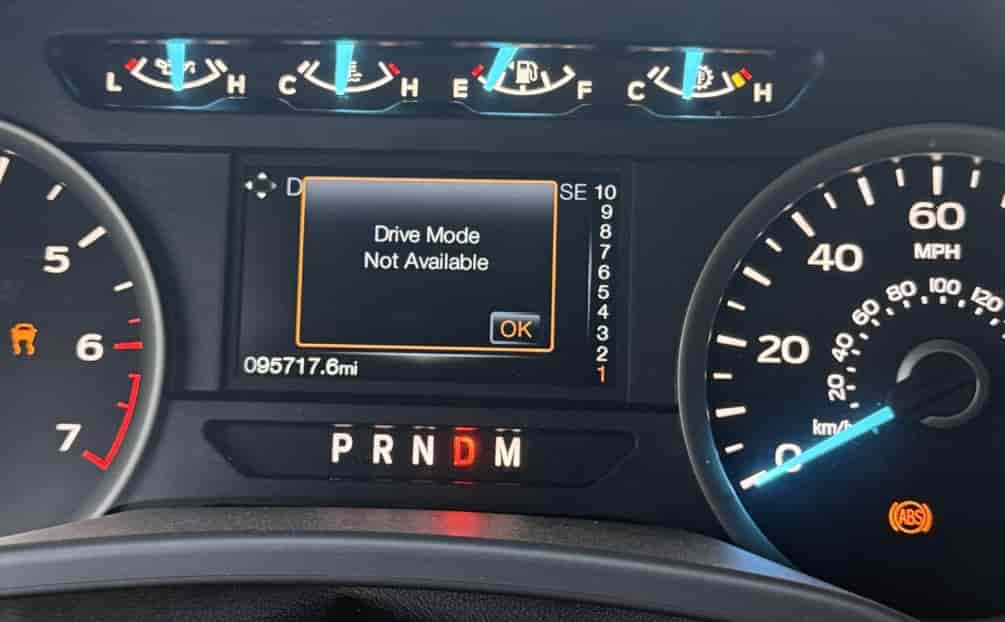
Have you ever turned on your Ford F150 and seen the message “Drive Mode Not Available” on your dashboard? This issue can confuse drivers and make them worry about safety and performance. Drive mode helps your truck perform better in different conditions, whether you are towing, driving off-road, or cruising on highways. When it becomes unavailable, handling, fuel efficiency, and your overall driving experience can suffer.
In this guide, we will explain the main reasons why the “Ford F150 Drive Mode Not Available” message appears. You will learn how to identify software glitches, spot faulty sensors, and update your vehicle’s system to prevent future problems. We also provide practical tips to maintain your F150’s drive mode, helping you stay safe and enjoy optimal performance every time you drive.
Whether you are a long-time Ford owner or new to the F150, this guide will help you understand the issue, take quick action, and prevent it from happening again. By following these steps, you can regain full control of your truck and enjoy the drive without interruptions.
Contents
- Common Causes of “Ford F150 Drive Mode Not Available”
- Step-by-Step Fixes for Ford F150 Drive Mode Not Available
- Tips to Prevent Drive Mode Issues in the Future
- Step-by-Step Fixes for Ford F150 Drive Mode Not Available
- Tips to Prevent Drive Mode Issues in the Future
- FAQ Section – Ford F150 Drive Mode Not Available
- Conclusion
Common Causes of “Ford F150 Drive Mode Not Available”
One of the most common reasons for the “Ford F150 Drive Mode Not Available” message is a software glitch. The vehicle’s system may fail to recognize the selected drive mode due to outdated firmware or minor bugs. Updating the truck’s software usually resolves this problem and restores normal operation. Another frequent cause is a faulty sensor. Drive mode relies on several sensors that monitor wheel speed, traction, and engine performance. If any sensor malfunctions, the system cannot engage the selected mode and displays the warning message. Checking sensors regularly can prevent this issue.
Electrical problems also contribute to the drive mode error. Loose wiring or a weak battery can disrupt communication between the drive mode module and the main control unit. Ensuring connections are secure and the battery is in good condition can reduce the risk of this error. Some older Ford F150 models may experience temporary drive mode failure after extreme weather conditions. Exposure to very high or low temperatures can affect electronic components, leading to the “Drive Mode Not Available” alert. Finally, hardware issues in the drive mode control module itself can trigger this warning. If the module fails, the truck cannot switch modes properly. In such cases, a professional diagnostic at a Ford service center is recommended to replace or repair the faulty component.
Understanding these causes allows owners to act quickly. Identifying whether the problem comes from software, sensors, electrical issues, or hardware helps you choose the right solution and avoid prolonged downtime. By addressing the root cause promptly, you can maintain your F150’s performance and enjoy safe, reliable driving.
Step-by-Step Fixes for Ford F150 Drive Mode Not Available
If you see the “Ford F150 Drive Mode Not Available” message, following a clear step-by-step approach can help you resolve the issue quickly. The first step is to restart your truck. Turning the engine off, waiting a few minutes, and then restarting can reset minor software glitches and may restore drive mode functionality. If the message persists, the next step is to check the vehicle’s software. Ensure your F150 has the latest firmware updates. Updating the system can fix bugs that prevent drive mode from engaging.
The third step is to inspect the sensors. Look for loose connections or damaged wiring that may cause the system to misread data. Sensors related to traction control, wheel speed, and the engine are critical for proper drive mode operation. If you identify a faulty sensor, replacing it often resolves the problem. Electrical issues such as a weak battery or corroded terminals should also be checked. Ensuring the battery is fully charged and all connections are secure can prevent communication errors with the drive mode module.
For older F150 models or persistent errors, extreme weather may affect electronic components. If your truck has been exposed to very high or low temperatures, letting it return to normal operating conditions may temporarily restore drive mode. Finally, if these steps do not solve the issue, a professional diagnostic at a Ford service center is recommended. Technicians can identify hardware failures in the drive mode module and replace or repair components as needed.
Following these steps allows you to address the root cause efficiently and restore full drive mode functionality. Acting promptly ensures your F150 performs safely and reliably under all driving conditions.
Tips to Prevent Drive Mode Issues in the Future
Preventing the “Ford F150 Drive Mode Not Available” message is easier than fixing it after it occurs. Regular maintenance plays a key role in avoiding this problem. Checking sensors, wiring, and battery health during routine service ensures that the drive mode system operates correctly. Keeping your vehicle’s software up to date is equally important. Ford regularly releases firmware updates that fix bugs and improve system stability, so applying updates promptly can prevent errors.
Monitoring the truck for early warning signs can also help. Pay attention to unusual messages on the dashboard, inconsistent drive mode performance, or warning lights. Addressing these issues quickly often stops minor problems from becoming major repairs. Avoid exposing your F150 to extreme temperatures for long periods whenever possible. If you park in direct sunlight during hot days or leave the vehicle in freezing conditions, electronic components can be affected temporarily.
Using a professional diagnostic tool periodically can provide insights into your drive mode system’s health. Tools like OBD2 scanners allow you to detect sensor or module issues early, saving time and money. Finally, if you experience repeated errors, consult a certified Ford technician. They can provide advice, repairs, or parts replacement to maintain optimal drive mode performance.
By following these preventive tips, you can reduce the likelihood of encountering the “Ford F150 Drive Mode Not Available” message. Regular care, timely updates, and early detection keep your truck running safely and efficiently, allowing you to enjoy every drive without interruptions.
Step-by-Step Fixes for Ford F150 Drive Mode Not Available
If you see the “Ford F150 Drive Mode Not Available” message, following a structured approach helps resolve the issue efficiently. First, restart your truck. Turn off the engine, wait a few minutes, and restart. This simple step can reset minor software glitches and may restore drive mode functionality.
Next, check your vehicle’s software. Ensure your F150 has the latest firmware updates. Updating the system fixes bugs and improves overall performance.
Inspect the sensors carefully. Drive mode depends on several sensors monitoring traction, wheel speed, and engine performance. Look for loose connections, damaged wires, or faulty sensors. Replacing any malfunctioning sensor often resolves the problem quickly.
Electrical issues also play a role. A weak battery, corroded terminals, or loose connections can disrupt communication between the drive mode module and the main control unit. Ensure the battery is fully charged, connections are secure, and terminals are clean.
Extreme weather can affect older models. Exposure to very high or low temperatures may temporarily impact electronic components. Allow your truck to return to normal operating conditions if necessary.
Finally, if all steps fail, consult a certified Ford technician. Professionals can diagnose hardware issues in the drive mode module and replace or repair components as needed.
Quick Checklist for Fixes:
- Restart the truck and engine
- Update vehicle software/firmware
- Inspect sensors and wiring
- Check battery health and connections
- Allow recovery from extreme weather
- Consult a certified Ford technician if persistent
Following these steps restores drive mode and prevents further downtime, ensuring your truck remains safe and reliable.
Tips to Prevent Drive Mode Issues in the Future
Preventing the “Ford F150 Drive Mode Not Available” message is easier than fixing it. Regular maintenance ensures sensors, wiring, and battery health remain optimal. Keep your truck’s software updated to fix bugs and enhance system stability.
Monitor for early warning signs such as inconsistent drive mode performance, unusual dashboard messages, or warning lights. Addressing minor issues promptly can prevent expensive repairs. Avoid long exposure to extreme temperatures. Electronic components can be temporarily affected during very hot or cold conditions.
Using professional diagnostic tools can help. OBD2 scanners detect sensor or module issues early, saving both time and money.
Tips to Maintain Drive Mode:
- Schedule regular maintenance and check sensors
- Apply software updates promptly
- Watch for early warning signs on the dashboard
- Avoid extreme temperature exposure
- Use professional diagnostic tools periodically
- Consult certified technicians for repeated errors
Following these preventive tips reduces the likelihood of encountering the “Ford F150 Drive Mode Not Available” message and ensures safe, reliable driving.
FAQ Section – Ford F150 Drive Mode Not Available
Q1: How long does it take to fix Ford F150 drive mode?
A1: Minor software or sensor issues can be fixed within 30–60 minutes. Hardware problems may require professional repair and take longer.
Q2: Can I drive with drive mode not available?
A2: Yes, your F150 is drivable in default mode, but towing, off-road, or traction performance may be affected.
Q3: Do I need a Ford technician to fix drive mode errors?
A3: Simple software resets and sensor checks can be done at home. Persistent or hardware-related issues require certified technician assistance.
Conclusion
The “Ford F150 Drive Mode Not Available” message can be alarming, but understanding its causes and solutions helps you act quickly. Most issues result from software glitches, faulty sensors, electrical problems, extreme temperatures, or hardware failures in the drive mode module. Identifying the root cause allows you to choose the right fix, whether it is updating the software, checking sensors, securing electrical connections, or seeking professional assistance.
Following step-by-step fixes can restore drive mode functionality and ensure your truck operates safely. Preventive measures, including regular maintenance, firmware updates, monitoring warning signs, and using diagnostic tools, reduce the likelihood of future errors. Addressing minor issues early often prevents costly repairs and keeps your F150 performing at its best.
By taking these steps, you can enjoy reliable performance, optimal handling, and safe driving in all conditions. If the problem persists despite your efforts, consulting a certified Ford technician is the safest option. Understanding and maintaining your vehicle’s drive mode system ensures that the “Ford F150 Drive Mode Not Available” message does not disrupt your driving experience and keeps your truck ready for any road or task.