Did you just replace your Ford battery but something still feels off? Maybe your start stop system is no longer working, or your vehicle seems to drain battery faster than expected. These are common issues many Ford owners face, especially after installing a new battery. The problem is not always the battery itself, but how the car understands it.
Modern Ford vehicles rely on a smart system called the Battery Management System, often referred to as BMS. This system continuously monitors battery performance, charging cycles, and energy consumption. However, after replacing the battery, the system still operates based on old data unless it is properly reset. This mismatch can lead to reduced battery efficiency, warning lights, and even long term damage.
That is where a proper Ford BMS reset becomes essential. It allows the system to recalibrate and adapt to the new battery, ensuring optimal performance and longevity. In this complete guide, you will learn exactly how to perform a Ford BMS reset step by step for all models. You will also understand when to reset it, what mistakes to avoid, and how to keep your battery running at its best.
Contents
- What Is Ford BMS Reset and How Does It Work?
- When Do You Need a Ford BMS Reset?
- Ford Models That Require a BMS Reset
- Ford BMS Reset Methods Overview
- How to Perform Ford BMS Reset Manually
- How to Reset Ford BMS Using an OBD Diagnostic Tool
- Common Mistakes When Resetting Ford BMS
- What Happens If You Do Not Reset Ford BMS?
- Tips to Extend Ford Battery Life
- Conclusion
What Is Ford BMS Reset and How Does It Work?
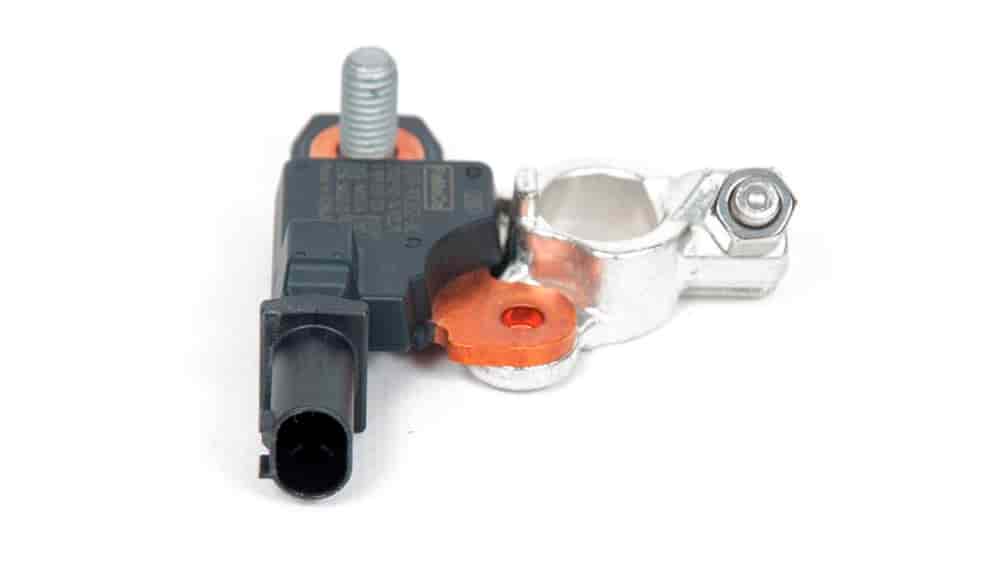
To fully understand why a Ford BMS reset is important, you first need to know how the system behind it operates. Ford vehicles are equipped with a Battery Management System that continuously monitors the condition of the battery. It tracks key parameters such as voltage levels, temperature, and state of charge to ensure the battery performs efficiently under different driving conditions.
Over time, the system learns the behavior of the battery. It builds a history based on usage patterns, charging cycles, and aging characteristics. This allows the vehicle to optimize alternator output and manage electrical loads more intelligently. However, this learning process becomes a problem when a new battery is installed.
When you replace the battery without performing a Ford BMS reset, the system still assumes the old battery is in place. As a result, it may undercharge or overcharge the new battery. This can lead to reduced battery life, inconsistent performance, and even unexpected electrical issues. In some cases, features like auto start stop may stop working altogether.
A Ford BMS reset essentially clears the old data and forces the system to relearn the new battery from scratch. It recalibrates charging strategies and ensures that the vehicle treats the battery correctly. This simple procedure plays a crucial role in maintaining battery health and avoiding unnecessary replacement costs.
Understanding this concept helps you see that a Ford BMS reset is not just a technical step. It is a necessary action to protect your investment and keep your vehicle running smoothly.
When Do You Need a Ford BMS Reset?
Knowing when to perform a Ford BMS reset is just as important as knowing how to do it. Many drivers only realize the need after experiencing performance issues, but in reality, there are clear situations where resetting the system is absolutely necessary.
The most critical moment is right after replacing the battery. Whenever you install a new battery in your Ford vehicle, the system still holds data from the old one. Without a proper Ford BMS reset, the car will continue to apply outdated charging patterns, which can shorten the lifespan of your new battery and reduce its efficiency from the very beginning.
Another common scenario is when the auto start stop function stops working unexpectedly. This feature depends heavily on accurate battery data. If the system detects incorrect values, it may disable the function entirely to protect the vehicle. A reset often restores normal operation.
You should also consider a Ford BMS reset if you notice warning lights related to the battery or electrical system. These alerts can appear even when the battery is new, simply because the system has not been recalibrated. Ignoring these signals can lead to more serious electrical issues over time.
In addition, after repairing or modifying any part of the electrical system, a reset may be required. Changes in components can affect how the system interprets battery performance, making recalibration essential.
Recognizing these situations early helps you avoid hidden problems, unexpected breakdowns, and unnecessary expenses. A timely Ford BMS reset ensures your vehicle continues to operate reliably and efficiently.
Ford Models That Require a BMS Reset
If you are wondering whether your vehicle needs a Ford BMS reset, the short answer is very likely yes. Most modern Ford vehicles are equipped with a Battery Management System, especially models produced in the last decade. This system is now a standard feature designed to improve fuel efficiency, support advanced electronics, and extend battery life.
Popular models such as the Ford Ranger, Ford Everest, and Ford Focus all use a BMS to control and optimize battery performance. The same applies to vehicles like the Ford Escape and Ford Transit, which rely on stable electrical systems for both daily driving and heavy duty usage. In these models, failing to perform a Ford BMS reset after replacing the battery can quickly lead to inconsistent behavior and reduced efficiency.
Even within the same model, different production years may have slightly different reset procedures. However, the core principle remains the same. The system must relearn the condition of the new battery to function correctly. This is particularly important for vehicles with start stop technology, as they depend heavily on accurate battery data.
It is also worth noting that older Ford models without advanced electronics may not require a BMS reset. However, if your vehicle includes features like intelligent charging or energy management, a reset is almost always necessary after battery replacement.
Understanding whether your specific model requires a Ford BMS reset helps you avoid guesswork and ensures you take the right steps at the right time. This small action can make a significant difference in maintaining long term vehicle performance.
Ford BMS Reset Methods Overview
Before performing a Ford BMS reset, it is important to understand the different methods available. Depending on your vehicle model and the tools you have, you can choose between a manual reset or using a diagnostic tool. Each method has its own advantages, and selecting the right one can save you time and prevent errors.
The manual method is the most accessible option for most drivers. It does not require any special equipment and can be performed using a sequence of actions with the ignition, high beam, and brake pedal. This approach is popular because it is quick and free. However, it may not work on every Ford model, especially newer vehicles with more advanced electronic systems. In some cases, the sequence must be followed very precisely, or the reset will fail.
On the other hand, using an OBD diagnostic tool provides a more accurate and reliable way to perform a Ford BMS reset. This method involves connecting a scanner to the vehicle’s OBD port and selecting the appropriate reset function. It allows direct communication with the vehicle’s system, ensuring that the reset process is completed correctly. This is often the preferred option for technicians and experienced users.
While the manual method is convenient, the diagnostic tool method offers greater consistency and is recommended if you want to avoid potential issues. Understanding both approaches helps you choose the best solution based on your situation, your vehicle model, and your level of experience.
How to Perform Ford BMS Reset Manually
If you want a quick and cost effective way to perform a Ford BMS reset, the manual method is often the first option to try. It does not require any special tools, but it does require you to follow each step carefully. Even a small mistake in timing or sequence can prevent the reset from working.
Start by turning the ignition to the ON position without starting the engine. This step powers up the electrical system while keeping the engine off. Once the ignition is on, you need to flash the high beam headlights five times in a row. Make sure you do this at a steady pace, not too fast and not too slow.
Next, press the brake pedal three times. Again, consistency matters here. After completing this sequence, watch the dashboard closely. If the Ford BMS reset is successful, the battery indicator light will begin to flash. This blinking signal confirms that the system has entered reset mode and is recalibrating.
Once the light stops flashing, the process is complete. At this point, the system has cleared old battery data and is ready to learn from the new battery. You can now start the engine and use the vehicle as normal.
It is important to understand that this manual Ford BMS reset method does not work on every model. Some newer vehicles may require a diagnostic tool instead. If the battery light does not flash after multiple attempts, do not keep repeating the process endlessly. This is usually a sign that your vehicle does not support the manual method.
Taking your time and following the steps precisely will give you the best chance of success. This simple procedure can help restore proper battery performance without the need for professional equipment.
How to Reset Ford BMS Using an OBD Diagnostic Tool
If the manual method does not work or you want a more reliable solution, using an OBD diagnostic tool is the best way to perform a Ford BMS reset. This method communicates directly with the vehicle’s system, ensuring that the reset is completed accurately without relying on timing or sequences.
To begin, locate the OBD port in your vehicle. It is usually found under the dashboard near the driver’s seat. Plug in your diagnostic scanner and turn the ignition to the ON position without starting the engine. Once the tool powers up, navigate through the menu to select your vehicle model and access the battery or body control module section.
Within the system menu, look for an option related to battery reset, BMS reset, or battery monitoring system reset. Select this function and follow the instructions displayed on the screen. In most cases, the process only takes a few seconds to complete. The tool will confirm when the Ford BMS reset has been successfully performed.
One of the biggest advantages of using an OBD tool is precision. It eliminates guesswork and ensures the system is properly recalibrated. This is especially important for newer Ford models with more complex electronics, where manual methods may not be supported at all.
However, this method does require access to a compatible scanner. If you do not own one, you may need to visit a garage or service center. While this involves a small cost, it can save you from long term issues such as battery damage or electrical faults.
Choosing the OBD method gives you confidence that your Ford BMS reset is done correctly, helping your vehicle maintain stable performance and extend battery life.
Common Mistakes When Resetting Ford BMS
Even though performing a Ford BMS reset is not overly complicated, many drivers still make critical mistakes that can lead to poor results or ongoing issues. Understanding these common errors will help you avoid unnecessary frustration and protect your battery investment.
One of the most frequent mistakes is skipping the reset entirely after replacing the battery. Many people assume that installing a new battery is enough, but without a proper Ford BMS reset, the system continues to operate based on old data. This often results in incorrect charging behavior, which can shorten the lifespan of the new battery.
Another common issue is performing the manual reset incorrectly. The sequence of turning the ignition on, flashing the high beams, and pressing the brake pedal must be followed precisely. If the timing is off or the steps are done out of order, the system will not recognize the reset command. Some drivers repeat the process multiple times without realizing that their vehicle may not support the manual method at all.
Using incompatible or low quality diagnostic tools is also a problem. Not all OBD scanners support Ford specific functions like BMS reset. Attempting to use the wrong tool can lead to incomplete resets or no response from the system. This creates confusion and may cause users to think there is a deeper issue with the vehicle.
Another overlooked mistake is ignoring the condition of the new battery itself. A Ford BMS reset cannot fix a defective or low quality battery. If the battery is weak or not suitable for the vehicle, problems will continue even after a successful reset.
Avoiding these mistakes ensures that your Ford BMS reset is effective and that your vehicle operates as expected. Paying attention to detail during this process can save you both time and money in the long run.
What Happens If You Do Not Reset Ford BMS?
Skipping a Ford BMS reset may seem harmless at first, but it can lead to a series of hidden problems that gradually affect your vehicle’s performance. Many drivers only notice the impact after experiencing repeated battery issues or unexpected electrical behavior.
One of the most immediate consequences is improper charging. Since the system still uses data from the old battery, it may undercharge or overcharge the new one. This imbalance reduces efficiency and can significantly shorten the lifespan of the battery. Instead of lasting several years, the battery may start to degrade much earlier than expected.
Another common issue is the failure of the auto start stop system. This feature depends on accurate battery data to function properly. If the system detects inconsistencies, it may disable the feature entirely as a protective measure. This not only affects fuel efficiency but also indicates that the vehicle is not operating as intended.
You may also notice warning lights appearing on the dashboard. These alerts can be confusing because the battery itself is new, yet the system behaves as if there is a fault. Over time, incorrect battery data can also impact other electrical components, leading to unstable performance across different systems in the vehicle.
Perhaps the most frustrating outcome is the unnecessary cost. Many drivers end up replacing batteries more frequently without realizing that the root cause is the lack of a proper Ford BMS reset. This turns a simple maintenance step into an expensive recurring problem.
Performing a reset at the right time prevents all of these issues and ensures that your vehicle can fully benefit from the new battery.
Tips to Extend Ford Battery Life
Keeping your battery in good condition is not only about replacing it when needed. With the right habits and maintenance steps, you can significantly extend its lifespan and avoid unexpected problems. A proper Ford BMS reset is just the beginning of a smarter approach to battery care.
First, always perform a Ford BMS reset immediately after installing a new battery. This ensures the system starts fresh and applies the correct charging strategy from day one. Skipping this step can slowly damage even a high quality battery without obvious signs at the beginning.
Next, choose the right type of battery for your vehicle. Modern Ford models often require specific battery technologies such as AGM or EFB. Using a cheaper or incompatible option may save money upfront, but it often leads to poor performance and shorter lifespan.
Driving habits also play an important role. If you frequently take short trips, the battery may not have enough time to recharge fully. Over time, this leads to gradual discharge and reduced capacity. Try to include occasional longer drives to allow the charging system to work effectively.
Another important tip is to avoid leaving your vehicle unused for long periods. Even when the car is off, certain systems continue to draw power. If the vehicle sits too long, the battery can drain and lose its ability to hold a charge properly.
Regular inspection is equally important. Check for signs of corrosion on terminals, loose connections, or unusual behavior in the electrical system. Catching small issues early can prevent bigger problems later.
By combining these practices with a proper Ford BMS reset, you can maximize battery performance, reduce long term costs, and ensure your vehicle remains reliable in daily use.
Conclusion
A Ford BMS reset is not just a technical procedure. It is a critical step that directly impacts how your vehicle manages and protects its battery. From the moment you install a new battery, the system needs accurate data to function correctly. Without a reset, even a brand new battery can suffer from poor performance and a shortened lifespan.
Throughout this guide, you have learned what a Ford BMS reset is, when it is required, and how to perform it using both manual and diagnostic methods. You have also seen the common mistakes to avoid and the real consequences of skipping this step. These insights help you make better decisions and prevent costly issues in the future.
In addition, applying simple maintenance habits can further extend battery life and improve overall vehicle reliability. When combined with a proper reset, these actions ensure that your Ford operates exactly as designed.
If you are unsure about performing a Ford BMS reset yourself, using a diagnostic tool or visiting a professional is always a safe choice. Taking the time to do it right will save you money and frustration in the long run.
Have you ever performed a Ford BMS reset on your vehicle, or are you planning to try it after reading this guide?