Modern drivers expect their cars to work seamlessly with their smartphones, yet many Ford owners still feel frustrated when their infotainment system cannot keep up. If you are using an older Ford model or an early version of the SYNC system, chances are you have already faced limitations such as outdated navigation, slow interfaces, or the lack of Apple CarPlay support. This is exactly why the topic of Ford Apple CarPlay Upgrade has become increasingly important for Ford drivers worldwide.
Apple CarPlay transforms the driving experience by bringing familiar iPhone features directly to your vehicle’s screen. From real time navigation and hands free calls to music streaming and voice controlled messaging, CarPlay improves both convenience and safety. However, not every Ford vehicle supports Apple CarPlay out of the box, and many owners are unsure whether an upgrade is possible for their specific model and year.
This complete guide to Ford Apple CarPlay Upgrade is designed to answer those questions clearly and accurately. You will learn how Apple CarPlay works on Ford vehicles, which SYNC systems support it, which Ford models are compatible, and what upgrade options are available. We will also break down costs, compare official and aftermarket solutions, and highlight common problems to avoid. By the end of this guide, you will know exactly whether upgrading Apple CarPlay on your Ford is worth it and which path makes the most sense for your needs.
Contents
- What Is Apple CarPlay and How It Works on Ford Vehicles
- Ford SYNC Systems Explained
- Ford Apple CarPlay Upgrade Compatibility by Model and Year
- Ford Apple CarPlay Upgrade Options Explained
- Ford Apple CarPlay Upgrade Cost Breakdown
- Wireless Apple CarPlay Upgrade for Ford
- Common Problems After Ford Apple CarPlay Upgrade and How to Fix
- Final Verdict
What Is Apple CarPlay and How It Works on Ford Vehicles
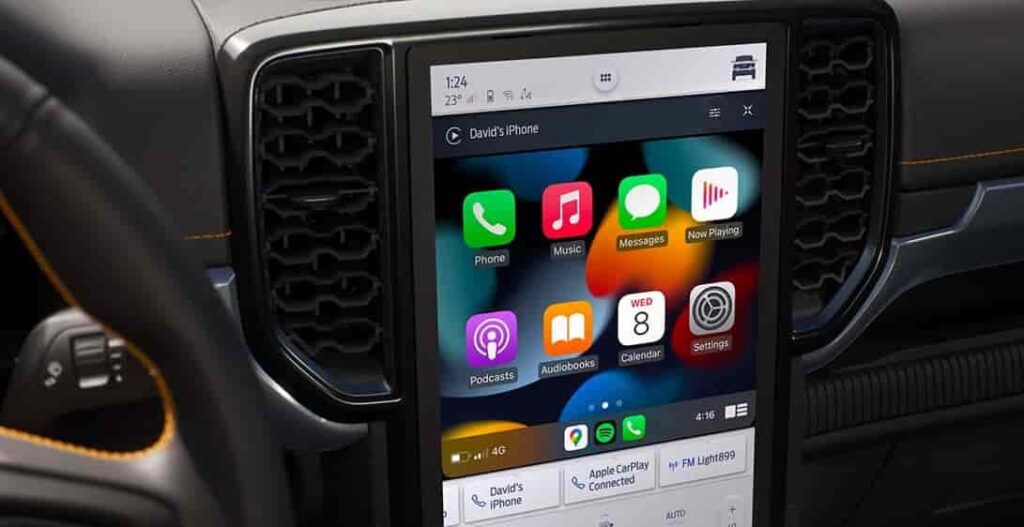
Apple CarPlay is a smart interface from Apple that lets iPhone users connect directly to their vehicle’s infotainment system. On Ford vehicles, Apple CarPlay works closely with the SYNC system to display essential iPhone features on the center screen. Drivers can control navigation, calls, messages, and music without touching their phones, which helps reduce distraction while driving.
Once Apple CarPlay is active, the system mirrors selected iPhone apps that are designed for in car use. These apps usually include navigation tools, phone and messaging functions, music streaming services, and podcast platforms. Siri plays a key role in this experience. Drivers can use voice commands to send messages, make calls, or request directions while keeping their hands on the steering wheel.
Most Ford vehicles use a wired Apple CarPlay connection through a USB cable. After connecting the iPhone, the SYNC system detects the device and launches the CarPlay interface automatically. Newer Ford models with SYNC 4 or SYNC 4A often support wireless Apple CarPlay. In this case, the system connects through Bluetooth and Wi Fi, which removes the need for a physical cable and improves daily convenience.
Before choosing a Ford Apple CarPlay Upgrade, drivers need to understand how this system works. The iPhone model, the SYNC version, and the vehicle’s hardware all affect compatibility. Knowing these factors helps Ford owners choose the right upgrade path and avoid unnecessary costs.
Ford SYNC Systems Explained
Ford uses several versions of the SYNC infotainment system, and each version affects Apple CarPlay support in a different way. Many Ford owners feel confused about upgrades because they do not know which SYNC system their vehicle uses. Understanding these differences is the first step toward a successful Ford Apple CarPlay Upgrade.
SYNC 1 is the earliest version and relies heavily on voice commands with limited screen functions. This system does not support Apple CarPlay in any form. Drivers who use SYNC 1 must replace the entire head unit if they want Apple CarPlay. Software updates alone cannot add CarPlay to this system.
SYNC 2 offers a larger touchscreen and better multimedia support, but it still lacks native Apple CarPlay compatibility. Ford did not design SYNC 2 to run CarPlay, so upgrades require a full hardware replacement. Many owners of SYNC 2 vehicles choose aftermarket solutions because official upgrades often cost too much for older cars.
SYNC 3 marks a major improvement for Ford vehicles. This system supports Apple CarPlay, but only under specific conditions. The vehicle must run the correct SYNC 3 software version and use a compatible USB hub. In many cases, Ford owners can enable Apple CarPlay through a software update combined with a USB hub upgrade. This option makes SYNC 3 one of the most cost effective paths for a Ford Apple CarPlay Upgrade.
SYNC 4 and SYNC 4A appear in newer Ford models and offer the most advanced experience. These systems support both wired and wireless Apple CarPlay. They also deliver faster performance and smoother integration with modern iPhones. Vehicles equipped with SYNC 4 usually do not need any upgrades, as Apple CarPlay comes enabled from the factory.
Ford Apple CarPlay Upgrade Compatibility by Model and Year
Ford Apple CarPlay compatibility depends on both the vehicle model and the production year. Many Ford owners assume that all trims within the same model offer the same infotainment options, but this is not always true. The SYNC system version plays a critical role in determining whether a Ford Apple CarPlay Upgrade is possible.
Ford F One Fifty models built from twenty eighteen onward usually support Apple CarPlay through SYNC 3 or SYNC 4. Earlier model years often require a software update and a compatible USB hub. F One Fifty trucks equipped with SYNC 1 or SYNC 2 need a full hardware upgrade to enable Apple CarPlay.
Ford Ranger models produced after twenty nineteen commonly include SYNC 3 with Apple CarPlay support. In many cases, owners only need to update the software to activate CarPlay. Older Ranger models often require aftermarket solutions, especially in markets where SYNC 3 was not standard.
Ford Explorer vehicles from twenty sixteen to twenty nineteen typically run SYNC 3. These models support Apple CarPlay once the correct software version and USB hardware are installed. Newer Explorer models use SYNC 4 or SYNC 4A and offer wireless Apple CarPlay as a standard feature.
Ford Escape models show wide variation in compatibility. Versions produced before twenty seventeen often use SYNC 2 and do not support Apple CarPlay without major hardware changes. Models from twenty seventeen onward usually support CarPlay through SYNC 3, making upgrades more affordable.
Ford Focus and Ford Mustang models follow similar patterns. Vehicles equipped with SYNC 3 can support Apple CarPlay with minimal upgrades, while older systems require full replacements. Checking the SYNC version remains the most reliable way to confirm compatibility before planning a Ford Apple CarPlay Upgrade.
Ford Apple CarPlay Upgrade Options Explained
Ford owners can choose from several upgrade paths when adding Apple CarPlay to their vehicles. Each option fits a different budget, vehicle condition, and level of technical comfort. Understanding these choices helps drivers avoid unnecessary expenses and choose the most practical solution.
The first option is an official upgrade through a Ford dealership. This approach offers peace of mind because Ford technicians handle the installation and ensure system compatibility. Dealership upgrades often include genuine Ford parts and software updates. However, this option usually comes with a higher cost. Many owners of older Ford models find the price difficult to justify, especially when the vehicle value has already declined.
The second option involves aftermarket Apple CarPlay upgrades. This category includes replacement head units, retrofit modules, and wireless CarPlay adapters. Aftermarket solutions offer more flexibility and often cost less than dealership upgrades. Many modern aftermarket systems support advanced features and frequent software updates. The main risk involves installation quality. Poor installation can lead to audio issues, screen lag, or system errors, so choosing a trusted installer remains essential.
The third option is a do it yourself upgrade. This path appeals to drivers with technical experience and a desire to save money. DIY upgrades usually involve software updates, USB hub replacements, or installing wireless adapters. While this option reduces labor costs, it carries higher risk. Incorrect installation can damage the infotainment system or create long term reliability issues.
Choosing the right Ford Apple CarPlay Upgrade depends on the vehicle model, the SYNC system, and personal priorities. Some drivers value warranty protection, while others focus on cost and flexibility. Evaluating these factors leads to a better long term experience.
Ford Apple CarPlay Upgrade Cost Breakdown
The cost of a Ford Apple CarPlay Upgrade varies widely based on the vehicle model, the SYNC system, and the chosen upgrade method. Many Ford owners hesitate to upgrade because they fear unexpected expenses. Breaking down the cost helps clarify what to expect and how to plan a realistic budget.
Dealership upgrades often represent the most expensive option. In most cases, the total cost includes hardware, software, and labor. For vehicles that require a new head unit or USB module, prices can reach several hundred dollars or more. This option works best for newer Ford models or owners who want to maintain factory level integration and warranty coverage.
Aftermarket upgrades usually cost less and provide more flexibility. Replacement head units and retrofit kits range across different price levels, depending on features and brand quality. Wireless Apple CarPlay adapters tend to cost less than full system replacements and appeal to drivers who already have wired CarPlay. Labor costs vary based on installer experience and vehicle complexity.
Do it yourself upgrades offer the lowest upfront cost. Software updates and USB hub replacements often require minimal spending. However, this approach demands technical knowledge and careful installation. Mistakes can lead to higher repair costs later, which offsets the initial savings.
Several factors influence the final price of a Ford Apple CarPlay Upgrade. These include the vehicle year, the SYNC version, and regional labor rates. By comparing options and understanding total costs, Ford owners can choose an upgrade that fits both their budget and long term needs.
Wireless Apple CarPlay Upgrade for Ford
Wireless Apple CarPlay has become a popular upgrade among Ford owners who value convenience and a clean interior setup. Without the need for a physical cable, drivers can enter the vehicle and connect their iPhone automatically. This feature appeals to users who make frequent short trips and want instant access to navigation, music, and calls.
On Ford vehicles, wireless Apple CarPlay usually appears on models equipped with SYNC 4 or SYNC 4A. These systems support wireless connections through Bluetooth and Wi Fi. For vehicles with SYNC 3, owners can add wireless functionality through aftermarket adapters. These devices plug into the USB port and simulate a wireless connection between the iPhone and the infotainment system.
Despite its convenience, wireless Apple CarPlay does not suit every driver. Some users experience slight audio delay or occasional connection drops, especially with lower quality adapters. Wireless CarPlay also consumes more battery power than a wired connection, which may concern drivers who rely heavily on navigation during long trips.
Choosing a wireless Ford Apple CarPlay Upgrade depends on driving habits and expectations. Drivers who prioritize ease of use and a clutter free cabin often find wireless CarPlay worthwhile. Those who value maximum stability and charging efficiency may prefer a traditional wired setup. Understanding these trade offs helps Ford owners make a confident upgrade decision.
Common Problems After Ford Apple CarPlay Upgrade and How to Fix
Some Ford owners experience issues after completing an Apple CarPlay upgrade. These problems can affect usability and reduce overall satisfaction if drivers do not address them early. Understanding common issues helps prevent frustration and protects the investment in a Ford Apple CarPlay Upgrade.
One frequent problem involves Apple CarPlay failing to connect. This issue often appears after software updates or when using damaged USB cables. Drivers should test a different cable and confirm that the iPhone runs the latest iOS version. Restarting the SYNC system also resolves many connection errors.
Another common issue is screen freezing or slow response. This problem usually points to outdated SYNC software or incompatible aftermarket hardware. Updating the SYNC system and checking hardware compatibility often restores smooth performance. In some cases, resetting the infotainment system to factory settings improves stability.
Audio delay or sound distortion can occur after installing wireless Apple CarPlay adapters. Lower quality adapters struggle with signal stability, especially in areas with high wireless interference. Choosing a reputable adapter and keeping firmware updated reduces this risk.
USB hub problems also affect Apple CarPlay functionality. Older USB hubs may not support the data transfer speed required for CarPlay. Replacing the hub with a compatible version often solves detection and connection issues.
By addressing these common problems quickly, Ford owners can enjoy a reliable and smooth Apple CarPlay experience. Proper installation, regular updates, and quality hardware remain the key factors for long term success.
Final Verdict
A Ford Apple CarPlay Upgrade can significantly improve the daily driving experience, especially for owners of older Ford models. Apple CarPlay adds modern navigation, hands free communication, and easy access to entertainment. These benefits help drivers stay connected while keeping their focus on the road.
The value of an upgrade depends on the vehicle’s SYNC system, model year, and driver expectations. Vehicles equipped with SYNC 3 often offer the best balance between cost and functionality. Newer models with SYNC 4 already include Apple CarPlay, which removes the need for any upgrade. Older systems such as SYNC 1 and SYNC 2 require more extensive hardware changes, which may not suit every budget.
Choosing the right upgrade path matters. Dealership solutions offer reliability and factory integration. Aftermarket options provide flexibility and lower costs. DIY upgrades appeal to experienced users who understand the risks. Each approach serves a different type of Ford owner.
Before committing to a Ford Apple CarPlay Upgrade, drivers should confirm compatibility and define their priorities. A careful evaluation helps avoid wasted spending and technical issues. With the right setup, Apple CarPlay can make any compatible Ford feel more modern, connected, and enjoyable to drive.