Did you just change the oil in your Chevy Equinox, only to see the oil light still on? This situation confuses many drivers and often leads to unnecessary worry. You might think something is wrong with the engine or feel tempted to visit a mechanic right away. In reality, the issue is usually simple and easy to fix.
The oil light does not reset automatically after an oil change. Chevy designed the Oil Life Monitor to track driving conditions and remind you when service is needed. After changing the oil, you must reset this system manually. If you skip this step, your vehicle may show incorrect warnings and disrupt your maintenance schedule.
The good news is that you can complete the chevy equinox reset oil light process in less than a minute. You do not need any special tools or technical skills. This guide will walk you through clear and simple steps for all models from 2010 to 2025. By following these instructions, you can reset the system quickly and keep your vehicle running smoothly.
Contents
Understanding the Oil Life System in Chevy Equinox
The Oil Life Monitor in your Chevy Equinox plays a key role in keeping your engine healthy. Instead of relying on a fixed schedule, this system tracks your real driving conditions. It analyzes factors like engine temperature, trip length, speed, and driving habits. Based on this data, it calculates when your engine oil needs to be changed.
Many drivers assume the oil light means the oil level is low. In reality, the system does not measure the physical oil level directly. It estimates oil condition based on usage. That is why the light may still appear even after you have already changed the oil.
You need to reset the system after every oil change. This step tells the vehicle that fresh oil is now in use. If you skip the reset, the system continues tracking old data. As a result, it may trigger warnings too early or too late. Both situations can affect your maintenance routine and long term engine performance.
Understanding this system helps you avoid confusion and unnecessary repairs. It also gives you better control over your vehicle’s maintenance. Once you know how it works, the chevy equinox reset oil light process becomes simple and logical.
How to Reset Oil Light on Chevy Equinox
You can complete the chevy equinox reset oil light process in less than a minute if you follow the correct steps. This general method works for most models and is the fastest way to clear the oil life warning after an oil change.
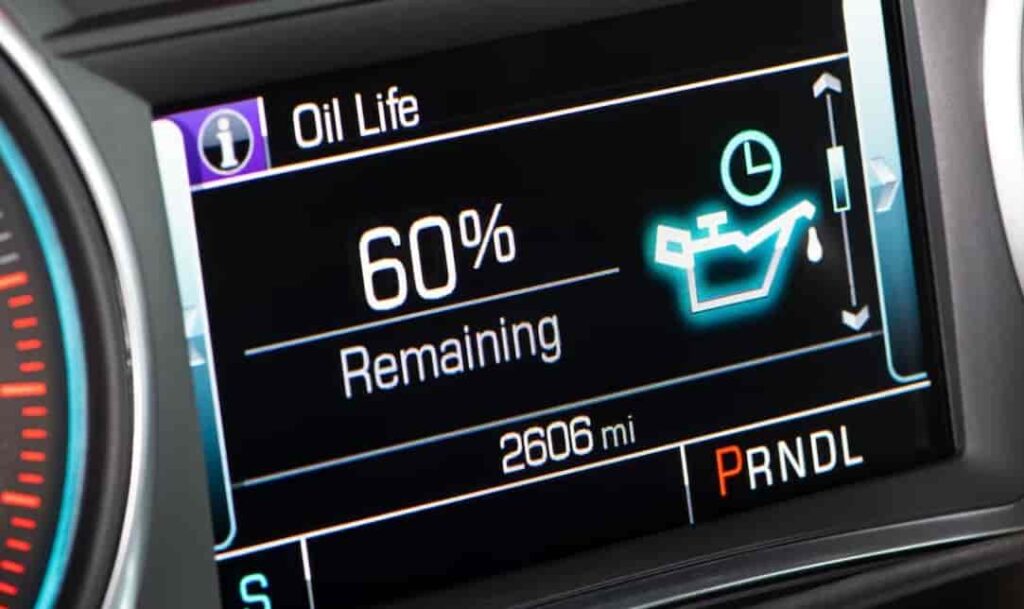
Start by turning the ignition to the ON position without starting the engine. This step activates the dashboard system while keeping the engine off. Next, locate the controls on your steering wheel. Use the arrow buttons to navigate through the menu until you find the “Oil Life” or “Remaining Oil Life” option on the display.
Once you reach this screen, press and hold the check or reset button. Keep holding it for a few seconds until the oil life resets to 100 percent. When you see this change, the process is complete. You can now turn off the ignition and start your vehicle normally.
Make sure you follow each step carefully. If you move too quickly or select the wrong menu, the system may not reset. Also, confirm that the ignition stays in the correct position during the process.
This simple method helps you avoid unnecessary trips to the garage. It also ensures your maintenance system stays accurate and reliable.
Reset by Model Year (2010–2017)
If you drive an older Chevy Equinox from 2010 to 2017, the reset process is slightly different. These models often use basic dashboard controls instead of modern digital menus. However, the steps remain simple and quick once you know where to look.
Start by inserting your key and turning the ignition to the ON position without starting the engine. Look at the dashboard and locate the menu or trip button. In many models, you will need to press this button repeatedly until the oil life percentage appears on the screen.
When you see the oil life display, press and hold the reset or set button. Keep holding it for a few seconds until the value changes to 100 percent. This confirms that the system has been successfully reset.
Some drivers release the button too early or do not hold it long enough. This mistake prevents the system from updating. Make sure you wait until the number fully resets before letting go.
Compared to newer models, this process feels more manual and less intuitive. There is no touchscreen or advanced interface to guide you. Still, once you understand the sequence, the chevy equinox reset oil light task becomes fast and easy.
Reset by Model Year (2018–2025)
Chevy Equinox models from 2018 to 2025 come with a more advanced digital system that makes the reset process faster and easier. The improved driver information center allows you to navigate menus clearly without guessing or repeating steps multiple times. If you follow the correct sequence, you can complete the chevy equinox reset oil light process in under a minute.
Begin by turning the ignition to the ON position without starting the engine. This step activates the dashboard display and gives you access to the vehicle settings. Next, look at the screen behind the steering wheel. Use the arrow controls on the steering wheel to scroll through the menu options until you find “Oil Life” or “Remaining Oil Life.”
Once the correct screen appears, press and hold the checkmark or confirm button. Keep holding it steadily for a few seconds. You will see the oil life value change to 100 percent. This update confirms that the system has reset successfully. After that, you can turn off the ignition and start your vehicle as usual.
Even though the system feels intuitive, small mistakes can still prevent a successful reset. Many drivers release the button too early or select the wrong menu. Always check the final result before exiting the screen.
This modern setup reduces effort and saves time. It also helps you maintain accurate service intervals without relying on a mechanic.
Chevy Equinox Oil Light Won’t Reset?
Sometimes, the chevy equinox reset oil light process does not work on the first try. This situation can be frustrating, especially when you follow the steps but still see the warning on your dashboard. In most cases, the issue comes from small mistakes rather than serious mechanical problems.
One common cause is using the wrong ignition mode. If you start the engine instead of turning the ignition to the ON position, the system may not allow the reset. Always keep the engine off while performing the procedure. Another frequent mistake is navigating to the wrong menu. Some drivers select a different setting instead of the oil life screen, which prevents the reset from happening.
Timing also plays an important role. If you release the reset button too early, the system will not update. Make sure you press and hold the button until the oil life clearly shows 100 percent. Rushing this step often leads to failure.
In rare cases, the issue may come from a system glitch. You can try turning the vehicle off, waiting a few seconds, and repeating the process. If the problem continues, a simple battery reset may help refresh the system.
If none of these methods work, you should consider visiting a technician. Persistent issues may indicate a deeper problem with the vehicle’s electronics or sensors.
Common Mistakes to Avoid
Many drivers complete the steps but still fail to reset the system correctly. In most cases, simple mistakes cause the issue rather than a real technical problem. Understanding these errors will help you perform the chevy equinox reset oil light process with confidence.
One of the most common mistakes is resetting the oil life before changing the oil. This action gives the system false information and may lead to poor maintenance habits. Always replace the oil first, then perform the reset.
Another frequent issue comes from confusing the oil life light with the oil pressure warning. These two indicators serve different purposes. The oil life system tracks maintenance intervals, while the oil pressure light signals a serious engine problem. Resetting the system will not fix a real pressure issue, so you should never ignore that warning.
Some drivers also skip checking the actual oil level. Even if the system resets successfully, low or dirty oil can still damage the engine. Always confirm that the oil level and condition meet the recommended standards.
Rushing through the steps can also cause problems. If you press the wrong button or release it too early, the system will not update. Take a few extra seconds to follow each step carefully.
Avoiding these mistakes will save you time and prevent unnecessary stress. It will also keep your vehicle running safely and efficiently.
Quick Reset Method
If you need a fast solution, you can complete the chevy equinox reset oil light process in under one minute. This method works best when you already understand the system and want a quick reminder without reading detailed instructions.
First, turn the ignition to the ON position without starting the engine. Make sure the dashboard lights up and the system becomes active. Next, use the controls on the steering wheel to navigate to the “Oil Life” or “Remaining Oil Life” screen.
Once the correct screen appears, press and hold the reset or checkmark button. Keep holding it until the oil life changes to 100 percent. This step usually takes only a few seconds. After that, release the button and turn off the ignition.
Start the engine to confirm the result. If the oil light no longer appears, the reset was successful. If the warning remains, repeat the steps more carefully and ensure you hold the button long enough.
This quick method saves time and helps you avoid unnecessary trips to the garage. It is especially useful when you perform regular maintenance yourself and want a simple, reliable reset process.
Conclusion
Resetting the oil light on your vehicle may seem confusing at first, but the process becomes simple once you understand how the system works. The chevy equinox reset oil light procedure only takes a few steps and requires no special tools. Whether you drive an older model or a newer version, you can complete the reset quickly by following the correct method.
This small action plays an important role in keeping your maintenance schedule accurate. When you reset the system after every oil change, you ensure that your vehicle tracks fresh data instead of outdated information. This helps you avoid unnecessary warnings and keeps your engine running in optimal condition over time.
Many drivers waste time and money by visiting a mechanic for this simple task. By learning how to do it yourself, you gain more control over your vehicle and reduce maintenance costs. You also build confidence in handling basic car care tasks.
If you still experience issues, you can revisit the troubleshooting section or check your vehicle manual for additional guidance.
Which Chevy Equinox model are you using right now? Share your experience or questions, and you can get more specific guidance tailored to your vehicle.